How to Share Memory Between Local and Cloud AI Agents
You've built a local agent with rich memory, and then your cloud agent starts from zero. Or the reverse: your cloud agent learns something in production, and your local setup never sees it. Sharing memory between local and cloud AI agents means solving for different storage backends, network boundaries, and consistency trade-offs, and most guides don't touch it. They cover local-only setups with Mem0 and Ollama, or they assume everything runs inside one platform. That leaves a gap for anyone running hybrid infrastructure. GigaRAG is purpose-built for agent memory and RAG pipelines, but before you pick a tool, you need to understand the architectures. This guide covers three patterns that actually work: a shared vector database, event-driven sync, and MCP as a memory access layer. Each one gets setup steps, honest trade-offs, and the failure modes you'll hit in practice.
| At a glance | Details |
|---|---|
| Core challenge | Agents in different environments can't see each other's memory |
| Top pattern | Shared vector database as single source of truth |
| Sync options | Event-driven sync or MCP for tool-based access |
| Latency trade-off | Real-time sync needs infrastructure; batch sync is simpler |
| Consistency | Strong consistency requires a shared store; eventual is easier |
| Security | Encrypt in transit and at rest; use scoped access tokens |
In This Guide
- Why Sharing Memory Between Local and Cloud Agents Is Hard
- Shared Vector DB vs Event-Driven Sync vs MCP
- Three Architectures for Sharing Memory Between Local and Cloud AI Agents
- Share Memory Between Local And Cloud AI Agents: A Step-by-Step Guide
- Architecture 1: Shared Vector Database
- Architecture 2: Event-Driven Memory Sync
- Architecture 3: Model Context Protocol (MCP)
- Common Mistakes When You Share Memory Between Local and Cloud AI Agents
- What You Cannot Do: Honest Limitations
- How to Choose the Right Architecture
- Final Thoughts
Why Sharing Memory Between Local and Cloud Agents Is Hard
The problem starts with a simple fact: your local agent and your cloud agent don't share a brain. Each one writes to its own storage, in its own format, on its own side of a network boundary. When you try to make them remember the same things, you hit four walls at once.
Different storage backends and schemas
A local agent running Ollama with Mem0 typically stores memory in SQLite or a local Chroma instance. A cloud agent might use Pinecone, Qdrant Cloud, or a managed Postgres with pgvector. These backends don't talk to each other natively. Worse, the schema each agent expects is different. One agent stores memory as a flat list of facts. Another stores session state as nested JSON. When you copy data between them, you're not syncing memory. You're doing a data migration every time.
Network boundaries and latency
Local memory reads happen in microseconds. Cloud memory reads happen in tens to hundreds of milliseconds, depending on where the database lives and what your connection looks like. That gap matters. An agent that retrieves context in 5ms locally will behave differently than one waiting 200ms for the same context from a cloud store. If your agent makes multiple memory calls per turn, the latency compounds. You can't paper over that with caching alone.
Consistency vs. availability trade-offs
Here's the core tension. If both agents write to the same shared store, you get consistency but you also get a single point of failure and added latency for the local agent. If each agent keeps its own copy and you sync in the background, you get availability but you accept that the two agents will sometimes disagree. There's no architecture that gives you both. You pick one.
Security and data governance across environments
Memory contains the most sensitive data your agents handle: user preferences, past conversations, maybe PII. Sending that from a local machine to a cloud database means it crosses a network boundary you don't fully control. You need encryption in transit, encryption at rest, and a clear answer to the question "who can read this memory?" Local-only memory keeps data on your machine. Shared memory puts it somewhere else. That's a governance decision, not just an engineering one.
[!note] Real-time, zero-latency memory sharing between local and cloud agents is not achievable without dedicated infrastructure and careful consistency trade-offs. Expect some delay or conflict resolution in most practical setups.
Shared Vector DB vs Event-Driven Sync vs MCP
| Factor | Shared Vector DB | Event-Driven Sync |
|---|---|---|
| Latency | Low (direct query) | Medium (sync delay) |
| Consistency | Strong (single source) | Eventual (conflict resolution needed) |
| Security | Centralized access control | Distributed; need encryption and auth |
| Complexity | Low to moderate (manage one DB) | High (event bus, consumers, idempotency) |
| Best for | Teams wanting a unified memory store | Teams needing near-real-time updates across environments |
Three Architectures for Sharing Memory Between Local and Cloud AI Agents
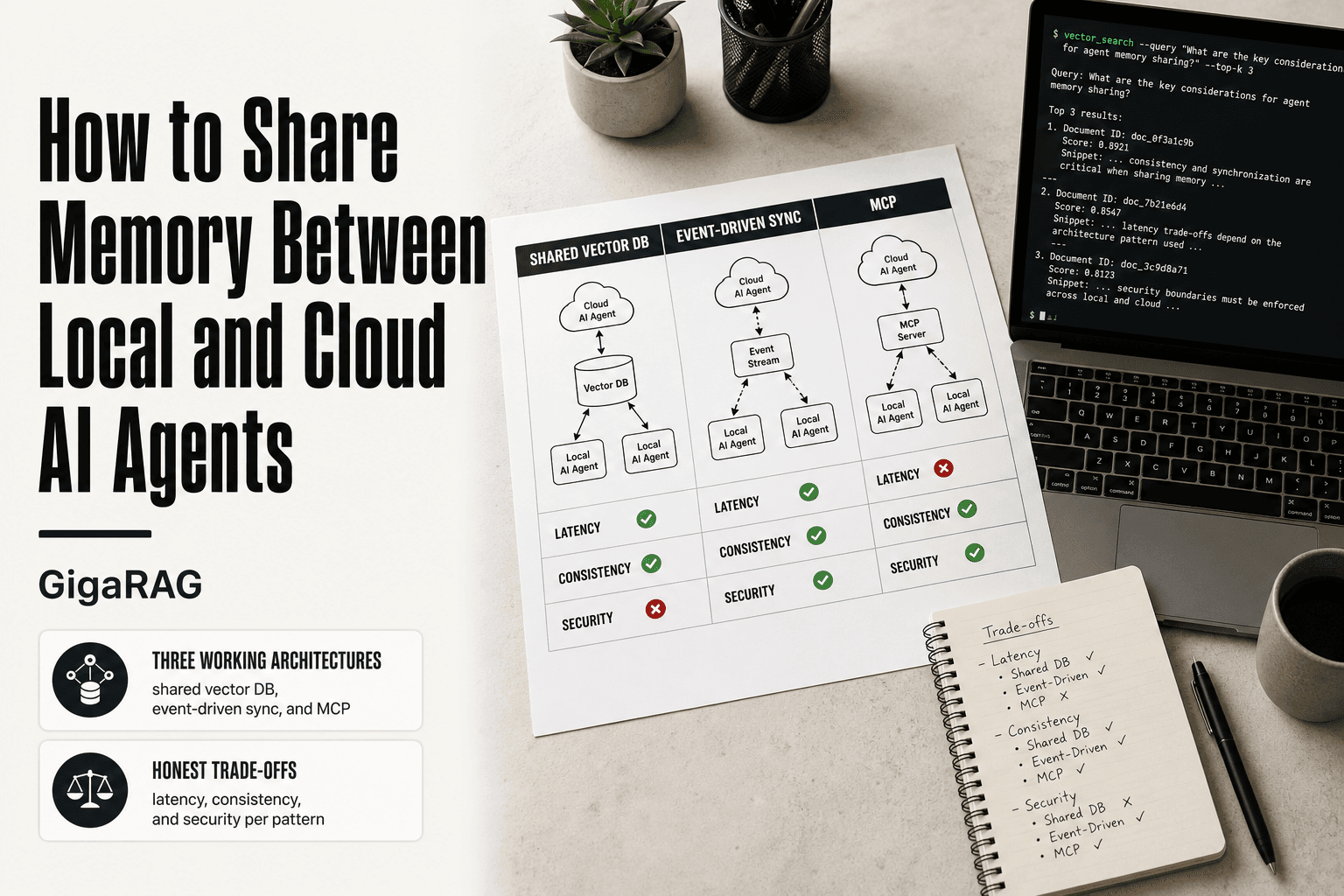
You have three viable patterns: a shared vector database, event-driven sync, or MCP. Each trades latency, consistency, and complexity differently. Pick based on whether you need real-time reads, can tolerate eventual consistency, or want a standardized interface.
Shared vector database
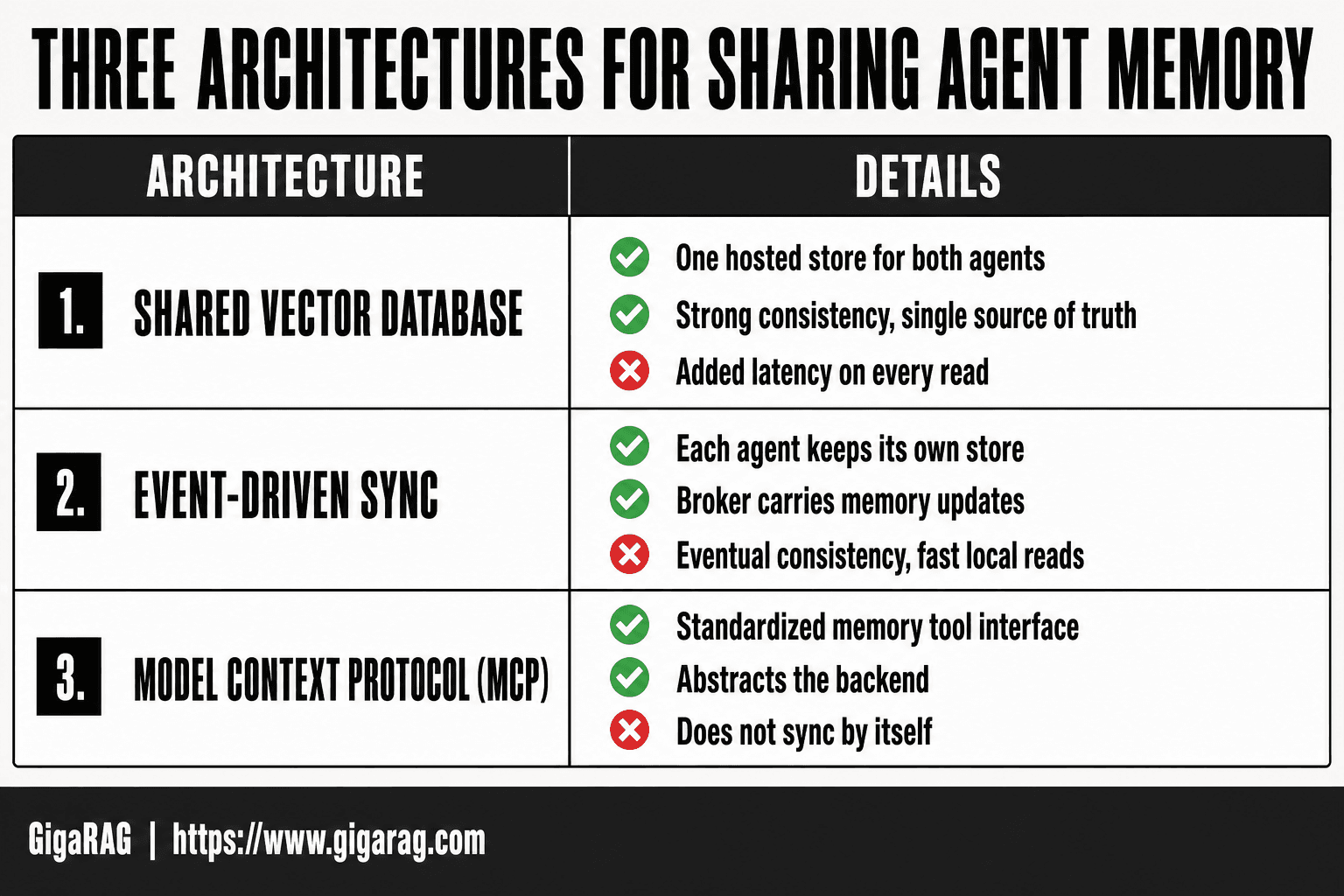
Both agents read and write to one hosted vector store. Qdrant Cloud, Pinecone, or Weaviate hold the embeddings. The local agent queries over the network instead of a local Chroma instance. You get one source of truth. You pay for it in latency on every read, plus a single point of failure if the cloud store goes down.
Event-driven synchronization
Each agent keeps its own local store. A message broker, Kafka or Redis Streams or NATS, carries memory updates between them. When the local agent writes a new fact, it publishes an event. The cloud agent consumes it and updates its own copy. Reads stay fast. Writes propagate asynchronously, so the two agents can disagree for seconds or minutes.
Model Context Protocol (MCP)
MCP standardizes how agents call memory tools. You run one MCP memory server that both agents connect to, local and cloud. The server abstracts the backend. MCP doesn't solve sync or consistency itself. It solves the interface problem, so you can swap backends without rewriting agent code.
[!tip] Start with a shared vector database as your single source of truth; it's the simplest pattern to implement and debug. Only add event-driven sync or MCP if you need near-real-time updates or tool-based access.
Share Memory Between Local And Cloud AI Agents: A Step-by-Step Guide
- Choose a shared memory store (e.g., vector database) accessible from both local and cloud environments.
- Define a common schema for memory entries, including embeddings, metadata, and timestamps.
- Set up secure access: use API keys or IAM roles with least privilege, and encrypt data in transit and at rest.
- For event-driven sync, deploy a message broker (e.g., Kafka, NATS) and publish memory change events.
- Implement idempotent consumers that update the shared store and handle conflicts (e.g., last-write-wins or vector clocks).
- For MCP, expose memory operations as tools via an MCP server that both local and cloud agents can call.
- Test failure modes: simulate network partitions, embedding drift, and schema mismatches; add retries and dead-letter queues.
Architecture 1: Shared Vector Database
How it works
Both agents point at one hosted vector store. Qdrant Cloud, Pinecone, or Weaviate hold the embeddings. The local agent queries over the network instead of a local Chroma instance. The cloud agent hits the same endpoint.
You get one source of truth. Every memory write lands in the same place, so both agents see the same facts. No sync loop. No conflict resolution. The database is the memory.
The catch is latency. Every read crosses the network. If your local agent does ten retrievals per turn, that's ten round trips before it can answer.
Setup steps
Start with a hosted instance. Qdrant Cloud and Pinecone both offer free tiers that work for prototyping. Weaviate Cloud has a sandbox too.
Create one collection per memory type: session state, long-term facts, tool outputs. Don't dump everything into one collection. Different memory types need different distance metrics and payload schemas.
Give both agents the same API key and collection names. That's the whole integration. The local agent swaps its Chroma client for a Qdrant client. The cloud agent already runs in the same network.
Embedding consistency requirements
This is the part people get wrong. Both agents must use the same embedding model. If your local agent embeds with nomic-embed-text and your cloud agent uses text-embedding-3-small, the vectors live in different spaces. Semantic search returns garbage.
Pin the model name and version in your config. Re-embed old memories when you upgrade. Don't mix.
Latency and cost trade-offs
Reads add 50 to 200 ms of network latency per query, depending on region. That's fine for batch retrieval. It's painful for tight agent loops that retrieve on every step.
Cost scales with storage and queries. Pinecone charges per pod or serverless per million vectors. Qdrant Cloud bills per node. For a single-agent prototype, you'll stay in free tier. For production with millions of vectors, budget $50 to $200 per month.
The honest answer: shared vector database is the simplest architecture. It's also the slowest on reads and the most exposed to a single outage. Use it when consistency matters more than latency.
Architecture 2: Event-Driven Memory Sync
How event-driven sync works
Each agent keeps its own local memory store. When one agent writes a memory, it publishes an event to a message broker. The other agent subscribes, receives the event, and updates its own store.
You get two copies that eventually agree. No shared database. No network reads on every retrieval. Each agent queries its own local store at full speed.
The trade-off is consistency. Between the write and the sync, the two agents disagree. That window can be milliseconds or minutes, depending on your broker and network.
Choosing a message broker
Kafka is the default for high-volume, ordered streams. It's heavy. You'll run a cluster or pay for Confluent Cloud. Redis Streams is lighter and works if you already run Redis. NATS is the simplest option: single binary, no cluster required, built-in pub/sub.
For two agents exchanging memory events, NATS or Redis Streams is enough. Kafka only makes sense if you already run it or expect many agents.
Implementing the sync loop
Define a memory event schema first. Minimum fields: agent_id, memory_id, operation (create, update, delete), payload, timestamp. Keep the payload as JSON. Include the embedding model name in the payload so the receiving agent can re-embed if needed.
The local agent publishes to a topic like memory.events. The cloud agent runs a subscriber that consumes events and applies them to its store. Same in reverse: cloud publishes, local subscribes.
Each agent needs a sync loop that runs in the background. It consumes events, applies them, and tracks the last processed offset so it can resume after a crash.
Handling conflicts and ordering
Ordering breaks when two agents write to the same memory at the same time. Kafka preserves order per partition. Use memory_id as the partition key so all events for one memory land in the same partition, in order.
Conflicts still happen. If both agents update the same memory before syncing, the last write wins. That's acceptable for facts. It's dangerous for session state. For session state, use a shared store instead.
The honest answer: event-driven sync gives you fast local reads and independent operation. You pay for it with eventual consistency and a sync loop you have to operate. Use it when each agent can tolerate a few seconds of stale memory.
Architecture 3: Model Context Protocol (MCP)
MCP is a protocol, not a database. It standardizes how agents talk to memory tools, so a local agent and a cloud agent can use the same interface to read and write memories, even when the underlying stores differ.
What MCP standardizes
MCP defines two things: a transport (how the agent connects to a server) and a set of tools (what the server exposes). A memory server built on MCP exposes operations like store_memory, search_memory, and delete_memory. Any agent that speaks MCP can call those operations.
The agent doesn't care whether the memory lives in a local SQLite file or a hosted vector database. The server handles that. Swap the server, keep the agent code.
Setting up an MCP memory server
Start with a memory server that already implements the protocol. Several exist, including reference servers that wrap SQLite or a vector store. Run it locally for your local agent. Run a second instance in the cloud, pointed at your cloud store.
Both agents connect to their respective servers using the same tool names. When you move a memory from local to cloud, you call the same store_memory tool on the cloud server. No schema translation in your agent code.
Limitations of MCP for cross-environment memory
MCP does not sync anything. It standardizes access. If your local agent writes a memory to its local MCP server, the cloud agent still can't see it unless something copies that memory to the cloud store.
That something is Architecture 1 or Architecture 2. MCP pairs with a shared database or an event stream. It replaces the access layer, not the sync layer.
The main catch: MCP is still young. Tool coverage is uneven, and server implementations vary in quality. You'll write glue code. Use MCP when you have multiple agents, different frameworks, and want one interface for memory. Skip it if you have two agents and a simple setup. A direct database call is less code.
Common Mistakes When You Share Memory Between Local and Cloud AI Agents
Most failures aren't architectural. They're operational. You pick a pattern, wire it up, and then hit one of four problems that nobody warned you about.
Embedding drift between local and cloud models
Your local agent uses one embedding model. Your cloud agent uses another. Both store vectors in the same database, but those vectors live in different spaces. A query embedded with model A returns garbage when matched against vectors from model B.
The fix is boring: pin the embedding model. Same model name, same version, same dimensions, everywhere. If you can't, store the model identifier alongside each vector and filter at query time. That works, but it fragments your memory.
Schema mismatches across agents
One agent writes memories as {text, timestamp, source}. Another expects {content, created_at, origin}. The sync layer copies bytes happily. The receiving agent can't parse them.
Define the memory schema once, before you build either agent. Version it. Treat schema changes like database migrations, not like code edits.
Ignoring network partitions
Your local machine loses internet. Your cloud agent keeps writing. When the connection returns, you have two divergent memories and no plan.
Decide upfront: last-write-wins, or merge. Last-write-wins is simpler and loses data. Merge is harder and needs conflict resolution logic. Pick one before the partition happens, not during it.
Security misconfigurations
A shared memory store means shared attack surface. The most common mistake: an open vector database endpoint with no authentication, because it was easier during development. Then it ships.
Encrypt memory in transit. Require auth on every read and write. Scope API keys per agent, not per team. If your memory contains user data, treat the cloud store like a production database, because it is one.
What You Cannot Do: Honest Limitations
Some things simply won't work, no matter how clever your architecture is. You should know them before you spend a week building.
No real-time sync without infrastructure
Real-time means milliseconds. You cannot get millisecond sync between a laptop in one city and a cloud region in another without standing up dedicated infrastructure: a message broker, a stream processor, a low-latency database. If you're polling a REST endpoint every 30 seconds, that's near-real-time at best. Call it what it is.
No zero-latency cross-environment memory
Physics gets a vote. A round trip from your local machine to a cloud database takes at least tens of milliseconds on a good connection, often hundreds. Every memory read that crosses the network pays that cost. You can cache locally to hide it, but then you're back to consistency problems. There is no free lunch here.
No fully consistent state without a shared store
If each agent keeps its own local memory and you sync occasionally, you have eventual consistency. That means two agents can disagree about what happened, sometimes for minutes. Strong consistency requires a single source of truth that every read and write goes through. That's a shared store. No shared store, no strong consistency.
No seamless sync across different embedding models
Different embedding models produce vectors that are not comparable. You cannot sync memories embedded with model A into a store indexed by model B and expect useful retrieval. You either pin one model everywhere, or you maintain separate collections and accept that cross-model search won't work. There's no adapter that fixes this.
How to Choose the Right Architecture
You've seen three workable patterns. Now you need to pick one. The honest answer is that the right choice depends on four things: how fast you need memory reads, how much inconsistency you can tolerate, what your security constraints are, and how much operational work your team can absorb.
Latency tolerance
If your agents need memory reads in under 50 milliseconds, a shared vector database is your only real option. Everything else adds a sync hop. Event-driven sync is fine when agents can wait seconds or minutes for updates. MCP sits somewhere in between, depending on where the memory server lives.
Consistency requirements
Strong consistency means every agent sees the same memory at the same time. That requires a shared store with synchronous reads and writes. If your agents can tolerate brief disagreement, say a few seconds of stale data, event-driven sync is cheaper and more resilient. The main catch is that eventual consistency makes debugging harder. When two agents give different answers, you won't always know which one had the newer memory.
Security and compliance constraints
A shared cloud database means your memory data leaves your network. If that's a problem, event-driven sync with a local broker keeps raw memory on your infrastructure and only sends updates you explicitly approve. MCP adds an abstraction layer, but the security posture depends entirely on where the MCP server runs and who can reach it. Check your data residency requirements before choosing.
Team expertise and operational overhead
A shared vector database is the simplest to operate: one service, one schema, one place to debug. Event-driven sync adds a broker, a sync loop, and conflict handling. That's real operational surface. MCP is the newest of the three, which means fewer battle-tested patterns and more time reading specs. If your team is one person, start with the shared database. You can add sync later when the pain shows up.
Final Thoughts
You now have three ways to share memory between local and cloud AI agents. A shared vector database gives you the lowest latency and the simplest operations, but it means your memory data lives in one hosted place. Event-driven sync keeps raw memory on your infrastructure and handles network partitions gracefully, but it adds a broker, a sync loop, and conflict handling you'll have to debug. MCP standardizes how agents talk to memory, but it's the newest pattern and the security posture depends entirely on where the server runs.
The honest limitations haven't changed. You won't get real-time sync without infrastructure. You won't get zero-latency cross-environment memory. You won't get fully consistent state without a shared store. And you won't get seamless sync across different embedding models without re-embedding everything.
Start with the shared vector database if you're one person or a small team. Add event-driven sync when latency tolerance loosens and data residency matters. Reach for MCP when you need a standard interface across many tools, not just two agents.
If you'd rather not assemble the plumbing yourself, GigaRAG is built for exactly this: agent memory and RAG pipelines that work across local and cloud environments. It handles the sync, the embeddings, and the consistency so you don't have to. But you now know enough to build it yourself if that's the better call.
Frequently Asked Questions
Can local and cloud AI agents share memory in real time?
Real-time sharing is possible but requires a low-latency network and a shared store or event bus. In practice, you'll see some delay due to network and processing. For most use cases, near-real-time (sub-second to seconds) is achievable with event-driven sync.
What is the best way to sync memory between local and cloud agents?
The best approach depends on your needs: a shared vector database offers simplicity and strong consistency; event-driven sync provides near-real-time updates but adds complexity; MCP is ideal if you want to expose memory as tools. Start with a shared store and evolve.
How do I handle conflicts when syncing memory?
Use conflict resolution strategies like last-write-wins, vector clocks, or CRDTs. The choice depends on your consistency requirements. For many applications, last-write-wins with timestamps is sufficient, but be aware of potential data loss.
Is MCP suitable for sharing memory between local and cloud agents?
Yes, MCP (Model Context Protocol) can be used to expose memory operations as tools that both local and cloud agents can call. It provides a standardized way to access memory, but you'll need to run an MCP server and manage authentication.
What are the security risks of sharing memory across environments?
Key risks include unauthorized access, data leakage, and man-in-the-middle attacks. Mitigate by using encryption in transit and at rest, scoped access tokens, and network isolation. Always follow the principle of least privilege.
How do I prevent embedding drift when sharing memory?
Embedding drift occurs when different models or versions generate embeddings. To prevent it, use the same embedding model and version across all agents, and periodically re-embed stored data if you upgrade. Monitor for drift by comparing similarity distributions.
What infrastructure do I need for event-driven memory sync?
You'll need a message broker (e.g., Kafka, NATS, RabbitMQ), a shared store for memory, and consumers that process events. This adds operational overhead, so consider whether you truly need near-real-time sync before adopting it.
About GigaRAG
GigaRAG is for agent memory and RAG pipeline builders. get this right. Whether you are working through How to Share Memory Between Local and Cloud AI Agents or something adjacent, we publish what we have actually tested, including where it falls short.


