How to Share Project Memory Across Multiple AI Coding Agents
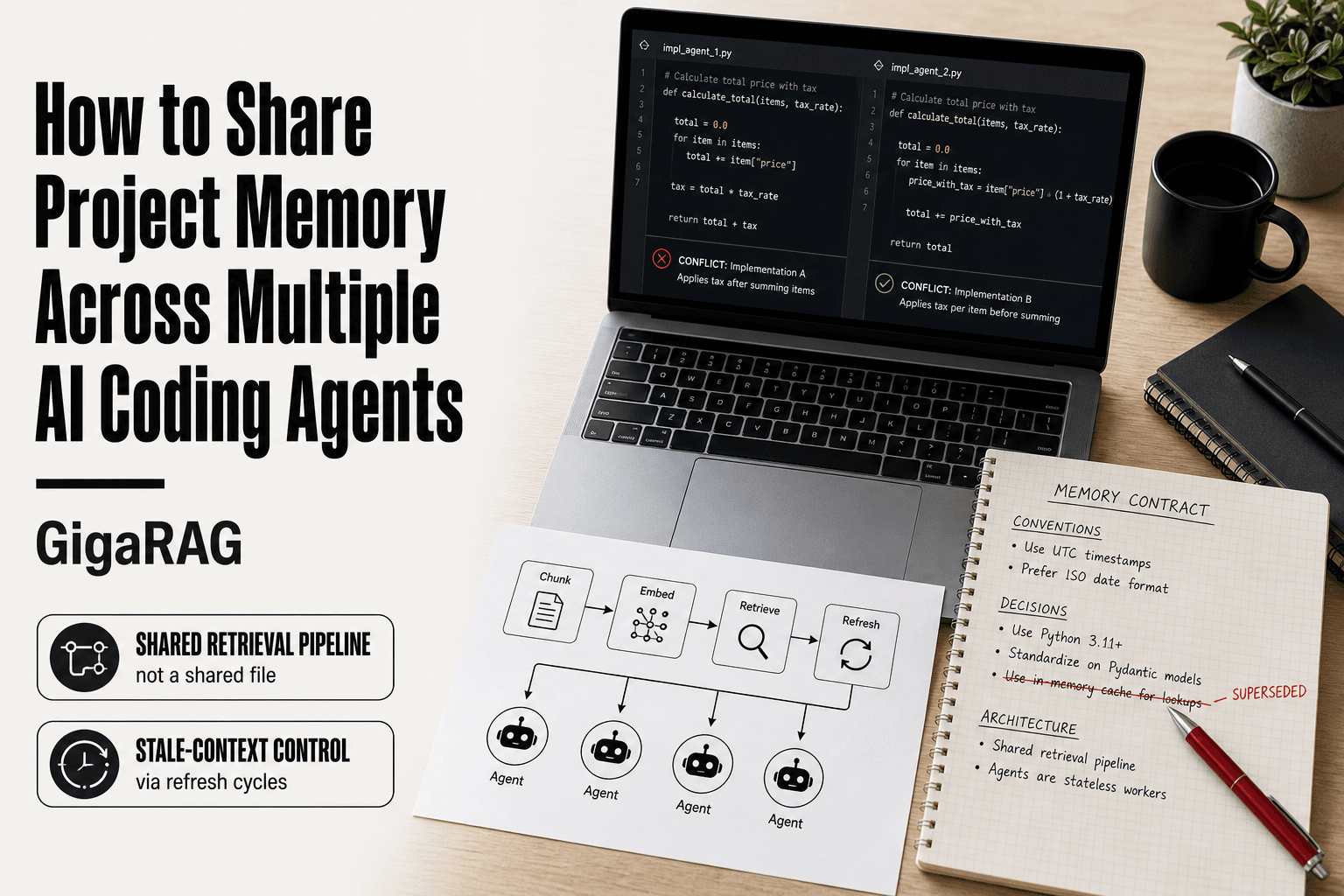
How to share project memory across multiple AI coding agents starts with a failure you've probably seen: one agent refactors a function, another rebuilds it the old way, and now the repo has two conflicting implementations. Neither agent is wrong. Neither knows what the other decided. That's the stateless agent problem, and it's not a model limitation. It's a retrieval and synchronization problem.
The honest answer is that shared memory won't make agents agree on design decisions. It won't replace code review, and it won't work without disciplined write paths. What it can do is give every agent the same project conventions, decisions, and architecture before it writes a line.
GigaRAG is one option among several for RAG pipeline builders, but the real work is designing memory as a retrieval pipeline: what gets chunked, what gets embedded, what gets retrieved, and when it goes stale. This guide covers what works, what doesn't, and the failure modes most tutorials skip.
| At a glance | Details |
|---|---|
| Core idea | Shared memory is a retrieval pipeline, not a file |
| Main backends | Files, MCP, vector DBs, knowledge graphs |
| Biggest risk | Stale or conflicting context across agents |
| Token control | Chunk, embed, and retrieve only what's needed |
| Refresh cadence | Re-index after merges or major decisions |
| Not a silver bullet | Conflicts, staleness, and security still apply |
In This Guide
- Why AI Coding Agents Forget (And What Shared Memory Actually Fixes)
- Files vs MCP vs Vector DBs vs Knowledge Graphs: Which Shared Memory Backend?
- Shared Memory as a RAG Pipeline Problem
- How To Share Project Memory Across Multiple AI Coding Agents: A Step-by-Step Guide
- Memory Backends Compared: Files, MCP Servers, Vector DBs, and Knowledge Graphs
- How to Share Project Memory Across Multiple AI Coding Agents: A Step-by-Step Pattern
- What Should Be Shared vs. Isolated
- Common Mistakes When Sharing Project Memory
- What Shared Memory Won't Solve
- Security and Access Control for Shared Agent Memory
- How Multiple AI Agents Communicate with Each Other
- Final Thoughts on Sharing Project Memory Across AI Coding Agents
Why AI Coding Agents Forget (And What Shared Memory Actually Fixes)
Two agents work the same repo. One decides the API returns camelCase. The other writes snake_case. Neither knows the other exists. That's not a bug. It's the default.
The stateless agent problem
Every AI coding agent starts as a blank slate. It has no memory of your last session, your conventions, or the decisions another agent made ten minutes ago. The context window holds what you paste into it. When the session ends, that context is gone.
You can re-explain your project every time. That costs tokens and time. Or you can write things down somewhere both agents can read. That's the entire fix.
What shared memory is actually for
Shared memory is a place where project facts live outside any single agent's context window. Conventions, architecture decisions, API contracts, file layouts. An agent reads what it needs, when it needs it.
The good news is you don't need anything exotic. A markdown file works. A vector database works better for large projects. The point is that the memory survives the session.
What shared memory is not
Shared memory is not a brain. It won't make agents agree on design choices. It won't resolve conflicts automatically. It won't replace code review.
It's a retrieval problem. You store facts. Agents fetch relevant facts. If the retrieval is bad, the memory is useless no matter how good the storage is.
[!note] Shared memory does not make agents agree — it only gives them the same source material. Without a merge or arbitration step, two agents can still write conflicting code from the same memory store.
Files vs MCP vs Vector DBs vs Knowledge Graphs: Which Shared Memory Backend?
| Factor | Files / Shared Docs | Vector DB / Knowledge Graph |
|---|---|---|
| Setup complexity | Very low: just a shared repo or folder | Moderate to high: embedding pipeline, schema, hosting |
| Query latency | Fast for small sets, slow as files grow | Low for vector search; graph traversal varies |
| Cost | Near zero beyond storage | Embedding compute, storage, and possible API fees |
| Multi-agent suitability | Good for small teams; conflicts on concurrent writes | Strong: scoped retrieval per agent and role |
| Best for | Conventions, ADRs, small decision logs | Large codebases, semantic search, cross-repo context |
Shared Memory as a RAG Pipeline Problem
Most guides treat shared memory as a storage problem. Pick a database, write files to it, done. That misses the actual failure point. The hard part is retrieval: getting the right fact to the right agent at the right time without dumping the whole project into every context window.
If you've built a RAG pipeline, you already know this shape. Shared project memory is a retrieval pipeline where your agents are the users. The same three decisions matter: how you chunk, how you embed, and when you refresh.
Chunking project context for retrieval
Don't chunk project memory by character count. Chunk by decision boundary. A convention like "API responses use camelCase" is one chunk. A file layout map is another. An architecture decision with its rationale is a third.
Small, self-contained chunks retrieve better than big ones. A chunk that mixes three unrelated decisions will pull in two irrelevant facts every time an agent queries for one. That's token waste.
In practice, one chunk per decision or convention works well. Keep each under 200 words. If a decision needs more than that, split the rationale from the rule.
Embedding models for code and docs
Code and prose embed differently. A general-purpose embedding model handles natural language conventions fine. But code snippets, function signatures, and API shapes need a model trained on code.
The honest answer is it depends on what dominates your shared memory. If it's mostly conventions and decisions written in prose, any decent embedding model works. If you're storing code patterns, use a code-aware model or store the code as text and accept lower retrieval precision.
Don't overthink this. Most project memory is prose. Start with a general model. Switch only if retrieval misses become visible.
Retrieval windows and memory refresh cycles
Retrieval windows control how much memory an agent pulls at once. Too wide and you're back to token bloat. Too narrow and agents miss context.
A practical window is 3 to 5 chunks per query. That covers the relevant decision plus enough adjacent context to avoid misreading.
Memory refresh cycles matter more than most builders admit. Project conventions drift. A decision made in sprint one gets reversed in sprint four. If your memory store never expires old chunks, agents will retrieve stale facts and act on them.
Set an invalidation rule: every chunk gets a review date. Anything older than 30 days without a touch gets flagged. Better, make the write path the refresh path. When an agent changes a convention, it updates the chunk, not just appends a new one.
[!tip] For RAG pipeline builders: store memory chunks with a 'last verified' timestamp and a 'source' field, then have agents prefer recent, human-approved chunks over agent-generated ones. This single metadata habit cuts stale-context bugs dramatically.
How To Share Project Memory Across Multiple AI Coding Agents: A Step-by-Step Guide
- Define what counts as memory: decisions, conventions, interfaces, and open questions — not raw chat logs.
- Choose a backend: start with versioned files for small projects, move to a vector DB or knowledge graph when retrieval quality drops.
- Chunk memory by meaning: one decision or convention per chunk, with metadata like repo, file path, and date.
- Embed and index chunks, then expose a retrieval endpoint or MCP tool that every agent can call.
- Set a retrieval window: cap the number of chunks and tokens returned per agent request to control cost and context bloat.
- Add a write path: agents propose memory updates, and a human or lead agent merges them to avoid conflicts.
- Schedule refresh cycles: re-index after merges, architecture changes, or when agents report missing context.
Memory Backends Compared: Files, MCP Servers, Vector DBs, and Knowledge Graphs
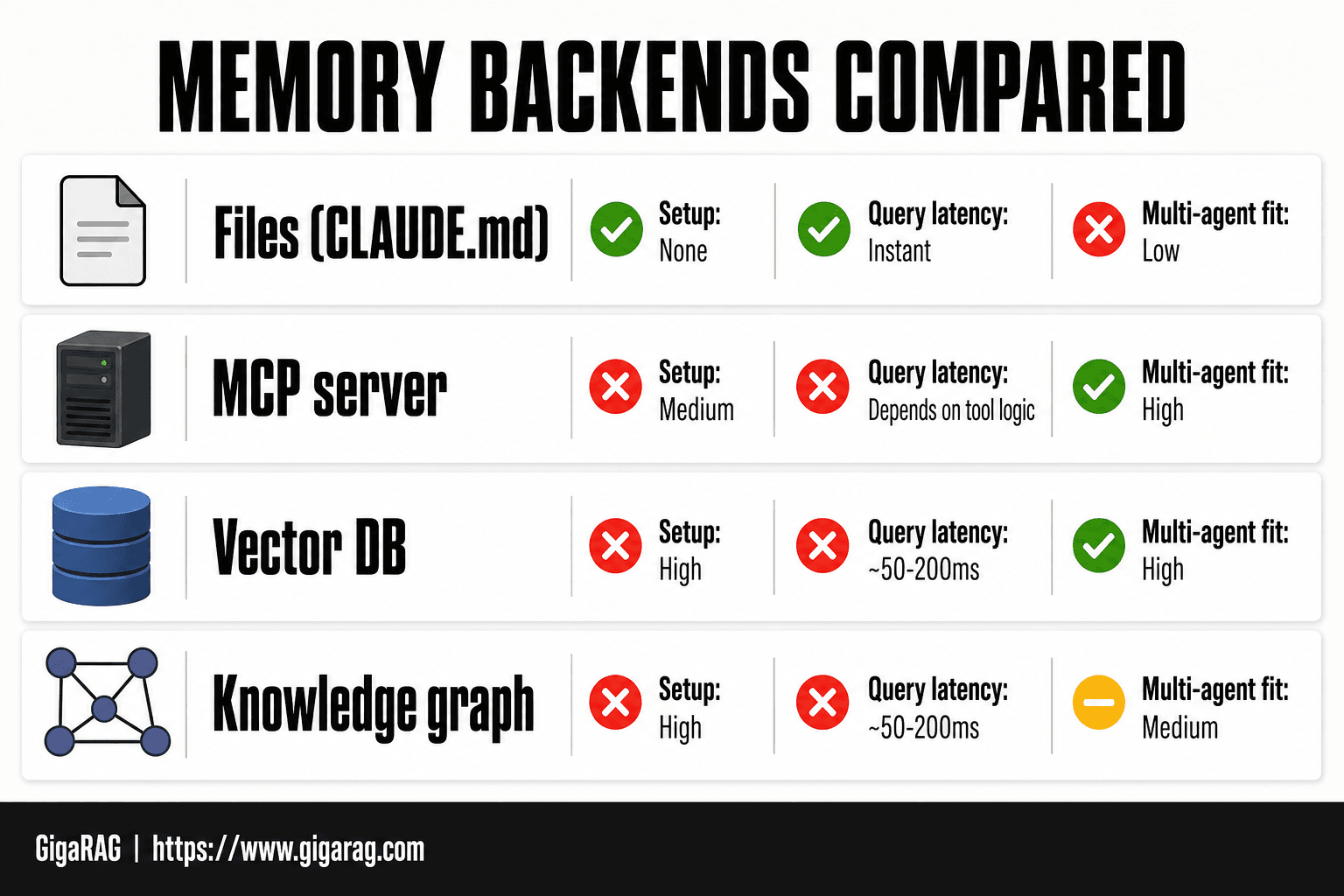
The best shared memory backend depends on your query pattern, not your preference. Files suit small teams with low query volume. MCP servers suit tool-calling agents. Vector DBs suit semantic search over large memory stores. Knowledge graphs suit relational queries across decisions.
CLAUDE.md and file-based memory
CLAUDE.md is a plain markdown file agents read at session start. It's the cheapest backend: zero setup, zero latency, zero cost beyond tokens. The catch is retrieval. Agents read the whole file or nothing. Past a few hundred lines, every session pays for context the agent doesn't need.
File-based memory works for conventions and decisions that change rarely. It fails when memory grows past what fits in one read.
MCP servers for shared context
An MCP server exposes memory as tools: read_memory, write_memory, search_memory. Agents call these tools instead of reading a file. This gives you write paths and read paths with actual logic behind them.
The trade-off is setup. You're running a server, not editing a file. Query latency depends on what the server does behind the tool call. Cost is per tool call plus whatever the server returns in tokens.
Vector databases for semantic retrieval
Vector DBs store embedded chunks and retrieve by similarity. This is the right backend when memory is large enough that keyword search or full reads stop working. An agent queries "how do we handle auth" and gets back the three most relevant chunks, not the whole memory file.
The cost is infrastructure. You need an embedding step on write, a vector index to maintain, and a retrieval window to tune. Setup complexity is the highest of the four.
Knowledge graphs for relational memory
Knowledge graphs store entities and edges: Decision A depends on Decision B, Module X uses Pattern Y. Queries traverse relationships instead of matching text. This matters when agents need to know what else breaks if one convention changes.
The honest answer is most projects don't need this. A graph earns its complexity only when your memory has dense interdependencies. For a typical repo, a vector DB or even a well-organized file covers it.
Comparison table: setup, latency, cost, multi-agent fit
| Backend | Setup | Query latency | Cost | Multi-agent fit |
|---|---|---|---|---|
| Files (CLAUDE.md) | None | Instant | Tokens only | Low: full read per agent |
| MCP server | Medium | Depends on tool logic | Per call + tokens | High: shared tool access |
| Vector DB | High | ~50-200ms | Infra + embedding | High: concurrent queries |
| Knowledge graph | High | ~50-200ms | Infra + graph build | Medium: read-heavy, write-heavy |
Files win on simplicity. MCP wins on control. Vector DBs win on scale. Knowledge graphs win on relationships. Pick the one that matches your query pattern, not the one that sounds most advanced.
How to Share Project Memory Across Multiple AI Coding Agents: A Step-by-Step Pattern
The backend comparison gives you options. This section gives you the wiring. The pattern below works with any backend, though the details shift slightly depending on what you picked.
Step 1: Define the memory contract
A memory contract is a written spec of what every agent must read and write. It lists the memory types, their format, and who owns each one. Without it, agents write whatever they want and the store becomes noise.
Write the contract in a file every agent reads at session start. Keep it under 50 lines. Specify: conventions (naming, structure), decisions (with dates and rationale), and architecture (module boundaries, dependencies). Anything not in the contract is agent-local by default.
Step 2: Choose a shared memory backend
Pick from the four options in the previous section. For most teams, start with a file or MCP server. Move to a vector DB only when memory exceeds what a full read can handle. Don't start with a knowledge graph.
The backend choice locks in your write and read paths. Changing it later means rewriting both.
Step 3: Implement write paths from each agent
Every agent needs a write path that appends to shared memory after significant decisions. The write path should be a tool call or a script, not a manual instruction. If an agent has to remember to write, it won't.
Write paths must include a timestamp and a source agent ID. Without those, you can't do invalidation or conflict resolution later.
Step 4: Implement read paths with retrieval windows
Read paths fetch only what the agent needs for the current task. A retrieval window is the number of chunks or lines returned per query. Set it low: 3 to 5 chunks for vector search, 50 to 100 lines for file reads.
The window controls token cost. Too wide and every agent pays for context it ignores. Too narrow and agents miss relevant decisions.
Step 5: Set refresh and invalidation rules
Shared memory goes stale. Define when entries expire or get marked outdated. A simple rule: any decision older than 30 days gets flagged for review. Any convention contradicted by a newer decision gets invalidated immediately.
Invalidation is a write operation. An agent that finds a conflict writes the correction and marks the old entry superseded. Without this, stale context compounds silently.
What Should Be Shared vs. Isolated
The memory contract from Step 1 defines what gets written. It doesn't define what should be written. That's a judgment call, and most teams get it wrong by erring toward over-sharing.
Shared: conventions, decisions, architecture
Three things belong in shared memory. Conventions: naming rules, file structure, linting preferences, test patterns. Decisions: what was chosen and why, with a date and the alternatives considered. Architecture: module boundaries, dependency direction, data flow.
Anything that affects how another agent writes code goes in. Anything that only affects the current task stays out.
Isolated: in-progress reasoning, speculative code
An agent's working notes, half-formed ideas, and abandoned approaches don't belong in shared memory. They're noise. Another agent reading them wastes tokens on context it can't use.
Speculative code is the same. If an agent tries an approach that fails, the failure doesn't need to be shared unless it's a decision: "we rejected X because of Y." The rejection goes in. The scratch work doesn't.
Isolation patterns and bank boundaries
The cleanest pattern is a two-tier structure: a shared bank and agent-local banks. The shared bank holds the contract, conventions, decisions, and architecture. Agent-local banks hold task state, intermediate outputs, and exploration.
The boundary is simple: if another agent would act differently without this information, it's shared. If not, it's local. When in doubt, keep it local. You can always promote something to shared later. Demoting is harder because other agents may have already built on it.
Over-sharing has a real cost. Every extra entry in shared memory gets read by every agent on every task. Ten agents reading 500 lines of irrelevant context is 5,000 wasted lines per session. The fix is discipline on the write path, not a smarter retrieval system.
Common Mistakes When Sharing Project Memory
Most shared memory failures aren't architectural. They're operational. Teams pick a reasonable backend, write a memory contract, then break it through the same five mistakes. Each one has a concrete fix.
Token bloat from unbounded memory
Shared memory grows every session. Decisions accumulate, conventions get refined, architecture notes expand. If nothing ever gets removed, retrieval windows pull in more context than the actual task needs. Ten agents reading 2,000 lines of shared context on a one-file bug fix is 20,000 lines of wasted tokens.
The fix is a size budget. Set a hard cap on the shared bank, say 500 lines or 50 entries. When it's full, something gets archived or merged. Review the bank monthly. Delete entries no agent has retrieved in 60 days.
Stale context and missing invalidation
A decision gets reversed. A convention changes. The architecture shifts. But the old entry stays in shared memory because nobody wrote the update. Agents keep following rules that no longer apply.
Every write path needs a matching invalidation path. When a decision changes, don't just add the new one. Mark the old one superseded with a pointer to the replacement. If your backend doesn't support versioning, add a status field: current, superseded, deprecated. Retrieval only pulls current entries.
Memory conflicts between agents
Two agents write to the same entry at the same time. One overwrites the other's change. Or worse, they write contradictory decisions and both survive. The next agent to read gets confused context.
The fix is a write lock or a single-writer pattern. For file-based memory, use git with pull requests for shared bank changes. For databases, use a last-write-wins timestamp and surface conflicts in the retrieval window. Don't let agents write silently.
Over-reliance on one backend
Files work until you need semantic search. A vector DB works until you need relational queries. Teams pick one backend and force every memory type through it, then wonder why retrieval quality drops.
The honest answer is most teams need two: files for the contract and conventions, a vector store for decisions and architecture that agents query semantically. Don't make one backend do everything. It won't.
What Shared Memory Won't Solve
Shared memory fixes forgetting. It does not fix disagreement. Two agents can read the same decision record and still produce different implementations, because they weigh trade-offs differently or interpret the decision differently. That's not a retrieval failure. It's a design problem.
Shared memory won't resolve design disagreements
If one agent prefers a service layer and another prefers direct database calls, shared memory won't make them agree. It can record the decision once it's made. It can't make the decision. You still need a human to break ties, or an orchestrator with explicit authority. Memory stores outcomes. It doesn't produce consensus.
Shared memory won't prevent all conflicts
Write locks and conflict detection reduce collisions. They don't eliminate them. Two agents can still write contradictory entries minutes apart, each internally consistent, each unaware of the other's intent. The conflict surfaces later, during retrieval, when a third agent gets both versions. Shared memory makes conflicts visible. It doesn't make them impossible.
Shared memory won't replace code review
An agent that retrieves the full shared context can still write buggy code. It can still miss an edge case, misread a convention, or apply a decision to the wrong module. Shared memory improves consistency. It doesn't improve correctness. Human review stays in the loop, especially for anything touching security, data migrations, or public APIs.
Shared memory fails without disciplined writes
This is the honest catch. Every limitation above gets worse when write paths are sloppy. If agents skip writes, the memory bank drifts from reality. If they write vague entries, retrieval returns noise. If they never invalidate, stale context poisons every downstream read. Shared memory is only as good as the write discipline behind it. No backend fixes that.
Security and Access Control for Shared Agent Memory
Shared memory is a shared attack surface. Every agent that can read the bank can read everything in it, unless you build boundaries. Most setups skip this. That's a mistake when the bank holds API keys, customer data, or unreleased features.
Read/write permissions per agent
Not every agent needs write access. A code review agent should read decisions but not modify them. A planning agent should write decisions but not touch implementation notes. Enforce this at the backend, not in prompts. Prompts are requests. Backend permissions are rules.
Secrets and sensitive context in shared memory
Don't put secrets in shared memory. API keys, tokens, and credentials belong in a secrets manager, not a retrieval bank. If an agent needs a secret, inject it at runtime from the vault. Shared memory holds decisions and conventions. It shouldn't hold anything that would hurt if leaked.
Access control patterns
Three patterns cover most cases. Role-based access: assign each agent a role with fixed read/write rights. Namespace isolation: split memory into banks per project or team, and grant access per bank. Audit logging: record every read and write so you can trace what an agent saw and when. Start with role-based access. Add namespaces when teams grow. Add audit logs before you need them.
How Multiple AI Agents Communicate with Each Other
Agents talk in two ways: by passing messages directly, or by reading and writing shared memory. Most production systems use both.
Message passing vs. shared memory
Message passing is a direct handoff. One agent sends a structured payload to another: a task, a result, a question. It's fast and explicit, but it only works when both agents are live at the same time and know how to reach each other. Shared memory is indirect. An agent writes a decision to a bank, and another agent reads it later, possibly hours or days after. No direct connection needed. The trade-off: message passing gives you immediacy but no persistence. Shared memory gives you persistence but no guarantee the other agent will read it.
Orchestration patterns for multi-agent workflows
Three patterns dominate. Sequential: agent A finishes, then hands off to agent B. Parallel: multiple agents work on separate tasks and merge results through a coordinator. Hierarchical: a planner agent assigns subtasks and collects outputs. In all three, shared memory acts as the coordination layer. The orchestrator writes the plan to memory. Workers read their slice, do the work, and write results back. Direct messages handle the live handoffs. Shared memory handles everything that has to survive a restart.
Final Thoughts on Sharing Project Memory Across AI Coding Agents
You have four decisions to make, and none of them are exotic. Choose a backend that matches your retrieval pattern. Define a memory contract that says what gets written and who reads it. Set retrieval windows so agents pull recent, relevant context instead of everything. Accept that shared memory reduces forgetting, not disagreement.
The honest answer is that most teams overbuild here. A file-based contract plus one vector store covers most multi-agent setups. Start there. Add a knowledge graph only when relationships between decisions become the bottleneck.
If you're building the RAG pipeline yourself, GigaRAG is one option for the retrieval layer. It handles chunking, embedding, and refresh cycles without forcing a specific agent framework. But it won't write your memory contract for you. That part is still a design decision, and it's the part that determines whether your agents actually share context or just share a database. How to share project memory across multiple AI coding agents comes down to that contract, not the tooling around it.
Frequently Asked Questions
How to share memory between agents?
Expose a single retrieval interface — such as an MCP tool or HTTP endpoint — that all agents query. Store memory as chunked, embedded documents with metadata, and require agents to read from that store before writing code. Writes should go through a merge step to prevent conflicts.
How to give memory to AI agents?
Give agents memory by connecting them to an external store they can read and write through a defined protocol. Common options include versioned files, MCP servers, vector databases, and knowledge graphs. The agent itself does not need to remember; it needs reliable retrieval.
How to use multiple AI agents together?
Assign each agent a clear role and a shared memory source, then define how they hand off work. Use a lead agent or human to resolve conflicts, and keep a decision log that all agents can query. Communication protocols like MCP help standardize tool access.
How do multiple AI agents communicate with each other?
Agents typically communicate through a shared store, message queue, or orchestration layer rather than direct peer-to-peer chat. In coding workflows, the shared memory store acts as the common ground, while an orchestrator routes tasks and merges results.
What are the limitations of shared memory for AI coding agents?
Shared memory does not solve conflicting decisions, stale context, token bloat, or security gaps. If two agents write contradictory memory, retrieval can amplify the confusion. You still need merge rules, refresh cycles, retrieval limits, and access controls.
How often should project memory be refreshed?
Refresh after every merge to the main branch, after architecture decisions, and whenever agents report missing or contradictory context. For active repos, a daily or per-merge re-index is a practical baseline; quieter projects can refresh weekly.
About GigaRAG
GigaRAG is for agent memory and RAG pipeline builders. get this right. Whether you are working through How to Share Project Memory Across Multiple AI Coding Agents or something adjacent, we publish what we have actually tested, including where it falls short.


