Tool-Calling Retrievers: What They Are and How to Use Them in RAG Pipelines
Tool-calling retrievers solve a problem every multi-tool agent builder hits: your agent has 50 tools, the context window can't hold all their schemas, and the model has to pick the right one in under 100ms. A tool-calling retriever is a small model or index that takes the current task and returns the few tools most likely to help, before the LLM ever sees them. GigaRAG uses this pattern for agent memory, keeping a searchable index of tools so agents can recall what's available without dumping everything into the prompt. The good news is the pattern is simple to implement. The catch is most guides stop at the happy path and skip what breaks. This guide covers what tool-calling retrievers are, how they work inside a RAG pipeline, a step-by-step implementation path, and the honest list of what they cannot do.
| At a glance | Details |
|---|---|
| What it is | Retriever that selects tools via LLM function calling |
| Core mechanism | Semantic search over tool descriptions, then LLM picks |
| Typical scale | Dozens to hundreds of tools |
| Latency budget | Often under 100ms for selection |
| Key limitation | Cannot handle tools with complex multi-step dependencies |
| Best for | Agents with many tools needing fast, accurate selection |
In This Guide
- What Are Tool-Calling Retrievers?
- Tool-Calling Retrievers vs Traditional Retrievers
- Why Tool-Calling Retrievers Matter for Agent Memory
- Tool-calling Retrievers: A Step-by-Step Guide
- How Tool-Calling Retrievers Work
- Tool-Calling Retrievers in RAG Pipelines: A Practical Implementation Path
- Common Mistakes When Building Tool-Calling Retrievers
- What Tool-Calling Retrievers Cannot Do
- Tool-Calling Retrievers vs. Alternative Approaches
- Evaluating Tool-Calling Retrievers
- Final Thoughts on Tool-Calling Retrievers
What Are Tool-Calling Retrievers?
A tool-calling retriever is a component that selects the most relevant tools from a larger set at inference time, returning a ranked list of candidate tools for an LLM to consider. It doesn't execute anything. It narrows the field.
The core definition
A tool-calling retriever takes a query or task description and returns a subset of tools likely to help. The retriever scores each tool against the query, ranks them, and passes the top candidates to the LLM. The LLM then picks which tool to call, if any.
The retriever is a filter, not a decision-maker. It shrinks a list of 50 tools down to 5 or 10. The LLM still does the final selection.
How they differ from general retrievers
A general retriever finds documents or passages. A tool-calling retriever finds tools. The mechanics look similar: encode the query, encode the items, compute similarity, return the top matches.
The difference is what gets retrieved and why. Documents get retrieved to provide context. Tools get retrieved to be called. A tool has a name, a description, and a schema for its arguments. The retriever must match on the description and the task, not just surface text similarity.
This matters because tool descriptions are short. A document might be 500 words. A tool description is often 20 to 50. There's less signal to work with, so the retriever has to be more precise.
How they differ from the tools they retrieve
The tools themselves do the work: query a database, send an email, run a calculation. The retriever doesn't do any of that. It only decides which tools are worth showing to the LLM.
Think of it as a librarian versus the books. The librarian tells you which shelf to check. The book contains the answer. Confusing the two leads to bad architecture: you don't want your retriever executing API calls, and you don't want your tools doing retrieval.
In practice, the retriever sits between the agent's query and the tool registry. It reads the query, scans the registry, and returns candidates. The LLM then reads those candidates and issues a tool call. The retriever's job ends before any tool runs.
[!note] Tool-calling retrievers are not a replacement for traditional retrievers; they complement them by handling tool selection, while traditional retrievers handle knowledge retrieval. In many pipelines, both are used together.
Tool-Calling Retrievers vs Traditional Retrievers
| Factor | Tool-Calling Retrievers | Traditional Retrievers |
|---|---|---|
| Primary function | Select and invoke tools based on query | Retrieve documents or passages |
| Output type | Tool calls (function name + arguments) | Text chunks or documents |
| Integration | Requires LLM with function-calling support | Works with any LLM or embedding model |
| Latency | Higher due to LLM call for selection | Lower, often just vector search |
| Use case | Agent tool selection, API orchestration | Question answering, document search |
Why Tool-Calling Retrievers Matter for Agent Memory
An agent with 50 tools doesn't have a memory problem in the human sense. It has a selection problem. Every tool description competes for space in the context window, and the model can't hold all of them at once without losing fidelity. The retriever acts as the agent's working memory: it recalls which tools are relevant to the current task and surfaces only those.
The memory problem in multi-tool agents
Most agents don't forget tools. They drown in them. When you pass 50 tool descriptions in every prompt, three things happen. The context window fills with schema noise. The model starts confusing tools with similar names or overlapping functions. And latency climbs because the model has to parse all 50 descriptions before it can decide.
A retriever fixes this by shrinking the candidate set before the LLM sees it. Five relevant tools beat 50 irrelevant ones. The model makes better calls, faster.
Where retrievers sit in the agent loop
The retriever runs after the agent receives a query but before the LLM generates a tool call. It's a pre-filter. The query goes in, a ranked list of candidate tools comes out, and only those candidates go into the prompt.
This is the same position a document retriever occupies in a standard RAG pipeline. You retrieve context first, then generate. Here you retrieve tools first, then decide which to call.
Agent memory vs. tool registry
A tool registry is a static list. It holds every tool the agent could ever use, with names, descriptions, and schemas. It doesn't change based on the task.
Agent memory is dynamic. It's the subset of tools the agent actually considers for this query, right now. The retriever is what turns the registry into memory. Without it, the registry is just a pile. With it, the agent has a working set.
That distinction matters when you design the system. The registry is infrastructure. The retriever is cognition. You maintain the registry. You tune the retriever.
[!tip] For agent memory systems, consider caching tool selection results for frequent queries to reduce latency and LLM costs. GigaRAG, for example, uses tool-calling retrievers to manage agent memory efficiently.
Tool-calling Retrievers: A Step-by-Step Guide
- Inventory your tools and write clear, concise descriptions for each, including input parameters and expected outputs.
- Generate embeddings for each tool description using a model that captures semantic meaning (e.g., OpenAI embeddings or open-source alternatives).
- Index these embeddings in a vector database that supports fast similarity search, such as FAISS, Pinecone, or Weaviate.
- At query time, embed the user's request and retrieve the top-k most similar tools (k typically 3-10).
- Pass the retrieved tool descriptions to an LLM with function-calling capabilities (e.g., GPT-4, Claude 3) and let it select the best tool and generate arguments.
- Execute the selected tool with the generated arguments and return the result to the user or agent loop.
- Monitor and log tool selection accuracy and latency; refine tool descriptions and retrieval parameters as needed.
How Tool-Calling Retrievers Work
A tool-calling retriever is a search engine over tool descriptions. You give it a query, it returns the tools most likely to help. The mechanics are simple to describe and easy to get wrong in practice.
Encoding queries and tools
Everything starts with embeddings. Each tool gets encoded into a vector: its name, its description, and its parameter schema all go through an embedding model and come out as a fixed-length list of numbers. The query gets the same treatment. "Find the weather in Tokyo" becomes a vector, and so does "get_weather(location, unit)".
The encoding step is where most failures begin. If your tool description says "does stuff with data", the embedding is mush. If it says "fetches current temperature and conditions for a city", the embedding is sharp. The retriever can only find what the description actually says.
Indexing and retrieval
Once encoded, tool vectors live in a vector index. At inference time, the query vector is compared against every tool vector using a similarity measure, usually cosine similarity. The retriever returns the top-k tools ranked by that score.
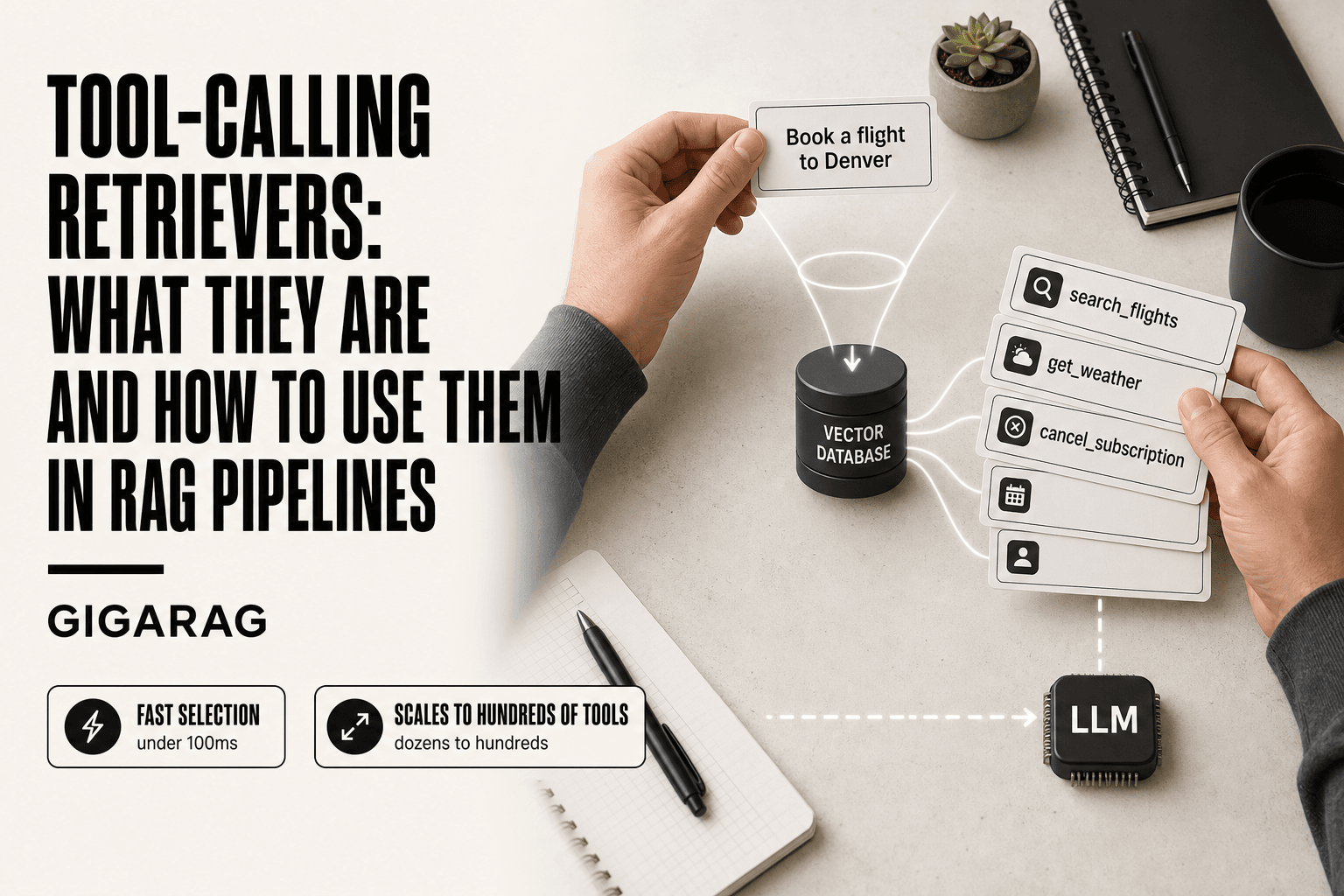
Here's what happens behind the scenes. The query "book a flight to Denver" gets embedded. The index computes similarity against every tool. "search_flights" scores high. "get_weather" scores lower. "cancel_subscription" scores near zero. The retriever returns the top 5 or 10, and the LLM only sees those.
The index itself is just a data structure. It can be a vector database, an in-memory array, or anything in between. What matters is that similarity search is fast. With a few hundred tools, brute-force search over embeddings takes single-digit milliseconds. With thousands, you'll want an approximate nearest neighbor index.
Training-time vs. inference-time behavior
There are two distinct phases, and they behave differently.
At training time, the retriever learns to map queries to tools. This is where fine-tuning happens. You feed it pairs of queries and correct tools, and it adjusts the embedding weights so relevant pairs land closer together in vector space. ToolDreamer, for example, generates synthetic queries for each tool and uses those to train the retriever. The result is a model that understands tool descriptions better than a generic embedding model would.
At inference time, the retriever is frozen. No learning happens. The query comes in, gets embedded, and the index returns the nearest tools. That's it.
The honest answer is that most builders skip the training phase entirely. They use an off-the-shelf embedding model and rely on well-written tool descriptions to do the work. That's fine for small tool sets. It starts to break down when tools have overlapping functions or when queries use vocabulary that doesn't match the descriptions.
Re-ranking and fusion
The initial retrieval is coarse. Cosine similarity over embeddings gets you candidates, but it doesn't always rank them well. A cross-encoder re-ranker can fix this. It takes the top 20 or 50 candidates and scores each one against the query using a more expensive model that actually reads both texts together. The re-ranked list is what goes to the LLM.
Fusion is a different technique. You run multiple retrievers, say one over tool names and another over descriptions, and merge their results. Reciprocal rank fusion is the common approach: each tool gets a score based on its rank in each list, and the scores are combined. It's more robust than relying on a single embedding model.
Keep in mind that re-ranking and fusion both add latency. A cross-encoder pass over 50 candidates can take 50 to 100 milliseconds. That's fine if your budget is 500ms. It's not fine if you're targeting 100ms end to end.
Tool-Calling Retrievers in RAG Pipelines: A Practical Implementation Path
You've seen the mechanics. Now you need to wire one into a pipeline that already exists. The good news is the integration is not exotic: it's four steps, and each one fails in a predictable way.
Step 1: Write tool descriptions that retrieve well
The description is the retrieval unit. Not the function name, not the code. The text you write is what gets embedded and matched against queries.
Start by writing descriptions that answer three questions: what the tool does, what inputs it takes, and when you'd use it. "Gets weather" is useless. "Fetches current temperature, humidity, and wind speed for a given city and date" retrieves well because it shares vocabulary with the queries people actually type.
Make sure you include synonyms. A user says "book a flight", your tool is called search_flights, and the description says "finds available airline tickets". That matches. But if the description only says "queries the flight database", it won't. Write for the query, not for the API doc.
Don't cram every parameter into the description. The embedding model doesn't need the full schema. It needs enough signal to distinguish this tool from the 49 others sitting next to it in the index.
Step 2: Choose an embedding model
It depends on your tool count and your query vocabulary. For under 100 tools with clear, distinct functions, an off-the-shelf model like text-embedding-3-small or bge-small-en works. You don't need fine-tuning.
For 100+ tools or overlapping functions, a fine-tuned retriever starts to earn its cost. ToolDreamer's approach is the reference here: generate synthetic queries for each tool, train the embedding model on those pairs, and the retriever learns to map real user language to your specific tool set.
The main catch is that fine-tuning requires a training set. You need hundreds of query-tool pairs per tool, and you need them to reflect how users actually phrase requests, not how you'd phrase them. If you can't produce that, stick with a generic model and better descriptions.
Step 3: Build and maintain the tool index
The index is a vector store, nothing more. You embed every tool description once, store the vectors, and run similarity search at inference time.
What trips people up is maintenance. Tools change. Descriptions get rewritten. Parameters get added. Every change means re-embedding the affected tool and updating the index. If you don't have a process for that, the index drifts and retrieval quality silently degrades.
Keep the index rebuildable from source. Store tool descriptions in a registry or a config file, not in the vector database. When you need to re-embed everything after switching models, you regenerate from the registry in one pass.
Step 4: Evaluate retrieval quality
You can't improve what you don't measure. Build a test set of 50 to 100 real queries, each labeled with the correct tool. Run them through the retriever and check whether the right tool lands in the top 5.
Recall@5 is the metric that matters most here. If the right tool isn't in the top 5, the LLM never sees it, and nothing downstream can fix that. Precision matters less: returning a few extra candidates is cheap, missing the right one is expensive.
Run this evaluation every time you change a description, swap an embedding model, or add tools. A retriever that worked last month can break this month without anyone noticing.
Common Mistakes When Building Tool-Calling Retrievers
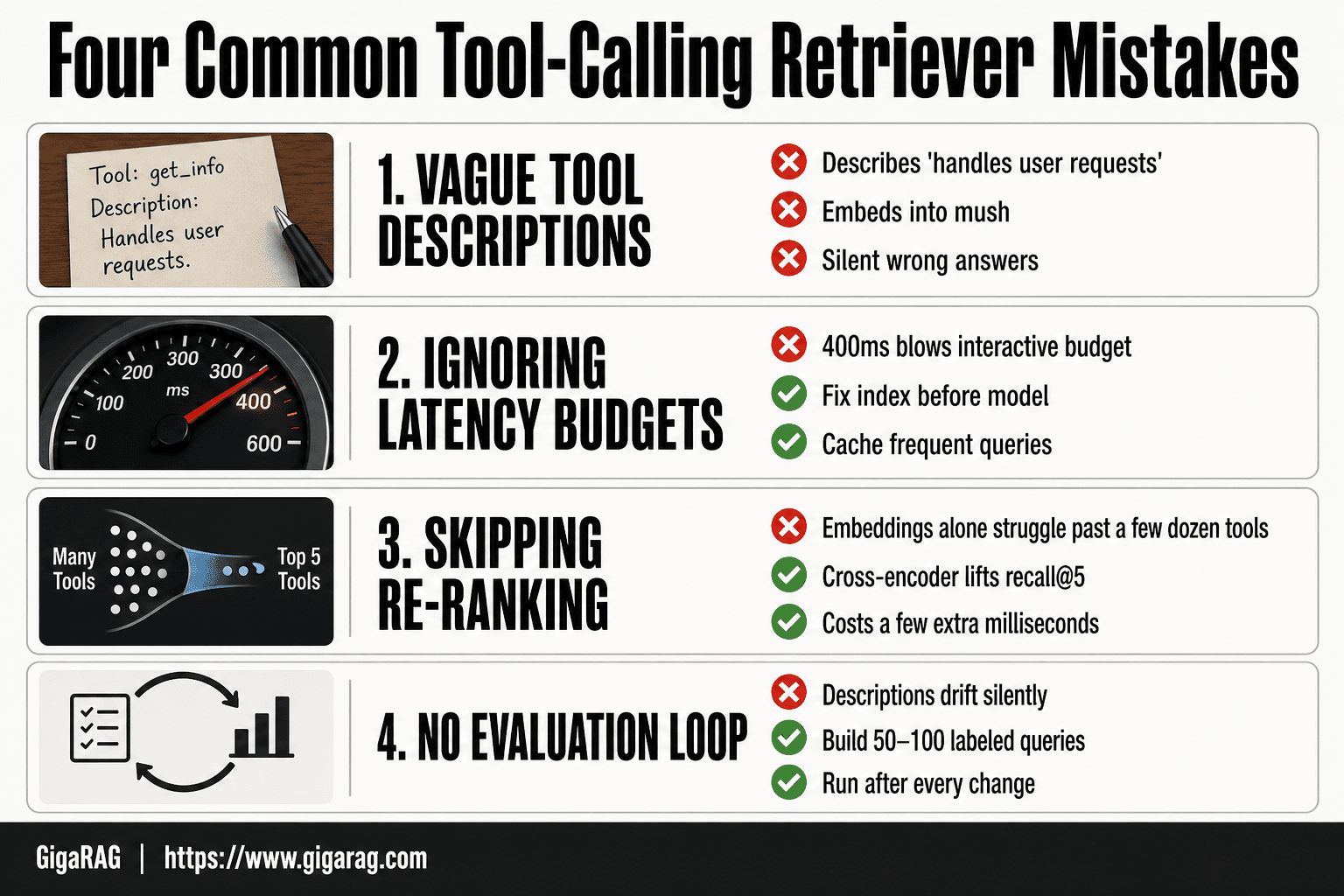
Most tool-calling retriever failures aren't exotic. They're the same four mistakes, repeated across teams, and each one is fixable if you catch it early.
Vague tool descriptions
The most common mistake is treating the description as documentation instead of as a retrieval key. "Handles user requests" or "Processes data" embeds into a vector that matches nothing useful. The consequence is silent: the retriever returns the wrong tools, the LLM picks from a bad candidate list, and the agent calls a tool that doesn't do what the user asked. You won't see an error. You'll see a wrong answer.
The fix is to write descriptions that share vocabulary with real queries. Include the verbs users actually type, the nouns they name, and one concrete example of when the tool applies. Test it: take ten real user queries and check whether the right tool's description contains overlapping terms. If it doesn't, rewrite the description, not the embedding model.
Ignoring latency budgets
A retriever that takes 400ms to return candidates has already blown the budget for most interactive agents. Users expect a response in under a second, and the LLM still needs time to reason and call the tool after retrieval returns.
Measure retrieval latency separately from end-to-end latency. If the embedding lookup plus similarity search exceeds 50ms for a few hundred tools, you have an index problem, not a model problem. The fix is usually a smaller embedding dimension, an approximate nearest neighbor index, or caching frequent queries. Don't reach for a bigger model first. Reach for a faster index.
Skipping re-ranking
Embedding similarity is a rough first pass. It gets the right tool into the top 20 reliably, but the top 5 is where it struggles, especially when tools have overlapping functions. If you feed the top 5 raw embedding results to the LLM, you're asking it to compensate for the retriever's ranking errors.
A cross-encoder re-ranker, or even a simple LLM pass over the top 20 candidates, costs a few extra milliseconds and consistently lifts recall@5. The honest answer is that embeddings alone are not enough once your tool set grows past a few dozen. Re-ranking is not optional at that scale.
No evaluation loop
The worst mistake is building the retriever, shipping it, and never measuring it again. Tool descriptions drift. New tools get added with sloppy descriptions. The embedding model gets swapped. Each change silently degrades retrieval quality, and nobody notices until a user reports that the agent keeps calling the wrong tool.
Build a test set of 50 to 100 labeled queries before you ship. Run it after every change to the tool registry, the embedding model, or the index. If recall@5 drops, you know exactly which change caused it. Without that loop, you're debugging blind.
What Tool-Calling Retrievers Cannot Do
A retriever is a narrow component. It ranks tools by relevance to a query. That's the whole job. Everything else is someone else's problem, and pretending otherwise leads to broken agents and angry users.
They don't execute tools
A tool-calling retriever returns a list of candidate tools. It does not call them, does not pass arguments, does not handle errors, and does not know what happened after the call. The LLM or the agent runtime does all of that.
If you expect the retriever to validate that a tool actually ran, you've built the wrong expectation. The retriever's output is a suggestion, not an action. The distinction matters because debugging gets harder when you blame the retriever for a failed tool call. The retriever picked the tool. Something else failed to use it.
They don't guarantee the right tool
Retrieval is probabilistic. A retriever returns the tools most likely to be relevant, not the tool that is definitely correct. Even a well-tuned retriever with recall@5 of 0.95 misses the right tool one time in twenty.
That miss rate compounds. If your agent calls the wrong tool, the user gets a wrong answer, and the retriever's confidence score won't tell you anything useful. Confidence scores from embedding similarity are not calibrated probabilities. A score of 0.8 does not mean an 80% chance the tool is right. It means the query and tool description vectors are close in embedding space. That's a weaker claim.
They add latency
Every retrieval step costs time. Encoding the query, searching the index, and re-ranking candidates adds anywhere from 10ms to 200ms depending on your embedding model, index type, and tool count. For a single-tool agent with five tools, that's overhead you don't need. For a fifty-tool agent, it's the price of not stuffing every description into the prompt.
The honest answer is that a retriever is a trade. You spend latency to save context window. If your context window is large enough to hold all tool descriptions, and your LLM handles that fine, a retriever may be pure overhead. It depends on your tool count, your latency budget, and how well your LLM performs with a long tool list in the prompt.
They can't fix bad tool design
A retriever can only rank the tools you give it. If two tools have overlapping functions, the retriever will return both and let the LLM sort it out. If a tool's description is vague, the retriever will rank it poorly for queries it should match. If a tool does too many things, the retriever can't tell which part of it is relevant.
The retriever is a mirror. It reflects the quality of your tool registry. Fix the tools first. Then tune the retriever.
Tool-Calling Retrievers vs. Alternative Approaches
Before you add a retriever, check whether a simpler approach already works. Four options cover most agent designs, and each has a clear failure point.
All-tools-in-prompt
You put every tool description in the system prompt and let the LLM pick. This works fine up to roughly 20 to 30 tools, depending on description length and model context window.
The failure point is predictable. Past a certain tool count, the LLM starts confusing tools with similar names or overlapping functions. Accuracy drops, and prompt cost climbs with every call. You're also paying to re-send the full tool list on every turn, even when the user's query only needs one tool.
Hardcoded routing
You write if-else rules: if the query mentions a calendar, route to calendar tools. If it mentions email, route to email tools.
This is fast and deterministic. It also breaks the moment a query doesn't match your rules. "Schedule a follow-up with the person I emailed yesterday" needs both calendar and email tools, and a hardcoded router either picks one or falls through to a default. Maintaining the rules becomes a second codebase you have to test.
LLM-only tool selection
You let the LLM choose tools at inference time without a separate retriever, but you don't stuff all descriptions in the prompt. Instead, you rely on the model's training knowledge of common tool names.
This works for well-known APIs. It fails for internal tools, custom names, or anything the model hasn't seen. You also get no ranking, no confidence signal, and no way to log why a tool was chosen. Debugging is guesswork.
When a retriever is worth it
A retriever earns its complexity when you have more tools than fit comfortably in a prompt, or when your tools change often enough that hardcoded routing rots. The retriever gives you a ranked list, a log of what was considered, and a way to add tools without rewriting rules.
It depends on three things: tool count, latency budget, and how often your tool set changes. Under 20 tools, all-in-prompt is usually simpler and good enough. Over 50, a retriever starts paying for itself.
Evaluating Tool-Calling Retrievers
You can't improve what you don't measure. A retriever that picks the wrong tool half the time will quietly wreck your agent, and you won't notice until a user reports it. Here's how to catch it first.
Metrics that matter
Start with recall@k and precision@k. Recall@k answers: did the right tool show up in the top k results? Precision@k answers: how many of the top k results were actually relevant? For tool retrieval, recall@5 is the number to watch. If the right tool isn't in the top five, your agent will likely pick wrong.
End-to-end agent success rate matters more than either metric alone. A retriever can have perfect recall and still fail if the agent misuses the tool it retrieved. Log every agent run, mark whether the final action was correct, and track that rate over time. Retrieval metrics tell you where the pipeline breaks. Success rate tells you whether it matters.
Building a test set
You need queries paired with the correct tool for each one. Don't generate these by hand for a hundred tools. Take real user queries from your logs, or have an LLM generate variations on your actual tool descriptions, then review a sample yourself.
Keep a held-out set you never use for tuning. If you tweak embeddings or re-ranking against the same test set repeatedly, your numbers stop meaning anything. Refresh the set when your tool list changes.
Latency and cost
Measure retrieval latency separately from total agent latency. A retriever that adds 200ms on top of a 2-second LLM call is a 10% tax. Whether that's acceptable depends on your product. For interactive agents, keep retrieval under 100ms if you can.
Cost is simpler: embedding lookups are cheap, re-ranking is less cheap, and re-embedding your entire tool index on every change is the expensive mistake. Cache embeddings and only re-embed tools whose descriptions actually changed.
Final Thoughts on Tool-Calling Retrievers
Tool-calling retrievers solve a real problem: agents with dozens of tools can't stuff every description into a prompt and expect good choices. A retriever narrows the field before the LLM decides. That's the whole pitch.
The honest trade-off is this: you're adding a component that can fail. Retrievers don't execute tools, don't guarantee the right pick, and add latency you have to budget for. If you have five tools, skip the retriever. Pass them all in the prompt and move on. The complexity only pays off when your tool list outgrows the context window or your agent starts confusing similar tools.
Where they earn their keep is agent memory. A retriever that indexes tools by description and picks candidates based on the current task gives your agent a working memory of what it can do, without you hand-writing routing rules for every case.
If you want to implement this pattern without building the index, embedding pipeline, and evaluation loop from scratch, GigaRAG uses tool-calling retrievers for agent memory out of the box. It's one practical starting point, not the only one. The mechanics in this guide apply whichever stack you choose.
Frequently Asked Questions
What are tool-calling retrievers?
Tool-calling retrievers are a mechanism that uses semantic search to narrow down a large set of tools to a few relevant ones, then leverages an LLM's function-calling ability to select and invoke the most appropriate tool for a given query. They are particularly useful in agent systems where the number of tools is too large to include all in the prompt.
How do tool-calling retrievers differ from traditional retrievers?
Traditional retrievers return documents or text passages, while tool-calling retrievers return tool calls (function names and arguments). Traditional retrievers are used for knowledge retrieval, whereas tool-calling retrievers are used for action selection. They can be combined in a single pipeline.
When should I use a tool-calling retriever?
Use a tool-calling retriever when your agent has many tools (e.g., more than 10) and you need to select the right one quickly and accurately. It is also beneficial when tool descriptions are complex and require semantic understanding to match with user intent.
What are the limitations of tool-calling retrievers?
Tool-calling retrievers struggle with tools that have complex, multi-step dependencies or require stateful interactions. They also add latency due to the LLM call for selection, and their accuracy depends heavily on the quality of tool descriptions and the embedding model. They are not suitable for scenarios where tool selection must be deterministic or where the toolset is very small.
How do I implement a tool-calling retriever in my RAG pipeline?
Start by creating embeddings for your tool descriptions and indexing them in a vector database. At query time, retrieve the top-k tools and pass them to an LLM with function-calling support to select the best tool. Execute the tool and return the result. Monitor performance and iterate on tool descriptions.
Can tool-calling retrievers be used with any LLM?
No, the LLM must support function calling or tool use. Popular models like GPT-4, Claude 3, and some open-source models (e.g., Llama 3) offer this capability. Without it, you would need to implement a custom parsing mechanism, which is less reliable.
What is the typical latency of a tool-calling retriever?
Latency varies based on the embedding model, vector search speed, and LLM response time. In practice, the retrieval step can take a few milliseconds, while the LLM selection may add 100ms to several seconds depending on the model and load. Optimizing with caching and smaller models can help meet sub-100ms budgets for selection.
About GigaRAG
GigaRAG is for agent memory and RAG pipeline builders. get this right. Whether you are working through tool-calling retrievers or something adjacent, we publish what we have actually tested, including where it falls short.


