How to Add Memory to Claude Code
How to add memory to Claude Code starts with a hard truth for RAG pipeline builders and agent memory architects: every session begins from zero. Claude Code doesn't carry context between conversations unless you give it a file to read, and even then, that file sits inside a token-limited context window. The frustration is real, and it compounds when you're wiring up multi-agent systems or retrieval pipelines that need persistence beyond a single run.
The honest answer is that memory in Claude Code comes in three layers. Native file memory via CLAUDE.md handles project conventions and stable instructions. Auto memory captures details as you work, though it's unreliable for anything complex. External memory systems, including GigaRAG, handle what neither native layer can: semantic retrieval, cross-session persistence, and RAG-scale storage.
This guide covers all three approaches with practical steps, code snippets, and the limitations each one carries. What it won't do is pretend native memory solves agent-scale persistence. It doesn't.
| At a glance | Details |
|---|---|
| Native memory file | CLAUDE.md in project root |
| Auto memory | Session summaries written automatically |
| Persistence scope | Per project, per interface |
| Scales to RAG? | No — file-based only |
| External option | Vector DB or GigaRAG pipeline |
| Best for | Agent memory architects, RAG builders |
In This Guide
- What Is Claude Code Memory?
- Native Claude Code Memory vs External Memory Systems
- Where Is Memory Stored in Claude Code?
- How To Add Memory To Claude Code: A Step-by-Step Guide
- How to Add Memory to Claude Code with CLAUDE.md
- Using Auto Memory in Claude Code
- Implementing the Claude Memory Tool for Developers
- Claude Code Memory for RAG and Agent Builders
- External Memory Solutions: GigaRAG and Beyond
- What Claude Code Memory Cannot Do
- Troubleshooting Memory Issues in Claude Code
- How Much Memory Does Claude Code Have?
- Can You Import Memory to Claude Code?
- Final Thoughts on Adding Memory to Claude Code
What Is Claude Code Memory?
Claude Code memory is the set of mechanisms that let the tool remember things between sessions. Without it, every conversation starts from scratch. You tell Claude your project structure, your naming conventions, your preferred testing framework. Then you close the terminal and it's gone.
Memory fixes that. It's not one thing. It's three separate systems, each with a different job.
Why Claude Code forgets between sessions
Claude Code is stateless by design. Each session loads a fresh context window. Nothing carries over unless you explicitly save it somewhere Claude will read on startup. That's not a bug. It's how Anthropic keeps sessions isolated and predictable. But it means persistence is your job.
The three native memory mechanisms
There are three ways to add memory natively:
- CLAUDE.md files. Plain markdown files you create. Claude reads them at the start of every session. You control exactly what goes in.
- Auto memory. Claude writes its own notes about your preferences as you work. You review and edit them with the
/memorycommand. - The memory tool. A programmatic API for developers who want memory handled in code, not files.
Each layer solves a different problem. CLAUDE.md is deterministic. Auto memory is convenient but less predictable. The memory tool gives you programmatic control.
What memory can and cannot do
Memory stores text. It doesn't store embeddings, vectors, or semantic relationships. It can't retrieve information by meaning, only by what's written in the file. And every word of memory consumes tokens from your context window.
So memory helps with preferences, conventions, and project context. It does not replace a vector database for RAG-scale retrieval. Keep that distinction clear before you start building.
[!note] Claude Code's native memory is file-based and injected into the context window; it does not perform true semantic retrieval, so it cannot scale to RAG-sized knowledge bases on its own.
Native Claude Code Memory vs External Memory Systems
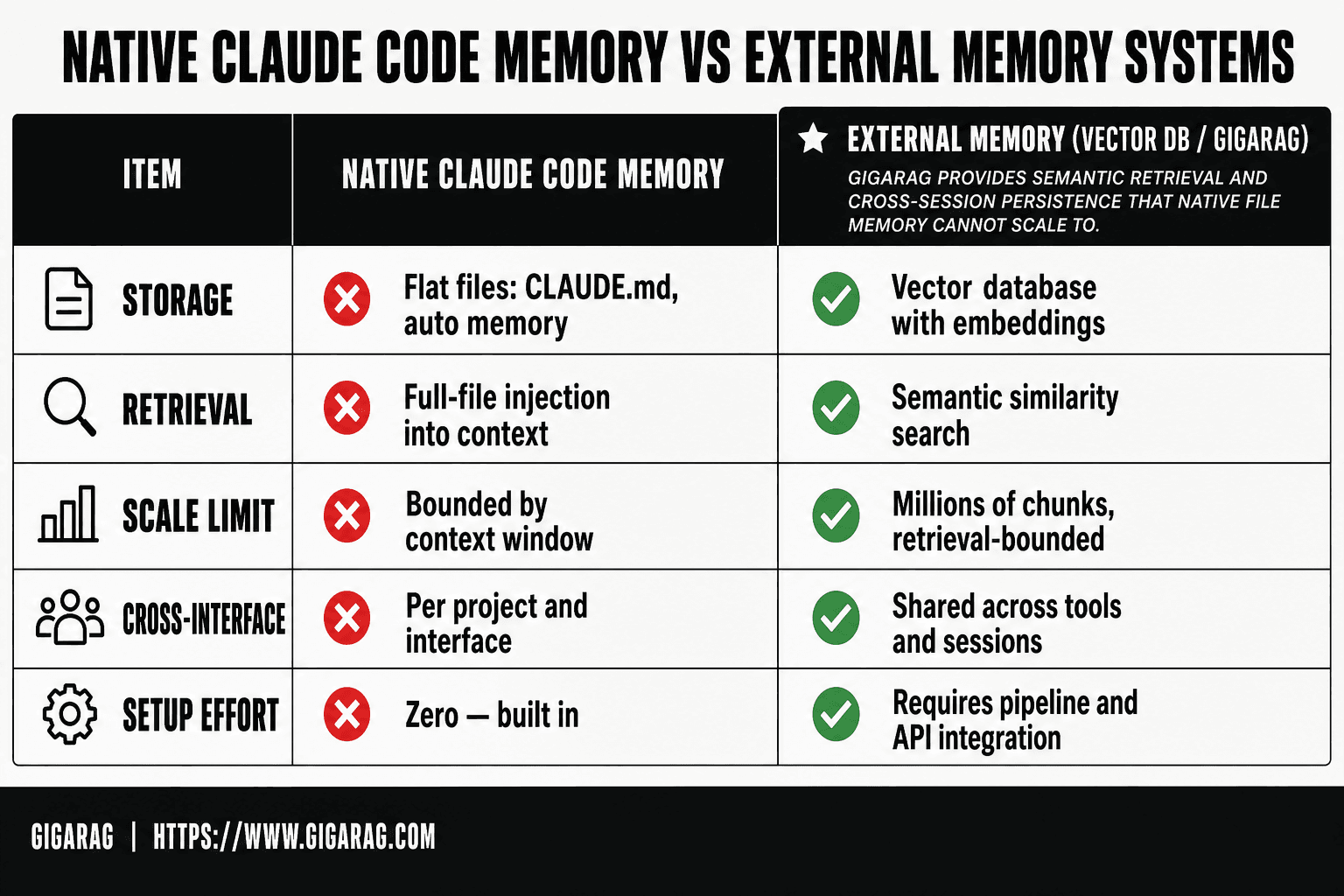
| Factor | Native Claude Code Memory | External Memory (Vector DB / GigaRAG) |
|---|---|---|
| Storage | Flat files (CLAUDE.md, auto memory) | Vector database with embeddings |
| Retrieval | Full-file injection into context | Semantic similarity search |
| Scale limit | Bounded by context window | Millions of chunks, retrieval-bounded |
| Cross-interface | Per project and interface | Shared across tools and sessions |
| Setup effort | Zero — built in | Requires pipeline and API integration |
Where Is Memory Stored in Claude Code?
Claude Code memory is stored in plain text files on your local machine, not in a database. CLAUDE.md lives in your project directory or home folder, auto memory lives in a local JSON file, and the memory tool writes to whatever location your code specifies.
CLAUDE.md file location
CLAUDE.md is a markdown file you create yourself. Claude Code looks for it in two places: your project root directory, and your home directory (~/.claude/CLAUDE.md). The project-level file takes priority. If both exist, Claude reads both, but project settings override global ones.
Auto memory storage
Auto memory doesn't write to CLAUDE.md. It stores its notes in a separate local file managed by Claude Code itself. You can't edit this file directly. You interact with it through the /memory command, which shows you what Claude has captured and lets you delete or correct entries.
Memory tool storage
The memory tool is different. It's a programmatic API, so storage location is up to you. You write the handler that saves and loads memory. That could be a local file, a database, or an external service. Claude Code doesn't manage this storage. Your code does.
What file-based storage means for persistence
Everything is file-based. That means memory survives as long as the files survive. Delete the file, you delete the memory. Move to a new machine without copying your CLAUDE.md and auto memory file, you start fresh. There's no cloud sync, no automatic backup. Persistence is manual.
[!tip] For RAG pipeline builders: keep CLAUDE.md as a thin index of pointers (schema names, endpoint routes, chunking rules) and push the actual knowledge into your vector store — this keeps context tokens low while preserving retrieval depth.
How To Add Memory To Claude Code: A Step-by-Step Guide
- Create a CLAUDE.md file in your project root with project context, conventions, and key decisions.
- Enable auto memory so Claude Code writes session summaries you can review and edit.
- Structure CLAUDE.md with clear sections (stack, commands, architecture) to keep injected context tight.
- For cross-session persistence beyond files, stand up a vector store and embed your project knowledge.
- Wire Claude Code to query that store via a tool or MCP server before each task.
- Route retrieval through a RAG layer like GigaRAG when you need semantic search at scale.
- Audit memory regularly — prune stale entries so context stays relevant and token cost stays low.
How to Add Memory to Claude Code with CLAUDE.md
CLAUDE.md is the simplest memory mechanism Claude Code offers. You create a markdown file, Claude reads it at the start of every session, and the instructions inside shape how it behaves for the rest of the conversation. It's manual memory. You decide what goes in, and you maintain it.
Creating a CLAUDE.md file
Start in your project root. Create a file named CLAUDE.md and add plain markdown. Here's a minimal example:
# Project Context

This is a FastAPI backend for a billing system.
Use Python 3.11. Tests run with pytest.
Never modify the migrations folder without asking.
Save the file. The next time you start Claude Code in that directory, it loads the file automatically. You don't need to import anything or run a command. If Claude is already running, restart the session or type /memory to confirm the file loaded.
Project-level vs global CLAUDE.md
Two locations matter. A CLAUDE.md in your project root applies only to that project. A ~/.claude/CLAUDE.md in your home directory applies to every project on that machine.
Project-level wins when both exist. Claude reads both, but if they conflict, the project file takes priority. Use global memory for preferences that span all your work: your name, your preferred coding style, tools you always want Claude to use. Use project memory for anything specific to that codebase: architecture decisions, file conventions, known gotchas.
What to include in CLAUDE.md
Keep it short. Every line consumes tokens from your context window, and a bloated CLAUDE.md crowds out actual conversation. Include:
- Project purpose: one or two sentences on what the code does.
- Stack and versions: languages, frameworks, key dependencies.
- Conventions: naming rules, file structure, test commands.
- Constraints: things Claude should never do, like touching certain files or using deprecated APIs.
- Repeated corrections: anything you find yourself telling Claude more than once.
Skip anything Claude can discover by reading the code. Don't document function signatures or file contents. That's redundant and wastes tokens.
Best practices for maintaining CLAUDE.md
Treat it like code. Review it when the project changes. If you rename a directory or switch test frameworks, update the file the same day.
Keep it under 100 lines for most projects. If you're past that, you're probably documenting things Claude can already see. When Claude makes a mistake you've corrected before, add one line to CLAUDE.md instead of repeating yourself next session.
Don't put secrets in it. CLAUDE.md is plain text in your repo, and if you commit it, anyone with access can read it. Use environment variables or a secrets manager for keys and tokens.
Using Auto Memory in Claude Code
Auto memory is Claude Code's attempt to remember things without you writing them down. It watches your sessions, picks out details it thinks will matter later, and saves them. You don't maintain a file. Claude does.
How auto memory works
Claude watches for patterns as you work. When you correct it, state a preference, or describe how your project works, it may store that as a memory. The next session, it injects those memories into the system prompt before you say anything.
It's not a database. It's a set of text snippets that get prepended to your context. That means every saved memory costs tokens, same as CLAUDE.md. The difference is you didn't write them.
Enabling auto memory
Auto memory is on by default in recent Claude Code versions. If it's not working, check your settings. Type /memory and look for the auto memory toggle. You can turn it off entirely or clear stored memories from the same screen.
There's no granular control over what gets saved. You can't say "remember my stack but not my file structure." It's all or nothing.
Viewing and editing with /memory
Run /memory in any session. You'll see a list of saved memories with options to edit or delete each one. Editing works like editing a text file. Delete anything wrong or outdated.
Check this regularly. Auto memory makes mistakes. It may save a half-finished thought or a preference you stated once and later changed. If you don't review it, those stale memories keep getting injected.
What auto memory captures (and misses)
It captures explicit statements. If you say "I prefer tabs over spaces" or "this project uses Python 3.11," that's likely saved. It also picks up repeated corrections.
It misses implicit context. It won't infer your architecture from reading code. It won't remember that you're building a billing system unless you say so. And it's unreliable: sometimes it saves nothing from a session where you gave clear preferences.
The honest answer is that auto memory is a convenience, not a system you can depend on. For anything critical, write it in CLAUDE.md yourself.
Implementing the Claude Memory Tool for Developers
The memory tool is the programmatic sibling of auto memory. Instead of Claude deciding what to save, you call it explicitly from your code or your prompts. You control what goes in, what comes out, and when.
Memory tool overview
The memory tool lets you store and retrieve text snippets through a structured interface. It's not a separate service. It runs inside Claude Code and writes to the same file-based storage as auto memory. The difference is you're the one making the calls.
Think of it as a key-value store with a natural language front end. You save a memory with a label, retrieve it later by asking for that label, and delete it when it's no longer useful. That's the whole API.
Basic usage and code snippets
You call the memory tool through the tool interface, not through slash commands. Here's the basic pattern:
# Save a memory
memory.save(key="project_stack", value="Python 3.11, FastAPI, PostgreSQL 16")

# Retrieve a memory
memory.get(key="project_stack")

# Delete a memory
memory.delete(key="project_stack")
In practice, you'll wrap these calls in your own functions. A common pattern is to save project context at the start of a session and retrieve it whenever you start a new one.
The tool accepts plain text values. No JSON, no schemas, no types. If you need structure, serialize it yourself before saving.
Prompting guidance for memory tool
The memory tool responds to explicit instructions. Tell Claude exactly what to save and under what key. Vague prompts produce vague memories.
Good: "Save the database connection string under the key db_config."
Bad: "Remember the database stuff."
When retrieving, ask for the specific key. Don't ask Claude to "find relevant memories." It will return whatever matches the key, not semantically similar content. There's no embedding search here.
Security considerations
Memory is stored in plain text on your machine. Anyone with filesystem access can read it. Don't store API keys, passwords, or tokens in the memory tool. Use environment variables or a secrets manager for that.
The tool also has no access control. Any session running in the same Claude Code installation can read any saved memory. If you share a machine or a project directory, assume everything in memory is visible to everyone who can open Claude Code there.
For sensitive data, external memory systems with encryption and access controls are the better choice. The native tool is for convenience, not security.
Claude Code Memory for RAG and Agent Builders
Native memory in Claude Code is a flat file. That's the whole story. CLAUDE.md, auto memory, and the memory tool all write text to disk and read it back into the context window when a session starts. For RAG pipelines and multi-agent systems, that model breaks fast.
Why native memory falls short for RAG pipelines
RAG needs semantic retrieval. You ask for "how we handle auth," and the system finds passages about tokens, sessions, and login flows, even when none of those words match exactly. Native memory does exact-key lookup. Ask for the wrong key and you get nothing.
The second problem is scale. Every memory file you load consumes context window tokens. A CLAUDE.md with 2,000 words eats roughly 2,700 tokens before you've asked a single question. RAG pipelines routinely work with millions of documents. You can't load that into a prompt.
Integrating Claude Code with vector databases
The practical pattern is to treat Claude Code as the orchestrator, not the memory store. Your pipeline embeds documents, stores vectors in a database like Pinecone, Weaviate, or pgvector, and retrieves the top-k results before calling Claude.
Claude Code connects to these systems through MCP servers or custom tools. You write a tool that takes a query, runs the vector search, and returns the top results. Claude calls it when it needs context. The memory lives in the vector database. Claude just asks for it.
Multi-agent memory considerations
Multiple agents sharing one CLAUDE.md creates conflicts. Agent A writes a preference, Agent B overwrites it. There's no locking, no versioning, no merge strategy.
For multi-agent systems, you need a shared memory layer with write controls. A vector database with namespaced collections works: each agent gets its own namespace, plus a shared namespace for common context. Claude Code's native memory has no concept of namespaces.
When to use external memory tools
Use native memory when your context fits in a few thousand tokens and you don't need semantic search. Use external tools when you need retrieval across large document sets, shared memory across agents, or persistence that survives beyond a single machine.
The honest answer is that most RAG builders will hit the limits of native memory within the first week. The file-based approach is fine for remembering a project's coding conventions. It's not a memory architecture.
External Memory Solutions: GigaRAG and Beyond
The previous section ended where most RAG builders land: native memory works for conventions, not for architecture. GigaRAG exists to fill that gap. It's an external memory layer that stores agent context in a vector database instead of flat files, which means retrieval is semantic rather than exact-key.
What GigaRAG offers for agent memory
GigaRAG gives Claude Code a persistent, queryable memory store that lives outside the context window. Instead of loading every memory file into the prompt, Claude sends a query to GigaRAG and gets back only the relevant passages. That's the core difference: retrieval happens before the prompt is built, not after.
The system embeds your documents, code snippets, and past conversation summaries into vectors. When Claude needs context, it searches those vectors by meaning. Ask about "the auth flow we discussed last week" and GigaRAG finds the relevant exchange even if the words don't match exactly.
For multi-agent setups, GigaRAG supports namespaced collections. Each agent writes to its own namespace, and a shared namespace holds common context. No overwrites, no merge conflicts.
Native memory vs external memory tools
The comparison comes down to three things: retrieval method, scale, and persistence.
Native memory does exact-key lookup against text files. External tools do semantic search against vectors. Native memory loads everything into the context window. External tools load only what's relevant. Native memory lives on one machine. External tools can live on a server that multiple agents and interfaces share.
The tradeoff is complexity. CLAUDE.md takes five minutes to set up. GigaRAG requires embeddings, a vector database, and an MCP server or API integration. You're adding infrastructure.
When to choose GigaRAG over CLAUDE.md
Choose GigaRAG when your memory needs exceed a few thousand tokens, when you need semantic retrieval, or when multiple agents share context. Choose CLAUDE.md when you're remembering coding conventions for a single project and the setup cost of external memory isn't justified.
The honest answer: most solo developers don't need GigaRAG. Most RAG pipeline builders do. It depends on whether your memory problem is "remember my preferences" or "retrieve the right context from a million documents."
What Claude Code Memory Cannot Do
Native memory is a text file that gets pasted into the prompt. That's the whole mechanism. Everything Claude Code "remembers" costs tokens, and every token competes with the actual task for space in the context window.
Token and context window limits
CLAUDE.md files load into every conversation. A 5,000-token CLAUDE.md eats 5,000 tokens from your context before you type a single prompt. Auto memory adds more on top. The context window is finite, and memory files are the first thing to crowd out code, conversation history, and tool output.
Keep in mind: Claude Code compacts older context when the window fills. Memory files survive compaction, but the conversation around them gets summarized. You keep the rules, you lose the nuance.
Auto memory reliability issues
Auto memory captures what it thinks matters. It misses things. It sometimes records preferences you stated once in passing as permanent rules. It can't distinguish "I'm trying this approach" from "I always use this approach."
There's no undo for a bad memory entry. You edit it manually with /memory or it keeps getting injected.
No true semantic retrieval
File-based memory does exact-key lookup. Claude reads the whole file and finds what's relevant by reading it. That's not retrieval, it's attention. Ask about "that database decision from March" and Claude can only find it if the words appear in a file it's currently reading.
No embeddings. No vector search. No ranking by relevance. Just text in a prompt.
Cross-interface persistence gaps
Memory set in the Claude web app doesn't automatically carry to Claude Code. Memory set in Claude Code doesn't carry to the API. Each interface has its own memory store, and syncing between them is manual.
The honest answer: Claude Code memory is a convention system, not a knowledge system. It works for preferences and project rules. It doesn't work for retrieval at scale.
Troubleshooting Memory Issues in Claude Code
Memory failures in Claude Code almost always trace to one of three causes: the file isn't where Claude expects it, the file is too large to load fully, or auto memory wrote something you didn't intend. Start by checking the file path before touching anything else.
Memory not persisting between sessions
If CLAUDE.md changes don't stick, check that you saved the file in the project root, not a subdirectory. Claude Code reads CLAUDE.md from the working directory where you launched it. A file in src/ or docs/ gets ignored.
Global memory lives in ~/.claude/CLAUDE.md. If you edited that file and nothing changed, restart the session. Claude Code loads memory files at startup, not mid-conversation.
Auto memory not capturing information
Auto memory needs to be enabled per project. Check /memory and confirm the toggle is on. If it's on but nothing gets captured, your prompts may be too vague. Auto memory extracts from explicit statements: "I prefer TypeScript" gets recorded. "Maybe we should think about types" doesn't.
The main catch: auto memory won't capture anything from tool output or file contents. It only reads your conversation text.
Conflicts between CLAUDE.md and auto memory
When CLAUDE.md says one thing and auto memory says another, Claude follows both and gets confused. The fix is to treat CLAUDE.md as the source of truth. Open /memory, find the conflicting entry, and delete or edit it.
Don't duplicate rules across both files. If a preference is stable, put it in CLAUDE.md. If it's session-specific, let auto memory hold it and clean it up later.
Error handling for memory tool
The memory tool returns errors when the file path is invalid or permissions block writes. Check that the directory exists and you own it. If the tool times out, your memory file is probably too large. Trim it.
Keep in mind: the memory tool doesn't validate content. It writes whatever you pass it, including malformed entries that break later reads.
How Much Memory Does Claude Code Have?
Claude Code doesn't have a fixed memory bank. It has a context window, and everything you load into it, including memory files, counts against that window. The honest answer: your effective memory is whatever fits in the context window after your prompt and conversation history take their share.
Context window limits
Claude models run with context windows between 200K and 1M tokens depending on the model and plan. That sounds large. In practice, a 200K window holds roughly 150,000 words. Your CLAUDE.md file, auto memory entries, system prompt, and conversation all draw from the same pool.
How memory files consume tokens
Every line in CLAUDE.md gets injected into the context at session start. A 500-line memory file eats 500 lines of context before you type anything. Auto memory entries stack on top. The more memory you add, the less room Claude has for actual work.
Practical memory capacity
A lean CLAUDE.md under 100 lines costs you almost nothing. Past 1,000 lines, you'll notice Claude losing track of earlier conversation. The fix isn't more memory. It's trimming what you store. For anything beyond a few hundred lines, external storage beats stuffing the context window.
Can You Import Memory to Claude Code?
Yes, with limits. You can import memory into Claude Code as plain text files, but you can't import the conversational memory from the Claude app or other tools directly. There's no import button. You copy content into CLAUDE.md or paste it into a session.
Importing from Claude app
The Claude app stores conversation history, but Claude Code doesn't read it. If you want something from a Claude app conversation to persist in Claude Code, you have to copy the relevant text yourself and paste it into a CLAUDE.md file or into the session. There's no sync between the two.
Importing from other tools
Anything that exports plain text can become Claude Code memory. Export notes from Notion, Obsidian, or a markdown file, then drop the content into CLAUDE.md. The file gets injected at session start. For larger imports, like documentation sets or codebase notes, you can point Claude Code at the files directly rather than pasting everything into memory.
What cannot be imported
You can't import vector embeddings, database records, or structured memory from other agent frameworks. Claude Code memory is file-based. No API endpoint accepts a memory dump from LangChain, AutoGen, or a vector database. If your memory lives in a database, you'll need a retrieval step, not an import.
Final Thoughts on Adding Memory to Claude Code
Three layers, three tradeoffs. CLAUDE.md gives you static, predictable context that loads every session. Auto memory captures what you tell Claude to remember, but it's hit-or-miss on what it actually stores. External memory, whether a vector database or GigaRAG, handles scale and semantic retrieval that file-based memory can't touch.
The honest answer is that most people only need CLAUDE.md. It's simple, it works, and it costs nothing. Auto memory helps when you want Claude to build context over time without manual file edits. External memory becomes necessary when your agent needs to search across thousands of documents or share state across multiple agents.
For RAG pipeline builders, the gap is real. Native memory won't do semantic search, won't persist across interfaces, and won't scale past the context window. That's where GigaRAG fits: a persistent memory layer that Claude Code can query rather than load.
How to add memory to Claude Code depends on what you're building. Start with CLAUDE.md. Add auto memory if you need it. Reach for external tools when file-based memory stops being enough.
Frequently Asked Questions
Can you import memory to Claude?
Claude Code does not offer a formal memory import command. You add memory by placing a CLAUDE.md file in your project root or by letting auto memory accumulate session summaries. For bulk knowledge, you import into an external store and retrieve it at query time.
How do I enable memory in the Claude app?
In the Claude app, memory is a settings toggle that lets Claude retain preferences and context across conversations. In Claude Code specifically, memory is file-based — you enable it by creating CLAUDE.md and using auto memory, not through an app toggle.
Where is memory stored in the Claude code?
Native memory lives in your project directory as CLAUDE.md and related auto-memory files. It is local to the project and interface, which is why it does not follow you across machines or tools without external storage.
How much memory for a Claude code?
There is no fixed memory quota — the practical limit is your context window. Every memory file you inject consumes tokens, so large CLAUDE.md files crowd out working context. For RAG-scale knowledge, use external retrieval instead of stuffing files.
Does Claude Code have persistent memory between sessions?
Only what you persist yourself. CLAUDE.md and auto memory survive sessions, but Claude does not retain conversational context automatically. Without files or an external store, each session starts fresh.
Can Claude Code memory work with a vector database?
Not natively. You connect a vector database by exposing it as a tool or MCP server that Claude Code can call. The retrieval logic — embedding, chunking, ranking — lives in your pipeline, not in Claude Code itself.
Is CLAUDE.md enough for complex agent workflows?
Usually not. CLAUDE.md works well for stable project conventions, but it does not scale to dynamic, growing knowledge. Agent workflows that need semantic recall across large corpora require an external memory layer.
About GigaRAG
GigaRAG is for agent memory and RAG pipeline builders. get this right. Whether you are working through how to add memory to claude code or something adjacent, we publish what we have actually tested, including where it falls short.