How to Resume a Claude Code Session After a Restart
Claude Code closes, your terminal restarts, or a usage limit cuts off a task halfway through. That doesn't mean your work is gone, but it doesn't mean you can get it all back either. A recent interruption doesn't guarantee a resumable transcript, and native resume can't restore deleted conversations, unsaved responses, missing files, or actions that never finished.
There are two things to recover: an available Claude Code conversation and changes already written to your project directory. They're related, but they're not the same. Code may remain in the working tree when the transcript is unavailable, while a resumed chat can be out of step with Git. Session recovery isn't a backup plan, so check git status and keep a short handoff before you trust the context.
Process overview
A restart may interrupt the conversation without losing repository changes. Check the project state first, then resume available context or rebuild it with a recovery brief.
- Check the project directory and Git state.
- Look for the session you want to resume.
- If it is unavailable, write a recovery brief from the repository and your notes.
- Verify the code and remaining work before continuing.
How to resume a Claude Code session after a restart: know what can return
A restart may let you reopen an available Claude Code conversation, but it does not guarantee that the transcript still exists or that every action finished. Files written and saved in your project directory may remain even when the conversation cannot return.
[!note] Transcript availability is not guaranteed just because an interruption was recent. Resuming a conversation does not restore deleted conversations, unsaved responses, missing files, or unfinished actions.
Conversation history: what native session resumption may make available
Native resume may restore an available transcript and its working context. It depends on whether that session is still available, not how recently the interruption happened. Check it, but don't treat it as your only record.
Repository state: what remains if files were written and saved
Saved files can remain in the project directory after the terminal closes. Git can show tracked changes, while git status can reveal untracked work. The transcript can't prove your working tree is correct.
What readers should not expect after an interruption
A restart workflow can't restore deleted conversations, unsaved responses, missing files, or actions that never finished. It also can't tell you whether a half-done change is safe. Verify the repository before you ask an agent to continue.
Resume the conversation or rebuild context?
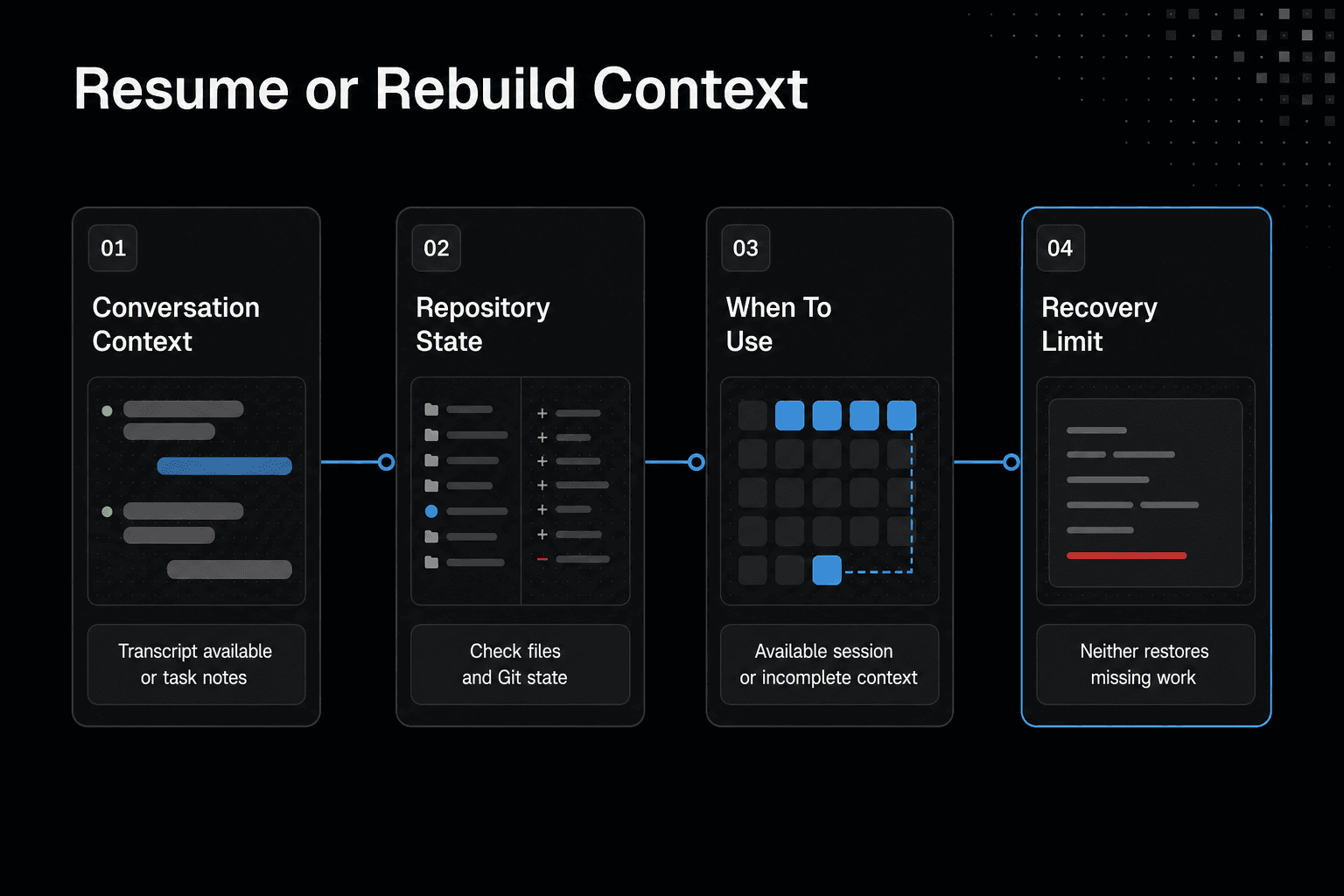
| Factor | Resume an available session | Rebuild with a recovery brief |
|---|---|---|
| Conversation context | Continue with the transcript if it is available. | Summarize the task and decisions from available notes. |
| Repository state | Check the files and Git state. Do not assume they match the conversation. | Inspect the files and Git state before acting. |
| When to use | When the relevant session is available. | When the session is unavailable or its context is incomplete. |
| Limit | Cannot restore deleted conversations or unsaved responses. | Cannot recreate missing files or unfinished actions by itself. |
Before you resume: check the project directory and Git state
Before you recover a conversation, reopen the repository the work belonged to. A valid transcript in the wrong folder can lead an agent to inspect, change, or create the wrong files.
Open the same project directory
Start from the project root, where your source files, Git metadata, and project instructions live. Check the path in your terminal, then look for expected files such as CLAUDE.md, your package manifest, or the main source folders.
If expected files are absent, stop and locate the correct project directory before resuming work.
Run git status before asking an agent to repeat work
Run git status before you ask Claude Code to redo anything. It shows changed, staged, deleted, and untracked files, giving you a record of work that may have survived the restart even when the transcript did not.
Identify uncommitted changes, generated files, and missing expected files
Read the working tree with care. Uncommitted source changes may be real work, generated files may be safe to rebuild, and a missing expected file needs investigation before you continue. Check git diff for tracked edits, and don't let an agent overwrite them based on remembered context.
Step-by-step: recover work after a restart
- Open the project directory where the work was happening.
- Inspect the repository and Git state to see which changes are present.
- Check whether the relevant Claude Code session is available to resume.
- If it is available, resume it and compare its context with the current files.
- If it is unavailable, prepare a recovery brief with the task, changed files, Git status, unresolved issues, and next action.
- Ask the agent to verify the current state before it continues the work.
Step 1: continue the latest available Claude Code session
Native resume can restore an available conversation transcript. It can't restore deleted conversations, unsaved responses, missing files, or actions that stopped before Claude Code completed them.
Use claude --continue
From the project directory, run:
claude --continue
This asks Claude Code to continue the latest session it can make available. After a terminal restart or usage-limit interruption, start here if the work you want was your most recent Claude Code task.
Use the short alias: claude -c
The shorter form is:
claude -c
It serves the same purpose. However, a recent interruption is not proof that a transcript will exist.
When continuing the latest session is appropriate
Use --continue when you have one clear recent task and the repository still matches that work. Check git status first, then ask Claude Code to restate its understanding of the task and verify it against the current files.
A resumed conversation can describe a repository state that changed while the session was interrupted, so confirm its assumptions before acting on them.
If no usable recent session is available
Don't keep retrying a missing or wrong transcript. Start a new session, inspect the working tree, and provide a short recovery brief with the task, changed files, unresolved issues, and next action.
Step 2: resume a specific session with a session ID
Choose a specific session when the latest available transcript belongs to another task, branch, or repository. A session ID gives you a targeted recovery path, but it doesn't prove the transcript is complete or that its assumptions still match your files.
Use claude --resume to select an available session
From the intended project directory, run:
claude --resume
Use this when you need to choose from available sessions rather than accept the most recent one. Check the session details carefully, especially if you switch among several tasks in one day.
Use the short alias: claude -r
The short form is:
claude -r
It serves the same purpose. Use it when you need a prior session, not simply the newest one.
Use a known session ID when it is available
A known ID is useful when a teammate included it in a handoff or you recorded it with a task note. Keep the ID with the task name, branch, and last known next action.
An ID alone doesn't explain what changed after the session stopped.
Avoid assuming a session ID guarantees complete or current context
A session ID identifies a session, not a reliable snapshot of your repository. Files may have changed, generated output may be stale, and an unfinished action may still be unfinished.
After resuming, run git status and ask Claude Code to verify its understanding against the working tree before it makes more changes.
Step 3: reconstruct context with a recovery brief
If the transcript is missing, incomplete, or doesn't match the files, don't force a resume. Start a new Claude Code session from the right project directory and give it facts from the working tree. A recovery brief can't restore lost conversation, but it can stop the agent from guessing.
When to start a new session instead of forcing a resume
Start fresh when the prior session is unavailable, covers the wrong task, or makes claims you can't confirm in Git. This is often faster than untangling stale context.
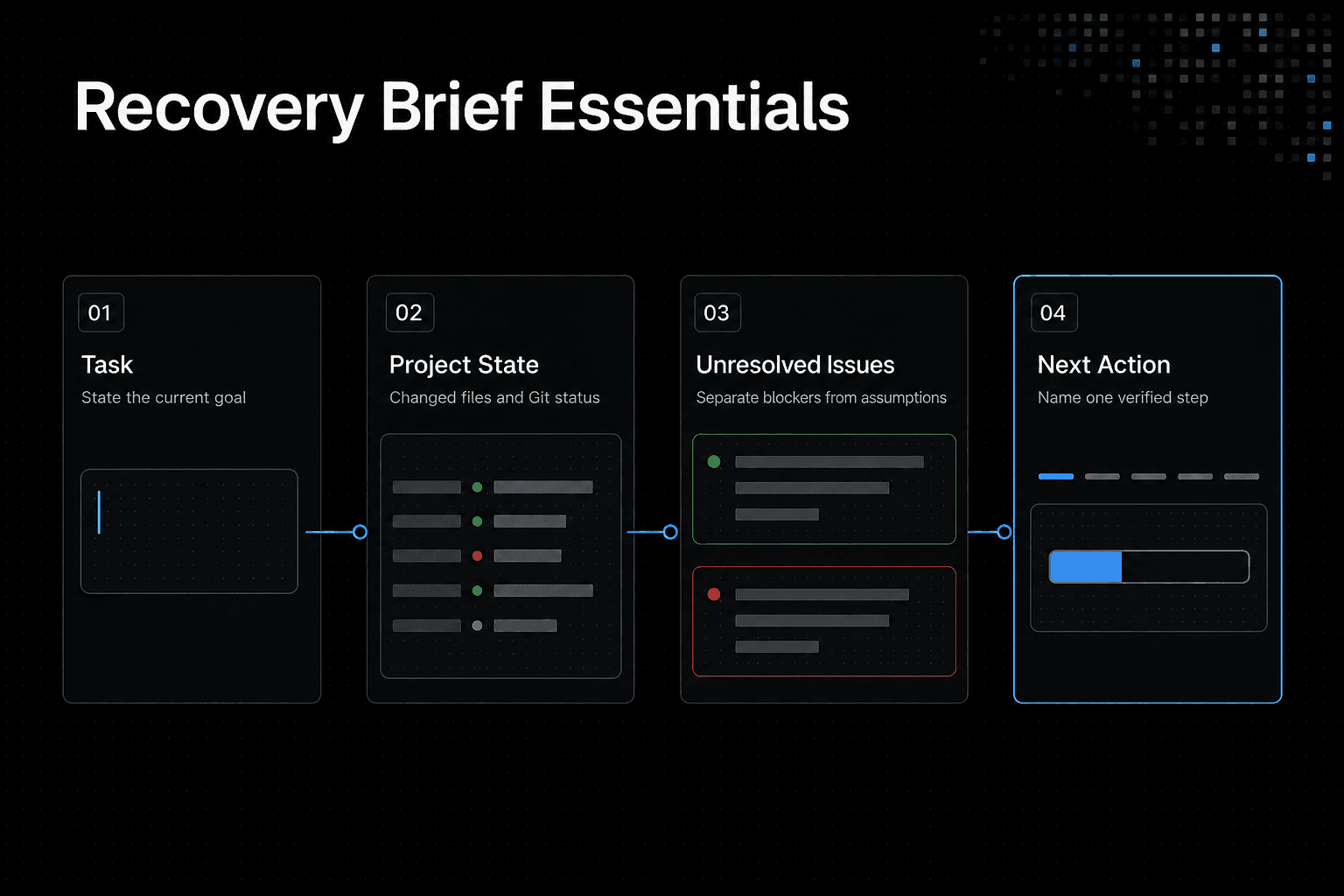
Recovery-brief template: task, changed files, Git status, unresolved issues, and next action
Write five short fields:
Task:
Changed files:
Git status:
Unresolved issues:
Next action:
Keep it evidence-based. Name files you can see, include uncommitted or untracked work, and separate known blockers from assumptions.
Realistic example recovery brief for a partially completed coding task
Task: Add validation for the account settings form.
Changed files: src/settings.ts, tests/settings.test.ts.
Git status: Modified files are unstaged; no commit created.
Unresolved issues: Email validation test still fails. Error message copy is not decided.
Next action: Run the focused test, inspect the validation branch, then fix or update the test.
Don't add a long transcript summary. The next agent needs a usable starting point, not every thought that led there.
Ask the agent to verify the brief against the working tree before continuing
Paste the brief, then ask the agent to inspect git status, review the named files, and identify any mismatch before editing. Ask it to report missing files, extra changes, and failed tests first.
If you use GigaRAG for saved project knowledge, compare those notes with the same repository evidence before you continue.
Step 4: save reusable project knowledge through GigaRAG MCP
A saved decision can help a later session regain project context. It can't bring back a deleted Claude Code conversation, an unsaved response, missing files, or an action that never finished. Keep Git and your recovery brief as separate safeguards.
Capability boundary: GigaRAG preserves knowledge saved beforehand
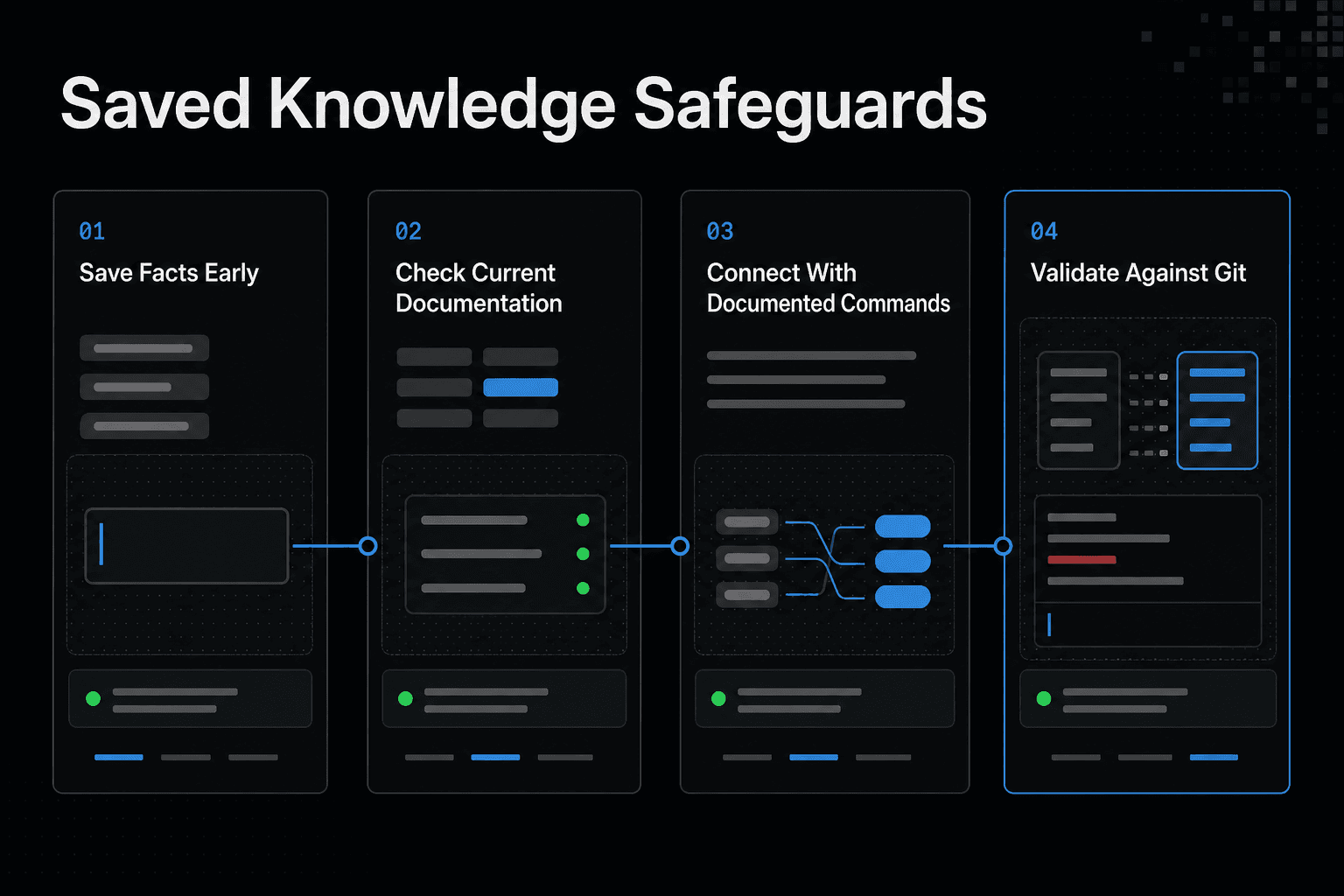
Save facts before the interruption: why you chose an approach, what remains, and what must not change. If you didn't save it, GigaRAG MCP has nothing to retrieve.
It does not restore deleted conversations, unsaved responses, missing files, or unfinished actions.
Check the current GigaRAG MCP documentation before setup
Don't copy MCP setup from an old post or an unverified example. Check GigaRAG's current official documentation for the server configuration, authentication, install steps, tool names, and required arguments.
Connect Claude Code through MCP using documented commands
Use only the documented Claude Code MCP configuration and verification command. A server entry that looks valid isn't proof that Claude Code can reach it.
Save a project decision and task handoff note
Once the connection works, save a short note with the decision, its reason, affected files, open issue, and next action. Avoid transcript dumps. They add noise when you need a clear handoff.
After restart: retrieve the saved note, then validate it against Git
Retrieve the GigaRAG note, then compare it with git status, the named files, and current tests before editing. Saved knowledge can be stale. The repository is the evidence you need to trust.
Troubleshooting when Claude Code will not resume
A recent interruption doesn't guarantee a usable transcript. Treat the repository as the source of truth, then decide whether a session adds enough context to be worth using.
[!tip] Before handing work back to an agent, record the changed files and current Git status alongside the next action. This makes the brief useful even when the transcript is unavailable.
No session appears or the expected session is unavailable
Don't keep retrying indefinitely. The session may no longer be available, or it may not be the one you need. Inspect the working tree and start a new session with a recovery brief.
The resumed transcript does not match the repository
Stop before making edits. Check the project directory, run git status, open the changed files, and compare the transcript's stated task with what is actually present.
Treat the working tree as the current evidence and use the transcript only as context for interpreting it.
A restart occurred after a usage limit, terminal failure, or IDE restart
A restart in VS Code or a terminal can end active work without explaining what completed. Reopen the intended repository, check Git and tests, then give the agent the current task, observed changes, and one next action.
When to stop recovery attempts and create a new, verified handoff
Create a new handoff when the transcript is missing, contradictory, or unclear about unfinished work. Record changed files, Git status, unresolved issues, and the next action, then ask the new session to verify each point before it continues.
Use resume for conversation context, not as a backup strategy
Native resume can give you a conversation to pick up from. It can't protect work that was never written to disk, restore a deleted transcript, or prove that the transcript matches the repository. Git, a recovery brief, and saved GigaRAG project knowledge cover separate risks.
A practical restart routine for solo developers and teams
Start each restart the same way: open the right directory, inspect Git, and read the handoff before you ask an agent to act. For a solo project, that can be a short note in the repository. For a team, put the same facts where the next person can find them, with an owner and one clear next action.
What to save before ending an important agent session
Before you end a session, save the task goal, changed files, current Git status, decisions made, open questions, and the next command or edit to check. Keep secrets out of notes. If the work matters, commit or otherwise preserve the files separately. A handoff explains the state, but it doesn't preserve it.
Frequently asked questions
What is the difference between claude --continue and claude --resume?
claude --continue continues the latest session Claude Code can make available. Use claude --resume when you need to choose from available sessions. In either case, first verify that the intended session is available and matches the repository.
Can I use claude -c instead of claude --continue?
Yes. claude -c is the short form of claude --continue, which continues the latest session Claude Code can make available. Confirm that the resumed session matches the current repository before continuing.
Can I use claude -r instead of claude --resume?
Yes. claude -r is the short form of claude --resume, which lets you choose from available sessions. Verify that the selected session is the intended one and that its context matches the repository.
Does a recent Claude Code interruption guarantee that I can resume the session?
No. Transcript availability is not guaranteed by how recently the interruption happened.
Will resuming a Claude Code session restore my code changes?
No. Don't assume that resuming a conversation restores repository changes. Inspect the project files and Git state to determine what is actually present.
What should I check before continuing work in a restarted Claude Code session?
Check that you are in the right project directory, inspect the files and Git state, and verify that the intended session is available. Compare the session's context with the repository before continuing.
What should a Claude Code recovery brief include?
Include the task, changed files, Git status, unresolved issues, and next action. These details help an agent regain context if the conversation cannot be resumed.
Can saved project knowledge restore deleted conversations or unsaved files?
No. Saved project knowledge can provide context, but it can't restore deleted conversations, unsaved responses, missing files, or unfinished actions.
About GigaRAG
GigaRAG is a shared memory platform for AI agents that helps developers and teams keep project knowledge available across sessions and tools.
You can connect agents to a central Hive Mind through MCP or the API. Access controls manage what each agent can use.