Vector Database Use Cases for AI Agents and RAG Teams
Your coding or support agent can have the right answer buried in a runbook, pull request, or incident note and still give a weak reply because it can't find that context when the request arrives. Vector database use cases start there: matching meaning rather than exact words, so a question about a failed deploy can surface relevant guidance even when its wording differs.
A vector database isn't a replacement for your transactional store, access controls, or reliable long-term agent memory. It depends on clean source documents, useful chunks, embeddings that fit the task, and metadata filters that keep one repository or environment from bleeding into another.
The main catch is that application retrieval for one RAG request and shared knowledge that survives new agents and sessions are separate design problems.
Quick answer
Use vector retrieval when your application needs to find content by meaning, then check whether filtering, freshness, and access controls also fit the task.
- Keep durable project context separate from a single request's retrieved context.
- Test retrieval on representative queries before choosing an implementation.
What are vector database use cases?
A vector database stores embeddings, numeric representations of text, code, or other data, so your AI can find items with similar meaning rather than only exact words. It supports retrieval for RAG, coding assistants, and agents, but it doesn't replace SQL, access control, or durable memory on its own.
Vectors, embeddings, and semantic similarity in simple terms
An embedding turns a chunk of text or code into a list of numbers. Similar content lands near similar content, so a search for "failed deploy rollback" can find a runbook that says "revert a release" without sharing the same words.
That's semantic similarity. It finds meaning, not truth.
The retrieval problem a vector database solves
An LLM can't read your whole repository, ticket history, and knowledge base on every request. A vector index narrows that material to a few relevant chunks, which your application can place in the prompt before it asks for an answer.
For an AI agent, this can mean finding the right API notes, incident record, or code example at request time.
When keyword search, SQL, or file search may be the better choice
Use SQL for exact records, counts, transactions, and fields such as a user ID or deployment status. Use keyword search when exact terms matter, such as error codes, function names, or legal language.
File search may be enough for a small, stable folder. Don't add vector retrieval when exact lookup already gives you the answer.
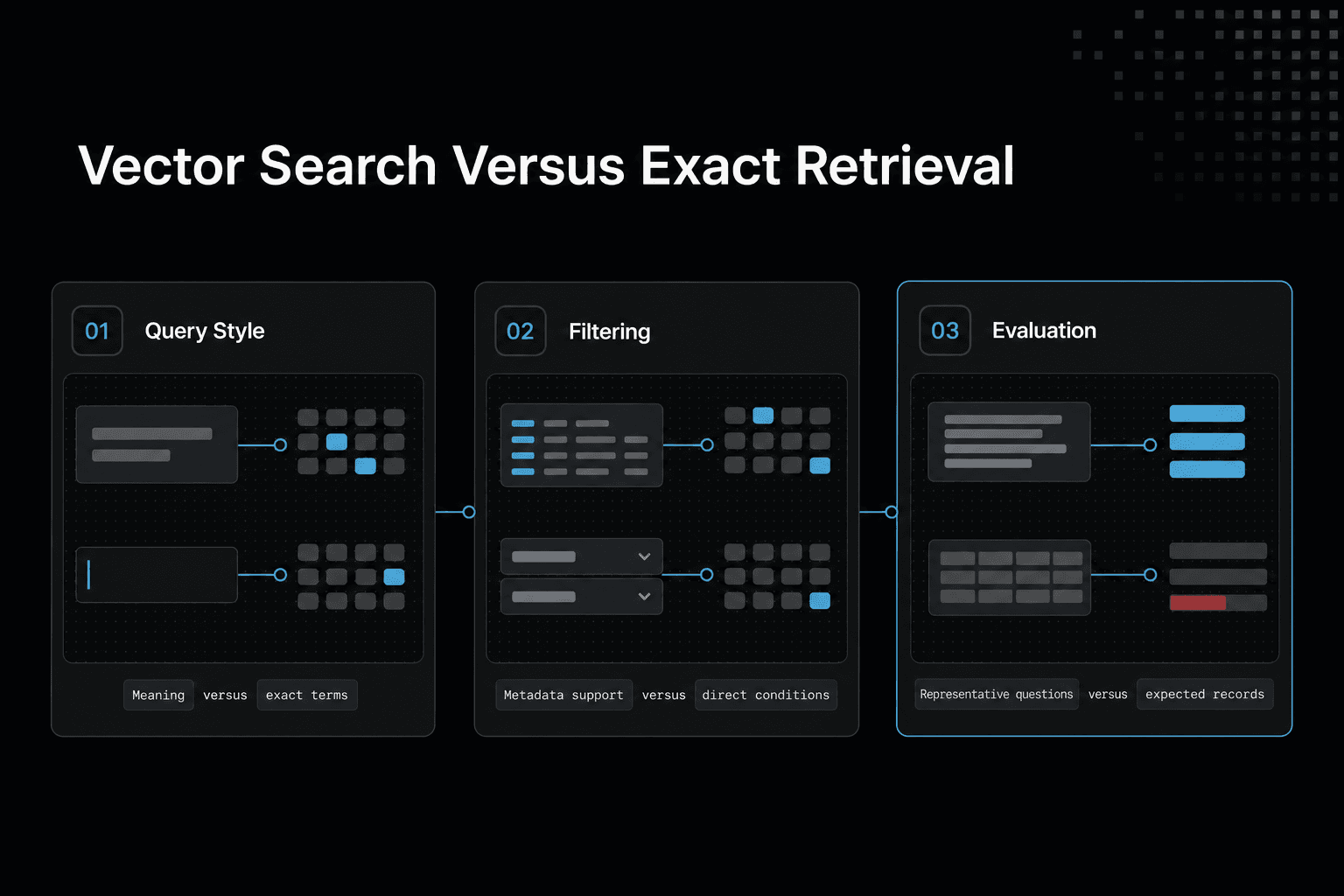
Vector search vs. other retrieval approaches
| Factor | Vector search | Keyword or SQL search |
|---|---|---|
| Query style | Try when meaning matters | Try when exact terms or structured conditions matter |
| Filtering | Check whether required metadata filters are supported | Express conditions directly in the query |
| Evaluation | Test retrieved results against representative questions | Test results against expected terms or records |
How vector databases work in a RAG application
A RAG path turns a question into a search, then turns the search results into bounded context for an LLM. The database doesn't answer the question. It returns source material your application chooses to show the model.
Chunk documents before embedding them
Start by splitting source files into chunks small enough to cover one idea, procedure, or code unit. Embed each chunk, not the whole document, so a query can retrieve the part about rollback steps rather than an entire runbook.
Chunking has a trade-off. Chunks that are too small lose the surrounding detail, while chunks that are too large mix unrelated topics and waste prompt space.
Store vectors with metadata that supports filtering
Write each embedding with its chunk text, a stable ID, and metadata such as repository, document type, environment, status, and update time. The vector is for meaning-based search. Metadata gives you hard boundaries.
For example, a deployment assistant can search for rollback guidance while filtering to environment: production and status: approved. Don't rely on similarity alone to enforce those limits.
Retrieve relevant chunks before generating an answer
When a user asks a question, embed the query with the same embedding setup used for your documents. Run nearest-neighbor search, apply metadata filters, and take a small set of returned chunks.
Here's what happens behind the scenes: your application formats those chunks as context, includes the user's question, and sends both to the LLM. The model can then ground its answer in retrieved material instead of guessing from its training data.
Why a similar result can still be unhelpful
Similarity is not proof of relevance. A chunk may share language with the query but be outdated, incomplete, meant for another service, or missing the exact action you need.
Keep in mind that retrieval quality depends on the source documents, chunk boundaries, embeddings, query wording, filters, and how many results you pass into the prompt. A vector database can find close matches, but your application still needs to reject stale or out-of-scope context.
Step-by-step: Plan a project-knowledge retrieval workflow
- Choose a project task and identify the documents or records an agent may need.
- Decide what context should persist across sessions and what should remain request-specific.
- Define metadata fields that help narrow retrieval to the relevant project or content.
- Create representative queries and specify which results should be retrieved.
- Test retrieval, filtering, and context assembly with those queries.
- Review how updates, deletions, and access checks will be handled before relying on the workflow.
[!note] Retrieved project context and durable shared agent memory are different design requirements. Specify which one the workflow needs before you implement it.
Vector database use cases for AI agents and coding workflows
A vector database doesn't make an agent authoritative, remember work forever, or decide who may see a record. It finds semantically related material from the sources you index. The source owner, access rules, and update process still define what your agent can safely use.
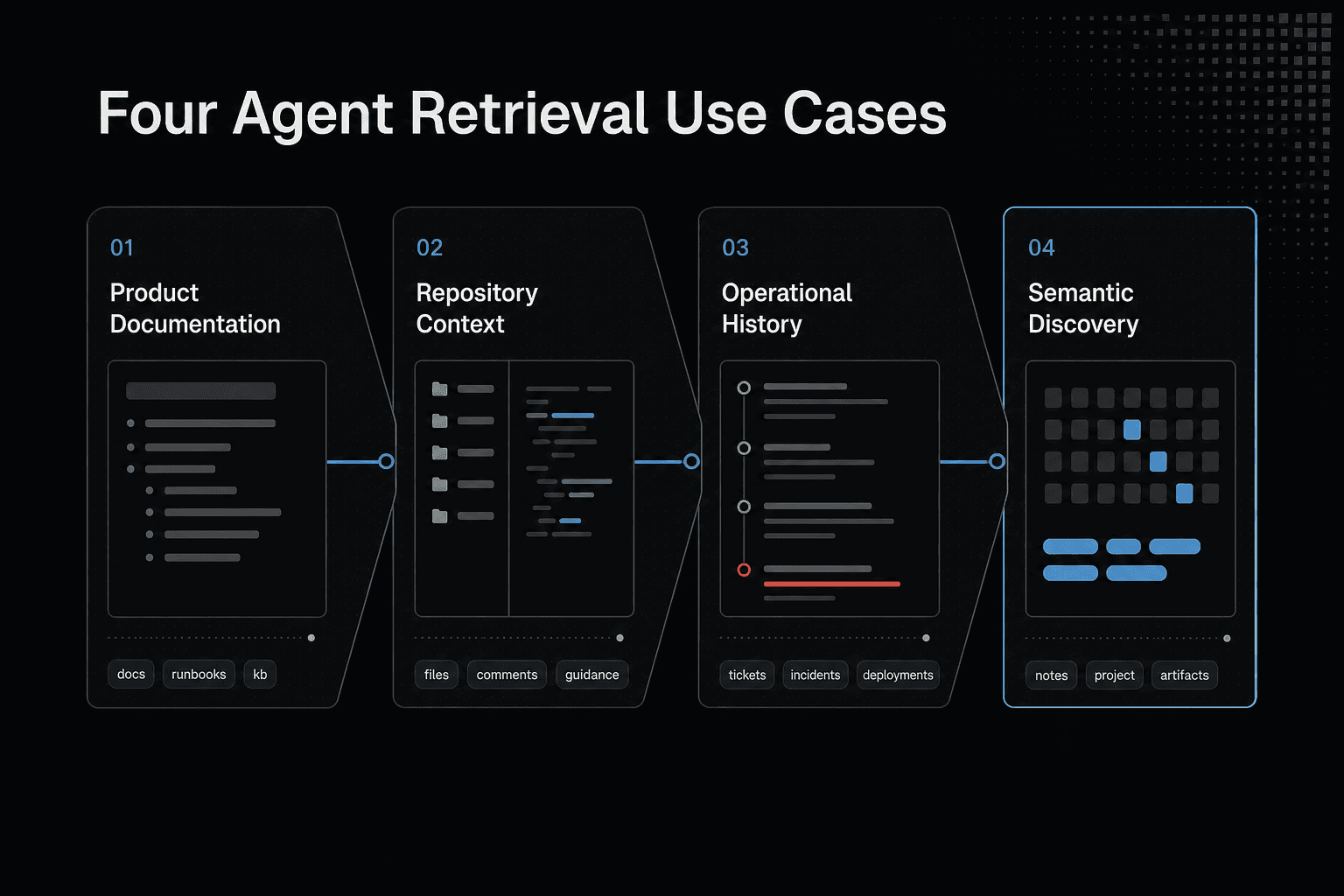
RAG over product documentation, runbooks, and internal knowledge
Index approved docs, support articles, and runbooks when users ask questions in their own words. The documentation team owns the source, so your retrieval layer should filter by product version, status, and audience before it builds context.
This works well for "How do I roll back?" questions. It is not worth using for an exact account balance or a live system state held in a transactional database.
Codebase and repository-context retrieval for coding assistants
A coding assistant can retrieve relevant files, function comments, architecture notes, and pull request guidance before it suggests a change. The repository remains the source of truth, while metadata can restrict results to a branch, service, language, or repository.
Keep the boundary clear. Similar code is not proof that a suggested patch compiles, passes tests, or matches the current checkout.
Ticket, incident, and deployment-history retrieval for operational agents
Operational agents can search past incidents, tickets, postmortems, and deployment notes for similar symptoms. Support, SRE, and engineering teams own these records, and sensitive fields may need to stay out of the index.
The main catch is staleness. An old incident can explain a pattern, but it can't confirm the cause of a live outage.
Semantic discovery across research notes and project artifacts
Use semantic search to find related meeting notes, design drafts, experiment results, and planning documents when terms differ. Each team should own and maintain its project material, with workspace or tenant filters set before retrieval.
This is discovery, not a decision record. Your agent still needs a current, approved source before it treats a draft as project direction.
Build a filtered RAG workflow in Python
A retrieval index should not decide which runbook is approved or current. It can return chunks that match a deployment question, but metadata and an update process must keep withdrawn guidance out of the prompt.
Scenario: retrieve approved engineering runbook guidance for a deployment-support assistant
Start with short runbook chunks, each tied to one repository and environment. Store only guidance marked approved, and keep the source document ID so you can remove or replace every chunk when the runbook changes.
Choose a vector database client and confirm its current setup
Consult the current documentation for the vector database and embedding tools you choose before installing or configuring them. Package names, client setup, and embedding integrations can change, so do not copy unverified Python syntax into a production service.
Create embeddings and store chunk IDs, documents, metadata, and embedding-version fields
Generate one embedding per chunk with a chosen embedding model. Write the chunk ID, text, vector, and metadata together: repository, environment, document status, source ID, update time, and embedding version.
Keep versions explicit.
Run similarity search with a metadata filter
Embed the user's question, then search only within the allowed scope. A deployment question for payments in production should filter for that repository, environment, and approved status before nearest-neighbor retrieval.
Assemble retrieved chunks into a bounded RAG prompt
Set a fixed context budget and include only the highest-ranked chunks that fit. Pass those chunks, their source IDs, and an instruction to cite or decline unsupported answers to your generation model.
Don't send the whole index.
Handle no matches, stale documents, and unsupported filters
Return a clear fallback when no approved chunks match, rather than asking the model to guess. Reject stale records during ingestion or retrieval, and validate filter fields before search so unsupported filters do not quietly widen what your assistant can read.
Implementing shared AI-agent memory with GigaRAG
A shared-memory service does not replace your vector index, and it will not make project facts correct, current, or authorized by itself. Keep application retrieval and cross-session project knowledge as separate systems until you have a deliberate reason to connect them.
[!tip] For a developer-project example, test a new session with a question that depends on an earlier project decision. Then verify that the retrieved context is relevant and scoped to the intended project.
Architecture boundary: application retrieval versus shared project knowledge
Use a vector index to retrieve approved runbook chunks for an application request. Use GigaRAG when a new agent session needs project context that another agent saved earlier, with access controls determining what that agent can use.
Connect agents through MCP or the API
Before you start, obtain an API key and check GigaRAG's official documentation for the MCP client setup at https://mcp.gigarag.com/mcp. Don't publish connection code, headers, or tool arguments from memory.
Confirm each agent's permitted project scope
Before an agent creates, searches, or uses shared knowledge, confirm that its access controls limit it to the intended project scope. This prevents an agent from retrieving context from projects it should not be able to use.
Organize knowledge by project and workstream
Organize shared knowledge around a defined project and bounded workstream, such as a deployment investigation. Keeping scope narrow makes it easier to retrieve relevant context and apply access controls consistently.
Save durable project facts, decisions, and artifact references
Save durable project facts, decisions, and references to relevant artifacts so another agent can recover the context later. Include enough source and timing information for the receiving agent to assess whether the record still applies.
Retrieve records before acting on shared knowledge
Search for relevant shared knowledge, then retrieve the selected record's full context before acting on it. A search match alone is not proof that a record is complete, current, or valid for the task.
Compare shared knowledge with vector-index results in a new session
Start a new agent session and ask for a deployment decision saved in the project knowledge. Then ask the same question of the approved runbook index: it may return related operational guidance, but it will not contain the saved decision unless that decision was indexed there as well.
The main catch is no automatic synchronization. Writing a record to GigaRAG does not add a vector to your index, and updating the index does not change shared project knowledge, so you need an explicit ingestion and update path for each system.
Production trade-offs: Evaluation, updates, deletion, and access
A working demo can retrieve useful text and still fail in production. Vector search can't tell you whether a source is current, whether a user may see it, or whether a deleted document still has indexed chunks.
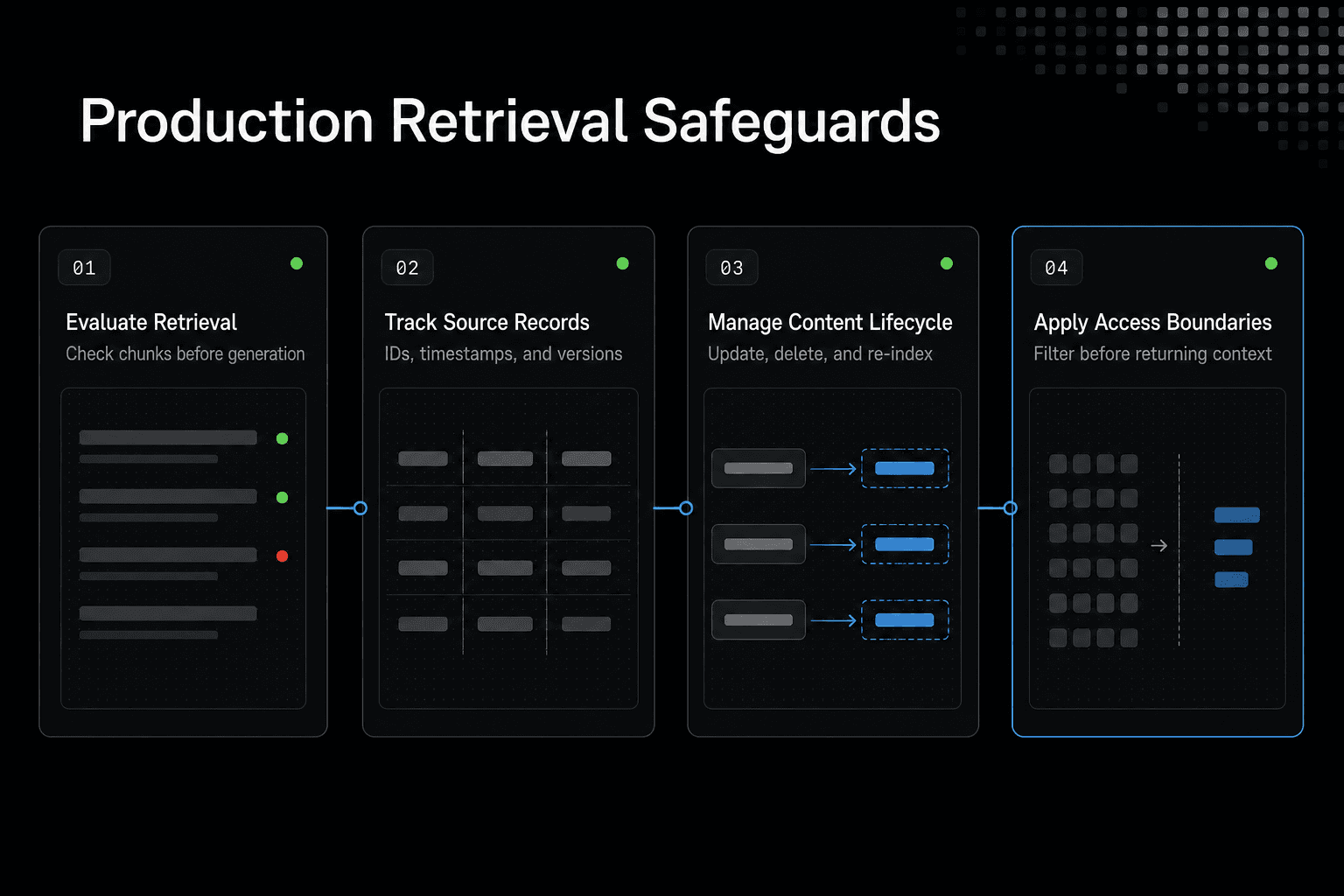
Evaluate retrieval before evaluating generation
Start with a fixed set of real questions, expected sources, and known bad matches. Check whether the right chunks appear before judging the model's answer, because a fluent answer can hide a retrieval failure.
Track source IDs, chunk IDs, timestamps, and embedding versions
Give every chunk a stable ID tied to its source document, plus its update time and embedding version. Keep these fields with the vector record. Without them, you can't trace a bad result back to its source or know which records need re-indexing.
Handle updates, deletions, and re-indexing without stale chunks
Treat an update as a lifecycle event, not a new upload. Find the old chunks by source ID, delete or replace them, then index the revised content.
Deletion needs the same care. Removing a file from storage doesn't remove its vectors.
Plan embedding-model migrations and relevance regression tests
An embedding change can alter which chunks rank highest. Run the old and new indexes against the same evaluation set, compare the retrieved results, and switch only when the new version meets your relevance bar.
Apply tenant, repository, and role boundaries before returning context
Filter retrieval by tenant, repository, environment, and role before context reaches the model. Don't rely on the model to ignore sensitive chunks after retrieval. Access control belongs in the retrieval path, so users only receive context they were allowed to search.
Choose the smallest retrieval architecture that fits
A vector database isn't a default layer for every AI feature. It won't fix weak chunks, unsuitable embeddings, stale source data, or missing access rules, so start with the kind of question your system must answer.
Use structured systems for exact facts and transactions
Use a relational database or service API for order status, account balances, permissions, inventory, and other facts that need an exact answer. Query by ID, field, or filter. Semantic similarity can return a related record, which isn't good enough when your agent must act on the result.
Use vector retrieval for meaning-based discovery
Use vector retrieval when users describe a need in varied language and the answer lives in unstructured text. It depends on chunk quality, embedding fit, and metadata filters. Keep keyword search too when exact terms, error codes, or file names matter.
Add a separate shared-knowledge layer only when work must persist across agents and sessions
Add shared knowledge when a new agent must recover project context created by another agent or session. A vector index for one application request doesn't create durable memory by itself. Store ownership, scope, updates, and deletion rules with that knowledge, or you'll create another stale context store.
Frequently asked questions
What is a vector database in AI?
It is a storage and retrieval component for an AI application that needs to search content by semantic similarity. Define the content, queries, and retrieval expectations for your use case before selecting one.
What are the most useful vector database use cases for AI teams?
Start with the team's retrieval task, such as finding relevant project material for an application or agent. Then assess whether the task also needs metadata filters, durable context, or access checks.
How does a vector database support RAG?
In a RAG workflow, retrieval supplies candidate context for an application to assemble with a query. Test whether the retrieved material is relevant to the questions your application must answer.
Why should vector search use metadata filtering?
Use metadata filters when the workflow needs to restrict retrieval by a defined property, such as project or document category. Test the filter alongside the query to confirm the results meet the intended scope.
When should I use keyword search or SQL instead of a vector database?
Use keyword search for exact terms and SQL for structured conditions. Compare results on representative queries before choosing a retrieval path.
How do document updates and deletions affect vector retrieval?
Treat updates and deletions as lifecycle events. Find old chunks by source ID, then delete or replace them so changed or removed content does not remain in retrieval results.
What should teams measure when evaluating retrieval quality?
Use representative queries with expected relevant results, then assess whether retrieval returns those results and respects required filters. Include the application's context-assembly step in the evaluation.
Can a vector database alone provide shared memory across AI-agent sessions?
No. Specify how context persists across sessions, how agents retrieve it, and how access and updates are handled.
About GigaRAG
GigaRAG is a shared memory platform for AI agents that helps developers and teams keep project knowledge available across sessions and tools.
You can connect agents to a central Hive Mind through MCP or the API. Access controls manage what each agent can use.