How to Add Memory to OpenCode: A Practical Guide for RAG and Agent Memory Builders
How to add memory to OpenCode starts with a problem every RAG builder hits: the agent forgets everything the moment the session ends. Context, preferences, the decisions you made three hours ago. Gone. Most guides paper over this by showing you one vendor's plugin and calling it solved. That's not how memory works in a retrieval pipeline, and it's not how you should build one. GigaRAG exists to give agent memory and RAG pipelines a real home, but this guide isn't a pitch for it. It's a field report. I compared MCP servers, local vector databases, and file-based plugins side by side. Each has a place. Each has a hard ceiling, and I'll name it. By the end, you'll know which memory architecture fits your RAG pipeline, what each approach cannot do, and how to wire it up without vendor lock-in.
| At a glance | Details |
|---|---|
| Core challenge | OpenCode forgets context between sessions |
| Main approaches | MCP servers, local vector DBs, file-based plugins |
| Best for RAG | Local vector DB for semantic recall |
| Best for simplicity | File-based plugins for structured notes |
| Key tradeoff | Semantic power vs. setup complexity |
| Decision factor | Your retrieval needs and infrastructure |
In This Guide
- What Is OpenCode Memory and Why Does It Matter?
- MCP Servers vs. Local Vector DBs vs. File-Based Plugins
- Memory Approaches for OpenCode: A Side-by-Side Comparison
- How To Add Memory To OpenCode: A Step-by-Step Guide
- How to Add Memory to OpenCode: Step-by-Step Setup
- Configuring Memory Scoping and Retrieval
- What You Cannot Do with OpenCode Memory (Yet)
- Choosing the Right Memory Architecture for Your RAG Pipeline
- Troubleshooting Common OpenCode Memory Issues
- Final Thoughts on Adding Memory to OpenCode
What Is OpenCode Memory and Why Does It Matter?
OpenCode memory is any mechanism that lets an agent retain context across sessions, so it doesn't start from zero every time you launch it. Without it, the agent forgets prior decisions, code changes, and retrieved documents the moment the session ends.
The problem: OpenCode forgets between sessions
OpenCode runs stateless by default. Close the terminal and the agent loses everything: what you asked, what it found, what it changed. For RAG pipeline builders this is worse than annoying. You re-feed the same context, re-run the same retrievals, and re-explain the same architecture every session.
What memory means for RAG pipeline builders
For RAG work, memory isn't just chat history. It's persistent, retrievable state: embeddings you've indexed, documents you've already pulled, decisions about which chunks matter. Memory turns a one-shot retrieval loop into something that compounds across sessions.
[!note] OpenCode does not have built-in persistent memory; you must add it via external tools or plugins. Each approach has tradeoffs in complexity, retrieval capability, and maintenance.
MCP Servers vs. Local Vector DBs vs. File-Based Plugins
| Factor | MCP Servers | Local Vector DBs |
|---|---|---|
| Setup complexity | Moderate: configure server and client | High: install and manage DB |
| Retrieval method | Tool calls via protocol | Semantic search over embeddings |
| Persistence scope | Session and cross-session | Cross-session with embeddings |
| Best for | Standardized tool integration | RAG pipelines needing semantic recall |
| Limitations | Protocol overhead, less control | Requires embedding model and storage |
Memory Approaches for OpenCode: A Side-by-Side Comparison
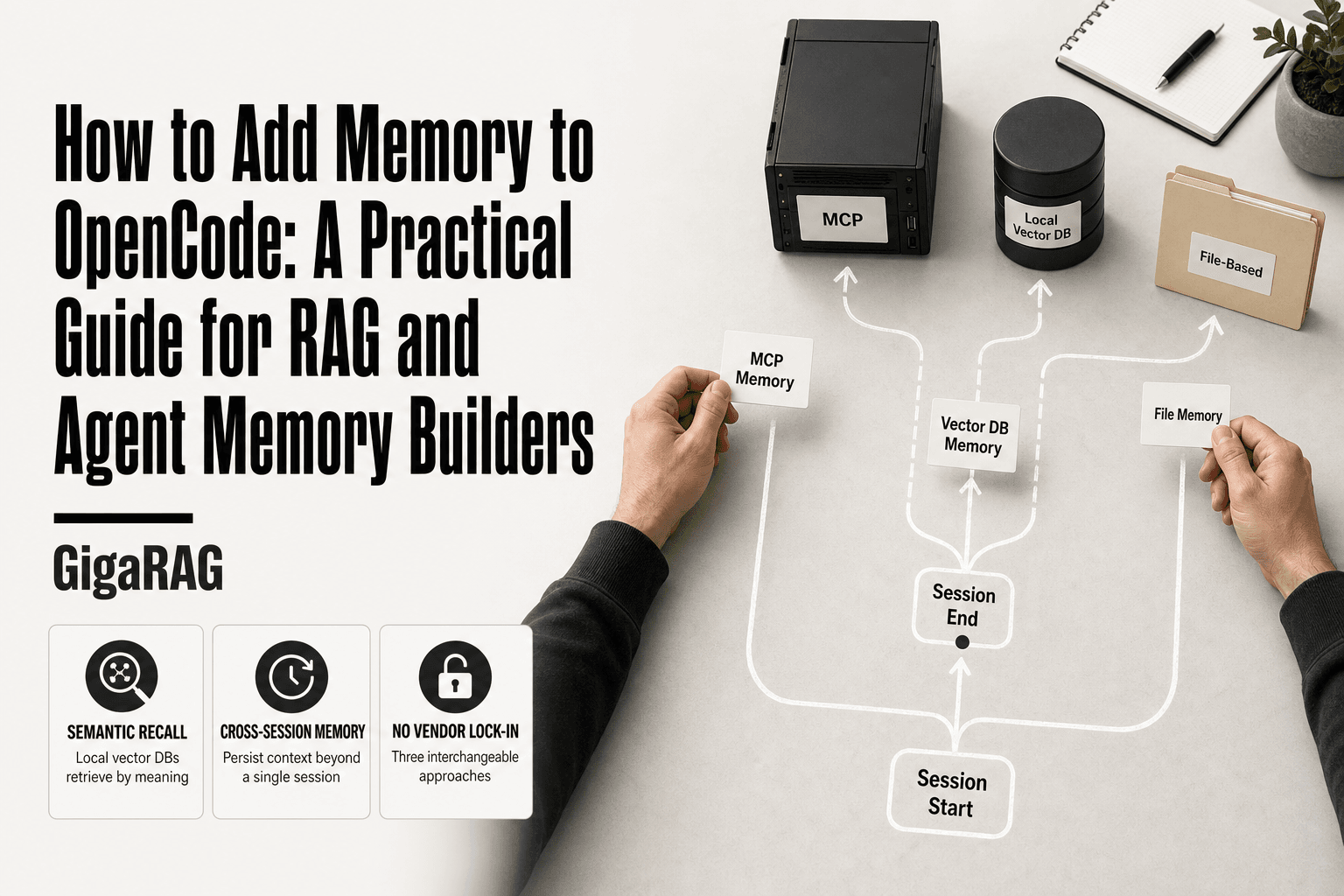
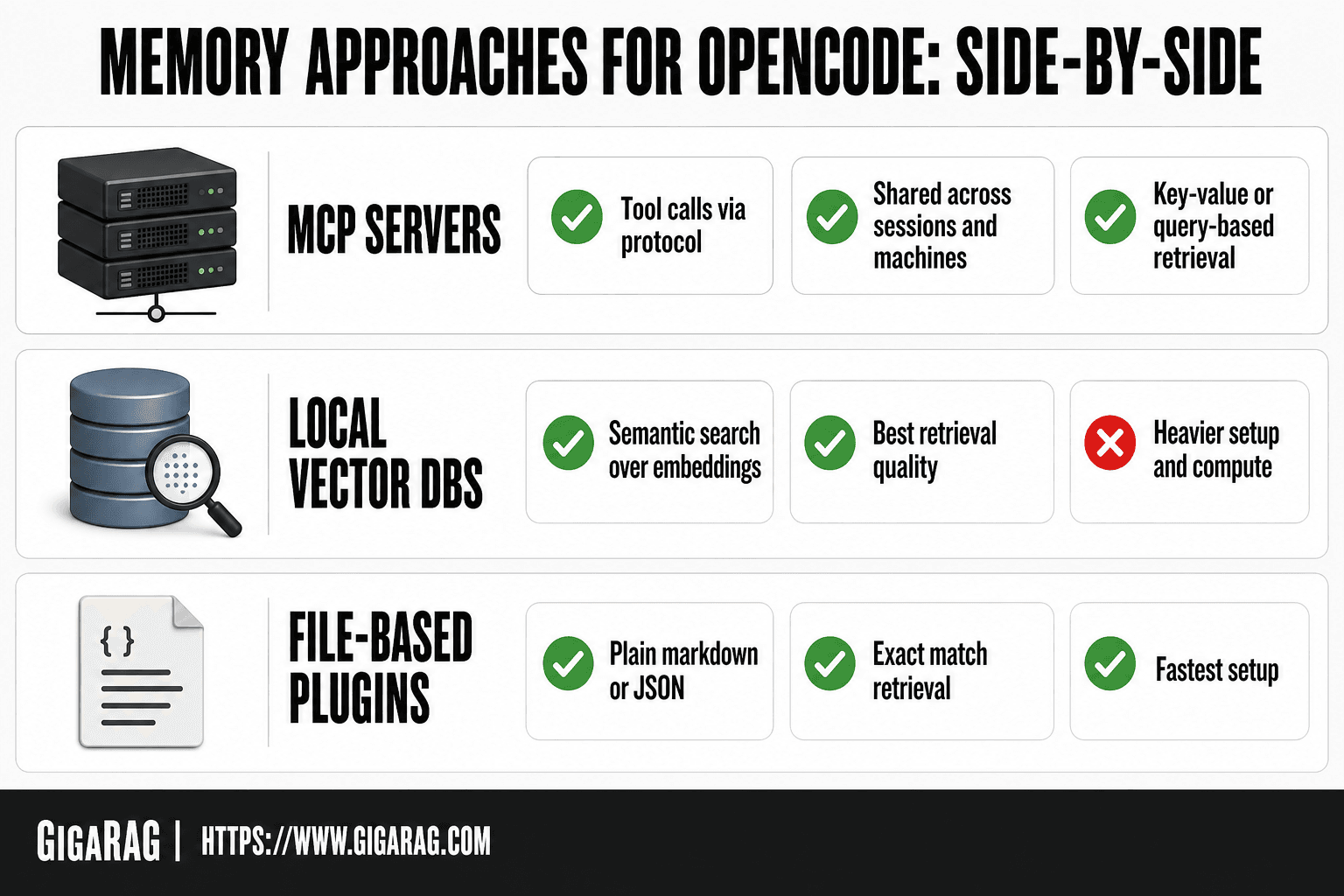
Three architectures dominate: MCP servers, local vector DBs, and file-based plugins. Each stores memory differently, retrieves it differently, and fails differently. The right pick depends on your retrieval needs and your tolerance for setup overhead.
MCP servers (e.g., Keynodex, server-memory)
MCP servers expose memory over the Model Context Protocol. The agent calls a tool to store or fetch context, and the server handles persistence. Setup means registering the server in opencode.json and authenticating. Retrieval is typically key-value or query-based, not semantic. You get shared memory across sessions and machines, but you depend on an external service staying up.
Local vector DBs (e.g., Hindsight)
Local vector DBs embed memory chunks and retrieve by similarity. Hindsight runs a local server, and OpenCode calls it through a plugin. This gives semantic retrieval: ask for "the auth fix from last week" and it finds related chunks without exact keywords. Setup is heavier. You run the server, manage embeddings, and pay the compute cost locally. Retrieval quality is the best of the three, but only if your embeddings are good.
File-based plugins (e.g., omni-memory, global skills)
File-based memory writes context to plain files: markdown, JSON, or skill definitions. The agent reads them back on demand. Setup is trivial, often just a plugin install and a directory path. Retrieval is grep-level: exact match or nothing. No embeddings, no semantic search. This works for checklists, conventions, and small stable facts. It breaks down when memory grows past a few hundred lines or when you need fuzzy recall.
[!tip] For RAG pipeline builders, start with a local vector DB if you need semantic search, but prototype with file-based memory first to validate your retrieval logic before scaling.
How To Add Memory To OpenCode: A Step-by-Step Guide
- Assess your memory needs: determine if you need semantic recall, structured notes, or simple persistence.
- Choose an approach: select MCP server, local vector DB, or file-based plugin based on your assessment.
- Set up the chosen memory store: install and configure the necessary components (e.g., MCP server, vector database).
- Integrate with OpenCode: connect the memory store to OpenCode via its plugin or MCP interface.
- Define memory read/write logic: specify when and how OpenCode should store and retrieve memories.
- Test and iterate: run sessions to verify memory persistence and retrieval accuracy, then refine.
How to Add Memory to OpenCode: Step-by-Step Setup
You have three viable paths. Pick one and follow it through. Don't mix approaches on your first setup.
Prerequisites: what you need before starting
OpenCode installed and working. A terminal. For MCP servers, an account with the provider. For local vector DBs, Node.js and enough disk for embeddings. For file-based memory, nothing beyond a text editor.
Option 1: Configure an MCP server for memory
Register the server in opencode.json. Add the server name, command, and any environment variables the provider requires. Start OpenCode. Run the verify command the provider documents. If the connection fails, check your auth token first.
Option 2: Install and register a memory plugin
Install the plugin through OpenCode's plugin manager. Register it in opencode.json under the plugins key. Point it at your memory server or local directory. Restart OpenCode. Test with a simple store-and-recall command before trusting it with real context.
Option 3: Set up file-based memory with a global skill
Create a global skill directory. Add a markdown file for each memory category: conventions, decisions, gotchas. Reference the skill in your agent instructions. The agent reads the file when relevant. This is the fastest setup and the least capable retrieval.
Configuring Memory Scoping and Retrieval
Memory without scoping is noise. You need control over what the agent remembers and when it retrieves it.
Understanding bank IDs and memory scoping
Bank IDs partition memory into named buckets. Assign a bank per project, per session, or per domain. The agent writes to and reads from only the banks you specify. This keeps unrelated context from bleeding into retrieval.
Key configuration options explained
Set the default bank in opencode.json. Override per-session with a slash command. Specify which banks load automatically at startup versus on demand. Limit token budget per retrieval so memory doesn't crowd out the prompt.
Retrieval settings for RAG pipelines
Tune similarity threshold, top-k results, and reranking if your backend supports it. Lower thresholds pull more context but add noise. Higher thresholds miss relevant memory. Test with your actual queries, not sample data.
Keep in mind: scoping is manual. The agent won't infer the right bank on its own.
What You Cannot Do with OpenCode Memory (Yet)
OpenCode memory is young. It handles retrieval and persistence, but not reasoning over memory. Don't expect the agent to infer what's relevant without explicit scoping. You set the banks. You tune the thresholds.
Limitations of MCP-based memory
MCP servers add a network hop. Retrieval latency depends on the server, not your local machine. Offline work breaks unless the server runs locally. Authentication tokens expire and need re-pairing.
Limitations of local vector DBs
Local vector DBs stay fast and private, but they don't sync across machines. Each workstation builds its own index. Embedding quality is fixed by the model you choose. No built-in deduplication: the same fact can be stored twice.
Limitations of file-based memory
File-based memory is simple, but retrieval is keyword matching at best. No semantic search. Large files slow down every read. Concurrency is a problem: two sessions writing to the same file can clobber each other.
None of these approaches forget on purpose. They just don't think.
Choosing the Right Memory Architecture for Your RAG Pipeline
The architecture you pick depends on three things: how many documents you retrieve, how often the index changes, and whether retrieval happens on one machine or many.
Decision framework: when to use each approach
Use a local vector DB when retrieval quality matters most and you work on one machine. Semantic search over embeddings beats keyword matching every time. Use an MCP server when you need shared memory across a team or across devices. Use file-based memory when your corpus is small, static, and you want zero infrastructure.
Tradeoffs: vector search vs. key-value vs. file-based
Vector search gives you meaning-based retrieval but costs setup time and compute. Key-value stores are fast and predictable, but you decide the keys ahead of time. File-based memory is the cheapest to run and the easiest to debug, but it doesn't scale past a few hundred entries.
Integrating OpenCode memory with existing RAG pipelines
If you already run a RAG pipeline, treat OpenCode memory as a cache, not a source of truth. Point the memory plugin at the same embeddings your retriever uses. That keeps retrieval consistent across your agent and your pipeline. Don't duplicate indexes. One index, two consumers.
Troubleshooting Common OpenCode Memory Issues
Most failures trace to three places: the connection, the write, or the query. Fix them in that order.
Authentication and connection failures
If the MCP server won't connect, check the URL and API key in opencode.json first. A trailing slash breaks some servers. Then confirm the server is actually running: curl the health endpoint from the same machine OpenCode uses. If auth fails after a restart, your token likely expired. Regenerate it and update the config. Don't reuse old tokens.
Memory not persisting between sessions
This usually means the write path is broken, not the read path. Check that the plugin registered correctly by running the memory slash command and watching for an error. If writes succeed but vanish on restart, your storage path points somewhere ephemeral, like a temp directory. Point it at a stable location and set the bank ID explicitly. Unscoped writes go to a default bank that some plugins clear.
Retrieval returning irrelevant results
Bad retrieval is almost always an embedding mismatch. If your memory plugin uses a different embedding model than your RAG pipeline, similarity scores mean nothing. Use one model everywhere. If results are still off, lower the similarity threshold or increase top_k. Too few candidates and you get noise; too many and you bury the signal.
Final Thoughts on Adding Memory to OpenCode
Memory for OpenCode isn't one thing. It's a choice between MCP servers, local vector DBs, and file-based plugins. Each trades setup time for retrieval quality.
The honest answer: start with the simplest option that meets your recall needs. File-based memory works for small projects. A local vector DB pays off when you need semantic search. MCP servers suit teams sharing memory across sessions.
For RAG builders, the same rules apply: scope your banks, match your embedding models, and test retrieval before trusting it. GigaRAG handles agent memory and RAG pipelines under one roof if you'd rather not wire it together yourself. That's how to add memory to OpenCode without locking yourself into a single vendor's way of doing it.
Frequently Asked Questions
How to add memory to OpenCode?
You can add memory to OpenCode by integrating an external memory store such as an MCP server, a local vector database, or a file-based plugin. Each approach requires configuring OpenCode to read from and write to that store during sessions. The best choice depends on whether you need semantic search, structured notes, or simple persistence.
What is the best memory approach for OpenCode?
There is no single best approach; it depends on your use case. MCP servers offer standardized integration, local vector DBs provide semantic recall for RAG, and file-based plugins are simplest for manual curation. Evaluate based on your need for semantic search, setup complexity, and maintenance overhead.
Can OpenCode remember context between sessions?
By default, OpenCode does not remember context between sessions. However, you can enable cross-session memory by integrating an external memory store and configuring OpenCode to persist and retrieve relevant information. This requires additional setup and is not available out of the box.
How to integrate a vector database with OpenCode?
To integrate a vector database with OpenCode, you typically need to run the database locally or remotely, generate embeddings for your data, and connect OpenCode to query and update the database via a plugin or custom code. This enables semantic search over stored memories. The exact steps depend on the database and your OpenCode setup.
What are the limitations of file-based memory in OpenCode?
File-based memory in OpenCode is simple but lacks semantic search capabilities. Retrieval is limited to keyword matching or manual lookup, and scaling to large memory stores can become unwieldy. It is best suited for small, structured notes rather than large RAG pipelines.
How does MCP server memory work with OpenCode?
An MCP server provides a standardized protocol for OpenCode to store and retrieve memories via tool calls. It abstracts the underlying storage, allowing you to use various backends. However, it adds protocol overhead and may offer less control than direct integration.
Can I use multiple memory approaches with OpenCode?
Yes, you can combine multiple memory approaches with OpenCode, such as using a vector DB for semantic recall and files for structured notes. However, this increases complexity and requires careful orchestration to avoid conflicts. Start with one approach and expand as needed.
About GigaRAG
GigaRAG is for agent memory and RAG pipeline builders. get this right. Whether you are working through How to add memory to OpenCode or something adjacent, we publish what we have actually tested, including where it falls short.