How to Add Memory to Cline: A Practical Guide for Agent Memory Builders
How to add memory to Cline starts with admitting the obvious: your agent forgets everything the moment a session ends. You close the window, reopen it tomorrow, and Cline has no idea what you were building, why you made the architectural calls you made, or which task was next. That's the problem the Memory Bank is designed to solve, and it does solve it, up to a point. The good news is that the setup is simple, a handful of markdown files plus a block of custom instructions. The main catch is that the Memory Bank doesn't update itself, doesn't do semantic retrieval, and won't share memory across projects. For RAG pipeline builders, that gap matters. GigaRAG takes a different approach, treating memory as a queryable layer rather than a static file, but you don't need it to get started. This guide covers the standard Memory Bank setup, what it can and cannot do, and how to extend Cline's memory with MCP servers, lifecycle hooks, and a vector database when the built-in tools stop being enough.
| At a glance | Details |
|---|---|
| What it is | Markdown files Cline reads at session start |
| Setup time | Minutes to create the memory-bank folder |
| Auto-updates | No — you or Cline must write updates |
| Cross-project | No — memory is per project folder |
| Semantic search | Not built in; add via MCP or RAG |
| Best for | Persistent project context across sessions |
In This Guide
- What Is the Cline Memory Bank?
- Memory Bank vs MCP Servers vs Lifecycle Hooks: Which Should You Use?
- How to Add Memory to Cline: Step-by-Step Memory Bank Setup
- How To Add Memory To Cline: A Step-by-Step Guide
- Core Memory Bank Files and What Each One Does
- What the Memory Bank Cannot Do
- Memory Bank vs MCP Servers vs Lifecycle Hooks
- Extending Cline Memory with a RAG Pipeline
- Best Practices for Managing Cline's Context Window
- Common Mistakes When Adding Memory to Cline
- Final Thoughts: Building a Memory Architecture That Scales
What Is the Cline Memory Bank?
The Cline Memory Bank is a set of markdown files that Cline reads at the start of each session to restore context from previous work.
The core problem: Cline's context window resets
Cline's context window is finite. When a session ends, everything in it is gone. The next session starts blank. You re-explain your project, your decisions, your progress. Every time.
How the Memory Bank solves it with persistent files
The Memory Bank stores that context in plain markdown files on disk. Cline reads them before doing anything else. The files survive session resets because they live outside the context window. You update them as you work, and Cline reloads them next time.
[!note] Cline's Memory Bank does not update itself automatically and does not persist across different projects — it is a set of markdown files that Cline reads when instructed, so accuracy depends on you or Cline writing updates.
Memory Bank vs MCP Servers vs Lifecycle Hooks: Which Should You Use?
| Factor | Memory Bank | MCP Servers / Lifecycle Hooks |
|---|---|---|
| Setup effort | Low — create markdown files and a rule | Higher — configure a server or hook script |
| Persistence scope | Per project folder only | Can span projects and external stores |
| Retrieval method | Cline reads files into context | Programmatic — query, filter, embed |
| Update mechanism | Manual or prompted by Cline | Can be automated on events |
| Best fit | Solo project context continuity | RAG pipelines and production agent memory |
How to Add Memory to Cline: Step-by-Step Memory Bank Setup
The setup takes about ten minutes. You'll create a directory, paste a prompt into Cline's custom instructions, and create five markdown files. Here's the exact sequence.
Step 1: Create the memory-bank directory
Create a folder named memory-bank in your project root. Cline will look for this folder by name, so don't rename it. If you're working across multiple projects, each project gets its own memory-bank folder. Memory doesn't transfer between them.
Step 2: Copy the custom instructions into Cline
Open Cline's settings and find the custom instructions field. Paste the Memory Bank prompt there. This prompt tells Cline to read the memory-bank files at session start, update them as work progresses, and follow a specific update protocol. The full prompt is available in the Cline docs under "Memory Bank." Copy it verbatim. Don't paraphrase it. The prompt's structure is what makes the system work.
Step 3: Create the core files
Inside the memory-bank folder, create five files: activeContext.md, progress.md, decisionLog.md, systemPatterns.md, and productContext.md. You can leave them empty at first. Cline will populate them as you work. The next section covers what each file holds.
Step 4: Verify Cline reads the files on session start
Start a new Cline session and ask: "What's in my memory bank?" If Cline lists the files and their contents, the setup worked. If it says it can't find them, check the folder name and the custom instructions field. The most common failure is a typo in the directory name.
[!tip] If you are building a RAG pipeline, keep the Memory Bank as the human-readable source of truth and mirror its contents into your vector store via a lifecycle hook, so retrieval stays in sync without duplicating manual edits.
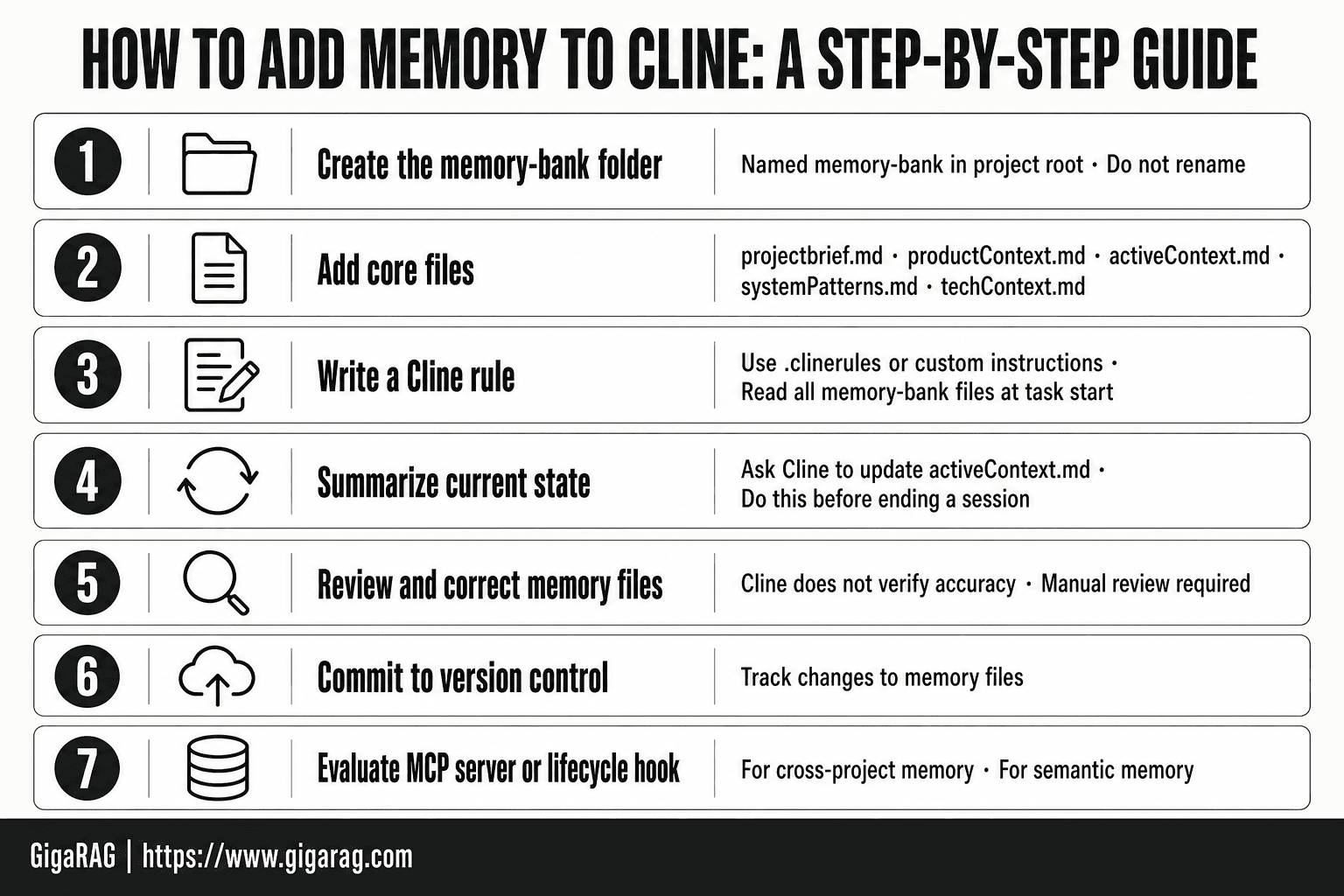
How To Add Memory To Cline: A Step-by-Step Guide
- Create a folder named memory-bank in your project root.
- Add core files such as projectbrief.md, productContext.md, activeContext.md, systemPatterns.md, and techContext.md.
- Write a Cline rule (in .clinerules or custom instructions) telling Cline to read all memory-bank files at the start of every task.
- Ask Cline to summarize the current project state into activeContext.md before you end a session.
- Review and correct the memory files yourself — Cline does not verify their accuracy.
- Commit the memory-bank folder to version control so changes are tracked.
- For cross-project or semantic memory, evaluate an MCP server or lifecycle hook as a next step.
Core Memory Bank Files and What Each One Does
Each file answers one question. Cline reads them in order at session start, and the custom instructions tell it which file to update when. Here's the map.
activeContext.md: current session state
What are you working on right now? This file holds the current task, recent changes, and the next step. It's the file Cline checks first, and the one you'll edit most often. Keep it under a screen.
progress.md: what's done and what's next
A running log of completed work and open items. Think of it as a changelog with a to-do list attached. When a task finishes, move it from "next" to "done" here.
decisionLog.md: why decisions were made
The reasoning behind choices, not just the choices themselves. "Used SQLite instead of Postgres because the app runs offline" is a decision log entry. Six months later, that context saves you from re-litigating the same call.
systemPatterns.md: architectural patterns
How the codebase is structured. Conventions, recurring patterns, file organization rules. If a new developer asked "how does this project work," this file is the answer.
productContext.md: project goals and constraints
What the product does, who it's for, and what it can't do. This file changes rarely. It's the anchor that keeps Cline from suggesting features that violate the product's core constraints.
What the Memory Bank Cannot Do
The Memory Bank is a manual system. It only knows what you write into it. Here's what that means in practice.
No automatic memory updates
Cline won't update these files on its own. If you finish a task and don't edit progress.md, the next session starts with stale context. The custom instructions prompt Cline to update files, but that's a request, not a guarantee. You still have to confirm the writes happened.
No semantic retrieval, it's keyword-based
Cline reads the files top to bottom. It doesn't search by meaning. If you wrote "auth flow" in decisionLog.md but ask about "login system," Cline may not connect the two. The Memory Bank is a flat text file, not a vector index.
Context window limits still apply
Every file you add consumes tokens. A bloated Memory Bank eats into the context you need for actual coding. Keep files lean or you'll trade one problem for another.
No cross-project persistence
The Memory Bank lives in one project directory. Open a different repo and Cline starts blank. There's no shared memory across projects unless you copy files manually.
Memory Bank vs MCP Servers vs Lifecycle Hooks
Three ways to give Cline memory. They solve different problems, and mixing them without a plan creates confusion.
Memory Bank: simple, manual, file-based
Markdown files in your project directory. Cline reads them at session start. You write the updates by hand. No dependencies, no servers, no API keys. It works offline and costs nothing. The tradeoff is that every update requires your attention.
MCP servers: programmatic, extensible, more setup
MCP servers let Cline call external tools through a standard protocol. A memory MCP server can query a vector database, write to a remote store, or pull context from another system. You get semantic retrieval and cross-project persistence. The cost is setup: you're running a server, managing credentials, and debugging integration failures.
Lifecycle hooks: automated updates, product-specific
Lifecycle hooks trigger scripts at specific moments: session start, task completion, file save. You can automate memory writes without manual editing. The catch is that hooks are tied to Cline's event model, not a general memory standard. What you build here doesn't transfer to other tools.
Decision framework: which to choose when
Start with the Memory Bank if you're working solo on one project and can remember to update files. Move to MCP servers when you need semantic search or shared memory across projects. Add lifecycle hooks when you want automation but don't need portability. Most teams end up combining all three: Memory Bank for quick context, MCP for retrieval, hooks for automation.
Extending Cline Memory with a RAG Pipeline
The Memory Bank is a flat file system. It stores context, but it can't retrieve it semantically. If you ask Cline "what did we decide about authentication last month," it reads whatever is in the active files, not what's most relevant to your question. A RAG pipeline fixes that by treating your markdown files as source documents for a vector database.
Treating Memory Bank files as RAG source documents
Each core file is already structured: headings, bullet points, short paragraphs. That's good input for a chunker. Point your ingestion script at the memory-bank directory and re-index on every file change. You don't need to reformat anything.
Chunking and embedding strategies for markdown files
Split on headings first. Each H2 or H3 section becomes one chunk. Keep chunks under 500 tokens. Use a general-purpose embedding model like text-embedding-3-small. Store the file name and heading as metadata so you can trace retrieved chunks back to their source.
Injecting retrieved context back into Cline
Run retrieval before session start. Take the top 5 chunks and prepend them to your custom instructions or write them into a temporary context file Cline reads on launch. Don't dump raw vectors into the prompt. Format retrieved chunks as plain text with a source label.
Evaluating memory retrieval accuracy
Test with known questions. If you ask "what's the current task status," the top hit should come from progress.md, not decisionLog.md. Track hit rate on 20 to 30 sample queries. If retrieval misses, adjust chunk size or add file-type metadata to bias the search.
Best Practices for Managing Cline's Context Window
The Memory Bank only helps if it fits. Cline's context window is finite, and every file you load eats tokens that could go to actual code. Keep the bank lean.
Keep files concise and updated
Each file should hold current state, not history. If a fact is stale, delete it. A 50-line activeContext.md beats a 500-line one every time.
Use decisionLog.md sparingly
Log decisions that changed direction, not every small choice. One entry per pivot. If you're logging daily, you're burning tokens on noise.
Prune stale information regularly
Set a cadence: review files at the end of each session or weekly. Remove completed tasks from progress.md. Archive old decisions instead of letting them sit in the active files.
Monitor token usage per session
Check how many tokens the Memory Bank consumes at session start. If it's over 10% of your context window, cut files. You'll see the cost in every response.
Common Mistakes When Adding Memory to Cline
Most Memory Bank failures come from one of four errors. Fix these and the system works.
Expecting the Memory Bank to update itself
It won't. Cline reads the files, but you write them. If you don't update activeContext.md after a session, the next session starts stale.
Dumping too much into activeContext.md
Keep it to current state only. Past decisions belong in decisionLog.md. Completed work belongs in progress.md. A bloated activeContext.md buries what matters.
Ignoring context window limits
Every file you load costs tokens. If the bank eats more than 10% of your window, cut it.
Not version-controlling memory files
Memory files are code. Put them in git. You'll want the history when a bad update breaks your next session.
Final Thoughts: Building a Memory Architecture That Scales
The Memory Bank is a file convention, not a memory system. It works because it's simple: markdown files, read at session start, updated by you. That simplicity is also its ceiling.
For a single developer on a single project, that's enough. For teams running multiple agents across projects, it isn't. You'll hit the same wall every RAG builder hits: keyword lookups can't find what a file means, only what it says.
That's when a dedicated memory layer earns its place. GigaRAG adds semantic retrieval and cross-agent memory on top of Cline's file-based approach, so what one agent learns, another can find. If you're still deciding how to add memory to Cline, start with the Memory Bank. Extend it when retrieval accuracy becomes the bottleneck.
Frequently Asked Questions
What is Cline's Memory Bank?
It is a structured set of markdown files stored in a memory-bank folder that Cline reads at the start of a session to recover project context. It is not a database or a built-in feature — it works because a rule tells Cline to read those files.
Does Cline memory update automatically?
- Cline does not automatically write to the Memory Bank unless you instruct it to, and even then you should review the changes. Treat updates as a deliberate step at the end of a work session.
How do I add memory to Cline using custom instructions?
Add a rule in your .clinerules file or Cline's custom instructions that tells Cline to read the memory-bank files at the start of each task and update activeContext.md when significant changes occur. The rule is what makes the memory bank effective.
Can Cline memory persist across different projects?
Not by default. The Memory Bank lives inside a single project folder, so a new project starts with its own empty or separate memory bank. Cross-project memory requires an external store such as an MCP server or a shared vector database.
What are the limitations of Cline's Memory Bank?
It has no automatic updates, no cross-project persistence, and no semantic retrieval out of the box. It also consumes context window space because the files are read directly into the prompt rather than queried selectively.
When should I use an MCP server instead of the Memory Bank?
Use an MCP server when you need programmatic access, semantic search, cross-project memory, or integration with an external database. The Memory Bank is simpler and sufficient for single-project context continuity.
How do I connect Cline memory to a vector database or RAG pipeline?
Use a lifecycle hook or MCP server to read the memory-bank files, embed them, and upsert them into your vector store. Then expose a retrieval tool back to Cline so it can query relevant memory instead of loading every file.
About GigaRAG
GigaRAG is for agent memory and RAG pipeline builders. get this right. Whether you are working through How to add memory to Cline or something adjacent, we publish what we have actually tested, including where it falls short.