How to Add Memory to Codex: A Practical Guide for Agent Memory and RAG Pipeline Builders
How to add memory to Codex starts with a hard truth for agent builders: Codex is stateless by default. You run a session, it learns your project, then it forgets everything the moment the terminal closes. That's not a bug. It's the design. The native local memory feature helps a little, but it won't carry context across projects, won't share anything with your team, and won't give you semantic recall when you need it most.
The existing docs don't help much either. They're either too basic to be useful or tied to one vendor's tool. What's missing is an honest comparison of every approach side by side, with real limitations named, not hidden in a footnote.
GigaRAG takes a different view: memory is just a retrieval problem, and you can solve it with embeddings, a vector store, and context injection. This guide covers native memory, AGENTS.md, MCP connectors, and third-party tools. It also tells you when memory isn't worth the trouble, because sometimes it isn't.
| At a glance | Details |
|---|---|
| Core problem | Codex forgets context between sessions by default |
| Native option | Limited built-in memory, varies by surface |
| File-based option | AGENTS.md committed to your repository |
| Connector option | MCP servers for external memory stores |
| Third-party option | Dedicated memory tools and plugins |
| Key decision | Scope, persistence, and data residency needs |
In This Guide
- How Codex Memory Works (and Why It Forgets)
- Native Codex Memory vs AGENTS.md vs MCP vs Third-Party Tools
- Where Codex Stores Memory Locally
- How To Add Memory To Codex: A Step-by-Step Guide
- How to Enable and Configure Native Memory in Codex
- Adding Persistent Memory with AGENTS.md
- Project Context
- Conventions
- Constraints
- Using MCP Connectors for Memory in Codex
- Third-Party Memory Tools for Codex Compared
- Memory as a RAG Pipeline Component: An Architecture Lens
- Security and Privacy Implications of Codex Memory
- Common Pitfalls and When NOT to Use Memory in Codex
- Troubleshooting Codex Memory Issues
- How to Choose the Right Memory Approach for Your Codex Workflow
How Codex Memory Works (and Why It Forgets)
Codex is stateless by default: it forgets everything between sessions unless you explicitly enable local memory or add an external memory layer. Native memory stores a limited set of preferences and facts on your machine. It does not share memory with ChatGPT, and it does not give you true semantic recall without extra infrastructure.
What Codex remembers natively
Codex's built-in memory is narrow. It can retain simple preferences you tell it to remember: your preferred language, your project's directory layout, your coding style choices. You turn this on in settings, and Codex writes those memories to a local file on disk. That's the whole mechanism. There's no embedding, no retrieval scoring, no semantic search. It's a flat list of saved notes.
What Codex forgets between sessions
Everything else. Conversation history, debugging context, decisions you made three sessions ago, the reason you chose one library over another. None of that persists unless you write it down somewhere Codex can read. The context window holds a lot during a single session, but when the session ends, that context is gone. Restart Codex and you're starting from zero.
The difference between local memory and persistent memory
Local memory is what Codex does natively: a small file of saved preferences on your machine. Persistent memory is what you build yourself. AGENTS.md files, MCP connectors to vector stores, third-party tools like Mem0 or Basic Memory. Those approaches survive restarts, work across team members, and support actual retrieval. The honest answer is that native memory handles maybe 10% of what most agent builders need. The rest requires infrastructure.
[!note] Memory behavior in Codex varies by surface (CLI, IDE extension, cloud) and changes frequently — verify current capabilities in the official documentation before committing to an architecture.
Native Codex Memory vs AGENTS.md vs MCP vs Third-Party Tools
| Factor | Native / AGENTS.md | MCP / Third-Party |
|---|---|---|
| Setup effort | Low — edit a file or toggle a setting | Medium to high — run and configure a server |
| Persistence scope | Per-repo or per-session | Cross-project, cross-tool |
| Data location | Local repo or vendor cloud | Your infrastructure or vendor cloud |
| Best for | Small teams, single-repo workflows | Multi-agent, RAG pipeline builders |
| Maintenance | Minimal — version-controlled text | Ongoing — schema, uptime, access control |
Where Codex Stores Memory Locally
Native memory lives in a plain file on your machine. That's the whole storage layer. No database, no cloud sync, no encryption at rest beyond whatever your OS provides. If you know where the file is, you can read it, back it up, or delete it outright.
Default storage location
Codex writes memory to a JSON file in your user config directory. On macOS, that's ~/.codex/memories.json. On Linux, the same path. On Windows, it's %USERPROFILE%\.codex\memories.json. The directory is created the first time you enable memory, so if you haven't turned the feature on, the file won't exist yet.
File format and structure
The file is a flat JSON array of memory objects. Each entry has a text field holding the memory itself, plus a timestamp and sometimes a source tag marking which session created it. There's no schema beyond that. No categories, no tags you control, no priority field. It's a list, and Codex reads the whole thing into context when a session starts.
How to inspect and edit memory files
Open the file in any text editor. You can add entries by hand, but be careful: malformed JSON breaks the whole file and Codex will ignore it silently. The safer path is to use Codex's own memory commands to add or remove entries, then check the file to confirm what actually got written. Back up the file before editing. If you delete it, Codex simply starts with an empty memory next session.
[!tip] For RAG pipeline builders, treat memory as a retrieval layer with its own schema and eviction policy — storing raw conversation logs without structure usually degrades recall quality over time.
How To Add Memory To Codex: A Step-by-Step Guide
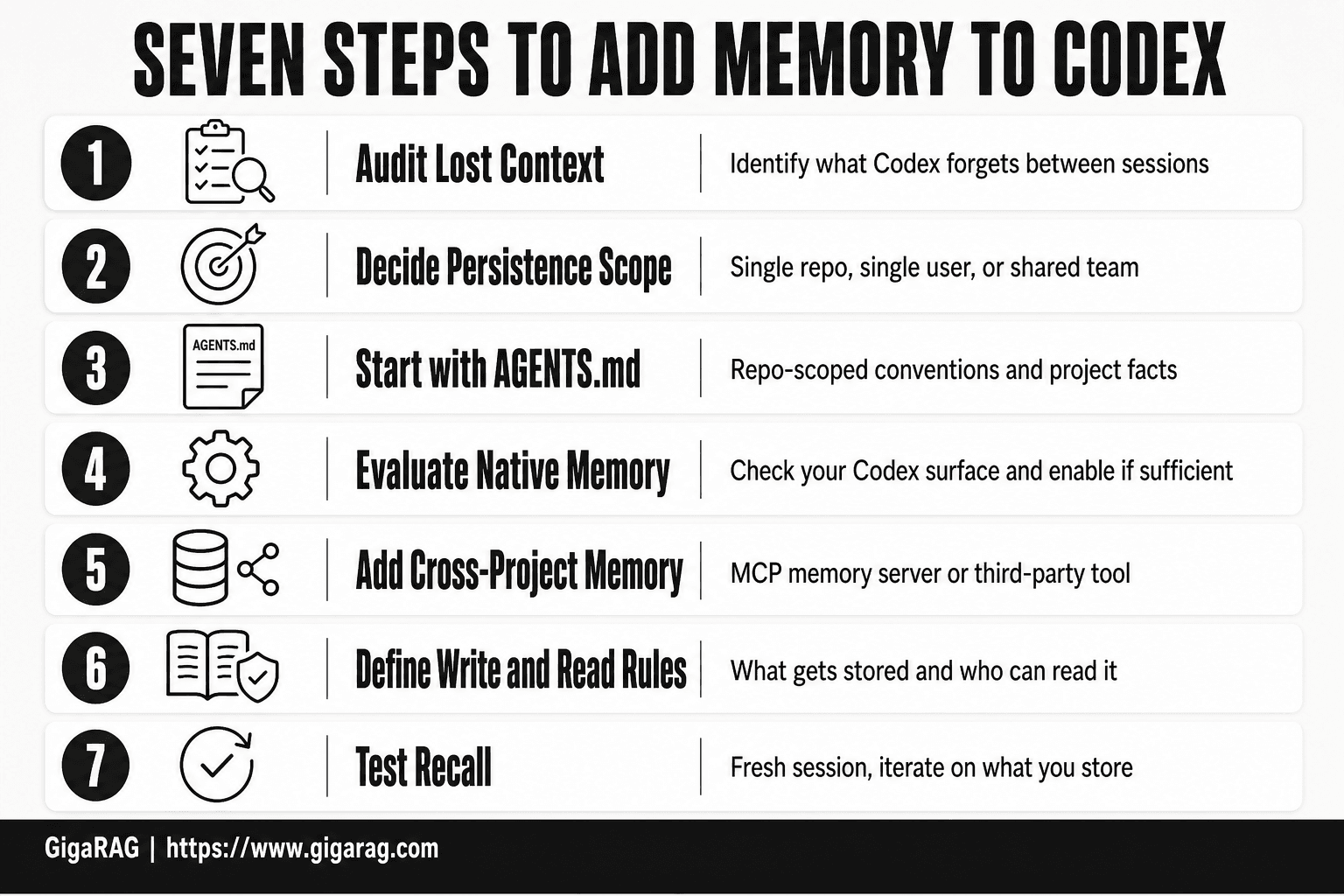
- Audit what context Codex currently loses between sessions in your workflow.
- Decide your persistence scope: single repo, single user, or shared across a team.
- Start with AGENTS.md for repo-scoped conventions and project facts.
- Evaluate native memory settings on your Codex surface and enable if sufficient.
- For cross-project memory, stand up an MCP memory server or connect a third-party tool.
- Define what gets written to memory and who can read it before going live.
- Test recall with a fresh session and iterate on what you store.
How to Enable and Configure Native Memory in Codex
Native memory is off by default. You turn it on once, and Codex handles the rest. The setup takes under a minute.
Step 1: Enable local memory
Open Codex and type /memory in the chat input. If the feature is available in your build, you'll see a toggle for local memory. Turn it on. Codex creates the memories.json file in your config directory the first time you enable it. No restart needed.
If /memory returns nothing, your Codex version doesn't ship with the feature yet. Check for an update. The memory toggle arrived in a rolling release, so version numbers vary. (verify at publish)
Step 2: Configure memory settings
There isn't much to configure. Native memory has two settings: on or off. You can't set a memory limit, choose what gets stored, or exclude topics. Codex decides what's worth remembering based on the conversation. You just live with its judgment.
Step 3: Control memory per chat
You can tell Codex to remember something specific by saying "remember that" followed by the detail. You can also say "forget that" to remove a memory from the current session. These commands work inline, no slash syntax required. What you can't do is review what Codex is about to store before it stores it. The write happens automatically.
Step 4: Review and manage stored memories
Type /memory again to see what's stored. You'll get a list of entries. Delete individual items by asking Codex to forget them, or wipe everything by deleting the memories.json file while Codex is closed. The file is plain JSON, so you can audit it directly. Keep in mind: Codex reads the entire memory list into context every session. A bloated memory file eats tokens before you've typed a word.
Adding Persistent Memory with AGENTS.md
Native memory helps, but it's a black box. You don't control what gets stored, and you can't share it with a teammate. AGENTS.md fixes both problems with a plain text file.
What AGENTS.md is and how it works
AGENTS.md is a Markdown file you drop into your project root. Codex reads it at the start of every session and loads its contents into context. You write the file. You decide what goes in it. Nothing gets stored automatically.
The file works because Codex treats it as project instructions, not as memory. It's the same mechanism as a README, but scoped to agent behavior. You can put coding conventions, architecture decisions, API keys to avoid, known gotchas, or anything else you want Codex to remember every time. The file is version-controlled, so changes are reviewable in git like any other code.
Creating an AGENTS.md file for persistent context
Start by creating AGENTS.md in your repository root. Keep it under 200 lines. Every line you add consumes tokens on every session, so be ruthless about what earns a spot.
A useful AGENTS.md has three sections: project context, conventions, and constraints. Project context covers what the codebase does and why key decisions were made. Conventions cover naming, file structure, and testing patterns. Constraints cover what not to do: deprecated endpoints, fragile modules, security boundaries.
Here's a minimal example:
# AGENTS.md

## Project Context
- E-commerce API serving 40k daily requests
- Postgres primary, Redis for session cache

## Conventions
- Tests use pytest, no unittest
- Error handling: raise domain exceptions, never catch-all

## Constraints
- Do not modify legacy billing module without approval
- Never commit .env files
Commit the file. Codex picks it up on the next session. No configuration needed.
Limitations of file-based memory
AGENTS.md is static. It doesn't learn from conversations, and it doesn't update itself. If your project changes, you update the file by hand. That's the tradeoff: full control, zero automation.
It also doesn't scale well. Past 200 lines, the token cost starts to hurt, and Codex may ignore parts of a bloated file. Teams need discipline to keep it current. A stale AGENTS.md is worse than no file at all, because Codex will confidently follow outdated instructions.
Using MCP Connectors for Memory in Codex
AGENTS.md gives you static context. MCP connectors give you something closer to real memory: Codex can query an external store at runtime, retrieve only what's relevant, and inject it into the current session. That's the bridge to RAG-style retrieval.
What MCP is and why it matters for memory
Model Context Protocol is an open standard for connecting AI assistants to external tools and data sources. An MCP server exposes capabilities, like searching a vector database or querying a knowledge graph, through a defined interface. Codex acts as the client.
For memory, this matters because the store lives outside Codex. You can persist embeddings, documents, or graph nodes in a database that survives sessions, grows over time, and supports semantic search. Codex doesn't remember anything itself. It asks the connector.
Setting up an MCP memory connector
You register an MCP server in Codex's configuration. The server points at your memory backend, whether that's a local SQLite file, a vector store like Chroma, or a knowledge graph. Once registered, Codex can call the server's tools during a session.
A typical setup: install the connector, add it to your Codex config with the server's command and arguments, then restart Codex. Test it by asking Codex to recall something you stored earlier. If the connector returns relevant results, it's working.
Local vs remote MCP memory setups
Local MCP servers run on your machine and access local files or databases. They're fast, private, and fine for solo work. Remote servers run elsewhere and expose memory over HTTP. They enable team-shared memory but add latency and a network dependency.
The main catch: MCP connectors don't give you memory for free. You still need to build or choose the backend, handle embedding, and manage retrieval quality. The connector is just the pipe.
Third-Party Memory Tools for Codex Compared
MCP gives you the pipe. Third-party tools give you the whole system: embedding, storage, retrieval, and context injection, prebuilt. You trade control for speed. Here's how the main options stack up.
Hindsight: auto-recall and auto-retain
Hindsight is a memory plugin built specifically for Codex. It watches your sessions, extracts what looks durable, and stores it. On later sessions it injects relevant memories automatically. You don't write memory files. You don't manage a vector store.
The tradeoff is opacity. You can't easily inspect what Hindsight decided to keep, and you can't tune the retrieval logic. If it stores something wrong, you'll spend time hunting for the bad memory rather than fixing a file. For solo developers who want memory without infrastructure, that's acceptable. For teams that need auditability, it isn't.
Mem0: embedding-based memory layer
Mem0 is a general-purpose memory layer that works across multiple AI apps, not just Codex. It embeds memories into vectors, stores them, and retrieves them by semantic similarity. You connect it through an API or an MCP server.
The good news is that Mem0 handles the hard parts: deduplication, conflict resolution, and relevance scoring. The main catch is that it's a cloud service by default. Your memories live on Mem0's infrastructure unless you self-host. That's a real consideration if you're storing code snippets, API keys, or customer data.
Basic Memory: MCP-native approach
Basic Memory is an MCP server that stores memory as Markdown files on your local disk. It's the middle ground between AGENTS.md and a full embedding layer. You get persistent, searchable memory without a database or a cloud dependency.
Because it's file-based, you can version it with Git, review it in any editor, and share it across a team by syncing the folder. The limitation is retrieval quality. Basic Memory relies on keyword and filename matching rather than semantic search, so it works best when you organize your memory files deliberately.
Comparison table: features, pricing, complexity
| Tool | Retrieval | Storage | Setup | Pricing |
|---|---|---|---|---|
| Hindsight | Automatic | Local plugin data | Low | Free (verify at publish) |
| Mem0 | Semantic (embeddings) | Cloud or self-hosted | Medium | Free tier, paid above limits (verify at publish) |
| Basic Memory | Keyword/file | Local Markdown | Low | Free, open source |
Hindsight wins on zero-config convenience. Mem0 wins on retrieval quality and cross-app memory. Basic Memory wins on transparency and control. None of them gives you true long-term semantic memory without some external dependency, whether that's a plugin's opaque store, a cloud API, or your own file discipline.
Memory as a RAG Pipeline Component: An Architecture Lens
The tools above hide the machinery. If you're building a RAG pipeline, you need to see it. Agent memory is four steps: embed, store, retrieve, inject. Codex doesn't do any of them natively beyond a flat file. Everything else is you assembling the pipeline.
Embedding memories for semantic retrieval
Embedding turns text into vectors. The value is that "user prefers tabs over spaces" and "formatting convention: tabs" land near each other in vector space even though they share no keywords. That's the whole game. Without embeddings, retrieval is string matching. With them, retrieval is meaning matching.
The catch is that embeddings are only as good as the model that produces them. A cheap embedding model will cluster "deploy to production" next to "deploy to staging" and you'll inject the wrong memory. Test your embedding model on your actual memory content before trusting it.
Choosing a vector store for agent memory
You don't need a vector database for ten memories. A flat file works. You need one when memory count hits hundreds and retrieval latency matters. Options split three ways: local (Chroma, FAISS), managed (Pinecone, Weaviate Cloud), and embedded in your MCP server.
Local stores keep data on your machine. Managed stores offload scaling but move your memory to someone else's infrastructure. The honest answer is that most solo Codex users never outgrow a local store. Teams with shared memory do.
Context injection strategies and token budget management
Retrieval is half the problem. Injection is the other half. You can't stuff every relevant memory into the context window. Codex has a token budget, and every memory you inject is a token you can't spend on code.
The standard pattern is top-k retrieval with a hard cap: retrieve the five most similar memories, inject only those, and drop the rest. Some systems add a relevance threshold so weak matches never enter context at all. That's the difference between memory that helps and memory that bloats.
Security and Privacy Implications of Codex Memory
Memory is context. Context is often secrets. Where that context lives determines who can read it.
Local memory: what's stored and who can read it
Native Codex memory sits in plaintext files on your disk. Anyone with filesystem access to your user account can read them. That includes other processes running as you, backup tools that sync your home directory, and anyone who borrows your machine.
The files aren't encrypted at rest. Codex doesn't add a permission layer. If your laptop is compromised, your memory is compromised. Treat local memory files the same way you'd treat a .env file with API keys in it.
Cloud-based memory tools: data residency and access
Third-party tools change the threat model. Mem0 and managed vector stores ship your memory to someone else's servers. You're trusting their access controls, their retention policies, and their incident response. Read the data processing agreement before storing anything sensitive.
Some tools offer self-hosted options. That keeps data on your infrastructure but shifts the security burden to you: patching, access control, audit logs. There's no free option here. Either you trust a vendor or you run it yourself.
Best practices for sensitive context in agent memory
Don't store secrets in memory. Store pointers to secrets. Instead of saving an API key, save "API key is in .env under STRIPE_KEY". The memory tells Codex where to look without holding the credential itself.
For team memory, use a shared store with per-user access controls. Not every teammate needs every memory. Segment by project or by sensitivity level.
The honest answer is that agent memory is a new attack surface. Most builders haven't thought about it. You should.
Common Pitfalls and When NOT to Use Memory in Codex
Memory is a tool, not a default. Injecting context you don't need costs more than it saves.
Stale memory and context poisoning
Stored memories go bad. A teammate changes the API endpoint, renames the database, or deprecates a function. The memory file still holds the old version. Codex retrieves it, trusts it, and generates code against a system that no longer exists.
Worse, stale memory can override fresh context. If a memory says "the auth service uses JWT" but the codebase migrated to sessions last week, Codex may follow the memory instead of the code in front of it. That's context poisoning. The fix is a review cadence: treat memory like documentation, with an owner and an expiry date.
Token bloat and performance degradation
Every memory you inject consumes context window. A 2,000-token memory block leaves less room for the actual task. Retrieval itself adds latency. If your memory store returns ten relevant chunks but only two matter, you're paying for eight chunks of noise.
The honest answer is that memory helps when retrieval precision is high. When it's low, you're better off with no memory at all.
Scenarios where memory is unnecessary or harmful
Skip memory for one-off scripts. Skip it for tasks where the codebase itself is the context. Skip it when sessions are short and self-contained.
Memory hurts most in fast-changing projects. If your schema shifts weekly, stored memories are wrong by Friday. You'll spend more time correcting bad recall than you'd spend re-explaining context each session.
Don't add memory because you can. Add it because forgetting costs more than remembering.
Troubleshooting Codex Memory Issues
Most memory failures trace to three causes: configuration, retrieval, or the connector. Start with the simplest.
Memory not persisting between sessions
Check whether local memory is actually enabled. Codex won't store anything if the setting is off, and it won't tell you. Run the configuration command and confirm the flag is set.
Then check the storage location. If the directory is read-only, or if you're running Codex in a container without a mounted volume, writes fail silently. The session looks fine. Nothing saves.
Incorrect or irrelevant memory recall
Bad recall usually means too much stored context, not too little. Delete old or conflicting entries. One wrong memory poisons every session that retrieves it.
If recall is consistently off, reduce the memory scope. Fewer, higher-quality entries beat a large store of half-relevant notes.
MCP connector failures and debugging
Test the connector outside Codex first. Most failures are auth or network issues, not memory problems. Check the MCP server logs before touching your Codex config.
If the connector connects but returns nothing, verify the tool is registered in Codex. An unregistered MCP server runs silently and contributes zero context.
How to Choose the Right Memory Approach for Your Codex Workflow
The honest answer is it depends on three things: how many people share the context, how much data you need to retrieve, and what infrastructure you already run.
Decision criteria: use case, team size, infrastructure
Solo work with a handful of facts? Native memory is enough. You need version-controlled context that survives team churn? AGENTS.md. You need semantic retrieval over a large corpus? MCP with a vector store. You need shared memory across a team with access controls? A third-party tool.
Infrastructure matters more than features. If you already run Postgres or a vector database, an MCP connector plugs into what you have. If you don't, a hosted tool costs less setup time but adds a data residency question.
Team and enterprise memory strategies
Teams break native memory. It's per-user and per-machine, so nothing is shared. AGENTS.md fixes the sharing problem for static context: project conventions, API keys, architecture decisions. It won't retrieve anything.
For dynamic shared memory, run one MCP server against a central store. Every team member's Codex instance connects to the same retrieval endpoint. That's the pattern, not a product.
Memory governance and shared context management
Governance means deciding what gets stored, who can edit it, and when it expires. Stale shared memory is worse than no memory: one wrong entry misleads every agent that retrieves it.
Assign an owner for AGENTS.md changes. Review stored memories on a schedule. And keep sensitive context out of shared stores unless you control the infrastructure end to end.
How to add memory to Codex comes down to matching the approach to the problem. Native memory handles simple preferences. AGENTS.md handles static project context. MCP connectors and third-party tools handle retrieval. The honest answer is that no single approach covers everything, and the right choice depends on your team size, your data, and your infrastructure.
Frequently Asked Questions
How do I enable memory in Codex?
Enabling memory depends on which Codex surface you use. Some surfaces expose a settings toggle, while others rely on repository files like AGENTS.md or external MCP servers. Check the current official documentation for your specific surface, since options change between releases.
How can I add persistent memory to Codex?
The most portable approach is committing an AGENTS.md file to your repository for project-scoped context. For cross-project or cross-tool persistence, connect an MCP memory server or a dedicated third-party memory tool that stores data outside the session.
Does Codex have memory from ChatGPT?
Codex and ChatGPT are separate products with separate memory systems. ChatGPT memory does not automatically carry over to Codex sessions, so you should not assume context saved in ChatGPT will be available in Codex.
Where does Codex store memory?
Storage location depends on the approach you choose. File-based memory like AGENTS.md lives in your repository, native memory may reside in vendor cloud infrastructure, and MCP or third-party memory stores live wherever you host them. Confirm data residency before storing anything sensitive.
Is Codex memory secure for team use?
Security depends entirely on where memory is stored and who has access. Repository-based memory inherits your existing code access controls, while external memory servers require you to configure authentication and access policies yourself. Never store secrets or credentials in memory files.
When should I not add memory to Codex?
Skip memory for one-off tasks, throwaway scripts, or work involving sensitive data you cannot safely persist. Memory adds maintenance overhead and a potential data exposure surface, so it only pays off when context genuinely repeats across sessions.
About GigaRAG
GigaRAG helps GigaRAG is for agent memory and RAG pipeline builders. get this right. Whether you are working through How to add memory to Codex or something adjacent, we publish what we have actually tested, including where it falls short.