Building the Pipeline: A Practical Guide for RAG and Agent Memory Systems
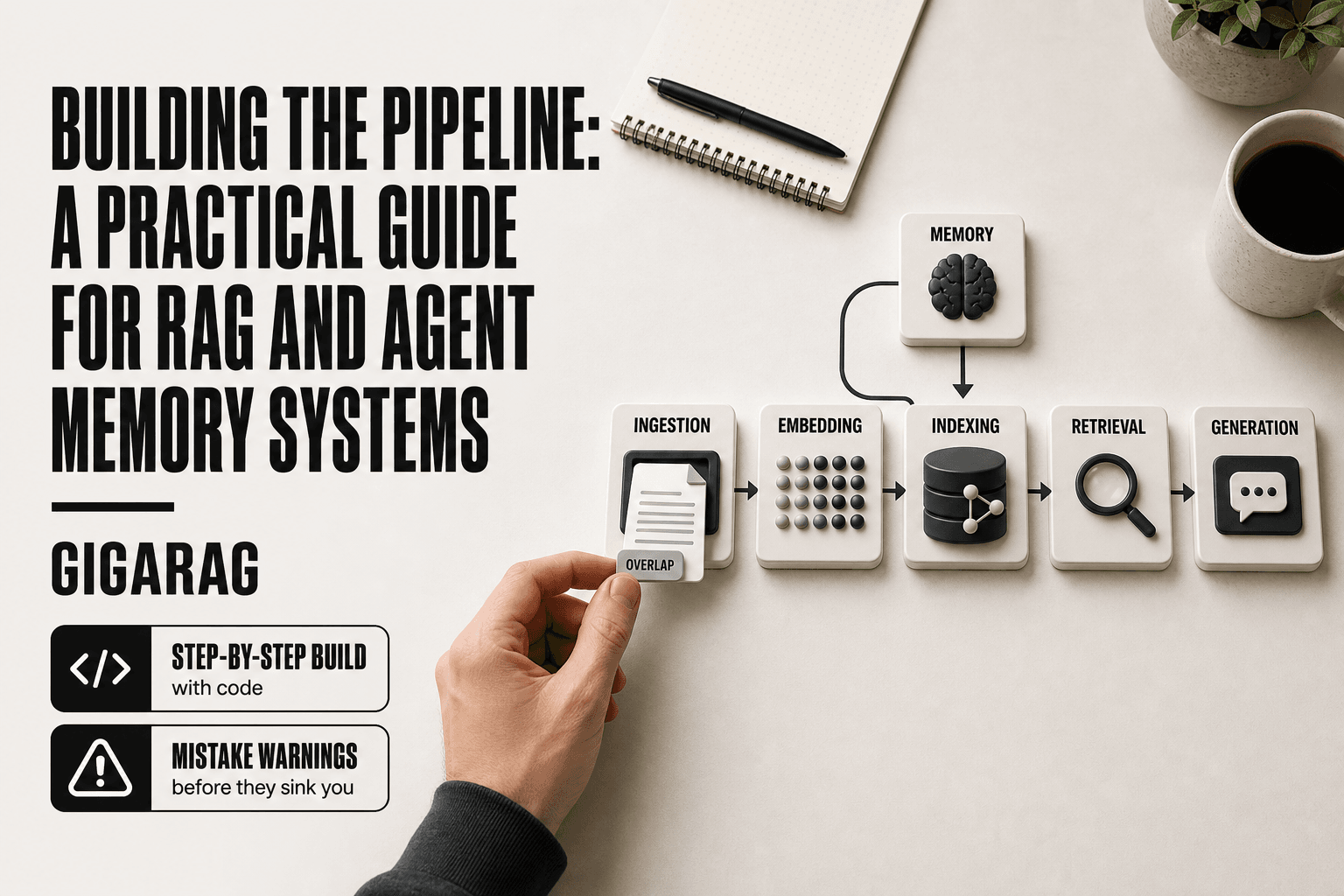
Building the pipeline means something very different for developers working with retrieval augmented generation and agent memory than it does for sales teams. Search for the phrase and you'll find funnels, CRM stages, and physical construction. What you won't find is a technical guide to the software architecture that lets an LLM pull from your knowledge base and remember what it learned. That's the gap this guide fills. A RAG pipeline has five core components: ingestion, embedding, indexing, retrieval, and generation. Agent memory adds a sixth concern: consolidation and forgetting. Tools like GigaRAG help with the memory side, but you need to understand the full architecture before you pick any tool. This guide covers the components, walks through each build step with code, names the mistakes that sink most pipelines, and states plainly what RAG cannot do. By the end, you'll have a working pipeline you built yourself, plus a clear sense of where it will fail.
| At a glance | Details |
|---|---|
| Core components | Ingestion, chunking, embedding, vector store, retrieval, generation, memory |
| Typical latency | Sub-second to a few seconds per query, depending on stack |
| Biggest pitfall | Skipping evaluation and chunking strategy |
| Memory vs retrieval | Memory manages state; retrieval fetches knowledge |
| Key limitation | Cannot guarantee factual accuracy or eliminate hallucinations |
| Best practice | Start simple, measure, then optimize incrementally |
In This Guide
- What Is a RAG Pipeline?
- RAG Pipeline vs Agent Memory Pipeline: What's the Difference?
- Prerequisites for Building the Pipeline
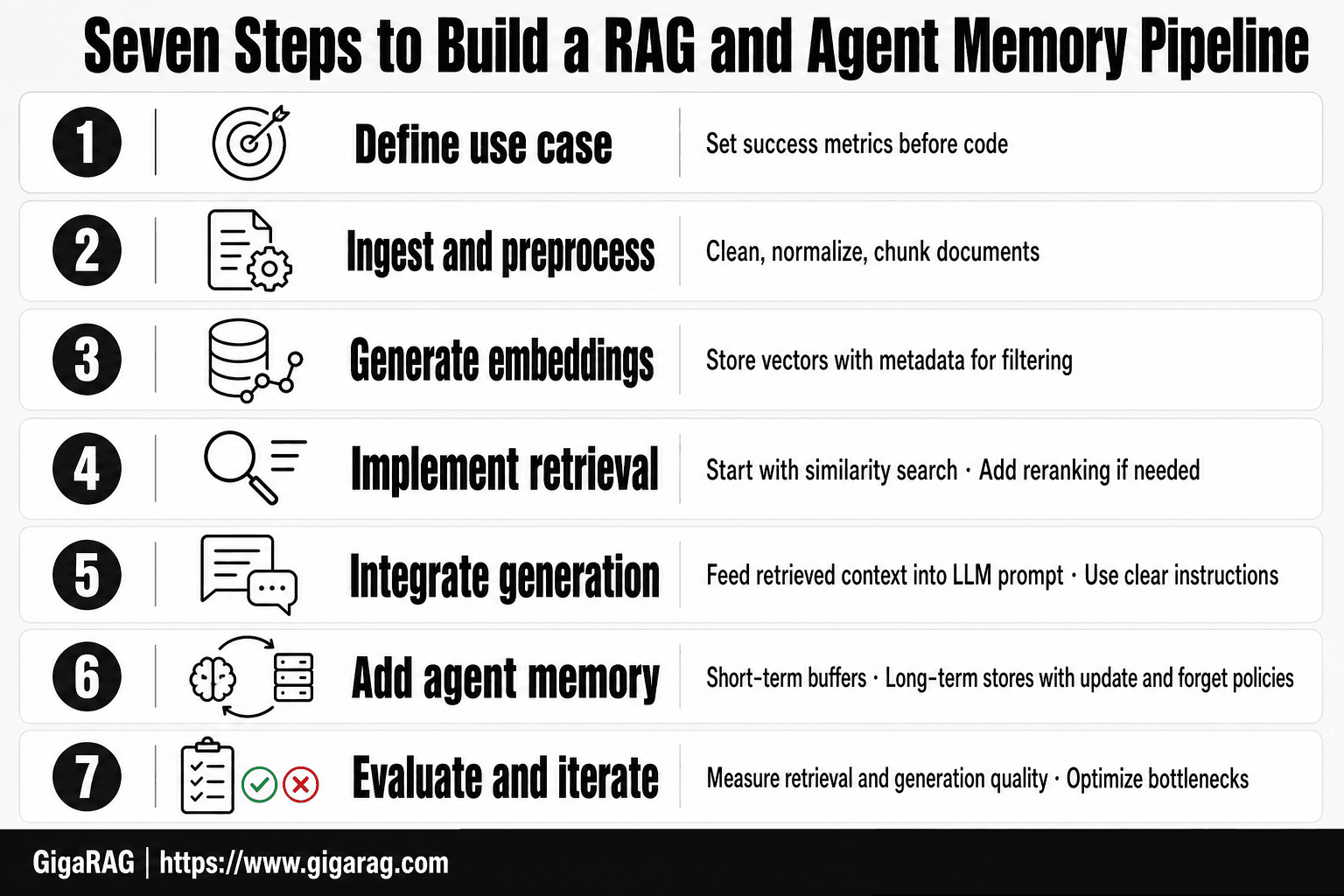
- Building The Pipeline: A Step-by-Step Guide
- Step 1: Data Ingestion and Preprocessing
- Step 2: Chunking and Embedding
- Step 3: Indexing and Vector Storage
- Step 4: Retrieval and Query Processing
- Step 5: Agent Memory Management
- Common Mistakes When Building the Pipeline
- What You Cannot Do with a RAG Pipeline
- Final Thoughts on Building the Pipeline
What Is a RAG Pipeline?
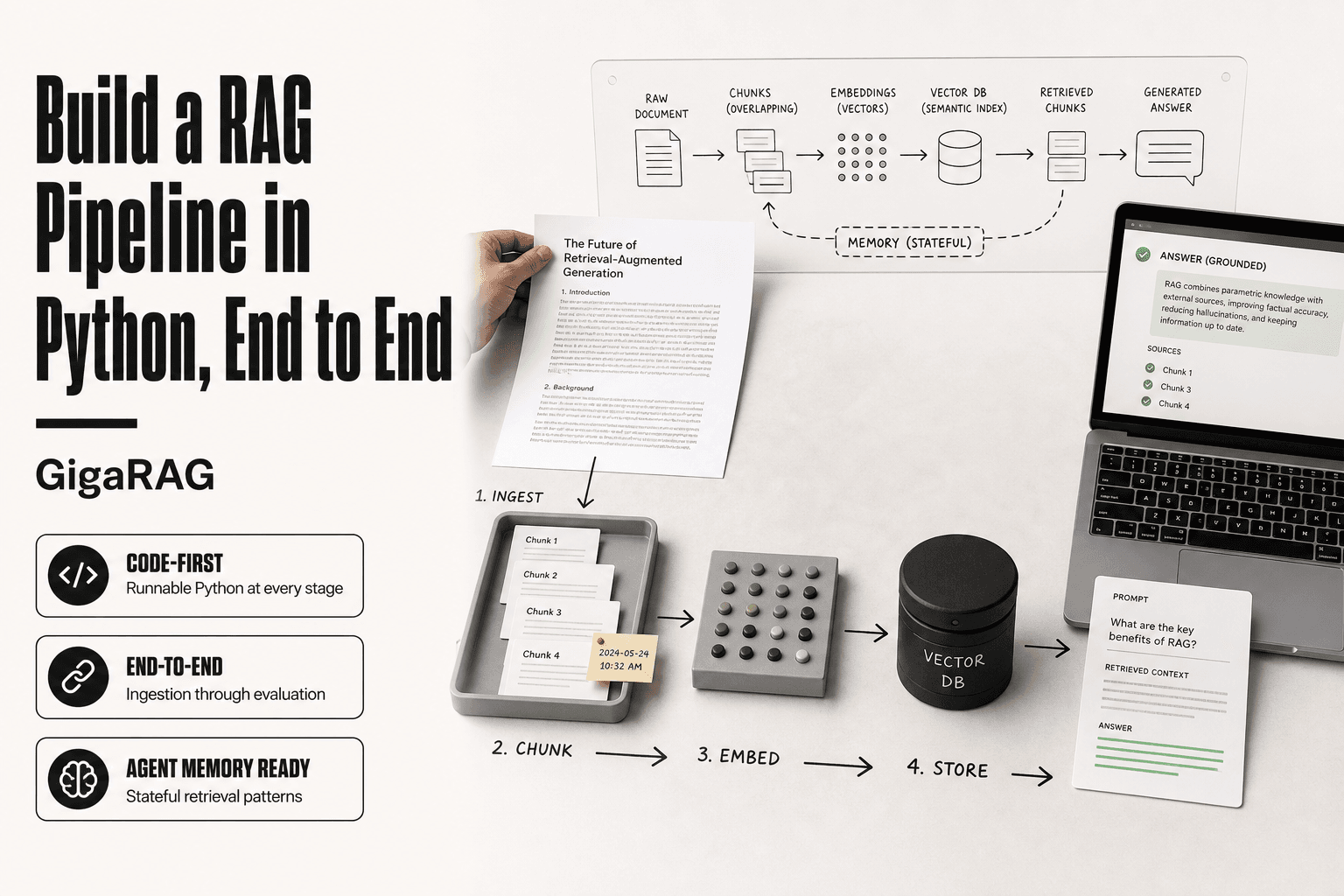
A RAG pipeline is the sequence of steps that takes raw documents, converts them into searchable vectors, retrieves the most relevant chunks for a query, and feeds those chunks to an LLM to generate a grounded answer. It's the plumbing between your data and the model's output.
How RAG pipelines differ from sales and physical pipelines
A sales pipeline moves leads through stages toward a closed deal. A physical pipeline moves oil or water from point A to point B. A RAG pipeline moves information through transformations: raw text becomes chunks, chunks become vectors, vectors get indexed, queries retrieve vectors, and retrieved chunks become context for generation. The pipeline isn't linear in practice. You'll loop back to re-chunk, re-embed, or re-index as your data changes.
Core components: ingestion, embedding, indexing, retrieval, generation
Five components do the work. Ingestion pulls data from sources and cleans it. Embedding converts chunks into dense vectors using a model like OpenAI's text-embedding-3 or a local option like bge-large. Indexing stores those vectors in a database optimized for similarity search. Retrieval takes a query, embeds it, and finds the nearest vectors. Generation hands retrieved chunks plus the query to an LLM, which produces the answer. Each step has failure modes. A weak chunking strategy poisons everything downstream.
Where agent memory fits into the RAG pipeline
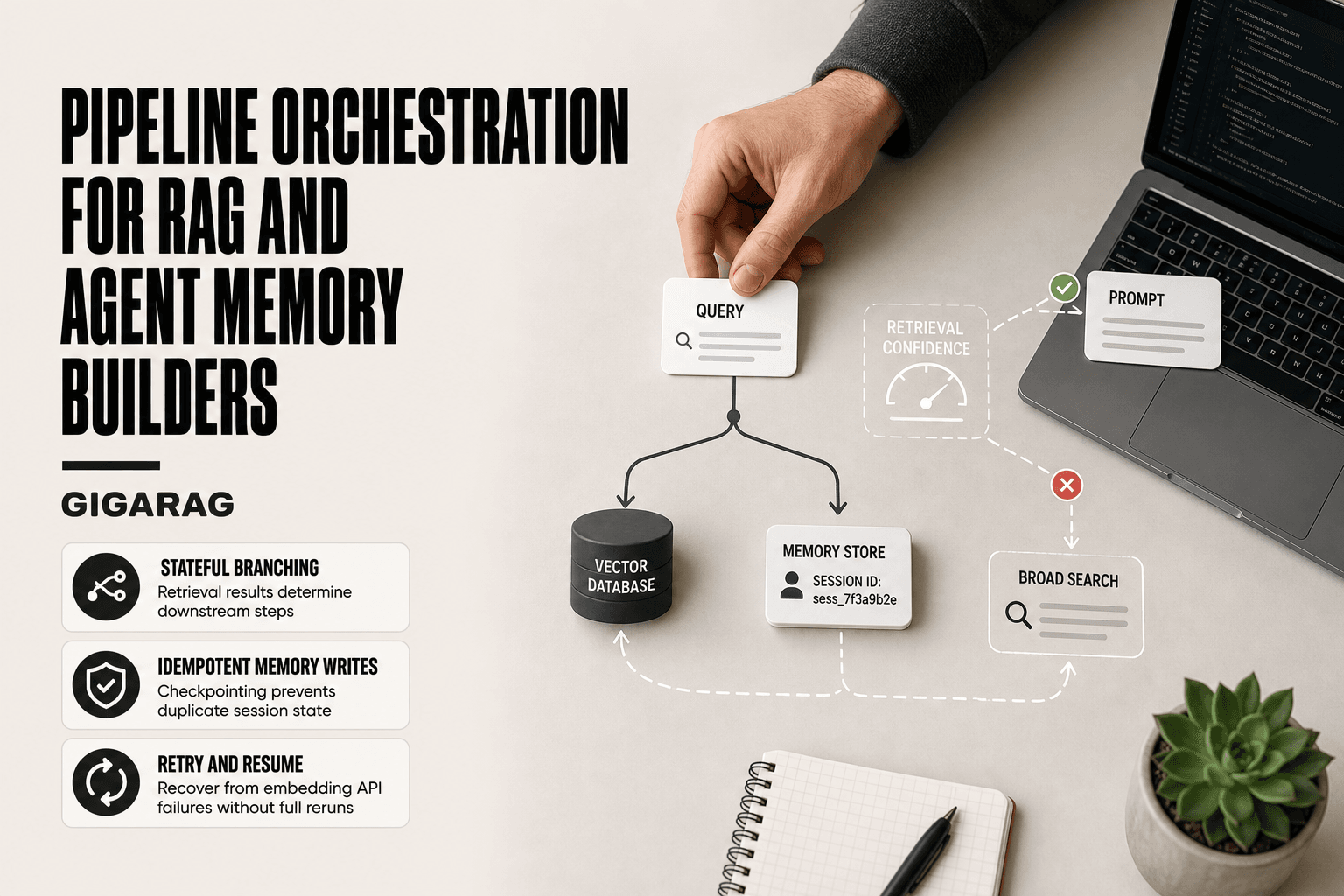
Agent memory is a layer on top of retrieval. Short-term memory holds the current conversation. Long-term memory stores distilled facts, preferences, and past interactions in the same vector index. The pipeline doesn't change; what changes is what gets written to it. Agents consolidate conversations into memory entries, then retrieve those entries alongside document chunks when answering. That's the difference between a search engine and a system that remembers.
[!note] A RAG pipeline cannot guarantee factual accuracy or eliminate hallucinations; it can only ground responses in retrieved context, which may still be incomplete or misinterpreted.
RAG Pipeline vs Agent Memory Pipeline: What's the Difference?
| Factor | RAG Pipeline | Agent Memory Pipeline |
|---|---|---|
| Primary purpose | Retrieve relevant knowledge to ground responses | Maintain and update state across interactions |
| Data flow | Query → retrieve → augment → generate | Perceive → store → retrieve → update → forget |
| Storage focus | Vector database of document embeddings | Short-term buffer, long-term vector store, episodic logs |
| Key challenge | Chunking, embedding quality, retrieval precision | Deciding what to remember, when to forget, and how to avoid bloat |
| Evaluation metrics | Retrieval recall, answer faithfulness, latency | Memory accuracy, consistency over time, context relevance |
Prerequisites for Building the Pipeline
You can't build a RAG pipeline without four things: data worth retrieving, an embedding model, a vector store, and LLM API access. Skip any one and the pipeline stalls. Here's what each requires before you write a line of code.
Data sources and preprocessing requirements
Your data needs to be text. PDFs, HTML, markdown, database rows, or plain files all work, but you'll extract text first. Clean it: strip navigation, boilerplate, and broken encoding. Deduplicate near-identical chunks. If your source is a mess, your retrieval will be too.
Choosing an embedding model
Pick a model that matches your text. OpenAI's text-embedding-3 is a safe default for English. For multilingual or domain-specific text, test bge-large or a fine-tuned variant. Embedding dimension matters: higher isn't always better, and it drives storage cost.
Selecting a vector database
You need similarity search, not just storage. Pinecone, Weaviate, Qdrant, and pgvector all work. The choice depends on scale, metadata filtering needs, and whether you want managed or self-hosted. Don't overthink this step early on.
LLM API access and cost considerations
You'll need API keys for an LLM and an embedding model. Budget for both. Embedding costs are one-time per chunk; generation costs recur per query. Track token usage from day one, or the bill surprises you later.
[!tip] For developer audiences: version your prompts and chunking strategies alongside your code, and log retrieval results for every query—this makes debugging and evaluation far easier when quality drops.
Building The Pipeline: A Step-by-Step Guide
- Define your use case and success metrics before writing any code.
- Ingest and preprocess your data: clean, normalize, and chunk documents appropriately.
- Generate embeddings and store them in a vector database with metadata for filtering.
- Implement retrieval: start with simple similarity search, then add reranking if needed.
- Integrate generation: feed retrieved context into your LLM prompt with clear instructions.
- Add agent memory: implement short-term buffers and long-term stores with update/forget policies.
- Evaluate and iterate: measure retrieval and generation quality, then optimize bottlenecks.
Step 1: Data Ingestion and Preprocessing
Ingestion is where most pipelines quietly fail. You pull data from wherever it lives, normalize it, and prepare it for embedding. Get this wrong and every downstream step inherits the mess.
Connecting to data sources
Start with the boring stuff: connectors. Most teams need three or four. A Postgres read replica for structured records, an S3 bucket for PDFs and docs, a Notion or Confluence API for internal wikis, and maybe a webhook for Slack or Zendesk. Write one extraction script per source. Keep them idempotent so re-runs don't duplicate rows.
Here's a minimal Postgres extractor:
import psycopg2

def fetch_rows(conn_string, query, batch_size=1000):
    conn = psycopg2.connect(conn_string)
    cur = conn.cursor(name="fetch_cursor")
    cur.itersize = batch_size
    cur.execute(query)
    while True:
        rows = cur.fetchmany(batch_size)
        if not rows:
            break
        yield rows
The cursor name matters. It forces server-side cursors, so you stream rows instead of loading a million into memory.
Cleaning and normalizing text
Raw text is full of junk. Strip HTML tags, remove navigation and footer boilerplate, collapse whitespace, and fix encoding issues. Normalize Unicode so "café" and "cafe\u0301" don't become two different tokens. Deduplicate near-identical chunks with a hash or MinHash. If two paragraphs differ by one word, keep one.
Don't over-clean. Removing punctuation or lowercasing everything can hurt embedding quality. Keep sentence boundaries intact. The embedding model needs real text, not a scrubbed skeleton.
Handling unstructured vs. structured data
Structured data (database rows, JSON) is easy: flatten fields into text. A customer record becomes "Name: Jane Doe, Plan: Pro, Last login: 2024-03-15." Unstructured data (PDFs, HTML, chat logs) needs extraction first. Use pdfplumber or PyMuPDF for PDFs, BeautifulSoup for HTML. Preserve section headers. They carry semantic weight that helps retrieval later.
The main catch: unstructured data hides structure. A PDF with tables will extract as garbage unless you handle tables explicitly. Test your extraction on a sample before you trust it.
Step 2: Chunking and Embedding
Chunking decides what your retriever can find. Embedding decides how well it matches. Both are cheap to get wrong and expensive to fix later.
Chunking strategies: fixed-size, semantic, recursive
Fixed-size chunking splits text every N characters or tokens. It's simple and predictable, but it cuts sentences in half. A 512-token chunk that ends mid-thought loses context the embedding model needs.
Semantic chunking splits on meaning: paragraph breaks, section headers, or sentence boundaries. It preserves context but requires more preprocessing. Recursive chunking is the middle ground. Split on headers first, then paragraphs, then sentences, then words, until chunks fit your target size.
Here's a recursive splitter:
from langchain.text_splitter import RecursiveCharacterTextSplitter

splitter = RecursiveCharacterTextSplitter(
    chunk_size=500,
    chunk_overlap=50,
    separators=["\n\n", "\n", ". ", " ", ""]
)
chunks = splitter.split_text(document)
The separator order matters. It tries the biggest break first and only falls back to smaller ones when a chunk is still too large.
Embedding generation and batch processing
Embeddings turn text into vectors. You send chunks to an embedding model (OpenAI's text-embedding-3-small, Cohere's embed-v3, or a local model like bge-large) and get back a list of floats. Batch your API calls. Most providers accept 100 or more inputs per request, and batching cuts latency by an order of magnitude.
Store the embedding alongside the chunk text and metadata. Don't regenerate embeddings for unchanged chunks. Hash the chunk and skip it if the hash matches.
Token limits and overlap considerations
Every embedding model has a token limit. text-embedding-3-small handles 8,191 tokens. bge-large handles 512. Chunks longer than the limit get truncated silently, which drops meaning without warning. Keep chunks well under the limit.
Overlap matters when a concept spans chunk boundaries. A 50-token overlap on a 500-token chunk means the last 50 tokens repeat at the start of the next chunk. That's 10% redundancy. It helps retrieval but costs storage and embedding tokens. Start with 10% and tune based on retrieval quality.
Step 3: Indexing and Vector Storage
Embeddings without an index are just a pile of numbers. The index is what makes retrieval fast. Without it, every query means scanning every vector in your database, which works fine at 1,000 chunks and collapses at 1 million.
Choosing a vector database
You have three real options: a dedicated vector database (Pinecone, Weaviate, Qdrant), a vector extension on an existing database (pgvector on Postgres, Redis), or a library that manages vectors in memory (FAISS, HNSWLib).
It depends on scale and what you already run. Under 100,000 chunks, pgvector works and keeps your stack simple. Past a few million vectors, a dedicated database handles sharding and replication better. FAISS is fast but you manage persistence yourself.
The main catch: switching databases later means re-indexing everything. Pick based on where you'll be in a year, not where you are today.
Creating and optimizing indexes
Most vector databases use HNSW (Hierarchical Navigable Small World) indexes. HNSW builds a graph where similar vectors connect, so search hops across a few nodes instead of scanning all of them.
Two parameters matter. M controls how many connections each node keeps. Higher M means better recall but more memory. ef_search controls how many candidates the search explores. Higher ef_search means slower queries but better results.
Start with defaults. Measure recall against a brute-force search on a sample. Tune only when recall drops below what your use case needs.
Metadata filtering and hybrid search
Vectors alone can't filter by date, author, or document type. Metadata does that. Store it alongside each vector: source, timestamp, chunk index, any field you might filter on later.
Hybrid search combines vector similarity with keyword matching (BM25). It helps when queries contain exact terms: product codes, error messages, names. Pure vector search misses those because embeddings blur exact matches.
The trade-off: hybrid search adds latency and complexity. Use it when your queries mix semantic intent with exact identifiers. Skip it when users ask natural-language questions about prose.
Step 4: Retrieval and Query Processing
Retrieval is where the pipeline either works or doesn't. You've indexed your chunks. Now a user asks a question, and you need to find the right chunks fast enough that the LLM can answer.
Query embedding and similarity search
The query goes through the same embedding model you used for your chunks. That's non-negotiable. Mixing models breaks the vector space, and your similarity scores become meaningless.
Then you run a nearest-neighbor search against your index. You get back the top-k chunks by cosine similarity or dot product. Most systems default to k=5 or k=10.
The main catch: similarity doesn't mean relevance. A chunk can be numerically close to your query but answer nothing. That's the low-recall problem, and it's why retrieval needs more than one pass.
Re-ranking and result filtering
Re-ranking fixes what similarity search gets wrong. You take the top 50 or 100 candidates, then run a cross-encoder or LLM-based reranker to score actual relevance. Keep the top 3 to 5.
It costs more latency. A cross-encoder pass adds 50 to 200 milliseconds. But it cuts irrelevant results sharply, which matters more than speed when the LLM is about to generate from whatever you feed it.
Filter by metadata before re-ranking. Date ranges, document types, source filters. It shrinks the candidate pool and makes re-ranking cheaper.
Context assembly and prompt construction
You have your final chunks. Now you assemble them into a prompt. Order matters: put the most relevant chunk closest to the question. Truncate each chunk to fit your context window, and leave room for the LLM's response.
Don't just dump chunks. Add source labels so the LLM can cite them. Add a short instruction: "Answer using only the provided context. If the context doesn't contain the answer, say so."
That instruction doesn't stop hallucination. But it reduces it, and it gives you a cleaner failure mode when retrieval misses.
Step 5: Agent Memory Management
Retrieval answers the current question. Memory answers the next one. An agent that forgets every turn is just a stateless RAG call with extra steps.
Short-term vs. long-term agent memory
Short-term memory is the conversation window. It holds the last few turns, the current context, and any intermediate reasoning. It's fast and cheap, but it dies when the session ends.
Long-term memory persists across sessions. It stores facts, preferences, and past decisions in a vector store or database. The agent queries it the same way it queries your knowledge base, except the data is about the user, not your documents.
The honest answer: most agents only need short-term memory. Long-term memory adds latency and a new failure mode, retrieving stale or wrong facts about the user.
Memory consolidation and summarization
Consolidation is how short-term memory becomes long-term. You don't store every turn. You summarize.
After a session ends, run the conversation through an LLM and extract durable facts: "User prefers Python over JavaScript." "User is building a customer support bot." Store those as embeddings with timestamps.
Summarization loses detail. That's the trade. You keep what matters and drop the rest, which is exactly what you want.
Forgetting and memory pruning strategies
Memory that never forgets becomes noise. Old preferences override new ones. Contradictory facts pile up.
Prune by recency and access frequency. Drop facts not retrieved in 90 days. Overwrite conflicting facts when a newer one arrives. Cap memory per user so retrieval stays fast.
Forgetting is a feature, not a bug. A memory system that can't forget is just a database with delusions.
Common Mistakes When Building the Pipeline
Most RAG pipelines fail quietly. They return results that look right but miss the mark. Here's where builders go wrong.
Poor chunking and its downstream effects
Chunk size controls everything downstream. Too small and you lose context. Too large and retrieval returns noise. A 2,000-token chunk buries the answer inside irrelevant text. A 100-token chunk splits a definition across two pieces. Neither retrieves well.
The fix is testing. Run the same query against different chunk sizes and measure what comes back.
Ignoring metadata and filtering
Embeddings capture meaning, not structure. A query about "Q3 revenue" retrieves any chunk that mentions revenue, regardless of year. Metadata fixes this. Filter by date, source, or document type before similarity search runs.
Skipping metadata means your vector store is just a pile of similar-sounding text.
Over-relying on embeddings without re-ranking
Embedding similarity is a first pass, not a final answer. The top 20 results often contain the right chunk at position 8 or 12. A re-ranker, whether cross-encoder or LLM-based, reorders those candidates.
Without re-ranking, you're trusting cosine similarity to understand nuance. It doesn't.
Neglecting evaluation and iteration
You can't improve what you don't measure. Build a test set of real queries with known-good answers. Run it after every change to chunking, embedding, or retrieval.
Most teams skip this. Their pipeline degrades silently and nobody notices until a user complains.
What You Cannot Do with a RAG Pipeline
RAG is a retrieval layer bolted onto a language model. It narrows the gap between what the model knows and what your data says. It does not close that gap. Here's what stays broken.
RAG does not eliminate hallucination
The model can still invent. Retrieval gives it better material, but the generation step remains probabilistic. If the retrieved chunks are incomplete, contradictory, or simply not read carefully by the model, it will fill the gaps with plausible-sounding fiction. You reduce hallucination. You do not remove it.
RAG is not a replacement for fine-tuning
Fine-tuning changes how the model behaves. RAG changes what the model sees. They solve different problems. If you need a specific tone, a domain-specific reasoning style, or a model that follows your format without prompting, fine-tune. If you need current or private data, use RAG. Most production systems need both.
RAG requires high-quality data to work
Garbage in, garbage out. If your source documents are outdated, contradictory, or poorly written, retrieval will surface that mess and the model will repeat it. RAG amplifies your data quality problems. It does not fix them.
Final Thoughts on Building the Pipeline
You now have the full arc: ingest, clean, chunk, embed, index, retrieve, and manage memory. Each step is simple on its own. The hard part is keeping them honest as a system.
Start small. One data source, one embedding model, one vector store. Get retrieval working end to end before you add re-ranking, hybrid search, or memory consolidation. Most pipeline failures come from building too much before testing any of it.
Evaluate as you go. A retrieval pipeline that returns the wrong chunks is worse than no pipeline at all, because it produces confident wrong answers. Check recall on real queries before you trust the system.
The honest answer is that building the pipeline is iterative work. You will rebuild your chunking strategy. You will swap embedding models. You will discover your metadata is wrong. That's normal.
If you want a head start on the agent memory side, GigaRAG handles memory consolidation and RAG pipeline setup without hiding the underlying pieces. It's a tool, not a shortcut. You still need to understand what's happening under the hood.
Build the pipeline, test it against real questions, and fix what breaks. That's the whole job.
Frequently Asked Questions
What does "building the pipeline" mean in the context of RAG and agent memory?
It refers to architecting and implementing the end-to-end data flow that ingests documents, generates embeddings, retrieves relevant context, and feeds it to an LLM, while also managing agent memory across interactions. Unlike sales or construction pipelines, this pipeline is software-defined and focuses on data processing and state management.
What are the key components of a RAG pipeline?
The core components are: document ingestion and preprocessing, chunking, embedding generation, vector storage, retrieval (with optional reranking), and generation with an LLM. Each component has configuration choices that affect overall performance.
How is agent memory different from retrieval in a RAG system?
Retrieval fetches relevant knowledge from a static or semi-static corpus to ground responses. Agent memory, by contrast, manages dynamic state—such as conversation history, user preferences, or task progress—and requires policies for what to store, update, and forget over time.
What are common pitfalls when building a RAG pipeline?
Common pitfalls include poor chunking strategies that split context, neglecting evaluation metrics, overcomplicating the architecture prematurely, and ignoring latency and cost trade-offs. Starting simple and measuring before optimizing helps avoid these.
Can a RAG pipeline eliminate hallucinations?
No. RAG can reduce hallucinations by grounding responses in retrieved evidence, but it cannot eliminate them entirely. The model may still generate unsupported claims if retrieved context is incomplete, ambiguous, or misinterpreted.
How do I evaluate a RAG pipeline?
Evaluate retrieval and generation separately. For retrieval, measure recall and precision of relevant chunks. For generation, assess faithfulness to retrieved context, answer relevance, and latency. Use a mix of automated metrics and human review.
What tools are commonly used to build RAG pipelines?
Common tools include vector databases like Pinecone, Weaviate, or Chroma; embedding models from OpenAI, Cohere, or open-source options; and orchestration frameworks like LangChain or LlamaIndex. The choice depends on your scale, latency needs, and existing stack.
About GigaRAG
GigaRAG is for agent memory and RAG pipeline builders. get this right. Whether you are working through building the pipeline or something adjacent, we publish what we have actually tested, including where it falls short.