Vector Search Explained: How It Works, Algorithms, and Practical Uses
A coding assistant can write a plausible patch, then miss the architecture decision buried in last month's ticket or pull a loosely related code comment instead. Vector search helps you find content by similar meaning, not just the same words, but it can't guarantee factual answers, understand code perfectly, enforce permissions, or turn retrieved text into reliable agent memory.
It isn't magic. Useful retrieval depends on source quality, document and code chunking, the embedding model, index, metadata filters, and whether the right source appears in your results. That operating work matters when agents share project knowledge across sessions and tools: retrieval can surface a decision, while review and access rules still decide whether it should guide the next change.
Quick answer
Vector search retrieves items by comparing numerical representations of a query and stored content. Useful results still depend on the content, representation, indexing choices, and evaluation.
- Prepare and represent source content.
- Index the representations and relevant metadata.
- Retrieve candidates, then check whether they answer real queries.
Vector search explained: what it is and what it is not
Vector search finds stored items whose embeddings are closest to an embedding for your query, so it can retrieve related meaning when the wording differs. It is retrieval, not fact checking or reasoning: results depend on your source content, embedding model, index, and filters.
A plain-English definition of vector search
Vector search starts with records you want to find later. It compares your query with those records by meaning-like patterns rather than exact word matches, then nearest-neighbor retrieval returns the closest candidates.
How embeddings turn text, code, or other content into vectors
An embedding model turns each chunk of content into a vector, a list of numbers. The model places related content closer together in that numerical space, but it doesn't store a plain-language explanation of why two items are near.
What vector search cannot infer or guarantee
It can't tell whether a source is true, current, permitted, or relevant enough for your task. It also can't fix weak chunks, missing documents, or vague queries.
Keep in mind: a close vector match is a candidate, not proof. You still need source checks, access controls, and retrieval tests before you rely on the result.
How vector search works: similarity, indexes, and ANN
Query embeddings and nearest neighbors
At query time, you pass the user's text through the same embedding model used for your stored chunks. The system compares that query vector with stored vectors and returns the nearest neighbors, along with their text, IDs, metadata, and similarity scores.
Consistency matters. Mixing embedding models or incompatible vector sizes breaks comparison, so keep the model and its version with each indexed record.
Cosine similarity, Euclidean distance, and dot product
Similarity needs a rule. Cosine similarity compares vector direction, Euclidean distance measures straight-line distance between vectors, and dot product combines direction and magnitude into one score.
It depends on how your embedding model was trained and normalized. Use the metric your model and vector store expect, or your rankings may be less useful.
Exact search versus approximate nearest-neighbor search
Exact search compares a query with every stored vector. It gives the true nearest results for that metric, but the work grows with your corpus.
ANN, short for approximate nearest-neighbor search, examines a smaller set of likely candidates instead. It trades some recall, meaning the chance of finding the best matches, for lower query latency.
HNSW and IVF indexing in practical terms
HNSW builds a graph of nearby vectors. A query moves through that graph toward promising regions instead of checking every record. It can return strong results quickly, but building and storing the graph costs resources.
IVF splits vectors into clusters, then searches the clusters closest to your query. Search more clusters for better recall, or fewer for faster responses. Neither index makes poor chunks relevant.
Why metadata filters affect index and query design
Filters narrow retrieval by fields such as tenant, repository, document type, or access group. That is necessary when users must only see permitted records.
The main catch is that a strict filter can leave few candidates for ANN to rank. Design metadata at ingestion, test filtered queries separately, and return no result when the allowed source set cannot support a useful answer.
Step-by-step: build and check a retrieval pipeline
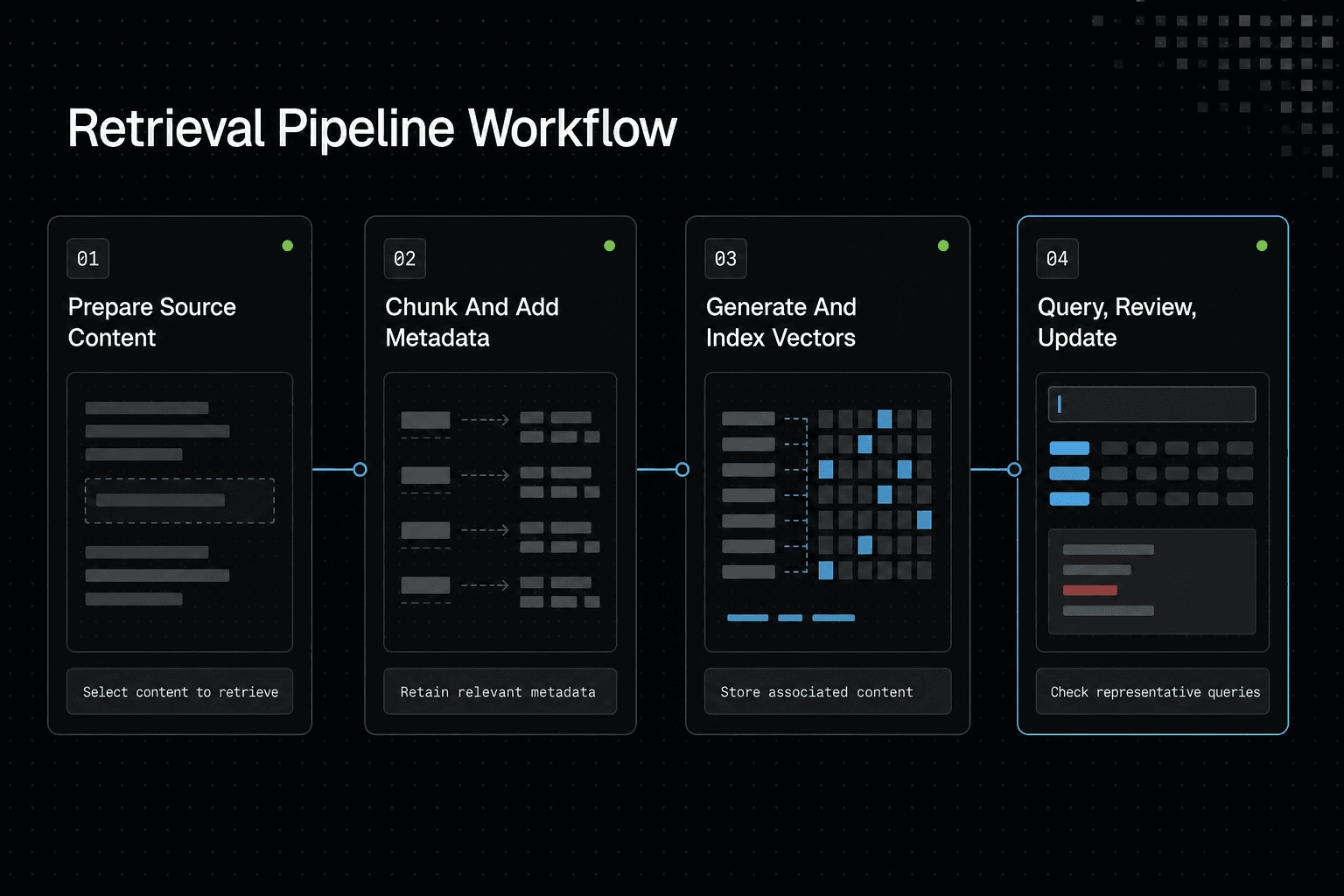
- Select and prepare the source content you want to retrieve.
- Choose how to divide content and what metadata to retain.
- Generate representations for the prepared content.
- Store and index the representations with their associated content.
- Query the index and apply any needed metadata filters.
- Review retrieved results against representative queries.
- Update the content and index when sources change.
Vector, keyword, and hybrid search: common misconceptions
Semantic retrieval doesn't replace keyword search. It finds related meaning, not necessarily the exact string, current record, permitted document, or structured field your task requires.
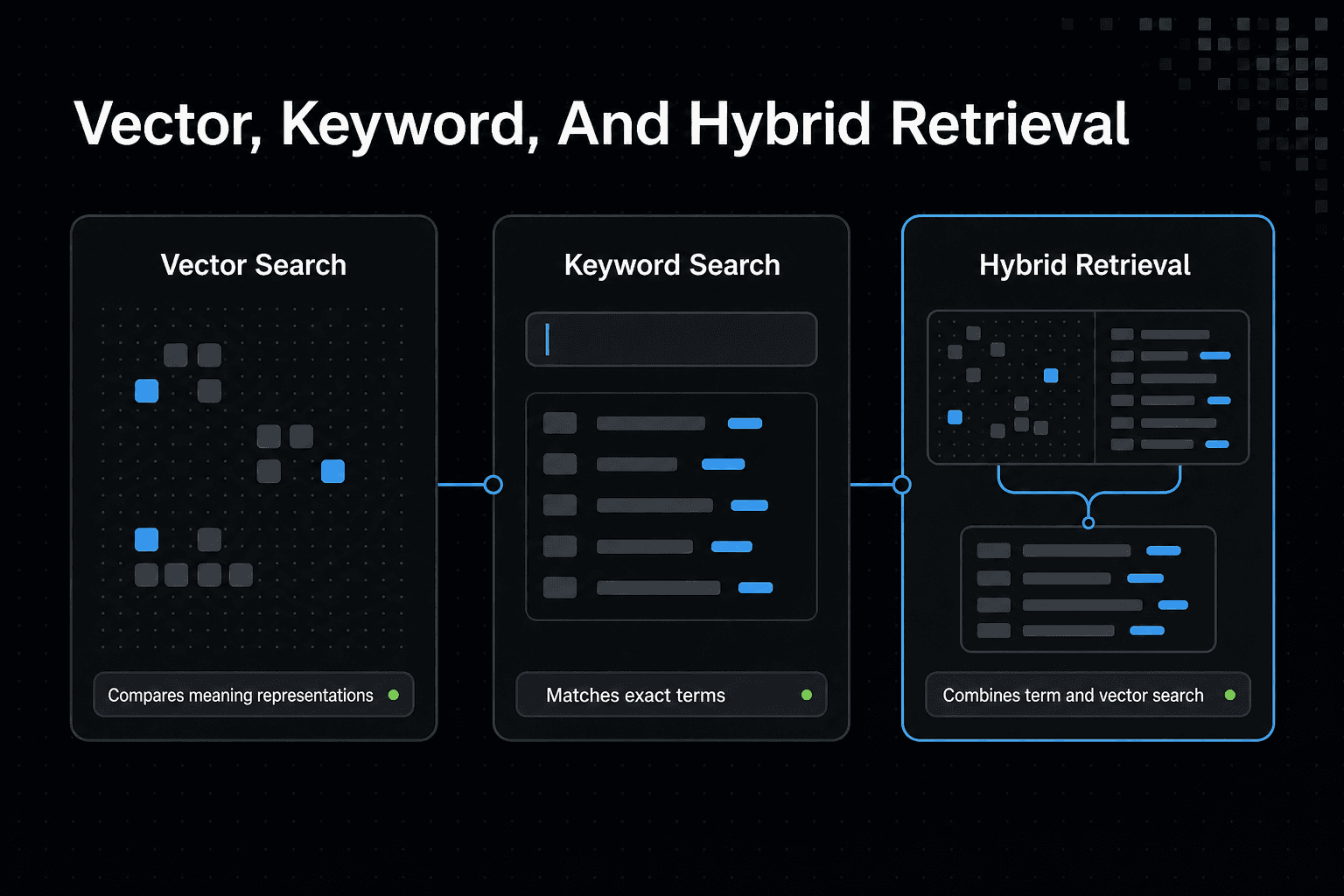
| Factor | Vector search | Keyword search or hybrid retrieval |
|---|---|---|
| Approach | Compares representations of meaning. | Matches terms, or combines term matching with vector search. |
| Potential fit | Queries phrased differently from the source wording. | Exact terms matter, or both wording and meaning matter. |
| Check before choosing | Whether retrieved results are relevant to your queries. | Whether the combined results improve relevance for your queries. |
When keyword search is the better default
Use keyword search for exact identifiers: error codes, ticket IDs, API names, filenames, product SKUs, and quoted terms. If a user asks for AUTH-417 or createInvoice(), matching those tokens is usually the point.
It also suits fresh facts when you index the latest source directly. A vector built from an older chunk can still look relevant, which leaves you with a plausible but stale result.
When vector search adds meaningful value
Vector search earns its place when users describe a concept in varied language. A query such as "why does login fail after a timeout?" may retrieve notes that use different words but cover session expiry or token refresh.
It depends on your source material and query style. Well-written, focused chunks give similarity search useful meaning to rank, while vague, duplicated, or weak source text gives it little to work with.
Why hybrid retrieval is often more reliable
Hybrid retrieval runs keyword and vector search together, then combines their ranked results. Reciprocal Rank Fusion is one simple method: it gives credit to records that rank well in either list without treating their raw scores as directly comparable.
This gives exact terms a path into the results while still catching related phrasing. For mixed queries, that is often the safer default.
Cases semantic similarity can get wrong
Similarity can join documents that discuss the same broad topic but disagree on the needed detail. It can also miss a rare identifier, prefer an old decision over a newer one, or return text the user is not allowed to read.
Keep permissions and structured filters outside the similarity score. If the allowed, filtered source set is thin, return fewer results or none rather than pretending the nearest available chunk answers your user's question.
Build a minimal vector search pipeline in Python
A small pipeline shows the full path: records become embeddings, embeddings sit beside IDs and metadata, a query becomes an embedding, and you rank the closest records. It won't prove your retrieval is good. You still need to inspect what comes back.
[!tip] In a multi-agent workflow such as GigaRAG, retain source identifiers and project metadata with retrieved content so teams can inspect what informed an answer and limit results to the appropriate project or access scope.
Choose a small, inspectable document set
Start with 10 to 30 short records you can read: architecture decisions, support notes, or product docs. Give each record an ID, source text, and metadata such as type, date, or project.
Keep chunks focused. A paragraph about authentication and a paragraph about billing should be separate records, so a query can retrieve one without dragging in the other.
Generate and persist embeddings with document IDs and metadata
Send each record's text to one embedding model, then store the returned vector with its ID and metadata. The model must stay the same for documents and queries.
records = [{"id": "dec-01", "text": "...", "meta": {"type": "decision"}}]
vectors = embed([r["text"] for r in records])

index = [
    {**record, "vector": vector}
    for record, vector in zip(records, vectors)
]
Save the records and vectors together. If you lose the text or metadata, a vector alone can't tell you what to show your user.
Create an index and run a top-k similarity query
For a tiny set, calculate similarity against every stored vector and sort the scores. Ask for a small top_k, such as three, then inspect the matches.
query_vector = embed(["Why did token refresh fail?"])[0]
ranked = sorted(
    index,
    key=lambda item: cosine_similarity(query_vector, item["vector"]),
    reverse=True,
)[:3]
This is exact search, not a production index.
Return source text, scores, and metadata rather than only an answer
Return the chunk, its score, ID, and metadata before passing anything to a language model. That makes weak matches, stale dates, and wrong document types visible.
A high score isn't proof.
Production caveats: batching, retries, model versioning, and access controls
Batch embedding requests and handle failed jobs, or a partial ingest can leave records without vectors. Store the embedding model and chunking version too, so you know when a change requires re-embedding.
Apply access checks and metadata filters before exposing results. Similarity ranking cannot decide who is allowed to read a retrieved chunk.
How vector search powers RAG and shared agent context
Retrieval can carry project context across separate tasks and tools. It can't make an agent remember, reason, or verify facts on its own.
[!note] Retrieval can provide relevant project material to an agent, but retrieving information is not the same as reasoning about it or guaranteeing persistent memory.
Vector search inside a RAG request flow
In RAG, your app embeds the user's request, retrieves related chunks, then places those chunks in the model prompt with the task. The model can use that supplied material, but it can still misread it, ignore it, or write claims the sources don't support.
Keep the retrieved source IDs and text visible. A generated answer without its evidence is hard to check.
A multi-agent development scenario with shared project knowledge
One agent might record an architecture decision, the reason a database migration failed, and links to the relevant ticket and pull request. During a later implementation task, a coding agent searches those records for the component, error, or design choice it needs.
A review agent can then inspect the retrieved sources before it accepts a proposed change. This gives the agents shared reference material, not shared judgment.
GigaRAG is a shared memory platform for AI agents that keeps project knowledge available across sessions and tools. That still does not make retrieved material a source of truth.
Chunking code, tickets, decisions, and runbooks differently
Don't split every source the same way. A code record may need a file path, symbol name, and nearby function; a decision record needs the decision, date, and rationale; a runbook needs steps that stay in order.
Store source type as metadata and filter on it when the task calls for it. An agent debugging an incident should not treat an old design discussion as the current runbook.
What agent memory should not be expected to do
Retrieved context is not durable reasoning. It depends on what was stored, how it was chunked, what the query finds, and whether the source is still current.
It also cannot replace permissions or a source of truth. GigaRAG connects agents to a central Hive Mind through MCP or the API, with access controls to manage what each agent can use.
Evaluate retrieval quality and operate vector search reliably
A search system can return plausible chunks and still miss the one source your workflow needs. Don't rely on answer quality alone, because a fluent model can hide a retrieval failure.
Create a retrieval evaluation set before shipping
Collect representative queries from the work your users actually do: error lookups, policy questions, code changes, and requests with exact IDs. For each query, record the source or chunk that should appear, plus acceptable alternatives.
Keep it small at first. A checked set is more useful than a large set with no relevance judgments.
Measure whether the right source appears in the top results
For each query, ask whether a relevant source appears in your chosen top-k results. Track misses, not just average similarity scores, because a high score does not prove the returned chunk answers the query.
Use recall-oriented checks when missing a source is costly. If the right document ranks at position 20 but your app sends only five chunks to the model, it is a miss for your workflow.
Inspect relevance, latency, empty results, and filter failures
Read the returned chunks and metadata for failed queries. Check how long retrieval takes, whether queries return nothing, and whether a metadata filter excludes records you expected to find.
Filters need their own tests. A query can retrieve good semantic matches from the wrong project, source type, or access scope, which makes the result unsafe or simply not useful.
Plan for changed documents, chunking, and embedding models
Store the document version, chunking version, and embedding model version with indexed records. When source text changes, embeddings become stale; when chunking rules or embedding models change, old and new vectors may no longer behave as one consistent collection.
Re-index when those inputs change. Keep in mind that rebuilding an index can also change latency and which approximate neighbors appear.
Separate retrieval evaluation from end-to-end answer evaluation
Test retrieval before you test generated answers. An answer evaluation tells you whether the final response helped, but it cannot reliably tell you whether failure came from search, prompt construction, source quality, or the model.
Keep the retrieved sources with each test result. That gives you something concrete to fix when an agent acts on the wrong context.
Choose a vector database or managed retrieval approach
Your database choice won't fix weak chunks, stale embeddings, or missing access checks. It changes who owns the index, storage, scaling, backups, and query path when those problems arrive.
Hosted vector services versus self-managed databases
Hosted services reduce infrastructure work, but you still own ingestion, embedding generation, retrieval tests, and source updates. Self-managed systems give you more control over deployment and data location, but you must run and tune them.
Where vector databases and retrieval tools commonly fit
Assess Pinecone, Weaviate, Milvus, Chroma, and pgvector by the systems you already run. pgvector may fit when PostgreSQL is already your source of application data; Chroma can suit a small local prototype; the others may fit teams that need a dedicated vector system or hosted option.
Don't treat that as a ranking. Scale, metadata filters, hybrid retrieval, language support, and cost can change the answer.
The infrastructure ownership checklist
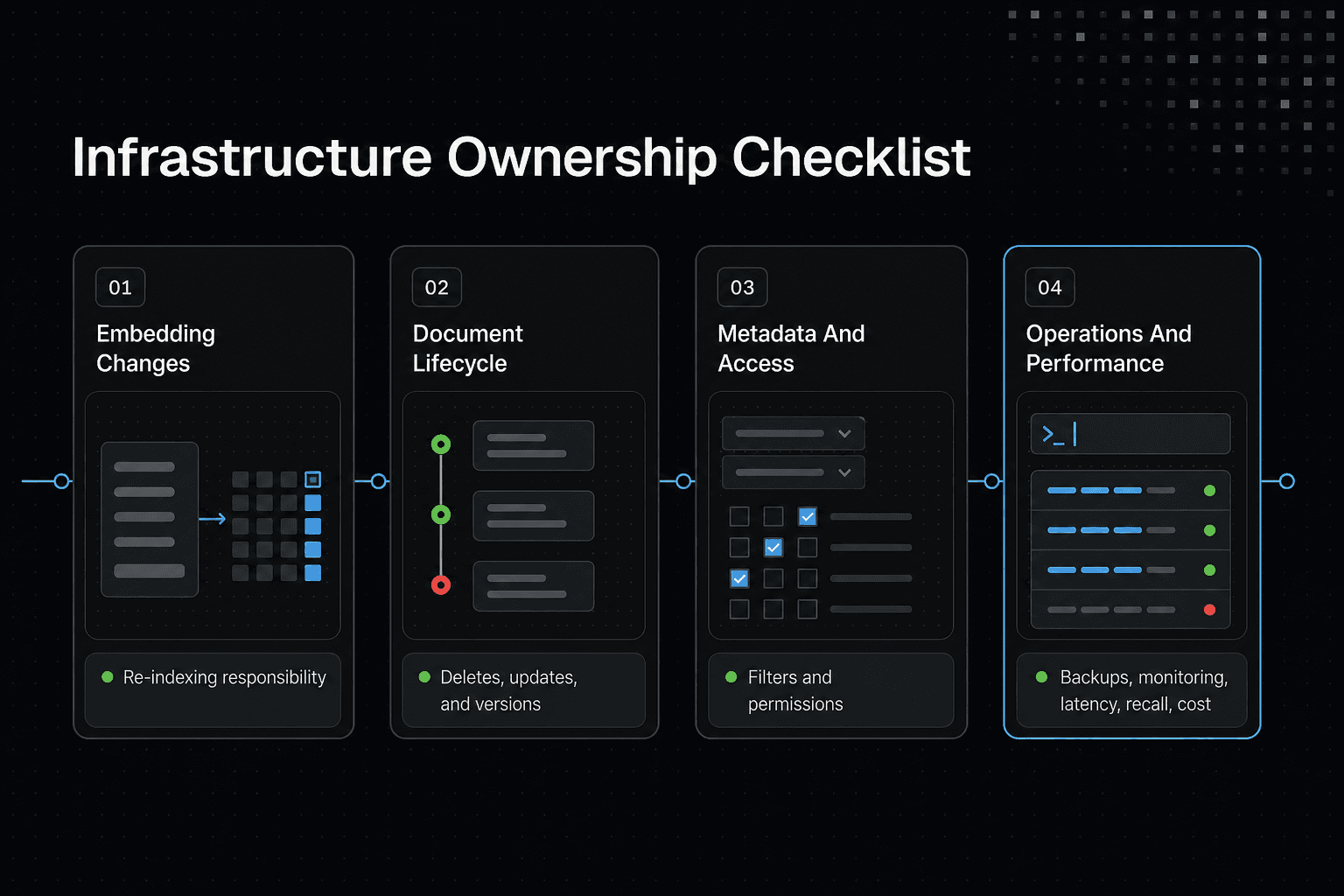
Before you choose, write down who will handle:
- embedding model changes and re-indexing
- document deletes, updates, and version tracking
- metadata and access filters
- backups, monitoring, and incident response
- latency, recall, and cost as data grows
The main catch is that managed retrieval removes only some of this work.
Verify managed product details before implementation
Connection steps, supported index types, filtering behavior, and pricing change. Check current official documentation before you build around a managed product, especially where permissions or production data are involved.
Use retrieval deliberately, not automatically
Retrieval is a decision layer, not a default feature. Start with the task and the corpus: exact IDs, error strings, and field names point to keyword search; meaning-based questions can justify vectors. Use hybrid retrieval when both signals matter. Empty or weak source material won't become useful because an embedding exists.
A practical next-step checklist
- List the user queries you need to answer, including exact terms and natural-language requests.
- Keep source text, metadata, and permissions attached to every retrieved chunk.
- Build a small judged query set, then check whether the needed evidence reaches the top results.
- Inspect failures before changing models or indexes.
- Choose only the storage and update path your team can keep current.
Frequently asked questions
What is vector search in simple terms?
It retrieves content by comparing numerical representations of a query and stored items, rather than relying only on matching the same words.
How does vector search differ from semantic search?
Vector search is a retrieval technique based on comparing vectors. Semantic search describes searching for content by meaning; vector search is one way to implement it.
What is the difference between vector search and keyword search?
Vector search compares representations of content, while keyword search looks for matching terms. The more suitable approach depends on the query and the retrieval results you need.
When should I use hybrid search instead of vector search alone?
Consider hybrid search when both meaning and specific wording may matter. Evaluate it against representative queries before choosing it.
What are cosine similarity and Euclidean distance in vector search?
They are measures used to compare vectors: cosine similarity compares their orientation, while Euclidean distance measures the distance between them. Which measure to use depends on the representation and retrieval setup.
What is approximate nearest-neighbor search?
It is an approach for finding nearby vectors without requiring an exact comparison against every stored vector. Assess its retrieval results for your own workload.
How does vector search support RAG applications?
It can retrieve content related to a query for use as context in a RAG workflow. The retrieved content still needs to be relevant and appropriate for the task.
How do I evaluate whether vector search retrieval is working well?
Test representative queries and inspect whether the retrieved content is relevant and useful for answering them. Revisit content preparation, representation, indexing, and filters when results fall short.
About GigaRAG
GigaRAG is a shared memory platform for AI agents that helps developers and teams keep project knowledge available across sessions and tools. It can support workflows where agents need to retrieve project material from a central place rather than rely on a single session.
Connect your agents to a central Hive Mind through MCP or the API. Its access controls help manage what each agent can use, but your team still needs to keep source records current and check retrieved material before acting on it.