How to Build a RAG Project Starter Repo in Python
This guide uses a Python baseline to make retrieval inspectable: prepare documents, retrieve passages for a question, and optionally provide those passages to an LLM. Treat retrieval and answer generation as separate steps so you can inspect the evidence returned for each query.
This guide covers application retrieval and, later, an option for teams that want project knowledge available to AI agents across sessions and tools.
Process overview
Treat retrieval as a separate checkpoint from answer generation: first verify that the index returns useful context, then decide whether to add an LLM.
- Prepare a small set of source documents.
- Split and embed the content, then store it in a searchable index.
- Query the index and inspect the retrieved text.
- Evaluate retrieval before relying on generated answers.
What this RAG project starter repo builds, and what it does not
This Python baseline shows a local document workflow: load files, retrieve passages for a question, and optionally pass the retrieved context to an LLM. Keep the ingestion, retrieval, and evaluation steps visible so each can be checked independently.
[!tip] Keep a few questions with known answers alongside your starter repo. Inspect retrieved passages for each before tuning how the LLM responds.
The request flow: documents, chunks, embeddings, vector store, retrieved context, LLM response
Embed knowledge-base documents and store the resulting vectors. When a user asks a question, retrieve relevant chunks and pass that context to an LLM, following the general workflow in this vector-database RAG overview.
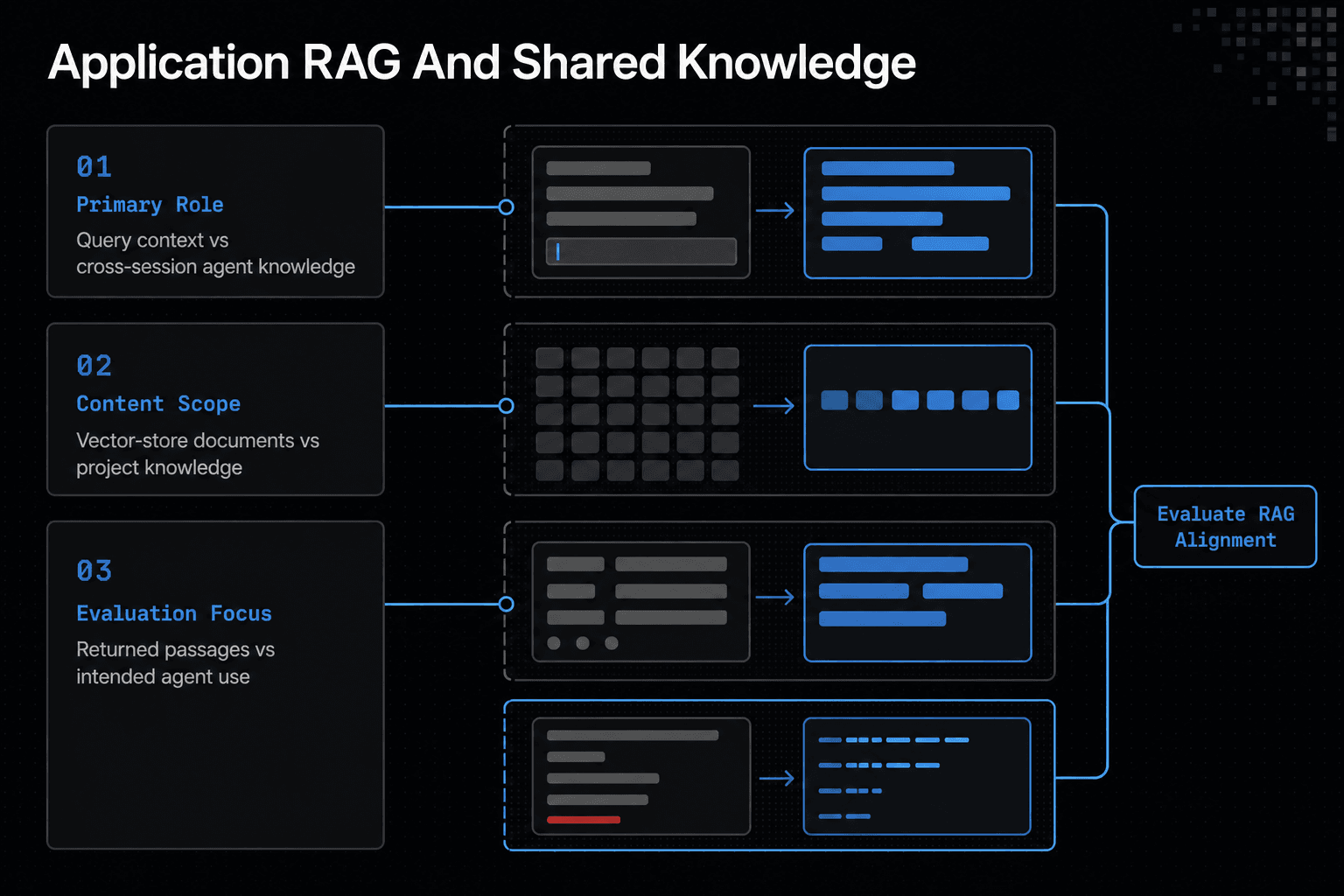
Application RAG versus cross-session agent project knowledge
Keep the application's index and query path explicit. If your team also needs project knowledge available to AI agents across sessions and tools, assess that need separately from this local retrieval workflow.
What readers should not expect from this starter repository
Run ingestion deliberately, then inspect retrieved context before relying on an answer. Keep the document set and the retrieval output easy to examine while you build the baseline.
Application RAG vs. shared agent project knowledge
| Factor | Application RAG | Shared agent knowledge |
|---|---|---|
| Primary role | Retrieve context for a query. | Keep project knowledge available across agent sessions and tools. |
| Content | Knowledge-base documents represented in a vector store. | Project knowledge available to AI agents. |
| Evaluation focus | Whether useful source passages are returned for a query. | Whether the intended agents can use the project knowledge they need. |
Step 1: Set up the Python repository and local configuration
Use Python 3.8 or later, as the referenced starter project recommends. Keep this repo local and small. Its index won't refresh when documents change, and .env must never enter Git.
Set out the folder structure before writing code
rag-starter/
├── data/
│   ├── docs/
│   │   └── onboarding.md
│   └── questions.json
├── src/
├── .env.example
├── .gitignore
└── requirements.txt
Create and activate a virtual environment
python -m venv .venv
source .venv/bin/activate
# Windows: .venv\Scripts\activate
Install dependencies with pinned or clearly labeled example versions
Create requirements.txt and document the dependency versions you select for this implementation:
chromadb==0.5.23
sentence-transformers==3.3.1
python-dotenv==1.0.1
Then run pip install -r requirements.txt.
Create a .env.example file and explain which values must never be committed
LLM_MODEL=your-local-model
Copy it to .env. If the file contains API keys, tokens, or private document paths, keep it out of Git.
Add a small sample document set and one sample question
Add data/docs/onboarding.md with a short project rule. Add data/questions.json:
[{"question":"What is the onboarding rule?"}]
Step 2: Build the RAG project starter repo ingestion pipeline
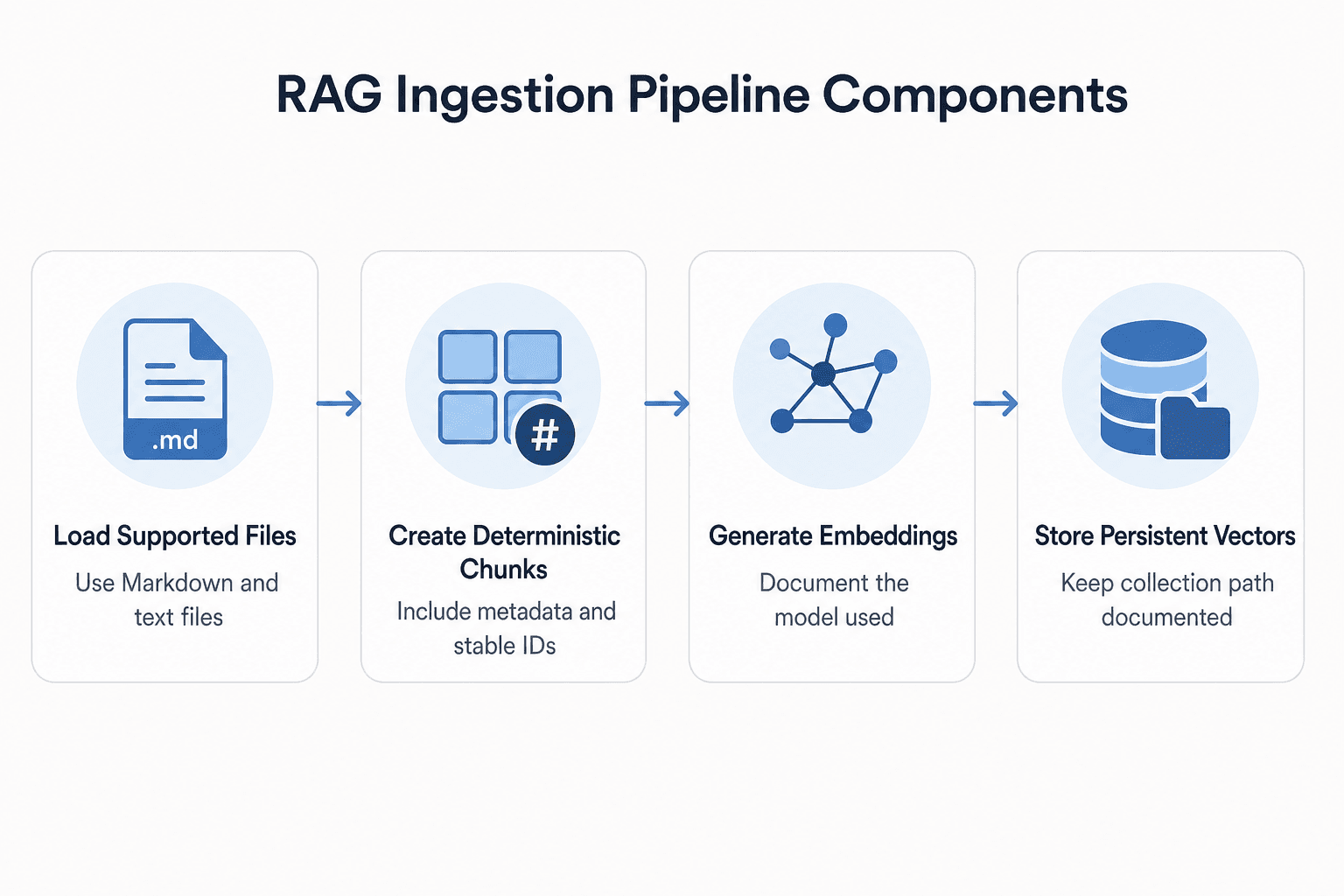
Create the document loader with supported file types and explicit unsupported-file behavior
Start with .md and .txt files. Skip everything else, including PDFs, images, and Word files, until you add a parser for each format.
Add deterministic chunking with chunk size, overlap, metadata, and stable chunk IDs
Use fixed character windows in this example. Derive each chunk ID from its source path, chunk position, and chunk text so the ingestion script uses a repeatable identifier for the same input.
# src/ingest.py
from hashlib import sha256
from pathlib import Path

import chromadb
from sentence_transformers import SentenceTransformer

DOCS = Path("data/docs")
DB_PATH = "data/chroma"
MODEL = "all-MiniLM-L6-v2"
CHUNK_SIZE, OVERLAP = 500, 80

def load_documents():
    docs = []
    for path in DOCS.rglob("*"):
        if path.suffix not in {".md", ".txt"}:
            continue
        if path.is_file():
            docs.append((path, path.read_text(encoding="utf-8")))
    return docs

def chunk_document(path, text):
    for index, start in enumerate(range(0, len(text), CHUNK_SIZE - OVERLAP)):
        chunk = text[start:start + CHUNK_SIZE]
        if not chunk:
            continue
        chunk_id = sha256(f"{path}:{index}:{chunk}".encode()).hexdigest()
        yield chunk_id, chunk, {"source": str(path), "chunk_index": index}

model = SentenceTransformer(MODEL)
client = chromadb.PersistentClient(path=DB_PATH)
collection = client.get_or_create_collection("project_docs")

documents = load_documents()
print(f"Documents found: {len(documents)}")

records = [item for path, text in documents for item in chunk_document(path, text)]
ids, texts, metadata = zip(*records) if records else ([], [], [])
vectors = model.encode(list(texts)).tolist() if texts else []

collection.upsert(ids=list(ids), documents=list(texts),
                  metadatas=list(metadata), embeddings=vectors)

print(f"Chunks created: {len(ids)}")
print(f"Vectors stored: {len(ids)}")
print(f"Persistence location: {DB_PATH}")
Generate embeddings and document the model used for ingestion and queries
Run python src/ingest.py. Define the MODEL setting explicitly for both ingestion and querying so your retrieval tests use a documented configuration.
Create or open a persistent local vector collection
Configure the example PersistentClient with data/chroma as its path, and use that same path in the query script. For a starter repository, keep the collection name and storage path in one clearly documented place.
Run ingestion and show expected logs: documents found, chunks created, vectors stored, and persistence location
Your counts depend on the files and chunk boundaries. If you want empty source folders to report zero documents and zero vectors, handle the empty-input case and print those counts before calling collection.upsert.
Explain when this simple local setup should be replaced with a managed or production vector-store design
Revisit this local design when your requirements include concurrent writes, backups, monitoring, access controls, or a much larger corpus. Vector databases can use specialized indexing algorithms for similarity search; measure retrieval quality as well as response time when comparing options.
Step 3: Retrieve context and generate a grounded answer
Print and inspect the retrieved chunks before using them as context for an answer.
[!note] This guide uses an explicit ingestion command. After you edit the sample documents, run ingestion again before checking retrieval against the changed files.
Embed the user question and retrieve top-k chunks
Create src/query.py. Querying an indexed codebase is a common RAG flow, as the Git_RAG example shows.
from ingest import client, collection, model

question = "Where is the deployment process documented?"
vector = model.encode([question]).tolist()

results = collection.query(
    query_embeddings=vector,
    n_results=3,
    include=["documents", "metadatas", "distances"],
)
Print retrieved text, source metadata, and similarity information where the selected library exposes it
for text, meta, distance in zip(
    results["documents"][0],
    results["metadatas"][0],
    results["distances"][0],
):
    print(f"\nSource: {meta['source']} #{meta['chunk_index']}")
    print(f"Distance: {distance}")
    print(text)
Print any distance or similarity values that the selected library exposes, and interpret them using that library's documented metric. Read the source text and metadata alongside those values when assessing a result.
Build a constrained prompt that cites supplied context and permits an explicit insufficient-context response
context = "\n\n".join(results["documents"][0])
prompt = f"""Answer only from this context.
If it lacks the answer, say: Insufficient context.

Context:
{context}

Question: {question}"""
Run a sample question and show the expected retrieval output separately from the final answer
Expect source paths, chunk indexes, distances, and text first. Only then send prompt to your LLM and review its answer against those chunks.
Step 4: Evaluate, troubleshoot, and choose the right trade-offs
Build a small repeatable retrieval check before changing chunk sizes, models, or storage. It gives you a consistent way to compare the returned sources after each change.
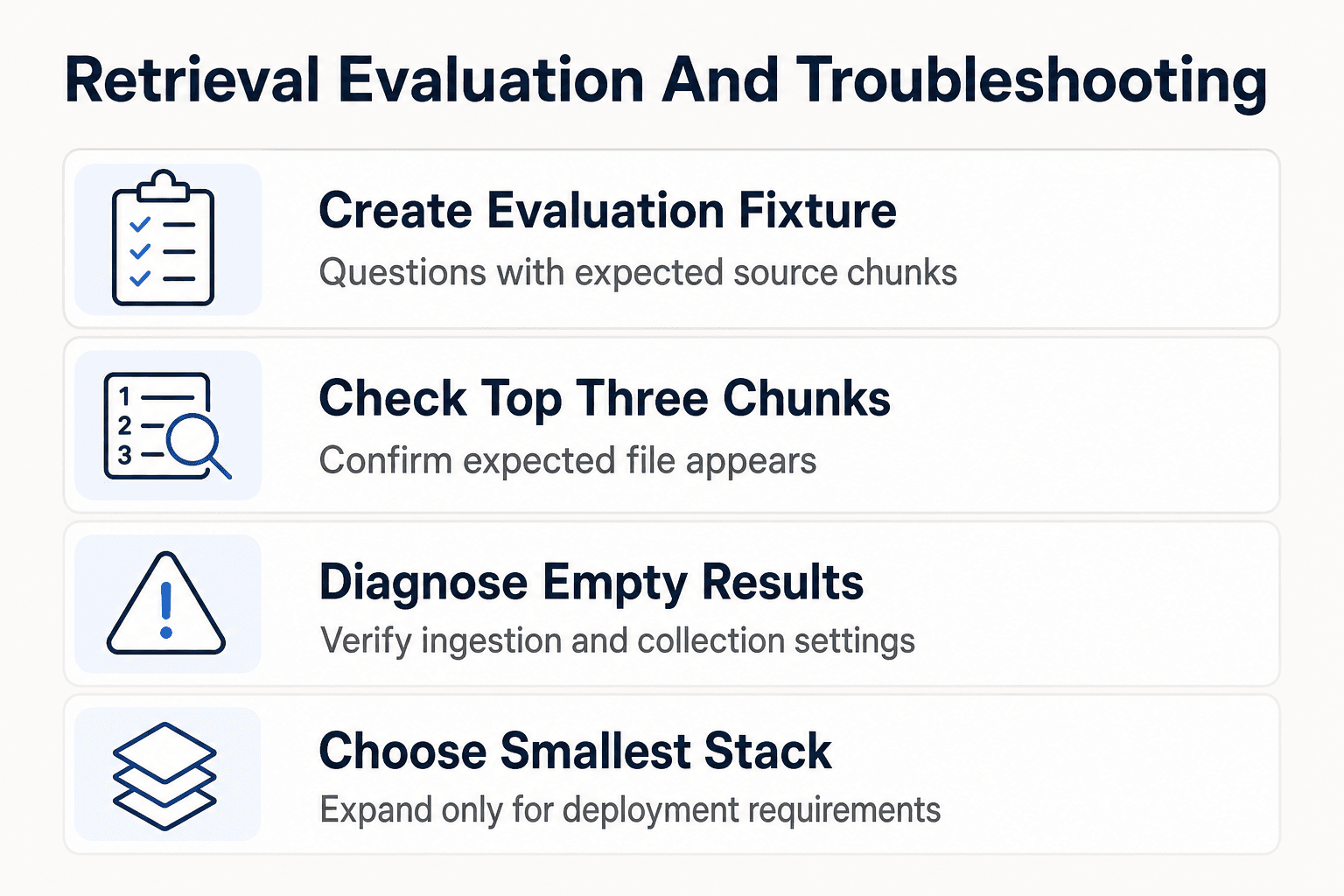
Create a small evaluation JSON or CSV with questions and expected source chunks
Start with five to ten questions whose answers appear in your sample files.
[
  {"question": "Where is deployment documented?", "expected_source": "docs/deploy.md"},
  {"question": "What port does the app use?", "expected_source": "docs/config.md"}
]
Keep the fixture in version control. When retrieval changes, you can see which expected sources disappeared.
Check retrieval relevance before judging answer quality
For each question, print the top three chunks and mark a pass when the expected file appears in them. If retrieval misses, don't tune the prompt yet.
Troubleshoot common failures
For empty results, first confirm that ingestion printed documents and vectors, then verify that the query script uses the intended collection name and storage path. For unexpected chunks, print the source path, chunk text, and query together before changing chunking or retrieval settings.
When you re-run ingestion, inspect the stored IDs and source metadata to confirm that the collection contains the records you intend. If the prompt becomes too large for your model, reduce n_results, reduce chunk size, or shorten the context you pass to the model.
Choose the smallest useful stack
Start with the smallest stack that lets you inspect documents, chunks, retrieval output, and evaluation results. Move to hosted models or managed vector storage only when your deployment requirements justify those choices.
For a few stable facts, a plain file or hand-written prompt may be more direct when similarity-based retrieval adds no useful capability. Use a database query when the information is structured and the question can be answered with the database operations you already need.
Using GigaRAG for shared project knowledge across agent sessions
Keep the application's ingestion, retrieval, and evaluation code separate from the project context that agents use while collaborating. GigaRAG is a shared memory platform for AI agents that helps developers and teams keep project knowledge available across sessions and tools.
Keep the application's RAG pipeline independent from shared agent knowledge
Connect agents to GigaRAG's central Hive Mind through MCP or the API. Its access controls let teams manage what each agent can use.
Keep the application's retrieval checks in place when you need to verify the sources returned for an application query. Shared agent knowledge does not replace those application-level checks.
Next steps: Keep the baseline small, observable, and testable
First improve retrieval evidence, then add features
Do not add more models or agent hooks until your evaluation set shows that expected sources appear in the retrieved results. Keep failed queries as regression cases so later changes can be compared against them.
Version documents and schedule or trigger re-ingestion when content changes
Store a document version or content hash with each chunk, then define a re-ingestion process for changed source files. Remove or replace records that no longer correspond to the documents you intend to search.
Add access controls, observability, and scale testing only when the use case requires them
Add permissions when documents have different audiences. Log retrieval inputs, selected sources, failures, and latency when you need to diagnose live behavior. Test larger collections before moving beyond local storage.
Frequently asked questions
What is a RAG project starter repo?
In this guide, it is a small Python baseline with separate ingestion, retrieval, and evaluation steps. It gives you a contained way to inspect retrieved passages before you add or rely on answer generation.
What are embeddings in a RAG application?
Embeddings are numerical representations of content used for similarity-based retrieval. Vector search finds content by similarity between these representations.
Why does a RAG application need a vector database or vector store?
A vector store holds document embeddings so the application can run similarity-based retrieval. In a RAG flow, the returned passages can then be supplied to the language model as context.
How should I choose a chunk size for a small RAG project?
It depends on whether your retrieved passages include the context needed to answer known questions. Test your splitting approach with questions whose answers you can verify in the source documents.
How can I tell whether my RAG system retrieved the right context?
Inspect the passages returned for a query and check whether they contain information relevant to the question. Test with questions whose answers you can verify in the source documents.
What should I inspect before adding an LLM to this baseline?
Inspect the retrieved passages, their source metadata, and any distance or similarity information the selected library provides. Confirm that the returned context is useful for questions whose answers you can verify in the source documents before sending that context to an LLM.
Does a RAG index automatically update when source documents change?
Don't assume that it does. Plan to re-ingest changed content using the workflow your project implements.
What is the difference between application RAG and shared AI-agent project knowledge?
Application RAG retrieves indexed material as part of an application's query flow. GigaRAG is a shared memory platform that helps developers and teams keep project knowledge available to AI agents across sessions and tools.
About GigaRAG
Use GigaRAG when your team needs project knowledge to remain available to AI agents across sessions and tools. For this starter repo, decide that shared-memory need separately from the local document-retrieval workflow.
Teams can connect agents to GigaRAG's central Hive Mind through MCP or the API. Access controls manage what each agent can use.