Building the Pipeline: A Practical Guide for RAG and Agent Memory
Building the pipeline means something different to a sales leader than it does to a developer. Search the term and you'll get oil and gas construction, CRM funnels, and a lot of advice about closing deals. None of that helps you. You're building a RAG pipeline: a system that takes your documents, chunks them, embeds them into vectors, and retrieves the right pieces to inject into an LLM's context so it can answer from your data instead of guessing.
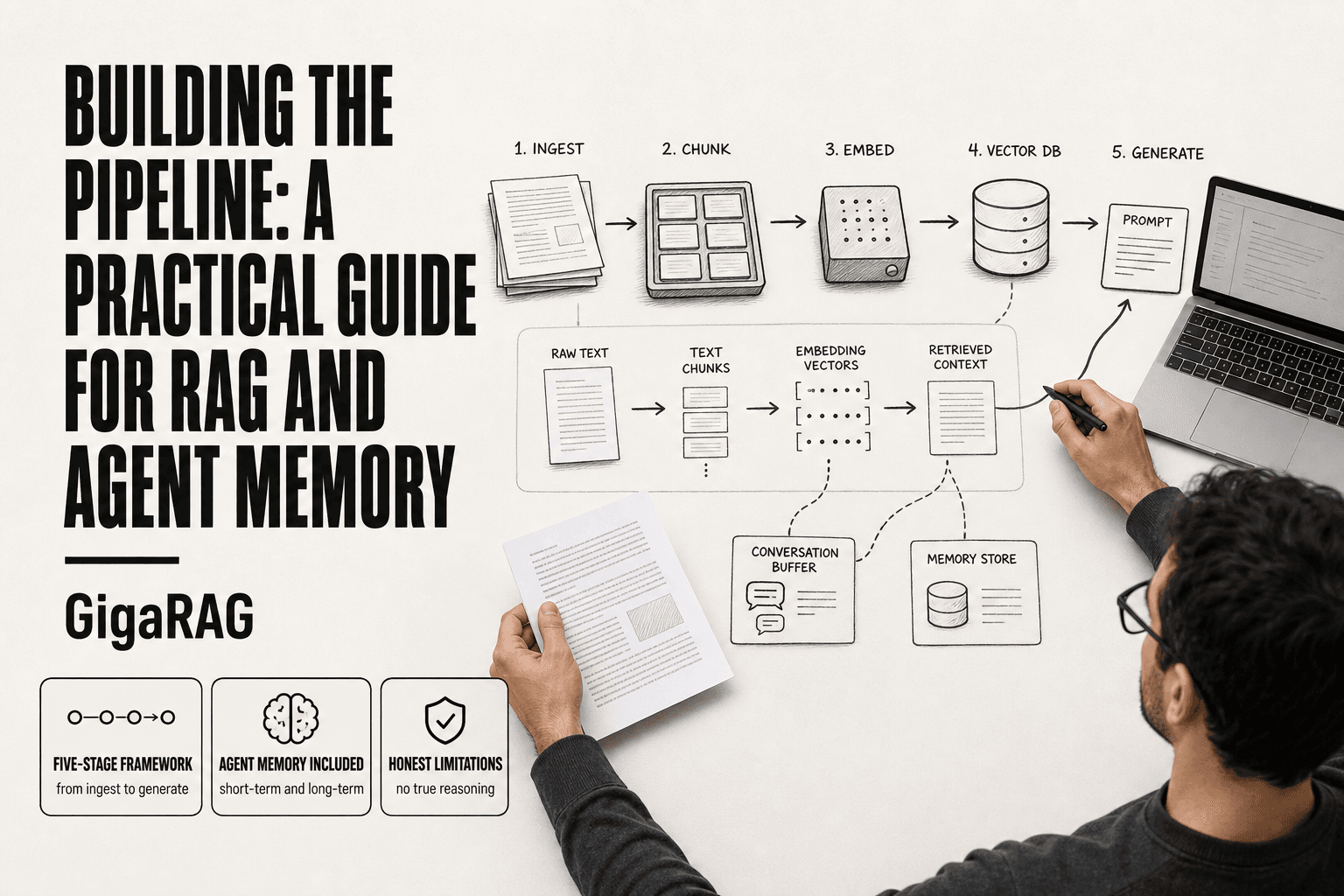
The honest answer is that most guides stop at the happy path. They show you a diagram, hand you a vector database, and call it done. This guide won't. It covers what a RAG pipeline actually does, the five stages you'll build, what to prepare before you start, and the step-by-step work for agent memory specifically. It also covers what the pipeline cannot do: no true reasoning, no guaranteed recall, and real hallucination risks. GigaRAG helps with agent memory and RAG pipeline building, but the framework here works with any stack. You'll leave with a practical, honest map of what to build, what to avoid, and what not to expect.
| At a glance | Details |
|---|---|
| Primary meaning | Building a RAG/agent memory pipeline |
| Core stages | Ingest, chunk, embed, index, retrieve, generate |
| Key limitation | No true reasoning; retrieval quality caps output |
| Memory types | Short-term context, long-term vector store |
| Main trade-off | Recall vs precision; cost vs latency |
| Common failure | Hallucination from poor retrieval or chunking |
In This Guide
- What Does "Building the Pipeline" Mean for RAG and Agent Memory?
- RAG/Agent Memory Pipeline vs Sales Pipeline
- The Core Stages of a RAG Pipeline
- Building The Pipeline: A Step-by-Step Guide
- What You Need Before Building the Pipeline
- Step-by-Step: Building the Pipeline for Agent Memory
- Agent Memory: Beyond Simple Retrieval
- Common Mistakes When Building the Pipeline
- What a RAG Pipeline Cannot Do
- How to Evaluate and Improve Your Pipeline
- Final Thoughts on Building the Pipeline
What Does "Building the Pipeline" Mean for RAG and Agent Memory?
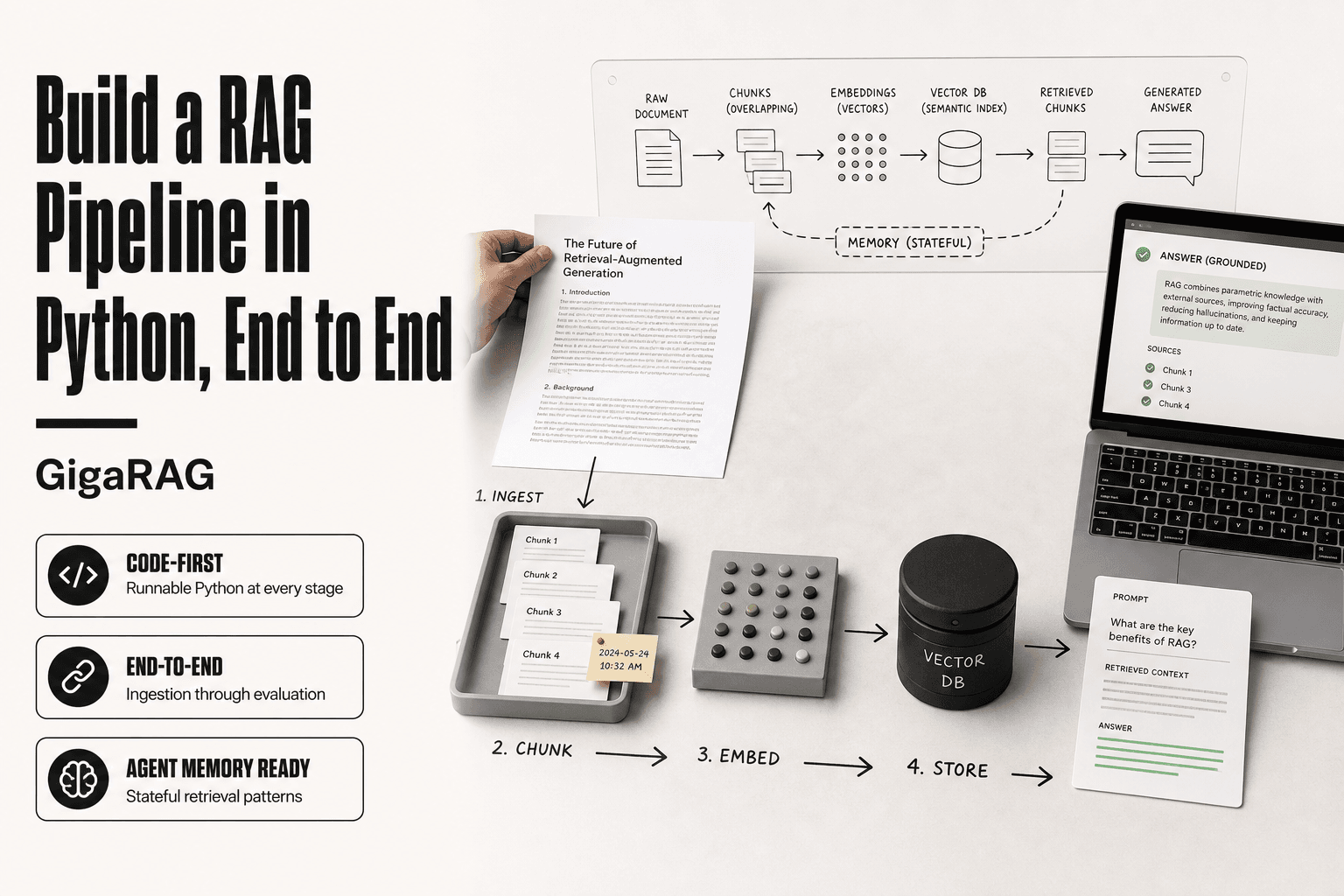
Building the pipeline means designing a repeatable sequence of stages that moves data from raw source to usable output. For RAG and agent memory, that sequence is: ingest, chunk, embed, index, retrieve, and generate. Each stage feeds the next, and a failure at any point degrades everything downstream.
The term gets borrowed from two older fields, and the fit is only partial.
Physical pipelines vs. sales pipelines vs. RAG pipelines
A physical pipeline moves a fluid or gas from point A to point B. The contents don't change. A sales pipeline moves a lead through stages, but each stage is a human judgment call: qualify, demo, negotiate, close.
A RAG pipeline is different in one key way. The material changes at every stage. Raw text becomes chunks. Chunks become vectors. Vectors become ranked results. Ranked results become context. Context becomes a generated answer. You're not just moving data. You're transforming it.
What a RAG pipeline actually does
In practice, a RAG pipeline takes a question, finds relevant passages in your knowledge base, and hands those passages to an LLM with instructions to answer from them. The pipeline's job is to get the right passages into the context window. Nothing more.
The honest catch: the pipeline doesn't understand your data. It matches patterns. Retrieval quality, not model quality, is usually the bottleneck.
Why agent memory is a pipeline problem
An agent that remembers across turns needs the same machinery: store what happened, retrieve what's relevant, inject it into the next prompt. Memory isn't a feature you bolt on. It's a pipeline you build. Short-term memory is the conversation buffer. Long-term memory is the indexed store. The pipeline connects them.
[!note] A RAG pipeline does not add reasoning capabilities to an LLM; it only supplies relevant context. If retrieval fails, the model may still hallucinate or produce incorrect answers.
RAG/Agent Memory Pipeline vs Sales Pipeline
| Factor | RAG/Agent Memory Pipeline | Sales Pipeline |
|---|---|---|
| Goal | Retrieve relevant context for LLM generation | Move prospects toward a sale |
| Core components | Ingestion, chunking, embeddings, vector DB, retriever, LLM | Leads, stages, CRM, sales reps |
| Success metric | Retrieval accuracy, answer faithfulness, latency | Conversion rate, deal velocity, revenue |
| Failure mode | Hallucination, missing context, stale embeddings | Leads stall, drop-off, lost deals |
| Typical tools | LangChain, LlamaIndex, Pinecone, Weaviate | Salesforce, HubSpot, Outreach |
The Core Stages of a RAG Pipeline
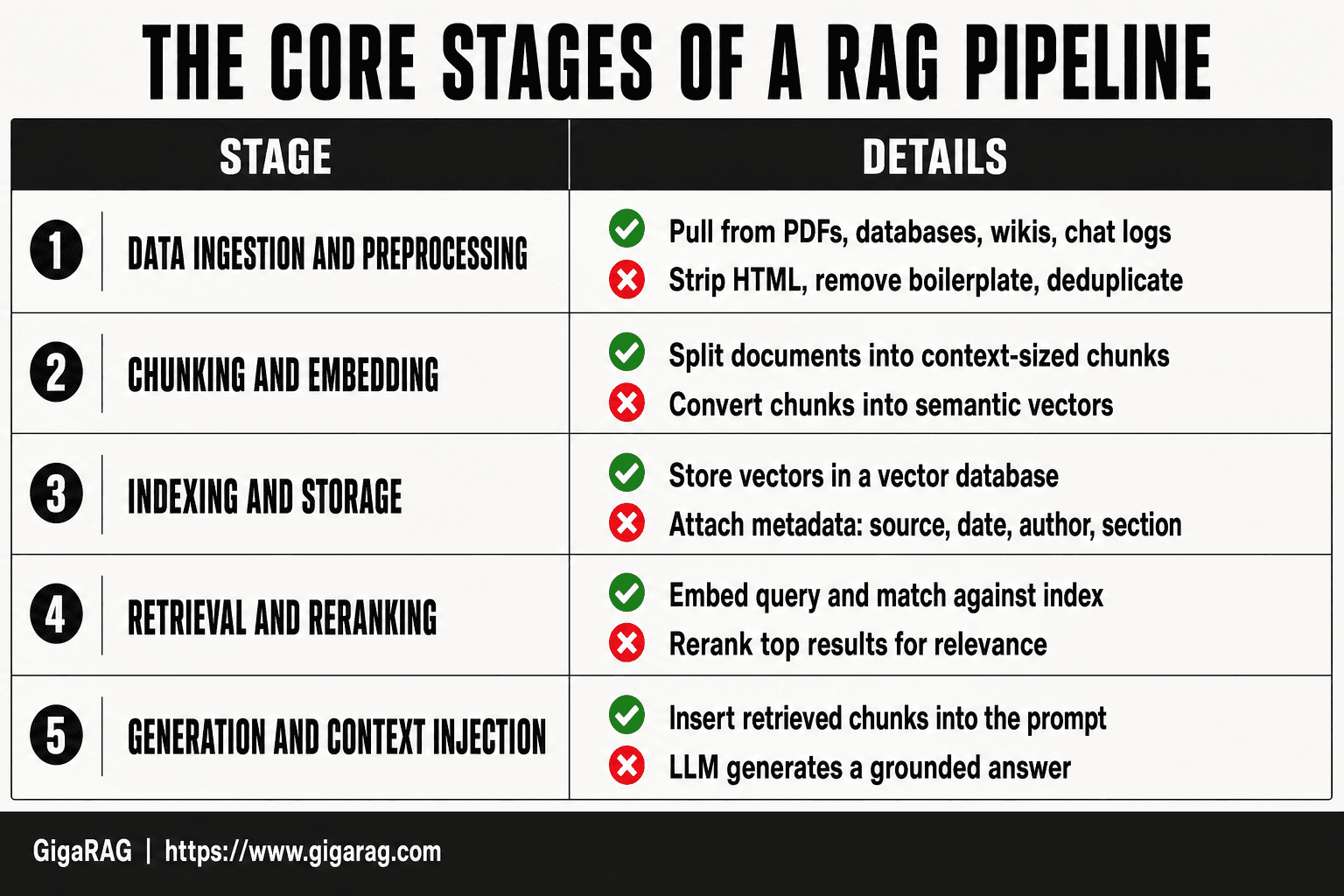
A RAG pipeline has five stages. You can build a minimal version in a weekend. You can spend months tuning the retrieval quality. The stages don't change.
Stage 1: Data ingestion and preprocessing
You pull data from wherever it lives: PDFs, databases, wikis, chat logs. Then you clean it. Strip HTML, remove boilerplate, fix encoding, deduplicate. Garbage in means garbage retrieved. Most teams skip this stage and pay for it later.
Stage 2: Chunking and embedding
You split documents into chunks small enough to fit usefully in a context window. Then an embedding model converts each chunk into a vector. The vector captures semantic meaning, not just keywords. Chunk size matters more than most people think. Too big and retrieval loses precision. Too small and you lose context.
Stage 3: Indexing and storage
Vectors go into a vector database. The index lets you run similarity search fast. You also store metadata alongside each vector: source, date, author, section. Metadata filtering is what separates a toy pipeline from a usable one.
Stage 4: Retrieval and reranking
A query gets embedded, then matched against the index. You pull the top K results. A reranker then reorders them for relevance. Reranking is optional but it's the single biggest quality boost you can add to a basic pipeline.
Stage 5: Generation and context injection
Retrieved chunks get inserted into the prompt as context. The LLM generates an answer grounded in that context. The pipeline's job ends here. The model's job begins.
[!tip] For developers: start with a small, high-quality dataset and a simple retrieval baseline (e.g., cosine similarity) before adding complexity. Instrument every stage to measure where errors originate.
Building The Pipeline: A Step-by-Step Guide
- Define the use case and success criteria (e.g., answer accuracy, latency budget).
- Collect and preprocess source documents; clean and normalize text.
- Chunk documents into semantically coherent segments with overlap.
- Generate embeddings using a suitable model and store in a vector database.
- Implement a retriever (e.g., similarity search, hybrid) with metadata filters.
- Integrate the LLM to generate answers using retrieved context.
- Add agent memory: maintain short-term conversation buffer and long-term vector store.
- Evaluate and iterate: measure retrieval precision/recall and answer faithfulness.
What You Need Before Building the Pipeline
You need four things: data worth retrieving, an embedding model, a vector store, and an LLM with API access. That's it. Everything else is tuning.
Data sources and quality assessment
Start with one source, not ten. A single well-structured knowledge base beats five messy ones. Check for duplicates, outdated pages, and content that contradicts itself. If you wouldn't trust it as a reference, don't index it.
Choosing an embedding model
Pick a model that fits your data's language and domain. OpenAI's text-embedding-3-small is a safe default. Open-source options like bge-large work if you need to run locally. Test on your actual queries before committing.
Selecting a vector database
For prototypes, use an in-memory store or SQLite with a vector extension. For production, Postgres with pgvector handles most workloads. Dedicated stores like Pinecone or Weaviate make sense at scale. Don't overbuild early.
LLM and API access
You need an LLM that accepts retrieved context in its prompt. GPT-4o, Claude, or a local model via Ollama all work. Budget for token costs: retrieval adds context tokens to every call.
Step-by-Step: Building the Pipeline for Agent Memory
You have your data, embedding model, vector store, and LLM. Now you build. Each step below is a decision point, not just a checkbox. Skip one and you'll feel it three steps later.
Step 1: Prepare and clean your data
Strip HTML, remove boilerplate, and normalize whitespace. Deduplicate near-identical passages. If a document references another document, keep that link explicit in metadata. Garbage in means garbage retrieved, and retrieval quality is the ceiling on everything after it.
Step 2: Chunk with context in mind
Chunk size depends on your content. For dense technical docs, 256 to 512 tokens per chunk works. For narrative content, go larger. Overlap chunks by 10 to 15 percent so sentences aren't cut mid-thought. Add a header line to each chunk with its source title and section. That header travels with the chunk into the prompt and gives the LLM grounding it otherwise lacks.
Step 3: Embed and index
Run your chunks through the embedding model and store vectors in your vector database. Index metadata alongside vectors: source URL, document title, timestamp, content type. Without metadata, you can't filter later. Filtering is what separates a working pipeline from a demo.
Step 4: Build retrieval with metadata filtering
Don't retrieve from the entire index every time. Filter by metadata first: only pull chunks from the relevant doc set, date range, or content type. Then run semantic search within that filtered set. This cuts noise and latency in one move. Hybrid search, combining keyword and vector scores, helps when queries contain exact terms like error codes or product names.
Step 5: Add reranking for quality
Retrieve more chunks than you need, say 20, then rerank them with a cross-encoder or a reranking API. Keep the top 5. Reranking adds 50 to 100 milliseconds but consistently improves relevance. It's the cheapest quality win in the whole pipeline.
Step 6: Inject context and generate
Format retrieved chunks into a prompt with clear delimiters. Tell the LLM which chunks came from where. Ask it to cite sources. If the retrieved context doesn't answer the query, instruct the model to say so rather than guess. That instruction alone cuts hallucination rates noticeably.
Step 7: Implement memory consolidation
Agent memory is not just retrieval. It's deciding what to keep. After each interaction, extract durable facts: user preferences, project state, decisions made. Store those as structured summaries in a separate memory store, not in the retrieval index. Periodically merge and prune them. The retrieval index holds reference material. The memory store holds what the agent has learned. They serve different jobs.
Agent Memory: Beyond Simple Retrieval
A basic RAG pipeline answers one question at a time. It retrieves, generates, and forgets. Agent memory changes that. It's what lets an agent remember what you said three turns ago, or last week, without you repeating yourself.
Short-term vs. long-term agent memory
Short-term memory is the conversation itself. It lives in the context window: recent messages, retrieved chunks, tool outputs. It's fast but volatile. Close the session and it's gone.
Long-term memory is what you persist outside the context window. Facts about the user, decisions made, project state. You store these in a separate memory store, not in your retrieval index. The retrieval index holds reference material. The memory store holds what the agent has learned. They serve different jobs.
Memory consolidation strategies
Consolidation is deciding what to keep from short-term memory and moving it to long-term storage. Don't save everything. Save what's durable: preferences, constraints, outcomes.
After each interaction, extract facts worth keeping. Store them as structured summaries with timestamps. Periodically merge duplicates and prune stale entries. A fact contradicted twice should be updated or removed. Consolidation is a batch job, not a real-time write. Run it after the conversation ends, not during it.
Managing context windows and token limits
Context windows are finite. Every retrieved chunk and memory entry you inject costs tokens. You can't stuff everything in.
Filter before you inject. Pull only memory entries relevant to the current query. Summarize older conversation turns instead of keeping them verbatim. If a fact hasn't been referenced in months, leave it out unless the query suggests it matters. The honest answer is that context management is a tradeoff: more context means better grounding but higher latency and cost. You tune that dial per use case.
Common Mistakes When Building the Pipeline
Most RAG pipelines fail quietly. They return something that looks right but isn't. Here are the mistakes I see most often, and what to do instead.
Poor chunking strategies
Chunking by fixed character count is the default, and it's usually wrong. A 500-character chunk can split a sentence mid-thought, or worse, split a code block from its explanation. The retrieval system then pulls fragments that don't stand alone.
Chunk by semantic boundary: paragraphs, sections, functions. Keep headings with their content. If a chunk can't be understood without its neighbor, it's too small. Test a few chunk sizes against real queries before you commit.
Ignoring metadata and filtering
Embeddings capture meaning, not structure. They don't know that a document is from 2019 or that it's a draft, not a release. If you skip metadata, your retrieval will surface outdated or irrelevant content with high confidence.
Tag every chunk with source, date, type, and any domain-specific fields that matter. Then filter on metadata before you rank by similarity. It's cheaper than reranking and catches errors embeddings can't see.
Over-relying on embeddings alone
Embeddings are good at semantic similarity, bad at exact matches. A query for "error code 503" may retrieve chunks about server errors generally, missing the one that names 503 specifically.
Add keyword search alongside vector search. Hybrid retrieval catches both. Rerank the combined results with a cross-encoder or an LLM before generation. Embeddings get you candidates. They don't get you the answer.
Neglecting evaluation and iteration
You can't improve what you don't measure. Build a test set of real queries with known-good answers before you tune anything. Track recall, precision, and latency on every change.
A chunking tweak that improves one query can break three others. Run the test set after every iteration. If you're not measuring, you're guessing.
What a RAG Pipeline Cannot Do
A RAG pipeline retrieves text. It does not think. If you expect reasoning, you'll be disappointed. Here's what it can't do, stated plainly.
No true reasoning or understanding
Retrieval matches your query to stored chunks by similarity. That's pattern matching, not comprehension. The model doesn't know why a chunk is relevant. It just scores it.
Ask a RAG system to solve a multi-step problem that requires combining facts across documents, and it will often fail. It can find the pieces. It can't reliably put them together. The LLM does some of that work at generation time, but the pipeline itself is a lookup system with extra steps.
Hallucination risks and how to mitigate them
Retrieval reduces hallucination. It doesn't eliminate it. The model can still ignore retrieved context, or blend it with training data that contradicts it. When the pipeline returns nothing useful, the model will often invent an answer rather than say "I don't know."
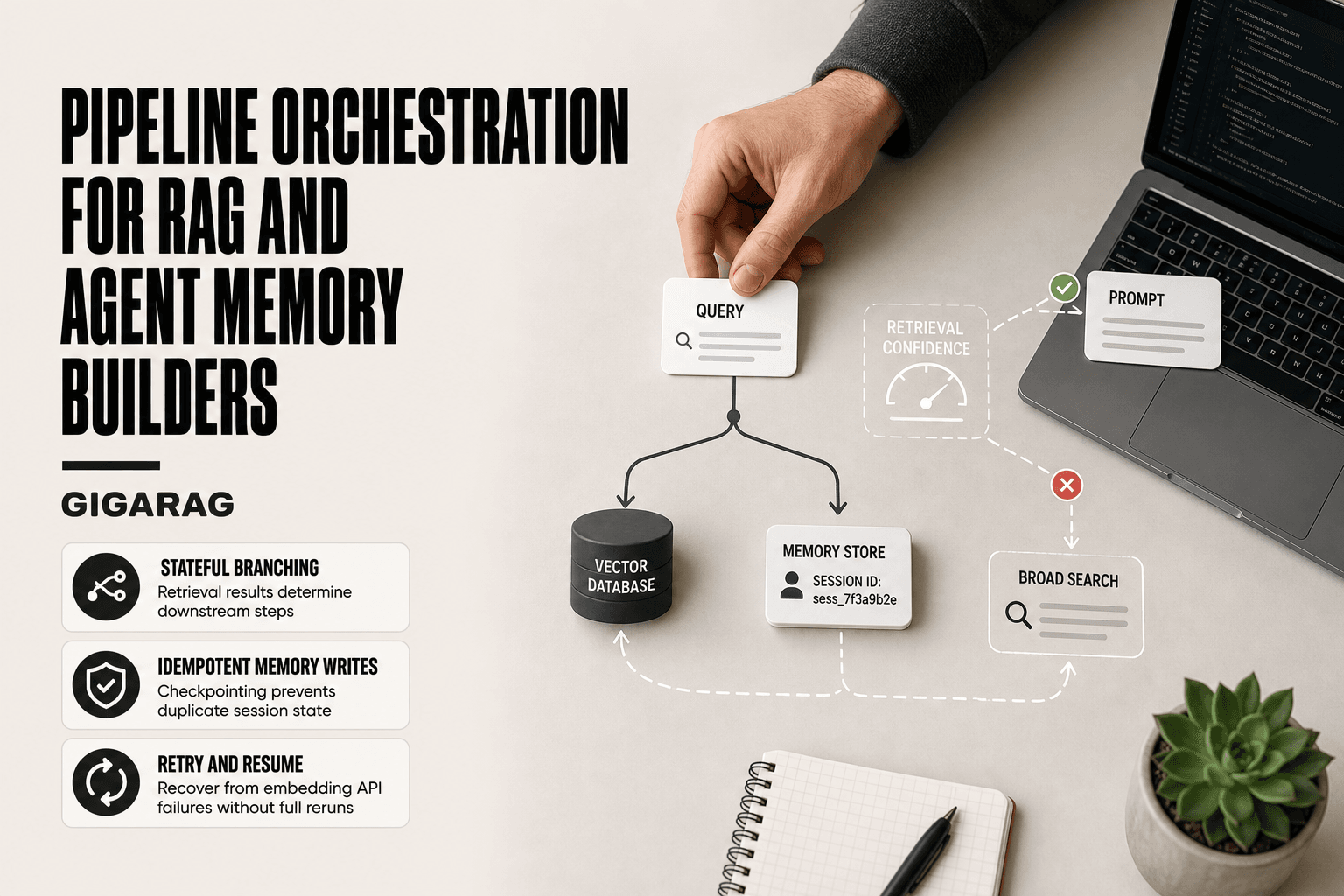
Mitigations help: constrain generation to retrieved context, set a retrieval confidence threshold, and return "no answer found" below it. But none of these are guarantees. Test your failure cases explicitly.
Memory limitations and forgetting
A RAG pipeline has no persistent memory of its own. It knows only what you index and what you inject per query. Drop a document from the index, and that knowledge is gone.
Long conversations exceed the context window. Older turns get truncated. The system forgets. You can build consolidation layers to summarize and re-index, but that's a workaround, not memory. The pipeline remembers what you store. Nothing else.
How to Evaluate and Improve Your Pipeline
You built it. Now prove it works. Evaluation is where most RAG pipelines fall apart, because developers ship on vibes instead of numbers.
Metrics that matter: recall, precision, latency
Recall measures whether the right chunk came back at all. Precision measures whether the chunks you got were actually relevant. Latency is the wall-clock time from query to answer. Track all three.
A pipeline with 95% recall and 40% precision drowns the model in noise. One with 90% precision and 50% recall misses half the answers. Neither is acceptable. Target recall above 90% and precision above 80% for most use cases, then tune from there.
Latency under 500ms feels instant. Over two seconds, users notice. Reranking adds quality but costs time. Measure the tradeoff.
Building a test set
You need 50 to 100 real queries with known-good answers. Not synthetic ones. Pull them from support tickets, search logs, or actual user questions.
For each query, mark which chunks should be retrieved. Then run the pipeline and compare. This is your ground truth. Without it, you're guessing.
Rebuild the test set as your data changes. A test set from last quarter won't catch drift in this quarter's documents.
Iterating on chunking and embedding
Start with the chunk size that fails most often. If recall is low, your chunks are probably too small or too large. Try 256, 512, and 1024 tokens on the same test set. Keep what scores best.
Embedding model swaps are cheap to test. Run three models against your test set before committing. A 2% recall gain is worth the migration. A 0.5% gain isn't.
Rerank only the top 20 candidates, not the full result set. It's faster and usually just as accurate.
Final Thoughts on Building the Pipeline
You now have the full framework: ingest, chunk, embed, index, retrieve, rerank, generate. The stages are simple on paper. The hard part is the iteration loop.
Most pipelines fail from neglect, not design. Chunking drifts as data changes. Embeddings go stale. Test sets rot. Schedule a monthly review of recall, precision, and latency. Fifteen minutes with your metrics beats a weekend rewrite later.
The honest answer is that building the pipeline takes real work. There's no shortcut around clean data and honest evaluation. What you can skip is the plumbing. GigaRAG handles the agent memory and RAG pipeline scaffolding so you spend your time on chunking strategy and test sets, not wiring vector stores to LLMs.
Start small. Ship a pipeline that answers 50 questions well before you chase 5,000. Building the pipeline is a loop, not a launch.
Frequently Asked Questions
What does "building the pipeline" mean?
In the context of LLM applications, it refers to constructing a RAG or agent memory pipeline: a series of steps that ingest data, create embeddings, store them in a vector database, retrieve relevant context, and generate responses. It is distinct from sales or physical pipelines.
Did Trump build the Keystone pipeline?
The Keystone XL pipeline was a proposed extension of the Keystone pipeline system. Construction was halted and the project was canceled in 2021. This is unrelated to RAG or agent memory pipelines.
What company is building the new pipeline?
If you are asking about physical pipelines, companies like TC Energy or Enbridge are often involved. For RAG pipelines, there is no single company; developers build them using tools like LangChain, LlamaIndex, and vector databases such as Pinecone or Weaviate.
Is the pipeline being built?
Physical pipeline projects vary by region and are subject to regulatory approval. For RAG pipelines, building is an ongoing software development process that you can start immediately with open-source tools.
What are the key stages of a RAG pipeline?
The typical stages are: data ingestion, chunking, embedding, indexing in a vector store, retrieval, and generation. Each stage affects the quality of the final output.
How does agent memory differ from standard RAG?
Agent memory often includes both short-term (conversation context) and long-term (persistent vector store) components. Standard RAG typically focuses on retrieving from a static knowledge base without maintaining state across interactions.
What are common pitfalls when building a RAG pipeline?
Common pitfalls include poor chunking strategies, using embeddings that don't match the domain, neglecting metadata filters, and failing to evaluate retrieval quality. These can lead to irrelevant context and hallucinations.
About GigaRAG
GigaRAG is for agent memory and RAG pipeline builders. get this right. Whether you are working through building the pipeline or something adjacent, we publish what we have actually tested, including where it falls short.