
Cheaper Reranking Strategies for Production RAG and AI Agents
Reranking reorders the limited candidate set returned by retrieval, placing stronger matches nearer the top. In a two-stage pipeline, retrieval produces the initial candidates and the reranker refines their order.
The cheapest viable approach depends on measured quality, candidate count, latency, completed-workload cost, and operating overhead. Compare API, self-hosted, and cascade options on the same workload rather than relying on a headline model price.
Quick answer
A reranker improves the order of retrieved candidates. Choose the cheapest setup by measuring relevance, latency, completed-query cost, and operating effort on representative queries.
- Compare candidate cutoffs on your own queries.
- Track Recall@k, MRR, nDCG, latency, and cost per query.
- Include operating and engineering effort in self-hosting estimates.
What are cheaper reranking strategies?
Cheaper reranking strategies limit the work performed after retrieval: choose an appropriate candidate set, compare model options, and measure the resulting quality, latency, and completed-query cost.
[!note] Reranking reorders the candidate documents it receives. Measure first-stage retrieval separately so you know what enters the ranking stage.
Where reranking sits between retrieval and generation
Reranking follows retrieval. Vector, lexical, or hybrid retrieval returns a limited candidate set; the reranker scores those candidates and returns a revised order.
Reranking is typically applied to the candidate set returned by retrieval rather than directly to every document in a corpus. One published two-stage example uses vector retrieval followed by reranking the top 100–200 candidates.
What reranking can and cannot improve
Use a reranker to refine the relevance order of retrieved candidates. This can be useful when a coding agent must choose among similar code chunks or retrieve project notes from an earlier session.
The candidate pool available to reranking comes from retrieval. Evaluate retrieval, chunking, freshness, and access controls separately rather than treating reranking as a substitute for them.
The five cost drivers: volume, candidates, tokens, utilization, and operations
“Cheaper” is not just a lower model price. Compare candidate count, service latency, infrastructure use, and the operating work required to deliver completed queries.
For any deployment, calculate cost per completed workload rather than comparing a model-call price with an hourly machine rate. Include idle time, retries, storage, bandwidth, support, and engineering overhead where they apply.
API reranking vs. self-hosting: what should you compare?
| Factor | API reranking | Self-hosted reranking |
|---|---|---|
| Deployment | Call a hosted reranking service. | Deploy and operate a model on your infrastructure. |
| Cost inputs | Measure the provider's billing unit against actual request volume and candidate count. | Include compute, utilization, idle capacity, and engineering effort. |
| Latency | Measure end-to-end service latency on your queries. | Measure inference latency on your target hardware and workload. |
| Operational work | Integrate the API and monitor its behavior. | Manage deployment, capacity, updates, and reliability. |
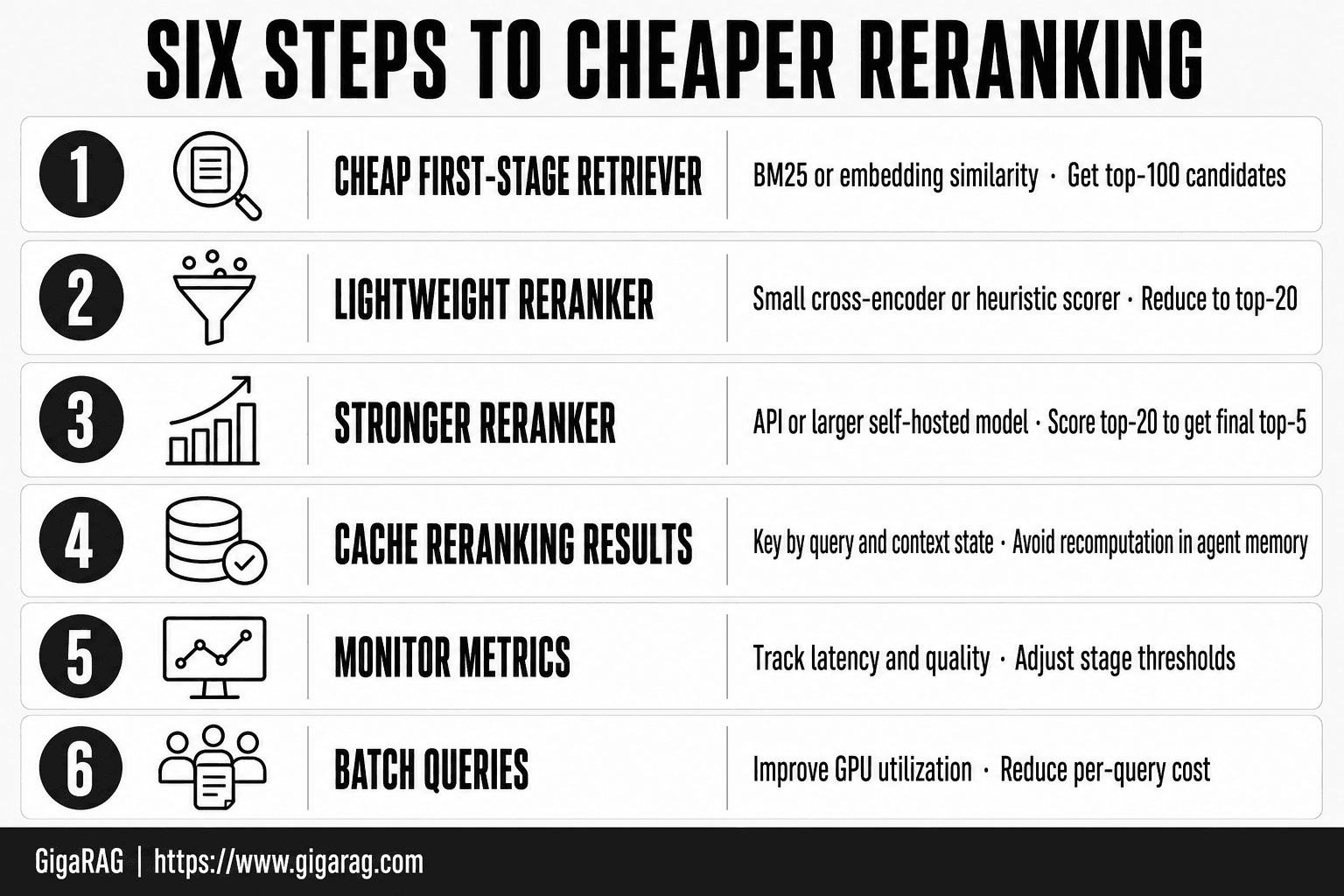
Build a cost model before comparing rerankers
Don't compare an API's headline rate with a GPU hourly rate. Compare the cost of a completed query, including idle capacity, failed requests, storage, bandwidth, and the engineering time needed to keep the service running. A completed-workload model makes those omissions visible.
Separate per-query, per-document, and token-based billing
First, record the billing unit stated in the provider’s current documentation. For self-hosting, allocate the measured cost of compute and related infrastructure across completed queries.
Record the candidate count and input size used in every comparison, since candidate count can affect combined retrieval-and-reranking latency.
A 100,000-query monthly worksheet with transparent assumptions
Use this illustrative worksheet, then replace every input with your current provider prices and measured workload values:
- Queries per month: 100,000
- Candidates reranked per query: C
- Average tokens per candidate, plus query: T
- API cost: 100,000 x billing units per query x current unit price
- Self-hosted compute: monthly machine, storage, and network cost
- Completed queries: 100,000 minus failed or abandoned requests
- Cost per completed query: total monthly cost / completed queries
Include retries and unsuccessful requests in the completed-query calculation.
Total cost of ownership: infrastructure, idle capacity, observability, retries, and maintenance
For self-hosting, include the infrastructure and reliability work that applies to your deployment in the completed-workload calculation. This can include storage, bandwidth, retries, support, and engineering overhead alongside compute costs.
For irregular workloads, compare usage-based capacity with the cost of capacity that may sit idle; bursty jobs can fit on-demand or spot capacity better than committed capacity.
Why a claimed $0.001 per query is incomplete without candidate count and billing-unit context
A claimed per-query figure is meaningful only with its stated billing unit and request assumptions. Record whether the price applies to a request, a batch, a token allowance, or another defined unit.
Record those assumptions beside every cost claim.
Step-by-step: choose a cascade candidate cutoff
- Create a representative offline query set with known relevant documents.
- Run first-stage retrieval and record which relevant documents appear at each candidate depth.
- Evaluate several candidate cutoffs, reranking each returned set.
- For each cutoff, record Recall@k, MRR, nDCG, latency, and cost per query.
- Compare the quality and resource trade-offs against your production limits.
- Choose a cutoff that meets your quality requirements without exceeding those limits.
- Recheck recall and ranking quality when project knowledge or retrieval behavior changes.
API-based reranking: when paying per request wins
For uncertain or bursty demand, compare a usage-based reranking option with the completed-workload cost of keeping serving capacity available.
Typical API request flow for a RAG or coding-agent pipeline
Your retriever returns a candidate set from vector, lexical, or hybrid search. Your application sends the query and candidate texts to the reranking API, receives an ordered list, then passes only the top results to the model.
Keep document IDs and access-control handling in your application flow. Evaluate authorization behavior separately from relevance ranking.
How to read a provider's billing unit before estimating spend
Use the provider’s current documentation, not an old comparison post. Record the exact billing unit and any request limits before estimating spend.
Model spend using the provider’s stated unit and your measured request shape, including candidates per query and input size where those affect the service.
Correctly modeling candidates reranked per query
Start with your real request shape: queries per month, candidates per query, average candidate length, retries, and the provider's billing unit. Then calculate the cost for that shape, not for an abstract request.
For a document-priced service, multiply monthly queries by the candidates reranked per query, then account for retries. Use measured query volume and candidate count when estimating the service.
When API latency, data handling, rate limits, or volume change the decision
Measure end-to-end API latency, including the hosted-service call, on representative requests. Also review the provider’s current documentation for applicable limits and data-handling terms.
Revisit the comparison as traffic changes. Stable production inference can justify reserved or committed capacity, while experiments and bursty jobs often fit on-demand or spot capacity better.
Self-hosted rerankers, quantization, and distillation
Self-hosting adds operating work beyond the model itself. Compare that work with an API using completed-query cost and the deployment, capacity, update, and reliability needs of your environment.
What self-hosting adds beyond GPU or CPU rental
A rented machine is only the start. Plan for the model-serving and reliability work your deployment requires, including how you will handle capacity, updates, monitoring, and ranking changes.
Idle time matters. Compare compute, storage, bandwidth, retries, and engineering time against completed queries, not an hourly GPU rate alone.
BGE, model cards, and FlashRank: verify version, license, hardware, and benchmark scope
Don't treat a model family name as a specification. Check the exact model release, its license, supported languages, context limit, runtime requirements, and the dataset behind any benchmark claim.
Jina reranker v1 turbo English is a deprecated English cross-encoder reranker with 37.8M parameters and an 8K input limit. Its model card reports BEIR and RAG results for the published evaluations.
Quantized builds: evaluate memory, latency, and relevance
If you are considering a quantized build, evaluate the exact runtime and hardware combination you plan to deploy. Compare its ranking metrics, memory use, throughput, and latency with the baseline build.
Test the actual build. Measure ranking metrics, p95 latency, memory use, cold starts, and failure behavior with the same queries and candidate texts.
Distillation: why smaller models may change relevance behavior
Jina’s turbo model uses knowledge distillation from a larger base reranker: the published model card describes a six-layer design derived from a 12-layer base architecture. Treat the resulting speed, memory, and relevance trade-offs as model-specific measurements.
Test distilled models on the query and document types that matter to your application. Jina reports minimal degradation on most tasks for its turbo model, with somewhat lower scores in extremely nuanced ranking scenarios.
A model-card checklist for latency, context limits, and evaluation datasets
Before you deploy, record: exact version, license, languages, maximum input length, supported hardware, precision mode, benchmark datasets, and benchmark metric. Then run your own latency and relevance evaluation, because the model card can't tell you what your retrieval pipeline will exclude.
Use cascade reranking without hiding recall loss
Treat each candidate cutoff as a separate configuration to evaluate. Compare quality, latency, and cost at every cutoff before choosing how many retrieved candidates to rerank.
The retrieval-to-reranking cascade
Start by retrieving a candidate set, then evaluate reranking that set at several candidate depths. If you add another ranking step, measure the resulting quality, latency, and cost against the simpler path.
For every evaluated pipeline design, record the candidate count and model used at each ranking step, then compare the resulting quality and latency.
Why reranking fewer candidates lowers cost and may lower recall
Candidate count is one factor in combined retrieval-and-reranking latency. As IoT Digital Twin PLM’s “RAG Latency: Optimizing Retrieval, Reranking and Streaming for Production” explains, users encounter slow-path behavior across the pipeline rather than an average stage time.
Use retrieval Recall@k to show whether relevant material is present at each candidate depth before reranking.
Choose candidate cutoffs from measured Recall@k and downstream ranking results
Choose K from labeled-query results rather than a vendor example. At each K, record whether the retrieval set contains the documents required for the task.
Then rerank those same sets and compare MRR, nDCG, or Precision@k with latency and completed-query cost. Select the cutoff that meets the targets you set for the workload.
Example experiment matrix: compare K values, p95 latency, and cost per query
Run each labeled query through K values such as 20, 50, 100, and 200. Record retrieval Recall@k, ranking metrics, p50 and p95 latency by stage, failures, and completed-query cost.
Hold the corpus, request shape, and hardware or provider configuration constant for each comparison so the K change is interpretable.
Failure conditions: weak retrieval, long-tail queries, and highly similar code chunks
Cascades need targeted testing when retrieval is weak or candidate sets contain highly similar material. Use the labeled failure cases in your workload to identify query classes that need a different retrieval configuration or a wider cutoff.
Use those results to adjust retrieval, widen K, or omit an extra ranking stage for the affected query class.
Hybrid search for agent memory and coding workflows
Hybrid retrieval merges dense and lexical result sets before later pipeline steps. It can provide a different candidate pool for reranking than either retrieval method alone; measure the merged set’s recall, latency, and candidate count.
Why lexical retrieval still matters for identifiers and exact strings
For corpora containing identifiers, error codes, ticket IDs, and filenames, include queries such as AuthMiddleware, ERR_CONNECTION_RESET, PROJ-482, and billing_rules.py in the retrieval evaluation. Compare lexical, dense, and merged retrieval results on those query types.
Also test queries that paraphrase the stored material. For example, compare retrieval results when a query says "request failures" and a relevant design note uses different wording about retry behavior.
Merge dense and lexical candidates before reranking
Where your stack allows it, run dense and lexical retrieval in parallel, then deduplicate returned chunks before reranking. Measure the added retrieval and merge stages as part of the pipeline latency budget.
Measure the merged candidate count and its effect on reranking latency before selecting a cutoff.
Durable project knowledge versus one-off conversation context
Don't treat chat history as your project memory. A one-off discussion may explain the current task, but repository files, accepted tickets, runbooks, and architecture decisions need their own indexed records and update rules.
For shared project knowledge, store source links, timestamps, and permission data with retrieved material when those controls are required by your workflow. Those records help teams trace retrieved material back to its source as project information changes.
Integration points for IDE agents, MCP tools, repositories, tickets, and documentation
Use a shared retrieval layer when an IDE agent, an MCP tool, and a chat agent need the same project facts. Feed it repository content, issue trackers, and documentation, but keep source type and access rules intact so reranking can return traceable material.
GigaRAG connects agents to a central Hive Mind through MCP or the API. Plan how project knowledge is updated when source material changes.
What hybrid search and reranking do not replace
Hybrid retrieval and reranking are retrieval-and-ranking stages. Design source resolution, permission enforcement, chunking, and knowledge-retention rules as separate system responsibilities.
Include those responsibilities in the same production evaluation as ranking quality and cost.
Evaluate quality, latency, and cost on your own queries
Use published benchmarks to help identify models for testing, then evaluate candidates on a repeatable query set drawn from your own retrieval tasks. Apply the same set to each API, model, quantization setting, hybrid merge rule, and candidate cutoff.
Create a labeled query set from real retrieval tasks
Sample queries from real tasks: bug investigations, code changes, incident questions, and requests that span sessions. Label the chunks that would let an agent complete each task, including more than one relevant result where that reflects reality.
Keep hard cases. Short identifiers, vague follow-ups, stale terms, and near-duplicate code are where a cheap setup can fail.
Measure Recall@k before reranking
Measure Recall@k on the first-stage candidate pool and record the result at each candidate depth before reranking.
Recall@k shows whether relevant material is present in the first-stage candidate pool at each depth. When a relevant file is absent from that pool, record it as a retrieval gap and address it through retrieval configuration rather than reranking evaluation.
Measure MRR, nDCG, and Precision@k after reranking
Use MRR when the first useful result matters most. Use nDCG when several results can be relevant and their order matters. Record Precision@k alongside those measures when it is part of your evaluation plan.
Record each metric at every candidate cutoff, then select the operating point that meets the quality, latency, and cost targets for your task.
Record p50 and p95 latency by pipeline stage
Time query rewriting, embedding, lexical search, vector search, merging, reranking, and prompt assembly separately. Record p50 and p95 at minimum rather than relying on an average alone, since slow pipeline stages can accumulate in a single request.
Calculate cost per successful query and publish assumptions
Divide the total measured operating cost by completed queries that meet your chosen quality bar. State the API charges, compute, idle time, retries, candidate count, and request inputs included in the run.
Make a decision only after quality and operational constraints are visible
Set a minimum quality score, a p95 budget, and a cost ceiling before choosing. If a reranker misses the quality target or breaks your latency budget, it isn't cheaper for your workload.
Caching and request design that reduce reranking work
Treat caching as a separately evaluated pipeline stage. Define cache keys, invalidation rules, and access boundaries so cached rankings remain appropriate for the request context.
Cache normalized queries, not raw strings alone
Normalize safe equivalents before building a cache key: trim whitespace, standardize case where case doesn't matter, and remove harmless formatting noise. Keep meaningful terms, filenames, error codes, and branch names intact, or distinct coding requests may receive the same ranked results.
Store candidate IDs, scores, index version, and reranker version with the result. That gives you a way to reject entries produced by an older pipeline.
Set invalidation rules for changing repositories and agent memory
Define invalidation rules for indexed files, tickets, documents, durable agent memory, and permission changes. Apply those rules to cached rankings so entries remain aligned with the current corpus and access configuration.
Decide whether short-lived conversation context belongs in the cache key for your workload, then test cached results against requests with different context.
Batch candidates carefully without breaking interactive latency
If you batch requests, measure throughput and queue time on the interactive workload you serve. Include the resulting p95 latency in the deployment decision.
Set a maximum wait time and measure its effect at p95, not just throughput. Include queueing and each pipeline stage in the latency budget for the interactive workload.
Avoid caching across tenants, permissions, or materially different contexts
Never reuse a ranking across tenants unless the corpus and access rules are truly shared. Include tenant, user or role permissions, repository scope, branch, retrieval filters, and relevant context version in the key.
GigaRAG includes access controls to manage what each agent can use. Keep permission boundaries in cache-key and reuse decisions so cached rankings follow the access rules you apply.
Choose the cheapest strategy for your operating profile
The lowest unit price can still be the costly choice. Match the setup to your traffic shape, data rules, latency budget, and the engineering work you can sustain.
[!tip] Include project-specific queries in the evaluation set and rerun the test when the corpus or retrieval configuration changes. This makes regressions visible in the workload you actually operate.
Choose an API for bursty demand and limited platform capacity
Consider an API when traffic is uneven, the workload is still changing, or your team does not plan to operate model serving. Compare its completed-query cost and operational scope with available capacity options.
Include request cost, end-to-end latency, data-handling requirements, and documented provider limits in the design. Model the actual candidates sent per query, not only the number of user requests.
Consider self-hosting for steady, well-utilized workloads with operational ownership
Self-hosting can make sense when demand is steady enough to keep hardware busy and you can run deployments, monitoring, retries, and incident response. Compare completed-query cost with the API alternative rather than relying on the GPU hourly rate alone.
Measure utilization and completed-workload cost before committing to capacity.
Use a cascade only when recall and ranking tests support its cutoff
Use a cascade when its measured cutoffs meet the relevance, latency, and cost targets for your workload. Compare Recall@k before reranking with MRR or nDCG after reranking.
Treat K as an operating parameter: compare several values and select the one supported by the evaluation results.
Skip reranking when retrieval quality, latency, or task simplicity makes it unjustified
Skip reranking when retrieval already meets the quality target or when the task does not benefit from another ranking pass. Evaluate retrieval quality, freshness, and access controls independently.
Keep p95 in view. Pipeline stages add up, and users feel slow tail requests rather than average latency.
A pre-launch checklist for production changes
Before you start, make sure you have:
- A labeled query set that includes long-tail and failure cases
- Recall@k, ranking quality, cost, and p95 latency for the old and new paths
- Permission, tenant, branch, and index-version checks
- A rollback path if quality or latency moves the wrong way
Implementation order for cheaper reranking strategies
Start by measuring the retrieval, data-handling, and access-control path that supplies reranking candidates. Add a reranker only when a measured ranking improvement justifies its latency, cost, and operational complexity.
A practical implementation order for teams
Start with a representative query set and confirm that first-stage retrieval returns useful documents at your chosen cutoff. Then set a quality target, p95 latency budget, and completed-query cost budget before you compare any reranker.
Run the current path as a baseline. Compare API, self-hosted, quantized, cached, or cascade options against the same queries and corpus, then deploy the smallest change that meets the target. Don't rebuild the stack for a ranking gain you can't measure.
What to document when publishing internal results
Write down the corpus version, permission rules, query set, relevance labels, candidate cutoff, model version, and hardware or provider setup. Record Recall@k before reranking, ranking results after it, p50 and p95 latency by stage, and cost assumptions for completed requests.
Keep failures in the report. A system that works on common repository questions but misses rare error strings, old decisions, or branch-specific code will give an agent false confidence when it needs context most.
When to revisit the decision as traffic, corpus, and model options change
Revisit the choice when traffic, corpus size, document length, or model options change. Stable workloads can change the capacity comparison, while uneven demand may favor a different capacity model.
Also retest after major corpus or tool-integration changes so quality, latency, cost, access controls, and retrieval behavior remain visible.
Frequently asked questions
What is reranking in a RAG pipeline?
Reranking scores an initial set of retrieved query-document pairs and changes their order by relevance. A cross-encoder reranker scores a query and document together before it returns rankings.
Can reranking recover documents that vector search did not retrieve?
No. A reranker can reorder only the candidates supplied to it. If first-stage retrieval excludes a relevant document, reranking cannot add it back.
How should I model API reranking pricing?
Use the provider’s current pricing documentation to identify its billing unit, then apply that unit to your measured request shape. Keep request charges, candidate counts, input size, retries, and any separate service fees explicit in the worksheet.
When is a self-hosted reranker cheaper than an API?
Compare the options with representative workload measurements. Include volume, candidate count, document length, utilization, operational effort, and the completed-query cost for each option.
How many documents should a reranker evaluate per query?
There is no single cutoff for every workload. Evaluate candidate depths against your own relevance judgments, then compare ranking quality, latency, and cost.
How do I choose a candidate cutoff for cascade reranking?
Run labeled queries at several first-stage depths. Record Recall@k before reranking, ranking metrics after reranking, p50 and p95 latency, failures, and completed-query cost; choose the depth that meets your defined targets.
Which metrics should I use to evaluate a reranker?
Use Recall@k, MRR, and nDCG to assess retrieval and ranking quality, alongside latency and cost per query. The right trade-off depends on your evaluation data and production limits.
Does quantization always preserve reranking quality?
No. Test the quantized model on your own queries and compare ranking metrics and latency with your baseline before adopting it.
Should coding agents use hybrid search before reranking?
It depends on the queries and corpus. Compare retrieval approaches on representative coding queries, then evaluate candidate recall and reranking results.
How should I evaluate caching for reranking?
Test cache keys, invalidation behavior, access boundaries, and p95 latency on representative requests. Include corpus and context changes in the test so the cached path is evaluated alongside the uncached baseline.
About GigaRAG
GigaRAG is a shared memory platform for AI agents that helps developers and teams keep project knowledge available across sessions and tools. It supports shared agent workflows that need project knowledge available beyond a single conversation.
Use GigaRAG to centralize the project material agents consult, then evaluate its retrieval behavior with the same relevance, latency, source-traceability, and permission tests used elsewhere in your workflow.


