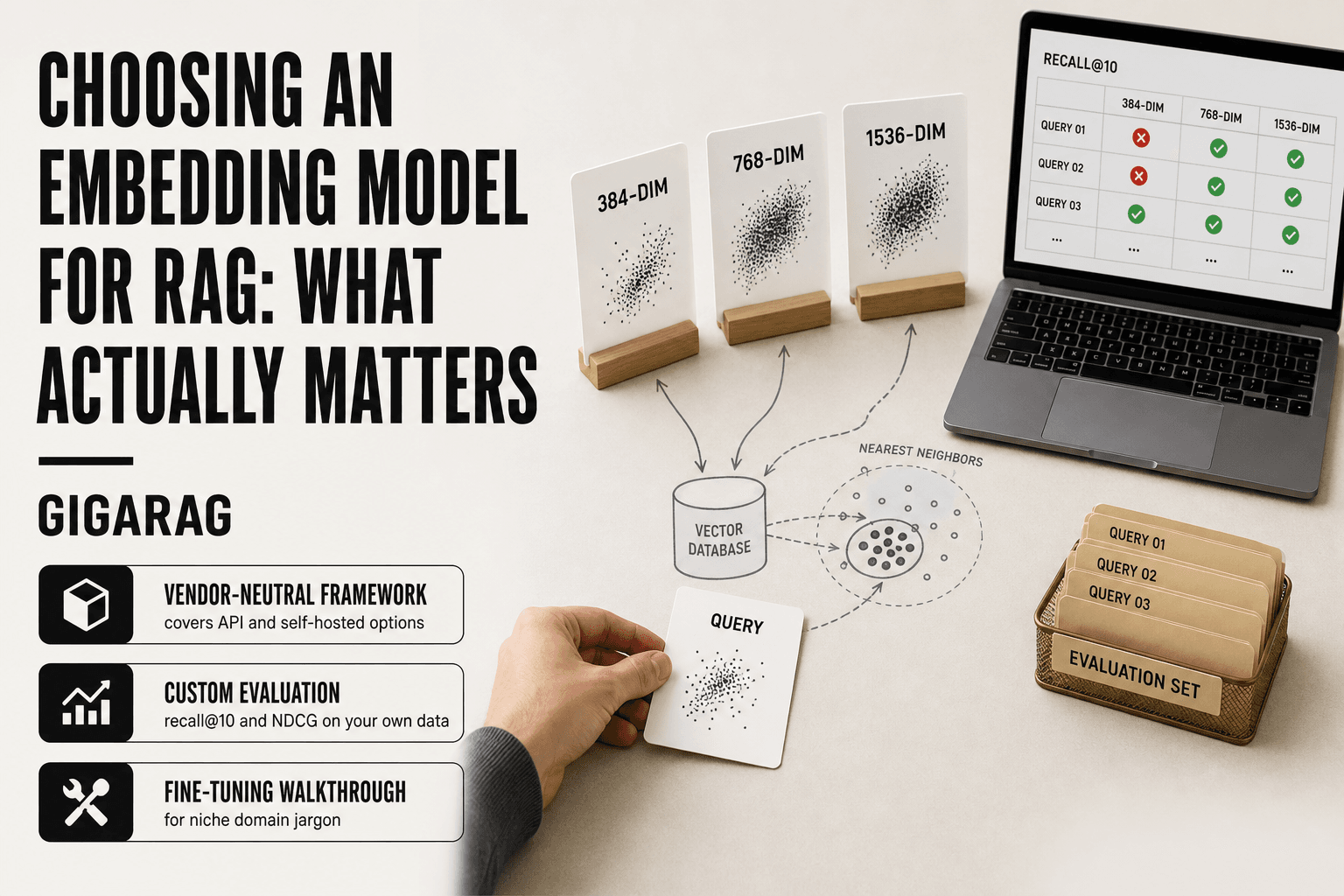
Choosing an Embedding Model for RAG: What Actually Matters
Choosing an embedding model for RAG is a mess, and most of the guidance out there makes it worse. The MTEB leaderboards tell you which model scores highest on a fixed benchmark, not which one will hold up when your agent memory stores a week of customer support tickets and needs to pull the right one in 200 milliseconds. Vendor posts are no better: every provider's model is somehow the best, and the fine print lives in a PDF you'll never open. The honest answer is that no single model wins for every pipeline. It depends on your retrieval task, your data domain, and whether your memory architecture needs fast updates or deep persistence. GigaRAG works with teams building exactly these systems, and we've watched the same confusion play out across dozens of production deployments. This guide covers a vendor-neutral framework for evaluating candidates, a step-by-step fine-tuning walkthrough for niche domains, the agent-memory trade-offs nobody else discusses, and the failure cases you should plan for before you ship.
| At a glance | Details |
|---|---|
| Primary metric | Retrieval recall on your own queries |
| Dimensions | 768-1536 typical; higher costs more |
| Context window | 512-8192 tokens; check chunk fit |
| Hosting | API vs self-hosted trade-off |
| Fine-tuning | Often needed for niche domains |
| Evaluation | Build a golden query set first |
In This Guide
- What Is an Embedding Model and Why It Matters for RAG
- API-Hosted vs Self-Hosted Embedding Models
- Types of Embedding Models: Dense, Sparse, and Multimodal
- Choosing An Embedding Model For Rag: A Step-by-Step Guide
- How to Evaluate Embedding Models for Your RAG Pipeline
- Key Criteria for Choosing an Embedding Model for RAG
- Embedding Models and Agent Memory: What Changes
- Fine-Tuning Embeddings for Your Domain: A Step-by-Step Guide
- Limitations and What You Should Not Expect
- Common Mistakes When Choosing an Embedding Model for RAG
- A Practical Decision Framework for Selecting Your Embedding Model
- Final Thoughts on Choosing an Embedding Model for RAG
What Is an Embedding Model and Why It Matters for RAG
An embedding model converts text, images, or other data into fixed-length vectors of numbers, where similar inputs land close together in vector space. For RAG, this is what lets a system find relevant passages by meaning rather than exact keyword match.
An embedding model takes a chunk of text and maps it to a point in a high-dimensional space. You can't read the coordinates, but the geometry does the work. Two sentences about the same topic sit near each other. Two sentences about different topics sit far apart. That's the entire mechanism.
Here's why it matters for RAG. Retrieval augmented generation works in two steps: find the right context, then generate an answer from it. The generation step is only as good as the context it receives. If retrieval pulls the wrong passages, the model produces a confident wrong answer. Embeddings are the retrieval step's engine.
How embeddings power semantic search in RAG
Traditional search matches keywords. You search for "car repair" and get documents containing those exact words. A document about "automotive maintenance" gets skipped even though it's exactly what you need.
Embeddings change this. The model learns that "car repair" and "automotive maintenance" point to the same concept, so their vectors land close together. When your RAG pipeline embeds a user query and searches for nearby vectors, it finds semantically relevant passages even when the wording differs completely.
In practice, you embed your document chunks once and store them in a vector database. At query time, you embed the question, run a similarity search (usually cosine similarity), and return the top-k nearest chunks. Those chunks become the context for your LLM.
Why embedding quality directly impacts retrieval accuracy
The honest answer is that retrieval accuracy is a ceiling on your RAG system's quality. If the embedding model places the right passage at rank 40 instead of rank 3, your top-k retrieval misses it. The LLM never sees it. No amount of prompt engineering fixes that.
A weak embedding model fails in specific ways. It confuses similar-sounding but different concepts. It misses paraphrases. It ranks generic passages above specific ones. Each failure means your RAG system answers from the wrong context.
The good news is that embedding quality is measurable. You can test models on your own data and see exactly where retrieval breaks. That's what the rest of this guide covers.
[!note] Embedding models are typically evaluated on semantic similarity, but RAG retrieval quality also depends heavily on your chunking strategy, query formulation, and whether you use hybrid search with keyword matching.
API-Hosted vs Self-Hosted Embedding Models
| Factor | API-Hosted | Self-Hosted |
|---|---|---|
| Setup effort | Minutes; just an API key | Hours to days; GPU and serving stack |
| Cost model | Per-token or per-request fees | Fixed GPU cost; scales with volume |
| Data privacy | Text leaves your infrastructure | Data stays on your hardware |
| Latency control | Network and provider dependent | You control batching and hardware |
| Customization | Limited to provider options | Full control; can fine-tune freely |
Types of Embedding Models: Dense, Sparse, and Multimodal
Embedding models fall into three families. Each has a different mechanism, and each wins on different data. You'll likely use more than one in a production RAG pipeline.
Dense embeddings: strengths and trade-offs
Dense models compress text into a fixed vector, usually 384 to 3072 dimensions, where every dimension carries some signal. They're the default choice for most RAG systems because they capture semantic similarity well and are easy to work with.
The strength is generalization. A dense model trained on broad text handles paraphrases, synonyms, and cross-lingual queries without any per-domain tuning. That's why models like OpenAI's text-embedding-3 and open-source options like bge-large dominate RAG stacks.
The trade-off is opacity and cost. You can't inspect a dense vector to see why two passages matched. And higher dimensionality means more storage and slower similarity search. A 3072-dimension vector costs roughly 4x the memory of a 768-dimension one at the same scale.
Sparse and hybrid embeddings: when they win
Sparse embeddings work like upgraded keyword search. Instead of dense vectors, they produce high-dimensional vectors where most values are zero, with non-zero entries mapping to specific terms or n-grams. BM25 is the classic sparse approach. Learned sparse models like SPLADE improve on it by weighting terms based on context.
Sparse models win on exact matches: product codes, legal citations, rare entity names, technical jargon. When a query contains a specific term that must appear in the result, sparse retrieval catches it. Dense models often blur these into a nearby but wrong concept.
Hybrid retrieval combines both. You run dense and sparse search in parallel, then merge results using reciprocal rank fusion or a learned reranker. The main catch is operational complexity: two indexes, two query paths, and a merge step. But for domains with lots of precise terminology, the recall gain is real.
Multimodal embeddings: text, image, and beyond
Multimodal models embed different data types into a shared vector space. A text query like "diagram of a transformer architecture" can retrieve an image, and an image query can retrieve text. Models like CLIP and its successors made this standard.
For RAG, multimodal embeddings matter when your knowledge base includes figures, screenshots, or scanned documents. You embed both text chunks and images into the same space, then retrieve whichever is most relevant to the query.
Keep in mind that multimodal models are typically weaker on pure text retrieval than dedicated text embedding models. If your corpus is 95% text, a text-only model will usually beat a multimodal one on retrieval quality. Use multimodal only when your data actually spans modalities.
[!tip] For agent memory systems, store the embedding model name and version alongside each vector; if you later switch models, you will need to re-embed all stored memories to keep retrieval consistent.
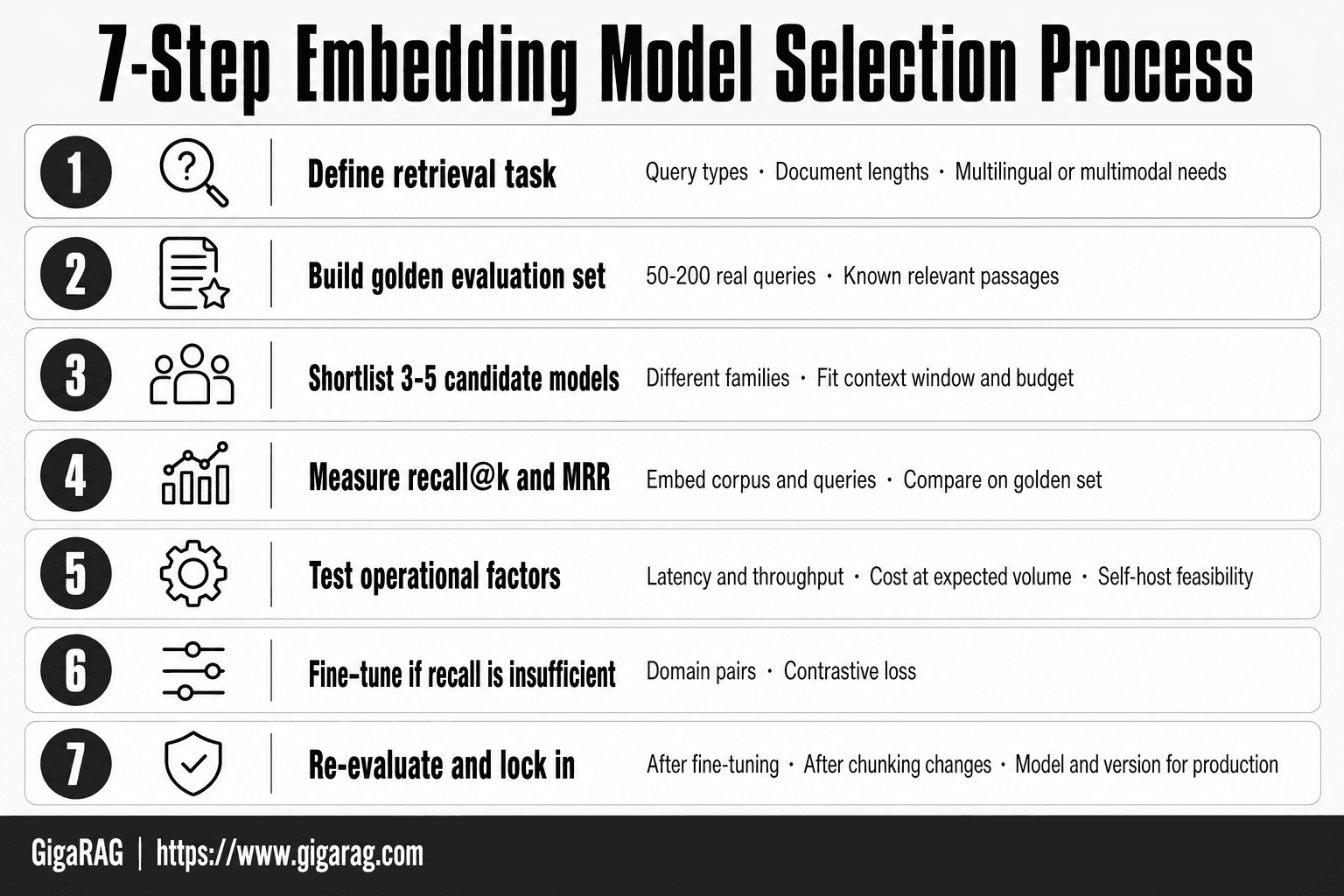
Choosing An Embedding Model For Rag: A Step-by-Step Guide
- Define your retrieval task: note query types, document lengths, and whether you need multilingual or multimodal support.
- Build a golden evaluation set of 50-200 real queries with known relevant passages from your corpus.
- Shortlist 3-5 candidate models from different families (e.g., open-source and commercial) that fit your context window and budget.
- Embed your corpus and queries with each candidate, then measure recall@k and MRR on your golden set.
- Test operational factors: embedding latency, throughput, cost at your expected volume, and whether you can self-host if needed.
- If recall is insufficient for niche jargon, fine-tune the top candidate on domain pairs (query, relevant passage) using contrastive loss.
- Re-evaluate after fine-tuning and after any chunking changes; lock in the model and version for production.
How to Evaluate Embedding Models for Your RAG Pipeline
MTEB scores won't tell you which model works on your data. They'll tell you which model won on a fixed set of public benchmarks. That's a starting point, not a decision.
Why MTEB leaderboards are a starting point, not the answer
MTEB aggregates performance across dozens of tasks: classification, clustering, retrieval, reranking. The overall score averages them. Your RAG pipeline uses exactly one of those tasks: retrieval. A model that ranks #1 overall might be mediocre at retrieval but excellent at classification, which drags its average up.
The retrieval tasks in MTEB also use public datasets like Wikipedia and StackExchange. Your domain probably isn't Wikipedia. If you're building retrieval for medical records, legal contracts, or internal documentation, MTEB retrieval scores measure the wrong thing.
So use MTEB to shortlist, not to choose. Filter for models that score well on retrieval specifically, then run your own evaluation.
Building a custom evaluation set with recall@10 and NDCG
You need a labeled set of query-document pairs from your own domain. Start with 50 to 200 queries. More is better, but 50 real queries from actual users beats 500 synthetic ones.
For each query, mark which documents in your corpus are relevant. This is the expensive part. You can pull queries from support tickets, search logs, or have domain experts write them.
Then measure two things:
Recall@10 answers: did the relevant document appear in the top 10 results? It's binary. If your RAG pipeline feeds the top 5 chunks to an LLM, recall@10 is a reasonable proxy for "did the answer have a chance."
NDCG (Normalized Discounted Cumulative Gain) answers: did the relevant documents rank high, not just appear? It weights position. A relevant document at rank 1 scores higher than the same document at rank 10. Use NDCG when ranking quality matters, not just presence.
Run every candidate model against this set. Compare recall@10 and NDCG side by side. The model with the best MTEB score might not win here.
Testing on your own domain data
Your evaluation set should match production data in three ways: vocabulary, document length, and query style.
Vocabulary matters most. If your domain uses terms that don't appear in general web text, a model trained on general text will embed them poorly. Test with real queries containing your domain's specific terminology.
Document length matters too. If your chunks are 200 tokens, don't evaluate with 2000-token passages. Embedding models behave differently at different lengths.
Query style is the one most people miss. Users type short, messy queries. Your evaluation queries should look like what users actually type, not what you'd write in a test.
Run the evaluation once before you commit to a model, then re-run it whenever you change chunking strategy or add new data. Embedding quality is a property of the model plus your data plus your chunking. Change any one and the numbers shift.
Key Criteria for Choosing an Embedding Model for RAG
You've run your custom evaluation. The numbers are in. Now you need to pick a model, and the decision involves more than recall@10. Here are the five criteria that actually matter, in priority order.
Retrieval accuracy on your domain
This is the one you already measured. Your custom evaluation set is the ground truth. A model that scores 0.82 recall@10 on your domain beats a model that scores 0.91 on MTEB but 0.71 on your data. Trust your numbers.
But accuracy isn't a single number. Look at where the model fails. If it misses queries with rare terms, that's a vocabulary problem. If it misses long queries, that's a context window problem. The failure pattern tells you more than the aggregate score.
Latency and throughput requirements
Embedding happens twice in RAG: once at indexing time, once at query time. Indexing is usually offline, so latency there barely matters. Query time is the constraint.
A 7B-parameter model might give you 2% better recall than a 110M-parameter model. It also takes 10x longer to embed a query. If your RAG pipeline needs to respond in under 500ms, that 2% costs you real latency.
Measure queries per second on your hardware. Don't trust vendor benchmarks. Run the model yourself with your batch size and your infrastructure.
Dimensionality and storage costs
Embedding dimension determines vector index size. A 1024-dimension model stores twice as much per vector as a 512-dimension model. For 10 million chunks, that's the difference between 40GB and 80GB of vector data before any index overhead.
Higher dimension doesn't automatically mean better retrieval. Some 384-dimension models outperform 1024-dimension models on specific domains. Check whether the extra storage buys you measurable recall improvement. If it doesn't, take the smaller model.
Domain fit and out-of-the-box performance
Some models are trained on broad web text. Others are trained on code, scientific papers, or multilingual corpora. If your domain matches a model's training data, you get better retrieval without fine-tuning.
Check the model card. Look at what data it was trained on. A model fine-tuned on medical text will likely beat a general-purpose model on clinical queries, even if the general model scores higher on MTEB.
Cost per embedding and total cost of ownership
Cost has three parts: compute to generate embeddings, storage for the vector index, and ongoing maintenance.
Compute cost scales with model size and query volume. A 7B model costs more per query than a 110M model. At 1 million queries per day, that difference is real money.
Storage cost scales with dimension and corpus size. We covered that above.
Maintenance is the hidden cost. Self-hosted models need updates, monitoring, and someone on call when the embedding service goes down. Managed APIs cost more per query but remove that operational burden. The honest answer is: calculate both, then decide which fits your team.
Embedding Models and Agent Memory: What Changes
Agent memory isn't a static index. It's a living store that grows, prunes, and rewrites itself as the agent works. That changes what you need from an embedding model.
Why agent memory demands different embedding properties
Standard RAG embeds a fixed corpus once and queries it forever. Agent memory embeds new information continuously. Every conversation turn, every tool result, every reflection becomes a candidate for storage. Your embedding model now runs at write time as often as read time.
That means two properties matter more than raw retrieval accuracy. First, consistency: the same concept embedded at different times should land in the same region of vector space. Models with high variance produce memory that fragments. Second, incremental cost: a model that takes 200ms per embedding is fine for indexing 10,000 documents offline. It's a bottleneck when the agent writes 50 new memories per minute.
The honest answer is that most MTEB leaderboards don't measure either property. You'll need to test for them yourself.
Persistence and update mechanisms for long-term memory
Long-term memory has three operations: write, retrieve, and forget. Embedding models only directly handle the first two.
Forgetting is the hard part. When an agent learns something new that contradicts an old memory, you need to find and update the stale vector. That means your embedding model must produce vectors where semantic similarity tracks conceptual overlap closely enough that a contradiction is retrievable as a near neighbor. If the model embeds "the user lives in Austin" and "the user moved to Denver" too far apart, your update logic never finds the stale memory.
You also need to store metadata alongside each vector: timestamps, confidence scores, source tags. The embedding model doesn't provide this. Your memory architecture does. But the model's consistency determines whether that metadata is reachable when you need it.
Balancing retrieval speed with memory depth
Depth costs speed. A memory store with 100,000 vectors retrieves slower than one with 10,000, regardless of model choice. The embedding model's dimensionality compounds this: 1024-dimension vectors double your index size and slow approximate nearest neighbor search compared to 512-dimension vectors.
In practice, most agent memory systems use a two-tier design. A fast, smaller model handles immediate context retrieval. A slower, higher-quality model handles deep memory search that runs less frequently. You don't need one model to do both jobs.
The main catch is that running two embedding models means maintaining two vector spaces. If the models embed the same concept differently, cross-tier retrieval breaks. Test that before you commit.
Fine-Tuning Embeddings for Your Domain: A Step-by-Step Guide
Fine-tuning an embedding model means training it on pairs of texts from your domain so it learns what "similar" means for your data. The base model already knows general language. Fine-tuning teaches it your vocabulary, your entity names, and your notion of relevance.
When fine-tuning is worth it (and when it isn't)
Fine-tuning pays off when your domain has a vocabulary the base model has never seen. Think medical codes, internal product names, legal citations, or a proprietary taxonomy. If your retrieval queries contain terms that don't appear in general training data, the base model embeds them poorly. Fine-tuning fixes that.
It's not worth it when your domain is close to general English. If you're building RAG over help desk articles or marketing copy, a strong off-the-shelf model like bge-large or e5 already retrieves well. Fine-tuning adds engineering time and a training pipeline you have to maintain. The honest answer is: run a baseline evaluation first. If recall@10 on your domain data is already above 0.8, fine-tuning won't move the needle enough to justify the cost.
The main catch is data. Fine-tuning needs hundreds of high-quality pairs at minimum, and thousands for meaningful gains. If you can't produce that, skip it.
Preparing domain-specific training data
You need pairs of texts where one is a query and the other is a relevant passage. The model learns to pull those pairs together in vector space.
Start with what you already have. Search logs from an existing system are gold: real queries paired with the documents users clicked. Support tickets linked to resolved articles work too. If you have neither, generate synthetic pairs. Take a passage from your corpus, then use an LLM to write 5-10 plausible queries for it. Filter out the bad ones by hand.
Make sure your pairs include hard negatives. These are passages that look relevant but aren't. Without hard negatives, the model only learns to separate obviously different texts. It never learns the fine distinctions your domain requires.
A practical target: 1,000-5,000 pairs for a first attempt. Less than 500 and you're likely to overfit.
Fine-tuning with sentence-transformers: pseudo-code
The sentence-transformers library handles most of the plumbing. Here's the shape of a training script:
from sentence_transformers import SentenceTransformer, InputExample, losses
from torch.utils.data import DataLoader

model = SentenceTransformer("BAAI/bge-base-en-v1.5")

train_examples = []
for query, positive, negative in training_pairs:
    train_examples.append(InputExample(texts=[query, positive, negative]))

train_dataloader = DataLoader(train_examples, shuffle=True, batch_size=16)
train_loss = losses.MultipleNegativesRankingLoss(model)

model.fit(
    train_objectives=[(train_dataloader, train_loss)],
    epochs=3,
    warmup_steps=100,
    output_path="./fine-tuned-embedding"
)
MultipleNegativesRankingLoss treats the positive as the only correct match within the batch. It's the default choice for retrieval fine-tuning and works well with triplets.
Keep the learning rate low: 2e-5 is a safe starting point. Three epochs is usually enough. More than five and you risk the model forgetting general language, which hurts performance on queries outside your domain.
Evaluating fine-tuned models against baselines
Don't trust the training loss. Evaluate on a held-out set of query-passage pairs the model never saw during training.
Compute recall@10 and NDCG@10 on both the base model and the fine-tuned model. The comparison is the point. A fine-tuned model that scores 0.85 recall@10 is only impressive if the base model scored 0.62.
Also test on out-of-domain queries. If your fine-tuned model collapses to 0.3 recall on general questions, you've overfit. A good fine-tune improves domain performance by 10-20 points while keeping general performance within a few points of the base model.
The honest answer is that fine-tuning is an experiment, not a guarantee. Run it on a small dataset first. If you don't see a clear gain over the baseline, stop there.
Limitations and What You Should Not Expect
Embedding models are not search engines. They compress text into vectors, and that compression loses information. The model doesn't understand your query. It maps it to a point in space and returns whatever sits nearby. That works well for common language. It breaks down fast when your data looks nothing like the training set.
Rare entities and technical jargon: why embeddings struggle
A rare entity is any term the model saw few times during training. A product code like "XJ-4471" or a protein name like "BRCA2" gets embedded based on its surface form, not its meaning. The model has no semantic anchor for it. So two documents about the same rare entity can land far apart in vector space, while unrelated documents that share similar letter patterns land close together.
Technical jargon is worse. Terms like "attention head" or "sharding" mean specific things in ML contexts but nothing in general text. The model averages across all its training data, so the embedding for "attention head" is a blur of psychology, marketing, and ML uses. Your retrieval precision drops accordingly. The fix is fine-tuning or a hybrid sparse-dense setup, not a better base model.
Adversarial queries and retrieval attacks
Adversarial queries are inputs designed to make retrieval return the wrong documents. A user might ask "show me the document that says the opposite of X" or inject terms that pull irrelevant passages to the top. Embedding models have no defense against this. They map whatever you give them to the nearest vectors, full stop.
The practical risk is higher in public-facing RAG systems. If users can query your knowledge base directly, they can probe it. A determined user can find ways to surface documents they shouldn't see, not by breaking security but by phrasing queries that exploit the model's blind spots. Rate limiting and output filtering help. The embedding model itself won't.
Embedding drift over time
Embedding drift happens when your data changes but your model doesn't. You trained or selected a model for a corpus of documents. Six months later, your corpus has new topics, new terminology, new entity names. The model still embeds everything through its old lens. Retrieval quality degrades slowly, then suddenly.
You won't get an alert. The first sign is usually a user complaint or a drop in your own evaluation metrics. Re-running your custom evaluation set monthly catches it early. Re-embedding your corpus with a newer model is the fix, but it's a full pipeline migration every time. Budget for that.
Common Mistakes When Choosing an Embedding Model for RAG
Most embedding model failures aren't model failures. They're selection failures. The model does exactly what it was trained to do. You picked it for the wrong reason.
Over-indexing on MTEB scores
MTEB is a benchmark suite, not a prediction of your retrieval quality. A model that tops the leaderboard on average might be mediocre on your specific domain. The average hides the variance. A model scoring 70 on MTEB could score 40 on legal text and 85 on news articles.
The honest answer is that MTEB is a starting filter, not a decision. Use it to cut the field from 200 models to 10. Then run your own evaluation on your own data. The model that wins your custom benchmark is the one that matters. A 3-point MTEB gap between two models is noise if your domain test shows the "worse" model retrieving 15% more relevant documents.
Ignoring latency and cost until production
You benchmark retrieval quality in a notebook. Latency doesn't show up there. Then you deploy and discover your 1024-dimension model takes 80ms per query, and your agent makes 12 queries per turn. That's nearly a second of added latency per response.
Cost compounds the same way. A model that charges $0.0001 per embedding sounds cheap. At 10 million embeddings per month, that's $1,000. Re-embedding your corpus quarterly triples it. The main catch is that these numbers only surface when you calculate them before committing. Do the math on your expected query volume and corpus size first. A slightly lower-quality model that's 5x cheaper and 3x faster often wins in production.
Choosing dimensionality without considering storage
Dimensionality is a storage decision disguised as a model decision. A 3072-dimension model produces vectors that take 12KB each in float32. A 384-dimension model takes 1.5KB. For 10 million documents, that's 120GB versus 15GB.
Vector databases charge by memory and disk. Higher dimensionality also slows similarity search, since distance calculations scale with vector length. You can quantize to shrink storage, but that trades recall. The fix is to decide your dimensionality budget before you fall in love with a model. If your corpus is 50 million documents, a 3072-dimension model might be operationally impossible regardless of its retrieval quality.
A Practical Decision Framework for Selecting Your Embedding Model
You've seen the criteria. You've seen the mistakes. Here's the sequence that turns both into a decision you can defend.
Step 1: Define your retrieval task and constraints
Write down three things before you look at a single model. First, what retrieval actually means for your system: top-k document search, passage ranking, entity lookup, or memory recall for an agent. Second, your hard constraints: latency budget per query, corpus size, monthly embedding volume, and storage ceiling. Third, your domain: legal, medical, code, general web text, or something narrower.
The honest answer is that most teams skip this step and start browsing leaderboards. Don't. A model that's perfect for semantic search over Wikipedia will fail on your 50,000-document internal knowledge base with proprietary terminology. Your constraints determine which models are even eligible. A 3072-dimension model is off the table if your vector database budget caps storage at 20GB. Write the constraints down. They're your filter.
Step 2: Shortlist 3-5 candidate models
Use MTEB as a coarse filter, not a ranking. Pull the top 20 models for your task type, then cut to 3-5 based on your constraints: dimensionality, context window, license, and cost per embedding. Include at least one open-source model and one API model. The open-source option gives you a fine-tuning path. The API option gives you a baseline without infrastructure work.
Keep the list short on purpose. Every additional model multiplies your evaluation effort. Five models is the ceiling. Three is better if your domain is narrow.
Step 3: Run a custom evaluation on your domain data
Build a test set of 100-200 queries with known relevant documents. Use recall@10 and NDCG as your primary metrics. Run each candidate model against this set. The model that wins here is your shortlist winner, regardless of what MTEB said.
This step takes a day, not a week. You're not building a research benchmark. You're answering one question: which model retrieves the right documents for my queries. If two models are within 2 points on recall@10, pick the cheaper or faster one. Retrieval quality differences that small won't survive contact with production.
Step 4: Test in production with a canary deployment
Deploy your winning model alongside your current baseline. Route 10% of traffic to the new model. Watch three things: retrieval quality on real queries, latency at your actual query volume, and cost per 1,000 embeddings. Run this for a week minimum.
The main catch is that production queries don't look like your test set. Users ask things you never anticipated. The canary catches that gap before you commit. If the new model underperforms on real traffic, roll back and try your second-place candidate. That's the whole point of the framework: you're not betting on a model, you're running a process.
Final Thoughts on Choosing an Embedding Model for RAG
The framework works because it forces you to answer the question with your own data, not someone else's leaderboard. You shortlist on constraints, evaluate on domain queries, and confirm with a canary. That's the whole job.
Choosing an embedding model for RAG is not a one-time decision. Your corpus changes. Your query patterns shift. The model you picked six months ago may no longer be the right one. Treat the selection as a process you can rerun, not a conclusion you defend. The evaluation set you built in Step 3 is your most valuable asset. Keep it. Add to it as you see production failures. It becomes your regression test for every future model change.
The honest answer is that most teams spend too long choosing and not enough time testing. A mediocre model with a good evaluation loop will outperform a great model with no loop at all. You'll catch drift, catch rare-entity failures, and catch cost overruns before they compound.
If you're building agent memory or a RAG pipeline and want the evaluation, fine-tuning, and canary steps handled inside one platform, GigaRAG is built for that. It won't pick the model for you. It gives you the harness to run the process without stitching together five tools.
Start with your constraints. Run the test. Ship the canary. That's the entire playbook.
Frequently Asked Questions
How to choose an embedding model for RAG?
Start by defining your retrieval requirements: language, domain, document length, and latency budget. Then evaluate a shortlist on a golden set of your own queries using recall@k, not just public leaderboards. Finally, weigh operational factors like cost, hosting, and fine-tuning support.
What is the best free embedding model for RAG?
Several open-source models are available for free self-hosting, such as those in the BGE, E5, and Instructor families. The best choice depends on your domain and language; evaluate them on your own data. Note that 'free' excludes GPU hosting costs.
Do I need to fine-tune an embedding model for my domain?
Not always, but fine-tuning often helps when your domain has specialized jargon or rare entities that general models handle poorly. Start with a strong base model and only fine-tune if evaluation shows a clear recall gap. Fine-tuning requires labeled pairs of queries and relevant passages.
How does embedding choice affect agent memory?
The embedding model determines how well your agent can retrieve relevant past interactions or facts. A model with a small context window may truncate long memories, while a model not tuned for your domain may miss key details. Consistency matters: if you change models, you must re-embed all stored memories.
What embedding dimension should I use for RAG?
Common dimensions range from 384 to 1536, with some models offering higher. Higher dimensions can capture more nuance but increase storage and compute costs. Start with the model's default dimension and only reduce if you need to optimize for scale, checking that recall does not drop significantly.
Can I use the same embedding model for queries and documents?
Yes, most embedding models are designed to embed both queries and documents into the same vector space. However, some models perform better when queries and documents are embedded with different prefixes or instructions, so check the model's documentation.
How often should I re-evaluate my embedding model?
Re-evaluate whenever your corpus changes significantly, when you update your chunking strategy, or when a new model shows substantially better results on your golden set. In production, monitor retrieval quality metrics and set up periodic reviews, such as quarterly.
About GigaRAG
GigaRAG is for agent memory and RAG pipeline builders. get this right. Whether you are working through choosing an embedding model for rag or something adjacent, we publish what we have actually tested, including where it falls short.