Chunking Explained Without the Jargon
Chunking explained without the jargon starts with a failure you've probably already met: you built a RAG pipeline, fed it the right document, and it still returned garbage. The model isn't stupid. The document wasn't missing. The problem is how you broke that document apart before it ever reached the model. That's chunking, and it's the quiet step most tutorials skip.
Chunking is cutting a long document into smaller pieces so a system can find the right piece later, the way you'd cut a long book into index cards instead of rereading the whole thing every time you need one fact. GigaRAG handles this well for agent memory and RAG pipelines, but you don't need any particular tool to understand the idea.
This guide explains chunking without the jargon, shows you exactly how to do it, and tells you honestly what it cannot do. You'll finish with a step-by-step walkthrough you can copy on your first document.
| At a glance | Details |
|---|---|
| What it is | Splitting documents into smaller pieces for retrieval |
| Why it matters | Retrieval quality depends on chunk boundaries |
| Typical chunk size | A few hundred tokens (tune per document) |
| Overlap | Small overlap preserves meaning across boundaries |
| Main risk | Splitting mid-idea causes wrong or missing answers |
| Key limitation | Chunking cannot fix bad source content |
In This Guide
- What Is Chunking? (In Plain English)
- Fixed-Size Chunking vs Semantic Chunking
- Why Chunking Matters for RAG and Agent Memory
- Chunking Explained Without The Jargon: A Step-by-Step Guide
- A Good Example of Chunking (You Can Copy)
- Chunking Methods: Fixed-Size, Semantic, and Everything Between
- How to Choose the Right Chunking Strategy
- How to Chunk Your First Document in 5 Steps
- What Chunking Cannot Do (Honest Limitations)
- Common Mistakes When Chunking for RAG
- Chunking and Tokenization: What's the Difference?
- Final Thoughts on Chunking for Agent Memory
What Is Chunking? (In Plain English)
Chunking is cutting a long document into smaller pieces of text, called chunks, so a system can store and find the right piece later. You don't read a whole book when you need one fact. You find the right page. Chunking does that for software.
The bookshelf analogy
Picture a bookshelf with one enormous book on it. You ask a question, and someone hands you the entire book. You have to flip through every page to find the answer. That's slow, and you'll probably miss things.
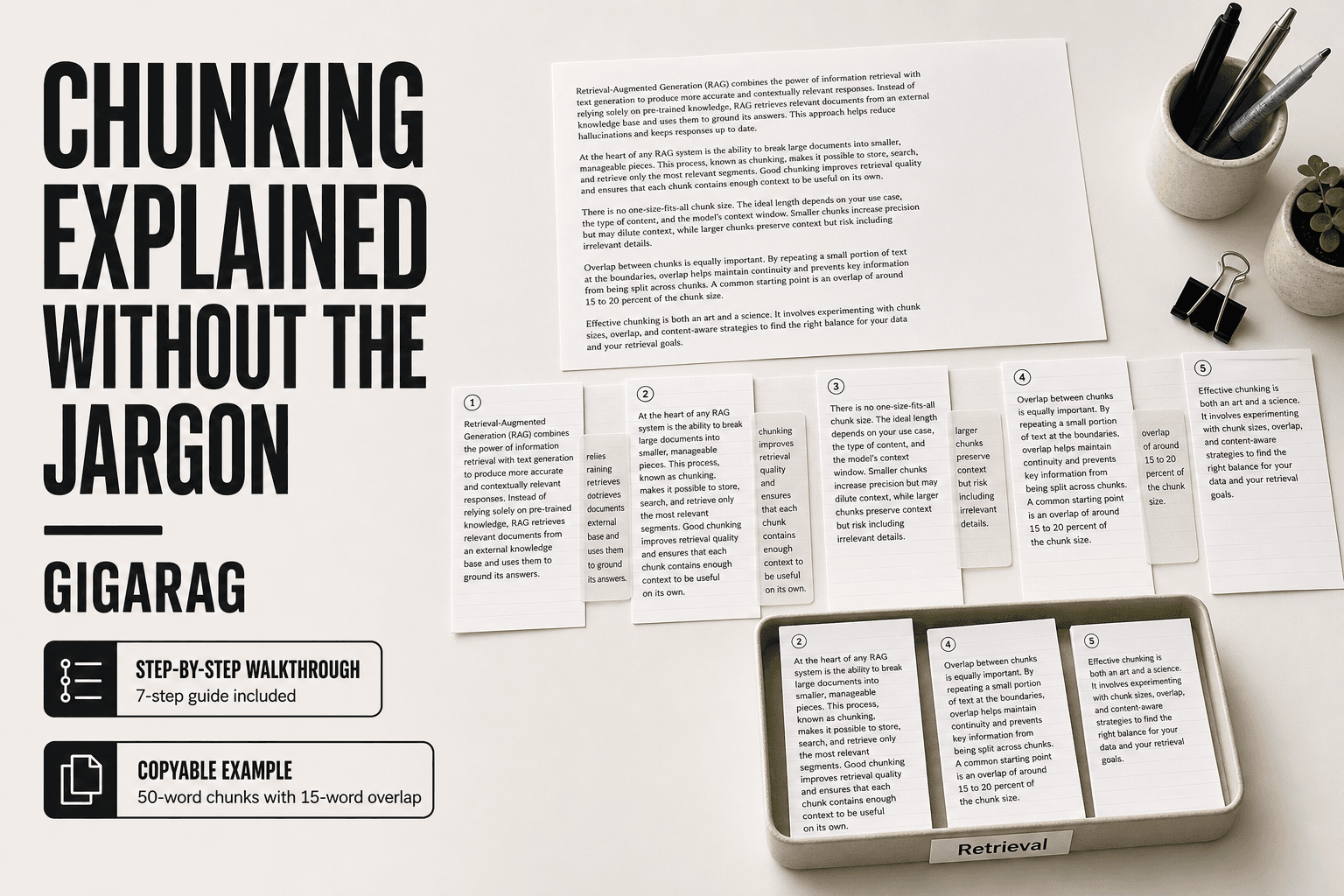
Now picture the same bookshelf with that book cut into index cards. Each card holds one idea. You ask a question, and someone hands you three cards. You read those three cards and answer instantly.
That's chunking. The book is your document. The index cards are chunks. The person handing you cards is the retrieval system.
Chunking in psychology vs. chunking in AI
The word "chunking" comes from psychology. In the 1950s, a researcher named George Miller found that people can hold about seven pieces of information in short-term memory at once. Chunking was the trick of grouping small pieces into bigger ones so you could remember more. A phone number like 555-867-5309 is easier to remember as three chunks than as ten separate digits.
That's a memory technique for humans. It's not what we're talking about here.
Chunking in AI is a storage technique. You're not helping a model remember more. You're cutting text into pieces before you store it, so the model can find the right piece later. Same word, different job.
Why "chunk" is just a fancy word for "piece"
A chunk is a piece of text. Nothing more. It could be 200 words. It could be a sentence. It could be a paragraph. It could be a section of a table.
The word sounds technical, but it isn't. If you've ever copied a paragraph from an article and pasted it into a note, you've made a chunk. The only difference is that in RAG and agent memory systems, you do this deliberately and consistently, with rules about how big each piece should be and where to cut.
That's the whole idea. The rest of this guide is about doing it well.
[!note] Chunking is not the same as the psychology term for grouping information into memorable units — in RAG and agent memory it specifically means splitting source text into retrievable pieces.
Fixed-Size Chunking vs Semantic Chunking
| Factor | Fixed-Size Chunking | Semantic Chunking |
|---|---|---|
| How it splits | By a set token or character count | By meaning or topic shifts |
| Setup effort | Low — pick a size and overlap | Higher — needs a model or rules |
| Speed and cost | Fast and cheap | Slower, more compute per document |
| Best for | Uniform text like logs or transcripts | Dense docs where ideas vary in length |
| Main weakness | Can cut through the middle of an idea | Boundaries can be inconsistent |
Why Chunking Matters for RAG and Agent Memory
Models have a limited working memory. That limit is the context window: the number of tokens a model can hold in mind at once. Feed it a 50-page PDF and it can't see the whole thing. It sees the first few pages, or it sees a summary that loses detail.
Chunking fixes that. You cut the document into small pieces before storing them. When a question comes in, the system retrieves only the chunks that look relevant. Retrieval is the step where the system searches stored chunks and pulls back the best matches. Small chunks mean the system can find the exact paragraph that answers the question, not the whole document.
The context window problem
A context window is like a desk. You can only fit so many papers on it at once. If you dump a 200-page manual on the desk, most of it falls off. If you put three index cards on the desk, you can read every word.
Chunking keeps the desk manageable. The model only sees the chunks that matter for the current question. That's faster and cheaper, and the answer is more likely to be right because the model isn't distracted by irrelevant text.
How agents use chunks as memory
An agent is a system that takes actions: it reads a question, decides what to do, calls tools, and writes an answer. For an agent to remember your documents, it needs to pull the right chunk at the right moment.
Think of chunks as the agent's notes. When you ask a question, the agent searches its notes, grabs the relevant ones, and uses them to answer. Good chunking means the notes are clean and self-contained. Bad chunking means the notes are torn in half, or so big that the agent can't tell which note actually matters.
What happens when chunking goes wrong
The agent doesn't crash. It just gives you a wrong answer with confidence.
A chunk that's too large pulls in paragraphs that have nothing to do with your question. The model reads them anyway and gets confused. A chunk that's too small cuts a sentence in half, so the model sees "the revenue increased by" with no number after it. The agent fills in the blank with a guess.
You'll see this as answers that are almost right but slightly off. The document had the information. The chunking lost it.
[!tip] For agent memory, keep a short summary chunk alongside the raw chunks so the agent can decide what to retrieve without loading everything.
Chunking Explained Without The Jargon: A Step-by-Step Guide
- Pick one document and read it once to note where ideas naturally start and stop.
- Choose a starting chunk size — a few hundred tokens is a common starting point.
- Set a small overlap so sentences spanning a boundary are not lost.
- Split on natural boundaries first (paragraphs, headings) before falling back to a hard count.
- Store each chunk with its source and position so you can trace answers later.
- Run a few test questions and check whether the right chunk is retrieved.
- Adjust size and overlap based on what your tests show, not on defaults.
A Good Example of Chunking (You Can Copy)
Here's a raw paragraph from a support doc. Then the same paragraph split into chunks with a chunk size of 50 words and an overlap of 15 words.
Before: a raw paragraph
"If your device won't connect to Wi-Fi, first restart the router by unplugging it for 30 seconds and plugging it back in. Wait for all lights to turn green. Then open Settings, tap Wi-Fi, and forget the network. Reconnect by entering the password again. If that fails, check whether other devices can connect. If they can, the problem is with this device. Reset network settings under General > Reset. This will erase saved passwords, so write them down first."
That's 82 words. Stored as one chunk, it works fine for a question about Wi-Fi. But ask "how do I reset network settings" and the system pulls the whole paragraph, including router steps you don't need.
After: three chunks with overlap
Chunk 1 (words 1-50): "If your device won't connect to Wi-Fi, first restart the router by unplugging it for 30 seconds and plugging it back in. Wait for all lights to turn green. Then open Settings, tap Wi-Fi, and forget the network. Reconnect by entering the password again."
Chunk 2 (words 36-85): "Reconnect by entering the password again. If that fails, check whether other devices can connect. If they can, the problem is with this device. Reset network settings under General > Reset. This will erase saved passwords."
Chunk 3 (words 71-82): "Reset network settings under General > Reset. This will erase saved passwords, so write them down first."
Why overlap matters
The overlap is the repeated text at the edge of each chunk. Chunk 2 starts with "Reconnect by entering the password again," which is the last line of Chunk 1. Chunk 3 starts with "Reset network settings," which is the last line of Chunk 2.
Without overlap, the splitter cuts wherever the word count lands. That can slice a sentence in half. Chunk 1 might end with "forget the" and Chunk 2 might start with "network." The model sees a fragment and guesses what was meant.
Overlap keeps the edges whole. Each chunk carries a bit of the previous chunk's context, so the model can read a complete thought even when retrieval only pulls one chunk. It costs a little extra storage. The trade is worth it when answers depend on sentences that sit near a boundary.
Chunking Methods: Fixed-Size, Semantic, and Everything Between
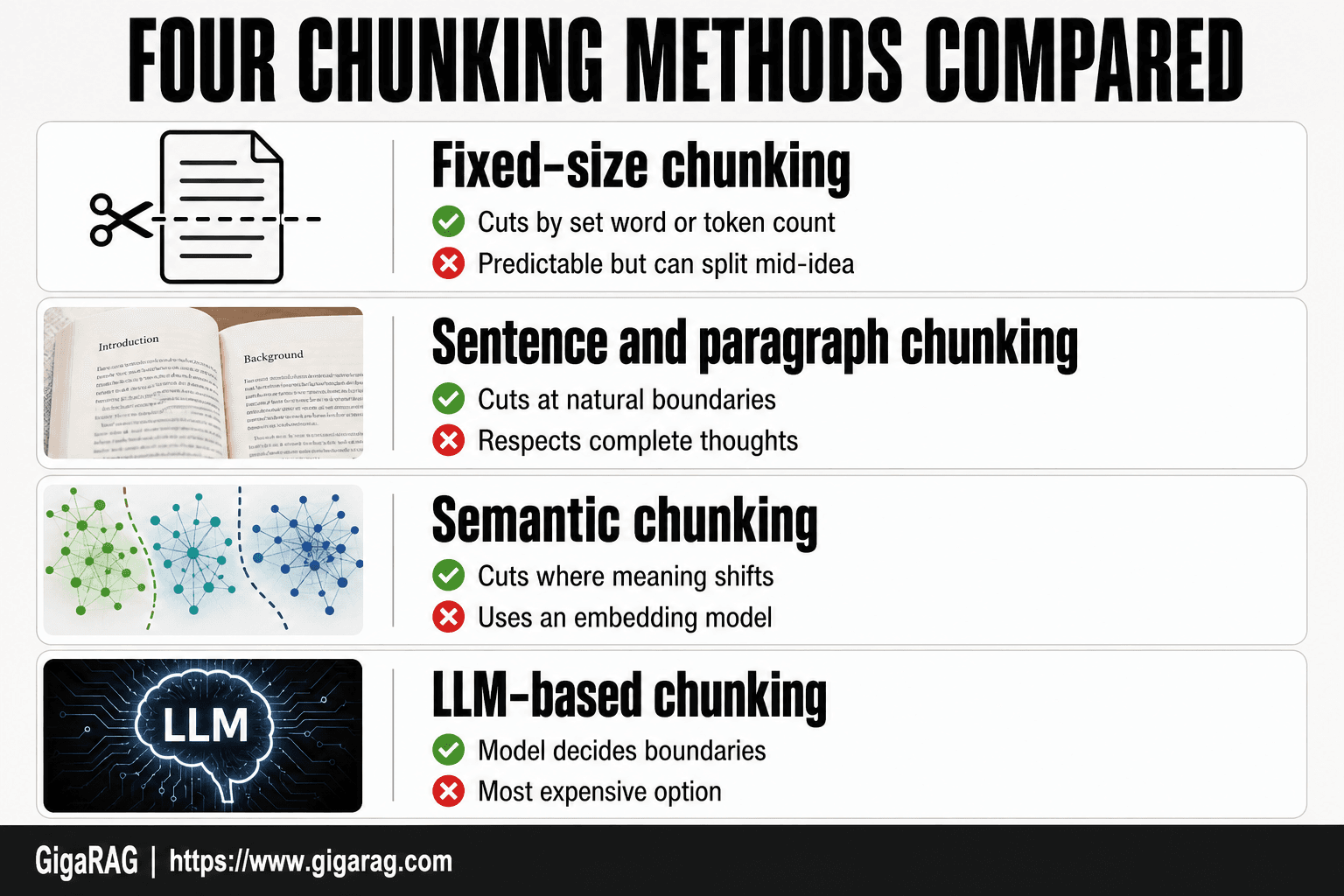
There are four main ways to split a document. They range from dead simple to genuinely clever, and each one fails in its own way.
Fixed-size chunking: the simplest approach
You pick a number, say 200 words, and cut the document every 200 words. That's it.
Pro: It's predictable. Every chunk is the same size, so storage and retrieval costs stay flat.
Con: It cuts mid-sentence, mid-thought, mid-anything. A chunk might end with "the patient was" and the next one starts with "diagnosed with." The model has to guess what connected them.
Fixed-size is where most people start. It's fine for rough drafts and quick tests. It's rarely where you should end up.
Sentence and paragraph chunking: respecting natural boundaries
Instead of counting words, you cut at periods, line breaks, or paragraph ends. The splitter reads until it hits a natural stopping point, then starts a new chunk.
Pro: Sentences stay whole. The model reads complete thoughts, not fragments.
Con: Chunk sizes vary wildly. A paragraph of short sentences might produce a 40-word chunk. A dense legal paragraph might produce a 400-word chunk. Uneven chunks make retrieval less predictable.
This is the best default for most documents. It's simple, and it respects how humans actually write.
Semantic chunking: cutting where meaning shifts
Semantic chunking uses an embedding model to measure how similar each sentence is to the next one. When similarity drops sharply, that's a topic change, and the splitter cuts there.
Pro: Chunks map to ideas, not arbitrary word counts. A chunk about billing stays about billing.
Con: It's slower and costs more. You're running an embedding model over every sentence just to decide where to cut. And it still gets it wrong when a document shifts topic gradually instead of all at once.
Use this when documents cover multiple distinct topics and you need retrieval to separate them cleanly.
LLM-based chunking: letting the model decide
You hand the document to a language model and ask it to split it into coherent chunks. The model reads the whole thing and decides where the boundaries should go.
Pro: It handles nuance better than any rule-based method. A model can tell that a paragraph about "billing" is actually about "billing disputes" and keep it separate from "billing cycles."
Con: It's the most expensive option by far. You're paying for model inference on every document you chunk. And the output isn't deterministic: run it twice and you might get different boundaries.
This is worth it for high-value documents where retrieval quality directly affects revenue or user trust. For everything else, sentence-based chunking gets you most of the way there.
How to Choose the Right Chunking Strategy
There's no one right answer. The best chunking strategy depends on your documents and what you're trying to retrieve. Here's the honest framework: start simple, then adjust based on what breaks.
Start simple, then adjust
Don't begin with semantic or LLM-based chunking. Start with sentence-based chunking at 200 words with 50 words of overlap. Run your RAG pipeline on real queries. See what fails.
When a query returns the wrong chunk, look at why. Did the chunk cut a key idea in half? Increase overlap or switch to paragraph-based. Did the chunk include too much unrelated content? Reduce the size. Did retrieval miss a conceptual match? That's when semantic chunking earns its cost.
The main catch is that you can't know what breaks until you test it. Chunking strategy is empirical. You adjust after seeing failures, not before.
Questions to ask about your documents
Before you pick a method, answer four questions about what you're chunking.
How long are your documents? Short documents (under 1,000 words) might not need chunking at all. Long documents (10,000+ words) need aggressive splitting, and the method matters more.
Are they structured or unstructured? Structured documents like HTML pages, markdown files, or JSON have natural boundaries: headings, sections, fields. Respect those. Unstructured prose needs sentence or paragraph boundaries instead.
Do you need exact matches or conceptual matches? If users search for specific phrases, fixed-size or sentence-based works fine. If they ask questions that require understanding, semantic chunking helps more.
How often does the content change? If documents update frequently, you'll re-chunk often. Expensive methods like LLM-based chunking get costly fast when you're re-running them on every update.
Chunk size and overlap: starting numbers
These aren't magic numbers. They're starting points that work for most English prose.
Chunk size: 200 to 500 words. Below 200, you lose context. Above 500, retrieval returns too much irrelevant content. For dense technical documents, go smaller. For narrative text, go larger.
Overlap: 10 to 20 percent of chunk size. For a 200-word chunk, that's 20 to 40 words. Overlap prevents cutting a sentence or idea in half at the boundary. Too much overlap wastes storage and makes retrieval return duplicate content.
Keep in mind that token counts matter more than word counts. A 200-word chunk is roughly 250 to 300 tokens depending on the text. If your embedding model has a token limit, stay well under it.
Start with 200 words and 50 words of overlap. Test. Adjust. That's the whole strategy.
How to Chunk Your First Document in 5 Steps
You've read the theory. Now do it once. This walkthrough uses sentence-based chunking with 200 words and 50 words of overlap, the same starting numbers from the previous section. Tools like GigaRAG, LangChain, or LlamaIndex can automate every step below, but the logic is the same whether you're writing a script or using a library.
Step 1: Pick a document
Start with something real but manageable. A 2,000 to 5,000 word document works well: long enough to need chunking, short enough to inspect every chunk by eye. A product manual, a help center article, or a section of documentation is ideal.
Don't start with a 200-page PDF. You'll get lost in edge cases before you learn the basics. Pick prose, not tables or code. Structured content needs different handling, and you want to learn the core mechanic first.
Step 2: Choose a method
Use sentence-based chunking. It cuts at sentence boundaries, so you never split a sentence in half. That's the simplest method that respects natural language structure.
Fixed-size chunking is simpler but worse: it cuts mid-sentence whenever it hits the word count. Paragraph-based chunking is also fine, but paragraphs vary wildly in length, which makes your chunks inconsistent. Sentence-based gives you control without much complexity.
Step 3: Set size and overlap
Set chunk size to 200 words and overlap to 50 words. These aren't magic numbers, but they work for most English prose and they're easy to reason about.
200 words is roughly 250 to 300 tokens, which fits comfortably inside any modern embedding model's limits. 50 words of overlap means each chunk shares its last 50 words with the next chunk. That overlap catches sentences that would otherwise get cut at the boundary.
Step 4: Split
Walk through the document sentence by sentence. Accumulate sentences until you hit 200 words. That's chunk one. Then step back 50 words and start chunk two from there. Repeat until you reach the end.
If you're using a library, this is one function call. LangChain's RecursiveCharacterTextSplitter, LlamaIndex's SentenceSplitter, or GigaRAG's chunking module all handle this. If you're doing it by hand, a simple script with a word counter works fine.
Step 5: Check for broken chunks
Read every chunk. Yes, all of them. That's why you picked a short document.
Look for three things. First, any chunk that starts or ends mid-sentence. Second, any chunk that contains two unrelated ideas. Third, any chunk that's missing context the reader would need to understand it.
When you find a problem, adjust. A broken sentence means your overlap is too small. Two unrelated ideas means your chunk size is too large. Missing context means you need more overlap or a different method entirely.
This checking step is where you actually learn chunking. The splitting is mechanical. The judgment is what you're building.
What Chunking Cannot Do (Honest Limitations)
Chunking is a mechanical process. It cuts text into pieces. It does not read, understand, or evaluate anything. If you expect it to fix a broken retrieval pipeline, you'll be disappointed. Here's what it actually can't do.
Chunking doesn't understand meaning
A chunker doesn't know that a pronoun refers to a name three paragraphs earlier. It doesn't know that a sentence is sarcastic, or that a paragraph is a counterargument. It just counts words and cuts.
Semantic chunking gets closer by using embeddings to measure similarity between sentences, but even that is pattern matching, not comprehension. The model sees that two sentences use similar words. It doesn't know what those words mean together.
The consequence: a chunk can be perfectly well-formed and still be useless for retrieval. If the meaning depends on context that lives in a different chunk, the chunk itself won't help your model answer the question.
Chunking can break context
Every chunk boundary is a place where context can leak. A definition in chunk one, an example in chunk two, and a caveat in chunk three. Retrieve only chunk two, and your model gets the example without the definition or the caveat.
Overlap helps, but it's a bandage. Fifty words of overlap catches sentences that straddle a boundary. It doesn't catch ideas that are separated by hundreds of words. If a document builds an argument across five pages, no chunking strategy keeps that argument intact in a single retrievable piece.
This is the tradeoff you're making. Small chunks retrieve precisely but lose context. Large chunks keep context but retrieve imprecisely. Chunking can't solve that tension. It can only let you choose where to sit on it.
Chunking isn't memory — it's just storage
For agent memory specifically, this is the honest truth: chunking alone does not give an agent memory. It organizes raw material so the agent can retrieve pieces of it later. That's storage, not memory.
Memory requires more: knowing which chunks are relevant to the current task, updating chunks when new information arrives, forgetting chunks that are no longer useful, and linking chunks that relate to each other. Chunking does none of that.
If your agent forgets things, better chunking won't fix it. You need a retrieval strategy, a memory management layer, and probably a way to prioritize and expire old chunks. Chunking is the filing cabinet. It is not the librarian.
Common Mistakes When Chunking for RAG
Most chunking mistakes come from treating it as a mechanical step you set once and forget. It isn't. Here are the five errors I see most often in RAG pipelines and agent memory systems.
Chunks too large
A chunk of 1,000 words retrieves fine, but it retrieves too much. Your model gets a wall of text where only two sentences matter. The relevant answer drowns in irrelevant context, and the model starts pulling details from the wrong part of the chunk.
You'll spot this when answers drift off-topic or include facts that were near the right answer but not actually about it. If retrieval keeps returning the right document but the wrong section, your chunks are too big.
Chunks too small
A chunk of 50 words is precise. It's also useless on its own. A definition without its example, a claim without its evidence, a step without the step before it. The model gets fragments and has to guess at the missing context.
You'll spot this when answers are technically correct but incomplete, or when the model confidently fills gaps with wrong information. If retrieval returns the right sentence but the answer is still wrong, your chunks are too small.
No overlap
Cutting at exactly 200 words with zero overlap means every boundary is a coin flip. A sentence that starts in chunk one and ends in chunk two gets split in half. Neither chunk contains the full thought.
Overlap isn't optional. Fifty words of shared text at each boundary catches most split sentences. Without it, you'll see answers that stop mid-idea or reference a concept the retrieved chunk never fully explains.
Ignoring document structure
A table split across two chunks is not a table anymore. A code block cut in half won't run, and worse, the model won't know it's broken. Headers, lists, and section boundaries carry meaning. Cutting through them destroys it.
You'll spot this when answers about structured content (tables, code, forms) come back garbled. If your documents have structure, your chunker needs to respect it. Sentence-based splitting on a table is a mistake.
Treating chunking as set-and-forget
The chunk size that works for your FAQ won't work for your technical docs. The overlap that works for prose won't work for code. Your embedding model, your retrieval method, and your documents all change. Chunking has to change with them.
You'll spot this when a pipeline that worked last month starts returning worse answers. Nothing broke. The data changed, or the queries changed, or the model changed. Chunking is a dial you adjust, not a switch you flip once.
Chunking and Tokenization: What's the Difference?
Chunking and tokenization both cut text into smaller pieces. That's where the similarity ends. Tokenization is how a model breaks text into units it can process. Chunking is how you break a document into pieces before storing or retrieving it. One happens inside the model. The other happens before the model ever sees the text.
Tokens vs. chunks: a simple analogy
Tokenization is like cutting a sentence into individual words. The model can't read "the cat sat" as one unit. It reads "the", "cat", and "sat" as separate tokens, each with a numerical ID. A token is usually a word or part of a word. "Unbelievable" might be two tokens: "un" and "believable".
Chunking is like cutting a book into chapters or pages. You're not breaking language into its smallest parts. You're breaking a long document into sections you can store and search separately. A chunk might be 200 words, a paragraph, or a section. It's a retrieval unit, not a processing unit.
Here's the key difference: tokenization is fixed by the model. You don't choose it. Chunking is your decision. You pick the size, the method, and the overlap.
Why both matter in RAG
You can't skip either step. Tokenization happens because models don't read text, they read numbers. Every chunk you create gets tokenized before it's embedded and stored. If your chunk is 200 words, it might be 250 tokens. The model's context window is measured in tokens, not words.
Chunking matters because retrieval works on chunks. The vector database searches for chunks that match your query, not whole documents. Tokenization matters because it determines how much of your chunk actually fits in the model's working memory.
The honest answer is that you control one and not the other. You can't change how a model tokenizes text. You can change how you chunk it. That's why chunking gets all the attention in RAG guides. It's the dial you can actually turn.
Final Thoughts on Chunking for Agent Memory
Chunking is simple in concept and easy to get wrong in practice. The idea is just cutting a document into pieces. The hard part is knowing where to cut, how big to make the pieces, and whether the cuts break meaning.
Start with fixed-size or sentence-based chunking. Test it. Watch what your agent retrieves and what it misses. Then adjust. No strategy survives contact with real documents, so treat your first chunking setup as a draft, not a decision.
The point of chunking isn't the chunks. It's better retrieval and more reliable agent memory. If your agent finds the right piece at the right time, the chunking worked. If it doesn't, no amount of clever splitting will save you.
That's the honest framing for chunking explained without the jargon: it's a means, not an end. Tools like GigaRAG handle chunking well for agent memory and RAG pipeline builders, but the tool only automates what you still need to understand. Get the basics right first.
Frequently Asked Questions
Can you explain chunking in a simple way?
Chunking means breaking a long document into smaller pieces so a system can find and use the relevant part. Instead of searching a whole book, you search the paragraphs. Smaller pieces make retrieval more precise, but pieces that are too small lose context.
What does chunking mean in slang?
In everyday slang, chunking usually means throwing or discarding something. In RAG and agent memory, it has nothing to do with that — it is a technical step for splitting text into retrievable units.
What is a good example of chunking?
Splitting a product manual by section, then by paragraph, so each chunk covers one instruction. A question about setup then retrieves the setup chunk instead of the entire manual. The same idea applies to policies, tickets, or chat logs.
Is chunking a mnemonic?
In psychology, chunking is a memory technique where you group items to remember them more easily, like grouping digits in a phone number. In RAG, chunking is a data preparation step, not a memory trick — the shared word can be confusing.
What can chunking not do?
Chunking cannot fix source content that is wrong, outdated, or contradictory. It also cannot guarantee that the right chunk is retrieved if your search or embeddings are weak. Treat it as one part of the pipeline, not a cure-all.
How do I choose chunk size and overlap?
Start with a few hundred tokens and a small overlap, then test with real questions. If answers miss context, increase size or overlap; if retrieval is noisy, decrease size. There is no universal best value — it depends on your documents and queries.
What is semantic chunking?
Semantic chunking splits text where the meaning shifts, rather than at a fixed count. It can keep ideas intact but costs more to run and can produce uneven chunk sizes. It is often compared with fixed-size chunking as a trade-off, not a strict upgrade.
About GigaRAG
GigaRAG is for agent memory and RAG pipeline builders. get this right. Whether you are working through chunking explained without the jargon or something adjacent, we publish what we have actually tested, including where it falls short.