How Many Files Can You Upload to Claude? Limits Explained
How many files can you upload to Claude? There isn't one fixed number you can rely on: the count depends on the context Claude can use, while an available search-result snippet separately cites a 30 MB per-file figure that you should check against the current Claude upload screen or official docs.
Successful uploads, useful analysis, and account quotas are different limits. They can vary by interface, plan, model, file type, and current policy. Chat attachments also don't persist across new sessions, so a repository or batch of image-heavy PDFs can exhaust usable context or parse poorly.
Quick answer
There isn't one universal file-count limit to plan around. A successful upload, the amount of content Claude can use, and any product or plan quota are separate constraints.
- Uploading files to a chat does not create persistent cross-session memory or a maintained retrieval layer.
How many files can you upload to Claude? The practical answer
There isn't one useful universal file-count limit for Claude. The number you can send depends on each file's size and format, the extracted text that fits in the active conversation, and the quota on the Claude interface and plan you use.
There is not one useful universal file-count number
A small bug fix might need four source files, a config file, and an error log. A large repository can contain thousands of files, but attaching all of them at once isn't a sound plan even if the upload screen accepts the batch.
The main limit is useful context. Claude needs room for your prompt, the file content it can read, and its response. More attachments can mean less attention for the files that matter.
Per-file size, total extracted content, and product quotas are separate limits
A search-result snippet cites a 30 MB per-file figure and describes file count as context-bound. Don't treat that as a permanent policy. Check current official Claude documentation or the active upload interface before relying on it, since limits can change by plan, model, file type, and surface.
File size is only one gate. A compact PDF with dense text may add more usable content than a larger image-heavy PDF, while an account quota can stop uploads even when each file is small.
What "unlimited subject to context" does and does not mean
It means there may not be one fixed file number for every chat. It does not mean every attachment will fit, parse cleanly, or receive equal attention.
Uploaded files also don't create maintained project knowledge across new chats by themselves. For repeat work, send a focused context pack rather than treating chat attachments as persistent memory.
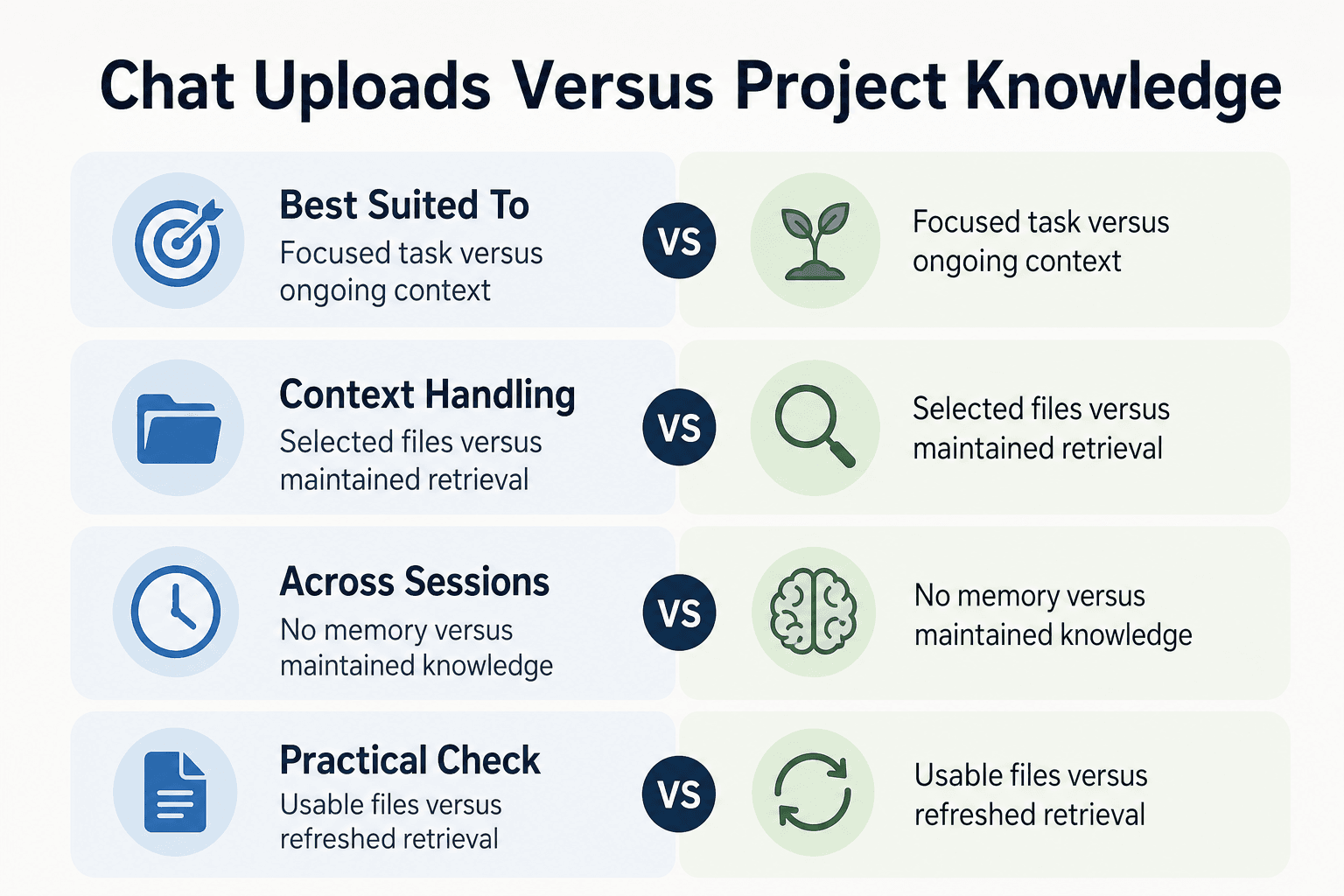
One-off chat uploads vs. ongoing project knowledge
| Factor | One-off chat uploads | Ongoing project workflow |
|---|---|---|
| Best suited to | A focused task using a selected set of files | Work that needs project context across sessions |
| Context handling | Choose the relevant files and content for the conversation | Use a maintained retrieval layer to provide relevant context |
| Across sessions | Uploading alone does not create persistent memory | Requires a separate way to maintain and retrieve project knowledge |
| Practical check | Confirm files attach and the needed content is usable | Check that the workflow refreshes and retrieves the right material |
GigaRAG is a shared-memory platform for AI agents that keeps project knowledge available across sessions and tools. It connects agents to a central Hive Mind through MCP or the API.
What actually limits Claude file uploads
Several gates can stop the same batch: a file may be too large, contain too much readable material, fail to yield usable text, or arrive after you have used an account or session allowance. The error message may not tell you which one happened.
[!note] A successful attachment does not guarantee that all extracted file content is usable for the task. File, context, and product or plan quotas are separate constraints.
File size versus extracted text volume
File size measures storage, not meaning. A short video, a scanned PDF, and a plain-text export can have very different sizes and very different amounts of content Claude can place into the conversation.
Keep the two checks separate. A file can pass the upload gate but still leave little room for your prompt, other attachments, and Claude's reply.
Why PDFs and image-heavy files may behave differently
A text-based PDF gives the system text to extract. A scan or image-heavy report may depend on image reading, page layout, and whether the text is clear enough to interpret.
That makes raw page count a poor planning tool. Before you send a large document batch, pull out the pages, tables, or sections that answer the task.
Conversation context is not the same as an upload quota
Context is the material Claude can work with in the active chat. An upload quota is a product rule that can limit how much you upload or use over a period, even when the conversation itself has room.
The main catch is that a successful attachment does not prove the whole batch remains useful. Start a focused chat when the task changes rather than piling unrelated files into one thread.
Why Free, paid plans, models, and interfaces can differ
It depends on the plan, model, and upload surface you use. The web app, a project workspace, and an API workflow can apply different rules, and those rules can change.
Check the current interface before planning around a batch size. If uploads suddenly fail, reduce the batch, try one representative file, and check whether the issue follows the file, the chat, or your account allowance.
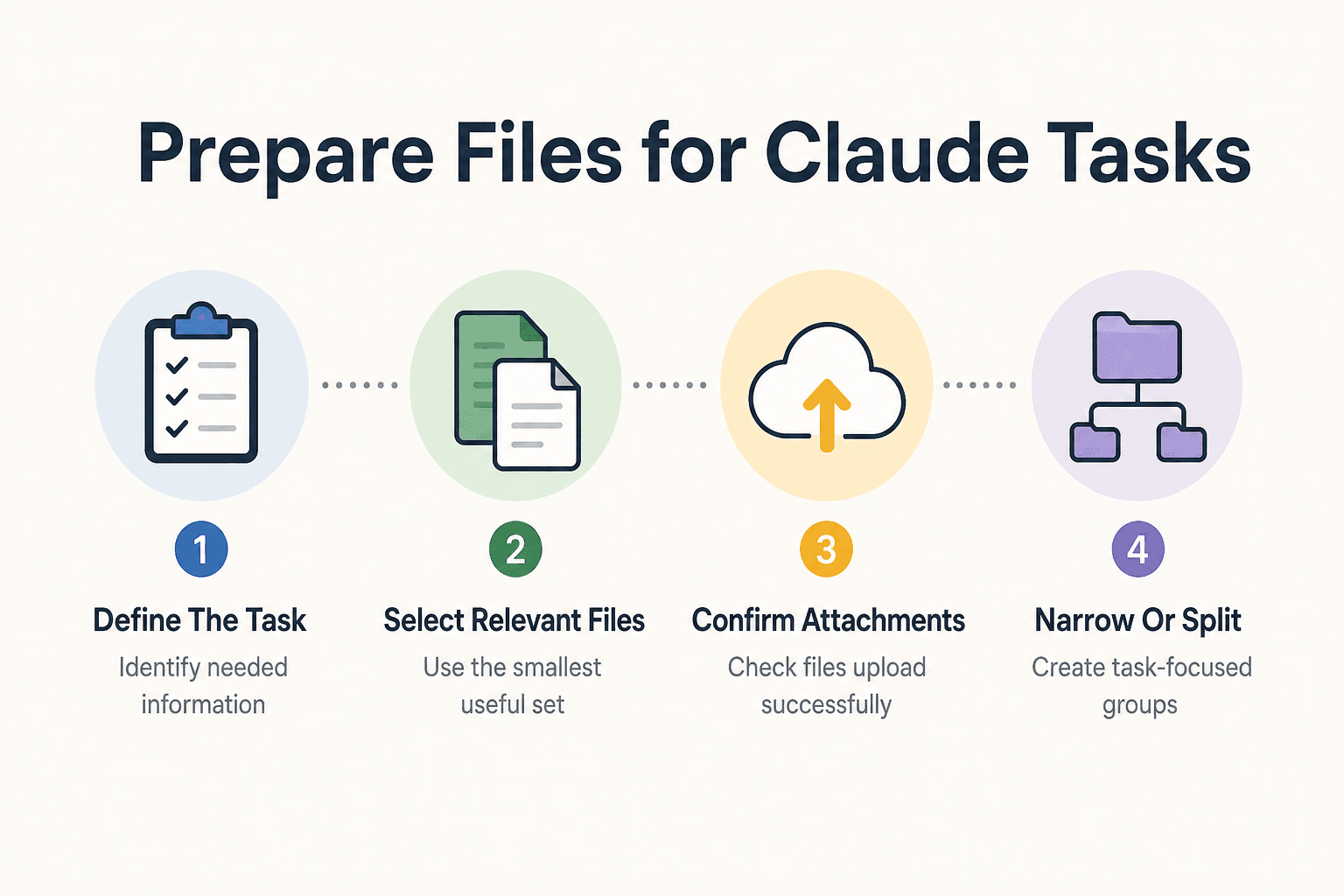
Step-by-step: prepare files for a Claude task
- Define the task and identify the specific information Claude needs.
- Select the smallest relevant set of files rather than attaching an entire repository by default.
- Check that the files attach successfully in the product you use.
- Ask Claude to work with the relevant material and verify that it has the context needed for the task.
- If the batch is too large to use effectively, narrow or split it into task-focused groups.
- For work spanning sessions, use a maintained retrieval workflow instead of relying on chat uploads as persistent memory.
Claude upload examples for documents and codebases
These are selection patterns, not promises about how many files a chat will accept. If you need to upload more than 20 files, don't treat 20 as a target to beat. Split the work by question and send the smallest set that can answer it.
[!tip] For a large codebase, start with the files tied to the task, such as the relevant source files and project instructions. Then add more only when needed.
Example: debugging one service with a focused file bundle
For one bug, attach the route or handler, the service it calls, the failing test, and the exact error output. Add the relevant config file only when it changes the behavior.
Leave out unrelated services, build output, and dependency folders, so your prompt and the files point at the same problem.
Example: reviewing a PDF set without assuming every page will fit or parse equally
Start with the documents that set the decision: the contract, brief, report section, or appendix named in the request. Pull out key pages from long or scanned PDFs when page layout, charts, or image quality matter.
Ask for a comparison against stated criteria, not a vague review of a large pile.
Example: preparing a large repository by sending architecture and dependency files first
Send the README, directory map, package manifest, lockfile if dependencies matter, and the few source files on the task path. Then add files as Claude identifies a real gap.
A full repository dump can bury the entry points you need it to inspect.
Misconception: more attachments do not automatically produce better answers
More files can add noise, duplicate versions, and conflicting instructions. The honest answer is that upload count matters less than relevance.
Give each batch one job, name the expected output, and start a separate chat when the job changes.
Build a reliable upload workflow for AI agent work
Start with a task-specific context pack
Give each upload batch one job: trace a failing request, review a pull request, or explain a module. Include the files that define the path through the code, plus a short prompt that names the expected output.
Keep it small. If the task shifts from debugging to redesign, start a focused chat with a new context pack rather than stacking unrelated files into the old one.
Example preparation snippet: create a review manifest for high-signal files
This is a local preparation example, not a Claude API requirement. It gives you a review list before you attach anything:
cat > review-manifest.txt <<'EOF'
README.md
package.json
src/api/users.ts
src/services/user-service.ts
tests/user-service.test.ts
EOF
Check the list before upload. A manifest makes it easier to spot a missing test, config file, or entry point without sending the whole repository.
Keep generated files, dependency directories, and secrets out of uploads
Don't upload node_modules, build output, caches, coverage reports, or copied vendor code unless the problem is inside them. They add bulk without explaining your application's intent.
Keep secrets out too: .env files, private keys, access tokens, production data exports, and credentials in config files. Redact the value or replace it with a placeholder when the variable name and structure are what matter.
When repeated uploads signal a need for persistent retrieval or memory
It depends on how often the same project context returns and how much of the repository each task needs. A few focused tasks can work well with fresh packs. Rebuilding the same architecture bundle for every chat is a sign you may need a project-knowledge or retrieval system that stores, indexes, and fetches relevant material for each task.
That setup has its own work. You still need to choose what it indexes, refresh stale files, control access, and check what the agent retrieved.
GigaRAG provides shared memory for AI agents through a central Hive Mind. It supports MCP and API connections, with access controls for what each agent can use.
What chat attachments cannot do: they do not maintain project knowledge across sessions by themselves
An attachment can support the chat where you provide it. It does not, by itself, create a maintained memory of your repository for future chats.
Before you start a new session, assume you will need to supply context again unless the product or workflow explicitly provides persistent project knowledge.
Use the current Claude limits as a planning check
The upload screen is the final authority for the chat you are about to start. Limits can vary by plan, interface, selected model, file type, and current Anthropic policy, so don't plan work around a number from an old post.
A file that attaches successfully can still be poor working context. If it crowds out the files that explain the task, or its text does not extract cleanly, Claude has less useful material to work with.
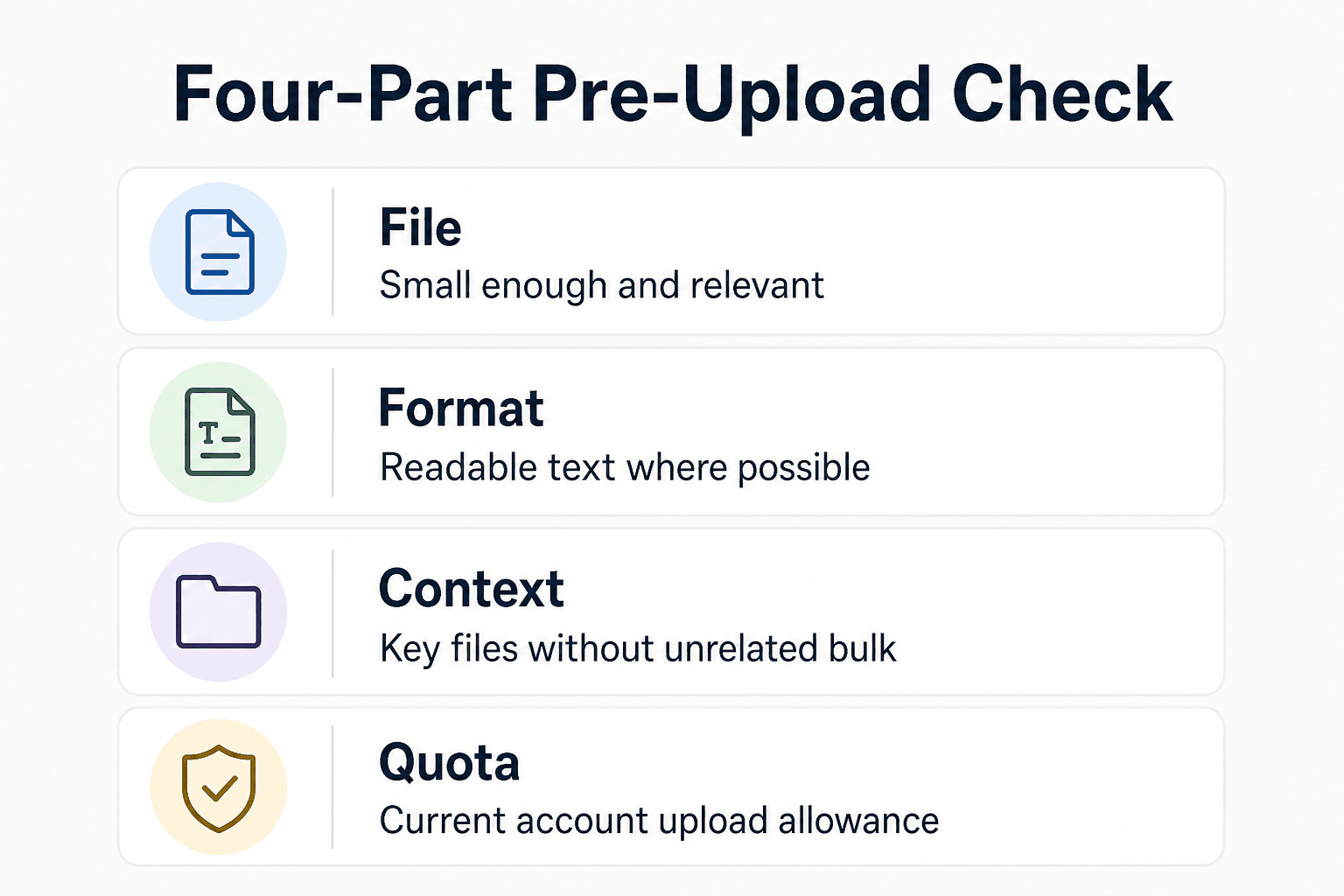
A four-part pre-upload check: file, format, context, and quota
Before you upload, check four things:
- File: Is each file small enough and relevant to the task?
- Format: Can you provide readable text rather than scans or image-heavy documents where possible?
- Context: Does this batch include the key entry points, configs, tests, and requirements without unrelated bulk?
- Quota: Does the current upload screen or official documentation show that your account can send the batch now?
Start with a small representative batch. If it works, add only the next most useful files. If it does not, reduce the set or split the work into focused chats.
If you use GigaRAG for project knowledge, check that its access controls give each agent only the material it needs. That does not change Claude's upload limits, but it can separate ongoing project context from one-off attachments.
Frequently asked questions
Is there a fixed maximum number of files you can upload to Claude?
Do not assume there is one universal file-count limit. The practical limit depends on successful uploads, usable context, and the product or plan quota.
How many files can I send to Claude in one conversation?
There is no single number that applies across every Claude product and plan. Check the current limit for the product you use, and account separately for how much of the files' content the task can use.
Can I upload more than 20 files to Claude?
The number 20 is not a universal limit to rely on. Check the current product limit. Even if a batch attaches, its extracted content may not all be usable for the task.
Do PDF uploads follow the same limits as other files?
A PDF still has to upload successfully, and its extracted content still has to fit the task's usable context. Do not assume that a successful PDF upload means every page will be usable.
Why does Claude accept a file but fail to use all of its content?
Upload success and usable context are different constraints. A file can attach while the amount of extracted material is too large for the task to use in full.
Why do I keep hitting a Claude upload or usage limit?
File upload constraints, usable context, and product or plan quotas are separate. Check which constraint applies in your product rather than treating every limit as a file-count limit.
Do Claude Free and paid plans have the same file-upload limits?
Do not assume the limits are the same across plans. Check the current limits for the specific product and plan you use.
Do uploaded files give Claude persistent memory across new chats?
No. Uploading files into a chat alone does not create persistent cross-session memory or a maintained retrieval layer.
About GigaRAG
GigaRAG is a shared memory platform for AI agents that helps developers and teams keep project knowledge available across sessions and tools. It connects agents to a central Hive Mind through MCP or the API.
Access controls manage what each agent can use. That makes it relevant when repeated attachment packs become a poor fit for ongoing project context, while leaving one-off Claude uploads for focused tasks.


