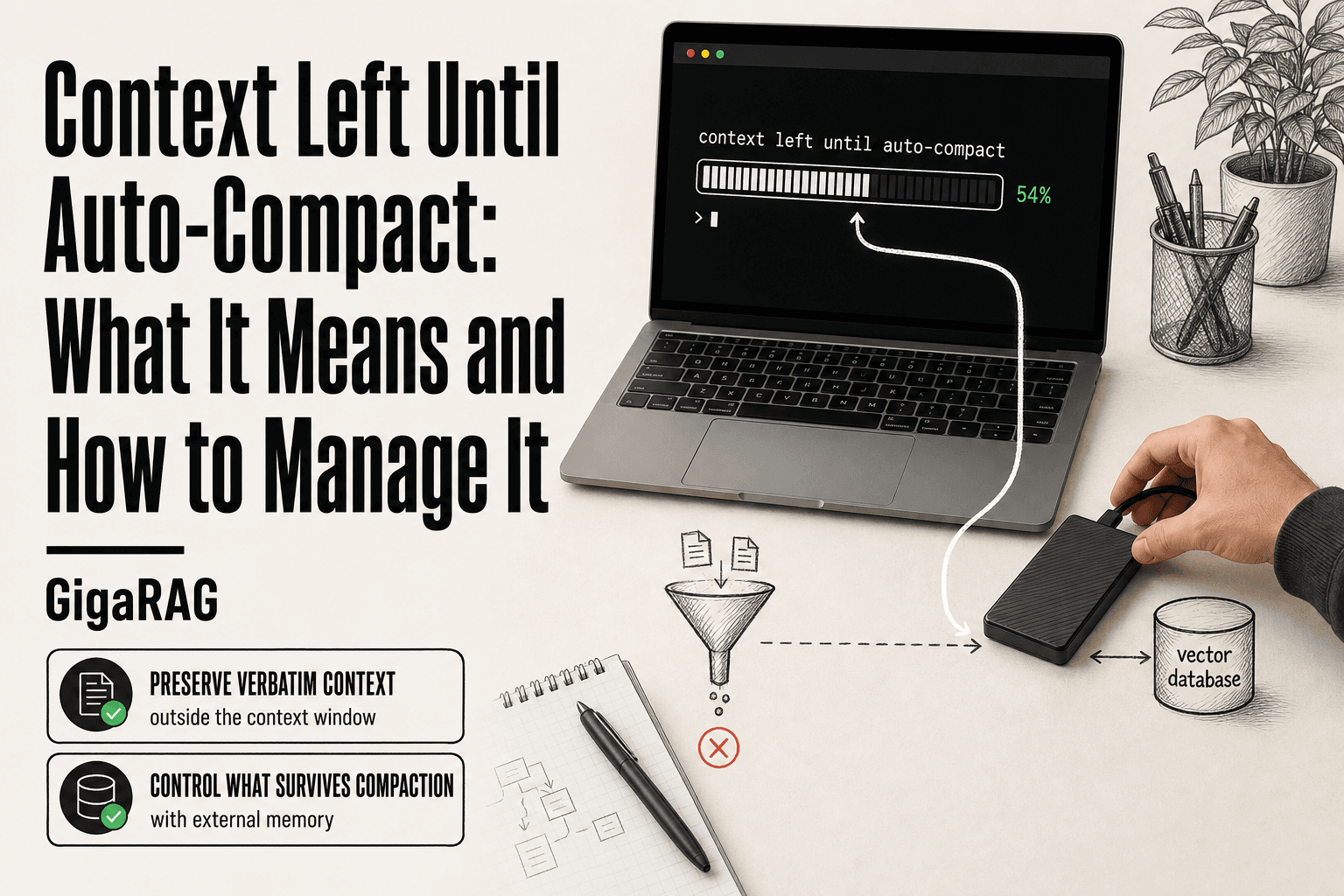
Context Left Until Auto-Compact: What It Means and How to Manage It
You're staring at the Claude Code status bar and it says "context left until auto-compact: 0%". You don't know what's about to be summarized, dropped, or mangled, and you're mid-way through a long agentic workflow that depends on the details you've spent the last hour building. That uncertainty is worse than the compaction itself.
The indicator is simple: it shows how much of your context window remains before Claude Code compresses the conversation to make room.
But if you're building RAG pipelines or agent memory systems, auto-compact isn't just an annoyance. It's a design decision happening to your context without your input. This guide covers what compaction actually preserves and loses, what you cannot expect from it, and when external memory like GigaRAG is the better move. No promises of perfect context preservation here. That's not how any of this works.
| At a glance | Details |
|---|---|
| What it is | Claude Code's automatic context summarization |
| When it triggers | As the context window nears its limit |
| What it keeps | A condensed summary of the session |
| What it drops | Verbatim detail and exact tool outputs |
| Main risk | Silent loss of reasoning-critical detail |
| Best for | Casual sessions, not strict RAG pipelines |
In This Guide
- What 'Context Left Until Auto-Compact' Actually Means
- Auto-Compact vs External Memory Tools: Which Should You Use?
- How Auto-Compact Works Under the Hood
- Context Left Until Auto-compact: A Step-by-Step Guide
- What Gets Preserved and What Gets Summarized
- Why Claude Keeps Compacting Your Conversations
- The Auto-Compact Trade-Offs: What You Gain and What You Lose
- What You Cannot Do and Should Not Expect from Auto-Compact
- Managing Context Left Until Auto-Compact in RAG Pipelines
- Controlling Auto-Compact: Thresholds, Settings, and Workarounds
- When External Memory Beats Auto-Compact for Agent Workflows
- Common Mistakes When Managing Context Left Until Auto-Compact
What 'Context Left Until Auto-Compact' Actually Means
"Context left until auto-compact" is a progress bar showing how much of Claude Code's context window remains before the tool automatically summarizes your conversation to free up space. The percentage drops as you add messages, files, and tool outputs. When it hits zero, compaction triggers.
Reading the indicator: what the percentage means
The percentage is not a measure of conversation quality. It's a measure of remaining token budget. At 50%, you've used half the context window. At 10%, you're close to the threshold where Claude Code will start condensing earlier messages into a summary.
The indicator updates as you work. Every tool call, file read, and response consumes tokens. The number drops faster when you're working with large files or long outputs.
What a healthy buffer looks like
A healthy buffer depends on what you're doing. For short, focused tasks, 40-60% remaining is comfortable. For long-running agent workflows, you'll spend most of your time below 30%.
The key is not the number itself. It's whether you have enough room to finish the current task before compaction kicks in. If you're mid-debugging session at 15%, you're about to lose detail.
The 0% state: what's happening when it hits zero
At 0%, Claude Code compacts the conversation. It summarizes earlier messages into a condensed form, then continues with the freed-up space. You don't lose the session. You lose the verbatim record of what came before.
The summary preserves the gist. It does not preserve exact code snippets, specific error messages, or the precise sequence of decisions that led to your current state. For RAG builders, that distinction matters.
[!note] Auto-compact is a summarization mechanism, not a memory system — it reduces token usage by replacing older turns with a condensed summary, which means exact wording, tool outputs, and edge-case details may not survive. Treat it as a context-budget tool, not a durable store of truth.
Auto-Compact vs External Memory Tools: Which Should You Use?
| Factor | Auto-Compact | External Memory Tools |
|---|---|---|
| Trigger | Automatic when context fills | Manual or programmatic retrieval |
| What is preserved | A lossy summary of the session | Verbatim chunks you choose to store |
| Control over loss | Low — summarization is opaque | High — you decide what to keep |
| Best fit | Short, exploratory coding sessions | Long-running agents and RAG pipelines |
| Setup effort | None — built in | Requires integration and schema design |
How Auto-Compact Works Under the Hood
Auto-compact is not magic. It's a two-stage process: detect that the context window is nearly full, then condense the conversation history into a smaller form that preserves the gist while dropping the verbatim record. The mechanics matter because what gets kept and what gets dropped determines whether your agent still has the information it needs.
What triggers auto-compact
The trigger is a threshold, not a timer. Claude Code watches the token count of the conversation as it grows. When the remaining context drops to a preset level, compaction kicks in automatically. You don't get a prompt asking for permission. The indicator hits zero and the summarization runs.
The threshold is not fixed at a single number across all sessions. It depends on the model's context window size and the buffer Claude Code reserves for the completion it's about to generate. That buffer is the key detail most explanations skip.
The compaction algorithm: summarization vs. truncation
Compaction is summarization, not truncation. Truncation would chop off the oldest messages and discard them entirely. Summarization reads the earlier conversation and produces a condensed version that captures the main points, decisions, and state.
Here's what happens behind the scenes. The compaction step takes the conversation history up to a certain point and asks the model to produce a summary. That summary replaces the original messages in the context window. The freed-up tokens become available for new messages and tool outputs.
The summary is lossy by design. It keeps the narrative thread but drops exact wording, specific code blocks, and fine-grained details. A 50,000-token conversation might compress to a few thousand tokens of summary. The trade-off is unavoidable: you can't keep everything and also keep working.
The completion buffer: why Claude leaves room
The completion buffer is the space Claude Code reserves so the model can finish generating its current response without running out of room. If compaction waited until the context was completely full, the model would have no tokens left to produce the summary itself, let alone continue the conversation.
So compaction triggers early. It fires when there's still enough headroom to run the summarization step and then generate the next response. That's why the indicator hits zero before the context window is technically exhausted. The buffer is not wasted space. It's the room the model needs to do the compaction work and then keep going.
In practice, this means you'll see compaction happen while you still have some nominal context left. The percentage isn't lying to you. It's counting down to the point where compaction must start, not the point where the session dies.
[!tip] For agent memory and RAG work, treat auto-compact as a last resort: write critical state (schemas, decisions, retrieved chunks) to an external memory layer like GigaRAG as you go, so compaction only ever summarizes conversation you no longer need. This keeps your retrieval pipeline's source of truth outside the volatile context window.
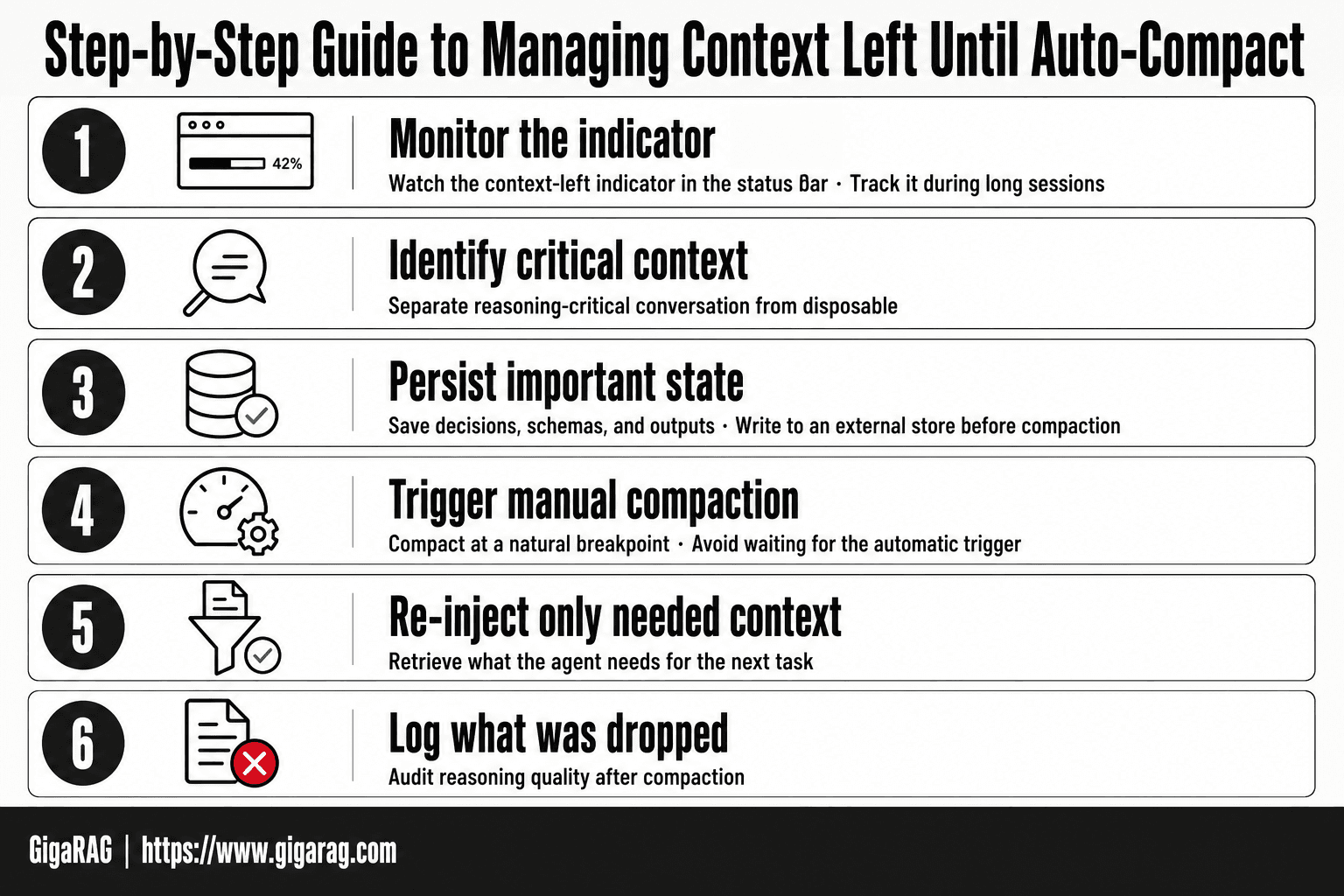
Context Left Until Auto-compact: A Step-by-Step Guide
- Monitor the context-left indicator in the status bar during long sessions.
- Identify which parts of the conversation are reasoning-critical versus disposable.
- Persist important decisions, schemas, and outputs to an external store before compaction.
- Trigger manual compaction at a natural breakpoint rather than waiting for the automatic trigger.
- Re-inject only the retrieved context your agent actually needs for the next task.
- Log what was dropped so you can audit reasoning quality after compaction.
What Gets Preserved and What Gets Summarized
Compaction keeps the shape of your conversation but not the texture. The summary preserves decisions, state, and intent. It drops exact wording, code blocks, and the reasoning chain that led to those decisions. For a RAG builder, that distinction is the whole game.
Information that typically survives compaction
The summary keeps what the model judges to be durable: the task you're working on, files you've touched, constraints you've stated, and conclusions you've reached. Variable names, function signatures, and architectural choices usually make it through because they're load-bearing. The model treats them as state, not noise.
Error messages and their fixes often survive too, but in compressed form. You'll get "fixed the import error by updating the path" rather than the full traceback and the three attempts that failed first.
Information that gets summarized or lost
The first thing to go is verbatim text. Exact prompts, exact outputs, exact code snippets. If you asked the agent to remember a specific string or a precise error message, don't count on it being there after compaction.
Reasoning chains are the second casualty. The summary records that you decided something, not why. The intermediate steps, the alternatives you rejected, the false starts, all of that collapses into a single line. For debugging, that's a real loss. You'll know what changed but not what you tried before it worked.
Tool outputs get flattened. A 2,000-token API response becomes "the API returned a list of 47 users with their roles." The actual data is gone.
Why the distinction matters for agent memory
If you're building an agent that retrieves from a vector store, compaction doesn't touch your external memory. Your embeddings, your documents, your retrieval results, those live outside the context window. What compaction threatens is the working memory: the conversation state that tells the agent what it's doing right now.
The honest answer is that compaction is a survival mechanism, not a memory system. It keeps the session alive by trading detail for continuity. If your agent needs the detail, you need to store it somewhere the compactor can't reach.
Why Claude Keeps Compacting Your Conversations
You're mid-task and the indicator drops to 0% again. The session doesn't die, but something gets flattened. That's not a bug. It's the context window doing its job.
The finite context window problem
Claude Code has a hard ceiling on tokens it can hold at once. Every message, tool output, and file read pushes you closer to it. When you hit the limit, the model has two choices: stop, or compress what came before. Auto-compact picks compression.
The window doesn't grow because your conversation does. Long agent sessions generate context faster than the model can retain it. Compaction is the pressure valve.
Why compaction is better than hard truncation
The alternative is worse. Without compaction, Claude would simply cut off the oldest messages and keep going. You'd lose everything before a certain point with no summary at all.
Compaction at least tries to preserve state. It reads the conversation, extracts what matters, and replaces the raw history with a condensed version. You lose detail, but you keep continuity. The agent still knows what it's doing, even if it can't quote what it said three turns ago.
When repeated compaction signals a deeper issue
If you're compacting every few minutes, the conversation is too heavy for the window. That's not a compaction failure. It's a signal that your working context has outgrown what the model can hold.
The fix isn't to compact more aggressively. It's to move durable information out of the conversation entirely. Store it in files, in a vector database, in anything the compactor can't touch. Compaction is a stopgap, not a storage layer.
The Auto-Compact Trade-Offs: What You Gain and What You Lose
Auto-compact is a trade, not a feature you turn on for free. You get session continuity. You pay in reasoning fidelity. The question isn't whether the trade is worth it. It's whether the trade is worth it for the specific task you're running.
What you gain: longer sessions, fewer hard failures
The obvious win is uptime. Without compaction, a long agent session hits the context ceiling and stops. You lose the whole conversation state. Auto-compact keeps the session alive by condensing history before the wall.
That matters for tasks that run for hours: refactoring a codebase, debugging a flaky test suite, iterating on a design doc. The agent keeps working. It doesn't forget the broad strokes of what it was doing. For many workflows, that continuity is worth more than the details it loses.
There's a second gain that gets less attention. Compaction reduces token pressure on every subsequent turn. A condensed history means each new message costs less to process. The agent responds faster and burns less of your quota. In long sessions, that compounding matters.
What you lose: reasoning quality, nuance, specific details
The cost is real and it's not subtle. Compaction summarizes. Summaries flatten. The specific error message from three turns ago becomes "an error occurred." The exact function signature becomes "the function." The constraint you stated in passing becomes a vague preference.
That loss hits reasoning quality directly. Claude reasons from what it can see. When the compactor replaces precise context with a summary, the model reasons from the summary. It makes different calls. Sometimes worse calls. The agent still sounds confident. It just has less to be confident about.
Nuance goes first. Anything that depended on exact wording, exact numbers, or exact ordering gets blurred. If your task requires the agent to remember that the API returns a 429 on the third retry, not just "rate limits exist," compaction is working against you.
The community debate: Reddit vs. official documentation
The Reddit threads are blunt: disable auto-compact. The reasoning is simple. Developers who hit the 0% indicator mid-debugging watch their agent lose the exact context they needed. They'd rather manage context manually than let an algorithm decide what to keep.
The official documentation is more measured. Compaction is framed as a necessary mechanism for long sessions, with the completion buffer designed to let the current task finish before summarization kicks in. Anthropic's position is that compaction beats hard failure.
Both are right, for different users. If you're running short, focused tasks where every detail matters, manual control wins. If you're running long, exploratory sessions where continuity beats precision, auto-compact earns its keep. The honest answer is that the default exists for the second group, and the first group should turn it off.
What You Cannot Do and Should Not Expect from Auto-Compact
Auto-compact is a lossy operation. It trades detail for continuity. If you expect it to preserve your context perfectly, you will be disappointed, and your agent will make decisions based on a summary that missed the one detail that mattered.
Auto-compact cannot preserve perfect context
Compaction summarizes. Summarization discards. The algorithm keeps what it judges important and drops the rest. It has no way to know that the offhand comment you made three turns ago is the constraint your agent needs next turn. The percentage indicator tells you how much room is left, not how much meaning will survive.
The honest answer is that no summarizer can preserve perfect context. Not Claude's. Not any other. The act of condensing text into a shorter form necessarily loses information. What changes is which information gets lost and whether that loss matters for your task.
Auto-compact cannot replace deliberate memory design
Auto-compact is a stopgap. It keeps a session alive. It is not a memory system. A memory system stores what you decide matters, retrieves it when needed, and preserves it across sessions. Auto-compact does none of those things deliberately. It reacts to a threshold and keeps whatever fits.
If you are building an agent that needs to remember user preferences, project constraints, or domain knowledge across multiple sessions, auto-compact will not do that job. It was never designed to. Treating it as memory means accepting that your agent will forget things at unpredictable moments.
Auto-compact should not be your only context management strategy
Relying on auto-compact alone is a plan to lose information at scale. You need a deliberate strategy: what to store externally, what to checkpoint, what to let compaction handle. The compaction threshold is a safety net, not a design principle.
For RAG pipeline builders, the implication is direct. If your retrieval quality depends on the agent remembering what it already retrieved, compaction can silently degrade that chain. External memory, checkpointing, or manual compaction gives you control over what survives. Auto-compact gives you a summary. Those are not the same thing.
Managing Context Left Until Auto-Compact in RAG Pipelines
RAG pipeline builders face a problem casual Claude Code users don't. Your agent's reasoning depends on what it retrieved, and compaction can silently degrade that chain. The summary keeps the gist but drops the specific passage, the exact quote, the source metadata that made the retrieval useful in the first place.
How auto-compact affects RAG retrieval quality
Compaction hits RAG pipelines at the worst possible point: after retrieval, before synthesis. Your agent pulls five chunks from a vector store, starts reasoning over them, and then compaction fires. The chunks get summarized. The summary says "the documents discuss pricing tiers" but loses the actual numbers. Your agent now answers from a paraphrase of a paraphrase.
The damage compounds across turns. Each compaction summarizes the previous summary. By the third cycle, the agent is reasoning over text that no longer exists in any retrievable form. If your pipeline logs the final answer but not the intermediate context, you can't even audit where the error came from.
When to use auto-compact vs. manual compaction vs. external memory
It depends on what your agent needs to remember and for how long.
Auto-compact works when the task is short, the context is disposable, and you don't need to audit the reasoning path. A quick code review, a one-off question, a scratch session. Let it compact and move on.
Manual compaction works when you know what matters. You trigger /compact at a deliberate checkpoint, after the agent has produced output you want to preserve. You control the moment, which means you control what gets summarized into the next phase.
External memory is the right call when retrieval quality matters across sessions. Store the raw chunks, the embeddings, the source metadata in a system built for that. Let the agent query it when it needs specifics. Compaction becomes irrelevant because the ground truth lives outside the context window.
A decision framework for context management in agent pipelines
Start with one question: does this agent need to recall exact details from earlier in the session, or is a summary enough?
If a summary is enough, auto-compact is fine. Don't over-engineer it.
If exact details matter, you need external memory. A vector store, a key-value checkpoint, a structured log. Something the agent can query that returns the original text, not a compressed version.
The middle ground is manual compaction at checkpoints you define. Compact after each completed subtask, not when the threshold forces it. That way the summary reflects a coherent unit of work, not whatever happened to be in the buffer when the percentage hit zero.
For long-running agentic workflows, the honest answer is that you'll likely use all three. Auto-compact as a safety net, manual compaction at task boundaries, external memory for anything that must survive intact. The mistake is picking one and pretending the others don't exist.
Controlling Auto-Compact: Thresholds, Settings, and Workarounds
You can't set a custom threshold in Claude Code. The percentage indicator is informational, not configurable. What you can control is when compaction happens, whether it happens at all, and what you do instead.
Adjusting auto-compact thresholds
There's no /config flag for "compact at 20% instead of 0%." The threshold is baked into the client. What you can adjust is your own behavior around it.
Watch the indicator. When it drops below 15%, you're close. Finish the current thought, checkpoint anything important, and decide: let it compact, trigger manual compaction now, or export and start fresh.
The percentage itself is an estimate. Claude Code calculates it from token usage against the context window, but the exact math isn't documented. Treat it as a rough gauge, not a precise meter.
Disabling auto-compact: when it makes sense
You can disable auto-compact in settings. The Reddit community recommends this almost universally, and for short sessions it's the right call. No surprise summaries, no silent context loss. You see exactly what's in the window at all times.
The trade-off: when you hit the hard limit, the session fails. No graceful degradation. You get an error and you lose whatever wasn't saved.
Disable it when your sessions are short, your context is disposable, or you're debugging and need to see the exact conversation state. Keep it enabled when sessions run long and a hard failure would cost more than a lossy summary.
Manual compaction and the /export, /clear, paste workaround
Manual compaction gives you the control auto-compact takes away. Run /compact at a checkpoint you choose, after the agent has produced output worth preserving. The summary reflects a coherent unit of work.
The workaround that Reddit settled on is more deliberate: /export the conversation, /clear the session, then paste back only what matters. You become the compaction algorithm. You decide what survives.
It's slower. It's manual. But for RAG builders who need to audit exactly what the agent saw, it's the only method that preserves the original text verbatim. The exported file is your ground truth. The pasted context is your curated subset.
For anything that must survive intact across sessions, neither manual compaction nor the export workaround is enough. That's where external memory earns its place.
When External Memory Beats Auto-Compact for Agent Workflows
Auto-compact is a lossy stopgap. It keeps a session alive by summarizing what came before, but it doesn't preserve what was said. For workflows where the agent's reasoning depends on exact prior context, that distinction is the whole game.
Scenarios where auto-compact loses critical information
Compaction summarizes conversation history. It doesn't archive it. When your agent is mid-debug and has narrowed a bug to three candidate functions, the summary might say "investigated several functions" and drop the names. The next step depends on those names.
Long-running agent workflows hit this constantly. A session that spans hours accumulates decisions: which files were ruled out, which API responses were anomalous, which hypotheses were tested and abandoned. Compaction condenses all of that into a paragraph. The agent continues, but it's reasoning from a summary, not from the record.
RAG pipelines make this worse. If your agent retrieves documents, embeds them, and reasons over them, compaction can summarize the retrieved content itself. The retrieval step becomes pointless if the evidence gets compressed before it's used.
How external memory complements or replaces compaction
External memory stores the full record outside the context window. The agent writes important state to a database or vector store, then retrieves it when needed. Nothing gets summarized away because nothing has to fit in the window.
This doesn't mean you never compact. It means compaction stops being your memory system. You compact to manage the working context. You use external memory to preserve the ground truth.
The pattern: agent writes checkpoints to external memory at decision points. When context runs low, compaction can summarize freely because the critical details are already stored elsewhere. If the summary loses something, the agent retrieves the original.
GigaRAG for agent memory and RAG pipeline builders
GigaRAG is built for exactly this split. It's an external memory layer designed for agent workflows and RAG pipelines, not a general-purpose note app. You store agent state, retrieved documents, and decision records in a queryable store that sits outside the context window.
The honest trade-off: external memory adds latency and complexity. Every write and read is an extra step. For short sessions, it's overhead you don't need. For long-running agents where context loss costs real money or real debugging hours, it's the difference between an agent that remembers and one that guesses.
Start with compaction for disposable context. Add external memory when the agent's next action depends on what it said three hours ago.
Common Mistakes When Managing Context Left Until Auto-Compact
Most developers don't lose context to auto-compact. They lose it to their own decisions about auto-compact.
Disabling auto-compact without understanding the trade-offs
The Reddit advice is blunt: turn it off. That works for short sessions where you'd rather hit the wall than lose nuance. It fails for long-running agents. Disable compaction and the context window fills until the session hard-fails. You trade gradual loss for sudden loss. The honest answer is it depends on session length. If your agent runs for hours, disabling auto-compact means it dies mid-task with no summary to fall back on.
Treating auto-compact as a memory system
Compaction is not memory. It's a survival mechanism. Developers who rely on it to preserve agent state end up with an agent that confidently reasons from a paragraph-long summary of three hours of work. The summary says "investigated the bug" but not which files were ruled out. The agent continues, unaware it's guessing. Auto-compact keeps the session alive. It does not keep the session accurate.
Ignoring the completion buffer
The buffer exists so Claude can finish what it started. Developers who pack the window to 100% leave no room for the next response. The agent compacts, then immediately needs more context than the summary provides. Leave headroom. The buffer isn't wasted space. It's the difference between a clean compaction and a mid-reasoning truncation.
Not planning for context loss in long-running agents
The mistake isn't losing context. It's being surprised by it. Long-running agents will compact. The question is whether critical state lives somewhere outside the window before that happens. Developers who plan for loss write checkpoints to external memory at decision points. Developers who don't plan watch the agent retrieve a summary and call it ground truth. Managing context left until auto-compact means deciding what survives compaction before compaction happens.
Frequently Asked Questions
What does context automatically compacted mean?
It means Claude Code has summarized older parts of your conversation to free up space in the context window. The original messages are replaced with a condensed version, so token usage drops but verbatim detail is lost.
What does auto compact mean?
Auto-compact is the automatic version of the /compact command in Claude Code. When the context window approaches its limit, the tool summarizes the session so you can keep working without manually clearing history.
What does compact context mean in Claude Code?
Compacting context means replacing a long conversation history with a shorter summary. It preserves the gist of what happened while discarding the exact wording, which reduces token cost but can lose nuance.
Why does Claude keep compacting my conversations?
It compacts because your session is consuming tokens faster than the context window allows. Long tool outputs, large file reads, and extended back-and-forth all accelerate this — reducing verbosity or offloading memory externally can slow it down.
What does 'context left until auto-compact' mean?
It is a countdown showing how much context budget remains before auto-compact fires. When it reaches 0%, Claude Code will summarize the session automatically, and you may lose details you did not save elsewhere.
Can I disable or change the auto-compact threshold in Claude Code?
Claude Code exposes settings that affect when compaction occurs, but the exact options and defaults change between versions. Check the current documentation or your local settings file rather than relying on older guides.
Is auto-compact safe for RAG pipelines and agent memory?
Not on its own. Auto-compact summarizes conversation, not your retrieval index, and it can drop exact chunks or tool outputs your pipeline depends on. For production RAG and agent memory, keep the source of truth in an external store and use compaction only for disposable chat history.
About GigaRAG
GigaRAG helps GigaRAG is for agent memory and RAG pipeline builders. get this right. Whether you are working through context left until auto-compact or something adjacent, we publish what we have actually tested, including where it falls short.