Document Ingestion and Parsing for RAG: What Actually Works
Document ingestion and parsing for RAG is where most pipelines quietly die. You feed in a clean PDF, the system chunks it, and retrieval returns fragments that are technically present but functionally wrong: a table split across three chunks, a heading divorced from its section, a footnote promoted to body text. The answers look plausible. They are not. Parsing is the foundation everything else depends on, and when it fails, retrieval quality fails with it no matter how good your embeddings are.
I've watched this happen across dozens of pipelines, and the honest answer is that most parsing failures are preventable. Not all of them. Some documents are simply hostile to automated extraction, and no tool fixes a source PDF that was never structured in the first place. But the gap between what a careless pipeline produces and what a deliberate one produces is enormous.
GigaRAG, a platform built for agent memory and RAG pipeline builders, treats parsing as a first-class problem rather than a preprocessing afterthought. This guide covers the full ingestion pipeline, the real trade-offs between rule-based and LLM-powered parsing, a decision framework for tool selection, and the failure cases you should plan for before they hit production.
| At a glance | Details |
|---|---|
| Core goal | Convert raw documents into clean, retrievable chunks |
| Biggest failure | Silent parsing corruption that ruins retrieval quality |
| Key decision | Parser choice by document type and structure |
| Common formats | PDF, HTML, DOCX, Markdown, plain text |
| Agent memory twist | Needs temporal and entity-aware chunking, not just text |
| Hard limit | Parsing cannot fix poor source quality or ambiguity |
In This Guide
- What Is Document Ingestion and Parsing for RAG?
- Rule-Based Parsing vs LLM-Based Parsing for RAG
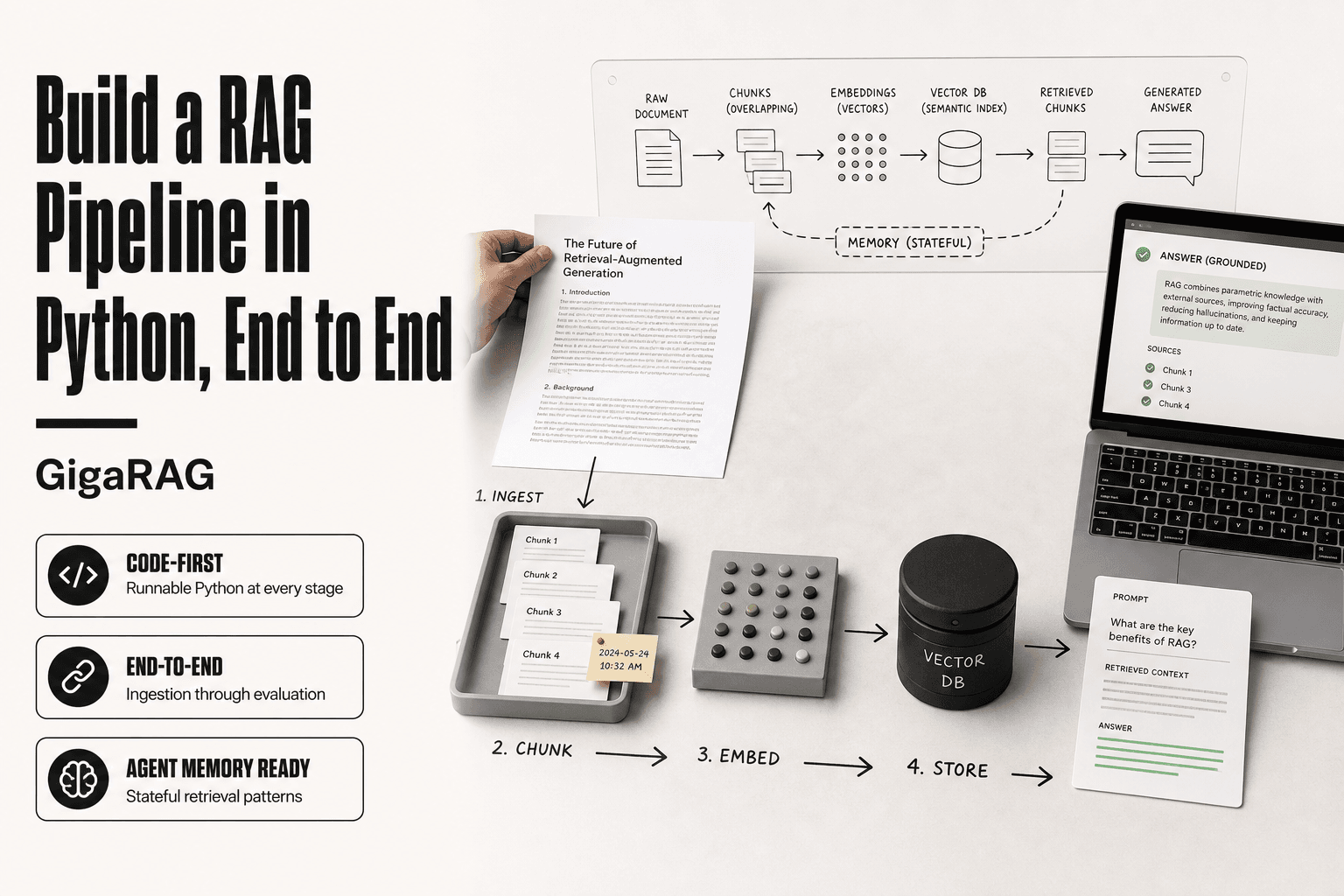
- The Document Ingestion Pipeline: From Raw File to Retrievable Text
- Document Ingestion And Parsing For Rag: A Step-by-Step Guide
- Chunking Strategies That Actually Work for RAG
- Rule-Based vs. LLM-Powered Parsing: An Honest Trade-off
- Choosing a Document Parsing Tool: A Decision Framework
- Document Ingestion and Parsing for RAG: Common Failure Cases
- Evaluating Parsing Quality: Metrics That Matter
- Agent Memory: Why Parsing Requirements Are Different
- Final Thoughts: Building a Parsing Pipeline You Can Trust
What Is Document Ingestion and Parsing for RAG?
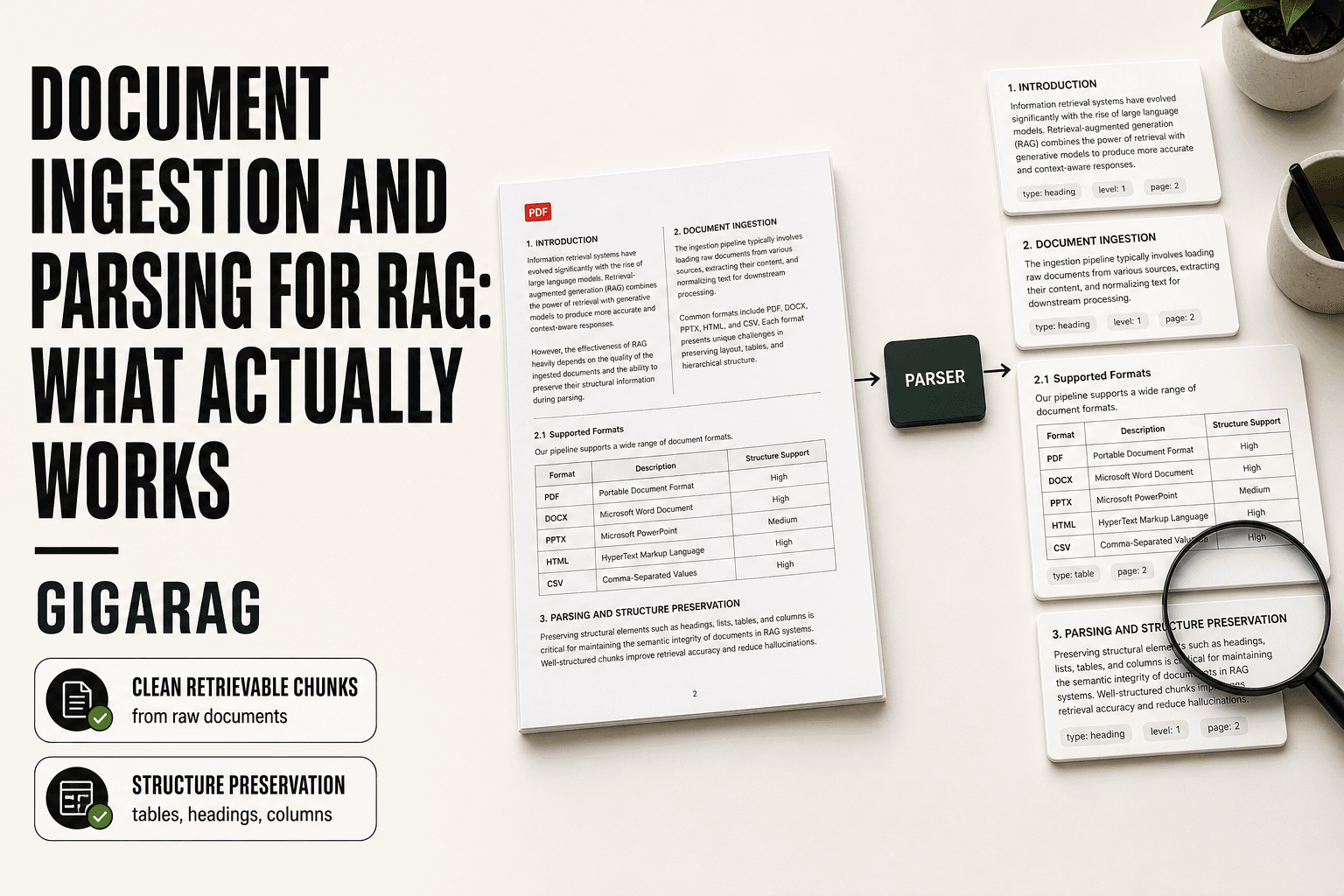
Document ingestion moves raw files into your pipeline. Parsing extracts clean, structured text and metadata from those files. If parsing mangles the content, retrieval returns garbage no matter how good your embeddings are.
Ingestion is the plumbing: connecting sources, handling formats, routing files. Parsing is the judgment call: reading a PDF's layout, pulling text out of tables, deciding what's a heading and what's body copy.
Ingestion vs. parsing: two distinct stages
Ingestion gets documents in. You point the pipeline at a folder, an API, a database. It handles file types, encodings, and access. Nothing intelligent happens here.
Parsing turns bytes into something a model can use. It extracts text, preserves structure, and attaches metadata like page numbers or section titles. A parser that drops a table's column headers has silently destroyed the meaning of that table.
Why parsing is the foundation of retrieval quality
Retrieval works by matching a query against chunks of text. If parsing split a paragraph mid-sentence or merged two unrelated sections, the chunk is corrupted. The embedding faithfully represents corrupted text. The retriever faithfully returns it. The LLM faithfully answers from it. Every downstream step amplifies the original error.
How agent memory changes parsing requirements
Standard RAG retrieves, then answers. Agent memory retrieves, then acts. An agent that reads a mangled table might execute the wrong API call or update the wrong record. Parsing fidelity isn't a nice-to-have when the output is an action, not a summary.
[!note] Parsing quality sets the ceiling for retrieval quality: if the parser drops a table or merges two sections, no embedding model or reranker can recover that lost meaning. Always validate parser output on a sample of your actual documents before scaling.
Rule-Based Parsing vs LLM-Based Parsing for RAG
| Factor | Rule-Based Parsing | LLM-Based Parsing |
|---|---|---|
| Speed | Fast, deterministic | Slower, API or GPU dependent |
| Cost | Low, no model inference | Higher, per-token or compute cost |
| Accuracy on complex layouts | Poor with tables, multi-column, scans | Better with messy or unstructured text |
| Reproducibility | High, same input yields same output | Lower, model outputs can vary |
| Best for | Clean, consistent, high-volume documents | Complex, varied, low-volume documents |
The Document Ingestion Pipeline: From Raw File to Retrievable Text
The pipeline has four stages. Each one can silently corrupt your content. You'll only notice at retrieval time, when answers come back wrong and you can't tell why.
Pre-processing: cleaning, format normalization, and metadata extraction
Pre-processing strips what you don't need before parsing starts. Remove headers, footers, page numbers, watermarks. Normalize encodings so a PDF exported from Word doesn't produce mojibake. Extract metadata: source, date, author, document type.
This stage is boring and easy to skip. Skipping it means your chunks carry junk. A chunk that starts with "Page 3 of 47" wastes tokens and confuses the retriever.
Parsing: extracting text, tables, and structure from raw files
Parsing reads the file's layout and pulls out content. Text is the easy part. Tables, columns, and nested sections are where parsers break.
A two-column PDF often gets read left-to-right across both columns, interleaving two unrelated stories into one chunk. A table with merged cells loses its header row. The parser doesn't warn you. It just outputs plausible-looking text.
Chunking: splitting parsed content into retrieval-ready units
Chunking cuts parsed text into pieces the retriever can match against a query. Chunk size matters: too small and context is lost, too large and the retriever returns noise.
The honest rule is that chunking decisions follow parsing quality. If parsing already destroyed the structure, no chunking strategy fixes it. You're slicing corrupted text into smaller corrupted pieces.
Embedding: converting chunks into vectors for retrieval
Embedding turns each chunk into a vector. The retriever compares query vectors to chunk vectors and returns the closest matches.
Embedding is faithful. It represents whatever text you gave it, including the errors. If a chunk merged two unrelated sections, the embedding faithfully represents that confusion. The retriever returns it. The LLM answers from it. Every stage amplifies the original parsing mistake.
[!tip] For agent memory specifically, store parsed chunks with timestamps, entity tags, and source references so the agent can retrieve by recency or entity, not just semantic similarity. This is a different requirement than standard RAG, where topical similarity is usually enough.
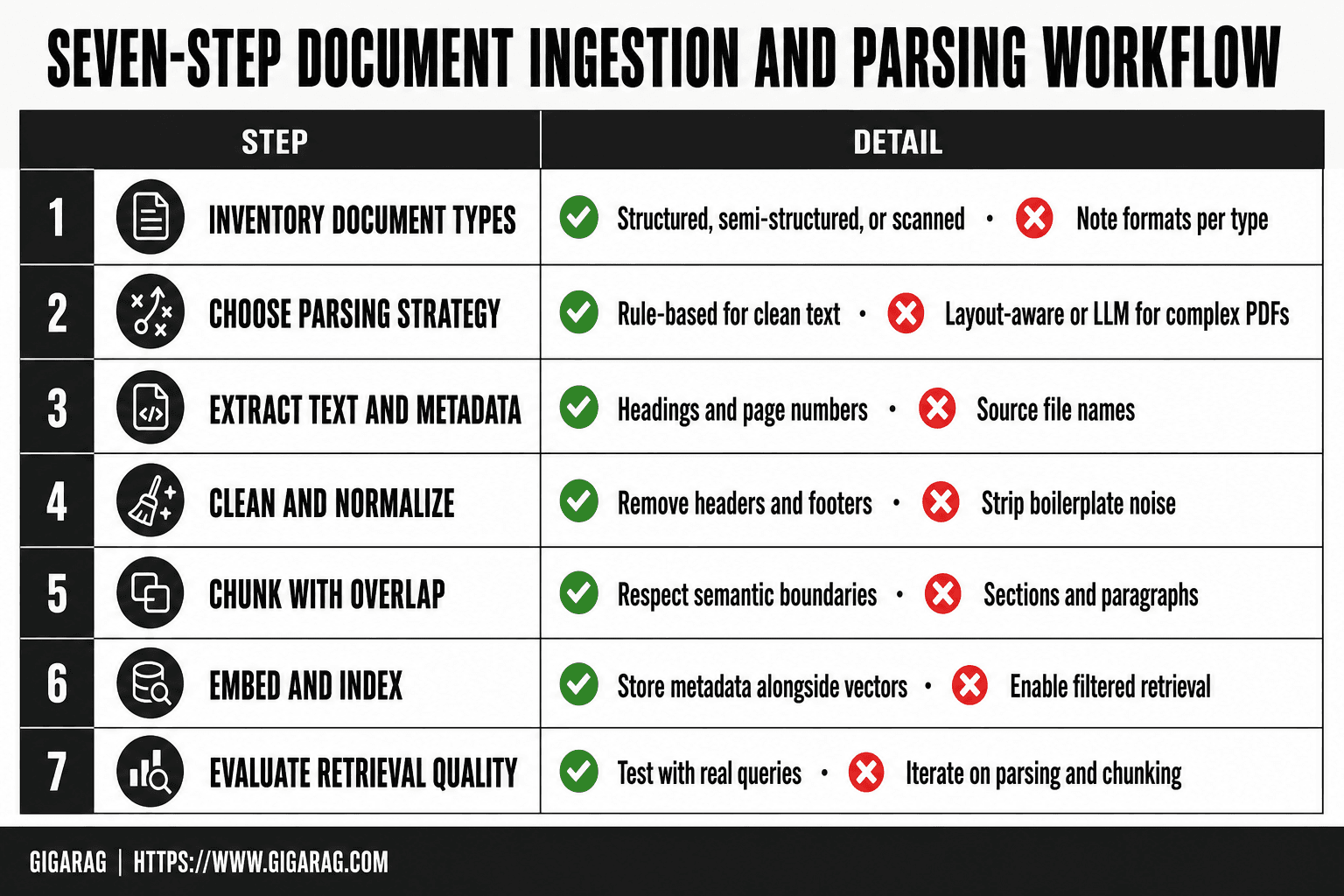
Document Ingestion And Parsing For Rag: A Step-by-Step Guide
- Inventory your document types and formats, then note which are structured, semi-structured, or scanned.
- Choose a parsing strategy per type: rule-based for clean text, layout-aware or LLM-based for complex PDFs and tables.
- Extract text plus metadata such as headings, page numbers, and source file names to preserve context.
- Clean and normalize the output by removing headers, footers, and boilerplate that add noise.
- Chunk the text with overlap and respect semantic boundaries like sections or paragraphs.
- Embed and index the chunks, storing metadata alongside vectors for filtered retrieval.
- Evaluate retrieval quality with real queries and iterate on parsing and chunking where results are weak.
Chunking Strategies That Actually Work for RAG
Chunking cuts parsed text into retrieval-ready units. The strategy you pick determines whether a query returns the right paragraph or a mangled fragment.
Fixed-size chunking: simple but destructive
Fixed-size chunking splits text every N characters or tokens, usually 256 to 512. It's fast and predictable. It also slices sentences mid-thought and splits tables across chunks.
Use it for clean, uniform prose. Don't use it for legal contracts, technical manuals, or anything with structure you need to preserve.
Semantic chunking: better retrieval, higher complexity
Semantic chunking groups sentences by meaning. It uses embeddings to detect topic shifts and breaks where the subject changes. Retrieval improves because each chunk holds one coherent idea.
The cost is complexity. You need an embedding model running during ingestion, and chunk boundaries become harder to debug. For high-stakes retrieval, the trade is usually worth it.
Structural chunking: respecting document hierarchy
Structural chunking follows the document's own boundaries: headings, sections, list items. A chunk is a section, not an arbitrary slice.
This works when parsing preserved the structure. If parsing flattened headings into body text, structural chunking has nothing to anchor on. Parsing quality comes first, again.
How chunk size impacts agent memory retrieval
Chunk size sets the ceiling on what an agent can retrieve in one shot. Small chunks give precise matches but lose surrounding context. Large chunks carry context but dilute relevance.
For agent memory, smaller chunks with metadata linking them to parent sections often work better. The agent retrieves the specific fact, then pulls the parent for context. It depends on whether your retriever supports that two-step lookup.
Rule-Based vs. LLM-Powered Parsing: An Honest Trade-off
Chunking only works if parsing preserved the document's structure. That's the fork in the road: rule-based parsers or LLM-powered ones.
What rule-based parsing does well (and where it breaks)
Rule-based parsers like PyMuPDF and pdfplumber extract text by reading the PDF's internal layout instructions. They're fast, cheap, and deterministic. A 100-page report parses in seconds, costs nothing per page, and produces the same output every time.
Where they break: anything the layout doesn't encode explicitly. Multi-column text gets read across columns. Tables lose cell boundaries. Headers and footers bleed into body text. Scanned documents return nothing without a separate OCR step.
What LLM-powered parsing adds (and what it costs)
LLM-powered parsers like LlamaParse and Unstructured's LLM mode read the page the way a person would. They infer reading order, recognize tables as tables, and reconstruct structure that isn't in the file's metadata.
The cost is real. LLM parsing runs 10 to 100 times slower than rule-based extraction and charges per page or per token. A million-page corpus becomes a budget line item, not a rounding error. Latency also matters: if you're parsing on ingest for an agent that needs documents available immediately, waiting minutes per batch hurts.
When not to use LLM parsing
Skip LLM parsing when your documents are born-digital PDFs with clean, single-column text. Rule-based tools handle those perfectly. Skip it when volume is high and budget is fixed. Skip it when you need deterministic, reproducible output for compliance or debugging.
A practical decision heuristic
Start with a rule-based parser. Run it on a sample of your actual documents. If the output preserves headings, tables, and reading order, stop there.
If tables come out scrambled or columns merge, try LLM parsing on the same sample. Compare quality against cost. The honest answer: most pipelines need both. Rule-based for the 80% of clean documents, LLM for the 20% that break.
Choosing a Document Parsing Tool: A Decision Framework
You've seen the trade-off between rule-based and LLM parsing. Now the question is which specific tool fits your documents, volume, and budget.
Decision factors: document type, volume, budget, latency
Four factors drive the choice. Document type is first: born-digital PDFs with clean text need far less than scanned contracts or multi-column research papers. Volume matters because per-page costs compound fast. Budget sets the ceiling on commercial tools. Latency decides whether you can parse on ingest or need a batch job.
Open-source parsing tools compared
PyMuPDF is the fastest option for born-digital PDFs. It extracts text and layout coordinates in milliseconds per page, costs nothing, and runs entirely locally. pdfplumber gives you finer control over tables and positioned text, but you write more code to get there. Unstructured's open-source library handles many file types (PDF, DOCX, HTML, email) with a single API, though its rule-based mode still struggles with complex layouts.
The main catch with all three: you own the pipeline. Error handling, OCR integration, and output validation are your job.
Commercial parsing tools compared
LlamaParse targets complex documents with LLM-powered layout understanding. It handles tables, multi-column text, and scanned pages well, but charges per page and adds latency. Reducto focuses on document structure extraction for RAG, with similar strengths and the same per-page cost model. GigaRAG bundles parsing with agent memory and RAG pipeline tooling, which matters if you're building memory persistence rather than a one-off index.
Commercial tools save engineering time. They don't eliminate the need to validate output on your actual documents.
A simple decision tree for tool selection
Start with PyMuPDF if your documents are born-digital and mostly single-column. Add pdfplumber when you need precise table extraction. Move to Unstructured when you have many file formats and want one library.
Switch to LlamaParse or Reducto when layouts break rule-based parsing and volume is low enough that per-page costs stay reasonable. Choose GigaRAG when parsing feeds an agent memory system that needs persistence and multi-turn retrieval, not just a static index.
The honest answer: test on a sample of your real documents before committing. A tool that works on someone else's PDFs may fail on yours.
Document Ingestion and Parsing for RAG: Common Failure Cases
Even a well-chosen parser fails on real documents. The failures are predictable, and knowing them upfront saves you from debugging retrieval quality later.
Multi-column and complex layout PDFs
Multi-column PDFs break naive text extraction. A parser reading left-to-right across the page interleaves column one and column two into a single garbled stream. Research papers, newsletters, and magazine-style reports all suffer this. Rule-based parsers need explicit column detection. LLM-powered parsers handle it better but still make mistakes on dense layouts with sidebars, captions, and pull quotes.
Scanned documents and OCR quality limits
Scanned documents are images, not text. OCR converts them, but quality depends on scan resolution, font clarity, and page condition. A 150 DPI scan of a faded fax will produce garbage no parser can fix. Even good OCR misreads similar characters: "rn" becomes "m", "0" becomes "O". Those errors propagate into embeddings and retrieval.
Tables with merged cells or complex formatting
Merged cells destroy table structure. A parser sees one cell spanning three rows and flattens it incorrectly, losing the relationship between headers and data. Nested tables, rotated headers, and tables split across pages compound the problem. You'll get text that looks complete but is semantically wrong.
What parsing cannot fix (and what to do instead)
Parsing cannot fix a bad source document. If the original PDF has no text layer, low-resolution scans, or ambiguous structure, the parser is guessing. It cannot recover information that isn't there.
What you can do: validate output on a sample before full ingestion. Check column order, table structure, and OCR accuracy manually. Where parsing fails, fix the source document first. Re-scan at higher resolution, request the original file, or manually correct the worst pages. A parser is not a repair tool.
Evaluating Parsing Quality: Metrics That Matter
You can't improve what you don't measure. Parsing quality shows up indirectly in retrieval results, but you need direct checks too. Here's what to track.
Retrieval quality metrics: precision, recall, MRR
Precision measures how many retrieved chunks are actually relevant. Recall measures how many relevant chunks you found. MRR (mean reciprocal rank) tracks whether the right chunk appears near the top. For RAG, MRR matters most: if the correct chunk ranks fifth, your LLM gets noise before signal. Run these on a test set of 50-100 queries with known answers.
Chunk coherence and metadata accuracy
A chunk is coherent if it contains one complete idea. Check for chunks that split sentences mid-thought or merge unrelated sections. Metadata accuracy means the title, source, and page number attached to each chunk are correct. Wrong metadata poisons filtering and citation.
End-to-end RAG evaluation
The real test: does the final answer match the source document? Build a small eval set of questions with ground-truth answers. Compare generated answers against them. Low scores here with high retrieval scores means your chunking or prompting is broken, not your parser.
Practical evaluation without a gold dataset
No labeled data? Sample 20 documents, parse them, and read the output. Check column order, table structure, and whether headings survived. It's manual but catches 80% of failures. Track error rate per document type, then fix the worst offenders first.
Agent Memory: Why Parsing Requirements Are Different
Agent memory isn't stateless RAG. A standard RAG pipeline answers one query, returns one response, and forgets. An agent accumulates context across turns, acts on retrieved content, and stores what it learned for later. That changes what parsing has to get right.
How agent memory differs from stateless RAG
Stateless RAG retrieves chunks for a single prompt. Agent memory persists: the agent writes notes, recalls past interactions, and builds a working model of the user over time. Retrieval happens repeatedly across a session. A parsing error that produces one bad answer in stateless RAG produces a corrupted memory that poisons every future turn.
Parsing fidelity requirements for agent actions
Agents don't just summarize retrieved text. They act on it: sending an email, updating a record, calling an API. If parsing mangles a date, a name, or a number, the agent executes the wrong action. Summarization tolerates noise. Action doesn't. Parsing fidelity for agent memory needs to preserve exact values, not just semantic meaning.
Memory persistence and re-parsing considerations
Agent memory stores parsed content long-term. If you improve your parser later, old memories stay corrupted. You need a re-parsing strategy: version your parsing pipeline, track which documents were parsed with which version, and re-ingest when the parser changes. Most teams skip this and live with stale errors.
Where GigaRAG fits for agent memory builders
GigaRAG treats parsing as a versioned, re-runnable step rather than a one-time import. That matters when your agent's memory outlives your current parser.
Final Thoughts: Building a Parsing Pipeline You Can Trust
Parsing is the foundation. Get it wrong and every layer above it, chunking, embedding, retrieval, generation, inherits the damage. You can't fix bad parsing with better prompts.
The honest answer is that no single tool handles every document well. Multi-column PDFs, scanned pages, merged table cells, each breaks different parsers in different ways. Choose based on what your documents actually look like, not what a vendor's demo shows. Run your own test set through any tool before committing.
Evaluate honestly. Precision and recall on retrieval, chunk coherence, metadata accuracy, these tell you whether parsing is working. If you don't measure, you're guessing.
Iterate. Parsing pipelines decay as document sources change. Version your parser, track which documents came from which version, and re-ingest when you improve it. This matters more for agent memory, where corrupted content persists across turns.
GigaRAG is built for exactly this: document ingestion and parsing for RAG pipelines where agent memory and re-parsing are first-class concerns, not afterthoughts. But the framework above works with any tool. Start with your documents, not the tool.
Frequently Asked Questions
What is document ingestion and parsing for RAG?
Document ingestion and parsing for RAG is the process of loading raw documents, extracting their text and structure, and preparing them as chunks that can be embedded and retrieved. It sits at the front of the pipeline and directly determines what the retriever can find.
How do I parse PDFs for RAG in Python?
Common Python options include PyMuPDF, pdfplumber, and unstructured for text and layout extraction, with LLM-based parsers for complex layouts. Start with a rule-based library, inspect the output on your own PDFs, and escalate to layout-aware or LLM parsing only where quality falls short.
What is the best document parsing approach for RAG?
There is no single best approach; it depends on document type, volume, and budget. Rule-based parsing works well for clean, consistent documents, while layout-aware or LLM-based parsing handles complex PDFs, tables, and scans better at higher cost and lower speed.
Can document parsing fix poor source document quality?
No. Parsing cannot recover information that is missing, illegible, or ambiguous in the source. If the original document is low quality, the practical fix is to improve the source or exclude it, not to add more parsing layers.
How is ingestion for agent memory different from standard RAG?
Agent memory often needs temporal awareness, entity tracking, and the ability to update or forget information over time. Standard RAG typically treats documents as static knowledge, so agent memory pipelines usually require richer metadata and different chunking rules.
What chunk size should I use for RAG?
There is no universal chunk size; it depends on your content and queries. A common starting point is a few hundred tokens with some overlap, then adjust based on retrieval evaluation rather than assuming one size fits all.
Where can I find document parsing examples on GitHub?
Many open-source projects demonstrate parsing pipelines, including libraries like unstructured, LlamaIndex, and LangChain, which offer ingestion and parsing examples. Review their code for patterns, but test against your own documents since results vary by format.
About GigaRAG
GigaRAG helps GigaRAG is for agent memory and RAG pipeline builders. get this right. Whether you are working through document ingestion and parsing for rag or something adjacent, we publish what we have actually tested, including where it falls short.