Elasticsearch and OpenSearch for Vector Search: A Developer Comparison
Choosing Elasticsearch or OpenSearch for vector search isn't a matter of running one kNN query and declaring a winner. Both can index embeddings, retrieve approximate nearest neighbors, apply metadata filters, and combine semantic results with keyword search. Neither is a complete RAG stack or persistent shared memory for agents: an index won't coordinate project state across sessions, tools, permissions, and changing context.
The honest answer is: it depends on your existing search stack, deployment constraints, filter and hybrid-search needs, and the workload you can measure on your own corpus. A generic benchmark can't settle those questions, and a feature checklist hides implementation and operating costs.
Elasticsearch and OpenSearch for vector search: Quick comparison
Both can index embeddings, run approximate kNN retrieval, apply metadata filters, and combine semantic and keyword signals. Neither is automatically the better choice. Your fit depends on the search stack you already run, how you deploy it, and how much operational work your team can own.
| Area | Elasticsearch | OpenSearch |
|---|---|---|
| Platform lineage | Elastic's search platform | Open-source fork of Elasticsearch and Kibana |
| Vector retrieval | Dense-vector and kNN retrieval | k-NN vector search |
| Filtering | Filters can narrow retrieval by metadata | Filters can narrow retrieval by metadata |
| Hybrid retrieval | Keyword and vector retrieval in one search stack | Keyword and vector retrieval in one search stack |
| Deployment | Self-managed or Elastic-managed | Self-managed, managed providers, or AWS service |
| Best fit | Teams already invested in Elastic | Teams with OpenSearch or AWS operations |
Where the platforms are similar
Both can store documents beside embeddings, which matters when your RAG system needs text, metadata, and retrieval in one place. Both also need index design, relevance checks, and access controls.
That's the shared baseline.
The differences that change an implementation decision
The main catch is operational fit. Elasticsearch may suit an existing Elastic deployment, while OpenSearch may fit an AWS-centered stack or a team that wants its deployment options.
Don't choose from a feature grid alone. Query syntax, client libraries, managed-service limits, upgrade paths, and support arrangements can change the work your team owns.
What a comparison table cannot tell you
It can't predict recall, p95 latency, or cost for your corpus. It depends on your embeddings, filters, shard layout, traffic, replicas, and relevance target.
Run representative queries before you commit.
What should you compare before choosing?
| Factor | Elasticsearch | OpenSearch |
|---|---|---|
| Implementation fit | Validate the Python workflow your team needs | Validate the Python workflow your team needs |
| Relevance | Evaluate retrieval against your own labeled or reviewed queries | Evaluate retrieval against your own labeled or reviewed queries |
| Performance | Measure p95 latency and indexing throughput under your workload | Measure p95 latency and indexing throughput under your workload |
| Operations | Estimate storage growth and operating cost for your deployment | Estimate storage growth and operating cost for your deployment |
How vector retrieval works in search engines
A vector query doesn't read meaning the way a person does. It compares numeric representations, so relevance depends on your embedding model, chunking, metadata, and ranking design.
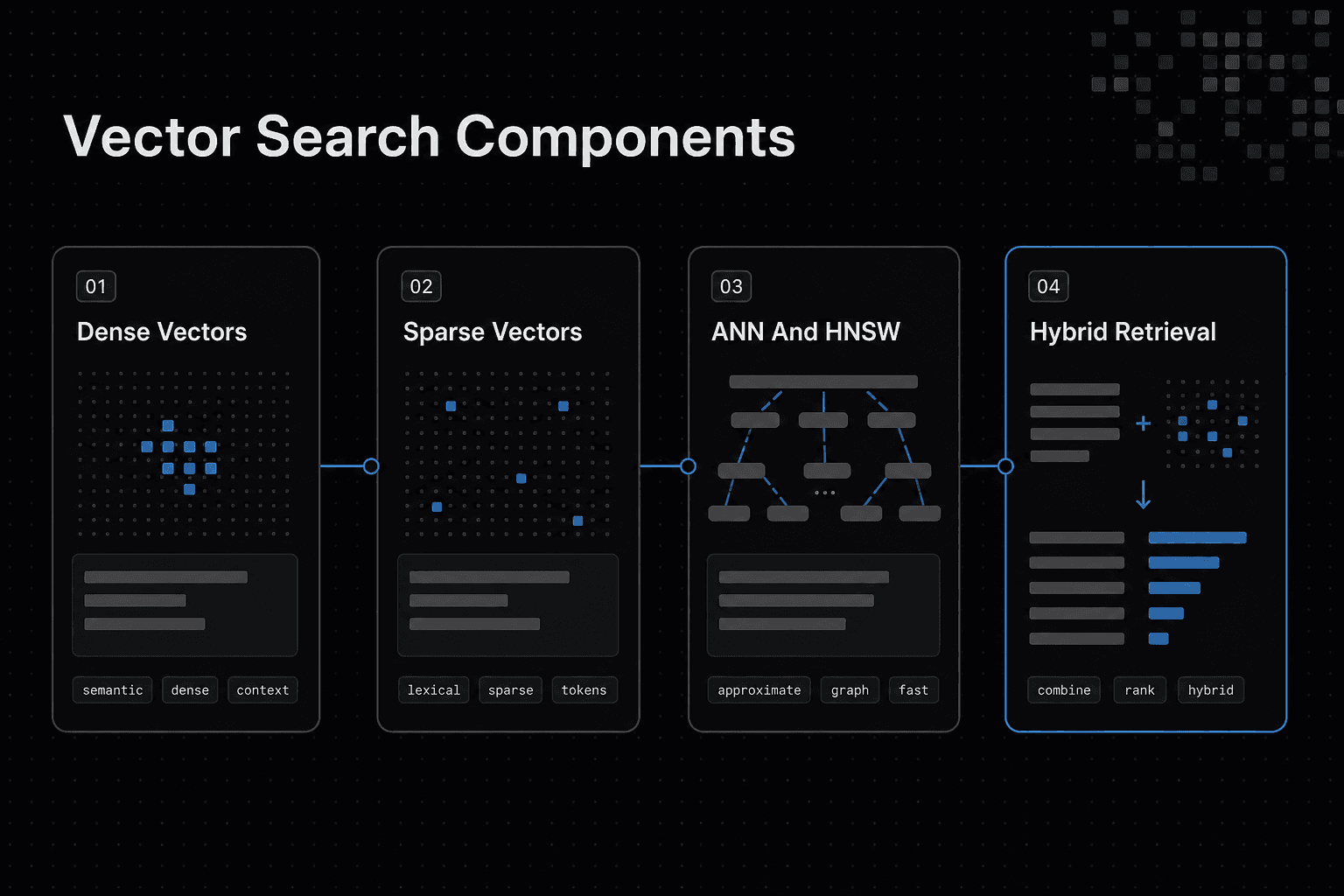
Dense vectors, sparse vectors, and embeddings
An embedding is a list of numbers that represents text, images, or another item. A dense vector gives most positions a value, which lets a search engine compare concepts that use different words.
Sparse vectors keep values only for selected terms or features. They suit lexical signals, where rare words, product codes, names, and exact phrases may matter more than broad semantic similarity.
Vectors don't replace text. You still need the original content and metadata to show a useful result and enforce who can retrieve it.
kNN, ANN, and HNSW indexing
kNN search asks for the k closest vectors to a query vector. Exact kNN checks every candidate, which can be costly as your index grows.
Approximate nearest neighbor (ANN) search trades some certainty for faster retrieval. HNSW, a graph-based ANN index, links similar vectors so the engine can travel through likely neighborhoods instead of scanning the full set.
The main catch is tuning. A larger or richer graph can improve the chance of finding close matches, but it also uses more memory and can slow indexing.
Hybrid search: keyword retrieval plus semantic retrieval
Hybrid search runs keyword retrieval alongside vector retrieval, then combines their rankings. This matters when a query needs both intent matching and exact terms, such as an error code, customer name, or policy title.
Common fusion methods include weighted scoring and reciprocal rank fusion, which combines result positions rather than raw scores. Check the merged results against real queries, because a good semantic match can still miss the one exact term your user needs.
Step-by-step: Evaluate both engines on your workload
- Define representative documents, queries, filters, and authorization requirements.
- Prepare equivalent embeddings and indexing workflows for each candidate.
- Run filtered vector retrieval and hybrid-query tests with the same inputs.
- Review recall and ranking quality against judgments relevant to your application.
- Measure p95 latency, indexing throughput, and storage growth under expected conditions.
- Compare operating costs and deployment requirements before selecting a platform.
Architecture, indexing, filtering, and deployment differences
Neither engine makes vector retrieval a drop-in feature. Your shard layout, mappings, update rate, filter rules, and deployment model can change both relevance and operating load.
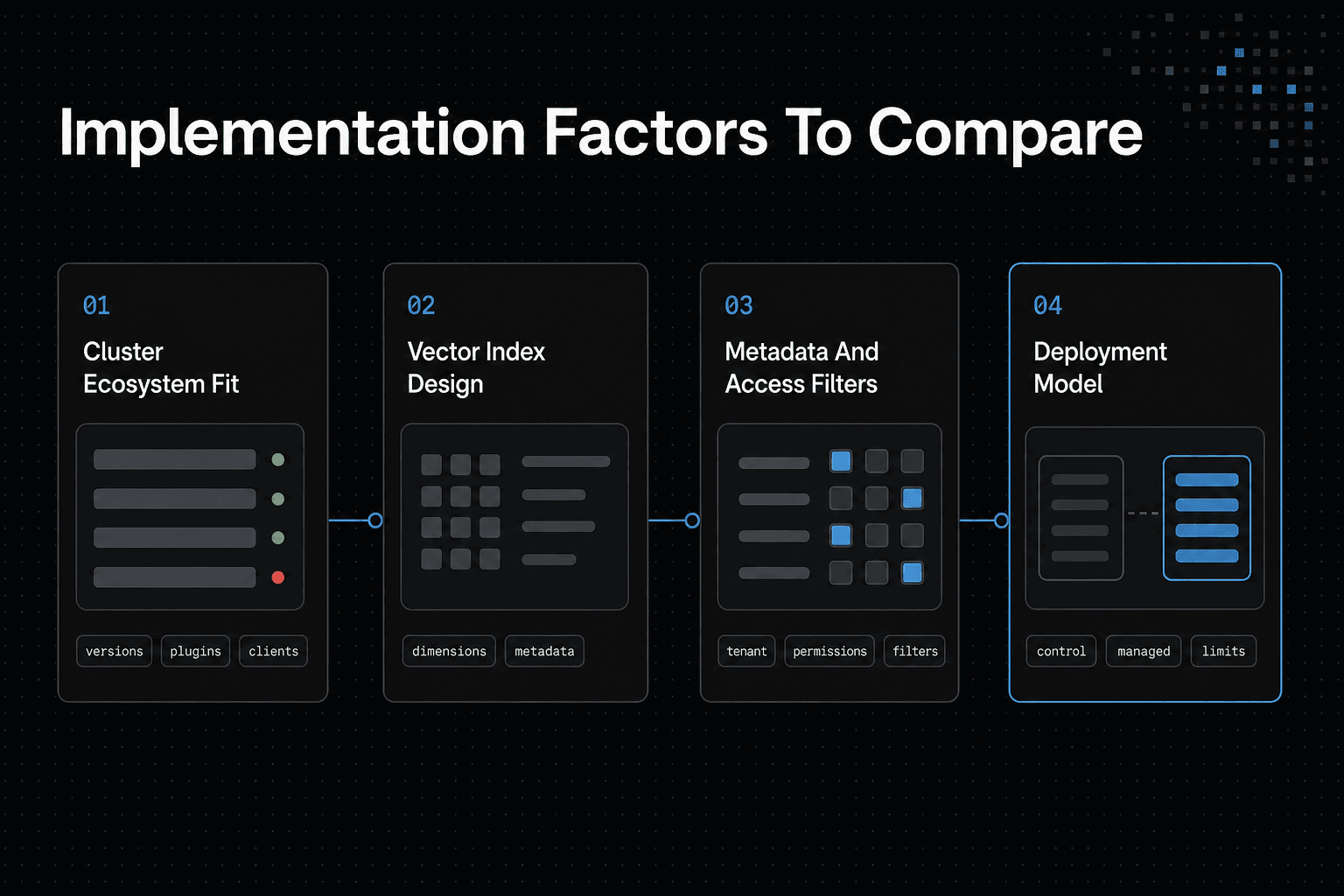
Cluster architecture and ecosystem fit
Start with the cluster you already run. If Elasticsearch or OpenSearch already holds your text search, logs, or product catalog, adding vectors may avoid a second data pipeline and another copy of your documents.
The honest answer is that compatibility depends on your engine version, plugins, client libraries, security setup, and managed-service limits. Don't assume a query, mapping, or tuning setting will move unchanged between the two.
Treat migration as code and data work, especially when your application depends on search templates, ingest steps, or role rules.
Vector mappings, index design, and document update behavior
A vector field needs an agreed dimension, and every embedding written to it must match. Store the source text, document ID, chunk ID, model version, and metadata beside it, so you can trace a poor result back to the indexed record.
ANN indexes also change the write path. They need work at index time to build and maintain their search structure, so heavy chunk updates can compete with query traffic.
Keep mutable fields separate where you can, and plan a re-embedding job when you change the embedding model or chunking rules.
Metadata filters, tenant isolation, and authorization-aware retrieval
Filters narrow the candidate set by fields such as tenant, language, document type, or access group. They are not optional in multi-tenant RAG.
The main catch is filter selectivity. A broad filter may leave vector search doing much of its normal work, while a very narrow filter can change which candidates are available for approximate retrieval.
Test real permission patterns, not just a single public corpus, and enforce authorization before retrieved text reaches your model.
Self-managed, managed cloud, and AWS-specific deployment considerations
Self-managed clusters give you control over versions, nodes, storage, network rules, and tuning. They also leave you responsible for upgrades, snapshots, failures, capacity planning, and security operations.
Managed offerings reduce some of that work, but they set boundaries around versions, node choices, plugins, networking, and billing. AWS-centered teams should check Amazon OpenSearch Service against their required vector settings, identity model, regional needs, and data-transfer path before committing.
A managed service is not worth it if its limits force a design you can't operate.
Python examples: Index and query vectors in both engines
These are starter patterns, not drop-in production code. They won't choose an embedding model, create access rules, tune recall, or guarantee that hybrid syntax works on every engine version. Check your deployed version before you build around either query shape.
[!tip] Keep the test corpus, query set, filters, and evaluation criteria identical for both candidates so differences in results are easier to interpret.
Dependencies, environment variables, and embedding-provider interface
Install the official clients: pip install elasticsearch opensearch-py. Set ES_URL or OS_URL in your environment, then replace embed() with your provider call. It must return a vector with the same dimension as your mapping.
import os
docs = [{"id": "1", "text": "Reset your account password", "tenant": "acme"}]

def embed(text):  # Replace with your embedding provider
    return [0.0] * 768
Elasticsearch Python client: Mapping, bulk indexing, kNN query, filter, and hybrid query
from elasticsearch import Elasticsearch, helpers
es = Elasticsearch(os.environ["ES_URL"])
index = "docs-es"

es.indices.create(index=index, mappings={"properties": {
  "text": {"type": "text"}, "tenant": {"type": "keyword"},
  "vector": {"type": "dense_vector", "dims": 768, "index": True}
}})
helpers.bulk(es, [{"_index": index, "_id": d["id"],
  "_source": {**d, "vector": embed(d["text"])}} for d in docs])

q = embed("forgot password")
result = es.search(index=index, knn={"field": "vector", "query_vector": q,
  "k": 10, "num_candidates": 100, "filter": {"term": {"tenant": "acme"}}},
  query={"match": {"text": "password"}})
The knn clause retrieves semantic candidates, while match adds lexical retrieval. How those signals combine depends on your Elasticsearch version and query settings.
OpenSearch Python client: Index setup, vector indexing, kNN query, filter, and hybrid query
from opensearchpy import OpenSearch, helpers
os_client = OpenSearch(hosts=[os.environ["OS_URL"]])
index = "docs-os"

os_client.indices.create(index=index, body={"settings": {"index.knn": True},
 "mappings": {"properties": {"text": {"type": "text"},
 "tenant": {"type": "keyword"}, "vector": {"type": "knn_vector",
 "dimension": 768}}}})
helpers.bulk(os_client, [{"_index": index, "_id": d["id"],
 "_source": {**d, "vector": embed(d["text"])}} for d in docs])

q = embed("forgot password")
result = os_client.search(index=index, body={"query": {"knn": {"vector": {
 "vector": q, "k": 10, "filter": {"term": {"tenant": "acme"}}}}}})
For hybrid retrieval, OpenSearch commonly needs a hybrid query and a search pipeline to normalize or combine scores. Don't assume the Elasticsearch request above transfers unchanged.
Expected outputs and implementation limits
Both calls return hits shaped like:
for hit in result["hits"]["hits"]:
    print(hit["_score"], hit["_source"]["text"], hit["_source"]["tenant"])
Keep in mind that _score is only useful within the query that produced it. You still need relevance judgments, tenant and permission tests, failure handling, retries, bulk error checks, and a plan for deleted or re-embedded chunks.
Building hybrid search that survives real RAG data
A hybrid query cannot fix bad chunks, stale permissions, or an embedding model that no longer matches your corpus. It also does not turn a search index into durable shared memory for agents. Teams that need project knowledge to remain available across sessions and tools can assess GigaRAG as a separate shared-memory layer.
Start with document rules, then make retrieval prove it respects them before any result reaches an LLM.
Choose a document and chunk schema before indexing
Keep a parent document ID on every chunk. Store a chunk ID, source URI, title, section path, tenant ID, document type, version, updated time, and access fields alongside text and its embedding.
Chunk by meaning where you can: a heading and its paragraphs are often safer than fixed character cuts. Preserve enough nearby text to answer a question, but don't pack unrelated topics into one vector.
A chunk that matches two ideas weakly can outrank one that answers either idea well.
Combine lexical and semantic signals without double-counting relevance
Use lexical retrieval for exact terms, codes, names, and rare phrases. Use vectors for wording that means the same thing without sharing words. The main catch is that scores from each method aren't naturally comparable.
Retrieve candidate lists independently, then use a defined fusion method such as reciprocal rank fusion, or normalize scores before combining them. Don't add the same text signal twice through overlapping fields and call the result hybrid search.
Judge the final ranked list against labeled queries, not a few convincing demos.
Handle updates, deletions, ACL changes, and stale embeddings
Treat each source change as an indexing event. Re-chunk and re-embed when text changes, replace or remove old chunk versions, and make deletion remove every child chunk and vector.
ACL changes need faster handling than a routine re-embed. Apply tenant and permission filters during retrieval, then check authorization again before sending chunk text to the LLM.
If a filter is missing, a strong semantic match can become a data leak. Keep an embedding model version in metadata, and re-index deliberately when you change models or chunk rules rather than mixing incompatible vectors in the same retrieval path.
Performance, scalability, and cost: What to measure instead of guessing
A generic benchmark won't choose your engine. Run the same workload on both platforms, with the same corpus, embeddings, filters, hardware, shard layout, and quality target, or the result won't tell you much about your production system.
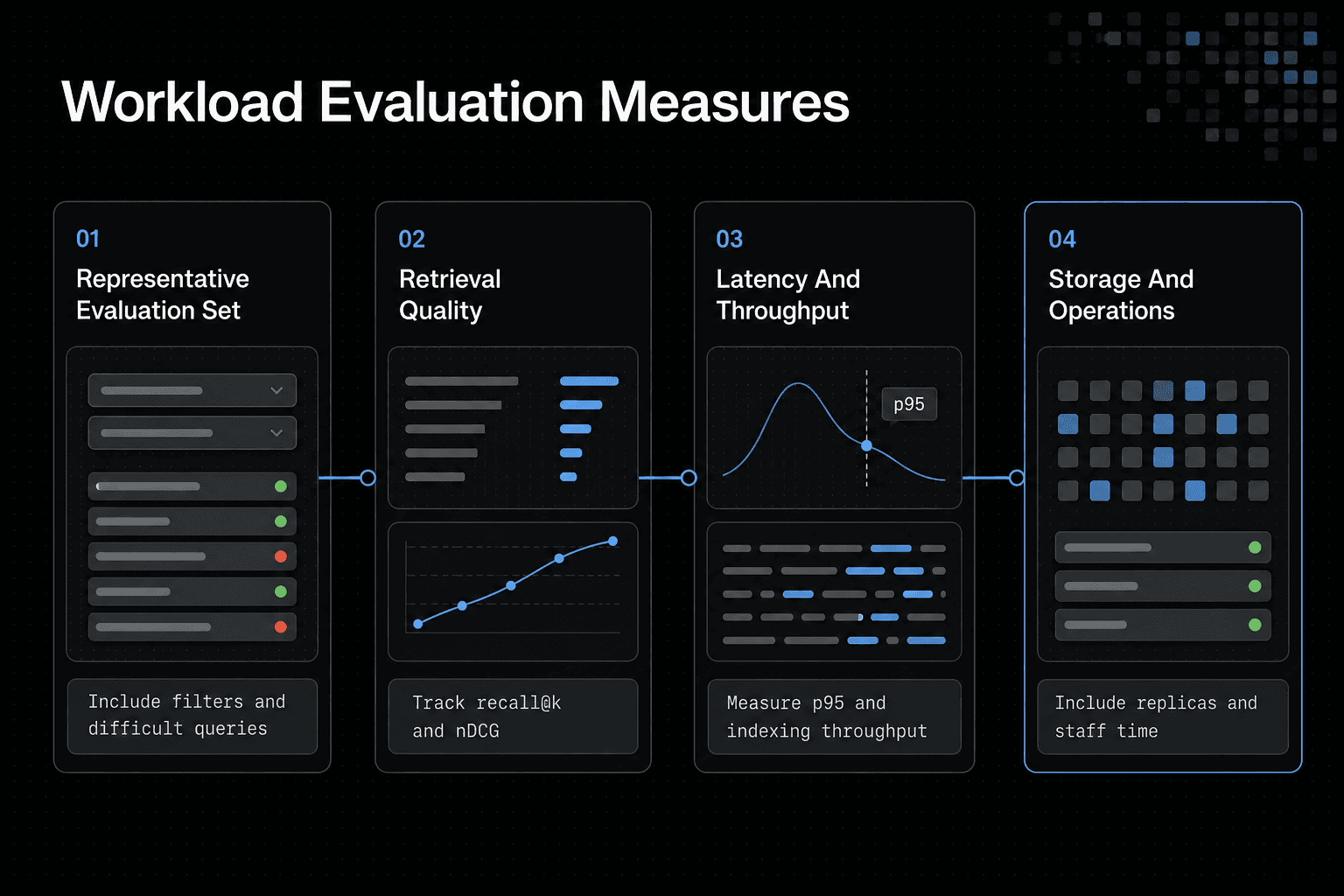
Build a representative evaluation set
Use real documents where possible, including your largest files, short records, duplicate-looking chunks, tenant boundaries, and common metadata filters. Add labeled queries with known useful results, plus hard cases such as codes, names, vague questions, and queries that should return nothing.
Small demos mislead.
Test at your expected corpus size, not just a sample that fits comfortably on one node. Embedding dimensions, chunk size, shard count, replicas, filter selectivity, and concurrent queries all change indexing load, memory use, and query behavior.
Measure recall@k, nDCG, p95 latency, throughput, and storage
Track recall@k to see whether relevant items appear in the first k results. Use nDCG when result order matters, then record p95 latency rather than relying on an average that hides slow requests.
Measure indexing throughput and total storage too. Include vector data, source text, metadata, replicas, and the disk growth created by ANN indexes, because a fast query path isn't worth much if it breaks your storage budget.
Tune HNSW and query settings against an explicit quality target
Set a relevance target before tuning. Then vary HNSW construction settings and query candidate counts while checking recall, nDCG, p95 latency, and memory together.
More candidates can improve retrieval quality, but they can also raise query work. Don't tune on unfiltered queries alone if tenant or ACL filters are part of normal traffic.
Compare current pricing and operational cost without assuming fixed rates
It depends on your deployment model, data volume, replicas, traffic pattern, and who runs the cluster. Compare current provider pricing with your measured node needs, then include snapshots, data transfer, monitoring, upgrades, and the staff time required to operate the system.
RAG, enterprise search, recommendations, and AI-agent workflows
Vector search retrieves indexed records. It doesn't preserve a project's changing state, decide which tools an agent may use, or coordinate work between agents and sessions.
[!note] A search index should not be treated as persistent shared agent memory by default. Memory across agents, sessions, tools, authorization boundaries, and changing project context requires explicit design and evaluation.
Treat retrieval as one layer, not the whole AI system.
RAG and enterprise knowledge search
For RAG, retrieve chunks that answer the user's question, then pass only the allowed results to the model. Your index needs source text, chunk IDs, document versions, tenant data, and ACL metadata, or you can't trace an answer back to its source or enforce access before generation.
Enterprise search often needs more than semantic similarity. Exact names, codes, dates, and policy terms matter, so combine lexical and vector retrieval when your query set contains both kinds of intent.
AI-powered support and recommendations
Support search needs current product and policy content, plus filters for product, language, account, and release version. Recommendations need a different signal set: the item, user or session context, and rules that stop unsuitable results from appearing.
Don't assume one index fits both. A support answer should favor grounded source material, while a recommendation flow may need behavioral or catalog signals that aren't useful in a knowledge search index.
What vector search can do for agents, and what it cannot do alone
Agents can use vector search to find prior documents, task notes, tool outputs, or project records that were deliberately indexed. That's useful, but retrieval doesn't make those records durable shared memory by itself.
The main catch is coordination. You still need a state store for task progress, an identity and permission layer for every retrieval and tool call, and orchestration rules for conflicts, retries, and handoffs.
GigaRAG addresses the separate need for shared project knowledge across sessions and tools. It connects agents to a central Hive Mind through MCP or the API, with access controls to manage what each agent can use.
Keep indexed knowledge separate from live project state, or agents can act on stale context.
When a dedicated vector database or hybrid architecture makes more sense
A second database won't fix poor embeddings, weak metadata, or missing access checks. It also adds data movement, failure paths, and another system to secure.
Don't split your stack just because vector search is involved.
Choose a search engine when lexical search and existing operations matter
Keep Elasticsearch or OpenSearch when you already run it well and your users need keyword search alongside semantic retrieval. Product codes, exact names, dates, and quoted policy text often need lexical ranking, while vectors cover looser phrasing.
This keeps documents, filters, and search operations in one place. The main catch is that vector workloads still change index size, query tuning, and capacity planning.
Choose a dedicated vector database when vector-first needs dominate
Consider a dedicated vector database when vector retrieval is the main job and you do not need a full search platform for the same corpus. The fit still depends on your query patterns, filtering needs, update rate, and who will run the system.
A dedicated vector layer may simplify a vector-first build. It won't replace your source-of-truth database, ACL checks, or document lifecycle process.
Use a hybrid architecture only when its benefits justify synchronization work
A two-system design can make sense when one system serves mature lexical search and another serves a distinct vector workload. Keep the boundary clear.
You must synchronize creates, updates, deletions, embeddings, and permissions across both stores. If you can't detect and repair drift, the extra retrieval flexibility isn't worth the operational risk.
Which platform should your team choose?
Neither engine gives you durable shared agent memory. It can retrieve indexed records, but it won't coordinate project state, sessions, tools, or permissions by itself.
Decision rules by workload and operating constraints
Choose Elasticsearch if you already run Elastic or need mature hybrid enterprise search. Choose OpenSearch if AWS is your operating center. For a vector-first prototype, test a dedicated vector database before adapting either search stack.
If your need is shared project knowledge across agent sessions and tools, GigaRAG is a separate layer to assess alongside retrieval. Its access controls manage what each connected agent can use.
A practical first-week validation checklist
- Define a representative query set with filters and permissions.
- Measure relevance, p95 latency, indexing rate, and storage.
- Test updates, deletions, and ACL changes.
- Fail closed when access data is missing.
- Decide from those results, not a generic benchmark.
Frequently asked questions
What is the difference between vector search and Elasticsearch?
Vector search is a retrieval approach. Elasticsearch is one platform that can provide it. Choose based on measured fit for your data, queries, and operating constraints.
Do Elasticsearch and OpenSearch both support kNN vector search?
Both can index embeddings and run approximate kNN retrieval. However, query syntax, mappings, client libraries, and managed-service limits can differ by version and deployment.
What is HNSW, and why does it matter for vector search performance?
HNSW is a graph-based ANN index that links similar vectors, so the engine can search likely neighborhoods rather than scan the full set. It trades some certainty for faster retrieval, while richer graphs can use more memory and slow indexing.
Can I filter vector search results by tenant, document type, or permissions?
Yes, filters can narrow retrieval by metadata such as tenant, document type, or access group. Test real permission patterns and enforce authorization before retrieved text reaches your model.
How does hybrid search combine keyword and vector retrieval?
Hybrid search runs keyword and vector retrieval together, then combines their rankings. You can use weighted scoring or reciprocal rank fusion, but you should judge the final ranked list against labeled queries.
Should I use Elasticsearch or OpenSearch for a RAG application?
Evaluate both with the same RAG data and workload. Compare retrieval quality, filtered-query behavior, p95 latency, indexing throughput, storage growth, and operating cost rather than choosing from a generic benchmark.
When is a dedicated vector database better than Elasticsearch or OpenSearch?
A dedicated vector database may fit when vector retrieval is the main job and you don't need a full search platform for the same corpus. It depends on your query patterns, filtering needs, update rate, and who will run the system.
Is vector search the same thing as persistent AI-agent memory?
- Vector retrieval alone does not establish shared persistent memory across agents, sessions, tools, authorization boundaries, and changing project context. Those requirements need explicit design.
About GigaRAG
GigaRAG is a shared memory platform for AI agents that helps developers and teams keep project knowledge available across sessions and tools. It is distinct from a search index: retrieval can find indexed records, while shared memory must also account for changing project context across agents and sessions.
You can connect agents to a central Hive Mind through MCP or the API. Access controls manage what each agent can use, which matters when project knowledge crosses tools and authorization boundaries.