Vector Data and Vector Embeddings Explained
"Vector data" can mean a mathematical list of numbers, a GIS map feature, or an AI embedding. Treating them as interchangeable leads to bad design choices. They share a mathematical foundation, but a point on a map, a vector used in algebra, and a learned representation of a document solve different problems.
Embeddings find related content. They don't verify facts, reliably catch exact constraints, or give an AI agent durable shared memory.
For AI builders, the useful path runs from source content and metadata to embeddings, similarity scores, retrieval, and then RAG or an agent workflow. You can inspect the vectors, compare cosine similarity, Euclidean distance, and dot product, and see why model choice and normalization matter.
Quick answer
"Vector data" can mean spatial features in GIS, mathematical vectors, or, in AI discussions, embeddings: numerical representations used to compare content. For semantic retrieval, embeddings help find content with similar meaning, but they don't verify facts or provide persistent shared agent memory.
- Use exact matching for strict identifiers and constraints.
- Treat similarity results as candidates to inspect, not verified answers.
Vector data and vector embeddings explained: three different meanings
"Vector data" can mean a mathematical list of values, map shapes such as points and polygons, or an AI embedding that places related content near one another. They share a mathematical base, but they serve different jobs. Mixing them up leads to the wrong storage, search, or analysis choice.
[!note] A vector is a numerical representation. An embedding is a vector produced to represent content for a particular task. GIS vector data refers to spatial features and is a different use of the word.
Mathematical vectors: ordered values with magnitude and direction
At the base level, a vector is an ordered set of numbers, such as [3, 4]. In geometry and physics, those values can describe magnitude and direction: the vector has a length and points somewhere in a two-dimensional space.
Order matters. [3, 4] is not [4, 3], because each position refers to a different axis or feature.
For AI work, the key idea is simpler: a vector is a numeric representation you can compare with other numeric representations. The numbers alone don't explain themselves. Their meaning comes from the system that created them and the comparison method you use.
GIS vector data: points, lines, and polygons on a map
In geographic information systems, vector data describes discrete things in space. A point can mark a shop, a line can trace a road, and a polygon can outline a building, park, or sales territory.
This is data about geometry. A map record may also hold attributes such as a road name, speed limit, or land-use type, but the vector part is the shape and its coordinates.
GIS vectors are not embeddings. You might store a city's boundary as a polygon, then create an embedding from a text description of that city, but those are separate representations for separate tasks.
AI embeddings: learned coordinates that represent meaning or similarity
An AI embedding is also a vector, but its values come from an embedding model rather than a hand-defined map coordinate or physical direction. You give the model text, code, an image, or another supported input. It returns a list of numbers.
Here's why that matters: content the model treats as related tends to sit closer together in its embedding space. A search for "reset a forgotten password" may retrieve material about account recovery even if it doesn't repeat the same words.
That doesn't mean the embedding understands truth. It doesn't verify a policy, preserve an exact number, or know which source is current. It captures patterns learned by the model, then gives your system a way to rank likely related items.
Semantic retrieval vs. exact matching: which fits the query?
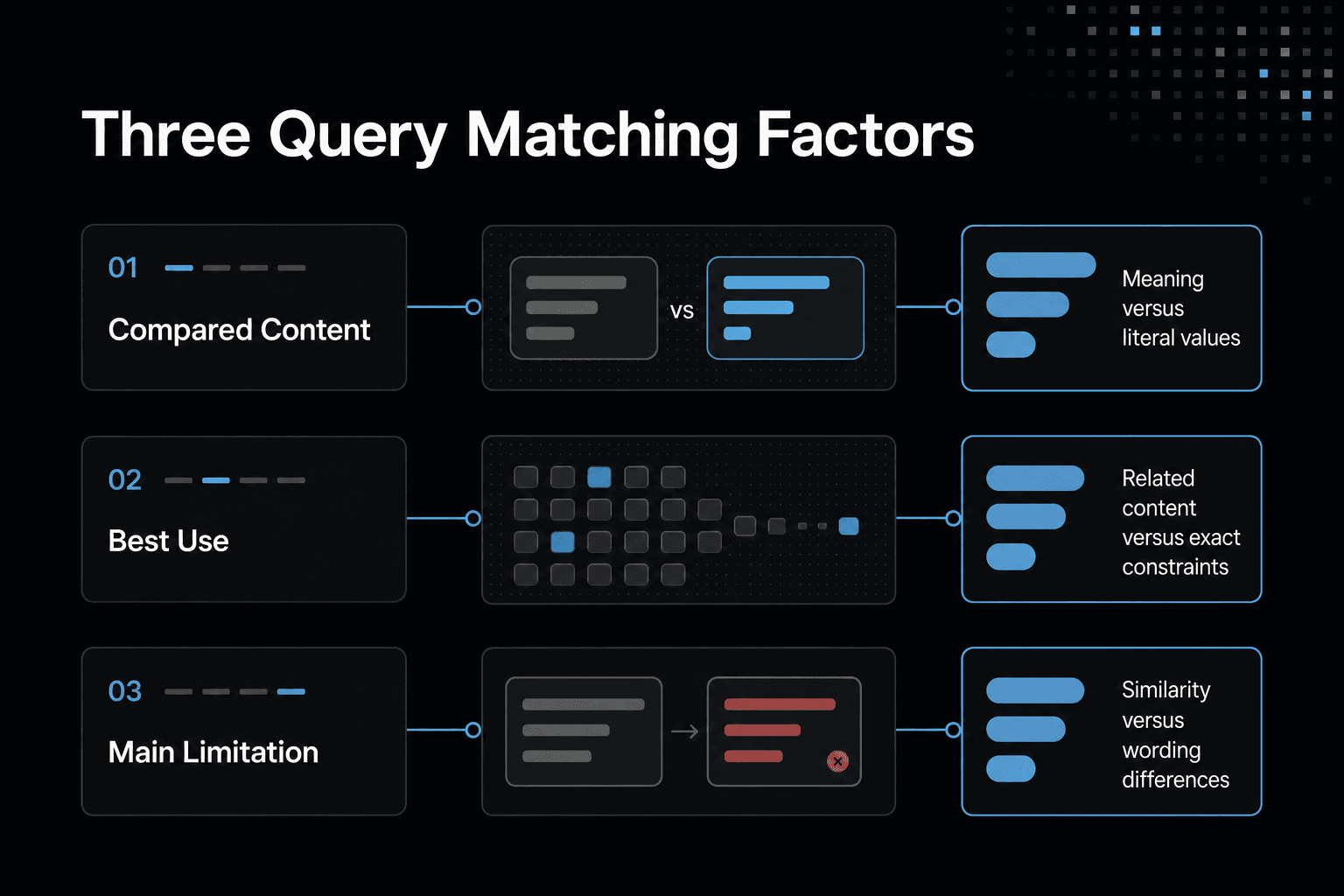
| Factor | Semantic retrieval | Exact matching |
|---|---|---|
| What it compares | Numerical representations of content | Literal terms or structured values |
| Useful for | Finding conceptually related content | Checking identifiers, codes, or precise values |
| Main limitation | Similarity does not guarantee a factual match | May miss relevant content expressed differently |
How embedding models turn content into numerical representations
An embedding model doesn't turn content into a fact record. It won't preserve every word, verify a claim, or make an exact identifier easy to find. Instead, it maps supported input into numbers that reflect learned patterns, so your system can compare content by likely related meaning.
From tokens, pixels, or audio features to an embedding
Text first becomes tokens, small units the model can process. An image becomes pixel-based features, while audio becomes features drawn from the sound signal. The model processes those inputs through learned layers and returns one numeric vector for the whole item, or sometimes for smaller parts of it.
The output is compact. A sentence, product image, and voice clip can all become lists of numbers, but only if the model supports those input types.
You don't assign each number by hand. The model learned how to place inputs during training, which is why related phrases can score closer than unrelated phrases even when their wording differs.
Dimensions and embedding spaces
Each position in an embedding vector is a dimension. A vector with 384 values has 384 dimensions; one with 1,536 values has 1,536. More dimensions don't automatically mean better retrieval, because quality also depends on the model, your content, and the queries you need to answer.
Together, those dimensions form an embedding space. Think of it as a coordinate system where the model places each input.
The axes usually don't have plain labels such as "topic" or "sentiment." What matters is the relationship among vectors: nearby items are candidates for retrieval, while distant items are less likely to match your query.
Dense vectors versus sparse vectors
Most embedding models produce dense vectors. Nearly every position contains a number.
Sparse vectors work differently. Most positions are zero, and the nonzero positions often represent specific terms or learned term weights. This can help when exact words, product codes, names, or rare jargon matter.
Neither kind solves every search problem. Hybrid retrieval can combine dense semantic matching with sparse term matching when users need both related meaning and exact constraints.
Why embeddings from different models are usually not interchangeable
A vector only has meaning inside the space created by its model. Two models may return vectors of the same length, but their dimensions need not represent the same learned relationships.
Don't embed documents with one model and queries with another unless their documentation says they share a compatible space. If you switch models, re-embed stored content and evaluate retrieval again, or your search index can compare coordinates that no longer belong together.
Steps for deciding whether embedding retrieval fits
- Identify whether the query asks for related meaning or an exact value.
- List constraints that must match literally, such as an identifier or required field.
- Choose semantic retrieval for meaning-based discovery and exact checks for strict constraints.
- Inspect retrieved content before using it to support an answer or action.
- Keep information agents must share persistently in an appropriate memory system rather than relying on retrieval alone.
How semantic similarity works: cosine, Euclidean distance, and dot product
Similarity metrics don't decide whether a result is true, current, or useful for your task. They only rank vectors according to a mathematical rule, so the wrong metric can put weak retrieval candidates at the top.
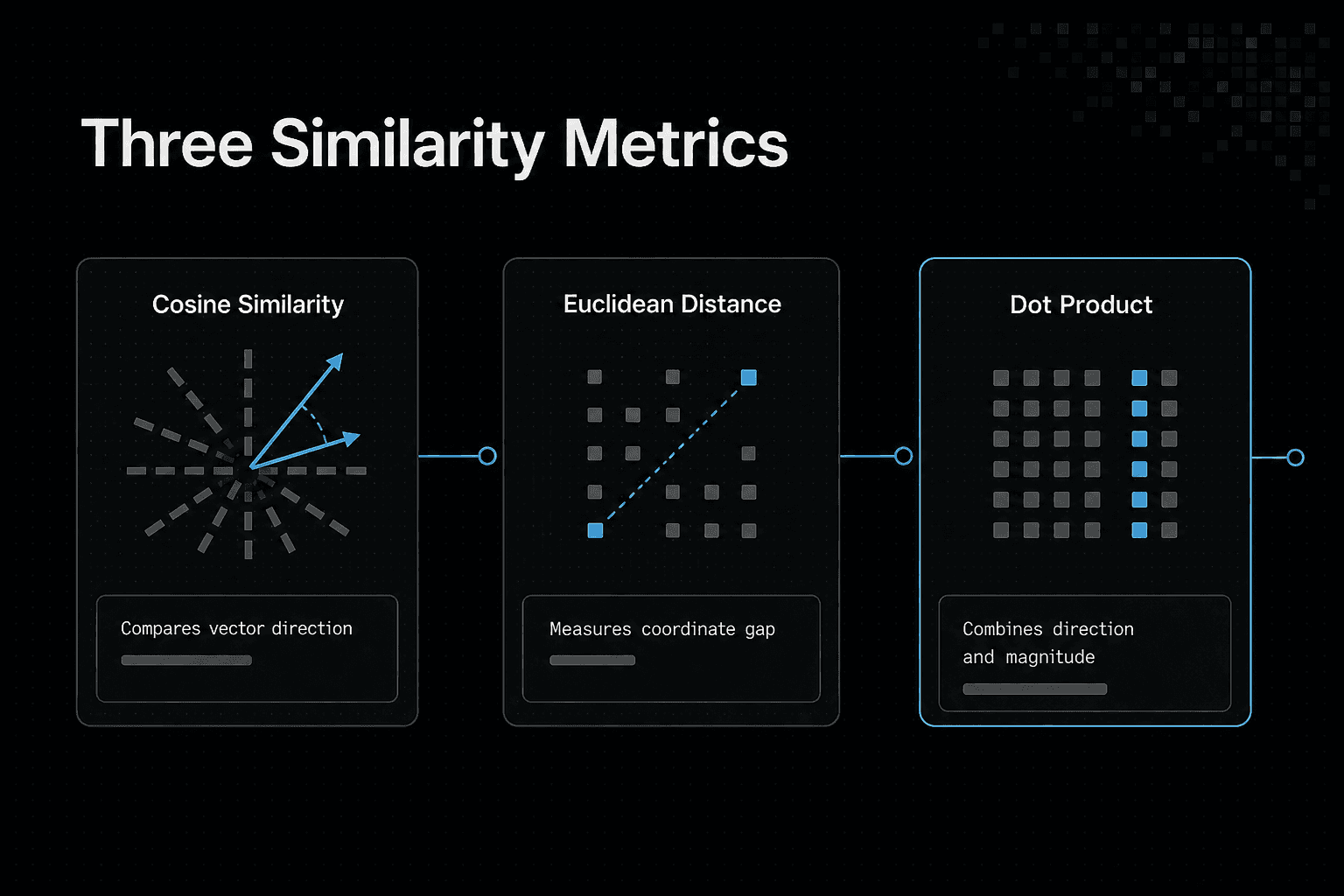
Use two-dimensional vectors to make the mechanics visible: A = (3, 4), B = (6, 8), and C = (-4, 3). Real embeddings have far more dimensions, but the same rules apply.
Cosine similarity compares vector direction
Cosine similarity asks whether two vectors point in the same direction, not how long they are. A and B point the same way, so their cosine similarity is 1, even though B has twice A's magnitude.
A and C are perpendicular, so their cosine similarity is 0. This makes cosine useful when vector length should not affect ranking, which is common for text embeddings.
Euclidean distance compares geometric distance
Euclidean distance measures the straight-line gap between coordinates. The distance from A to B is 5: B is farther from the origin despite pointing in the same direction.
Smaller is better. A and C have a distance of about 7.1, which reflects both their different direction and location in the space.
Dot product combines direction and magnitude
The dot product multiplies matching coordinates and adds them together. For A and B, it is 50: (3 x 6) + (4 x 8).
Unlike cosine similarity, dot product grows when vectors point alike and when either vector has greater magnitude. That can help if the embedding model uses magnitude as a meaningful signal, but it can distort results when magnitude only reflects how the model formats output.
What normalization changes and why metric-model alignment matters
Normalization scales each vector to length 1. After normalization, A and B become the same vector, (0.6, 0.8), because they already share a direction.
For normalized vectors, cosine similarity and dot product produce the same ranking, while Euclidean distance ranks the same neighbors in reverse order. The score values differ, but the ordering matches.
It depends on what metric to use: it depends on the embedding model's guidance and your index configuration. Check both before you build, then test real queries against known good results.
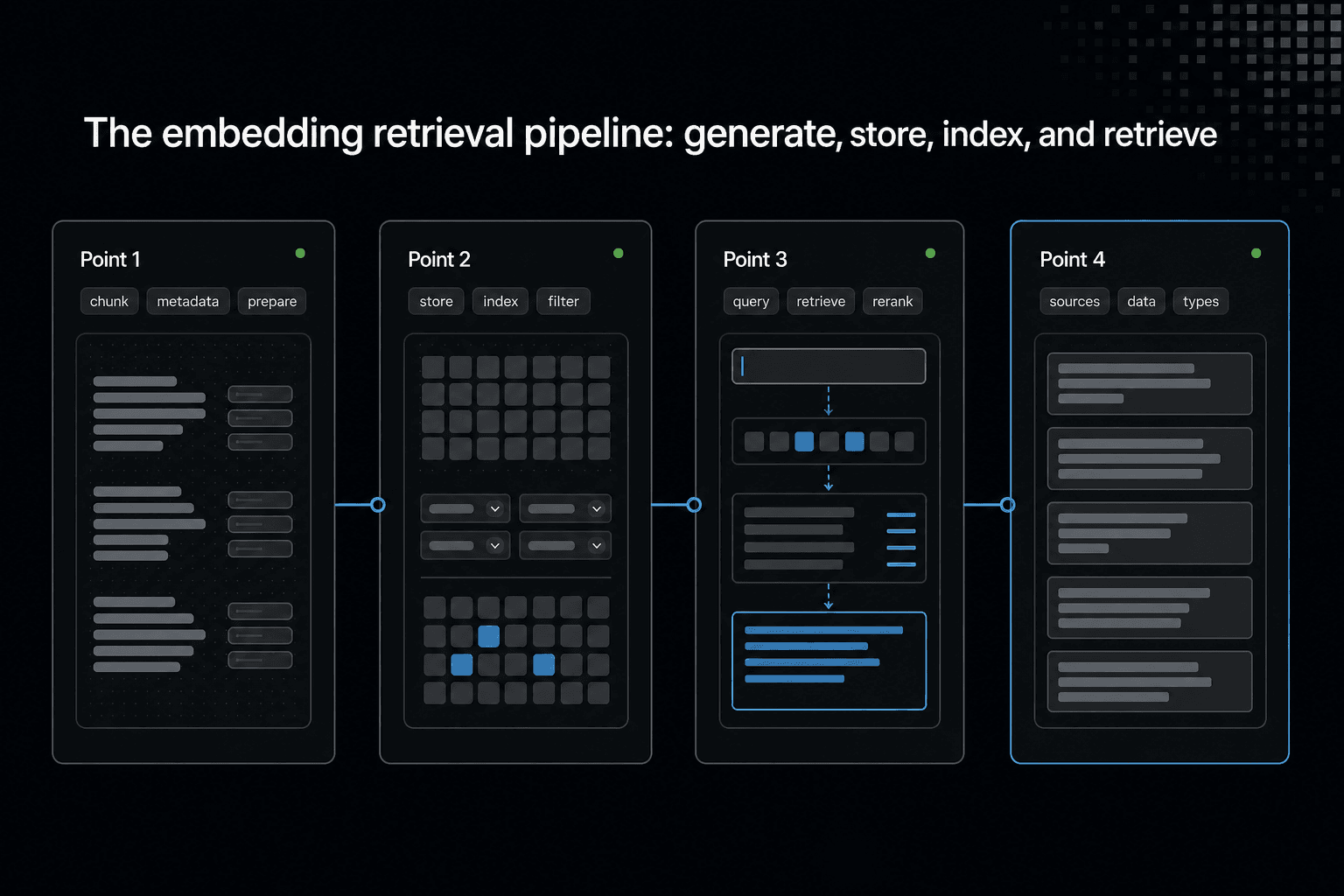
The embedding retrieval pipeline: generate, store, index, and retrieve
A similarity score is only one part of retrieval. You also need to decide what goes into each vector, what metadata stays attached, how candidates are found, and what your application does with them.
Chunking and metadata come before indexing
Start with source content: documents, product records, code files, images, or audio. Split long content into chunks that are small enough to retrieve as a focused answer but large enough to retain needed context.
Keep the original text and metadata beside each chunk. Metadata might include a title, source URL, author, date, document type, access rule, product ID, or code repository path.
Chunking is not a minor setup step. If a chunk joins unrelated ideas, a good vector match can still send confusing context to your search result or model.
Vector storage, metadata filters, and approximate nearest-neighbor indexes
Generate one embedding for each chunk, then store the vector, its text or source pointer, and its metadata. You can begin with an in-memory list for a small prototype. A vector database becomes useful when you need persistent storage, filtering, concurrent queries, or a larger collection.
Searching every stored vector works for a tiny dataset. As the collection grows, many systems use an approximate nearest-neighbor index, a data structure that seeks likely close vectors without comparing every possible pair.
The main catch is approximation. An index can return strong candidates quickly, but it may not return the exact mathematical nearest neighbors. Filter by metadata when a result must come from a certain tenant, language, date range, or permission scope.
Query embedding, candidate retrieval, reranking, and application output
At query time, embed the user's text with the same model used for stored content. Search the index with the metric that matches that model, then retrieve candidates rather than treating the first result as settled.
Reranking can help when the first vector search pass returns broadly related material. A second scorer can compare the full query and candidate text, while rules can remove duplicates, stale items, or results that fail an exact constraint.
For RAG, send selected source passages with their provenance, then ask the model to answer from that context. Retrieval grounds the prompt, but it doesn't verify that a source is correct or current.
Where semantic search, RAG, recommendations, and multimodal retrieval fit
Semantic search returns related content directly to a user. RAG uses retrieved content as context for a model response. Recommendations can retrieve items near a user's viewed or saved items, while multimodal retrieval uses embeddings that place supported inputs, such as images and text, in a shared search space.
The retrieval loop stays similar. What changes is the item you embed, the metadata you preserve, and the action you take after ranking results.
Build a small vector retrieval example in Python
This example won't give you production-grade semantic search. Its hand-built embedding only recognizes the word groups you define, so it can't understand new phrasing, verify facts, handle metadata filters, or persist data between runs.
Installation requirements and pinned package versions
You don't need any packages for this version. It uses only Python's standard library, which makes every vector and score easy to inspect.
That simplicity is the point. A learned embedding model comes later, once you can follow the retrieval loop without treating the vector as a black box.
Complete runnable code: embed documents and a query, calculate similarity, and rank results
Save this as retrieval.py, then run python retrieval.py.
import math
import re

FEATURES = {
    "python": (1, 0, 0), "code": (1, 0, 0),
    "list": (1, 0, 0), "function": (1, 0, 0),
    "vector": (0, 1, 0), "search": (0, 1, 0),
    "similar": (0, 1, 0), "text": (0, 1, 0),
    "documents": (0, 1, 0),
    "recipe": (0, 0, 1), "flour": (0, 0, 1),
    "oven": (0, 0, 1),
}

documents = [
    "Python code uses a list and function.",
    "Vector search finds similar documents.",
    "A recipe uses flour and an oven.",
]

query = "How can I search similar text?"

def embed(text):
    vector = [0.0, 0.0, 0.0]
    for word in re.findall(r"[a-z]+", text.lower()):
        for index, value in enumerate(FEATURES.get(word, (0, 0, 0))):
            vector[index] += value

    length = math.sqrt(sum(value * value for value in vector))
    return [value / length for value in vector] if length else vector

def dot_product(left, right):
    return sum(a * b for a, b in zip(left, right))

query_vector = embed(query)
ranked = sorted(
    ((dot_product(query_vector, embed(text)), text) for text in documents),
    reverse=True,
)

for score, text in ranked:
    print(f"{score:.3f}  {text}")
Expected output: explain the ranking
The output is deterministic:
1.000  Vector search finds similar documents.
0.000  Python code uses a list and function.
0.000  A recipe uses flour and an oven.
The query and first document both produce a normalized vector pointing only at the search feature. Their dot product is therefore 1.000. The other documents share no features with the query, so they score 0.000.
How to replace the in-memory list with a vector database later
Keep the same basic records: an ID, original text, embedding, and metadata. Replace the documents list and full sort with database upserts and a nearest-neighbor query.
Make sure you use the same embedding model, vector dimension, normalization approach, and similarity metric for stored documents and queries. A database can speed up search and retain vectors, but it can't fix weak chunks or an embedding model that misses the meaning you need.
How to compare embedding models before you build
A vector database and an embedding model solve different jobs. The database stores and searches vectors, while the model decides what those vectors mean. A fast index won't rescue a model that treats your key documents as unrelated.
Comparison criteria: retrieval quality, dimensions, latency, cost, privacy, languages, and modalities
Start with retrieval quality on your own queries. Build a small set of real questions, expected documents, awkward terms, and exact identifiers, then inspect the top results.
Check dimensions next. Higher-dimensional vectors take more storage and can raise search costs, but a larger vector isn't automatically better for your task.
Then check request latency, batch support, input length, per-token or per-request cost, supported languages, and input types. Text-only models can't retrieve an image from meaning alone. Keep privacy in the same list, because sending source content to an API may not fit your data rules.
Hosted API models versus self-hosted open embedding models
Hosted models reduce setup work. You send content, receive vectors, and let the provider run the hardware and model serving. The main catch is that cost, availability, data handling, and model changes sit partly outside your control.
Self-hosted open models give you more control over where text is processed and when a model changes. But you own deployment, capacity, updates, monitoring, and the time needed to make retrieval work well. For a small prototype, that work may not be worth it.
It depends on what you need to protect, how much traffic you expect, and who will run the service after launch.
A comparison table for text and multimodal model families
| Model family | Input | What to compare | Main caution |
|---|---|---|---|
| Hosted text API | Text | Quality, price, rate limits, data terms | Provider updates may change results |
| Open text encoder | Text | License, languages, hardware needs | You run serving and upgrades |
| Multilingual encoder | Text across languages | Cross-language retrieval quality | Test your actual language mix |
| Multimodal encoder | Text and images | Shared embedding space, image handling | It may not suit detailed document text |
Keep the model name and version with every stored vector. Otherwise, you won't know which records need re-embedding after a change.
Limitations: domain mismatch, truncation, model updates, and evaluation-set bias
Embeddings can miss the point when your domain uses specialized terms, short codes, or strict rules. They can also lose information when content exceeds the model's input limit and gets truncated before embedding.
Vectors from an old model and a new model usually shouldn't share one search space, so plan a re-embedding path rather than mixing them. If your evaluation set contains only clean, obvious matches, it won't reveal failures that matter to your users.
Embeddings for AI agents: retrieval is not persistent shared memory
Embeddings can help an agent find related project material across sessions. They can't verify that material is current, record a completed action, resolve conflicting instructions, or decide who is allowed to see it.
Useful agent retrieval cases: codebase context, specs, decisions, tickets, and runbooks
Retrieval is useful when an agent needs a relevant starting point, not a full account of project state. A coding agent can search for the module tied to a bug, the design note that explains an API choice, or a runbook for a failed deployment.
This works best when each item has clear metadata: repository, path, branch, owner, date, status, and source link. A semantic match can surface a ticket about "login failures" even when the ticket says "session expiry." It may still miss an exact error code, so combine it with keyword search and metadata filters when those details matter.
Why a vector match is not a memory write, source of truth, or permission system
A retrieval result is a ranked guess about relevance. Nothing has been written merely because an agent read it, and nothing proves the returned chunk is the latest approved decision.
Conversation history holds what happened in one exchange, while a durable record needs an explicit write, an owner, and a way to inspect or change it later. Permissions are separate too: don't treat a similarity score as authorization.
GigaRAG supports shared agent context by connecting agents to a central Hive Mind through MCP or the API. Its access controls help limit what each agent can use, while the durable record serves a different purpose from similarity-based retrieval.
What durable shared context additionally needs: provenance, updates, access controls, and conflict handling
Shared context needs a system of record behind it. Store where each fact came from, when it was written, who changed it, and which version is active. Keep the source link with the retrieved chunk so an agent or user can check the underlying record.
If a new architecture decision reverses an old one, mark the old record as replaced or exclude it from retrieval. Otherwise, both may rank well and give different agents different instructions.
Conflict handling matters most when agents can write. Decide whether they can propose changes only, write to a draft, or update approved records after a check.
Integration trade-offs for IDE, agent, MCP, and workflow-tool contexts
An IDE agent may need local code and branch context. An MCP server can expose controlled retrieval tools to several clients. A workflow tool may need durable job state, retries, and audit records more than semantic search.
Keep the boundary narrow. Give each integration only the sources and actions it needs, then log what it retrieved and what it changed.
Practical uses for vector embeddings in developer workflows
Embeddings aren't a general search replacement. They can miss exact IDs, dates, error strings, and hard constraints, so your workflow still needs filters, keyword search, or database queries where those facts decide the result.
Semantic search when users phrase the same need differently
Use semantic search when users describe the same problem in different words. A help center search for "can't get into my account" can retrieve material about password resets, locked accounts, or failed sign-in flows even if none repeats that exact phrase.
Keep original text and metadata beside each vector. Then you can filter by product, language, version, or document status before showing results, rather than trusting a similarity score alone.
RAG for bounded, cited source collections
RAG works best when you can name the source set and keep it current: product docs, policy pages, approved knowledge-base articles, or a team's internal handbook. Retrieve relevant chunks, pass them to the model, and require the answer to cite or link the underlying source.
The main catch is scope. Retrieval can ground an answer in supplied material, but it doesn't prove the material is true, complete, or up to date. Exclude drafts and replaced pages, or the model may receive conflicting context.
Code, issue, and documentation retrieval for engineering teams
For engineering work, embed code comments, design records, tickets, runbooks, and documentation with metadata such as repository, path, branch, service, and status. A query about a payment timeout can then retrieve an incident note, the owning service, and a related issue. When several agents need the same project context, keep the shared record available through controlled integrations rather than relying on each agent's retrieval results alone.
Exact matching still matters. Search error codes, function names, package versions, and file paths directly, then combine those results with semantic candidates when you need both precision and context.
Recommendations and multimodal retrieval
Recommendations use embeddings to find items near a user's viewed or saved items. Multimodal retrieval applies the same pattern to more than text, such as finding images from a text query or matching screenshots to UI documentation.
It depends on the embedding model. If your model supports text only, it can't make image search work.
When vector embeddings are the right choice and when they are not
Embeddings won't enforce business rules, preserve durable agent state, or guarantee an exact match. Use them for finding related meaning, then keep the systems that own facts, permissions, and workflow state separate.
[!tip] Retain the original text alongside each embedding so you can inspect what a similarity result refers to.
Choose embeddings when meaning-based matching is the core problem
Choose embeddings when people describe the same need in many ways and exact wording isn't reliable. This fits support questions, documentation discovery, related-content suggestions, and retrieval over varied code or project language.
The good news is that you can start small. Embed a bounded collection, define realistic queries, and inspect the retrieved text before you add a vector database or send results to a model.
Prefer keyword, relational, graph, or rules-based approaches for exact constraints
Use keyword search for error codes, IDs, file paths, quoted terms, and product names. Use a relational database when you need exact fields, joins, counts, transactions, or filters such as "open tickets owned by this team after this date."
Rules are better when the answer must follow a fixed policy. A similarity score can't decide whether a refund qualifies, whether a user has access, or which workflow step comes next.
Graphs fit relationship-heavy questions: who owns a service, which dependency connects two systems, or what changed after a particular deployment. For a small, static dataset, a plain list and direct search may be enough.
Use hybrid retrieval when both exact terms and semantic meaning matter
Most developer search needs both. Search exact terms for a package version or error string, retrieve semantic candidates for surrounding intent, then filter by metadata such as repository, branch, status, or access level.
Here's why: semantic ranking can surface useful context, but it can also bury the one token that makes a result valid. Hybrid retrieval gives you two signals instead of asking one vector score to do every job.
Pre-build checklist: data quality, evaluation queries, privacy, operational ownership, and failure handling
Before you start, check five things: clean source text, representative evaluation queries, privacy rules, a named owner for updates, and a failure path when retrieval returns weak or conflicting results. Make sure you can remove stale content and trace each result back to its source.
It depends on your data and risk. If wrong retrieval can expose private material, trigger an action, or shape a high-stakes answer, add access checks, thresholds, logging, and a safe fallback before you put embeddings in the workflow.
The practical takeaway for AI builders
Start with a small retrieval prototype you can inspect. Use real documents, representative queries, and a simple ranking output before you add an index, a chat model, or an agent loop.
Match the embedding model to its intended content and match the similarity metric to that model's guidance. Keep source records with every vector so you can check why a result appeared or replace it when the source changes.
If agents need reliable shared context, retrieval alone is not enough. Use a durable shared record with controlled access so agents can use the project knowledge they are permitted to see.
Frequently asked questions
What is the difference between vector data and vector embeddings?
Vector data can refer to spatial features in GIS or to numerical vectors. A vector embedding is a numerical representation of content used to compare it with other content.
Are AI embeddings the same thing as mathematical vectors?
An embedding is represented as a mathematical vector, but the terms aren't interchangeable in every context. "Embedding" means the vector represents content for a task such as similarity comparison.
What is the difference between cosine similarity and Euclidean distance?
Cosine similarity compares the angle between vectors, while Euclidean distance measures the straight-line distance between their points. They capture different kinds of closeness.
When should I use dot product instead of cosine similarity?
Use dot product when its magnitude-sensitive comparison matches your embedding setup. If vectors are normalized to unit length, dot product and cosine similarity produce the same ranking.
Do I need a vector database to use embeddings?
No. You can generate embeddings and compare vectors directly. A vector database stores and searches embeddings, but it isn't required for using them.
How do vector embeddings support semantic search and RAG?
Embeddings let a system compare a query with content representations and retrieve candidates that are similar in meaning. In RAG, retrieved content can go to a model as context, but retrieval doesn't verify that content.
Can vector search give an AI agent persistent memory?
Vector search can retrieve stored content, but retrieval alone doesn't create durable shared memory for agents. Persistent memory needs a system that stores and manages the information agents should retain.
When are vector embeddings the wrong solution?
They are a poor fit when a task depends on exact identifiers or strict constraints that similarity search could miss. Use exact matching for those requirements, or combine it with semantic retrieval.
About GigaRAG
GigaRAG is a shared memory platform for AI agents that helps developers and teams keep project knowledge available across sessions and tools. It is relevant when your agent workflow needs durable shared context rather than only retrieval of similar material.
Connect agents to a central Hive Mind through MCP or the API. Access controls manage what each agent can use, which matters when project knowledge should not be available to every agent or tool.