How a RAG Pipeline Works: A Practical Guide for Agent Memory Builders
Most explainers of how a RAG pipeline works oversell the technology and skip the hard parts. You'll read that RAG grounds your LLM in external knowledge, then the article stops before chunking trade-offs, retrieval misses, or what happens when the pipeline fails in production. This guide is for engineers building agent memory systems, not for executives skimming a vendor blog. You need to know where RAG breaks, because your agent's memory depends on it. GigaRAG offers a managed option for agent memory that this guide references at the end, but the mechanics here are vendor-neutral and open-source first. You'll get a clear mental model of how a RAG pipeline actually works, an honest accounting of what it cannot do, and a practical build path you can follow with open-source tools. Start with the definition, because most confusion about RAG starts there.
| At a glance | Details |
|---|---|
| Core idea | Retrieve relevant chunks, then generate grounded answers |
| Main stages | Ingest, chunk, embed, store, retrieve, rerank, generate |
| Best for | Agent memory, factual grounding, private knowledge |
| Key failure mode | Bad retrieval or stale index, not the LLM |
| Typical stack | Open-source: embeddings, vector DB, reranker, LLM |
| Not a fix for | Reasoning gaps, long-term planning, true statefulness |
In This Guide
- What Is a RAG Pipeline?
- RAG vs Fine-Tuning for Agent Memory
- How a RAG Pipeline Works: The Indexing Phase
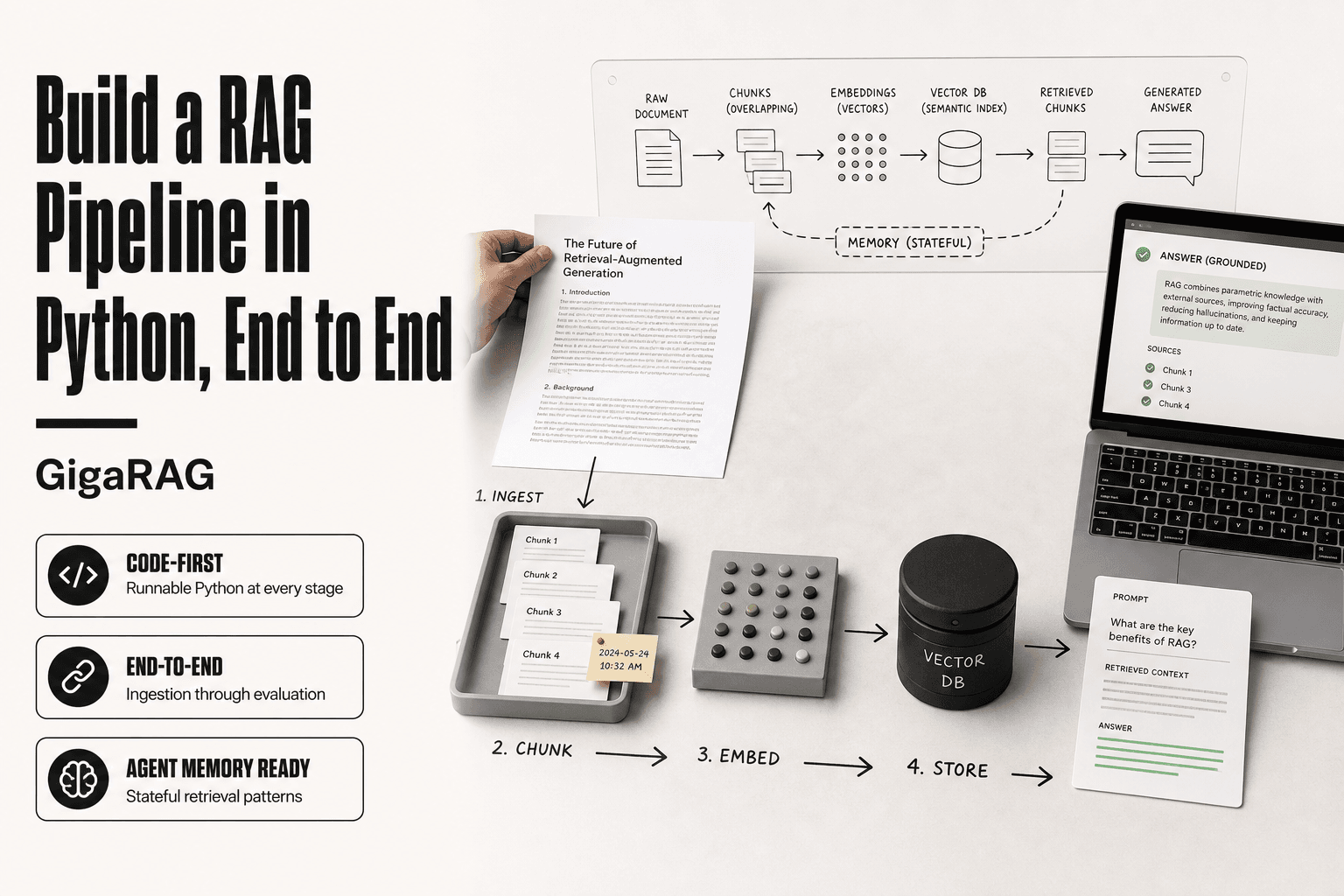
- How A Rag Pipeline Works: A Step-by-Step Guide
- How a RAG Pipeline Works: The Retrieval and Generation Phase
- Key Components of a RAG Pipeline
- Design Trade-offs Every RAG Builder Must Make
- What a RAG Pipeline Cannot Do
- Common Failure Modes in RAG Pipelines
- How to Build a RAG Pipeline for Agent Memory
- RAG for Agent Memory: What Changes
- Choosing the Right RAG Pipeline for Your Use Case
- Final Thoughts
What Is a RAG Pipeline?
A RAG pipeline is a two-phase system that retrieves relevant text from a knowledge base, then hands that text to an LLM as grounding for its answer. The LLM generates a response using both the retrieved content and its own training, which cuts hallucination on questions your documents can answer.
The two-phase model: indexing and query-time
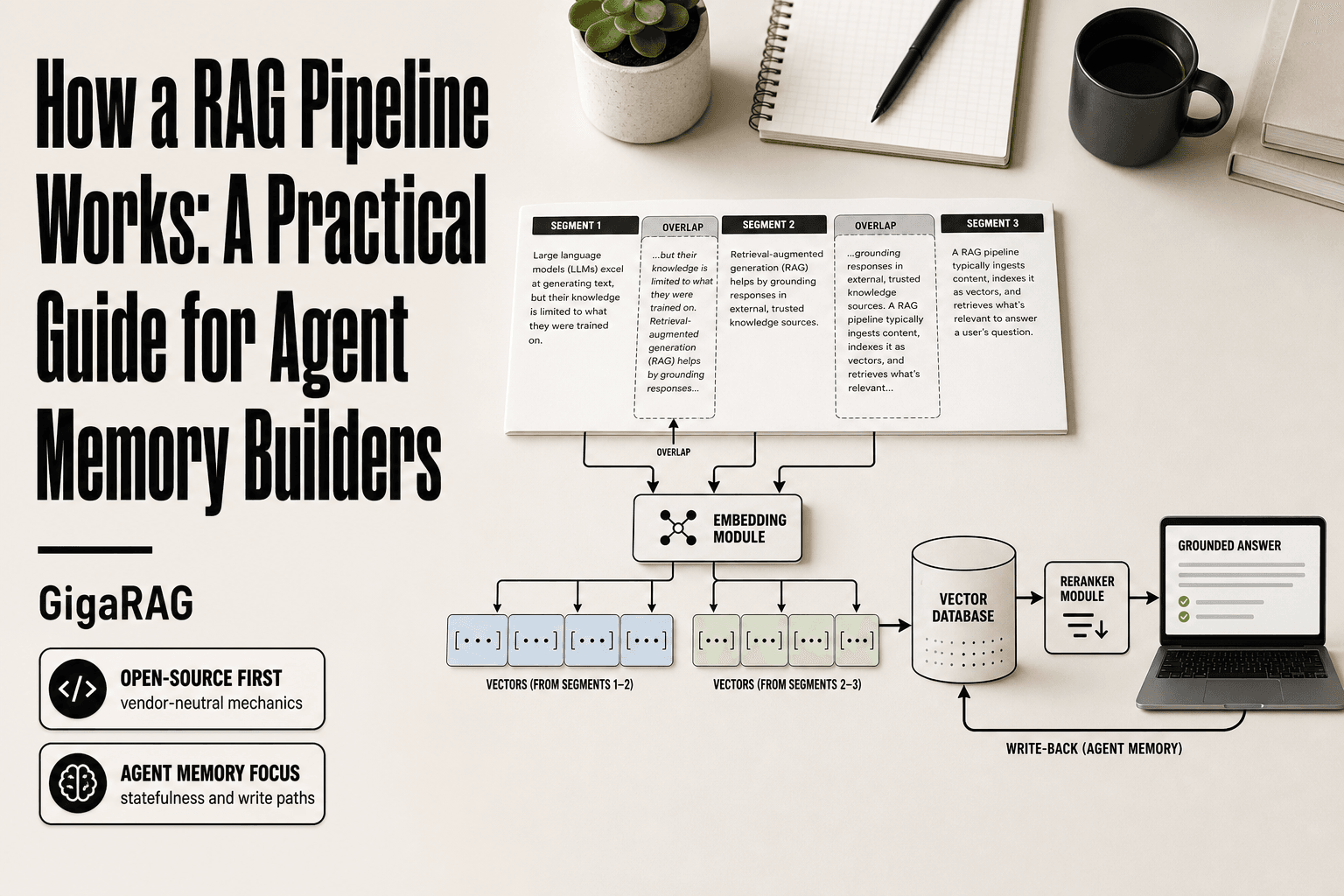
Indexing loads your documents, splits them into chunks, converts each chunk to a vector, and stores those vectors in a database. Query-time encodes the user's question the same way, finds the closest chunks by similarity, and feeds them into the LLM's prompt.
Why RAG exists: grounding LLMs in external knowledge
An LLM's training data is frozen. It can't know your codebase, your customer tickets, or anything that happened after training. RAG gives the model a way to look things up at runtime instead of guessing.
[!note] RAG does not make a model smarter; it changes what the model can see at generation time. If retrieval returns the wrong chunks, the answer will be wrong even with a strong LLM.
RAG vs Fine-Tuning for Agent Memory
| Factor | RAG | Fine-Tuning |
|---|---|---|
| Knowledge updates | Change the index; no retraining | Requires retraining or new adapter |
| Cost profile | Lower upfront; ongoing retrieval cost | Higher upfront; cheaper per query |
| Traceability | Can cite retrieved sources | Opaque; hard to attribute |
| Best use | Dynamic, factual, private knowledge | Style, format, domain tone |
| Agent memory fit | Strong for episodic and semantic recall | Weak for changing state |
How a RAG Pipeline Works: The Indexing Phase
Indexing is the offline half of the pipeline. It runs once per document, not per query, so you can spend compute here without slowing down user-facing responses. The output is a vector database your retriever can search in milliseconds.
Document loading and connectors
Connectors pull text from wherever it lives: PDFs, Notion pages, GitHub repos, SQL databases, Slack channels. Each connector handles one source type and normalizes the output to plain text. The main catch is that formatting gets lost. Tables, code blocks, and nested lists often flatten into a single stream of characters, which hurts retrieval quality later.
Chunking strategies and why they matter
Chunking splits documents into pieces small enough to embed and retrieve. A typical chunk runs 200 to 500 tokens. Too large and the embedding averages out the meaning, so retrieval returns vague matches. Too small and a single fact gets scattered across three chunks, none of which contains the full answer. Overlap between chunks, usually 10 to 20 percent, preserves context that would otherwise get cut at the boundary.
Embedding models: turning text into vectors
An embedding model converts each chunk into a fixed-length vector, typically 768 or 1536 dimensions. The vector captures semantic meaning, not just keywords. Two chunks about the same topic land close together in vector space even if they share no words. You pick the model once and use it for every chunk, so consistency matters more than raw benchmark scores.
Storing vectors in a vector database
The vector database stores each chunk's text alongside its vector. At query time it runs a similarity search, usually cosine similarity, to find the nearest neighbors. Most vector databases also store metadata like source, date, and chunk position, which you'll need for filtering and debugging later.
[!tip] For agent memory, treat retrieval as a stateful operation: store not just documents but also past interactions, decisions, and outcomes, then retrieve by recency and relevance together. This helps agents avoid repeating mistakes and keeps context windows focused.
How A Rag Pipeline Works: A Step-by-Step Guide
- Collect and normalize your source documents into plain text or markdown.
- Chunk documents into overlapping segments sized to your embedding model's context.
- Generate embeddings for each chunk with an open-source model and store them in a vector database.
- At query time, embed the agent's question and retrieve the top-k nearest chunks.
- Rerank retrieved chunks with a cross-encoder to improve precision before generation.
- Assemble a prompt with the reranked context and the agent's current task or state.
- Generate the answer, log retrieved sources, and feed the result back into agent memory.
How a RAG Pipeline Works: The Retrieval and Generation Phase
Retrieval is the online half. It runs per query, so latency and token cost matter here in a way they didn't during indexing. The handoff from retriever to generator is where most pipelines either feel sharp or fall apart.
Encoding the query
You run the user's question through the same embedding model you used for chunks. Same model, same dimensionality. If you swap models between indexing and query time, the vectors land in different spaces and similarity scores become meaningless. The query becomes a vector, and that vector is what the retriever searches against.
Similarity search and top-k retrieval
The vector database finds the k nearest chunks to the query vector, usually by cosine similarity. k is a real decision. Too low and you miss context. Too high and you flood the prompt with noise. Most builders start at 3 to 5 chunks and tune from there.
Re-ranking for better results
Similarity search is fast but crude. A re-ranker, often a cross-encoder, scores each retrieved chunk against the query more carefully. It reorders the list so the most relevant chunk sits first. The cost is latency: re-ranking adds tens of milliseconds per query. Worth it when retrieval quality is the bottleneck.
Prompt assembly and generation
The top chunks get stitched into a prompt alongside the user's question, usually with instructions like "answer only from the provided context." The LLM reads the chunks and generates a response. Here's the honest catch: the LLM can still ignore the context, contradict it, or hallucinate. Grounding improves the odds. It doesn't guarantee the outcome.
Key Components of a RAG Pipeline
You've now seen the full flow. Here's the reference list: six components, each with a one-sentence explanation and the common tool choices.
Vector database
Stores embeddings and runs similarity search against them. Common choices: Pinecone, Weaviate, Qdrant, Chroma, pgvector.
Embedding model
Turns text into vectors. Same model must be used for both chunks and queries. Common choices: OpenAI text-embedding-3, Cohere embed, open-source models like bge-large.
Chunking strategy
Splits documents into pieces small enough to retrieve precisely but large enough to keep context intact. No universal default; chunk size depends on your content.
Retriever
Finds the top-k chunks most similar to the query vector. Usually a vector database query, sometimes combined with keyword search (hybrid retrieval).
Re-ranker
Scores retrieved chunks against the query more carefully and reorders them. A cross-encoder is the standard choice. Adds latency but improves precision.
LLM generator
Reads the retrieved chunks and produces the final answer. Any instruction-tuned model works. The generator is where grounding either holds or breaks.
Design Trade-offs Every RAG Builder Must Make
Every choice in a RAG pipeline is a trade. There's no default that works everywhere. Here are the four that matter most.
Chunk size: small vs. large
Small chunks (100-200 tokens) retrieve precisely but lose surrounding context. Large chunks (500-1000 tokens) keep context intact but bury the answer in noise. For agent memory, start around 300 tokens and test. If your agent keeps missing context, go smaller. If it keeps getting fragments, go larger.
Embedding model: quality vs. cost vs. latency
Bigger models retrieve better but cost more and run slower. OpenAI's text-embedding-3-large outperforms the small variant on most benchmarks, but the small one is cheaper and faster. For agent memory with frequent writes, latency matters more than raw quality. Test your model on your actual queries before committing.
Retrieval depth: how many chunks to pull
Top-3 retrieval is fast but fragile. Top-10 is safer but floods the context window and raises token cost. For agent memory, start with top-5. If your agent hallucinates, pull more. If it gets confused, pull fewer.
To re-rank or not to re-rank
Re-ranking with a cross-encoder improves precision by 10-20% on most benchmarks but adds 50-200ms per query. For interactive agents, that latency is often unacceptable. Skip re-ranking when speed matters more than precision. Add it when your agent's answers are wrong in ways that better ordering would fix.
What a RAG Pipeline Cannot Do
RAG is a retrieval system bolted to a language model. It is not a reasoning engine. The honest answer is that RAG fails in four specific ways, and you should know them before you build.
RAG cannot reason or synthesize beyond retrieved text
The LLM can only work with what retrieval hands it. If the answer requires connecting facts across documents that were never retrieved together, RAG won't find it. It cannot infer what isn't in the chunks. It cannot do math across a corpus. It cannot spot a pattern that spans fifty documents unless those fifty chunks all land in the context window at once.
RAG cannot guarantee retrieval quality
Similarity search returns what is close, not what is correct. A query about "billing errors" will retrieve chunks about billing errors, even if the real answer lives in a chunk about "invoice discrepancies." The embedding model doesn't know they're the same thing. You get what the vectors think is relevant, not what actually is.
RAG cannot fix bad source data
If your knowledge base contains wrong information, RAG will retrieve it and the LLM will repeat it confidently. Grounding doesn't mean truth. It means the model is anchored to whatever you fed it. Garbage in, garbage out, with better formatting.
RAG adds latency and token cost
Every query pays for embedding, similarity search, and extra context tokens. A simple question that a fine-tuned model could answer in 50ms might take 300-500ms through RAG. For agent memory with frequent lookups, that cost compounds fast.
Common Failure Modes in RAG Pipelines
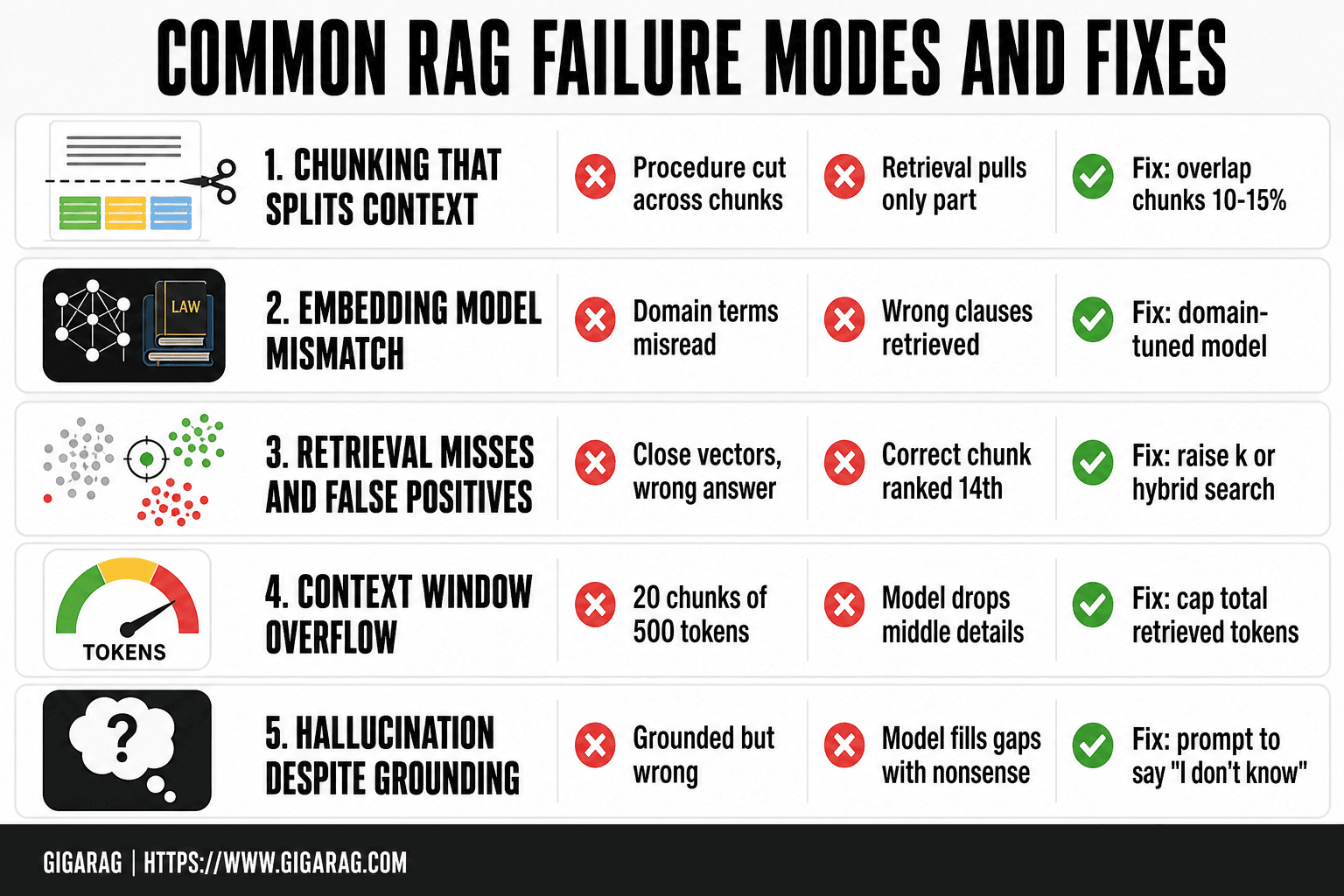
RAG fails in production for predictable reasons. Here are the five you'll hit first, with a concrete example for each.
Chunking that splits context
A 512-token chunk cuts a procedure in half. The first half says "never run this command without the flag." The second half, in a different chunk, contains the command. Retrieval pulls only the second chunk. The LLM generates the command without the warning. Fix: overlap chunks by 10-15% or chunk on semantic boundaries, not raw token counts.
Embedding model mismatch
You embed legal contracts with a model trained on product reviews. "Consideration" means payment in contract law, but the embedding model reads it as "thoughtfulness." Retrieval returns the wrong clauses. Fix: use a domain-tuned embedding model or fine-tune on your corpus.
Retrieval misses and false positives
A query about "how to reset a password" retrieves chunks about "password policy changes" because the vectors are close. The answer isn't there. Meanwhile, the actual reset instructions sit in a chunk ranked 14th. Top-k of 5 misses it entirely. Fix: raise k, add re-ranking, or use hybrid search with keyword matching.
Context window overflow
You retrieve 20 chunks of 500 tokens each. That's 10,000 tokens of context before the prompt and the LLM's own output. The model starts dropping details from the middle. The answer degrades. Fix: cap total retrieved tokens, not just chunk count.
Hallucination despite grounding
The retrieved chunk says "the API returns a 429 on rate limit." The LLM generates "the API returns a 429, which means the server is down." Grounded, but wrong. The model filled a gap with plausible nonsense. Fix: prompt the LLM to answer only from retrieved text and say "I don't know" otherwise.
How to Build a RAG Pipeline for Agent Memory
You can build a working agent memory RAG pipeline in an afternoon with open-source tools. Here's the stack I'd start with, and the steps to wire it up.
Step 1: Choose your stack
Use LangChain for orchestration, Chroma for the vector store, and an open embedding model like all-MiniLM-L6-v2 from sentence-transformers. Chroma runs locally with zero setup. The embedding model is small enough to run on CPU. For the LLM, use whatever you already have API access to.
Step 2: Load and chunk your documents
Load your agent's memory sources: past conversation logs, user preferences, documentation, whatever the agent needs to recall. Chunk at 300-500 tokens with 10-15% overlap. For agent memory specifically, chunk on turn boundaries in conversation logs, not arbitrary token counts. A user's stated preference should stay in one chunk.
Step 3: Embed and store vectors
Run each chunk through the embedding model. Store the vectors in Chroma along with the original text and any metadata: source, timestamp, user ID. Metadata matters more for agent memory than for standard RAG. You'll filter on it later.
Step 4: Build the retrieval function
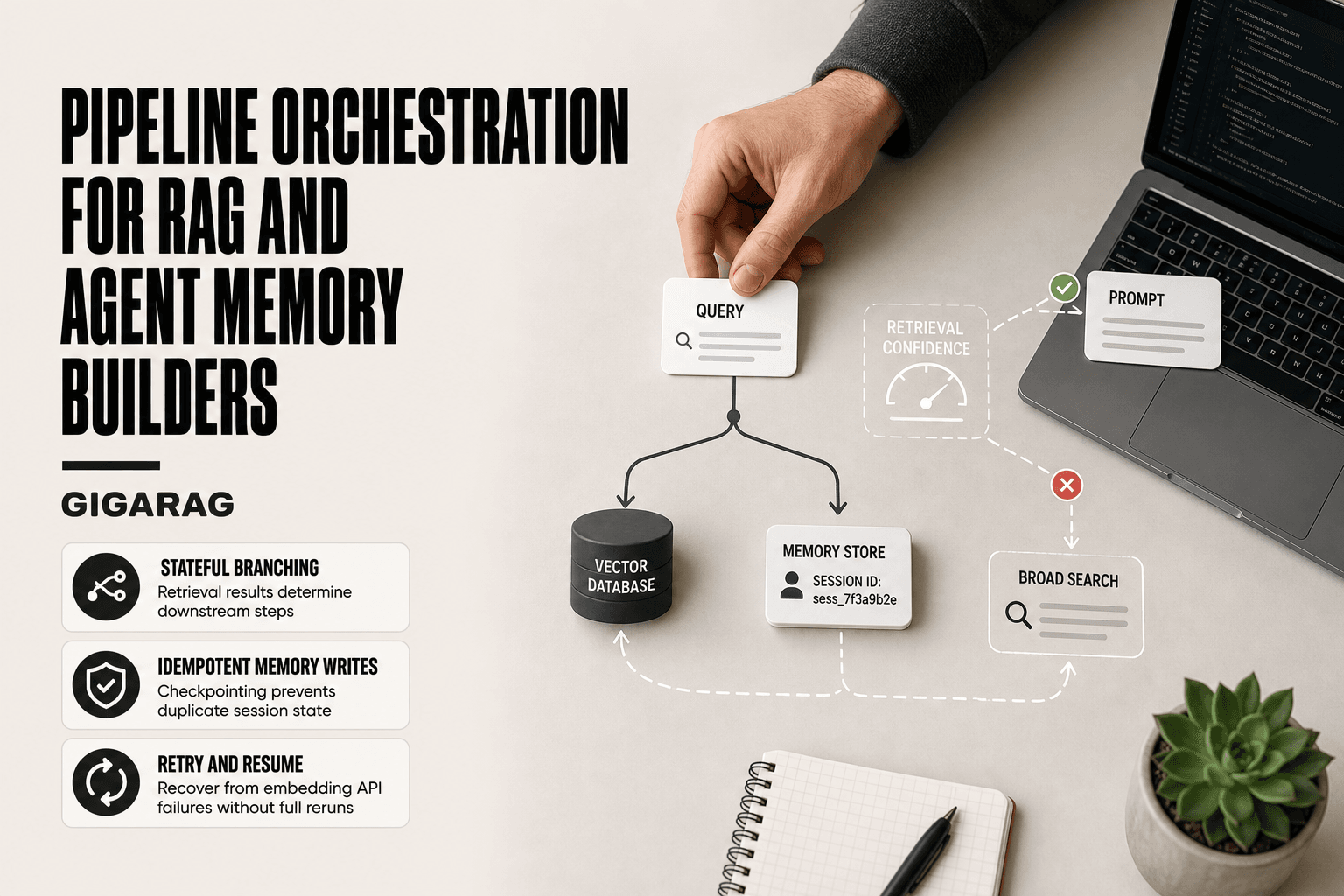
Write a function that takes a query, embeds it, and runs similarity search against Chroma. Start with top-k of 5. Add a metadata filter so the agent only retrieves memories for the current user or session. This is the statefulness piece most RAG tutorials skip.
Step 5: Wire retrieval into your agent's prompt
Retrieved chunks go into the system prompt as context. Tell the LLM: "Use only the following memories to answer. If the answer isn't there, say you don't know." Cap total retrieved tokens at 2,000-3,000 to leave room for the conversation history and the model's response.
Step 6: Test and evaluate retrieval quality
Build a small test set of 20-30 queries where you know the correct chunk. Check recall@5: what fraction of queries return the right chunk in the top 5. Below 80%, adjust chunk size, try a different embedding model, or add re-ranking. Don't skip this step. Retrieval quality is the ceiling on everything else.
RAG for Agent Memory: What Changes
Standard RAG is stateless. You embed a query, retrieve chunks, generate an answer, and forget everything. Agent memory breaks that model. The agent needs to remember what it learned five turns ago, and what you told it last week.
Statefulness and multi-turn context
An agent's conversation history is itself a retrieval source. Each turn adds new context that changes what the next retrieval should return. You can't just embed the latest query. You need to embed the query plus relevant prior turns, or maintain a rolling context window that gets re-embedded as it shifts.
Memory consolidation and forgetting
Agents accumulate noise. Not every turn deserves to become a permanent memory. You need a consolidation step: periodically summarize recent interactions, extract durable facts, and discard the rest. Forgetting is a feature, not a bug. Without it, your vector store fills with stale preferences and dead ends.
Write paths vs. read paths
Standard RAG has one path: read. Agent memory needs two. The agent must write new memories back to the store, not just query it. That means a write API, deduplication logic, and conflict handling when a user contradicts something they said earlier.
When agent memory RAG breaks down
It breaks when the consolidation step is missing. The agent retrieves outdated preferences and acts on them. It breaks when write paths are unbounded and the store bloats. It breaks when multi-turn context isn't embedded properly, so retrieval misses what the user just said.
Choosing the Right RAG Pipeline for Your Use Case
There is no single best RAG pipeline. The honest answer is that the right one depends on your constraints: latency budget, cost per query, scale of documents, and whether you need agent memory with write paths.
Evaluation criteria: latency, cost, scale, memory needs
Latency matters most for interactive agents. A pipeline that takes two seconds to retrieve and generate will frustrate users. Cost compounds with query volume. Scale determines whether you need a distributed vector store or a local one. Memory needs decide whether you need write paths and consolidation, not just read.
Open-source vs. managed options
Open-source stacks like LangChain plus Chroma or Qdrant give you full control and zero per-query fees. You own the failure modes too. Managed options handle scaling and re-ranking for you, but add per-query costs and lock-in. If you're building agent memory with consolidation and write paths, a managed option like GigaRAG saves you the plumbing. If you need full control over chunking and embedding, build it yourself.
Final Thoughts
How a RAG pipeline works is simple to state and hard to build well. It's a two-phase system: index your documents into vectors, then retrieve and generate at query time. Every design choice in between carries a trade-off.
RAG cannot reason over what it retrieves. It cannot guarantee the right chunk comes back. It cannot fix source data that was wrong before you indexed it. Build with those limits in mind, not around them.
For agent memory, the hard part is statefulness. Standard RAG reads. Agent memory RAG needs to write, consolidate, and forget. That's a different system wearing the same name.
If you want the plumbing handled, GigaRAG is a managed option built for agent memory RAG. If you want full control, the open-source path is there. Either way, start with the failure modes. They'll find you first.
Frequently Asked Questions
Is ChatGPT a RAG?
Not by default. ChatGPT is a generative model, and RAG is a technique that can be added to it. Some ChatGPT features use retrieval or browsing, but the base model does not retrieve from your private data unless you build or enable that layer.
How does RAG actually work?
RAG works in two phases. First, documents are chunked, embedded, and stored in a vector index. Second, at query time, the system retrieves the most relevant chunks and passes them to an LLM as context so the answer is grounded in your data.
How do I build my own RAG pipeline?
Start with a small corpus, an open-source embedding model, and a vector database. Add retrieval, then a reranker, then generation. Evaluate retrieval quality first, because most RAG failures come from bad retrieval, not from the LLM.
Which RAG pipeline is considered the best?
There is no single best pipeline. The right design depends on your data, latency budget, and whether you need agent memory. Pipelines with reranking and hybrid search tend to outperform naive vector-only retrieval, but you should benchmark on your own queries.
What can RAG not do?
RAG cannot fix poor reasoning, cannot guarantee factual correctness, and cannot provide true long-term statefulness on its own. It also struggles when the knowledge base is stale, contradictory, or missing the needed information.
How does RAG fit into agent memory?
RAG acts as the retrieval layer for agent memory. Agents can store past interactions, observations, and decisions in an index, then retrieve relevant memories to inform current actions. This supports episodic and semantic recall without retraining the model.
Do I need a vector database for RAG?
Not always. For small corpora, you can use in-memory similarity search or a simple index. A vector database becomes useful when you need persistence, scale, filtering, and fast approximate nearest-neighbor search.
About GigaRAG
GigaRAG helps GigaRAG is for agent memory and RAG pipeline builders. get this right. Whether you are working through how a rag pipeline works or something adjacent, we publish what we have actually tested, including where it falls short.