
How to Maintain AI Project Memory Across Multiple Days
How to Maintain AI Project Memory Across Multiple Days is a practical problem for agent-memory and RAG-pipeline builders. Every new chat means I have to explain: what I'm building, why I made certain decisions, what I've already tried, and what my goals are. A chat transcript is temporary conversation context, not durable project state. Loading every old message can fill the context window with stale details, hide a governing decision, and make the next action less reliable.
Persistent memory cannot guarantee factual recall, settle conflicting records on its own, replace source-of-truth documents, or remove context-window limits. Start with a structured project record, then use a clear loop: capture authoritative state, store it with provenance, retrieve task-relevant records, validate them before acting, and write a handoff for the next run.
Process overview
Treat conversation context as temporary and project memory as durable state stored outside the chat. Start with a concise, versioned project record. Add retrieval and validation before you invest in a dedicated memory layer.
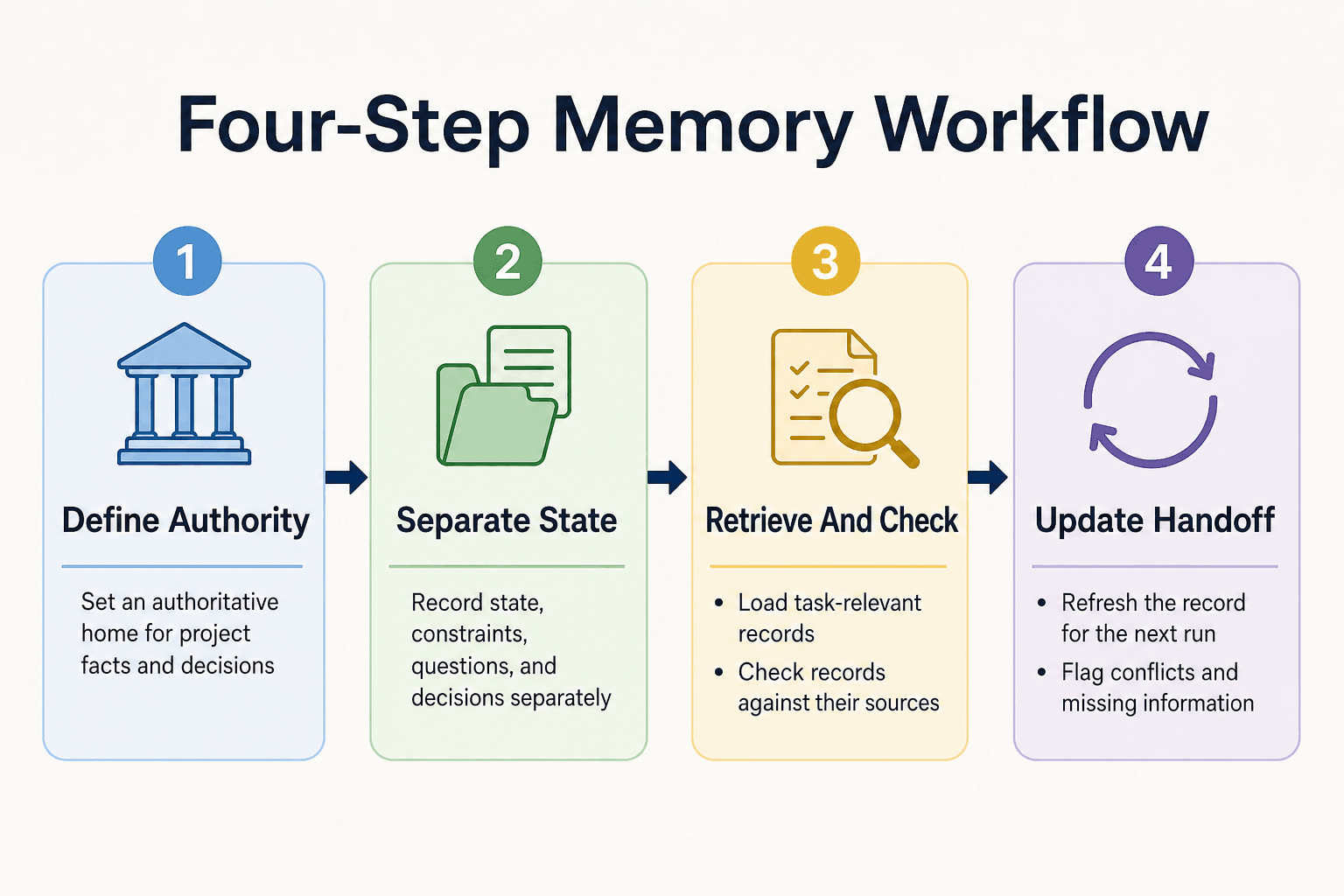
- Define an authoritative home for project facts and decisions.
- Record current state, constraints, open questions, and decision history separately.
- Retrieve records relevant to the task, then check them against their sources.
- Update the record at handoff and flag conflicts or missing information.
How to Maintain AI Project Memory Across Multiple Days: Define the Outcome
To maintain AI project memory across multiple days, store a compact project record outside the chat and retrieve it by task. It should cover the goal, current state, constraints, decisions, evidence, and open work. It can't guarantee correct recall or replace the documents that govern the project.
[!note] Persistent memory stores and retrieves project records. It does not guarantee factual recall, resolve conflicting records automatically, replace source-of-truth documentation, or remove context-window limits.
Conversation context vs. durable project memory
A context window holds what the model receives for one run. It may include useful detail, but replaying a long transcript also brings abandoned ideas and stale instructions. Durable memory is a smaller, named project state you can inspect, update, and hand to another run.
The minimum memory contract for every project
Give every record a project ID and a clear owner. Capture the current goal, status, hard constraints, decisions with their reasons, supporting sources, unanswered questions, and the next action. Mark each item with a date and status, including "superseded" when it no longer governs work.
What persistent memory cannot do
Persistent memory can't decide which conflicting record is true, prove a saved fact is current, or remove context-window limits. Keep a source of truth outside the memory store, validate consequential claims against it, and make the agent ask when the record lacks what the task needs.
Structured project memory vs. a long chat transcript
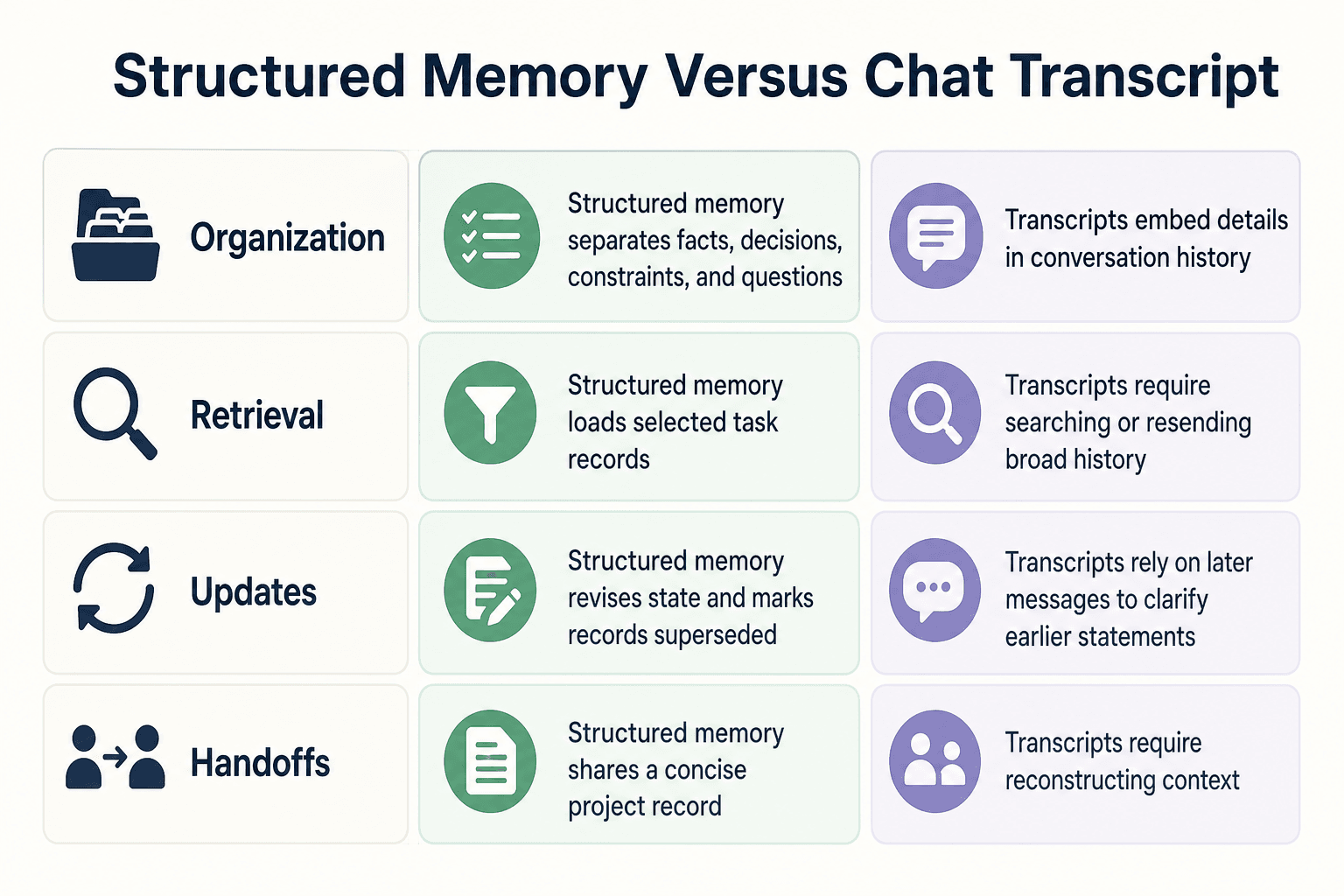
| Factor | Option A | Option B |
|---|---|---|
| Organization | Separate current facts, decisions, constraints, and open questions | Keep project details embedded in conversation history |
| Retrieval | Load selected records for the current task | Search or resend broad conversation history |
| Updates | Revise current state and mark outdated records as superseded | Rely on later messages to clarify earlier statements |
| Handoffs | Share a concise project record across sessions | Reconstruct context from the transcript |
Set up the sources of truth before you store memory
Memory is not the source of truth. It is a working record that points back to the people, documents, and systems that can settle a question when the stored state is incomplete or wrong.
[!tip] For a lightweight first version, keep a concise project document and a separate decision log. A Product Hunt discussion describes builders using these documents to carry goals, constraints, and decisions into new chats (S2).
Choose the project identifier and memory owner
Use one stable project ID across chats, jobs, and agents. Don't derive it from a task title that may change. Name a memory owner: a person or service responsible for approving updates and resolving disputes.
Keep the owner visible. Without one, conflicting records can sit in storage until an agent treats the wrong one as current.
Define canonical sources and access boundaries
List the canonical source for each kind of state: a requirements document for scope, a decision log for architecture choices, a ticket system for active work, and a repository for implementation. Set a precedence rule before records conflict, such as "approved decision log beats session summary."
Also record who may read and write each source. An agent that can retrieve a private planning note but should not expose it needs that boundary in metadata, not an informal instruction.
Decide when a simple project document is enough
For one project with few changes, a short versioned document can be enough. A Product Hunt discussion describes builders using lightweight project documents and concise decision logs to carry goals, constraints, and choices between chats.
Don't add a vector store just because memory sounds complex. Add retrieval infrastructure when many projects, records, or agents make manual selection unreliable.
How to maintain AI project memory across multiple days: A step-by-step guide
- Summarize the completed task and the project's current state.
- Record durable facts, constraints, decisions, and unresolved questions in separate fields.
- Link important claims and decisions to source documents or record IDs.
- Mark changed or superseded records rather than silently overwriting history.
- List what the next run should retrieve and what information it still needs.
- Check the handoff for conflicts and missing details before saving it.
Step 1: Capture durable state in a project-memory record
Don't save raw transcripts as your default memory layer. They mix settled facts, abandoned ideas, chat filler, and run-specific inputs that can mislead the next agent.
Capture records when something changes the project's future work. A lightweight project document and concise decision log can carry goals, architecture, constraints, and key choices between sessions, as builders in the Product Hunt discussion describe.
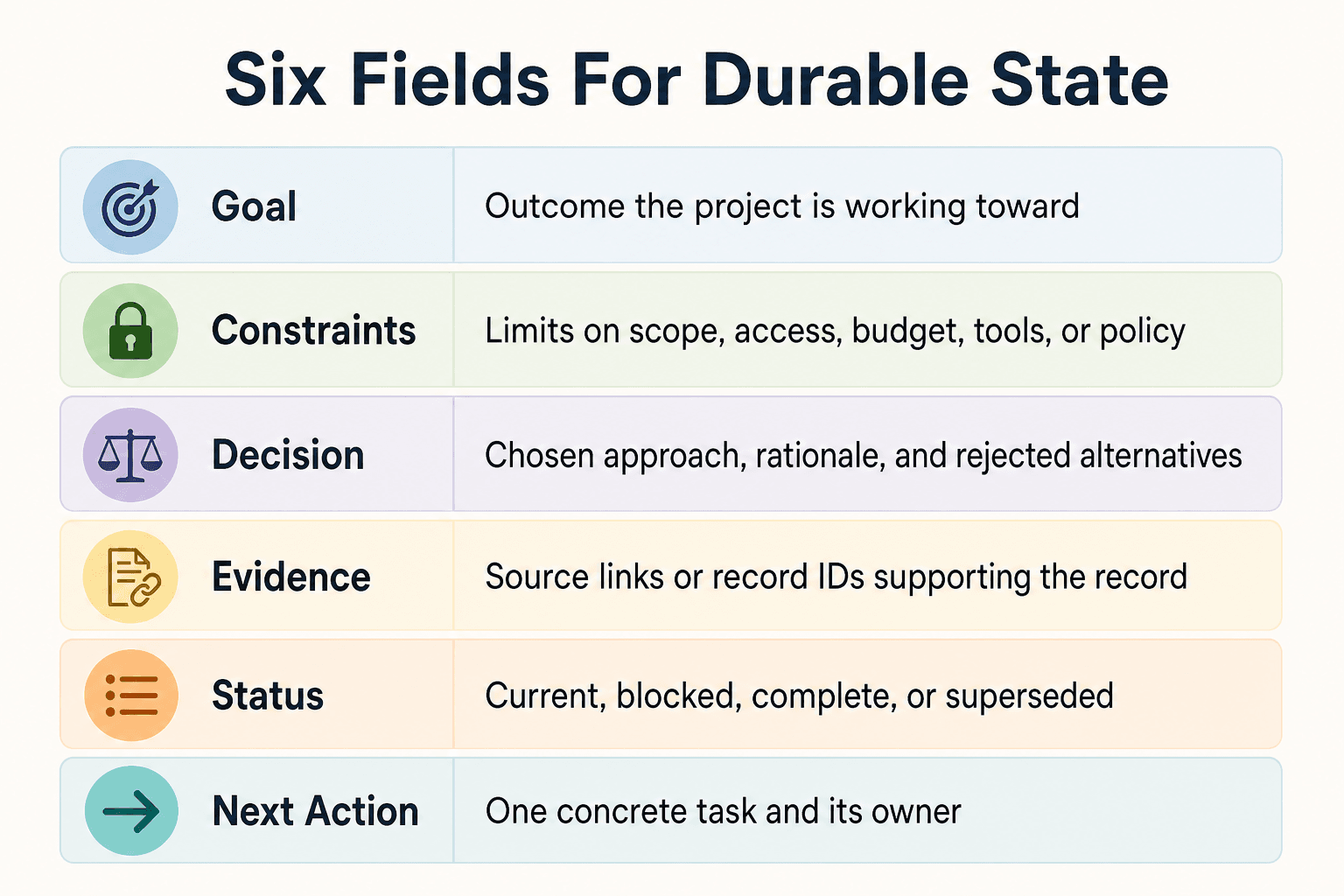
Fields to capture: goal, constraints, decisions, evidence, status, and next action
Give each record a project ID, record type, and short title. Then capture:
- Goal: the outcome the project is working toward.
- Constraints: limits on scope, access, budget, tools, or policy.
- Decision: what was chosen, why, and what alternatives were rejected.
- Evidence: links or IDs for the source that supports the record.
- Status: current, blocked, complete, or superseded.
- Next action: one concrete task and its owner.
Keep each field brief. The next run needs usable state, not a replay of the discussion that produced it.
Separate static facts from run-specific inputs
Static facts stay true across many runs, such as an approved API, a project constraint, or a store's opening hours. Run-specific inputs belong to one job, such as an order ID, a file path, or a user's current request.
Mixing them makes the agent guess context it should already know. Store inputs with the run record, then expire or archive them when the run ends.
Record provenance, timestamps, confidence, and supersession links
Every meaningful record needs provenance: where it came from and who or what approved it. Add a timestamp, a confidence field, and a link to the record it replaces.
Don't overwrite an old decision. Create a new record and mark the earlier one as superseded. That preserves why the project changed without treating old state as current.
Create a concise end-of-session handoff
End each session with a handoff record: completed work, unresolved questions, blockers, changed records, and the next action. Include missing fields plainly rather than letting the next agent infer them.
A handoff can't settle a disputed fact. Point the next run back to the source of truth before it acts.
Step 2: Retrieve only the memory needed for the current task
Retrieval is where stored memory becomes useful or harmful. Too much history makes the agent drift off-task. Limit the context before the model sees it.
Start with task and project metadata
Start with the task's project ID. Then filter by task type, record type, access boundary, status, and timestamp.
A request to draft a release note may need the current project status, approved decisions, and recent evidence. It probably doesn't need an archived debugging handoff. Metadata-First Retrieval Start with summaries or metadata; pull full documents only when required.
Use a retrieval order: current state, governing decisions, then supporting evidence
Load records in a fixed order:
- Current project state and the active next action.
- Governing constraints and current decisions.
- Supporting evidence linked from those records.
This order gives the agent a working view before it sees background material. The LinkedIn guidance on continuous AI task processing also recommends just-in-time context rather than frontloading all data, because excess history can pull an agent off task.
Exclude irrelevant history and superseded records
Filter out records marked superseded, archived, run-specific, or unrelated to the project ID. Don't silently delete them. Keep them available for audit or when a task asks why a decision changed.
Freshness alone isn't enough. An older approved architecture decision can still govern the work, while a newer unverified note may not. Rank authority and status ahead of recency when they disagree.
Require an explicit missing-context response
Define a stop condition for missing required context. For example: MISSING_CONTEXT: approved deployment target or CONFLICTING_RECORDS: decision-14, decision-22.
Don't tell the agent to fill gaps from likely assumptions. Ask for the missing source, request clarification, or route the task to its owner before it acts.
Step 3: Validate, update, and hand off memory after each run
Retrieved memory is context, not proof. Before an agent sends a customer message, changes a deployment setting, or closes work, check the record against its linked source of truth. Stop if the source is missing or access is denied.
Validate retrieved facts against their source before consequential actions
Give each consequential action a validation rule. Match a current status record to the canonical system, confirm an approved decision in its decision record, and check that cited evidence still exists and applies to this project.
Don't ask the model to judge its own memory alone. A retrieved note may be stale, incomplete, or written from a mistaken earlier run. When validation fails, return a clear status such as UNVERIFIED_MEMORY and route the task for review.
Write append-only decisions and mark replaced records as superseded
Don't overwrite a decision just because the project changed. Create a new record with the decision, reason, owner, timestamp, linked evidence, and the ID of the record it replaces.
This preserves why the old choice made sense at the time. A Product Hunt discussion describes the same pattern for architecture decision logs: versioned records remain immutable, while later records mark earlier ones as superseded. Your retrieval filter can then exclude the old choice from normal work without erasing its history.
Use a completion signal and next-run checklist
Make every run end in a machine-readable completion signal: COMPLETE, BLOCKED, or NEEDS_REVIEW. The supplied LinkedIn guidance recommends a clear termination signal, which prevents a workflow from treating partial output as finished work.
Attach a short handoff checklist: current state, files or sources changed, decisions made, unresolved questions, validation status, and the next action with its owner. Keep it concise. The next agent needs a reliable starting point, not a replay of the run.
Test the workflow with missing, stale, and conflicting memory
Happy-path tests aren't enough. Run cases with a missing required field, a stale status record, two conflicting decisions, a broken source link, and a request outside the agent's access boundary.
Check that the agent stops, names the conflict or gap, and avoids writing a new "fact" from an assumption. The LinkedIn guidance suggests testing ugly inputs and using a 10 to 20 sample evaluation before shipping, so you can score accuracy, format, and stability against known failure cases.
Troubleshoot memory drift, conflicts, and deployment failures
A memory store can preserve bad state as easily as good state. It can't resolve contradictory records, prove a retrieved claim is current, or make an agent safe to act without required information.
When retrieval returns the wrong or outdated state
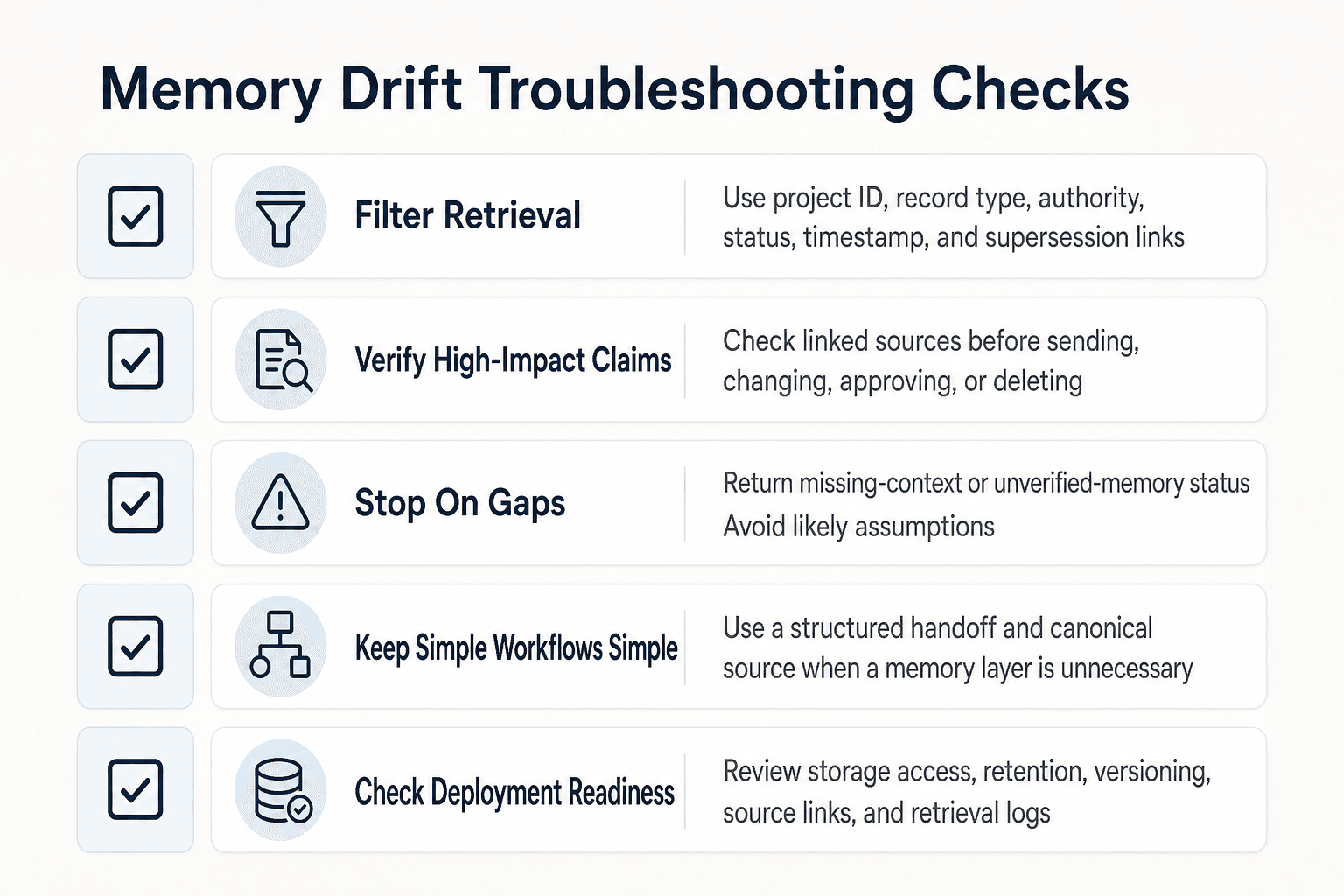
Start with filters, not similarity alone: project ID, record type, authority, status, timestamp, and supersession link. If a current status record and an old session note both match the task, load the canonical current record and keep the old note out of the prompt.
Duplicate records cause the same problem. Give each decision and state update a stable ID, then reject or flag writes that repeat an existing event. Keep prompt budgets tight too. The supplied LinkedIn guidance warns that excess history can pull an agent off task, so load supporting evidence only when the task needs it.
When the model treats memory as fact without verification
Memory is a lead, not proof. Require the agent to verify high-impact claims against the linked source before it sends, changes, approves, or deletes anything.
When a required field, source, or permission is absent, the agent should stop with a machine-readable status such as MISSING_CONTEXT or UNVERIFIED_MEMORY. Don't allow it to fill the gap with a likely answer. That is not worth the risk.
When a memory layer is unnecessary complexity
It depends on how often work resumes and what breaks when context is lost. A single owner working from one short, current project document may not need embeddings, retrieval ranking, or a separate vector store.
Add a memory layer when several runs or agents need selective access to changing state, decisions, and evidence. Until then, a structured handoff and canonical source may be easier to inspect and fix.
Deployment checks for storage, observability, and evaluation
Before you ship, check storage access, retention rules, record versioning, and source links. Log what the agent retrieved, what it excluded, its validation result, and any write it attempted.
Run an evaluation set with stale records, conflicts, missing fields, and oversized retrieval results. The LinkedIn guidance suggests 10 to 20 samples before shipping, scored for accuracy, format, and stability.
Build continuity without treating memory as truth
Persistent memory won't make an agent correct, settle conflicting records on its own, or remove the need for source checks. It also can't bypass a context window. The aim is narrower: give each new run enough trusted project state to resume work without replaying every chat.
Start with one structured project record. Include the goal, current status, constraints, decisions, source links, open questions, and next action. Make one owner accountable for each field, and mark records as replaced rather than silently editing history.
Then add selective retrieval. Load the current state first, followed by decisions that govern the task and only the evidence needed to verify a claim. Keep raw transcripts out unless they answer a specific unresolved question.
Start small, measure failure cases, then expand
Before you add a vector database or more agents, test the simple workflow against known bad cases: a stale status, two conflicting decisions, a missing source, and an irrelevant but similar record. Check whether the agent stops, asks for context, or acts on weak memory.
Log every retrieval and write. Review what was loaded, excluded, verified, and changed after each run. That feedback shows where your schema or retrieval rules fail.
How to Maintain AI Project Memory Across Multiple Days starts with disciplined project state, not a larger prompt.
Frequently asked questions
What tasks can AI not do?
This brief does not provide evidence for a definitive list of tasks AI cannot do. For a project-memory workflow, require the agent to flag missing information and avoid treating retrieved records as verified truth.
How to deploy an AI project with persistent memory?
Store project records outside the conversation, then have each run retrieve records relevant to its task. Save validated updates at handoff and keep authoritative source documents available for checking. You don't need a dedicated memory service to start.
What are the 6 stages of the AI project cycle in Class 10?
The supplied references do not describe the Class 10 AI project cycle, so they do not support a reliable list of its stages. Check the relevant curriculum or textbook for the exact framework.
Does AI use up a lot of data?
The references do not quantify data use. For multi-day continuity, the supplied context recommends loading only what the current task needs rather than resending an entire history.
How can Python maintain AI project memory across multiple days?
Persist structured records outside the running process, such as in files or a database, and load relevant records when a new run starts. Store fields for current state, decisions, constraints, open questions, and superseded records. The supplied references do not prescribe a particular Python library.
What GitHub-style patterns work for multi-day AI project memory?
A version-controlled project document and a concise decision log are practical patterns. In a Product Hunt discussion, one participant describes Markdown decision records with context, alternatives, decisions, consequences, and an index. Treat that as an individual implementation example, not a universal result (S2).
About GigaRAG
GigaRAG helps you share agent memory like you share Google Docs. It connects your AI agents to a central Hive Mind, with access controls for what each agent can use. Developers, vibe coders, and teams can keep project knowledge available across sessions and tools, so agents can pick up where work left off without rebuilding context or managing a full RAG stack.


