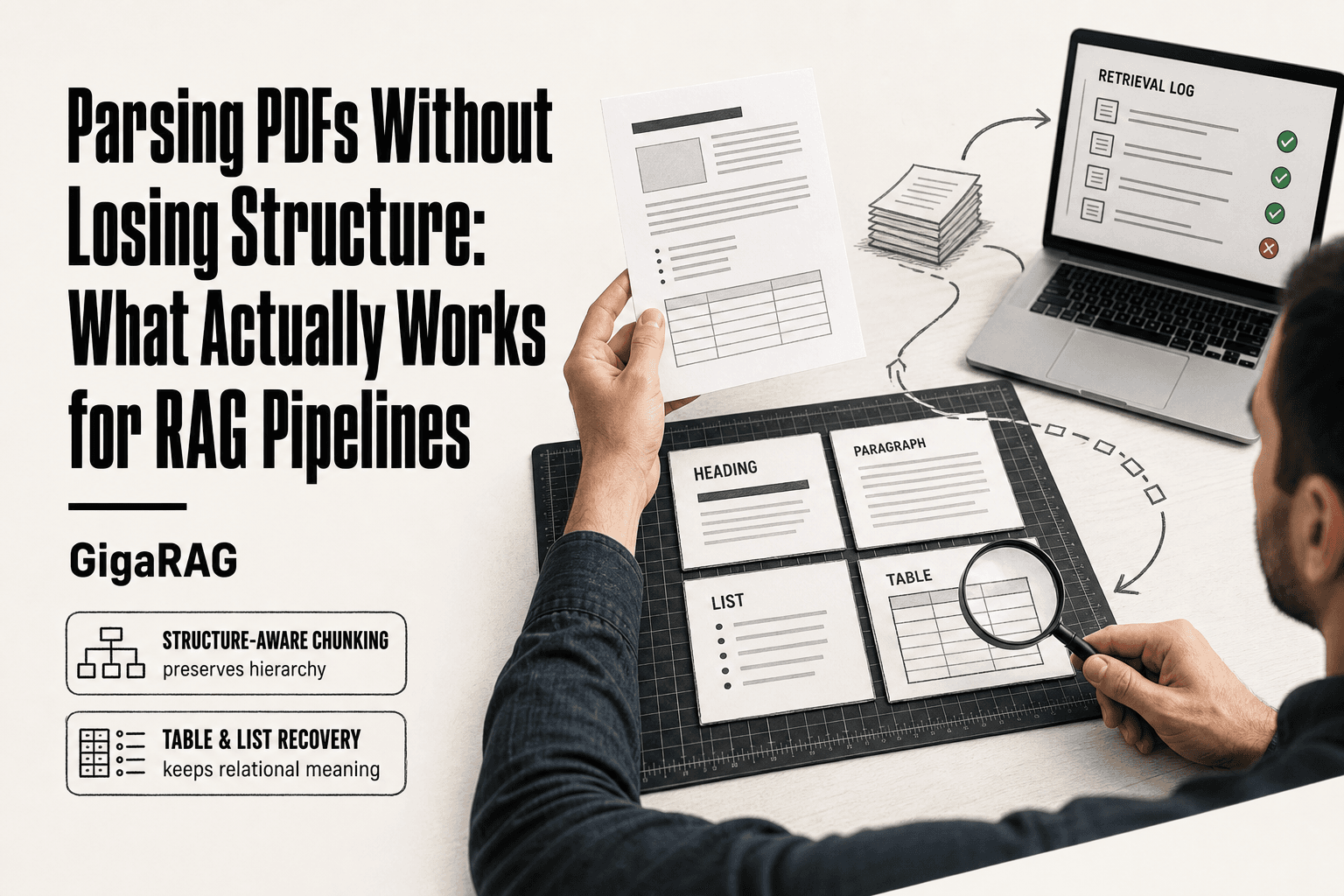
Parsing PDFs Without Losing Structure: What Actually Works for RAG Pipelines
Parsing PDFs without losing structure is the core tension every RAG pipeline builder hits sooner or later. You're not extracting text. You're reconstructing meaning from a format designed for printers, not parsers. Headings, nested lists, tables, and cross-references exist visually on the page, but the PDF tells you almost nothing about how they relate. Flatten that structure and your chunks lose hierarchy. Your embeddings blur. Your agent memory, the context your system actually reasons over, gets noisy in ways that are hard to debug. GigaRAG is one platform that benefits directly from well-structured document parsing, because agent memory quality tracks the quality of the structure you feed it. The honest answer is that no tool solves this perfectly. What you can do is understand the trade-offs and pick the approach that fails in ways you can tolerate. This guide covers what structure actually means for retrieval, which tools preserve it best, and what you should not expect from any of them.
| At a glance | Details |
|---|---|
| Core problem | PDFs render visually, not semantically |
| What breaks | Headings, tables, lists, reading order |
| Best for tables | Layout-aware or ML models |
| Best for speed | Rule-based text extractors |
| Key trade-off | Accuracy vs speed vs setup cost |
| RAG impact | Chunk quality drives retrieval accuracy |
In This Guide
- Why Parsing PDFs Without Losing Structure Is Hard
- Rule-Based vs AI/ML Parsing: Which Preserves Structure Better?
- What 'Structure' Means for RAG Pipelines and Agent Memory
- Parsing Pdfs Without Losing Structure: A Step-by-Step Guide
- Three Approaches to Parsing PDFs Without Losing Structure
- Tools That Preserve Structure (And What They Actually Do)
- Step-by-Step: Parsing PDFs Without Losing Structure for RAG
- What You Cannot Do: Honest Limitations of PDF Parsing
- Common Mistakes When Parsing PDFs Without Losing Structure
- How to Choose the Right Parsing Approach for Your Use Case
- Final Thoughts: Structure Is the Foundation of Good Retrieval
Why Parsing PDFs Without Losing Structure Is Hard
PDFs are built for printers, not parsers. Every decision you make downstream, from chunking to embedding, depends on structure the format never promised to keep.
What a PDF actually stores (and what it doesn't)
A PDF stores drawing instructions: text runs with coordinates, font references, and line segments. It does not store headings, paragraphs, or tables as semantic elements. What you see as a heading is just a text run with a larger font size and a different y-coordinate. The format has no concept of "this text belongs to that section."
Here's what happens behind the scenes. A PDF page contains a content stream, which is a sequence of operators like "move to this position" and "draw these glyphs." The word "Introduction" at the top of a page is indistinguishable from body text at the format level. The only difference is the font size and position, which a parser must infer as hierarchy.
Why visual fidelity ≠ semantic structure
A PDF renders identically on every device. That's the point of the format. But that fidelity comes at a cost: the document is optimized for appearance, not meaning.
A two-column layout is a good example. Visually, you read column one top to bottom, then column two. But the content stream may interleave the text runs from both columns. A naive parser extracts text in stream order, producing a scrambled mess: half a sentence from column one, then half a sentence from column two, then back again.
Tables are worse. A table in a PDF is just a grid of lines and text runs positioned to look like rows and columns. There's no underlying data structure. A parser must reconstruct the grid from coordinates, and it gets confused by merged cells, rotated headers, and multi-line entries.
The downstream cost of flattened structure in RAG
When structure is lost, retrieval quality degrades in predictable ways. A heading that gets merged into a paragraph loses its role as a hierarchy signal. A table flattened into a text stream loses its relational meaning. Chunking by character count instead of semantic boundaries splits coherent units apart.
The honest answer is that no parser recovers structure perfectly. The best you can do is choose a tool that preserves the structure your specific use case needs, and validate the output before it reaches your pipeline.
[!note] No parser can perfectly reconstruct every PDF's original structure because PDFs store visual layout instructions, not semantic tags. Expect to validate and post-process output, especially for tables and multi-column layouts.
Rule-Based vs AI/ML Parsing: Which Preserves Structure Better?
| Factor | Rule-Based Parsing | AI/ML Parsing |
|---|---|---|
| Structure accuracy | Good for simple, consistent layouts | Better for complex, varied layouts |
| Table handling | Struggles with merged cells, spanning rows | Handles complex tables more reliably |
| Speed & cost | Fast, low compute cost | Slower, higher compute cost |
| Setup effort | Low; works out of the box | Higher; may need model selection or tuning |
| Best for RAG | Clean, uniform document sets | Mixed or messy document collections |
What 'Structure' Means for RAG Pipelines and Agent Memory
Structure is not one thing. It's a set of signals your parser either preserves or destroys, and each signal affects retrieval differently.
Headings and hierarchy: the backbone of semantic chunking
Headings tell you where a section starts and ends. They're the difference between a chunk that contains a complete argument and a chunk that cuts off mid-thought. When a parser preserves heading levels, you can chunk along section boundaries instead of arbitrary character counts. That means a question about "installation steps" retrieves the installation section, not a fragment of it.
The catch: heading detection is inference, not fact. A parser guesses that a 16-point bold text run is a heading because of its font size and position. It has no access to the author's intent. When that guess is wrong, your chunk boundaries are wrong, and retrieval quality drops without you noticing.
Tables and lists: relational structure that flattens easily
Tables encode relationships: a row connects a feature to its price, a column connects a metric to its value. Flatten a table into a text stream and those relationships disappear. An embedding model can't recover what was never in the text.
Lists are similar. A nested list preserves parent-child relationships. A flattened list turns "Step 2, sub-step a" into "Step 2 a" and loses the hierarchy. For agent memory, this matters: an agent reasoning about a procedure needs to know which steps are subordinate to which.
Metadata and cross-references: the context agents need
Metadata is the context a document carries but doesn't display: title, author, creation date, section labels. Cross-references are pointers: "see Figure 3" or "as discussed in Section 2." Both are cheap to preserve when the parser tracks them, and expensive to reconstruct later.
For RAG pipelines, metadata enables filtered retrieval. For agent memory, cross-references let an agent follow a thread across a document instead of treating each chunk as an isolated fact. Most parsers drop both by default. You have to ask for them.
[!tip] For RAG pipelines, preserve heading hierarchy in your chunks — include the section title as metadata or prepend it to each chunk. This simple step often improves retrieval relevance more than switching parsers.
Parsing Pdfs Without Losing Structure: A Step-by-Step Guide
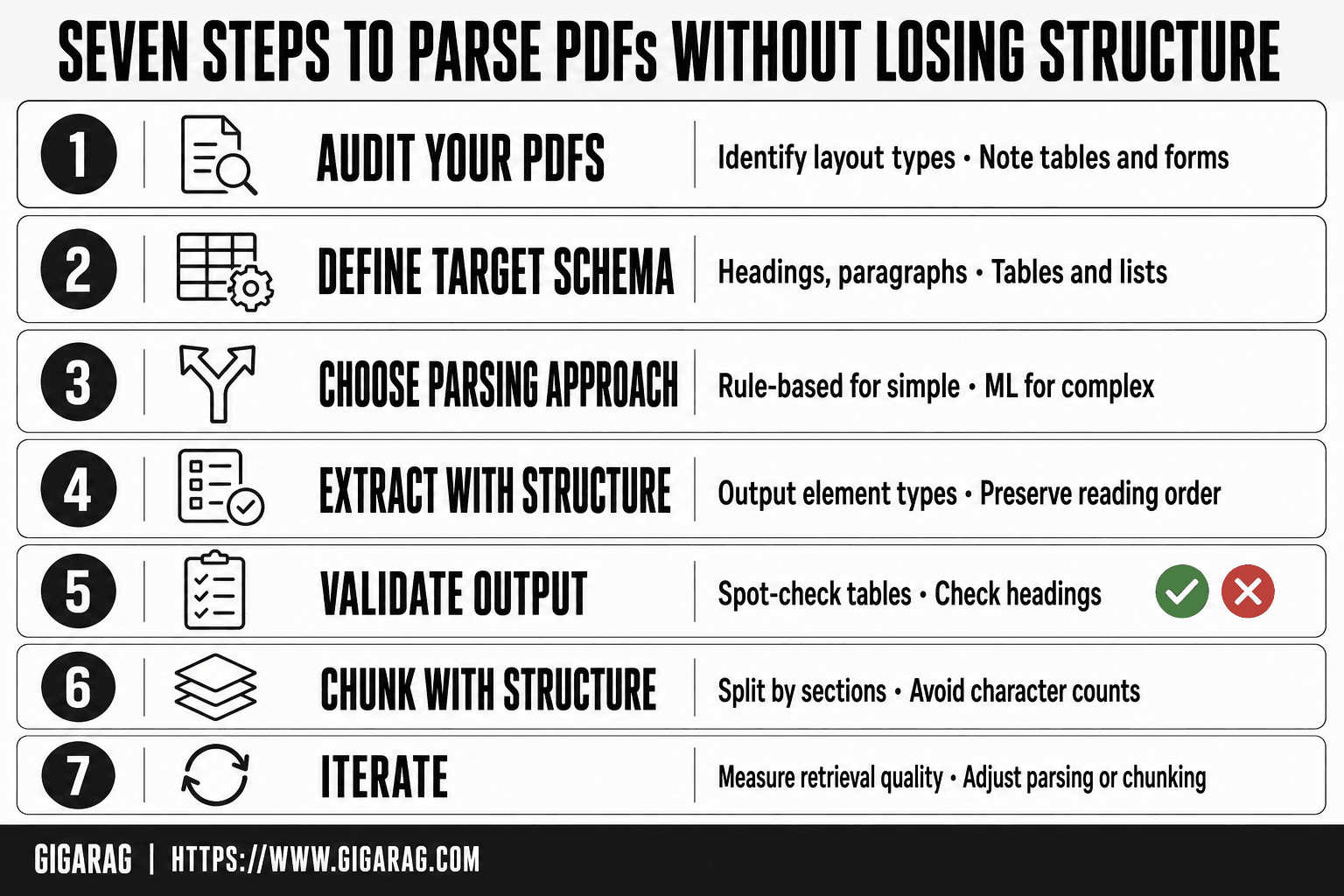
- Audit your PDFs: identify layout types (single-column, multi-column, tables, forms) and note variations.
- Define your target schema: decide which elements (headings, paragraphs, tables, lists) your RAG pipeline needs.
- Choose a parsing approach: rule-based for simple layouts, layout-aware or ML models for complex ones.
- Extract with structure: use tools that output element types and reading order, not just raw text.
- Validate output: spot-check tables, headings, and reading order against the original PDF.
- Chunk with structure: split by semantic boundaries (sections, headings) rather than fixed character counts.
- Iterate: measure retrieval quality and adjust parsing or chunking as needed.
Three Approaches to Parsing PDFs Without Losing Structure
There are three ways to parse a PDF: template-based, rule-based, and AI/ML-powered. Template-based is precise but breaks on new layouts. Rule-based handles variety but takes real work to set up. AI/ML-powered is the most flexible but the least predictable. Your choice depends on document variety and how much failure you can tolerate.
Template-based parsing: precise but brittle
Template-based parsing works by mapping fixed coordinates to fields. You tell the parser "the invoice number is at x=120, y=340" and it pulls that value every time. For a known document type, this is nearly perfect. If you're processing 10,000 invoices from the same vendor, template-based parsing will get the invoice number right 99% of the time.
The problem is obvious: change the layout and the template fails. A new vendor, a redesigned form, a slightly different font size, and your coordinates point at empty space. You'll spend more time maintaining templates than parsing documents. Template-based parsing is best for high-volume, low-variety document sets where the format never changes.
Rule-based parsing: flexible but labor-intensive
Rule-based parsing uses heuristics instead of fixed coordinates. You write rules like "a line in bold 14-point font followed by a line break is a heading" or "text between two horizontal lines is a table row." Tools like pdfplumber and PyMuPDF give you the raw layout data, and you build the rules on top.
This approach handles more variety than templates. A rule that detects headings by font size works across documents from different sources, as long as they follow similar typographic conventions. The trade-off is effort. You're writing and testing rules for every document type you encounter. A rule that works for financial reports might fail on academic papers. Rule-based parsing is a good middle ground when you have moderate document variety and the time to iterate on rules.
AI/ML-powered parsing: powerful but unpredictable
AI/ML-powered parsers use models trained to recognize document structure. Tools like LlamaParse and Unstructured's AI models look at the visual layout and infer headings, paragraphs, tables, and lists without explicit rules. They handle the variety that breaks templates and rules.
The catch is unpredictability. A model might correctly identify a complex nested table on one page and completely miss a heading on the next. You can't debug a model the way you debug a rule. When it fails, you often don't know why. AI/ML parsing is the right choice for high-variety document sets where manual rule-writing would be impractical, but you need a validation step to catch the failures.
Tools That Preserve Structure (And What They Actually Do)
No single tool preserves everything. Each one makes a bet about what structure matters and what can be sacrificed. Here's what the major options actually do, and where they fall short.
Unstructured: layout-aware but not perfect
Unstructured is a Python library that detects document elements, headings, paragraphs, tables, and lists, then outputs them as JSON. It's the default choice for many RAG pipelines because it handles a wide range of file types beyond PDFs, including HTML, email, and Word documents.
The main catch is accuracy. Unstructured's rule-based detection works well on clean, born-digital PDFs but struggles with complex layouts, multi-column text, and scanned documents. You'll get headings and paragraphs in the right order most of the time, but nested lists and tables with merged cells often come out scrambled. It's a solid default, not a guarantee.
LlamaParse: strong tables, vendor lock-in risk
LlamaParse is a hosted API from LlamaIndex that uses vision models to parse documents. It's notably good at table extraction, often recovering column boundaries and cell relationships that rule-based tools miss. It also handles scanned PDFs without a separate OCR step.
The trade-off is vendor dependence. Your documents go through LlamaIndex's servers, which raises privacy concerns for sensitive data, and you're locked into their API pricing and rate limits. If LlamaParse changes its model or pricing, your pipeline changes with it. For high-volume ingestion, the per-page costs add up quickly.
Docling and DeepSeek OCR: open-source options
Docling, from IBM Research, converts PDFs into structured formats like Markdown and JSON while preserving reading order and table structure. It runs locally, which means no data leaves your infrastructure. DeepSeek OCR is a newer open-source model that handles document parsing with strong multilingual support.
Both are free and self-hostable, but you'll spend more time on setup and tuning. Docling's output quality is good but not as polished as LlamaParse on complex tables. DeepSeek OCR requires GPU resources for reasonable speed. Open-source means control, but it also means you own the failures.
pdfplumber and PyMuPDF: low-level control, high effort
pdfplumber and PyMuPDF give you raw access to PDF layout data: character positions, font sizes, line coordinates, and drawing commands. You build the structure detection yourself. This is the most flexible approach, because you can write rules that match your exact document type.
The cost is time. You'll write hundreds of lines of code to detect headings, group paragraphs, and reconstruct tables. Every new document type means new rules. These libraries are best when you have a specific, well-understood document format and need precise control over extraction, not when you need a general-purpose parser.
pdf-parse (npm): quick but shallow
pdf-parse is a JavaScript library that extracts raw text from PDFs. It's fast and easy to use, which makes it popular for Node.js projects that need basic text extraction.
The limitation is structural. pdf-parse gives you text with line breaks, but no heading detection, no table reconstruction, no reading order guarantees. For a RAG pipeline that needs semantic structure, pdf-parse is a starting point, not a solution. You'll need to layer your own structure detection on top, which defeats the purpose for most use cases.
Step-by-Step: Parsing PDFs Without Losing Structure for RAG
You can't fix structure you can't see. Start by looking at what's actually inside the PDF before you pick a parser.
Step 1: Inspect the PDF's internal structure
Open the file with pdfplumber or PyMuPDF and dump the raw text with coordinates. Check whether headings have larger font sizes, whether text is in reading order, and whether tables are real tables or just aligned text. A scanned PDF will show no text layer at all, just images. That tells you whether you need OCR before anything else.
Don't skip this step. It takes ten minutes and saves you from building a pipeline around the wrong assumption.
Step 2: Choose the right parser for your document type
Born-digital PDFs with clean layouts work fine with Unstructured or pdfplumber. Scanned PDFs need OCR, so LlamaParse or Docling with an OCR backend. Complex tables push you toward LlamaParse or a custom pdfplumber script. Mixed document sets mean you'll likely need two parsers, not one.
The honest answer is that no single parser handles every document type well. Pick for the dominant type in your corpus.
Step 3: Extract and validate headings, paragraphs, and tables
Run your parser and inspect the output before you trust it. Check that headings are tagged as headings, not as body text. Verify that paragraphs aren't split across page breaks. Confirm that tables came out as structured data, not as a wall of text.
Validation is manual. Pull ten representative pages and read the extracted structure side by side with the original. If headings are wrong, your chunks will be wrong, and your retrieval will be wrong.
Step 4: Chunk with structure-aware boundaries
Don't chunk by character count. Chunk by semantic units: a heading plus its following paragraphs, a table plus its caption, a list as one block. If a section is 2,000 words, split it at paragraph boundaries, not mid-sentence.
Structure-aware chunking keeps related content together, which matters more for retrieval quality than any embedding model choice.
Step 5: Feed structured output into your RAG pipeline
Pass the structured JSON or Markdown into your indexing step. Preserve metadata: heading hierarchy, page numbers, table captions. That metadata becomes context your retriever can use to rank results and your agent can use to reason about where information came from.
If your pipeline flattens structure at ingestion, you've undone all the parsing work. Keep the hierarchy intact through indexing.
What You Cannot Do: Honest Limitations of PDF Parsing
No parser gives you lossless semantic structure from an arbitrary PDF. If your document is visually complex, scanned, or built from nested elements, expect to lose something. The question isn't whether you'll lose structure. It's how much, and whether what remains is good enough for your RAG pipeline.
Scanned PDFs: OCR is necessary but imperfect
A scanned PDF has no text layer. It's a photo of a page. You need OCR before any structure extraction can happen, and OCR introduces errors at a rate that varies with scan quality. A clean 300 DPI scan might hit 98% character accuracy. A faxed document or a photocopy of a photocopy drops well below that.
Those errors compound. A misread heading becomes a wrong chunk boundary. A garbled table cell becomes bad retrieval data. You can clean OCR output with post-processing, but you can't recover what the scan never captured. If the original scan is blurry, no tool fixes that.
Nested elements: where every parser struggles
Nested lists, sub-bullets, and multi-level outlines are the hardest structure to preserve. A list inside a list inside a table cell will flatten or scramble in most parsers. The PDF format doesn't mark nesting explicitly. It stores indentation and bullet glyphs, and the parser has to infer hierarchy from visual cues.
That inference fails often. A sub-bullet might come out as a sibling of its parent. A numbered list inside a paragraph might merge into running text. If your documents rely on deep nesting, test your parser on those specific pages before committing. Don't assume it works.
Cross-references and footnotes: often lost entirely
Footnotes, endnotes, and internal cross-references rarely survive parsing. A footnote marker in the body text might disappear, leaving the footnote text orphaned at the bottom of the page with no connection to its source. Cross-references like "see Section 4.2" become plain text with no link to the target.
For RAG, this means an agent can't trace a claim back to its source note. The information is still there, but the relationship is gone. If your use case depends on citation chains or footnote integrity, you'll need custom post-processing, and even then it's fragile.
When NOT to parse a PDF at all
Sometimes the right move is to skip PDF parsing entirely. If the original source document exists in another format, HTML, Word, Markdown, use that instead. It will have real semantic structure, and you'll save yourself the entire fight.
If the PDF is a scanned form with handwritten entries, don't parse it. Extract the data manually or use a specialized form-processing tool. If the document is a legal contract where every clause boundary matters, a general-purpose parser will not give you the precision you need. In those cases, parsing the PDF is the wrong tool for the job.
Common Mistakes When Parsing PDFs Without Losing Structure
Most parsing failures aren't tool limitations. They're process mistakes. You pick a parser, run it, and trust the output without checking what it actually did. Here are the four mistakes I see most often in RAG pipelines.
Chunking by size instead of structure
The most common error is chunking by character count. You split text into 500-character blocks and call it done. That breaks headings from their sections, separates table rows from their headers, and cuts paragraphs mid-thought.
Structure-aware chunking uses heading boundaries, paragraph breaks, and table blocks as split points. It's more work up front. Retrieval quality improves because each chunk is a coherent unit, not an arbitrary slice. If your parser gives you structure, use it. Don't flatten it back into character counts.
Assuming all PDFs are created equal
A born-digital PDF from a Word export has a text layer and often some metadata. A scanned contract has neither. A government report might mix both, with digital text on some pages and scanned exhibits on others.
Running the same parser on all three gives you wildly different results. Check what kind of PDF you're dealing with before you choose a tool. A quick test: try selecting text in a PDF viewer. If you can't, it's scanned and needs OCR first.
Ignoring metadata and document hierarchy
PDFs carry metadata: title, author, creation date, sometimes section bookmarks. Most parsers expose it, and most developers skip it. That's a mistake.
Metadata gives your RAG pipeline context that raw text doesn't. A document title helps agents disambiguate between similar chunks from different sources. Bookmarks, when present, are a pre-built outline of the document's hierarchy. Use them to validate your parser's heading detection. If the parser's headings don't match the bookmarks, something went wrong.
Over-trusting AI parsers without validation
AI-powered parsers like LlamaParse are impressive. They handle messy layouts better than rule-based tools. But they're also unpredictable. The same document parsed twice can produce slightly different output. A heading might be classified as a paragraph on one run and a heading on the next.
Don't treat AI parser output as ground truth. Spot-check it against the original PDF. Validate headings, table boundaries, and list nesting on a sample of pages before you commit to a full pipeline. The parser is a starting point, not a finished product.
How to Choose the Right Parsing Approach for Your Use Case
You've seen the mistakes. Now the question is which approach actually fits your situation. The honest answer is it depends on four things: what your PDFs look like, how many you're processing, what language they're in, and what you're feeding downstream.
Document type: born-digital vs. scanned
Born-digital PDFs have a text layer. Rule-based parsers like pdfplumber or PyMuPDF work fine here because the text is already there, you just need to extract it in the right order. Scanned PDFs are images. You need OCR before any parsing happens, and OCR adds errors, cost, and time. If your corpus is mostly scanned, start with an AI-powered parser that bundles OCR, like LlamaParse or Docling. Don't try to bolt OCR onto a rule-based tool unless you enjoy debugging.
Scale: one-off vs. high-volume ingestion
Parsing ten PDFs by hand is a different job than parsing ten thousand. For one-off work, a low-level library gives you control and costs nothing but your time. For high-volume ingestion, you need automation and consistency. That's where AI parsers earn their cost, they handle layout variation without you writing rules for every document. But volume also amplifies errors. A 2% failure rate on ten thousand documents is two hundred broken chunks in your index.
Downstream use case: retrieval vs. agent reasoning
Retrieval pipelines are forgiving. A chunk with slightly imperfect heading detection still embeds fine and still gets found. Agent reasoning is not forgiving. Agents need hierarchy, metadata, and cross-references to make decisions. If you're building agent memory, invest in the best structure extraction you can afford. The cost of a misclassified heading compounds when an agent uses it to reason about document relationships.
A simple decision heuristic
Start with three questions. Is the PDF scanned? If yes, use an AI parser with OCR. Are you processing more than a hundred documents? If yes, use an AI parser for consistency. Is the output feeding agent reasoning? If yes, validate structure manually before trusting it. If you answered no to all three, a rule-based library is probably enough. Don't over-engineer a pipeline for ten clean PDFs.
Final Thoughts: Structure Is the Foundation of Good Retrieval
You can't fix structure after the fact. Once a heading is flattened into a paragraph, once a table is scrambled into a wall of text, no amount of clever chunking or embedding brings it back. The damage happens at parse time, and it's permanent.
No tool gets this right every time. Rule-based parsers give you control but demand effort. AI parsers handle variation but introduce unpredictability. The right choice depends on your documents, your volume, and whether the output feeds retrieval or agent reasoning.
Parsing PDFs without losing structure is the quiet work that determines whether your RAG pipeline finds the right chunk or your agent draws the wrong conclusion. It's not glamorous. It's the foundation.
Platforms like GigaRAG, which rely on well-structured document parsing for agent memory, show what's at stake: when structure survives, agents reason better. When it doesn't, they guess.
Frequently Asked Questions
Can I parse PDFs without losing structure for free?
Yes, several open-source libraries (e.g., PyMuPDF, pdfplumber, pdf-parse) can extract text and some structure at no cost. However, they may struggle with complex tables or multi-column layouts, so you may need to combine tools or add post-processing.
What is the best PDF parsing tool for RAG pipelines?
There is no single best tool — it depends on your PDFs. For simple, uniform documents, rule-based libraries like pdfplumber work well. For complex layouts, layout-aware or ML-based tools (e.g., LayoutParser, Unstructured) often preserve structure better. Evaluate on your own document set.
How do I parse PDFs in Python without losing structure?
Use libraries like pdfplumber or PyMuPDF to extract text with coordinates, then reconstruct reading order and element types (headings, tables) using heuristics or a layout model. For tables, consider Camelot or Tabula. Always validate output against the original.
Why do PDFs lose structure when parsed?
PDFs are designed for visual rendering, not semantic extraction. They store text as positioned glyphs without inherent tags for headings, paragraphs, or tables. Parsers must infer structure from layout, which is error-prone.
What are the limitations of parsing PDFs without losing structure?
No parser is perfect. Complex tables, multi-column layouts, scanned documents, and unusual fonts often cause errors. You should expect to validate and correct output, and for scanned PDFs, you will need OCR, which adds another layer of potential structure loss.
How does structure preservation affect RAG retrieval quality?
Structure preservation directly impacts chunk quality. If headings, tables, and lists are scrambled, chunks may mix unrelated content or lose context, leading to poorer retrieval and less accurate agent responses. Clean structure enables semantic chunking and better metadata.
About GigaRAG
GigaRAG is for agent memory and RAG pipeline builders. get this right. Whether you are working through parsing pdfs without losing structure or something adjacent, we publish what we have actually tested, including where it falls short.