Quantization: How Much Accuracy You Actually Lose in RAG
Quantization stores model values with fewer bits, reducing the memory needed for the model. A Q4 model may still produce fluent responses, so judge it against a higher-precision baseline on the tasks your RAG system must handle.
There is no universal percentage for quantization accuracy loss. The result varies with the model, how aggressively it is quantized, and the task. Evaluate retrieval and generated answers separately so a strong-looking result in one part of the pipeline does not hide a weakness in another.
Quick answer
Quantization has no universal accuracy-loss percentage. Compare a quantized model with its higher-precision baseline using the same retrieval setup and task checks.
- Keep retrieval settings fixed when comparing models.
- Evaluate retrieval quality separately from generated answers.
- Include task-specific checks, not just fluent demo prompts.
How quantization works: weights, activations, and formats
A bit-width label alone cannot establish whether a model meets your workload’s quality requirements. Quantization stores model numbers with fewer bits, trading precision for lower storage and memory use; rounding can introduce errors that build across layers. AI/TLDR’s quantization quality-loss guide notes that results vary by model, method, and task.
[!note] Bit width describes how model values are stored, not whether a candidate meets your quality bar. Compare each candidate with a higher-precision baseline on the same task.
Where quantization error enters
A model’s knowledge is represented in weights: millions or billions of decimal numbers. Quantizing those values rounds them to a smaller set of representable values, introducing small errors that can accumulate as signals pass through the model’s layers.
Bit width in practical terms
At 4 bits, a quantized value has 16 possible stored values; at 8 bits, it has 256. Fewer available values require coarser rounding, which can increase quantization error. Compare candidates on the memory and quality measures that matter for your deployment.
Why quantization methods treat values differently
Some values matter more than others. Large outlier weights can have disproportionate influence, so coarse rounding can affect them more than typical values. As AI/TLDR explains in its quantization quality-loss guide, modern methods can preserve important weights rather than treating every value alike.
Compare the specific model build, not its filename alone
When comparing model files, record the underlying model, quantization method, bit level, and runtime configuration. This gives each candidate comparison a clear description of the build being tested.
Embedding model vs generative model quantization
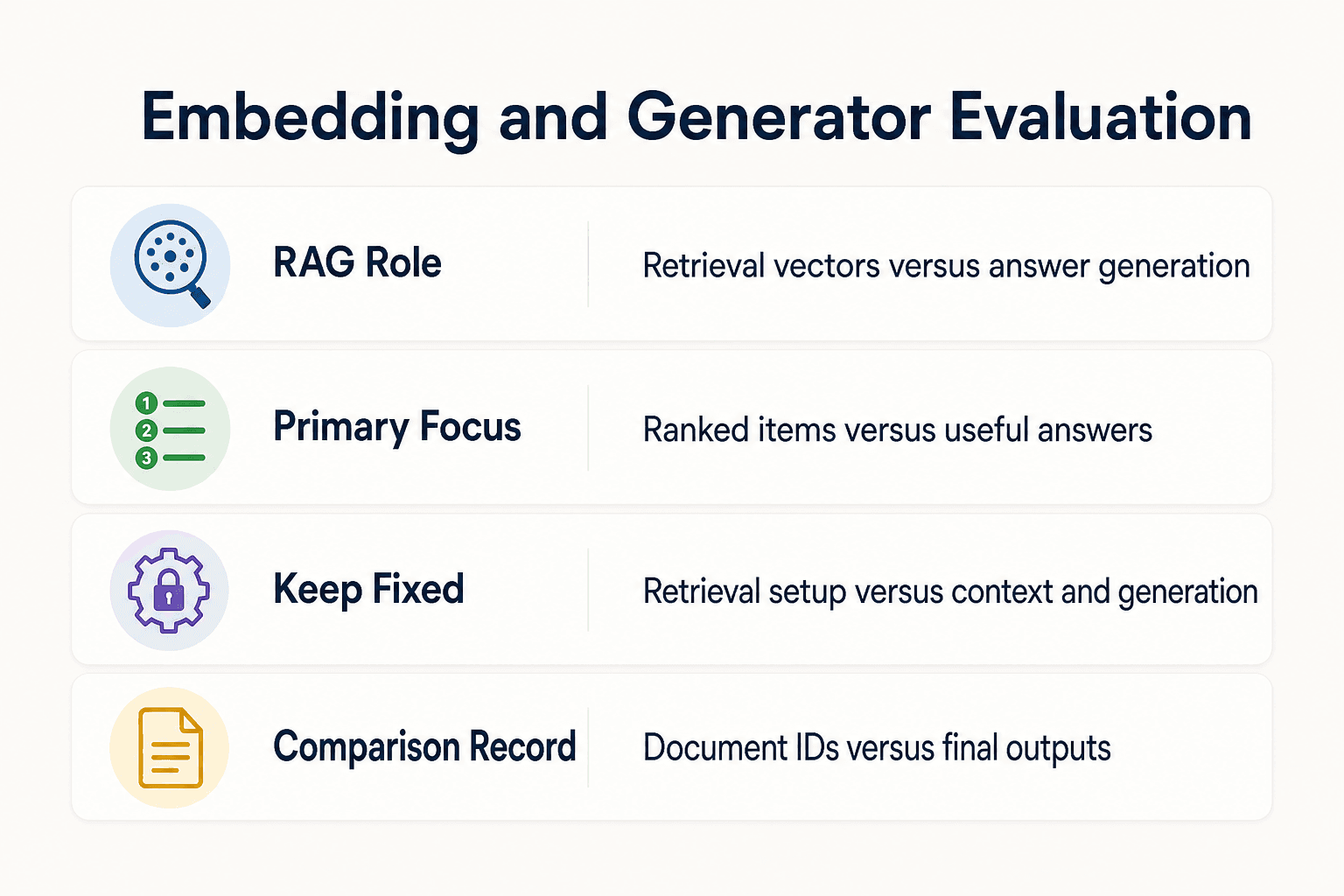
| Factor | Embedding model | Generative model |
|---|---|---|
| Role in RAG | Produces vectors used to retrieve context | Generates answers from retrieved context |
| Primary evaluation focus | Whether relevant items rank well | Whether answers remain correct and useful |
| Keep fixed | Corpus, queries, and retrieval settings | Prompts, retrieved context, and generation settings |
| Comparison record | Retrieved document IDs | Final outputs |
Quantization: how much accuracy you actually lose in RAG
[!tip] For a RAG or agent-memory system, save the retrieved document IDs and generated outputs for each test query. This makes it easier to tell whether a change came from retrieval or generation.
Why a bit-width label does not predict one fixed accuracy drop
A bit label describes how coarsely model values were stored; it does not predict one fixed accuracy drop. Results vary with the base model, the quantization method, and the task being evaluated.
Avoid treating a published INT4 or 2-bit loss figure as a guarantee for another model or task. AI/TLDR’s guide describes quality loss as uneven: a model can appear capable in casual conversation while making errors on demanding tasks that require exact choices.
What perplexity can reveal and what it cannot prove about RAG quality
Perplexity measures the probability a model assigns to the word that comes next in fixed text. Lower perplexity is better, and an increase after quantization can show that rounding changed the model’s predictions.
Use perplexity as an early indicator when it is available, then evaluate the complete RAG workflow with the retrieval and task checks that define success for your system. A token-prediction score is not a substitute for an end-to-end acceptance test.
Why coding, structured extraction, tool use, and long-context tasks can expose errors before casual chat does
Casual chat can conceal quality loss. Coding and arithmetic are less forgiving: a model may sound fluent yet botch a multiplication or omit a closing brace in a function.
Include the demanding prompts and outputs your application relies on in the evaluation set. Fluent prose alone is not enough evidence that a quantized candidate preserves the capabilities your workflow needs.
Practical ways to evaluate and reduce quantization risk
Begin with a representative evaluation set and compare each candidate with the higher-precision baseline under the same conditions. If a lower-bit candidate misses the required quality bar, test a less aggressive quantization level or keep the baseline for that workload.
The most reliable decision is empirical: use the same model, task set, and acceptance criteria for every candidate. Quantization is a model-precision trade-off, so the preferred build is the one that fits the memory budget while meeting the quality requirements you set.
Embedding models and generative models fail differently in RAG
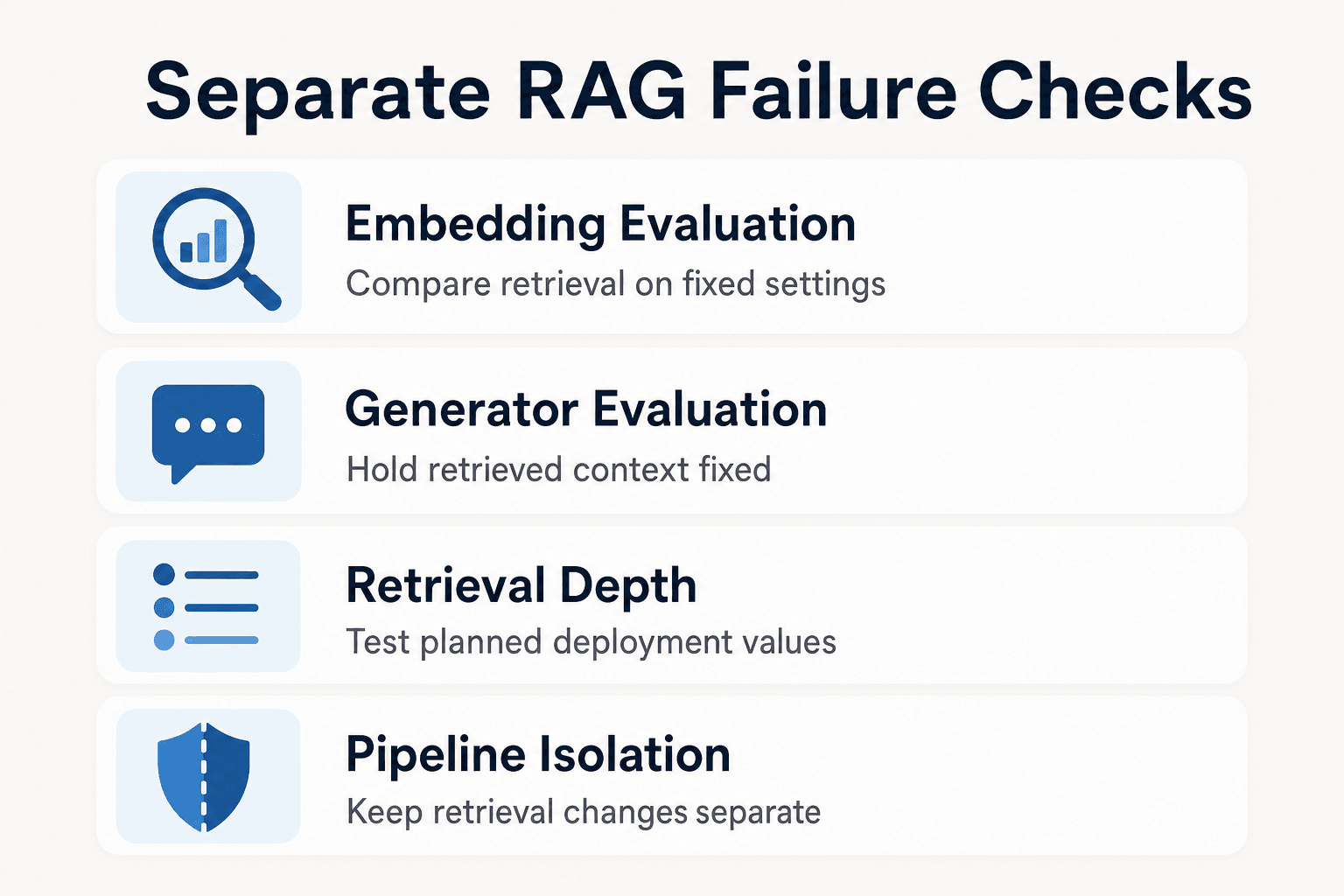
For a clear pipeline comparison, test embedding and generation changes separately, then record retrieval results and final task outputs for each candidate.
Evaluating embedding-model quantization
When evaluating a quantized embedding model, compare its retrieval results with the baseline on the same corpus, queries, index configuration, and retrieval settings. Record which documents appear for each query as well as the aggregate retrieval results.
Include queries that reflect the project knowledge your agents need. For shared agent memory in GigaRAG, test whether the same project knowledge remains available to the agent after the candidate change.
Evaluating generator quantization
Evaluate a quantized generator with the retrieved context held fixed. Compare its answers against the higher-precision baseline on the production tasks that matter, such as code generation or structured outputs where applicable.
Keep retrieval and generation checks separate. A change in the final answer can originate in either component, and isolated comparisons make the source of a regression easier to identify.
Test retrieval depth with your task set
Treat the number of retrieved documents as an evaluation setting, not a universal remedy. Compare candidate settings with the same query set and judge them by the final task outcomes as well as retrieval results.
The useful retrieval depth depends on the workload. Test the values you plan to deploy while holding the rest of the pipeline fixed, and select the setting that meets your retrieval and task-level criteria.
Keep retrieval-pipeline changes separate from quantization tests
For a quantization comparison, keep the corpus, chunking, metadata filters, reranking, and other retrieval-pipeline settings fixed. Record those settings with each result.
Test retrieval and generated outputs separately so you can distinguish a change in retrieved information from a change in the model’s final response.
A reproducible RAG A/B test for quantized models
To test whether quantization reduces RAG accuracy, hold the whole pipeline fixed, then change one component and measure retrieval, answer quality, latency, and memory against an FP16 or BF16 baseline. A lower-bit model that sounds fine is not a winner until it meets your workload's pass criteria.
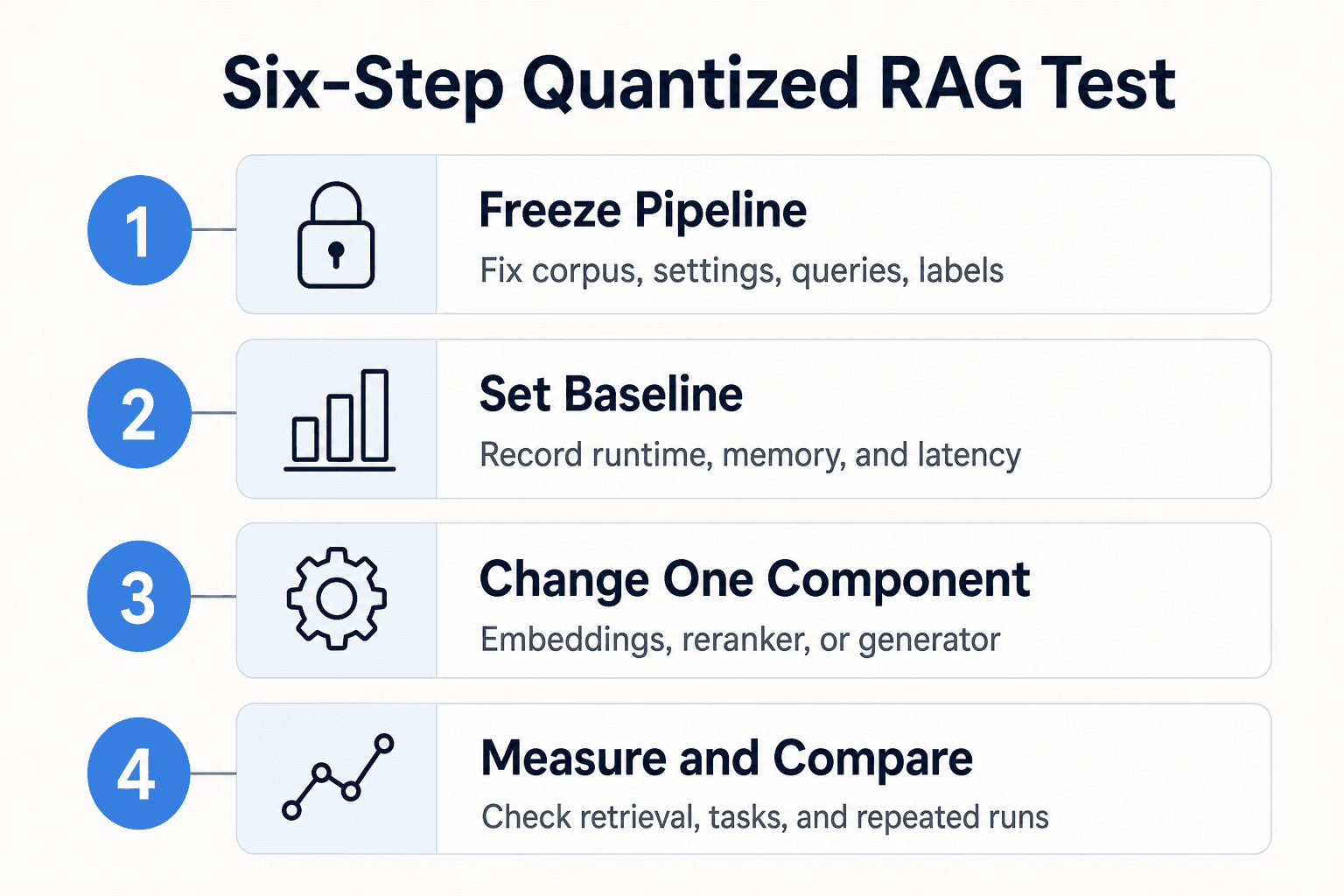
1. Freeze the corpus, chunking, index settings, queries, and relevance labels
Use one versioned corpus, the same chunk boundaries, metadata filters, vector index settings, prompts, query set, and human relevance labels. Fix retrieval k and reranking too.
2. Establish the FP16 or BF16 baseline and record hardware, runtime, memory, and latency
Run the higher-precision pipeline first on the deployment-like hardware and runtime you plan to use. Record peak memory, cold and warm latency, token counts, and per-stage timings. RQABench, an open-source RAG benchmark, gathers evaluation settings in a single YAML configuration and collects running-time and token-use information.
3. Quantize one component at a time: embeddings, reranker, or generator
Start with one candidate change. Quantize embeddings while leaving the reranker and generator unchanged, then repeat for the reranker or generator. This produces a separate comparison result for each component.
If your agents connect to GigaRAG through MCP or the API, keep that connection and its access controls unchanged during the comparison so every candidate uses the same GigaRAG setup.
4. Calculate recall@k, MRR, and nDCG for retrieval
Calculate recall@k, MRR, and nDCG consistently for the baseline and every candidate where those measures fit your evaluation design. Pair aggregate scores with per-query results so important failures are visible.
5. Add answer-grounding, code-task, or agent-trajectory checks for the generator
Use task checks that match production, such as cited-answer grounding, exact code tests, valid tool arguments, or successful agent trajectories. Keep decoding settings fixed, including temperature and maximum output length. Evaluate final outputs alongside retrieval results.
6. Compare confidence intervals or repeated runs before declaring a winner
When your evaluation design supports them, run repeated comparisons and use confidence intervals. Keep the baseline when the memory saving does not produce a clear, useful trade-off for your queries.
Choosing INT8, INT4, or lower bits for a RAG pipeline
Use the highest precision that fits the real deployment budget
Start with the highest precision your RAM or VRAM, latency target, and runtime can support. Memory savings are not enough if the candidate misses key task checks. Keep the baseline when the trade-off is not clear.
Choosing among INT8, INT4, and lower-bit candidates
Test INT8 first when quality-sensitive retrieval, coding, or tool use leaves little room for regressions. INT4 is a practical candidate when model size makes higher precision impractical, but it still has to pass your fixed evaluation.
Lower-bit options need stronger evidence. A 2-bit model may fit a tight budget, but it isn't worth production use unless your own retrieval and task results support it.
Decision checklist: hardware, workload, model size, benchmark deltas, and rollback plan
Check these before deployment:
- Available RAM or VRAM under real concurrency.
- Runtime support for the chosen format.
- Retrieval metrics and task-level pass rates.
- Latency and peak-memory savings.
- A higher-precision rollback path.
The same comparison discipline applies when GigaRAG keeps project knowledge available across sessions and tools. Confirm that the candidate still meets the retrieval and task-level requirements your agents depend on.
Frequently Asked Questions
Does quantization always reduce LLM accuracy?
Quantization rounds model values to a smaller set of representable values, which can introduce error. The resulting quality change varies with the model, method, and task, so test the candidate against its baseline.
Why can a 4-bit model sound good in chat but perform worse in a RAG system?
Fluent chat responses don't establish that retrieval or task performance is unchanged. Quantization effects can be uneven, so evaluate retrieved context and task-specific outputs rather than relying on a few conversational prompts.
Should I quantize the embedding model, the generator, or both?
Test one component at a time first while keeping the other settings fixed. Record retrieval results and final task outputs for each candidate, then decide whether either or both candidates meet your acceptance criteria.
What metrics should I use to test quantized RAG retrieval?
Compare retrieval rankings on the same queries and corpus, using measures such as recall@k, MRR, or nDCG where appropriate. Also check whether retrieved documents contain the context needed for your actual tasks.
Does INT8 always have no meaningful quality loss?
No universal claim applies to every model and workload. Compare the INT8 candidate with its baseline on the tasks you care about.
When should a team avoid lower-bit quantization?
Avoid adopting a lower-bit candidate when your own task checks show unacceptable regressions or when the output must meet a quality requirement the candidate does not meet. A smaller model file alone is not evidence of acceptable quality.
Can quantization reduce memory use?
Yes. Quantization stores model values with fewer bits, reducing the memory needed for the model and potentially making it runnable on more constrained hardware. Measure latency on your own hardware and workload rather than assuming a particular performance change.
How should I compare different quantized model files?
Compare the specific underlying model, quantization method, bit level, and runtime configuration against the same higher-precision baseline. Use the same workload and acceptance criteria for every candidate, and record the build details with the results.
About GigaRAG
GigaRAG is a shared memory platform for AI agents that helps developers and teams keep project knowledge available across sessions and tools. For RAG and agent-memory workflows, that makes retrieval quality a practical concern: an agent needs access to the right project knowledge before it can use it.
Connect your agents to a central Hive Mind through MCP or the API. Access controls manage what each agent can use, so keep those settings fixed when you compare a higher-precision baseline with a quantized candidate.


