RAG With Cloudflare Workers for AI Agents and Coding Workflows
RAG with Cloudflare Workers can ground responses in an application’s own data. This guide separates retrieval design from the state, access, and evaluation decisions that an application must make deliberately.
Treat the system as three layers: durable project knowledge, session and conversation state, and the short-lived context assembled for one prompt. Cloudflare provides building blocks for these layers; when used, GigaRAG can serve as a shared knowledge layer for agents.
Process overview
Use this sequence to make the architecture choices before configuring Workers, storage, and model bindings.
- Separate project knowledge, conversation state, and per-request retrieved context.
- If agents already use GigaRAG, decide how it fits alongside the Cloudflare components.
- Choose managed AutoRAG or a DIY stack based on how much control you need over ingestion, filtering, and retrieval.
- Test retrieval and generation with your own queries and documents.
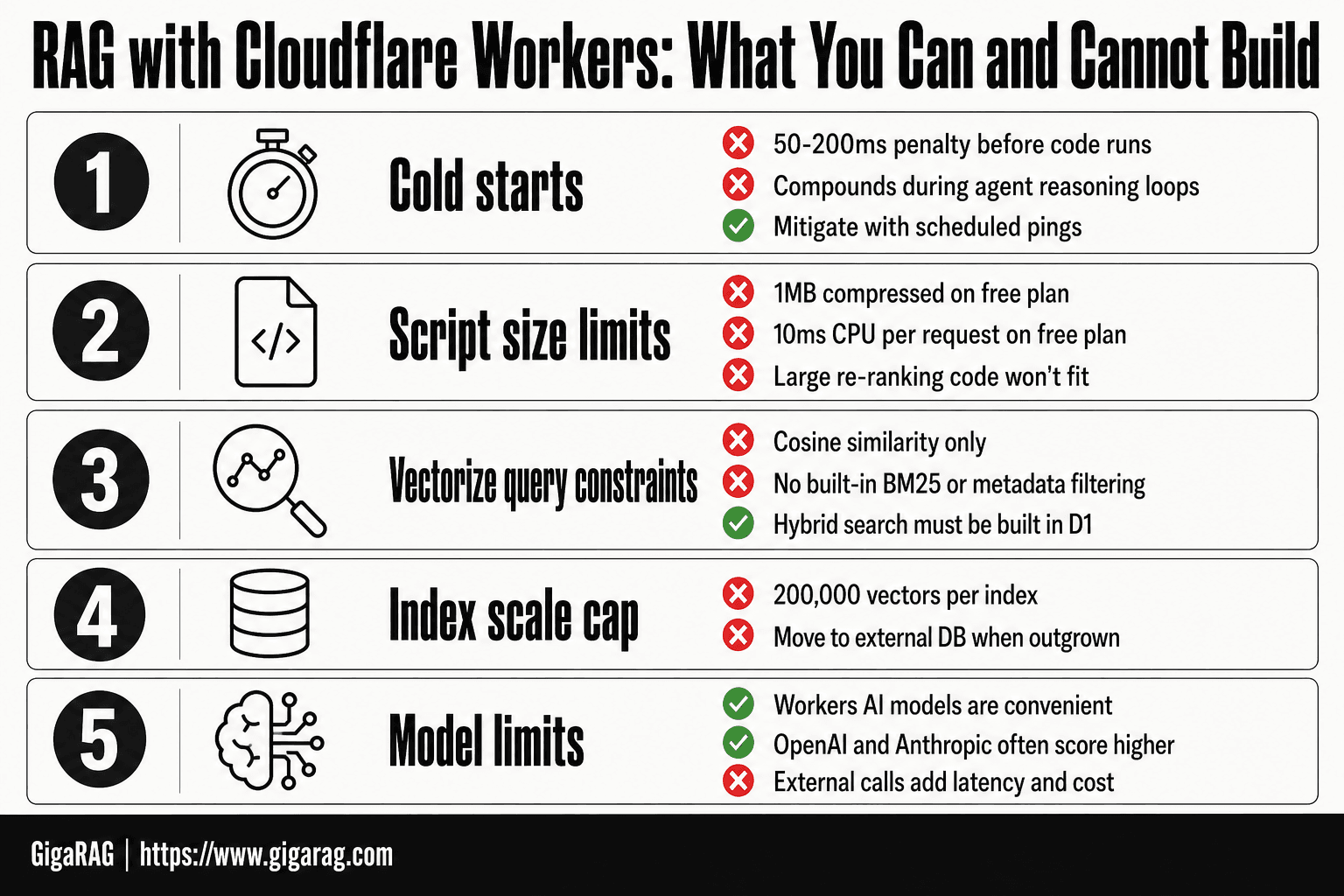
What RAG with Cloudflare Workers can and cannot do
RAG retrieves context at request time; it does not establish authorization, retention rules, or answer quality on its own. Treat those responsibilities as explicit parts of the application design.
The three memory layers: source knowledge, conversation state, and prompt context
Source knowledge is the indexed material. Conversation state records the exchange and can be stored in D1, as Cloudflare documents. Prompt context is the small retrieved slice supplied for one request.
Core request path: retrieve context, then generate
Here's what happens behind the scenes: the Worker embeds the query, searches Vectorize, loads relevant context, and asks Workers AI or a model through AI Gateway to generate text. The model doesn't search blindly.
What not to expect: no automatic long-term agent memory, permissions model, or answer quality guarantee
Keep in mind: a vector match isn't proof that a source is current, permitted, or correct. You still need source checks, authorization rules, and retrieval tests before an agent can safely act on an answer.
Cloudflare AutoRAG and a DIY Workers RAG stack
| Factor | AutoRAG | DIY stack |
|---|---|---|
| Ingestion and indexing | A managed RAG option; confirm its current supported sources and indexing behavior for your workload. | Define the ingestion flow, embedding process, storage locations, and update process. |
| Retrieval controls | Evaluate the available configuration against your product’s retrieval needs. | Configure Vectorize namespaces, metadata, and query behavior in the application. |
| Conversation state | Keep conversation state as an explicit application concern. | Choose and configure the state store that fits the application. |
| Evaluation and ranking | Test retrieved results and generated answers for your workload. | You can customize retrieval and ranking, but must build and evaluate those choices. |
Using GigaRAG alongside a Cloudflare RAG design
Use this section to decide how a shared knowledge layer should fit alongside Cloudflare retrieval and application-managed state.
Decide which knowledge belongs in the shared memory layer
Use the shared memory layer for project knowledge that several agents or tools need to reference. Keep the ownership, update process, and access scope clear so each agent receives only the knowledge intended for its work.
Keep shared knowledge, application state, and prompt context distinct
Map GigaRAG’s shared project knowledge to the durable-knowledge layer. Keep application session records in their own state store, and assemble only the context needed for the current request before calling a model.
Use documented interfaces for agent access
Document the request path and access checks for every agent that reads shared knowledge. When combining GigaRAG with a Cloudflare application, define those checks at the application boundary rather than assuming a particular platform integration.
Step-by-step: plan a minimal DIY retrieval path
- Choose the documents and project boundaries the agent should search.
- Decide where source content and conversation state will live. Treat them as separate concerns.
- Create a Worker and configure bindings for your storage, embedding, and inference components.
- Generate embeddings for content and store vectors with identifiers and useful metadata.
- Embed each incoming query, retrieve relevant vectors, and fetch source content for context.
- Pass the retrieved context and current request to the model, then test results against representative queries.
Operational considerations after choosing a RAG path
After selecting a managed or DIY approach, record where source files, embeddings, canonical text, and session records live. Include the storage location and ownership of each layer in the ingestion and retrieval design.
[!tip] Set retrieval scope from the application’s authorization rules before searching. The namespace and metadata-filter sections below cover the available Vectorize controls.
Define the source-of-truth and update workflow
For each document set, identify the authoritative source and how updates reach the retrieval index. A managed service and a custom pipeline both need a clear process for checking that the indexed material reflects the source you intend agents to use.
Make isolation rules part of the request design
Set the required scope before retrieval, then preserve it through context assembly and generation. Define that scope from the application’s authorization rules and test that requests cannot cross the intended boundary.
Evaluate retrieval and responses as separate stages
Measure whether retrieval returns useful source material before evaluating generated answers. Keep session history and other product state intentional, and test representative questions against known project sources.
Check current pricing and limits
Don't publish prices, quotas, or file limits from older guides. Check the current Cloudflare documentation before you commit to either path.
Step 1: Configure the DIY RAG with Cloudflare Workers
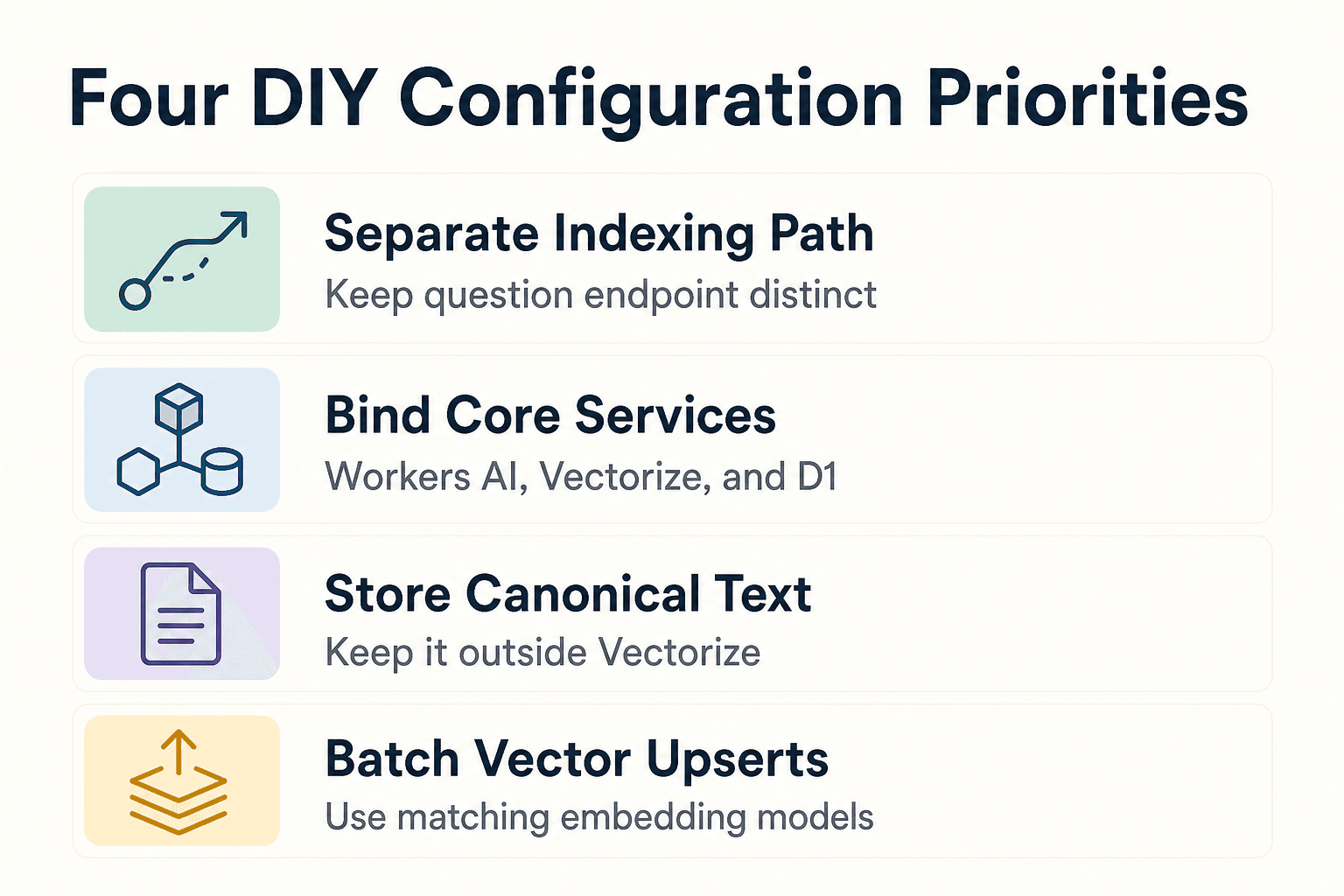
Keep indexing separate from the endpoint that answers questions. One path turns source files into vectors. The other embeds a query, retrieves matches, loads canonical text, and sends only that context to the model.
Prerequisites: Cloudflare account, Node.js, and Wrangler
For a new Cloudflare application, the documented prerequisites include a Cloudflare account, Node.js 16.17.0 or later, and Wrangler. Use the current Cloudflare setup documentation for installation and deployment commands.
Create a Worker and bind Workers AI, Vectorize, D1, and optionally R2
Bind Workers AI for embeddings and generation, Vectorize for storing embeddings used in RAG retrieval, and D1 for session state and conversation history. Add R2 only when it suits your source-file storage plan.
Store canonical text outside the vector index
Keep authoritative chunk text and source IDs in D1 or R2. Put each vector ID, lookup key, and small retrieval fields in Vectorize metadata, which can hold an object-storage key or database identifier.
Ingest in batches
Use the same embedding model for documents and queries. Batch upserts where limits allow, since Cloudflare recommends fewer, larger write requests for write-heavy workloads. Vectorize accepts number[], Float32Array, and Float64Array values.
Use current binding documentation before deployment
Don't copy an unverified binding file into production. Confirm the current binding names and configuration requirements for the services your Worker uses before deployment.
Step 2: Retrieve context, manage state, and add ranking carefully
[!note] Metadata filters narrow retrieval results; they are not a substitute for application authorization. Apply permission checks before loading text into prompt context.
Embed the query and search the correct namespace
Embed the user’s question with the same model used for source chunks. Assign each project or tenant’s vectors to its own namespace, then query the applicable namespace: Vectorize searches only vectors in the namespace specified for that request. Namespace filtering is applied before vector search.
Use metadata filters only on explicitly created metadata indexes
Namespaces work by default. Other Vectorize metadata filters need a metadata index for that property, and each Vectorize index can have up to 10 such indexes. Indexed properties support string, number, and boolean types; filters support equality, inclusion, and limited range operations. Check the documented operators and limits.
Use metadata filters for indexed metadata fields
A metadata filter narrows vector query results using metadata associated with each vector. Cloudflare applies the filter before selecting the top-K results from that filtered set, so choose indexed properties that match the fields your application needs to constrain.
Maintain conversation state outside the prompt
D1 can store session state and conversation history alongside inference logic. Cloudflare documents D1 for this role. Don’t append every prior turn forever: summarize, retain, or expire history according to your product policy so stale instructions and prompt size do not quietly take over.
Build hybrid retrieval and reranking only when measurement supports them
Hybrid retrieval is workload-specific: merge lexical and vector candidates, then test whether the merged set improves retrieval on representative coding questions. Keep reranking optional. Fetch a small candidate set and add a reranker only if your test set shows a quality gain worth its added latency and cost.
Load canonical text and enforce access before context assembly
Keep raw source text and authorization checks outside embeddings. Apply tenant and permission checks before loading candidate chunks, assemble only approved text, and include source identifiers in the response so you can trace what grounded the answer.
Test the RAG workflow, troubleshoot failures, and set expectations
Test retrieval separately from generation
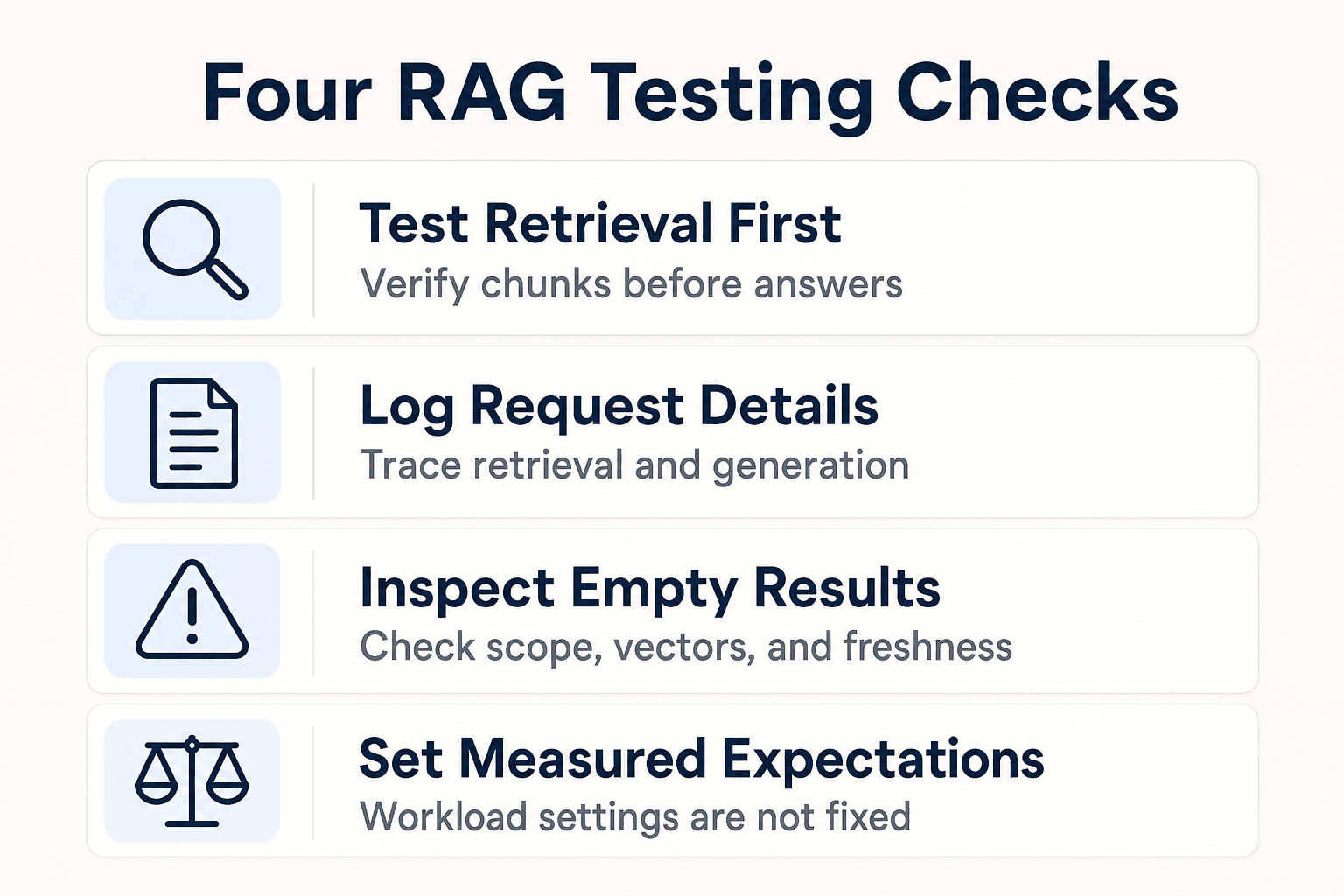
A fluent answer can hide bad retrieval. Test whether the right chunks appear before you judge the model's response, using real coding tasks and project questions with known source IDs.
Log the request path
Log source IDs, namespace, filters, scores, prompt size, model choice, and user feedback. This lets you trace an unsupported answer back to retrieval, prompt assembly, or generation.
Troubleshoot common failures
When retrieval is empty or irrelevant, inspect the namespace, indexed vectors, embedding consistency, chunk boundaries, query wording, index freshness, tenant scope, and prompt size before changing models.
Set workload-dependent expectations
It depends on your corpus, model, traffic, and evaluation results. Chunk size, overlap, top-K, latency, and cost aren't fixed settings you can copy from another application.
Verify limits and pricing before publishing
Check the current Workers AI, D1, Vectorize, and AutoRAG documentation before publishing figures or promises. Vectorize’s changelog records feature and limit updates, so confirm the documentation that applies to the deployment you are planning.
Frequently asked questions
What components do I need for RAG with Cloudflare Workers?
Cloudflare’s RAG pattern uses Vectorize to store knowledge-base embeddings, Workers to receive queries and search for relevant context, and Workers AI or AI Gateway to generate responses using that context. D1 can store session state and conversation history.
Does Cloudflare AutoRAG handle document chunking and indexing?
Cloudflare describes AutoRAG as managing chunking, indexing, and embeddings from an R2 data source. Check current Cloudflare documentation for supported inputs and configuration details before implementation.
Can D1 store AI agent conversation history?
Yes. Cloudflare describes D1 as a place to store session state and conversation history alongside inference logic.
How do Vectorize namespaces help isolate customer, merchant, or store data?
Namespaces segment vectors within an index. When a query specifies a namespace, Vectorize searches only the vectors in that namespace.
Do I need to create metadata indexes before filtering Vectorize results?
You need a metadata index to filter on a metadata property other than the namespace. Namespace filtering is supported by default.
What metadata filter operators does Cloudflare Vectorize support?
The documented operators are $eq, $ne, $in, $nin, $lt, $lte, $gt, and $gte. Some combinations are restricted, so check the filter limitations when composing range or other multi-clause filters.
What does Vectorize metadata filtering do?
Metadata filtering narrows Vectorize query results to vectors whose indexed metadata matches the filter criteria. Use it for fields such as customer ID, tenant, product category, or other metadata associated with vectors.
How many metadata indexes can a Vectorize index have?
Cloudflare documents a limit of up to 10 metadata indexes per Vectorize index.
What should I verify before using GigaRAG with Cloudflare Workers?
Confirm that GigaRAG documents a Cloudflare integration for your intended workflow, including supported bindings, setup steps, and compatibility. Don't rely on an unverified command or integration claim.
About GigaRAG
GigaRAG is a shared memory platform for AI agents that helps developers and teams keep project knowledge available across sessions and tools.
Agents connect to GigaRAG’s central Hive Mind through MCP or the API. Its access controls manage what each agent can use.


