
How to Add RAG Inside an Existing Django App
Adding RAG to an existing Django app is a data-integration project, not simply a chatbot feature. Start with one workflow and define how application content becomes retrievable context.
A practical design identifies the source record, chunk text, embedding model, metadata, and retrieval query used for that workflow. Vector databases store embeddings and can associate them with source content and metadata for retrieval.
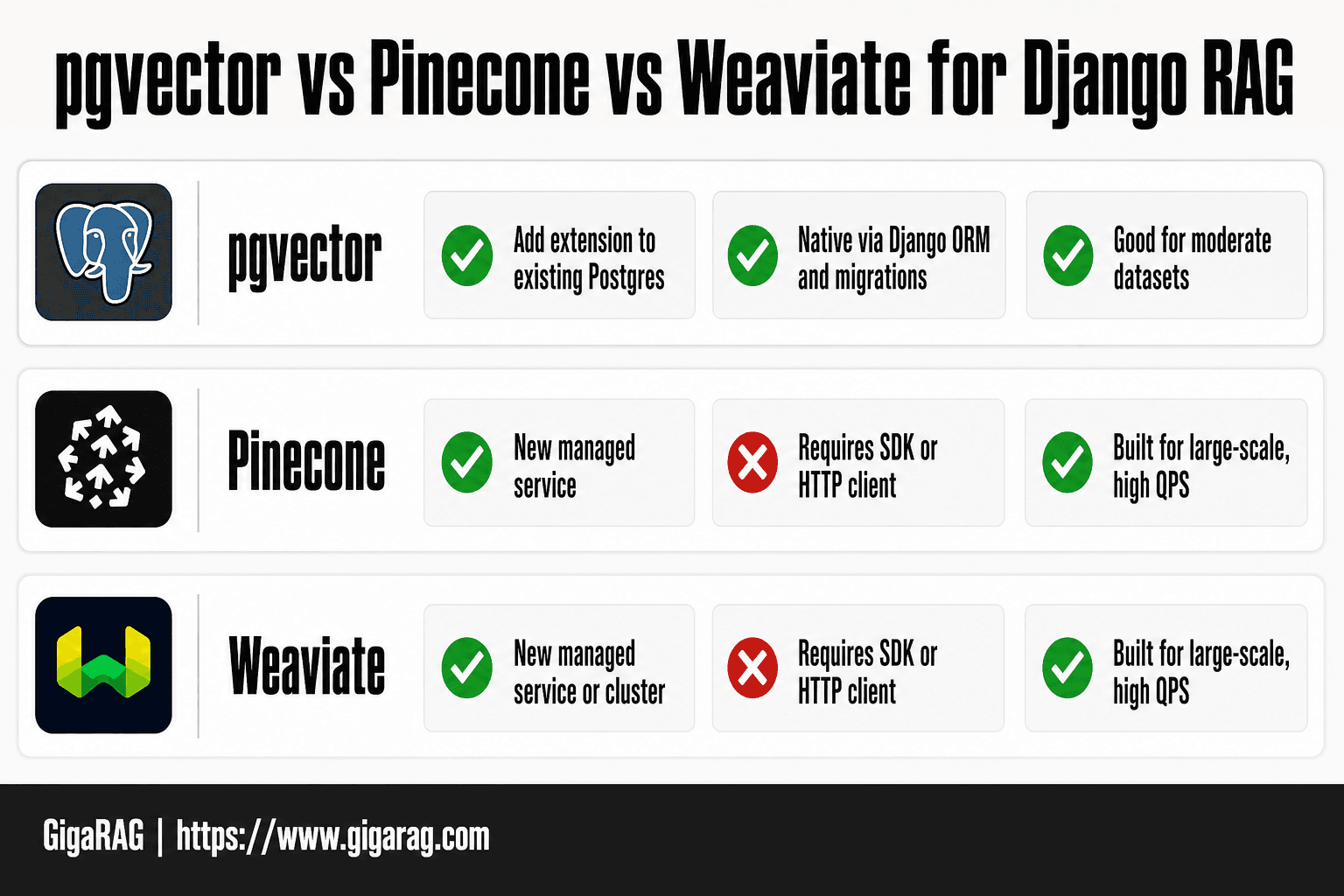
Backend selection follows that design. GigaRAG can connect agents to a central Hive Mind through MCP or an API. For vector storage, pgvector is an option for Postgres, while a vector database can index and store embeddings for retrieval. Choose the approach that fits the application’s retrieval and operating requirements.
Process overview
Treat RAG as a defined retrieval workflow connected to application content.
- Choose one content source and the user questions the workflow should support.
- Define how source text is chunked, embedded, stored, and associated with metadata.
- Build an indexing path for new and updated content, with job status and failure handling.
- Query the selected backend with the metadata constraints required by the workflow.
Plan RAG inside an existing Django app before adding a vector store
Plan the content, retrieval query, and access checks for one Django workflow before selecting storage. Start by identifying the source records, the text to index, and the metadata needed to narrow each retrieval query.
Define the retrieval unit: source object, chunk, embedding, and metadata
Define the retrieval unit before writing ingestion code: a source record, one or more text chunks, an embedding for each chunk, and metadata used by retrieval. DjangoStars’ guide to RAG question-answering with Python outlines the familiar sequence of segmenting text, generating embeddings, retrieving relevant segments, and using them as model context.
Keep a reference from each indexed entry to its application source record. When the selected backend supports metadata filtering, metadata can support finer-grained retrieval queries.
Choose the first narrow workflow: support content, project docs, or agent memory
Pick one. Support articles, internal project docs, and scoped agent memory need different update rules and access checks.
Don't index every model at once. A narrow workflow gives you real queries, known users, and a clear failure boundary.
What RAG cannot do for an existing Django app
RAG adds a retrieval path; it does not remove the need to design indexing, deletion, evaluation, and access handling around the application workflow.
Document which application checks produce the metadata constraints for each retrieval query, and test those constraints with representative requests.
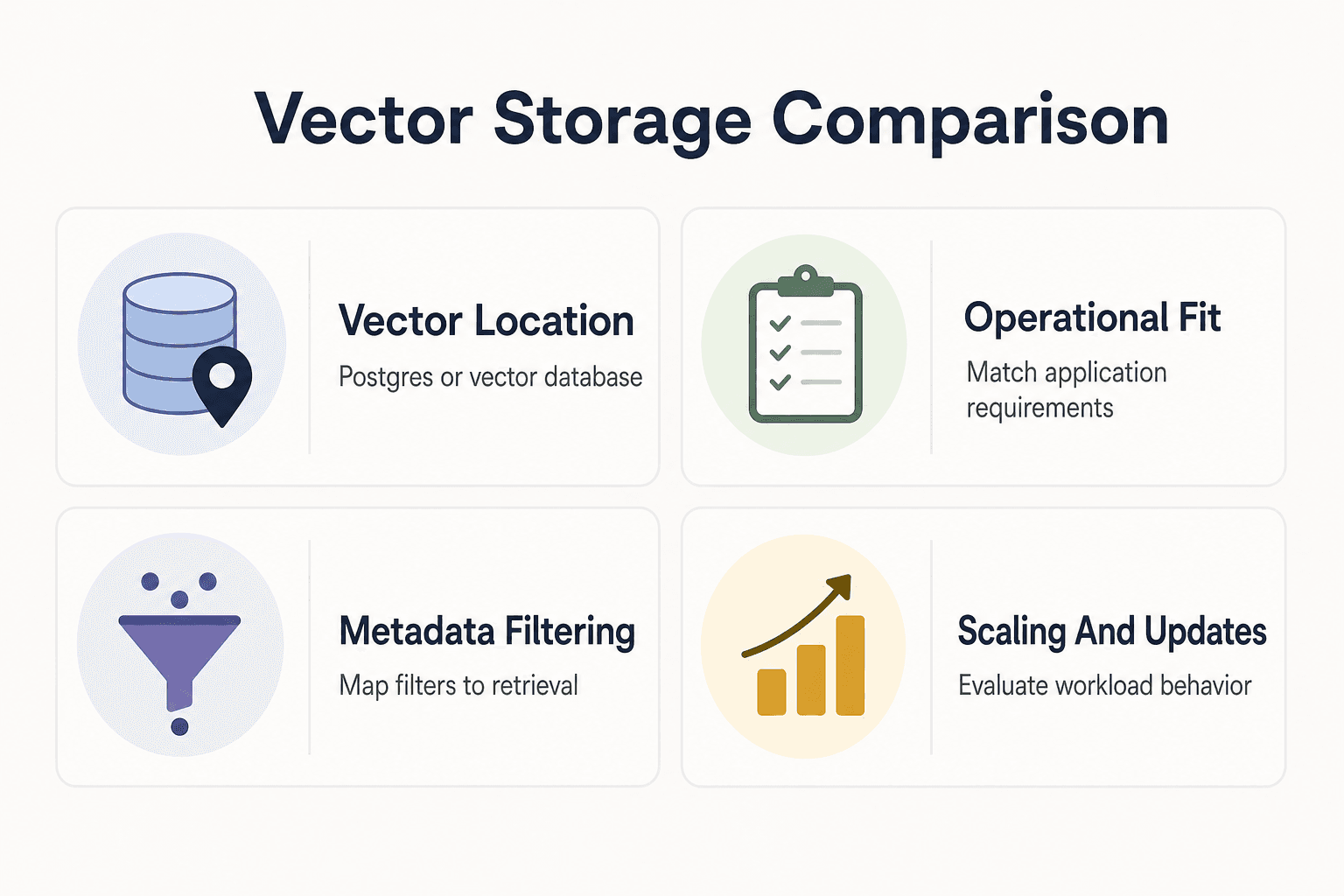
pgvector vs a separate vector database
| Factor | pgvector | Separate vector database |
|---|---|---|
| Where vectors live | In Postgres with the pgvector plugin | In a vector database that indexes and stores embeddings |
| Operational fit | Consider it when keeping vector storage with PostgreSQL suits your app | Consider it when specialized vector storage and retrieval capabilities are needed |
| Metadata filtering | Plan how application metadata and filters map to retrieval | Check the product's metadata-filtering support and behavior |
| Scaling and updates | Evaluate against your workload and operational needs | Verify scaling and update behavior for the chosen product |
Using GigaRAG with an existing Django app
For a Django integration, define the project knowledge an agent needs for the selected workflow and keep the connection method, source references, and retrieval requirements explicit.
[!note] Django transactions provide an all-or-nothing boundary for related database operations. Design indexing work and its status tracking as part of the broader application workflow.
Design the Django-to-GigaRAG boundary around the supported connection method
Use a Django service layer to prepare the project knowledge needed for a GigaRAG workflow and call the selected connection method. Keep the application’s source-record references and retrieval requirements explicit in that layer so the integration can be tested as one workflow.
Carry source references and retrieval metadata through the integration
For every item sent from Django, retain a reference to its source record and record the metadata required by the workflow. Use those fields to identify the relevant source content and apply the workflow’s retrieval requirements.
Decide those fields before indexing the first batch of content.
Keep retrieval behind a Django service boundary
Put integration calls behind a Django service layer rather than scattering them across views, models, and agents. The service layer provides one place to prepare content, attach workflow metadata, record outcomes, and test retrieval behavior.
Use GigaRAG access controls as part of the agent workflow
Map each agent’s permitted project knowledge to the access-control configuration used by the workflow. Keep source references available for updates and removal decisions.
Keep Django records and RAG data in sync
- Keep a source-record reference with every indexed chunk or vector entry.
- Save related Django record changes within an appropriate database transaction.
- Run indexing through a tracked application job or command after the source change is available.
- Record the source version or update marker that each indexing run used.
- When source content changes, schedule the affected retrieval entries for review or re-indexing.
- Include the metadata constraints required for the retrieval workflow in each query.
[!tip] Record the source identifier, indexing outcome, and any error for each integration request. These fields let the application inspect individual requests and their outcomes.
Backend considerations
Choose a backend based on the retrieval behavior, metadata support, update process, and operational model your workflow requires. The data contract remains important regardless of where embeddings are stored.
PostgreSQL-based vector storage
A PostgreSQL vector extension is one option for vector storage. Assess its indexing and query behavior against the data volume and retrieval patterns of the Django workflow.
Test representative retrieval queries and metadata constraints before committing to a storage design.
Dedicated vector databases
Pinecone’s overview of vector databases describes vector databases as systems that store and index embeddings for retrieval and similarity search, with capabilities such as CRUD operations and metadata filtering.
Metadata filtering is an important design concern for scoped retrieval. The filtering approach and its performance characteristics should be tested with the conditions and data volumes the application expects.
Evaluate the operating model
Compare deployment, backup, update, deletion, filtering, and monitoring requirements before placing production content in a selected backend.
Operational requirements belong in the selection decision.
Use the same embedding model and metric contract end to end
Record the embedding model, vector dimensions, and similarity measure used for each indexed collection. Pinecone’s vector-database overview describes generating query embeddings with the same embedding model used for indexed content.
Test retrieval settings with representative queries
Include representative queries and expected source records in evaluation. Use the same documented similarity settings in indexing, retrieval, and evaluation so results can be interpreted consistently.
Build the Django ingestion, migration, and re-embedding workflow
Build ingestion as an application workflow with clear records for source changes, indexing attempts, and resulting retrieval entries. Django transactions are useful when related database operations must succeed or fail together.
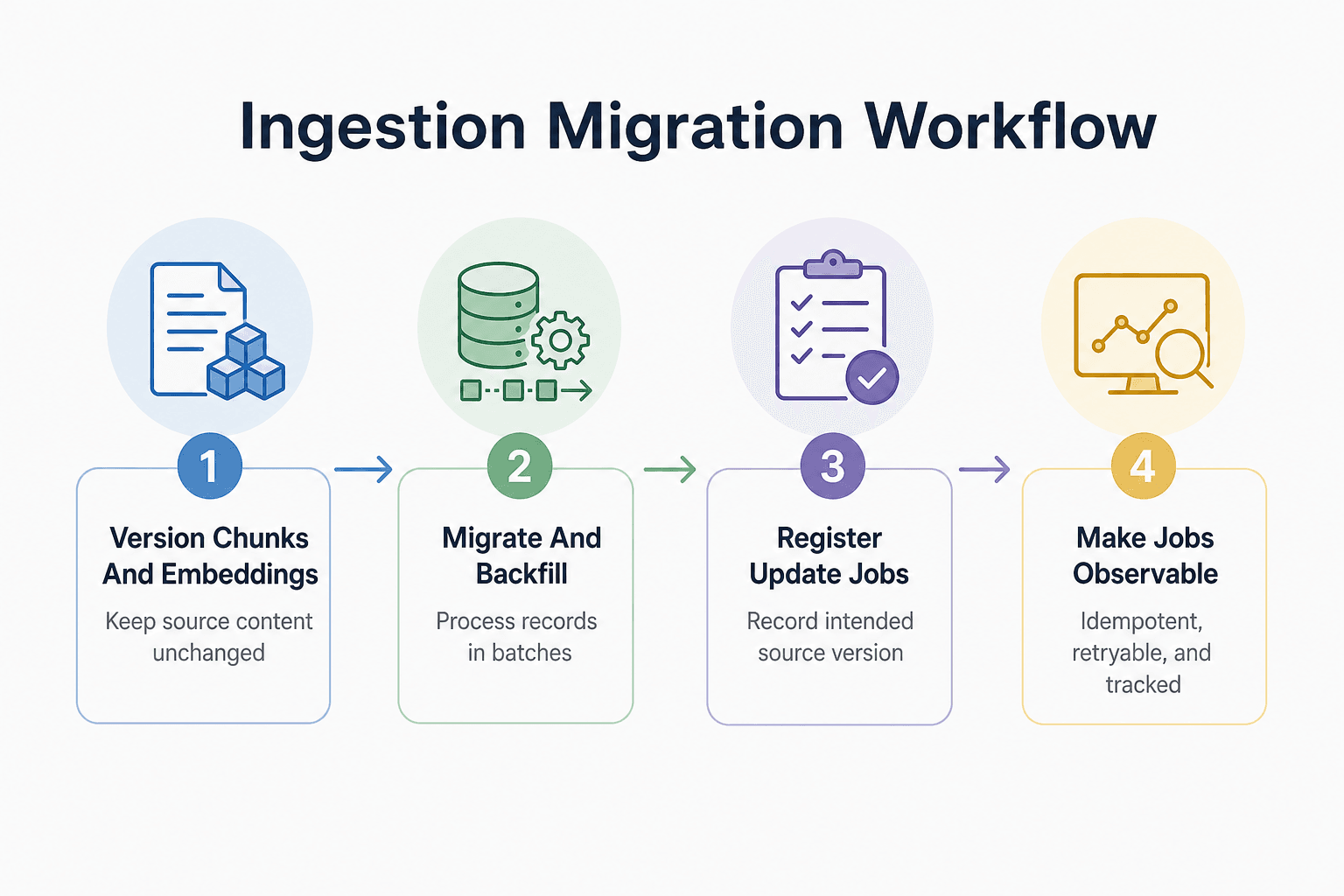
Step 1: add a versioned chunk and embedding record without duplicating source-of-truth content
Keep editable content on its existing Django model. Add chunk records that point to the source record and store the chunk text, content version, ownership metadata, and retrieval filters.
Store each embedding with its chunk, embedding model, dimensions, and distance metric. That gives you a clear contract for deciding whether a vector is still valid.
Step 2: create migrations and backfill in batches
Create the schema migration first, then run a separate backfill command or background job to generate embeddings. This separates schema changes from embedding generation and network-dependent processing.
Process existing source records in bounded batches. Record progress and failures so you can rerun unfinished work.
Step 3: register embedding work as part of the source-update workflow
Wrap related source and chunk updates in transaction.atomic() when they must succeed or fail together. OneUptime’s guide to Django database transactions explains the all-or-nothing behavior of transactions for database operations.
Then register the background task as part of the source-update workflow. Record the source version the task is intended to process.
Step 4: make jobs idempotent, retryable, and observable
Pass a chunk ID and expected content version to the job, not raw text alone. On execution, reload the chunk and stop if its version changed or an embedding for that exact contract already exists.
Track attempt counts, error details, queue time, and the indexed version. These records help investigate failed or incomplete indexing runs.
Step 5: re-embed when chunking, text normalization, embedding model, dimensions, or distance metric changes
When chunking rules, text preparation, the embedding model, vector dimensions, or the similarity measure change, plan and test the corresponding indexing migration. Standalone vector indexes may require full re-indexing to incorporate new data.
Run the new index beside the old one where possible. Switch retrieval only after the new records are complete and evaluation queries show the new contract is safe to use.
Retrieve authorized context, then troubleshoot the RAG pipeline
Step 6: apply organization, project, and user constraints before retrieval results enter the prompt
Build retrieval metadata constraints from the authenticated application workflow rather than from free-form query text. Pass the relevant conditions with the similarity query when the chosen backend supports metadata filtering.
Metadata filtering restricts vector-search scope using metadata conditions, such as a department or date range. The filtering approach affects retrieval behavior: pre-filtering can require exhaustive search across the remaining vectors and becomes harder to manage with large datasets.
Test access-scoped retrieval as an application requirement
Include access-scoped scenarios in retrieval testing. Verify the metadata conditions produced by each application workflow and inspect the source records returned for representative users.
Keep the retrieval service responsible for applying the workflow’s required constraints before selected context is passed to a model.
Troubleshoot empty results, stale chunks, duplicate embeddings, and poor ranking
For empty or unexpected results, inspect the query, metadata conditions, indexed source references, indexing status, embedding model, and similarity settings. For duplicate entries, inspect job records and the identifiers used for writes.
Poor ranking needs inspection, not guesswork. Log the query, applied filters, chunk IDs, scores, content versions, and embedding model, while keeping sensitive query text out of logs where needed.
Production checklist: evaluation queries, logs, failure handling, and rollback plan
Keep a small set of authorized queries with expected chunks. Run them after model, chunking, or filter changes. Alert on failed jobs and growing queue age, and retain the prior index until you can switch back.
Frequently asked questions
What does RAG add to an existing Django app?
RAG retrieves text segments related to a query and supplies them as context to a generative model. A typical workflow prepares documents, splits text into segments, creates embeddings, retrieves relevant segments, and constructs a model request with that context.
When should a Django app review its indexed content?
Review indexing when source content changes and whenever chunking, text preparation, embedding models, dimensions, or similarity settings change. Track the indexed version so the application can identify which source state produced each retrieval entry.
Can I use transaction.atomic() for Django records and indexing records?
Yes. Use transaction.atomic() for related Django database operations that should succeed or roll back together. Keep the indexing workflow observable through records such as source references, job status, and indexed versions.
What should an indexing job record?
Record the source identifier, the source version or update marker, the job outcome, timestamps, and error details. This information helps connect retrieval entries to the Django content and diagnose incomplete indexing runs.
How do metadata filters support scoped retrieval?
Metadata filters restrict vector search to entries that match specified conditions. For example, a query can be limited to a department or a date range when the backend supports those metadata conditions.
When is PostgreSQL vector storage worth evaluating?
It is worth evaluating when PostgreSQL-based vector storage fits the application architecture. Test retrieval queries, metadata constraints, indexing behavior, and operational requirements against the expected workload before choosing.
Why do metadata filters matter for multi-tenant RAG?
In a multi-tenant workflow, include conditions that identify the active tenant in the retrieval query so the search is scoped to that tenant’s entries. Test those conditions with representative tenant and user scenarios.
Does adding new source content make it immediately searchable?
That depends on the application’s indexing workflow. Track indexing status separately from the source record so the application can distinguish saved content from content that has completed the retrieval pipeline.
About GigaRAG
GigaRAG is a shared-memory platform for AI agents, built for developers and teams that need project knowledge available across sessions and tools.
Agents can connect to a central Hive Mind through MCP or the API. GigaRAG provides access controls to manage what each agent can use, giving teams a way to shape agent access within their project-knowledge workflows.


