Your First 1,000 Queries Per Second: A Practical RAG Scaling Guide
A RAG prototype can look fast when it answers a few friendly prompts. For capacity planning, map the complete request path and test it under concurrent traffic rather than relying on a small demo.
A vector-search result is useful evidence about the workload and configuration tested, but it is not an end-to-end capacity result. Set a 1,000-QPS target against your own query mix, concurrency, quality threshold, ingestion activity, and service dependencies; evaluate shared project knowledge separately from request-time retrieval.
Quick answer
Treat 1,000 QPS as an end-to-end workload target, not a vector-search score. Test retrieval quality and tail latency under representative concurrency, filters, and ingestion.
- Measure the full request path, including retrieval and downstream work.
- Track recall alongside P95 and P99 latency.
- Include metadata filters, concurrent clients, and live writes in load tests.
What your first 1,000 queries per second actually means
Define your first 1,000 QPS as 1,000 complete RAG requests per second against stated quality, latency, error, and cost targets. Measure the request stages your application uses, from admission and retrieval through model inference and dependencies.
[!tip] For Python-based RAG clients, test the worker and concurrency configuration you plan to deploy. Client-side deserialization and process design can affect measured throughput.
Define sustained QPS, burst QPS, concurrent in-flight requests, and end-to-end latency
Define sustained QPS as the rate you plan to hold for a specified period, and define burst QPS as the short-term rate you plan to tolerate. Set separate acceptance criteria for each.
Document how your service counts concurrent requests and which request boundaries its latency measurement covers. Include network and downstream model stages when they are part of the path you are testing.
Set a service objective: throughput, P95/P99 latency, retrieval quality, error rate, and cost per request
Start with a service objective, not a vendor headline. State the sustained and burst rate, then set P95 and P99 latency limits, a retrieval-quality measure such as recall@k, an error-rate limit, and a cost per request.
Track P95 and P99 alongside average latency. In its seven-engine retrieval benchmark, AIMultiple found that client-process configuration materially affected measured throughput under concurrency, so use the client shape you intend to deploy.
Why a single-component benchmark cannot certify production RAG capacity
Treat a vector-search benchmark as evidence about the retrieval configuration it tested. Compare that evidence with an application-level test that includes the request stages and operating conditions relevant to your service.
Actian’s evaluation guide argues that many vector-database benchmarks do not reflect production conditions such as concurrency, metadata filtering, and continuous ingestion. Include those conditions when they are part of your expected workload.
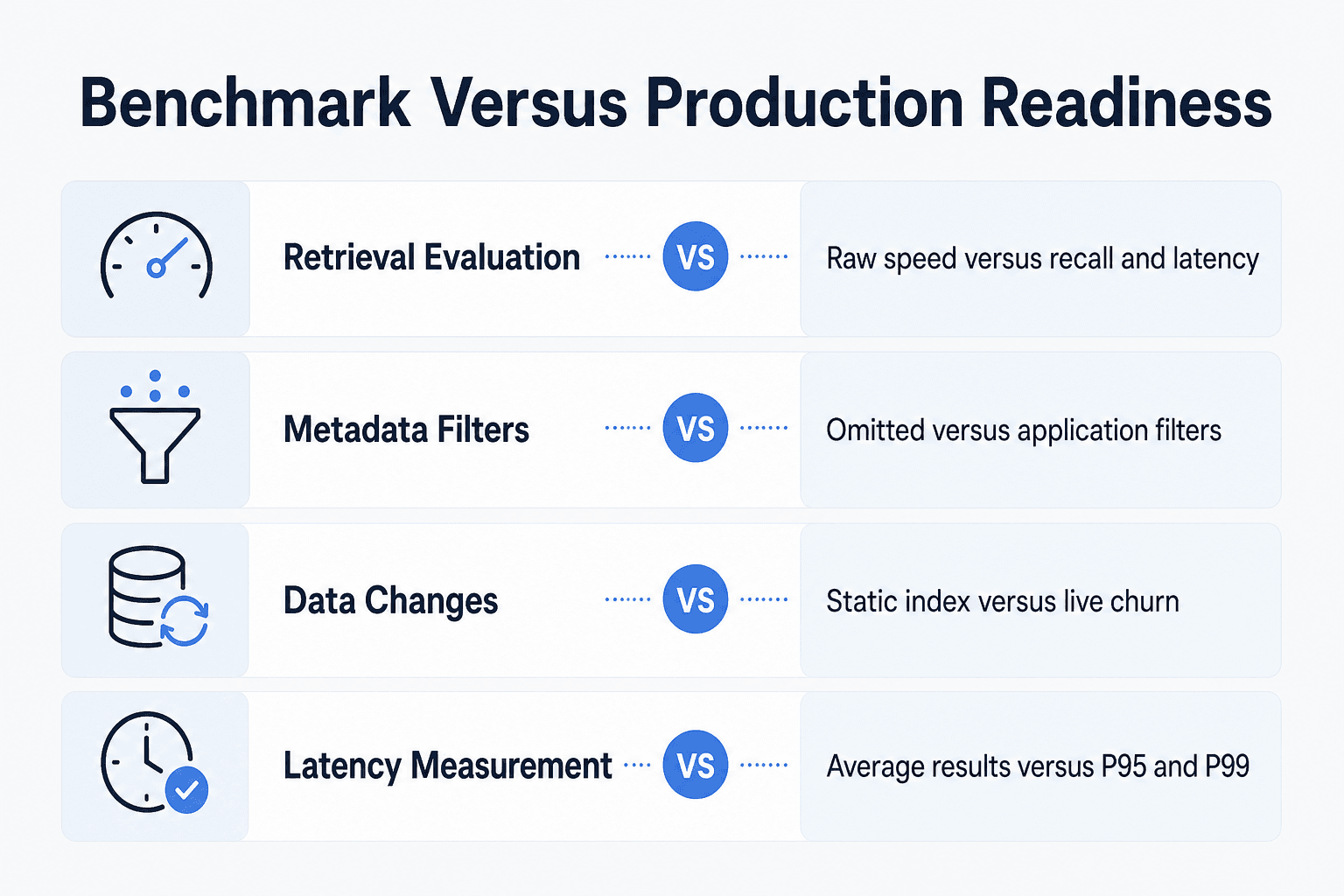
Vector search benchmarks vs. production RAG readiness
| Factor | Option A: Isolated benchmark | Option B: Representative RAG test |
|---|---|---|
| Comparison | Isolated vector-search benchmark | Production RAG readiness test |
| Retrieval | May emphasize raw speed | Checks recall alongside latency |
| Filtering | May omit metadata filters | Exercises the filters the application uses |
| Data changes | May measure a static index | Includes continuous ingestion or live churn |
| Latency | May foreground average or single-query results | Measures tail latency such as P95 and P99 |
Architecture for your first 1,000 queries per second
[!note] Record the dataset, recall target, query mix, filters, client configuration, and concurrency behind every benchmark result. Those details make results comparable and reproducible.
Trace one request: admission, retrieval, reranking, context assembly, model, and response
Document how requests enter the service, how callers are identified, and where rate limits and request identifiers are applied. If you use a cache, define which results may be reused and the content or access changes that invalidate them.
For each request, record the selected retrieval filters, reranking step, context construction, model call, and response. Trace the stages separately so the team can identify where time is spent.
Create a latency budget before tuning individual services
Allocate part of the P95 and P99 target to each stage you operate, such as admission, caching, vector search, reranking, context assembly, model time, and network overhead. This makes timing tradeoffs explicit before tuning individual services.
Measure the full path with the planned client configuration rather than optimizing any one stage in isolation.
Use backpressure, bounded queues, timeouts, retries, and load shedding to protect the system
Choose queue limits deliberately for the bursts and response times your service is designed to handle. Define what should happen when a queue reaches its limit.
Set a maximum queue depth and a deadline for each downstream call. Retry only failures that may succeed, and only within the remaining request deadline. When capacity is gone, shed low-priority work or return a clear overload response rather than letting every request fail slowly.
Keep reusable agent knowledge separate from session state and per-request context
Keep durable project knowledge in a managed source with its own update and access rules. Keep session state separate, such as a user's current task or tool results. Per-request context is the small, selected set of passages sent to the model.
GigaRAG can make project knowledge available across sessions and tools. Its access controls manage what each agent can use.
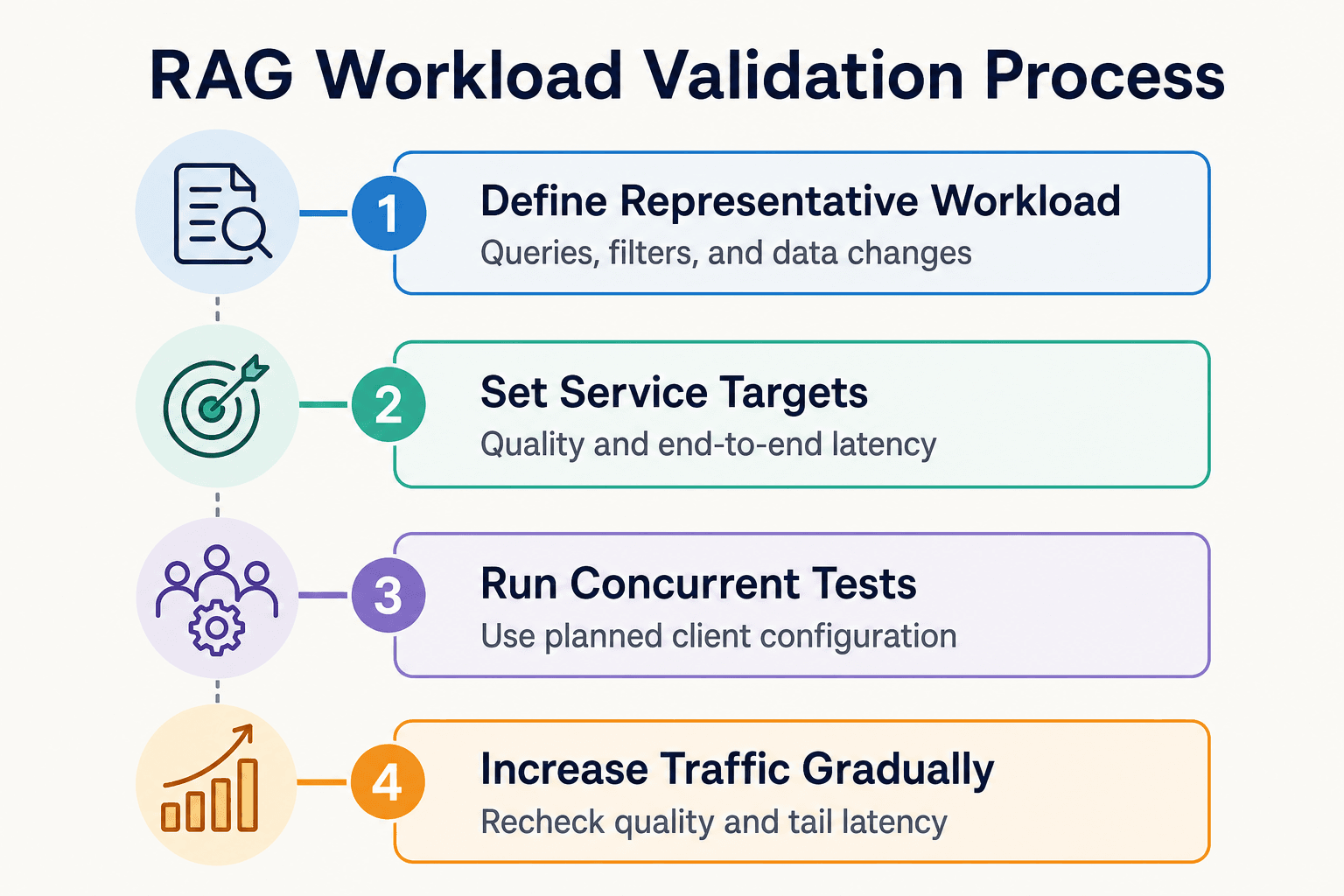
Step-by-step: validate a high-throughput RAG workload
- Define representative queries, retrieval settings, filters, and data-change patterns.
- Set retrieval-quality and end-to-end latency targets before tuning throughput.
- Run concurrent tests with the client configuration your application will use.
- Measure P95 and P99 latency across retrieval and downstream request stages.
- Repeat tests with metadata filters and continuous ingestion enabled.
- Inspect client-side limits and system bottlenecks before adding database capacity.
- Increase traffic gradually and recheck quality, tail latency, and operational behavior.
Find and fix retrieval bottlenecks before adding more hardware
Before adding retrieval capacity, identify where recall falls or tail latency rises under the traffic, filters, and write activity you expect. Then choose the change that addresses the measured constraint.
Benchmark with real embeddings, representative metadata filters, and production-like query mixes
Use your embedding model, document sizes, and query logs where you can. Include common filters, permission filters, misses, concurrent requests, and ongoing inserts and deletes.
Static, unfiltered benchmarks may not represent a workload with filters or concurrent clients. In its tested seven-engine configuration, AIMultiple reported lower throughput for metadata-filtered search and found that client-process design could constrain measured throughput.
Tune recall-versus-latency controls such as candidate count, search breadth, and reranking depth
Set a retrieval-quality target first, such as Recall@k on labeled queries. Then vary candidate count, search breadth, and reranking depth one at a time while recording P95 and P99 latency.
More candidates can give the reranker better material. However, they add search and model work, so don't increase top-k just to hide poor chunking or weak filters.
Understand HNSW, IVF, and disk-based index trade-offs without presenting one as universally best
Compare index approaches against the corpus size, recall target, RAM budget, filtering needs, write pattern, and operating model you have defined. No index choice is a substitute for testing those requirements with your workload.
At 2.25 million vectors in one seven-engine benchmark, memory use differed sharply across index designs. Treat that as a reason to test your workload, not as a universal ranking.
Use semantic caching for repeatable intent while defining invalidation, freshness, and access-control boundaries
Cache only answers or retrieval results you can safely reuse. Key entries on the normalized query, relevant tenant or permission scope, and the knowledge version that produced them.
The main catch is freshness. Invalidate on document or policy changes, set short expiry where content moves quickly, and never serve a shared cached result across access boundaries.
Common scaling mistakes that hurt RAG accuracy or reliability
Scaling failures often come from measuring the wrong workload or changing capacity before identifying the constraint. The mistakes below help keep testing, tuning, and rollout decisions tied to explicit service objectives.
Mistake: optimizing average latency while ignoring P95 and P99 under concurrent load
Track P95 and P99 under expected concurrency alongside average latency. Tail latency under load is a production risk that average QPS alone can miss.
Mistake: treating vector-store QPS as complete RAG capacity
Do not equate a vector-store QPS figure with application capacity. In AIMultiple’s tested retrieval setup, changing from one client process to multiple worker processes changed the measured concurrency result, illustrating why the application client belongs in capacity testing.
Mistake: increasing top-k and context length to mask weak retrieval
Set a retrieval-quality target before increasing top-k or context length. Test changes to chunking, metadata filters, hybrid retrieval, and ranking on representative queries, then keep the smallest configuration that meets the quality target.
Mistake: assuming more replicas solve client, network, model-provider, or ingestion bottlenecks
Identify the saturated resource before adding replicas. Test the client, network, retrieval service, model-provider path, and ingestion activity separately enough to determine which change is likely to improve the measured bottleneck.
Mistake: treating agent memory as an unlimited, always-correct source of context
Define how agent memory is scoped, who may access it, how it is updated, and how much context a request may use. For teams using GigaRAG, use its access controls to manage what each agent can use, while keeping shared project knowledge separate from session state.
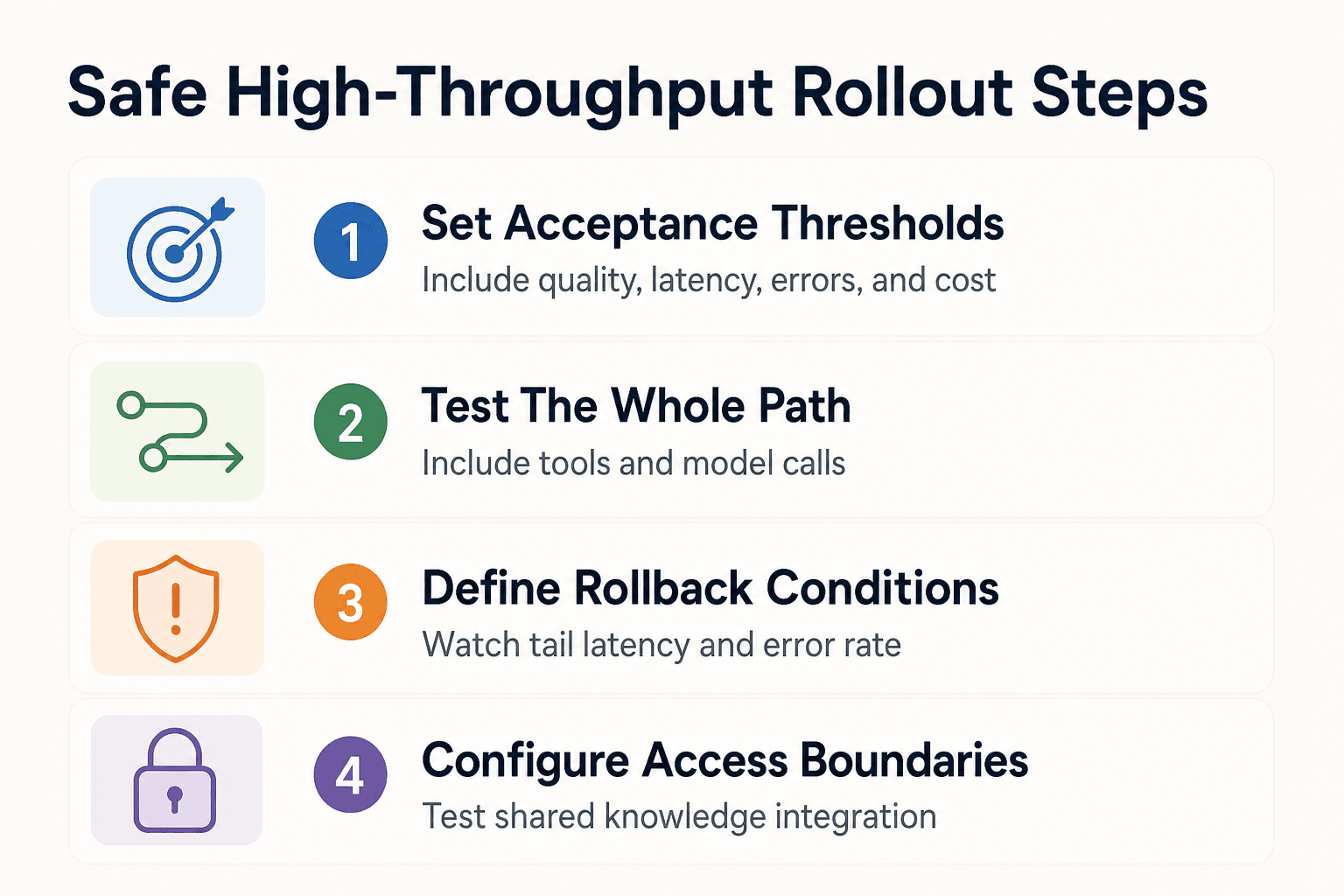
A safe rollout plan for high-throughput agent workflows
Start with a representative workload and explicit acceptance thresholds
Start with real query mixes, metadata filters, write activity, and agent tool calls. Set pass-or-fail thresholds for sustained QPS, P95 and P99 latency, retrieval quality, errors, and cost before you change infrastructure.
Load test the whole path, including coding assistants, agent tools, retrieval, and model-provider limits
Run the client, gateway, retrieval service, reranker, context builder, tools, and model calls together. Client design can cap measured throughput, and concurrent workloads can expose limits that a single-query test will miss.
Roll out with dashboards, traces, retrieval-quality sampling, and rollback conditions
Begin with a small traffic share. Trace requests across services, sample retrieved results for relevance and permission errors, and define rollback triggers before release, such as rising tail latency or error rate.
Use shared knowledge with explicit access boundaries
For teams using GigaRAG, connect agents to the central Hive Mind through MCP or the API and configure access controls for what each agent can use. Test that integration as part of the same representative workflow used for capacity and quality validation.
Frequently asked questions
What does 1,000 queries per second mean for a RAG application?
It is a throughput target whose meaning should be tied to a defined workload and explicit quality, latency, error, and cost criteria. For RAG, assess the full application workflow rather than treating vector-search throughput alone as application capacity.
How do you calculate the concurrency needed to support 1,000 QPS?
There is no single concurrency figure that a generic benchmark can provide. Test the request mix and client configuration you plan to deploy, then record the concurrency levels at which the workload meets its throughput, quality, and latency targets.
Why is P99 latency more useful than average latency when scaling RAG?
P99 is a tail-latency metric, not a replacement for average latency. Measure it alongside P95 and average latency under the concurrency you expect so load testing captures both typical and tail behavior.
Can a vector database benchmark tell you whether your full RAG system will handle 1,000 QPS?
Not by itself. Vector-database benchmarks may not reflect production conditions such as concurrency, metadata filtering, and continuous ingestion. Test those conditions in an application-level workload before using a benchmark result for capacity planning.
How do metadata filters affect vector search throughput?
In AIMultiple’s seven-engine test, metadata-filtered search had lower throughput in the configurations measured. An unfiltered benchmark therefore may not describe a workload that uses metadata filters.
How can you scale RAG throughput without reducing retrieval quality?
Track retrieval quality, such as Recall@k, alongside throughput and tail latency while tuning. Evaluate changes with the same representative queries and filters so speed gains do not hide a quality loss.
What should be included in a production load test for an AI agent or RAG workflow?
Include representative queries, concurrent clients, metadata filters, retrieval-quality checks, P95/P99 latency, and continuous ingestion or other live data changes. Measure the client and end-to-end workflow, not only the search engine.
When should you use semantic caching in a RAG system?
Use it only for answers or retrieval results you can safely reuse. Define invalidation, freshness, and access-control boundaries before you rely on it.
About GigaRAG
GigaRAG is a shared memory platform for AI agents. It helps developers and teams keep project knowledge available across sessions and tools.
Connect agents to a central Hive Mind through MCP or the API. Access controls manage what each agent can use.


