Staging and Production Parity for RAG Pipelines and Agent Memory
Staging and production parity for RAG can fool RAG pipeline and agent-memory builders: a clean staging answer doesn't prove production will retrieve the same evidence, apply the same tenant permissions, or retain the same cross-session context.
Perfect replication isn't possible. Staging can't fully copy live traffic, source-data churn, warm caches, third-party model changes, or every production incident, so matching infrastructure alone isn't enough. A green ingestion job can still leave a stale serving index, and the right chunk can exist while a metadata filter or delayed ACL update changes who sees it.
What you need is comparable behavior for a controlled request, identity, data version, and configuration, plus a record of intentional differences.
Quick answer
Staging and production parity for RAG means checking that the dependencies shaping retrieval and context, such as data, parsing, indexes, permissions, and memory, are aligned or have documented differences. A successful staging answer alone doesn't show that production will use the same evidence.
- Compare the versions and settings that affect each retrieval step.
- Verify that the serving index reflects the intended ingested data.
- Test metadata filters, permissions, and persistent memory behavior.
- Treat staging as a useful check, not a guarantee of live behavior.
What is staging and production parity for RAG?
Staging and production parity for RAG means the same controlled request, dataset version, user identity, and configuration produce comparable retrieval and access-control outcomes in both places. It doesn't mean identical servers or model wording, and it can't guarantee traffic, source churn, warm caches, or third-party model behavior.
Parity means comparable retrieval and policy outcomes
Comparable is the key word. Check the retrieved chunks, their order where ranking matters, and the policy decision for that identity. A fluent answer can still rest on the wrong evidence.
What must match versus what may intentionally differ
Match the artifacts that shape an answer: source snapshot, chunking, embedding and index versions, metadata schema, filters, prompts, model settings, and access rules. Infrastructure size or endpoint names may differ on purpose. Record intentional differences. Unplanned drift blocks release.
Why agent memory makes parity more than a deployment problem
Memory turns parity into state testing. A follow-up request can depend on stored facts, correction records, and recall rules. If staging starts clean while production has old cross-session context, matching the first answer tells you little about the next one.
Staging-only checks vs parity-gated releases
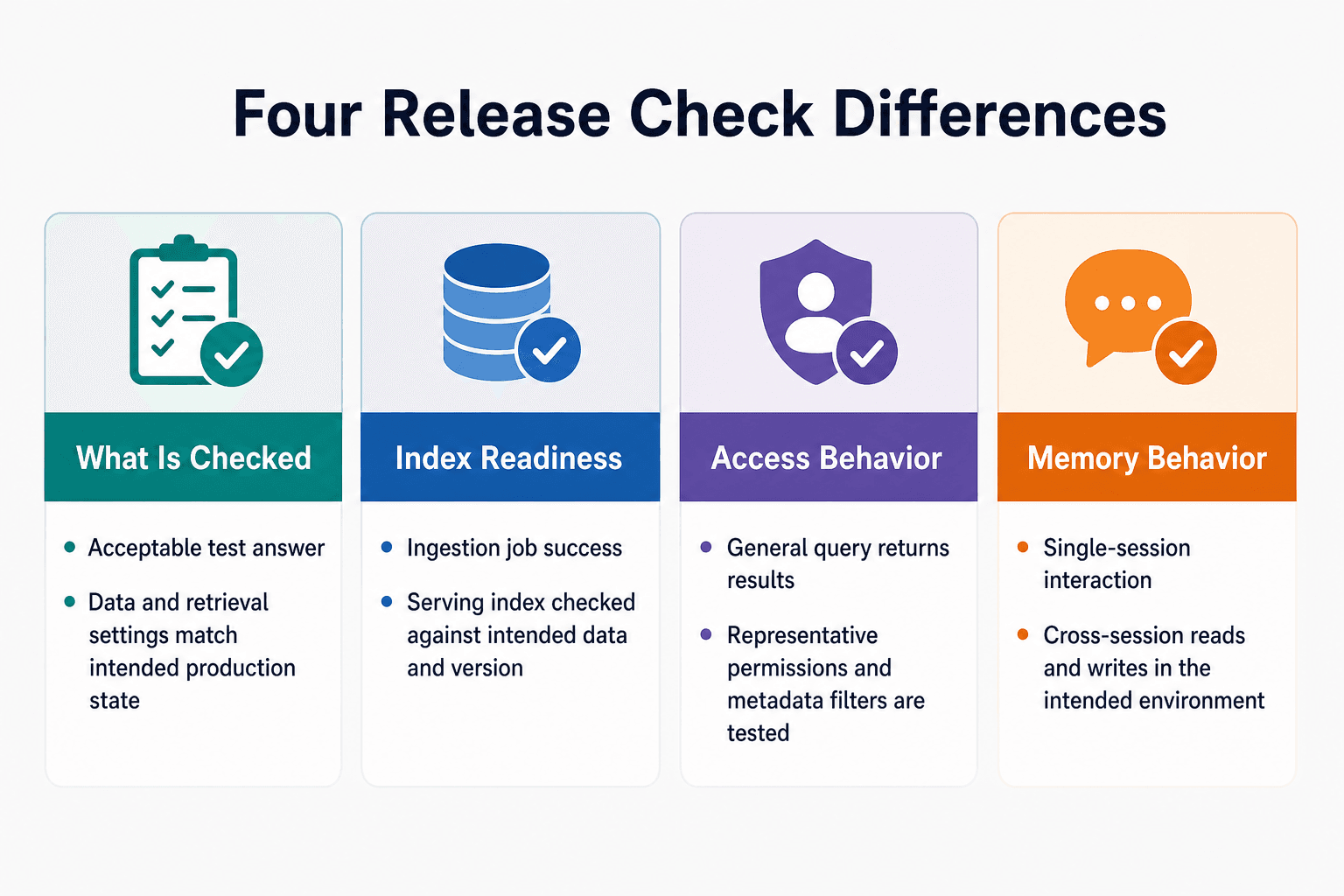
| Factor | Option A | Option B |
|---|---|---|
| What is checked | Whether a test query returns an acceptable answer | Whether the data and settings behind retrieval match the intended production state |
| Index readiness | Ingestion job reports success | Serving index is checked against the intended data and version |
| Access behavior | A general query returns results | Queries are tested with representative tenant permissions and metadata filters |
| Memory behavior | A single-session interaction is checked | Cross-session reads and writes are checked in the intended environment |
The RAG parity surface: components that must stay consistent
Treat parity as a comparison matrix, not one deployment check. For every request path, record the artifact version, runtime setting, and expected effect on retrieval, answer context, or remembered state. Small differences compound.
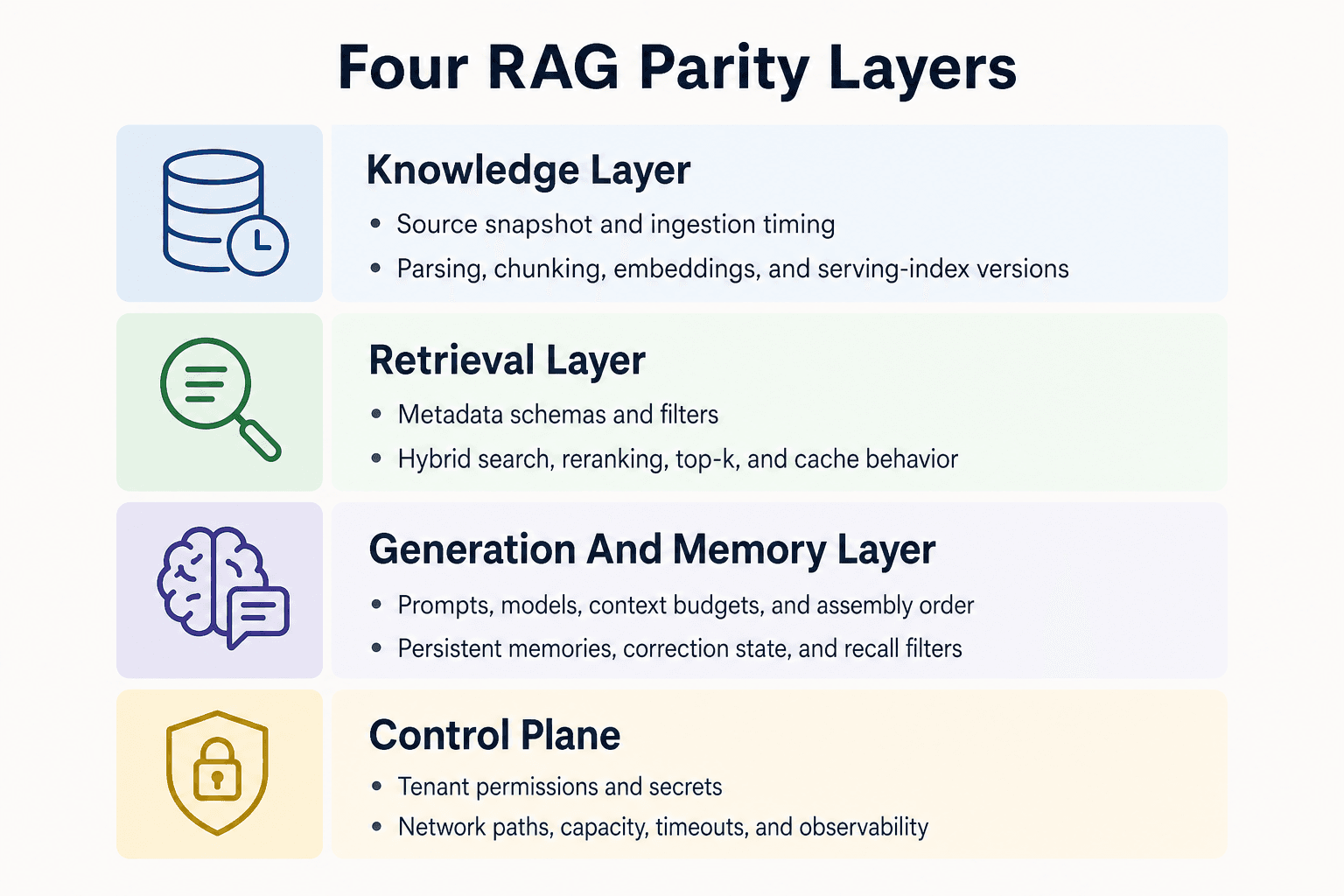
Knowledge layer: source data, ingestion timing, parsing, chunking, embeddings, and index versions
Compare the source snapshot and the time each environment ingested it. Then compare parser version, extraction rules, chunk boundaries, embedding model, and serving-index version.
A successful ingestion run isn't enough. If production serves an older index, or parses a PDF without its headings and table structure, it can retrieve different evidence from the same source file. The DEV Community guide also flags parsing as an upstream concern: poor structure becomes poor chunks, which then limits retrieval.
Retrieval layer: metadata schemas, filters, hybrid search, reranking, top-k, and cache behavior
Check the metadata schema and values, not just that metadata exists. A missing tenant field, different filter default, or changed null-handling rule can alter which chunks are eligible before ranking starts.
Also match dense and keyword retrieval settings where you use hybrid search, reranker version, top-k values, score thresholds, and cache keys and expiry rules. The main catch is cache state: a warm production cache may return a prior result while staging runs the full retrieval path. Compare cached and uncached behavior separately.
Generation and memory layer: prompts, models, context budgets, persistent memories, and correction state
Pin the prompt template, model identifier, generation settings, context budget, and context assembly order. More retrieved chunks don't automatically mean a better answer. The supplied guide warns against stuffing unrelated material into the context and recommends selecting ranked chunks within a token limit.
Memory needs its own fixture. Compare stored facts, conversation turns, summaries, correction markers, and recall filters for the same test identity. If a prior answer was marked wrong in one environment but remains eligible for context in the other, a follow-up can drift even when retrieval matches.
Control plane: tenant permissions, secrets, network paths, compute capacity, and observability configuration
Run parity checks with real permission shapes: allowed users, denied users, and users whose access changed recently. Delayed ACL propagation or a service identity with broader rights can expose the wrong chunk without changing the index.
Keep in mind that secrets, network routes, capacity limits, timeouts, and tracing settings also shape behavior. You don't need identical infrastructure, but you do need to know when those differences change the request path or hide the evidence needed to debug it.
Staging and production parity for RAG: a step-by-step guide
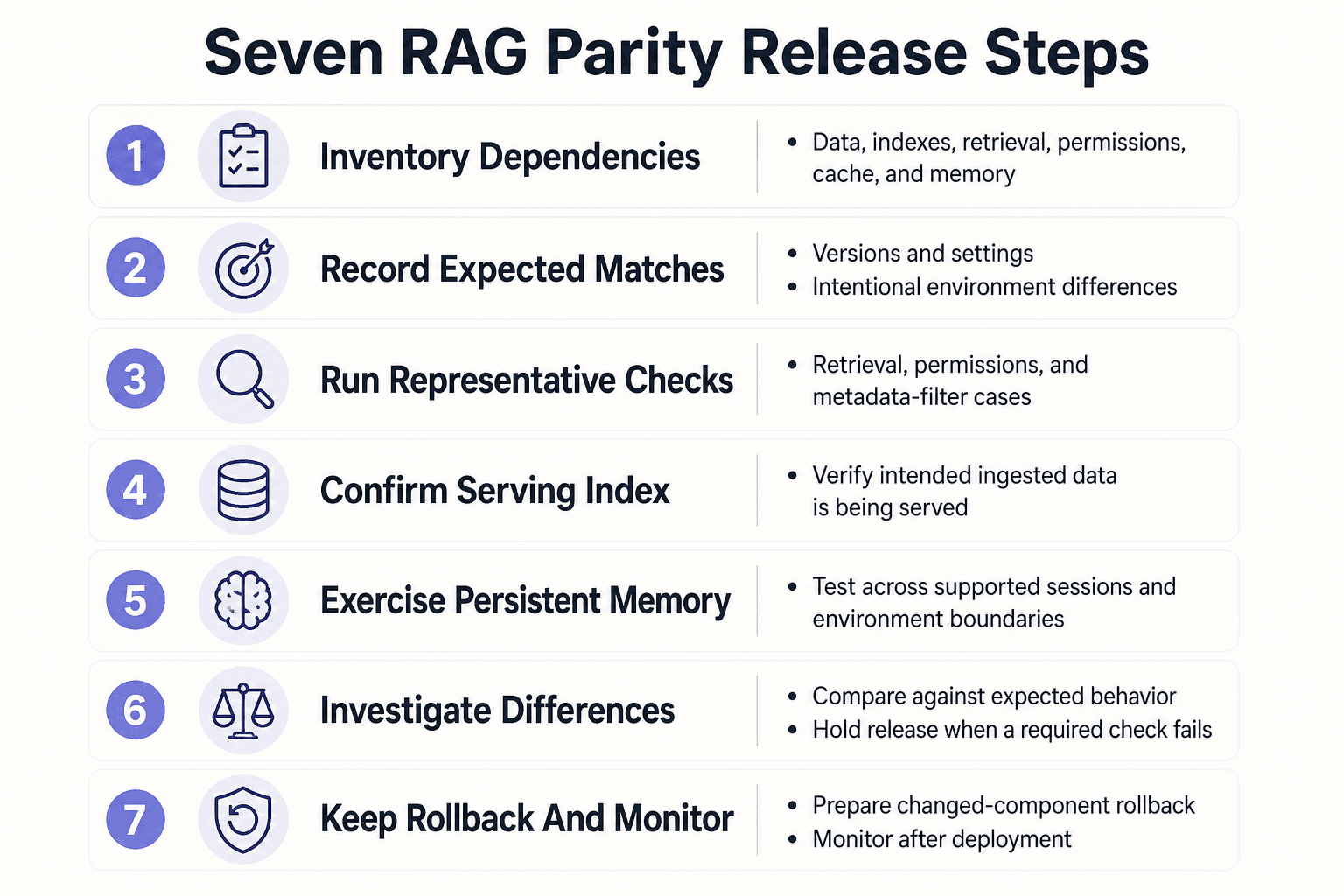
- Inventory the data, parsing, chunking, embedding, index, retrieval, prompt, model, permission, cache, and memory dependencies in the release.
- Record the versions and settings expected to match, and document intentional environment differences.
- Run representative retrieval and permission checks against the release candidate, including metadata-filter cases.
- Confirm that the serving index reflects the intended ingested data rather than relying only on ingestion-job status.
- Exercise persistent memory across the sessions and environment boundaries the release is meant to support.
- Compare results with expected behavior, investigate unexplained differences, and hold the release if a required check fails.
- Keep a rollback path for changed components and monitor for differences after deployment.
Five parity failures that make a working RAG system fail live
A green job, a passing smoke test, and matching vector counts don't prove that production will serve the same evidence. Parity breaks at the handoffs: between source and ingestion, index and query path, metadata and policy, or stored context and the next follow-up.
[!tip] For agent-memory changes, test a write in one session and a read in a later session using the intended environment and permissions. A single-session test won't establish cross-session behavior.
Fresh data, stale serving index: the ingestion run succeeded but retrieval did not change
A policy update reaches the ingestion store, embeddings finish, and the job reports success. Production still points at yesterday's serving index. A query returns the old policy because the new vectors never reached the index behind the live endpoint.
Start by comparing the serving-index version and deployment target, not the ingestion status. Then issue the same query against the new index directly and through the production request path.
A related failure is delayed ingestion. Staging imports a fixed source snapshot, while production hasn't received a changed document from an upstream system. Matching index counts won't expose that gap. Compare source timestamps and document IDs before comparing retrieval scores.
Metadata and permission drift: the right chunk exists but the wrong tenant can see it, or the right tenant cannot
A chunk is present in both environments, but production writes tenantId while the filter expects tenant_id. The query runs without an error and either drops valid evidence or searches too broadly.
Check the stored metadata payload and the exact filter sent at query time. Don't stop at schema definitions.
Another failure sits outside retrieval: an ACL update hasn't propagated, or the production service identity has wider rights than staging. Test the same chunk with an allowed identity, a denied identity, and one whose access changed recently. This is a release blocker, not a ranking issue.
Memory, cache, and model drift: a follow-up answer changes across environments
A follow-up passes in staging because it recalls a corrected fact. Production has an older memory record, a cache hit built before the correction, or a different model setting that changes how context is used.
Compare the full request trace: memory records, correction flags, cache key and age, assembled context, model identifier, and generation settings. The supplied production guide warns that invalid prior answers should be excluded from future context. If production retains them, a plausible follow-up can still be wrong.
How to test, debug, monitor, and roll back parity drift
Don't use exact generated wording as your only test assertion. A model update, sampling setting, or changed context order can alter phrasing even when retrieval is correct. Test the evidence, policy result, and context first.
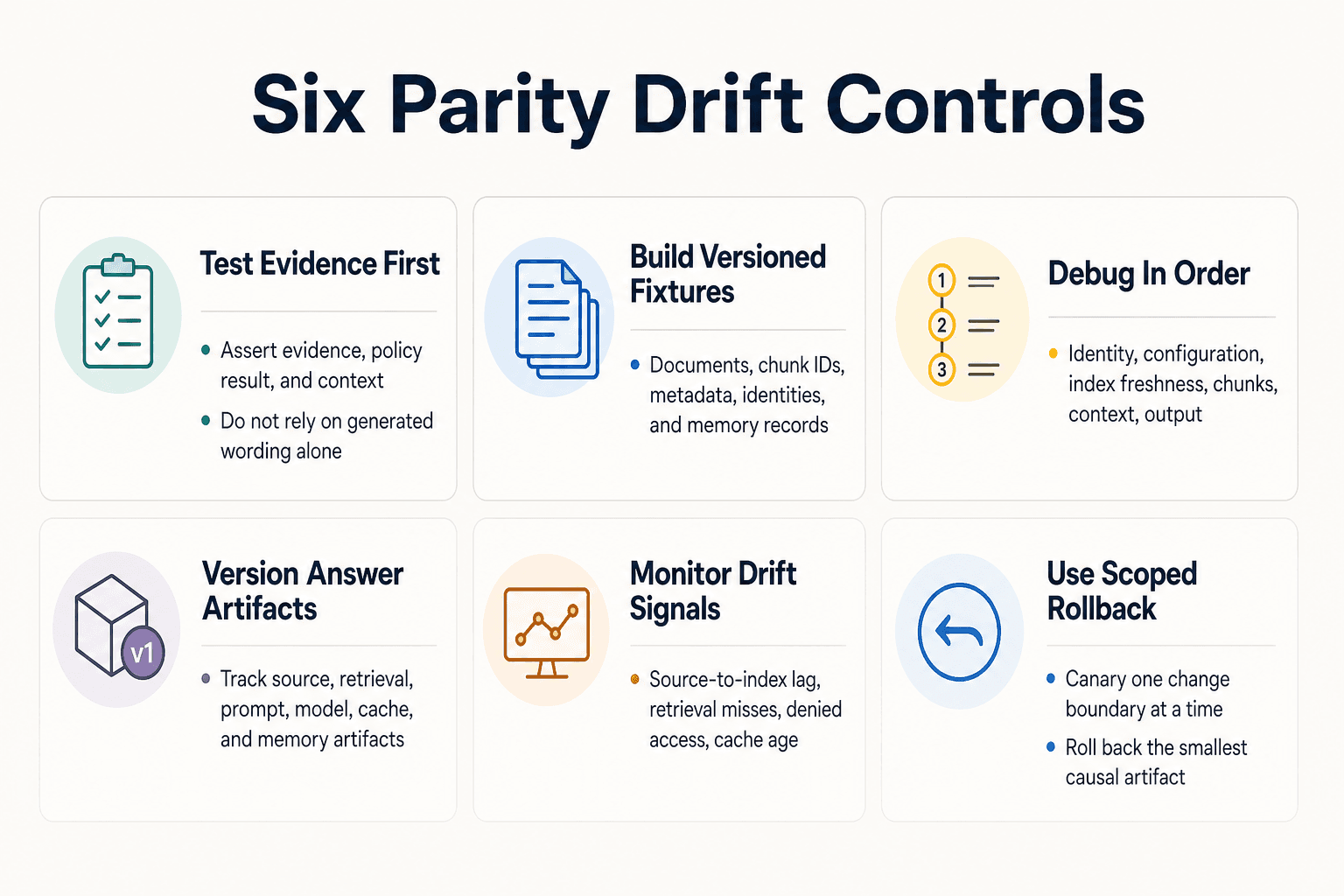
Build production-like fixtures with documents, tenant identities, query sets, and expected retrieval evidence
Create versioned fixtures that include source documents, chunk IDs, metadata, allowed and denied tenant identities, and follow-up memory records. For each query, record the chunks that must appear, chunks that must not appear, and the access decision you expect.
Use stable source snapshots. Then run the same identity-aware request through staging and the production path before a release.
Debug in order: request identity, configuration version, index freshness, retrieved chunks, assembled context, then model output
Start at the request boundary. Confirm the tenant, user claims, filters, prompt version, model settings, and index version before inspecting a generated answer.
Then compare document IDs, chunk IDs, scores, reranking output, and the final context sent to the model. This order matters: debugging wording first can hide a missing permission filter or stale index.
Version and monitor the artifacts that affect answers
Version the source snapshot, ingestion code, chunking rules, embedding model, index, metadata schema, retrieval settings, prompt, model settings, cache policy, and memory records. A deployment version alone isn't enough.
Monitor signals that expose drift: source-to-index lag, index deployment version, retrieval misses for fixture queries, denied-access results, cache age, and memory record version. Keep the request trace. You need it when a live answer changes.
Use canaries and scoped rollback for data, index, prompt, model, and memory changes
Release one change boundary at a time where you can. Send a canary share of traffic to a new index, prompt, or model setting, and compare retrieval evidence and policy outcomes before widening it.
Roll back the smallest artifact that caused the change. Repoint a serving index, restore a prior prompt, disable a memory migration, or bypass a bad cache entry. Don't roll back unrelated data if the fault is a filter version.
Make parity a release discipline, not a one-time environment check
Parity isn't a one-time environment check. It can't reproduce live traffic, source churn, warm caches, model changes, or every incident. What it can do is turn known differences into explicit release decisions instead of surprises users find.
[!note] Staging cannot fully reproduce live traffic patterns, source-data churn, warm caches, third-party model changes, or every production incident. Treat parity checks as a way to catch known differences, not as proof that production behavior will be identical.
Keep a release record: versions, fixture results, intentional differences, canary scope, and rollback point. If a result differs, don't waive it because staging is "close enough." Name the cause, accept the risk, or stop the release.
A practical pre-release parity checklist
Before you release, make sure you can:
- Identify the source snapshot, index, prompt, memory schema, and access-policy versions.
- Run representative allowed and denied requests, including follow-up queries.
- Compare retrieved chunk IDs and access decisions, not generated wording alone.
- Check freshness, cache state, traces, alerts, and rollback ownership.
- Confirm that a canary can stop without changing unrelated artifacts.
Staging and production parity for RAG works when every release leaves an audit trail.
Frequently asked questions
What does staging and production parity mean for a RAG pipeline?
It means checking that the dependencies shaping retrieval and context are consistent with production or have explicitly documented differences. It doesn't mean that every live condition can be recreated in staging.
Which RAG components need to match between staging and production?
Check data and ingestion, parsing and chunking, embeddings and indexes, retrieval settings, prompts, models, permissions, infrastructure, caches, and memory records. The goal is to identify which differences can change retrieved context or system behavior.
How can an index be stale if document ingestion succeeded?
An ingestion job reporting success doesn't establish that the serving index reflects the intended data. Check the index that queries actually use and verify its data and version against the release expectation.
How should teams test tenant permissions in a RAG staging environment?
Use representative tenant identities and queries, then verify that metadata filters and access rules return only the intended material. Also check whether permission changes are reflected in the environment being tested.
Why can the same RAG query retrieve different results in production?
The query may encounter different data, parsing, embeddings, index state, filters, caches, or model and retrieval settings. The supplied production-system reference also describes context drift and retrieval differences as possible sources of unreliable answers (S1).
How do you test persistent agent memory before release?
Test memory writes and later reads across the sessions and environment boundaries the feature is meant to support. Check that memory selection and filtering behave as expected. The supplied reference notes that blindly appending chat history can contribute to context drift (S1).
Can staging ever perfectly reproduce production RAG behavior?
- Staging cannot fully reproduce live traffic patterns, changing source data, warm caches, third-party model changes, or every production incident. It can still help expose known configuration and dependency differences before release.
About GigaRAG
GigaRAG helps you share agent memory like you share Google Docs. It connects your AI agents to a central Hive Mind, with access controls for what each agent can use. Developers, vibe coders, and teams can keep project knowledge available across sessions and tools, so agents can pick up where work left off without rebuilding context or managing a full RAG stack.


