Serverless RAG Architecture for Agent Memory and Pipeline Builders
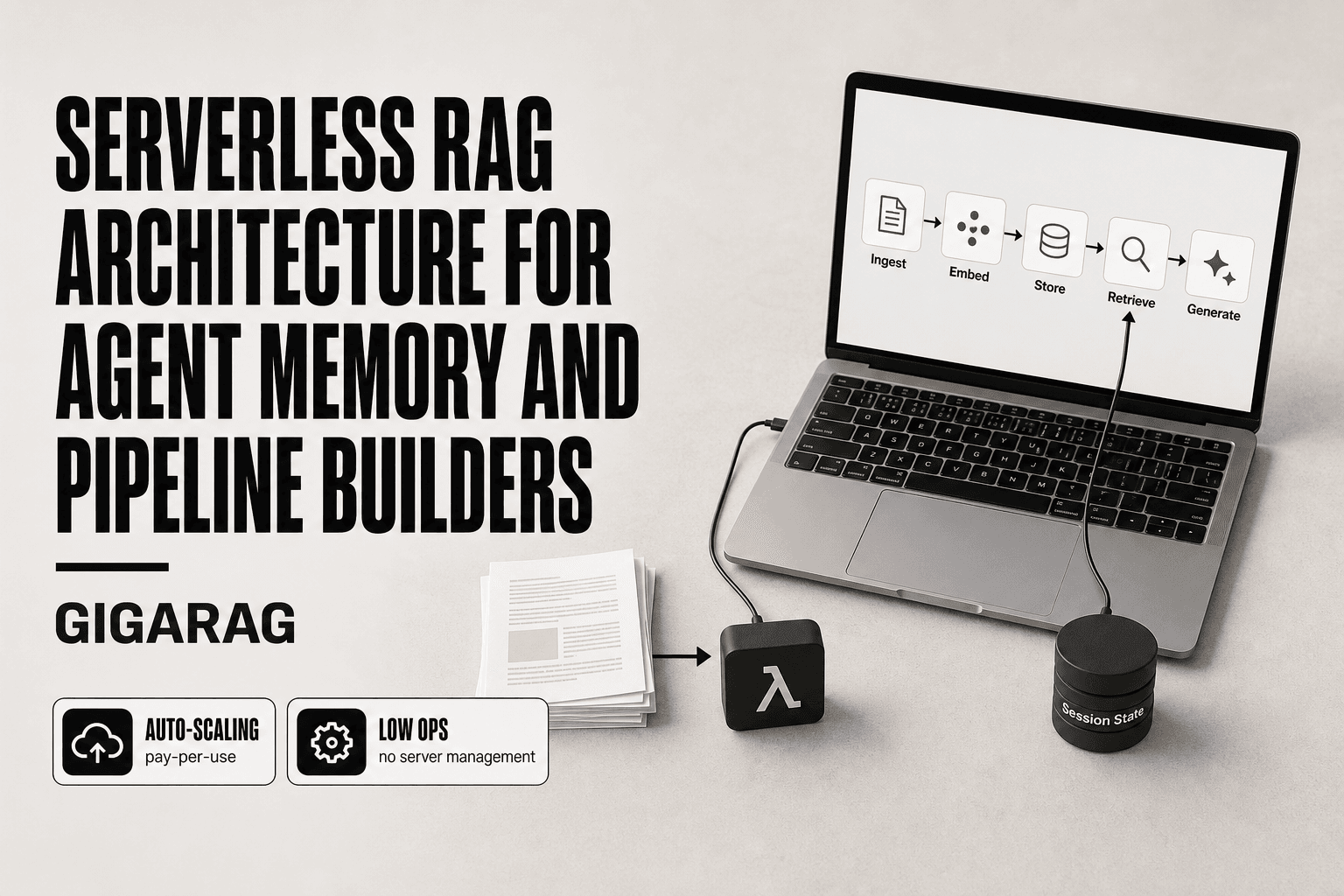
Most serverless RAG architecture content is AWS marketing that assumes you're building stateless document Q&A. You're not. You're building agent memory, where every invocation needs to know what happened in the last ten turns, and the honest architectural trade-offs matter more than a service catalog. The good news is that the core pattern is simpler than most vendor content suggests: ingest, embed, store, retrieve, generate. The main catch is that "serverless" changes how each of those components behaves under load, and nobody in the top search results tells you where it breaks. GigaRAG is built specifically for agent memory in serverless RAG pipelines, so this guide draws on that work without pretending every use case needs it. You'll get a vendor-neutral component breakdown, agent memory patterns that actually hold state, a serverless vs. container decision matrix, and the failure modes you'll hit before production.
| At a glance | Details |
|---|---|
| Primary use | Agent memory and stateless RAG |
| Key benefit | Auto-scaling, pay-per-use, low ops |
| Main limitation | Cold starts and state management |
| Best for | Sporadic or variable workloads |
| Alternative | Containers for steady, low-latency |
| Vendor-neutral | Works across AWS, Azure, GCP |
In This Guide
- What Is Serverless RAG Architecture?
- Serverless vs. Container-Based RAG: Which Should You Choose?
- Serverless RAG Architecture: Component Breakdown
- Serverless Rag Architecture: A Step-by-Step Guide
- Agent Memory Patterns in Serverless RAG
- Serverless vs. Container-Based RAG: A Decision Matrix
- When Serverless RAG Fails: Limitations You Should Know
- Vectorless RAG: A Lower-Cost Alternative
- Cost and Economics of Serverless RAG
- Common Mistakes in Serverless RAG Architecture
What Is Serverless RAG Architecture?
Serverless RAG architecture is a retrieval augmented generation pipeline where every component runs as a managed, event-driven service that scales to zero when idle. You pay per invocation or per stored record, not for provisioned capacity. The pipeline still does the same job as any RAG system: it ingests documents, converts them to embeddings, stores those vectors, retrieves relevant chunks at query time, and feeds them to an LLM for generation.
The five core components of any RAG system
Every RAG pipeline, serverless or not, has five parts. Ingestion pulls documents in and chunks them. Embedding generation converts each chunk to a vector. Vector storage holds those vectors and supports similarity search. Retrieval finds the chunks most relevant to a query. Generation sends those chunks plus the query to an LLM, which produces the answer.
What 'serverless' actually changes
Serverless doesn't change what the pipeline does. It changes how you run it. Instead of a long-lived service holding your vector index in memory, each step becomes a short-lived function or a managed API call. Storage moves to services like S3 and DynamoDB. The vector database becomes a managed offering that bills per query.
Stateless vs. stateful RAG: the key distinction for agent builders
The main catch: serverless functions are stateless by default. A simple document Q&A system works fine that way. Each query is independent. But an agent carrying conversation history needs state somewhere external. That's the architectural fork most guides skip, and it's where agent builders hit real friction.
[!note] Serverless RAG is not a single product but a pattern combining compute, storage, and retrieval services. The architecture varies by cloud provider, but the core trade-offs—cold starts, state management, and cost—remain consistent.
Serverless vs. Container-Based RAG: Which Should You Choose?
| Factor | Serverless (e.g., Lambda) | Containers (e.g., ECS, Kubernetes) |
|---|---|---|
| Cold start latency | High (seconds) for infrequent calls | Low (ms) if always running |
| Scaling | Automatic to zero and up | Manual or auto-scaling with lag |
| Cost model | Pay per invocation and duration | Pay for reserved or allocated capacity |
| Operational complexity | Low—no server management | Higher—cluster and orchestration |
| State management | External store required (e.g., DynamoDB) | Can hold in-memory state |
Serverless RAG Architecture: Component Breakdown
Ingestion: getting documents into the pipeline
Ingestion starts with an upload event. A file lands in S3, a Cloud Storage bucket, or Azure Blob Storage, and that event triggers a function. The function downloads the file, extracts text, and chunks it. Chunk size matters more than most builders expect: 500 to 1,000 tokens with some overlap works for most document Q&A, but agent memory often needs smaller chunks for finer-grained retrieval. Open-source options like Unstructured handle PDF and HTML extraction without vendor lock-in.
Embedding generation: serverless options
Embeddings turn each chunk into a vector. You have three serverless paths. Managed embedding APIs: OpenAI's text-embedding-3, Cohere Embed, or AWS Bedrock's Titan Embeddings. All bill per token, no infrastructure. Or you run an open-source model like BGE or E5 inside a Lambda function, which costs less at high volume but adds cold start latency. The trade-off is cost per token versus control over the model.
Vector storage: serverless vector databases
The vector database is where serverless shines or stalls. Pinecone, OpenSearch Serverless, and Azure AI Search all offer scale-to-zero pricing with per-query billing. But scale-to-zero means the index unloads when idle, and the first query after idle pays a cold start penalty. If your agent queries every few seconds, the index stays warm and this doesn't matter. If it queries once an hour, expect latency spikes.
Retrieval: semantic search at scale
Retrieval sends the query embedding to the vector database and gets back the top-k nearest chunks. Serverless retrieval is fast when the index is warm: typically 50 to 200 milliseconds. The catch is that pure vector search misses exact matches like product codes or error strings. Hybrid retrieval, combining vector similarity with keyword search, fixes this but adds a second query path and more moving parts.
Generation: connecting to LLMs
Generation is the easiest component to make serverless. You call a managed LLM API: Bedrock, Vertex AI, or OpenAI. The function assembles the prompt with retrieved chunks and streams the response back. No infrastructure to manage. The cost is per output token, and for agent workloads with long conversation histories, prompt size becomes the dominant cost driver.
[!tip] For agent memory, use a serverless function to orchestrate retrieval but store conversation history in a low-latency key-value store like DynamoDB or Redis. This avoids the statelessness trap and keeps your agent responsive.
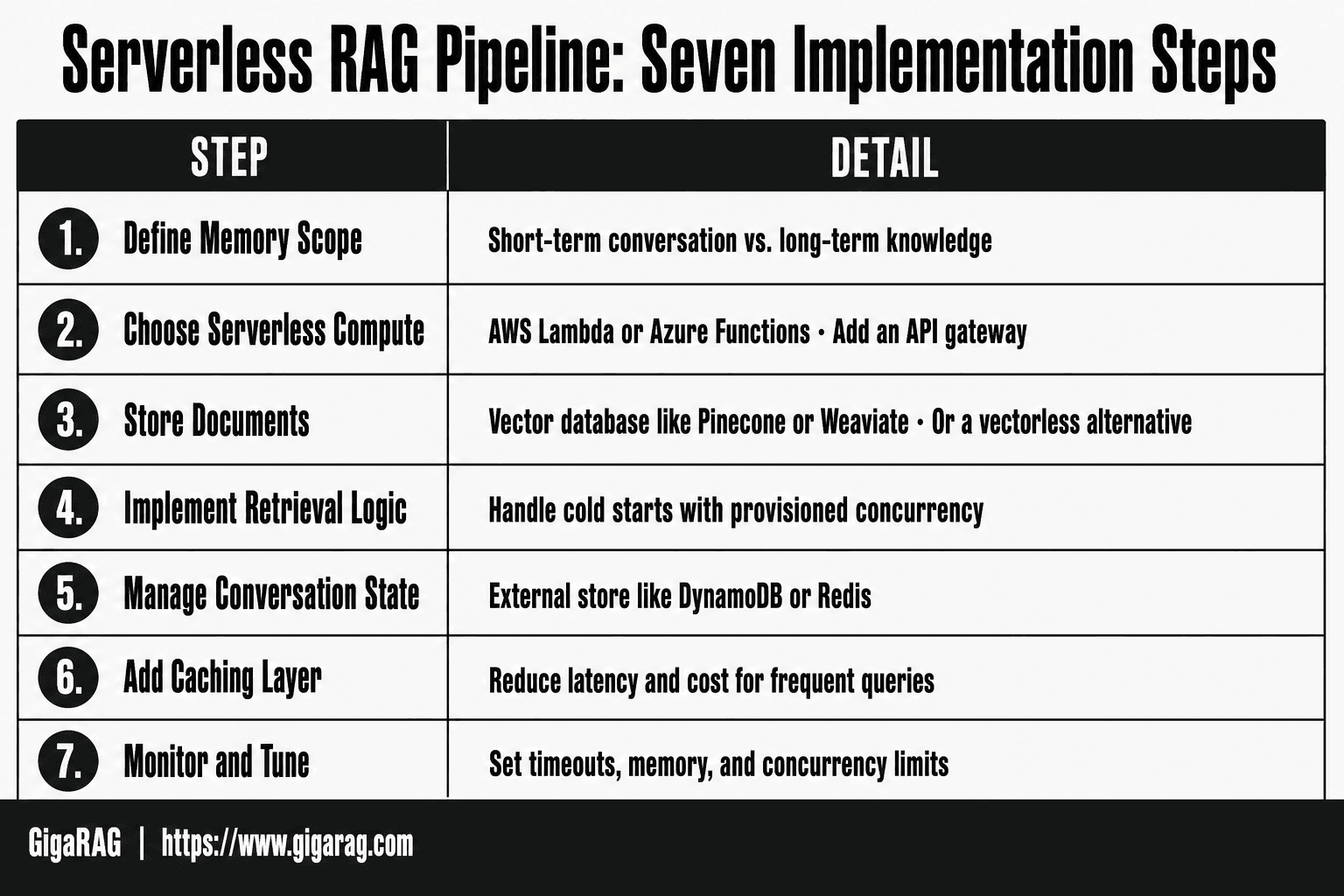
Serverless Rag Architecture: A Step-by-Step Guide
- Define your agent's memory scope: short-term conversation vs. long-term knowledge.
- Choose a serverless compute (e.g., AWS Lambda, Azure Functions) and an API gateway.
- Store documents in a vector database (e.g., Pinecone, Weaviate) or use a vectorless alternative.
- Implement retrieval logic in a serverless function, handling cold starts with provisioned concurrency.
- Manage conversation state in an external store (e.g., DynamoDB, Redis) for agent memory.
- Add a caching layer for frequent queries to reduce latency and cost.
- Monitor and tune: set timeouts, memory, and concurrency limits based on load tests.
Agent Memory Patterns in Serverless RAG
Why stateless RAG fails for agents
Document Q&A is stateless by design. You send a question, get an answer, done. Agents don't work that way. An agent loops: it retrieves, reasons, calls a tool, retrieves again, and each step depends on what happened before. If every Lambda invocation starts from zero, the agent forgets what it already found. You end up re-retrieving the same chunks, re-explaining context to the LLM, and burning tokens on repetition.
The honest answer is that stateless RAG works fine for single-turn queries. It breaks the moment your agent needs to remember anything across turns or across steps within a turn.
State management patterns: DynamoDB, session stores, and external memory
You have three practical options for keeping state in a serverless RAG pipeline.
DynamoDB is the default for AWS builders. Store session state keyed by session ID, with a TTL to expire stale sessions. Reads are single-digit milliseconds when warm, and you pay per request, not per hour. The catch is that DynamoDB is a key-value store, not a query engine. If you need to search across sessions, you'll need a secondary index or a different tool.
Session stores like Redis or Momento give you faster reads and built-in expiration, but they add a service to manage. External memory, meaning a dedicated vector store for agent memories separate from your document index, works when the agent needs to recall past interactions semantically rather than by exact key.
Conversation history and context window management
Conversation history is the silent cost driver in agent memory. Every turn you keep in the prompt is tokens you pay for on every subsequent call. A 10-turn conversation with 2,000 tokens per turn means 20,000 tokens of context before you add retrieval results.
The fix is summarization. After a few turns, compress the conversation into a running summary and drop the raw turns. You lose verbatim recall but cut prompt size by 70 to 90 percent. For agents that need exact recall, store raw turns in DynamoDB and retrieve them on demand rather than keeping them in the prompt.
Serverless vs. Container-Based RAG: A Decision Matrix
The decision comes down to four variables: latency, cost, scaling, and operational complexity. If you're building agent memory, latency and state handling dominate. If you're building a batch ingestion pipeline, cost and scaling matter more.
Latency: cold starts and real-time agent use cases
Serverless functions pay a cold start penalty on first invocation. For Lambda, that's typically 100 to 500 milliseconds for a Python function with dependencies, longer if you're loading an embedding model or SDK. Containers don't have this problem: a warm ECS task responds in single-digit milliseconds.
The honest answer is that cold starts matter most in agent loops. An agent making five retrieval calls per turn pays the penalty five times if each invocation goes cold. Provisioned concurrency removes the cold start but eliminates scale-to-zero savings. For real-time agent use cases, containers win on latency. For batch or occasional queries, serverless is fine.
Cost: scale-to-zero vs. always-on
Serverless costs nothing when idle. A container running 24/7 costs money whether it's serving requests or not. If your RAG pipeline handles a few hundred queries a day, serverless is cheaper by an order of magnitude.
The break-even point depends on volume. At sustained high throughput, per-request serverless pricing exceeds the cost of a reserved container. A rough rule: if your pipeline is busy more than 50 percent of the day, containers are usually cheaper.
Scaling: concurrency limits and burst capacity
Serverless scales automatically but with limits. Lambda has a default concurrency cap of 1,000 per region. A burst of 10,000 simultaneous retrieval requests will throttle. Containers scale manually or through autoscaling policies, which means you can provision for known peaks but pay for idle capacity during troughs.
For spiky workloads, serverless handles the burst better. For steady, predictable load, containers give you more control.
Operational complexity: managed vs. self-managed
Serverless removes infrastructure management: no patching, no capacity planning, no cluster upgrades. You deploy code and the platform handles the rest. The trade-off is observability. Debugging a cold start or a timeout in Lambda is harder than SSHing into a container.
Containers give you full control over the runtime, which matters when you need custom dependencies, GPU access, or long-running processes. You also own the operational burden: cluster upgrades, node failures, and autoscaling configuration.
When Serverless RAG Fails: Limitations You Should Know
Serverless RAG works until it doesn't. The failure modes aren't hidden; they're structural. If you know them before you build, you can design around them. If you don't, you'll find them in production.
Cold starts and latency spikes
Cold starts hit every serverless function that hasn't been invoked recently. For a RAG pipeline, that means the embedding call, the vector search, and the LLM generation each pay the penalty separately. A single query can trigger three cold starts. In an agent loop making five retrieval calls per turn, that's fifteen potential cold starts per conversation turn.
Provisioned concurrency removes the penalty but kills scale-to-zero savings. You're paying for idle capacity either way.
Concurrency and throttling limits
Lambda defaults to 1,000 concurrent invocations per region. OpenSearch Serverless has its own limits on collection throughput. A burst of simultaneous queries will throttle, and throttled requests don't fail gracefully by default. They queue, time out, or drop.
State management complexity
Serverless functions are stateless by design. Agent memory requires state. You end up pushing conversation history to DynamoDB or an external session store, which adds a read and write to every turn. That's more latency, more cost, and more failure points.
Vendor lock-in risks
Serverless RAG ties you to a cloud provider's services: Lambda, OpenSearch Serverless, Bedrock. Migrating means rewriting ingestion, retrieval, and generation code. The lock-in isn't theoretical; it's baked into the IAM roles, the SDK calls, and the service-specific APIs.
Debugging and observability challenges
When a serverless RAG query returns wrong results, you can't SSH into the function to inspect state. You're left with CloudWatch logs, X-Ray traces, and guesswork. Cold starts, timeouts, and throttling all look similar in the logs. Debugging a production issue can take hours instead of minutes.
Vectorless RAG: A Lower-Cost Alternative
Vector databases aren't the only way to retrieve relevant context. If your corpus is small, your queries are keyword-heavy, or your budget is tight, vectorless RAG can get you most of the way there for a fraction of the cost.
What is vectorless RAG?
Vectorless RAG skips embedding generation and vector search entirely. Instead, it matches queries to documents using keyword overlap, term frequency, or hashing techniques. No embedding model means no embedding API costs and no vector database to provision. The trade-off: you lose semantic understanding. A query for "car" won't match a document about "automobiles."
Locality sensitive hashing explained
Locality sensitive hashing (LSH) hashes similar items into the same bucket with high probability. For retrieval, you hash the query and pull documents from matching buckets. It's fast and cheap, but approximate. You'll get false positives and miss some relevant documents.
Hybrid retrieval: combining vector and keyword search
Hybrid retrieval runs both vector search and keyword search, then merges results. You get semantic matching plus exact term matching. The cost lands between pure vector and pure keyword approaches.
When vectorless RAG is the right choice
Vectorless RAG works when your corpus is under a few thousand documents, queries use predictable terminology, or you're prototyping. It's not the right choice for open-ended semantic search over large, varied corpora.
Cost and Economics of Serverless RAG
Serverless RAG costs split into two buckets: what you pay to get data in, and what you pay every time someone asks a question. They scale differently, so you need to track them separately.
Ingestion costs: embedding and storage
Ingestion costs are one-time per document. You pay for the embedding API call (typically per 1,000 tokens) and then for storing the vectors. Storage is cheap: a few cents per GB per month in most serverless vector stores. The embedding call is where money goes. A 10,000-document corpus might cost $20 to $50 to embed once, depending on the model and document length. Re-embedding on every schema change is where costs quietly multiply.
Querying costs: retrieval and generation
Query costs recur on every request. Retrieval itself is cheap: a vector search over a few million embeddings costs fractions of a cent. Generation is the expensive part. Every query sends retrieved context plus the prompt to an LLM, and you pay per output token. Long context windows mean more tokens per query. If your agent retrieves 10 chunks of 500 tokens each, that's 5,000 tokens of context before the model generates a single word.
Cost optimization strategies for agent workloads
Cache aggressively. Agent memory workloads repeat similar queries, so cache embeddings and retrieval results where you can. Cap context length: retrieve fewer, better chunks rather than dumping everything. Use smaller embedding models for less critical data. And batch ingestion during off-peak hours if your provider offers discounts. The honest answer: serverless RAG is cheap at low volume, but agent loops that query repeatedly will rack up generation costs fast.
Common Mistakes in Serverless RAG Architecture
Most serverless RAG failures aren't caused by the services. They're caused by builders treating serverless RAG architecture like a stateless document search when it's actually a stateful system with real latency constraints.
Ignoring cold start latency in agent loops
An agent loop might call your retrieval function five or ten times per turn. Each cold start adds 200ms to 2 seconds. That's not a one-time cost; it's multiplied across every step in the loop. If your agent feels sluggish, cold starts are usually the culprit, not the LLM.
Treating agent memory as stateless document retrieval
Document Q&A is stateless: query in, answer out. Agent memory isn't. Conversation history, user preferences, and intermediate reasoning all need to persist across invocations. Builders who skip this end up with agents that forget everything between turns. You need a session store, not just a vector index.
Over-provisioning vector databases
Scale-to-zero is the point of serverless. But many builders configure minimum capacity "just in case," which means paying for idle compute 24/7. That defeats the economics. Start with zero minimums and let concurrency scale up only when traffic actually arrives.
Neglecting observability and debugging
Serverless functions are hard to debug because they're ephemeral. When retrieval returns garbage, you can't just SSH in and inspect state. You need structured logs, tracing across the invocation chain, and a way to replay failed queries. Skip this and every production issue becomes a guessing game. That's the real cost of getting serverless RAG architecture wrong: you don't find out until you're debugging in production.
Frequently Asked Questions
What is a serverless RAG architecture?
A serverless RAG architecture uses on-demand, auto-scaling cloud services (like AWS Lambda or Azure Functions) to handle retrieval-augmented generation workloads. It typically involves a serverless function that queries a vector database and calls an LLM, with no persistent servers to manage.
How does serverless RAG handle agent memory?
Serverless functions are stateless, so agent memory must be stored externally. You can use a managed database (e.g., DynamoDB, Redis) to persist conversation history and retrieve it in each invocation. This allows the agent to maintain context across requests.
What are the main limitations of serverless RAG?
Key limitations include cold start latency (especially for infrequent calls), difficulty managing long-running or stateful processes, and potential cost spikes under high invocation volumes. Also, some vector databases may not integrate seamlessly with serverless functions.
When should I choose containers over serverless for RAG?
Choose containers when you need consistent low latency, have steady or predictable traffic, require in-memory state or GPU acceleration, or want to avoid cold starts. Containers give you more control over the runtime environment and can be more cost-effective for continuous workloads.
What are vectorless RAG alternatives?
Vectorless RAG alternatives include using full-text search (e.g., Elasticsearch, OpenSearch) or hybrid search that combines keyword and semantic methods. These can be simpler to implement and may suffice for domains with specific terminology, but they may miss semantic nuances.
How do I reduce cold starts in serverless RAG?
You can reduce cold starts by using provisioned concurrency (e.g., AWS Lambda reserved concurrency), keeping functions warm with scheduled pings, or using a lighter runtime like Python or Node.js. Also, minimize package size and initialization time.
Is serverless RAG cost-effective for production?
Serverless RAG can be cost-effective for spiky or low-traffic workloads because you pay only for what you use. However, for high-volume, steady traffic, container-based solutions may offer lower per-request costs due to reserved capacity.
About GigaRAG
GigaRAG helps GigaRAG is for agent memory and RAG pipeline builders. get this right. Whether you are working through serverless rag architecture or something adjacent, we publish what we have actually tested, including where it falls short.