
How to Stop Re-Embedding Documents That Did Not Change
RAG indexes need a way to stay synchronized as source documents are added, updated, or deleted. Depending on the update, processing may involve parsing, chunking, embedding, and changes in the vector store.
Keep a record of the source version and processing settings used for each successful indexing run. That record provides the context for later update decisions when either the document or the pipeline changes.
Process overview
Use stored source and pipeline state to decide which documents need processing, then choose an update path that matches your vector store and operational requirements. For teams making project knowledge available to agents with GigaRAG, apply this decision process to the ingestion pipeline that prepares the knowledge those agents access.
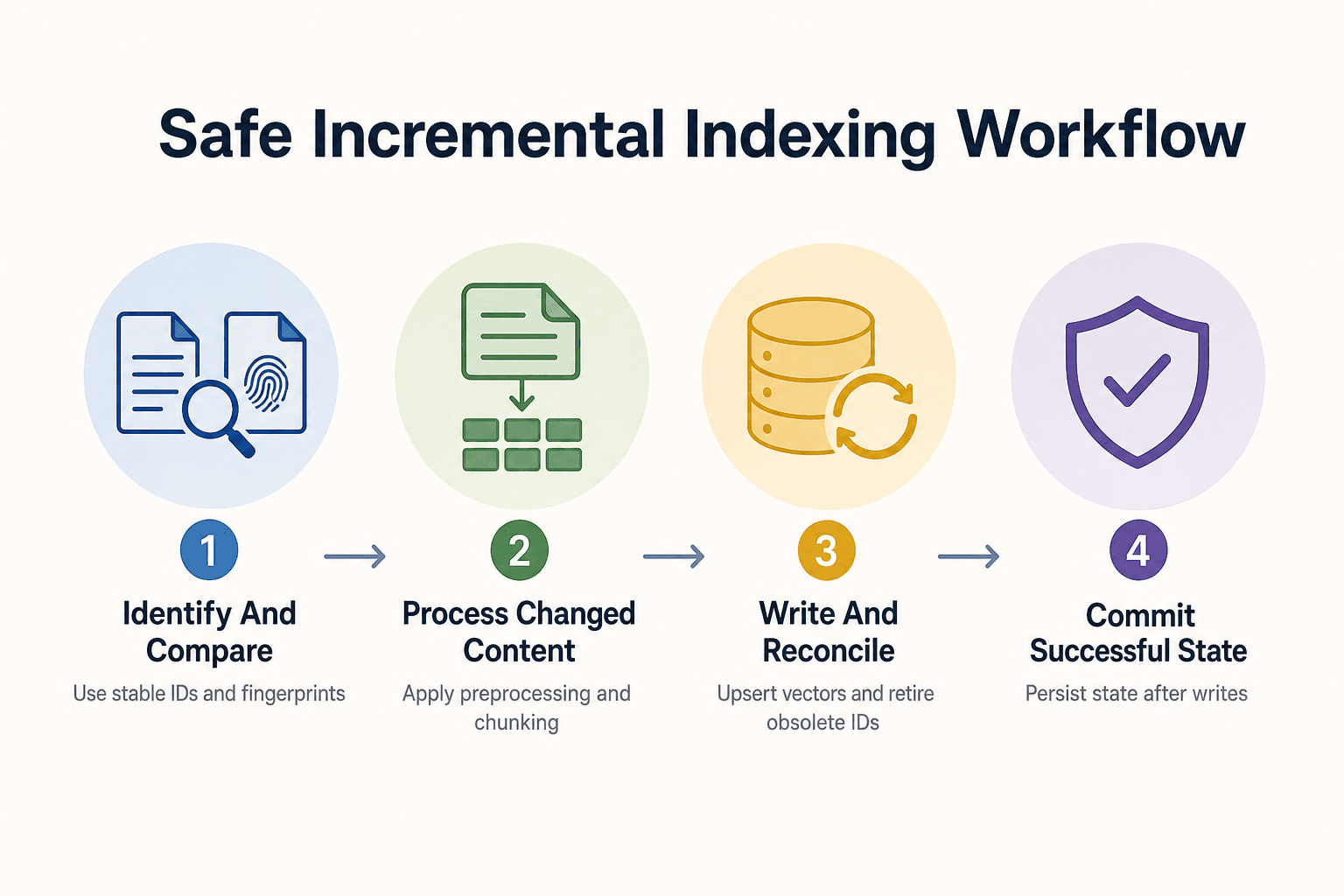
- Identify each source document and compare its fingerprint with the stored value.
- For changed documents, process the content and derive chunk IDs.
- Write vectors using stable IDs, then reconcile obsolete chunks.
- Persist the new fingerprint only after processing and vector writes succeed.
How to stop re-embedding documents that did not change
Use the committed source and pipeline record to select an update path. A source or configuration change does not require one fixed response: the appropriate processing scope depends on the rules of your pipeline and vector store.
[!note] A content fingerprint is one part of change detection. Keep pipeline configuration separately, and define how model, preprocessing, and chunking changes are handled before treating a document as unchanged.
What an unchanged document check can safely skip
A content fingerprint is one input to an update decision. Evaluate it alongside the processing configuration from the last successful run before selecting chunking, embedding, or vector-write work.
What content hashes cannot tell you
A source-content check is not a substitute for monitoring source systems, retrieval behavior, or the broader context in which answers are used.
Treat changes to the embedding model, parsing, chunking, or indexed fields as configuration changes that need an explicit processing decision, even when the source document itself has not been edited.
The minimum decision rule: content fingerprint plus pipeline fingerprint
After a successful run, record the source fingerprint together with a versioned description of the pipeline that produced the indexed records. That description can include the embedding model, chunking configuration, preprocessing version, and any fields incorporated into the embedded text.
Document-level vs. chunk-level fingerprints
| Factor | Document-level | Chunk-level |
|---|---|---|
| Scope of comparison | A source document as a unit | Chunks within a source document |
| Possible decision use | Select documents for processing under the defined update policy | Target updates after comparing current and prior chunks when chunk identities remain usable |
| Rechunking | A document update may require processing its chunks again | Rechunking may require new chunk IDs and retirement of IDs that no longer exist |
| Deletion cleanup | Reconcile the source inventory with indexed document records | Remove chunks no longer present for an existing document |
Set up the fingerprints, IDs, and state store first
Before indexing, define the text to hash, the naming scheme for records, and the point at which new state is marked committed. These choices establish the state your update process compares on later runs.
Document-level hash versus chunk-level hash
Use document-level state to identify documents selected for an update. For an edited document, chunk-level state can support a more targeted update strategy when its chunk identities remain usable.
Define and version text normalization before SHA-256
Define the normalization rules that produce the text you index, then apply those rules consistently before creating a fingerprint. Record choices such as Unicode handling, line endings, and whitespace treatment as part of the preprocessing version.
Only apply transformations that are part of the text-processing pipeline you intend to index. Record those transformations in the preprocessing version so later runs can be compared on the same basis.
What to include in a pipeline fingerprint
Create a versioned pipeline record for settings that influence the indexed output, such as the embedding model and version, chunk size, overlap, splitter rules, preprocessing version, and fields included in embedded text.
When a relevant setting changes, update that versioned record and route affected documents through the processing path your system defines for that change.
Stable document IDs, stable chunk IDs, and committed indexing state
Give each source document a durable ID from its source-of-truth location or an immutable upstream key, not its current filename alone. Derive chunk IDs deterministically from that document ID plus a stable chunk identity.
A state record can hold the committed document fingerprint, pipeline record, known chunk IDs, chunk fingerprints, and processing status. Define how that state is committed around embedding, upsert, deletion, and retry operations so a failure can be handled consistently. When GigaRAG connects agents to a central Hive Mind through MCP or the API, keep this ingestion state separate from the access controls that determine what each agent can use.
Step-by-step: skip unchanged content safely
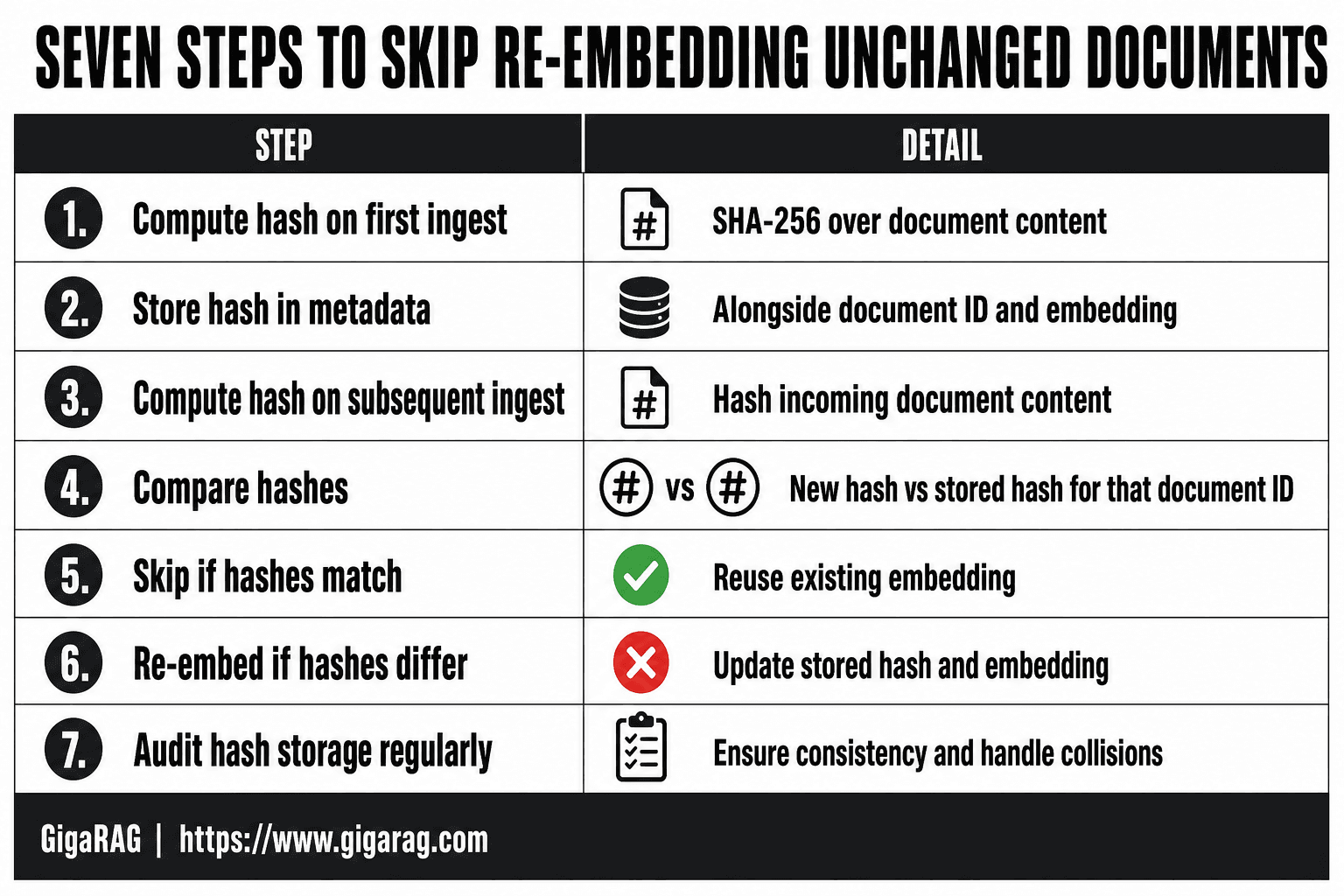
- Assign each source document a stable identity and calculate a fingerprint for the content you index.
- Compare the current fingerprint with the stored fingerprint before chunking or embedding.
- For changed content, apply the configured preprocessing and chunking rules, then derive stable IDs for the resulting chunks.
- Generate embeddings and write vectors for the chunks selected by the update strategy; configuration changes may require document-wide or broader reprocessing.
- After the required writes complete, remove or retire obsolete chunk IDs and reconcile source documents that were deleted.
- Persist the new document and chunk state only after the corresponding processing and writes succeed.
Step 1: Compare documents before you chunk or embed
Compare the committed document state with the current source and pipeline configuration before skipping downstream work. Changes in parsing, chunking, embedding, or indexed fields should follow an explicit update policy rather than being treated as unchanged content.
[!tip] Keep source-document identity separate from chunk identity. After rechunking, identify chunk IDs that are no longer present and delete or retire their corresponding vectors as required by your store.
Python example: canonicalize text and calculate a SHA-256 document hash
import hashlib
import unicodedata

def canonical_text(text: str) -> str:
    text = unicodedata.normalize("NFC", text)
    text = text.replace("\r\n", "\n").replace("\r", "\n")
    return "\n".join(line.rstrip() for line in text.split("\n")).strip()

def sha256(value: str) -> str:
    return hashlib.sha256(value.encode("utf-8")).hexdigest()

text = canonical_text(source_text)
document_hash = sha256(text)
Keep canonicalization rules versioned. When those rules change, record a new preprocessing version and choose a migration or reprocessing path rather than mixing state created under different rules.
Python example: build a deterministic pipeline fingerprint
import json

pipeline_inputs = {
    "embedding_model": "text-embedding-model-v3",
    "chunk_size": 800,
    "chunk_overlap": 120,
    "splitter": "markdown-v2",
    "preprocessing": "nfc-trim-lines-v1",
    "metadata": {"language": "en"},
}
pipeline_hash = sha256(json.dumps(
    pipeline_inputs, sort_keys=True, separators=(",", ":")
))
Separate fields incorporated into embedded text from metadata stored for filtering, permissions, display, or other record handling. Vector-store APIs differ on whether metadata updates patch existing fields or replace the record.
Decision table: skip, metadata-only update, partial re-index, or full document re-index
- Committed source and pipeline state match: use your documented skip policy for that document.
- Only metadata changed: where the vector store supports an appropriate metadata operation, use its documented update semantics; otherwise process the record according to the store's replacement behavior.
- Source changed while the pipeline record is unchanged: compare chunks when your chunk identities and store behavior support a targeted update; otherwise reprocess the document.
- Chunking or preprocessing changed: select a reprocessing scope that accounts for the new chunk boundaries and any old IDs that must be retired.
- Embedding model changed: define a migration or reprocessing plan for records that must use the new model, taking account of the vector store and retrieval setup.
APXML’s “Managing RAG Data Updates” describes production update concerns including additions, updates, deletions, and failures.
When document-level hashing is enough and when it is not
Use document-level state when your update policy selects documents as units for processing. Apply chunk-level comparison when a more targeted update is supported by usable chunk identities and your vector store.
After a source edit, chunk-level comparison can support a targeted update when the chunk identities remain valid. When the pipeline record changes, reassess the processing scope and reconciliation work required for the new configuration.
Steps 2–4: Process changed documents, reconcile records, and commit state
After selecting a changed document for processing, do not mark its state committed until the vector operations required by the selected update path have completed.
Step 2: Generate deterministic chunks and compare chunk fingerprints
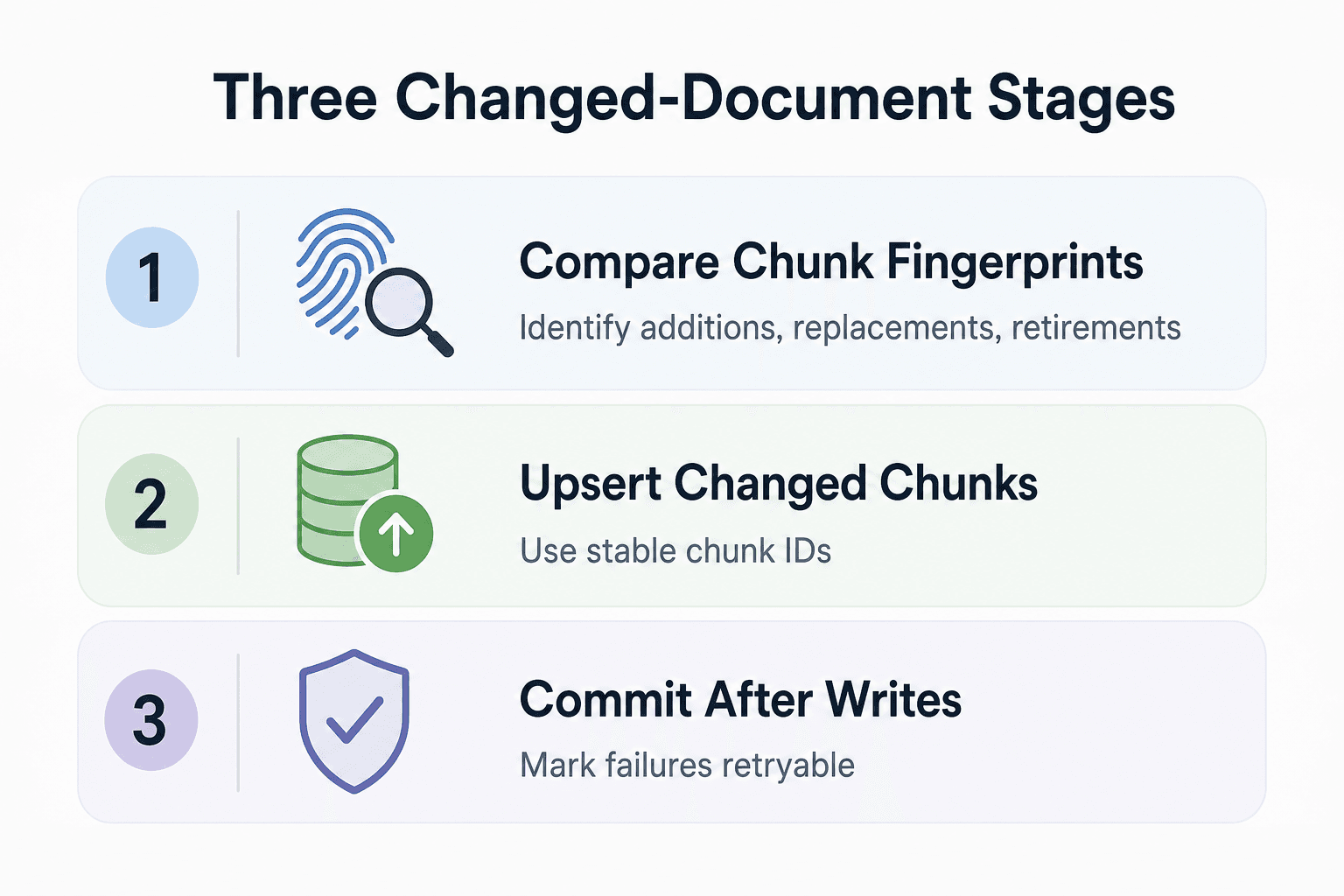
Apply the canonicalization and splitter settings selected for the current run, then record chunk fingerprints for the resulting chunks. Use the prior committed chunk record as an input to the update strategy, including identification of records that must be added, replaced, or retired.
Keep chunk identity separate from a chunk fingerprint. Use a durable document ID plus an anchor that remains appropriate for your content model. If a structural edit or rechunking produces new chunk IDs, reconcile the prior IDs and retire or delete records that no longer belong to the document.
Step 3: Upsert changed chunks with stable IDs
Embed only chunks that are new or whose fingerprint changed, then upsert them with their stable IDs, text, metadata, and vector. An upsert inserts a missing record or replaces one with the same ID, which is why stable IDs matter for keeping source data and the index aligned (The AI Database Blog).
Don't assume every store treats an update the same way. Check whether its API replaces all metadata or merges fields, especially for permissions and filters.
Step 4: Commit fingerprints only after vector writes succeed
Treat vector writes and state persistence as separate stages unless your infrastructure provides a transaction that coordinates them. One application-level pattern is to complete the selected embeddings, upserts, and retirement operations before recording the state for that run as committed.
try:
    vectors = embed(changed_chunks)
    store.upsert(vectors)
    store.delete(removed_chunk_ids)
    state.commit(doc_id, new_state, status="success")
except Exception as error:
    state.mark_retryable(doc_id, str(error))
    raise
The code example illustrates an application-level ordering, not transactional coordination between the vector store and the state store. Define failure handling for your own stores, including how a retry uses stable IDs and how the committed state is recovered or advanced.
Handle embedding failures, vector database failures, retries, and idempotency
Design retries so repeated writes use the same record identities where your store supports upsert semantics. Stable IDs allow an upsert to address an existing logical record instead of creating a second record with a different ID.
Plan for failures during update processing. Your retry and reconciliation design should account for the possibility that source state, vector-store state, and the application’s committed record need to be brought back into alignment.
Delete removed chunks and reconcile stale or orphaned vectors
Compare the previously recorded chunk IDs with the current set after an update. Delete missing IDs, or retire them with the soft-delete mechanism supported by the store, so the vector index reflects the current source structure.
For a whole-document deletion, reconcile the indexed records associated with that document against the source inventory and remove or retire them according to the vector store’s deletion model. Include source additions, updates, deletions, and failure recovery in the reconciliation process.
Test the incremental workflow and fix common failure modes
Example: only a few documents changed in a large corpus
Scan the corpus and compare each document with its committed indexing state. For documents selected for an update, use the configured chunk, embedding, write, and reconciliation path; leave documents outside that selection unchanged. Teams using GigaRAG to keep project knowledge available across sessions and tools can use these tests to validate the ingestion path that refreshes that knowledge for agents.
Incremental indexing checklist
- Confirm stable preprocessing, chunking, and IDs.
- Commit state only after writes succeed.
- Reconcile removed chunk and document IDs.
- Reassess processing scope when the recorded pipeline configuration changes.
Troubleshooting stale, duplicate, and unexpectedly re-embedded vectors
When behavior is unexpected, inspect the recorded preprocessing version, chunking configuration, IDs, and write history. Check whether repeated ingestion addressed the same IDs and whether removed source records were reconciled in the vector store.
Frequently Asked Questions
Should I use document-level hashing or chunk-level hashing for RAG indexing?
Use document-level hashing when your update policy processes a document as a unit. Use chunk-level hashing when your chunk identities remain usable and the update strategy can target individual chunks; in either case, reconcile chunks that disappear after an update or rechunking.
What should be included in a RAG pipeline fingerprint?
Record the versioned settings your team uses to determine whether indexed output needs to be regenerated. Common examples include the embedding model, preprocessing rules, chunking configuration, and fields included in embedded text. Keep this record separate from the source-content fingerprint.
Does a matching SHA-256 hash mean a document is still semantically up to date?
No. A source-content fingerprint is a change-detection input for the text and normalization rules your pipeline chose. Evaluate source freshness, retrieval quality, and other context through separate monitoring and update processes.
Should I lowercase text before hashing documents for embeddings?
Use the same text transformations for fingerprinting that your indexing design specifies. Record lowercasing, or any other transformation, in the preprocessing version so future comparisons use the same rules.
When should an embedding model change force re-embedding?
Treat an embedding-model change as a pipeline change and define a migration plan for the records affected by that model. The appropriate scope depends on the model transition, vector-store behavior, and retrieval design.
How do I prevent stale or orphaned vectors after a source document is deleted?
Reconcile the source-document inventory with the indexed records and remove or retire vectors for documents no longer present. For updated or rechunked documents, also reconcile the old chunk IDs against the new set.
When should I update the stored document hash after indexing?
Update it only after the processing and vector-write operations required by your selected update path have completed successfully. Define that commit point alongside the retry and failure-handling behavior for your own state and vector stores.
Can I update metadata without generating a new embedding?
Possibly. Metadata-only updates may not require a new embedding, but the available operation and its behavior depend on the vector store. Confirm whether the API patches metadata, merges fields, or replaces the full record.
About GigaRAG
GigaRAG is a shared memory platform for AI agents that helps developers and teams keep project knowledge available across sessions and tools. It provides a shared place for project knowledge that agents can use across their work.
Connect agents to a central Hive Mind through MCP or the API. Access controls manage what each agent can use, helping teams apply appropriate boundaries when agents work with shared project knowledge.


