Tiered Storage for Cold Documents in AI Agent Workflows
An AI agent can find the record for a project document while the original file sits in cold storage, unavailable for minutes or hours. Search does not make that file readable. If your workflow treats a metadata hit as instant access, the agent can promise context it can't yet retrieve, or point a user to a file they aren't allowed to open.
AWS Glacier storage classes illustrate the trade-off between long-term storage pricing, retrieval time, and retrieval charges. Keep responsibility clear: a knowledge layer can surface project context, while your application enforces access, submits restore requests, tracks their status, validates returned files, and applies any caching policy.
Quick comparison
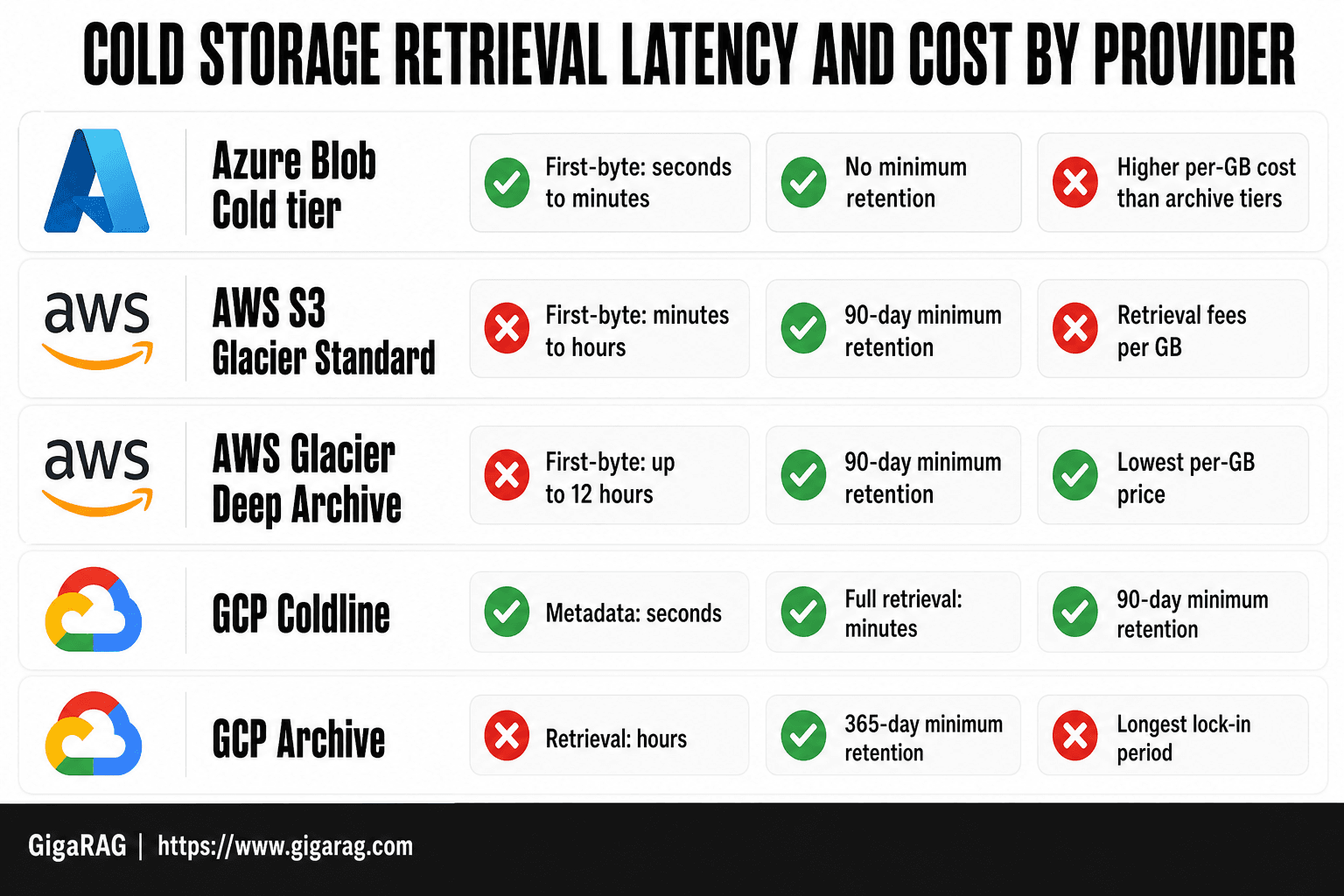
When an application stores document records separately from original objects, it should present object availability explicitly. Choose an AWS Glacier tier according to the retrieval delay your workflow can tolerate.
| Tier example | Access pattern | Workflow implication |
|---|---|---|
| Glacier Instant Retrieval | Millisecond access | May suit infrequently accessed files that still need fast retrieval. |
| Glacier Flexible Retrieval | Retrieval options range from minutes to hours | Represent restore progress explicitly before the agent uses the original. |
| Glacier Deep Archive | Retrieval takes 12–48 hours | Treat retrieval as a delayed workflow, not an immediate read. |
Tiered storage for cold documents: Compare tiers before you build
Classify documents by access frequency, acceptable wait time, retention requirements, and expected retrieval charges. If your application keeps a searchable record separately from the source object, expose the record's availability and the object's availability as distinct fields.
[!note] A search result and a readable original are separate states. An archived object may need a restore request before the application can make the original available to an authorized user or agent.
Define hot, warm, cold, and deep-archive document states
These are policy states, not fixed provider labels. Define hot files as those your workflow must read immediately, and define warmer or colder states around the delay your users and agents can accept. AWS Glacier storage classes vary in retrieval time and minimum storage duration.
Keep the state on the document record. A file can move tiers without changing its document ID or canonical URI.
Compare immediate access, delayed restore, minimum-duration, and retrieval-cost trade-offs
AWS Glacier tiers illustrate why retrieval policy needs to be explicit. Inventive HQ's AWS S3 Glacier Backup Guide lists millisecond access for Glacier Instant Retrieval, retrieval from minutes to hours for Flexible Retrieval, and 12–48-hour retrieval for Deep Archive.
Minimum storage periods matter too: Instant and Flexible Retrieval have 90-day minimums, while Deep Archive has a 180-day minimum. Deleting an object early can incur charges.
Choose document classes by user and agent latency tolerance
Put active project files in hot storage. Use colder tiers for closed projects, historical reports, compliance records, and source material an agent may need to identify but rarely needs to open.
Match the tier to the task. An agent may be able to answer from context your application has indexed, while a task that requires the original attachment, image, or checksum should remain pending until your storage workflow makes that file available.
Set expectations: searchable is not available
Show document identity and object availability separately in search results so a record can identify its source without implying that the original is ready to download.
Return an availability state with every result: available, restore requested, restoring, restored, or failed. Have the agent use that state to determine whether the original file can be requested or read.
Searchable metadata vs. archived original: What does each provide?
| Factor | Searchable metadata | Archived original |
|---|---|---|
| Purpose | Helps locate and identify a document | Preserves the source file |
| Availability | In a separated design, can remain usable for search while the object has a pending restore | For AWS Glacier objects, may require a restore before download |
| Agent use | Provides a record that can support a request for the source | Provides content only after the application confirms the object is available and appropriate for the request |
| Application responsibility | Keep a reliable link to the source object | Handle authorization, restore status, validation, and caching |
Reference architecture: Agent memory, metadata, and original documents
Architecture flow: agent to application policy layer to knowledge lookup to metadata record to object storage or restore workflow
Route every agent request through your application policy layer. It checks the caller's scope, queries the knowledge layer for relevant project context, then resolves each source to a metadata record.
That record tells the application what happens next: read a reachable object, return a cached copy, or place a restore request. The agent should never call archive storage directly.
Keep searchable project knowledge separate from the original binary or source document
Your knowledge layer can hold extracted text, chunks, embeddings, and source references. It should not stand in for the original PDF, spreadsheet, image, repository file, or other binary.
This boundary matters because extracted knowledge and the original file serve different roles. Keep the original file behind its own access check and availability state, even when the knowledge layer provides relevant context.
Required metadata fields: document ID, canonical URI, object version, storage class, integrity data, authorization scope, and retrieval state
Use one metadata record per source object version. At minimum, store a stable document ID, canonical URI, object version, storage class, checksum or other integrity data, authorization scope, and retrieval state.
Keep retrieval state explicit: available, restore requested, restoring, restored, expired, or failed. Short labels prevent an agent from treating a search result as a ready file.
Use stable document IDs and canonical locations so retrieved knowledge can link back to the source file
Design document IDs to remain stable across tier changes, cache copies, and re-indexing. Use the canonical URI to identify the authoritative original, and retain an object version when the knowledge record must point to a specific revision.
Don't use a temporary restore location as the source of truth. Your agent can then cite the right document even when the file is waiting in archive.
Step-by-step: Connect agent search to a cold document
- Store searchable document metadata separately from the original, including a stable reference to the source object.
- Use the GigaRAG interface documented for your deployment to search for relevant records. Confirm current product documentation before choosing MCP or an API.
- Check the requesting user's authorization in the application before permitting access to the original.
- Request a restore through the storage provider's documented interface, and record the request and its status.
- Return a pending state to the agent while the object is unavailable. Do not present the search result as readable source content.
- When retrieval completes, validate the restored object and its relationship to the metadata record before making it available.
- Cache or promote the object only under an application-defined policy, then track when temporary access ends or the object is re-archived.
[!tip] Have the application retain a restore-request record keyed to the object reference. Check existing status before submitting another request, and handle provider-specific in-progress responses rather than treating them as readable content.
Using GigaRAG in a cold-document storage architecture
Use GigaRAG as a shared project-knowledge layer for AI agents, connected through MCP or the API with access controls for what each agent can use. Keep archive access checks, storage calls, restore tracking, caching, and file validation in your application.
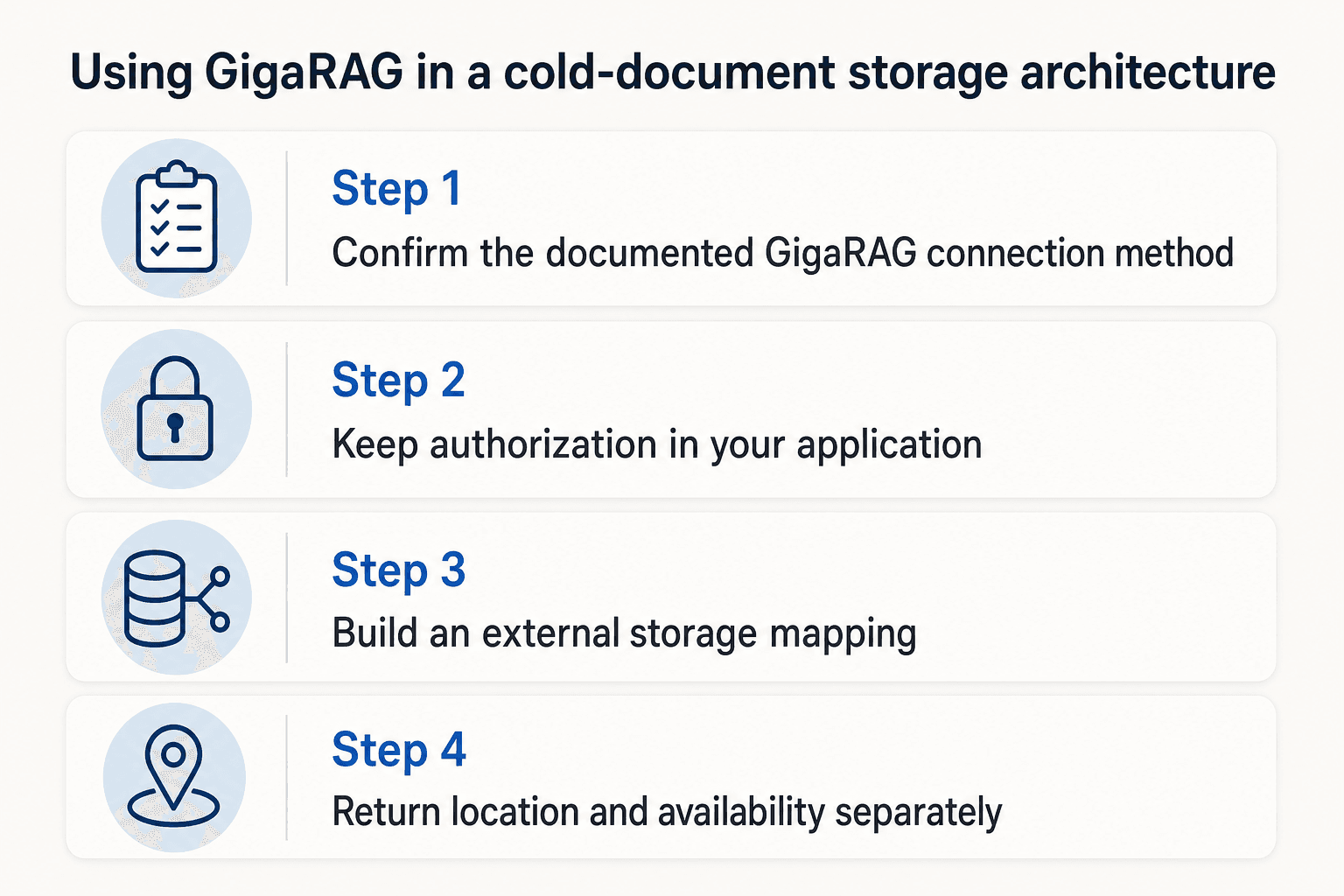
Step 1: Confirm the documented GigaRAG connection method
Check current GigaRAG documentation before you connect an agent through MCP or an API. If it doesn't document the interface, credentials, and supported operations you need, don't invent a payload or command. Use only the documented path.
Step 2: Keep authorization in your application
Authenticate the caller, resolve its project and document scope, then send only allowed retrieval context to the knowledge layer. A knowledge match isn't permission to download the original.
Step 3: Build an external storage mapping
Link each knowledge record to a stable document ID, canonical object URI, object version, archive tier, checksum, and lifecycle state. The mapping table is your source of truth when an indexed chunk points back to a cold file.
Step 4: Return location and availability separately
Return useful knowledge with a source-location reference and an availability field. For example, searchable context may be available while the original is restore_requested or restoring.
Step 5: Request restores through a storage adapter
Your application storage adapter should issue the provider's supported restore request and attach an idempotency key in its own request record. For Cloud Storage Pool objects, NetApp StorageGRID documentation shows that a request can be accepted, conflict when a restore is already in progress, or succeed when the object is already restored.
Step 6: Make pending states visible
Use explicit states: requested, in progress, ready, failed, and expired. Don't block the agent while it waits, and don't label a file ready until the provider reports it retrievable.
Step 7: Validate before use
When retrieval is ready, check document identity, requested version, current authorization, checksum or another integrity signal, and expected content type. A temporary restored copy isn't proof that it is the right file.
Step 8: Set cache and promotion rules
Cache only where access frequency, restore cost, expiry, and document sensitivity justify it. Define when temporary copies expire and when repeated retrieval delays or charges warrant moving a document to a warmer tier.
Step 9: Test the full handoff
Run one complete task: the agent finds project knowledge, your application authorizes the request, requests a restore, polls status, validates the file, and links the result to the task. For AWS archives, restore speed and cost vary by retrieval tier, so test the tier you plan to use, not just a hot-storage path.
Other methods for cold documents
These options don't remove the hard parts: an agent still needs permission, a clear availability state, and a validated original before it can rely on a cold file.
Direct object storage plus a custom metadata service
Keep objects and a metadata table under your control. This suits teams that can build search, access checks, and restore tracking themselves, but it isn't worth it if you need a ready-made knowledge search layer.
Conventional RAG pipeline with a vector index and storage adapter
Index document chunks in a vector store, then use an adapter to fetch or restore the source object. The application should return both the search result and the source object's availability state.
Document management or records-management platforms
Use a platform when retention rules, records controls, and human review matter more than agent automation. Check its API and export limits first, then confirm that your application can enforce authorization and retrieve the original through a supported path.
Manual or ticket-driven archive restores for low-automation environments
Use a human approval and restore process when access is rare and delayed handling fits the workflow. Record the request, authorization decision, and resulting availability state so the agent does not treat the file as ready before the process finishes.
What none of these methods eliminate: authorization, restore-state handling, and original-file validation
Whichever method you choose, keep identity, version, permission, integrity, and restore-state checks in the application rather than assuming that a searchable record makes the original ready to use.
Choose policies by retrieval risk, then test the full workflow
For a workflow that needs the original file, wait until the storage integration reports the file ready, then apply your application's identity, authorization, and integrity checks before use. Set retrieval policies around the delay and risk each document class can accept.
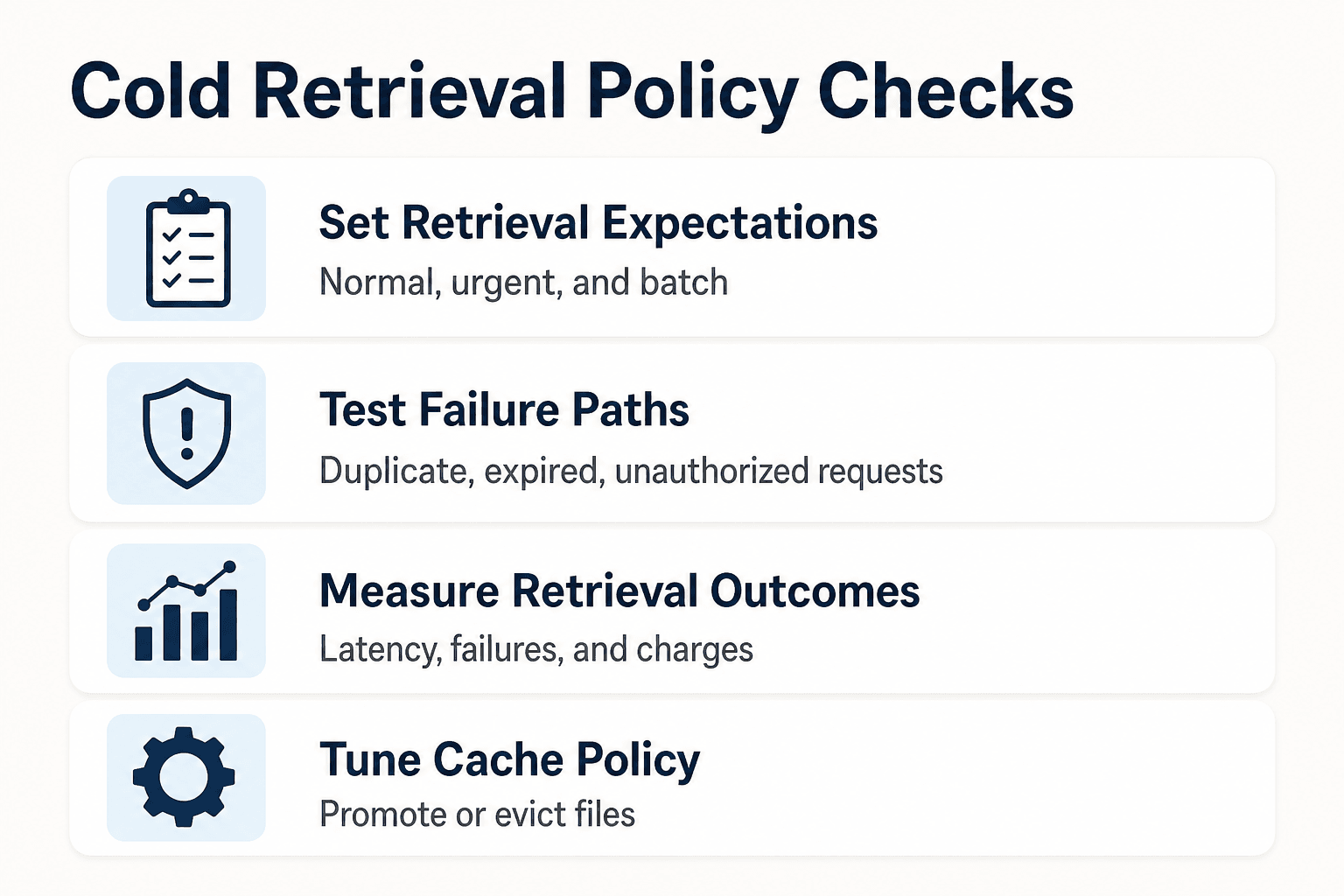
Define service-level expectations for normal, urgent, and batch retrievals
Set separate expectations for each path: normal requests can wait, urgent requests may use a faster retrieval tier, and batch work should favor lower-cost retrieval.
Test duplicate restore requests, restore-in-progress responses, expired restores, missing versions, and unauthorized agent requests
Test the failure paths as well as the successful one: duplicate restore requests, in-progress responses, expired restores, missing versions, and unauthorized agent requests should each produce a clear application state.
Measure cache hit rate, restore latency, restore failures, and unexpected retrieval charges
Track these measures by document class. Compare restore charges with cache-hit and cache-miss patterns to determine whether the current cache and storage policy is meeting the workflow's needs.
Use retrieval data to tune cache and storage-tier policy
Promote files that repeatedly cause waits or retrieval charges. Evict cached copies when their restore window ends, access drops, or policy requires it.
Final decision rule: use cold tiers only when delayed access is acceptable for the document and the workflow
If the task can't wait, don't archive it.
Frequently asked questions
What is tiered storage for cold documents?
It is an approach to placing documents in storage classes with different access characteristics. In AWS Glacier, access can range from milliseconds for Instant Retrieval to delayed retrieval for archive tiers.
How do hot, warm, cold, and deep-archive document tiers differ?
The labels describe relative access patterns rather than universal provider categories. Define each tier by the access delay, retention requirements, and retrieval costs your workflow can accept; AWS Glacier offers Instant Retrieval, Flexible Retrieval, and Deep Archive as concrete storage-class examples.
Can an AI agent search for a document that is stored in a cold archive?
An application can keep searchable metadata separate from the original object and use that record to identify the document. Whether the agent can read the original depends on its retrievability and the application's access and restore workflow.
What should searchable document metadata retain for an archived file?
Keep a reliable link to the source object and record the document's identity, object version, storage class, authorization scope, integrity data, and retrieval state. This lets the application identify the source object and report whether it is available.
What should an application return while a cold-document restore is pending?
Return a pending or unavailable state rather than the original file's contents. Include enough status information for the agent or user to understand that the source has been identified but is not yet readable.
How do you prevent duplicate archive restore requests?
Track restore requests by object reference and check the current request state before submitting another. Use an idempotency key in your application record and handle the storage provider's in-progress response as a pending state rather than as readable content.
How should an application validate a restored document before an agent uses it?
Before making a restored object available, verify that it matches the expected document record and source reference, that the requester remains authorized, and that an integrity signal such as a checksum is acceptable.
When should a restored cold document be cached or promoted to a warmer storage tier?
Cache or promote a document when repeated access delays or retrieval charges outweigh the cost and risk of keeping it warmer. Set thresholds for expected reuse, expiry, sensitivity, and acceptable retrieval delay rather than relying on a universal promotion rule.
About GigaRAG
GigaRAG is a shared memory platform for AI agents. It helps developers and teams keep project knowledge available across sessions and tools.
You can connect agents to a central Hive Mind through MCP or the API. Access controls manage what each agent can use.


