How to Troubleshoot MCP Authentication Errors
Connecting to an MCP server isn't the same as being allowed to use its tools. A browser login can succeed while the client still sends a token for the wrong audience, lacks the needed scope or workspace access, reaches the wrong endpoint, or fails TLS before the server sees a request. Retrying or clearing credentials won't fix a server policy, a bad redirect URI, or an unavailable service.
Before you change anything, save the exact status code, error body, client version, transport type (stdio or remote HTTP), endpoint, and timestamp, then redact tokens and cookies. Those details show which boundary failed: OAuth, authorization, transport, TLS, or the MCP server itself. The main catch is that Claude, Cursor, and OpenWebUI can expose different settings, but client changes cannot repair identity-provider registration or server-side access rules. This guide covers a protocol-first error matrix, safe diagnostics, transport checks, and client-specific paths to isolate the smallest correct fix.
Quick diagnosis
A completed browser login does not by itself confirm that an MCP tool call is authorized or can reach its server. Locate the failing boundary before changing settings.
- Record the exact error and when it occurs.
- Confirm whether the client uses stdio or remote HTTP.
- Check the configured server endpoint and transport.
- Review token audience, scopes, and workspace access.
- Check server policy and connection or TLS diagnostics.
Define the Failure Boundary Before You Change Anything
An MCP failure isn't always an authentication failure. A browser login can succeed while the client still cannot reach the endpoint, present a usable token, meet a server policy, or invoke a specific tool.
Before you change credentials, save the exact error, endpoint, transport, client version, and timestamp. That gives you a boundary to test instead of a pile of guesses.
Authentication vs. authorization vs. connectivity
Authentication asks who you are. Authorization asks whether that identity may use this server, workspace, or tool. Connectivity asks whether the client can reach the server at all.
These are separate checks. A 403 can mean your token is valid but lacks access, while a TLS or DNS error means no token fix will help.
OAuth flow diagram: client discovery -> browser login -> callback -> token exchange -> token validation -> tool invocation
Client discovery -> browser login -> callback -> token exchange
-> token validation -> tool invocation
Any link can fail. Discovery can point at the wrong server, the callback can differ from the registered redirect URI, and token validation can reject its audience or scope.
What a successful login does not prove
Successful login proves only that the identity provider accepted a sign-in. It doesn't prove the token targets this MCP server, carries the needed scope, reaches the server over the chosen transport, or passes workspace and tool policy checks.
Where Should You Investigate an MCP Connection Failure?
| Factor | Client configuration | Identity provider or MCP server |
|---|---|---|
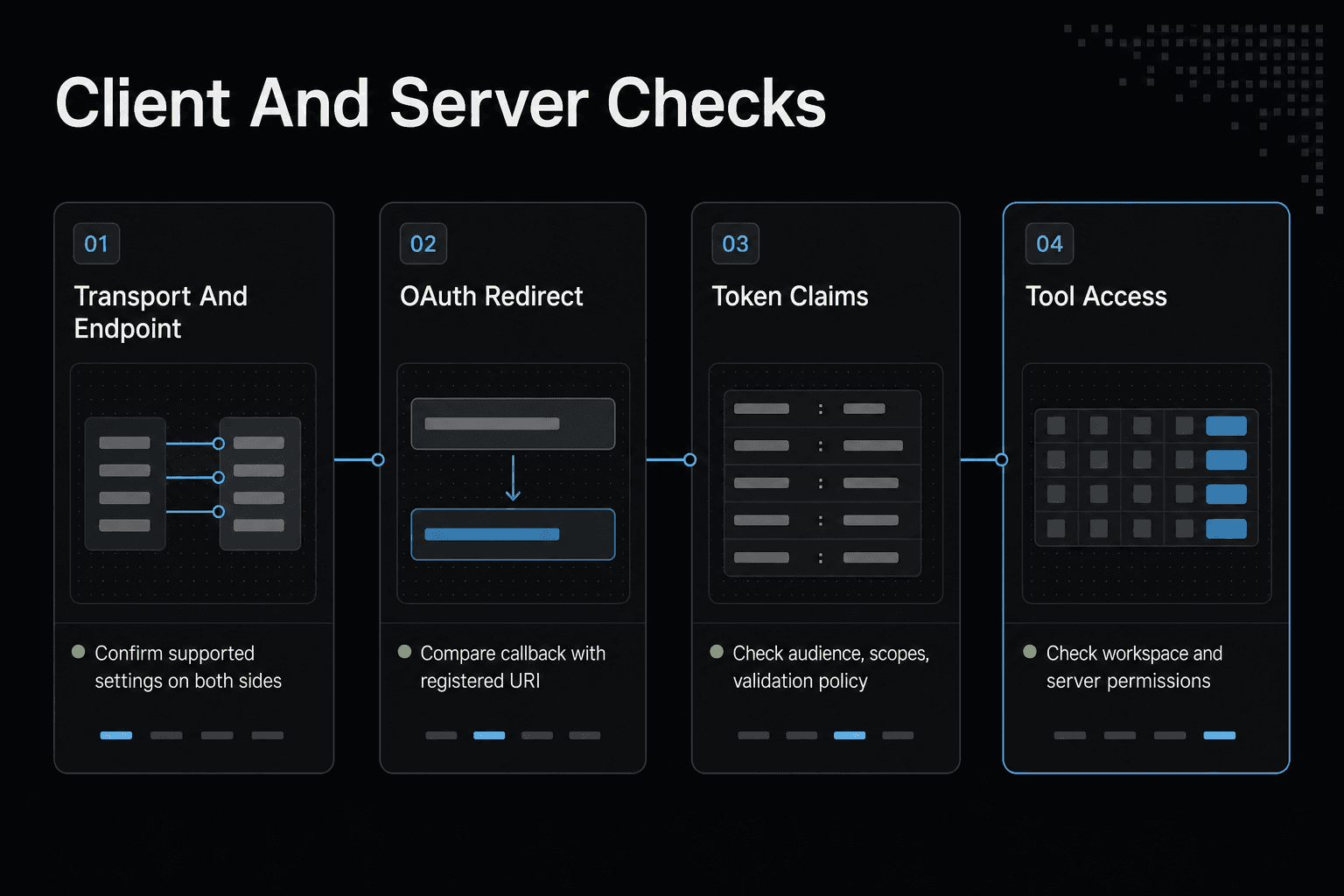
| Transport and endpoint | Check the selected transport and configured endpoint. | Confirm the server supports the configured transport and endpoint. |
| OAuth redirect | Compare the client's configured callback with the registered value. | Check the redirect URI registered for the OAuth client. |
| Token claims | Capture the error without exposing the token. | Check token audience, scopes, and validation policy. |
| Tool access | Confirm the intended account or workspace is selected. | Check server-side permissions and tool access policy. |
| TLS or connection | Review client connection diagnostics. | Check server certificate, availability, and network policy. |
How to Troubleshoot MCP Authentication Errors: Capture Evidence First
Don't revoke a token or reset a client yet. Capture one failed attempt while the details are still intact, then make changes one at a time so you can tell which boundary moved.
[!note] Treat access tokens, refresh tokens, client secrets, and authorization codes as credentials; redact them from logs and support requests.
Record the client, server, transport, endpoint, version, operating system, and reproduction steps
Write down the client and MCP server names, their versions, your operating system, and whether you use stdio or remote HTTP. Include the exact endpoint or command, plus the shortest sequence that reliably triggers the failure.
Save status code, response body, request ID, and timestamp without copying secrets
Keep the status code, error text, request ID, and timestamp with its time zone. These details can tie a client-side failure to server logs, while a screenshot of a generic "authentication failed" message usually can't.
Safe diagnostics: inspect environment variable presence, resolve DNS, test endpoint reachability, and inspect certificate metadata without printing tokens
Check that required environment variable names exist, not their values. Resolve the hostname, test whether the endpoint is reachable, and inspect certificate subject, issuer, and expiry metadata. Don't print tokens.
Redact Authorization headers, refresh tokens, API keys, cookies, and callback parameters before sharing logs
Remove Bearer values, refresh tokens, API keys, session cookies, and OAuth callback parameters before you share anything. Keep header names and response fields where possible, since their presence can still show where the request failed.
Step-by-Step: Isolate an MCP Authentication Failure
- Record the client, transport, endpoint, timestamp, and exact error text.
- Determine whether the failure occurs during discovery, browser authorization, token exchange, token validation, or tool invocation.
- Check the configured endpoint and transport against the MCP server's documented settings.
- Review the OAuth client registration and compare its redirect URI with the client's configured callback.
- Ask the identity provider or server administrator to verify token audience, scopes, and access policy without sharing the token.
- Retest after changing only the setting associated with the identified failure boundary.
- Escalate with redacted logs and configuration details if the failure persists.
Step 1: Verify stdio vs. Remote HTTP MCP Configuration
Your transport choice sets the first failure boundary. Stdio starts a local server process and passes settings into it, while remote HTTP sends requests to an endpoint over the network. Switching transports won't repair a bad token or missing permission.
stdio: local process launch, command path, environment injection, and no browser redirect assumption
With stdio, check the command path, working directory, and environment variable names the client gives the server. A missing executable, bad path, or absent variable can stop the server before authentication starts.
Don't assume a browser redirect is part of this setup. A local process can still use credentials, but the client isn't reaching it through an HTTP callback.
Remote HTTP: MCP endpoint URL, HTTPS reachability, Authorization header handling, OAuth discovery, and callback behavior
Remote HTTP adds more places to fail: the endpoint URL, DNS, HTTPS, proxies, and Authorization header handling. If OAuth is involved, also check discovery, the registered callback, and which client receives the browser result.
The main catch is ownership. A redirect URI or audience mismatch needs a fix in the identity provider or server setup, not a new endpoint URL.
Generic stdio configuration example with redacted environment variable placeholders
Use this as a shape, not a copy-paste configuration:
{
  "command": "/path/to/mcp-server",
  "env": {
    "API_KEY": "<redacted>",
    "WORKSPACE_ID": "<workspace-id>"
  }
}
Keep secrets out of source control and logs.
Generic remote HTTP configuration example with a placeholder endpoint and no live secret
{
  "url": "https://mcp.example.com/mcp",
  "headers": {
    "Authorization": "Bearer <access-token>"
  }
}
Make sure you use the server's actual MCP endpoint, not its home page or OAuth authorization URL.
What cannot be fixed by switching transports
Changing from stdio to HTTP can't grant a missing scope, restore revoked access, trust an invalid certificate, or make a server accept the wrong token audience. It only changes how your client reaches the server.
Step 2: Match Each MCP Error to Its Cause and Fix
Match the exact error signal to the boundary that rejected the request. A login can succeed while token validation, workspace policy, TLS, or network access still fails. Check the response body and server logs before changing credentials, because the right fix may belong to your client, identity provider, MCP server, or network team.
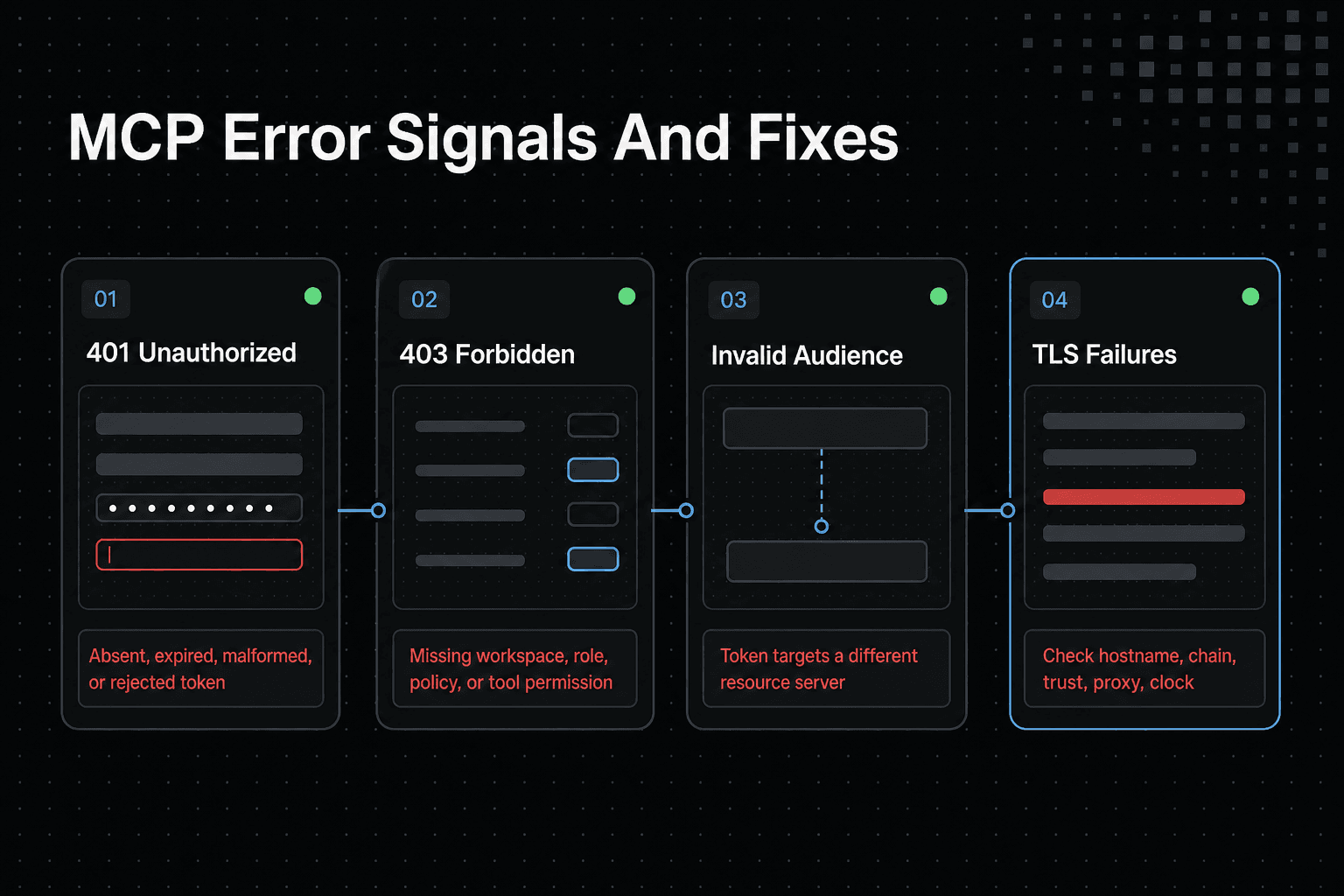
401 Unauthorized: absent, expired, malformed, or rejected access token
A 401 usually means the server can't accept the presented token. Check that your client sends a current Bearer token to the MCP endpoint, then involve the identity provider or server owner if token validation still rejects it.
403 Forbidden: valid identity without required workspace, role, policy, or tool permission
A 403 means the identity was accepted but isn't allowed to invoke that tool or resource. Ask the workspace or MCP administrator to check roles, access-control policy, and tool permissions.
Invalid audience: token issued for a different resource server or endpoint
The token's audience doesn't match the resource server that received it. Fix the OAuth client or server configuration so authorization requests ask for a token meant for this MCP endpoint.
Invalid scope: granted token lacks the scope required for the requested MCP operation
The token may be valid but lack permission for the operation. Request the scope the server requires, and make sure the identity provider is allowed to grant it to this client.
Redirect URI mismatch: registered callback differs from the client callback used during OAuth
The callback sent during authorization must exactly match a redirect URI registered for the OAuth client. This is an identity-provider registration fix, not a token refresh problem.
TLS failures: certificate chain, hostname, local trust store, proxy interception, or clock problems
TLS fails before the server can assess your token. Check the endpoint hostname, certificate chain, local clock, trust store, and any proxy that intercepts HTTPS traffic.
Connection failures: wrong endpoint, DNS, firewall, proxy, server downtime, or unsupported transport
No connection means no authentication result yet. Verify the MCP URL, DNS resolution, firewall and proxy rules, server status, and whether your client supports the chosen transport.
When to stop retrying locally and involve the MCP server or identity-provider administrator
Stop retrying when the same error persists with a known current configuration. Server-side audience rules, redirect registrations, scope grants, workspace policy, and certificate deployment need an administrator who can change them.
Step 3: Apply Client-Specific Checks in Claude, Cursor, and OpenWebUI
Don't treat a fix in one client as an MCP-wide rule. The same server can fail for different reasons when each client uses a different transport, credential store, runtime, or network path.
[!tip] For an agent or RAG deployment, record the failing tool call and workspace context alongside the error so an administrator can check the relevant server-side access policy.
Claude: confirm the configured transport, selected server, sign-in state, and tool-invocation error separately
Check the configured server and transport before signing in again. Then trigger one tool call and save the exact error, because a successful sign-in doesn't prove that Claude selected the intended server or sent an accepted token.
Keep those checks separate. A server-selection problem, a browser sign-in problem, and a rejected tool invocation need different fixes.
Cursor: check MCP endpoint selection, runtime compatibility, token configuration, and whether an adapter such as mcp-remote is actually required
Confirm the endpoint Cursor is using, the runtime that starts any local server, and where its token comes from. Don't add an adapter such as mcp-remote just because another setup uses one. It depends on the server's transport and what Cursor can connect to directly.
An adapter can add another failure boundary. Check its logs and target URL if it is already part of your setup.
OpenWebUI: confirm server URL, credential injection method, container-to-server network reachability, and server logs
If OpenWebUI runs in a container, test reachability from that container rather than from your host machine. A URL that works in your browser may not resolve or route from the container.
Check how credentials enter the runtime, then inspect MCP server logs for the matching timestamp. Never paste a token into shared logs.
For all clients: reconnect only after identifying whether the token, endpoint, or policy changed
Reconnect after you can name what changed: token, endpoint, transport, or access policy. Repeated reconnects won't repair a server-side scope, audience, or workspace rule.
Step 4: Connect GigaRAG as an MCP Memory Server Safely
GigaRAG gives AI agents a shared memory layer so project knowledge can remain available as work moves between sessions and tools. Agents connect to its central Hive Mind through MCP or the API, and access controls determine what each agent can use.
Confirm the supported client connection details before configuring GigaRAG
Use the connection method supported by the client you are configuring. Do not substitute undocumented commands, endpoint URLs, credential fields, or tool names from another MCP setup; those details determine whether the client can establish and authenticate a connection.
Configure the client to connect through MCP
Connect the agent to GigaRAG through MCP using the configuration supported by your client. Confirm that the intended agent has access to the central Hive Mind, since access controls can limit what an individual agent may use.
Verify the connected client and its available access
After connecting, verify that the client recognizes the MCP server and can perform a supported operation. A completed sign-in or connection flow alone does not show which knowledge the agent is permitted to access.
Handle credentials using the client’s supported secure method
Use the credential placement supported by the client and connection method you are using. Keep credentials out of source control, shell history, and shared logs, and redact them before requesting support.
Test with a supported MCP operation
Test the connection with an operation the connected client and server support. If the operation is denied, distinguish a working connection from an access-control decision about what that agent may use.
Shared agent memory remains subject to connection and access controls
The main catch is that memory access remains a policy decision. A connected client still needs accepted credentials and permission for the selected workspace.
Troubleshoot the Remaining Failures and Escalate With Useful Evidence
When the fault still isn't clear, stop changing settings. A good ticket gives the client, MCP server, or identity-provider owner enough detail to reproduce the failure without asking you to expose a token.
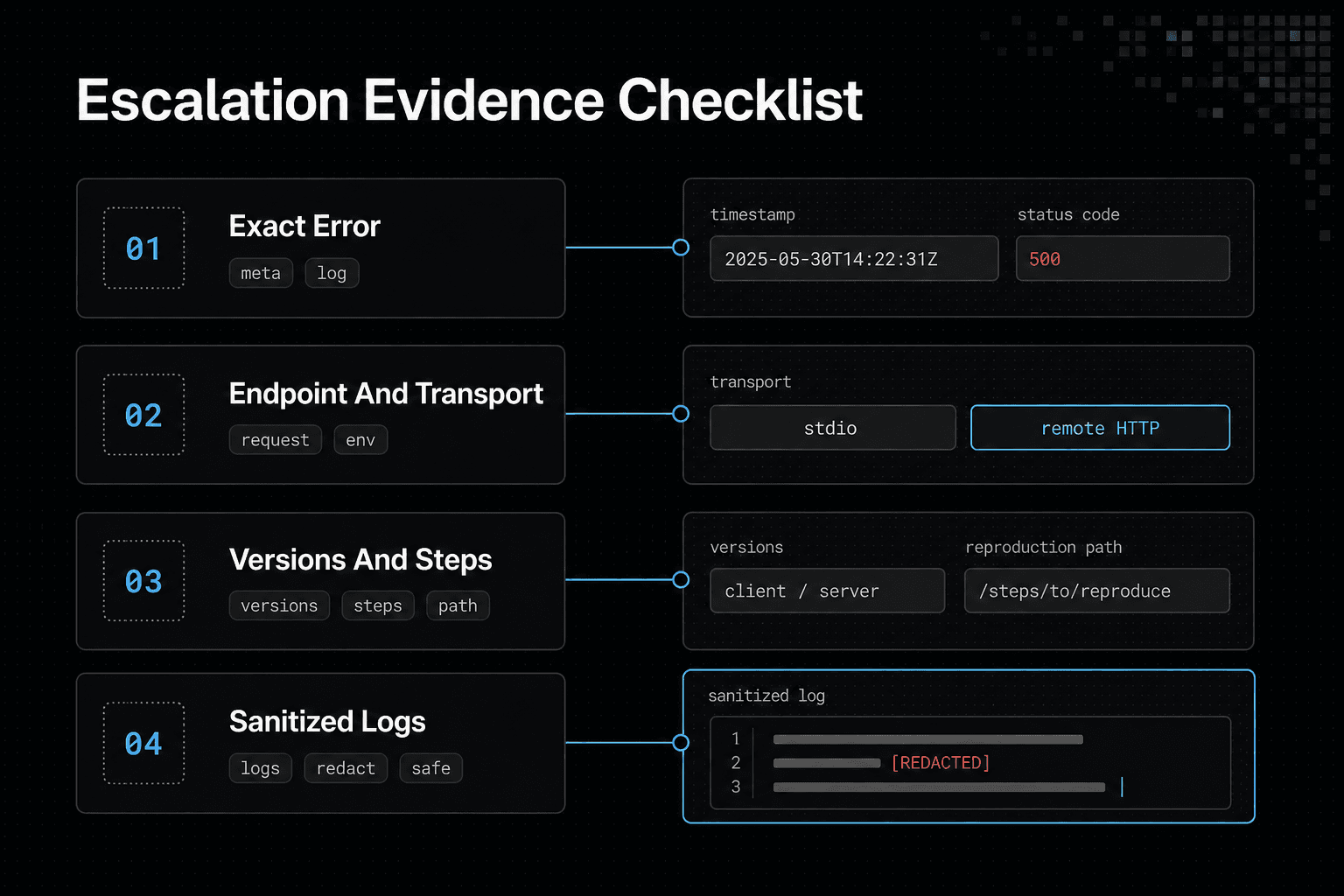
Minimum escalation packet: sanitized logs, exact error, endpoint, transport, client version, server version, reproduction steps, and recent configuration changes
Include the timestamp, status code, full error text, endpoint hostname, and whether you use stdio or remote HTTP. Add client and server versions, a short reproduction path, and changes to OAuth registration, scopes, proxies, certificates, or workspace policy. Redact Authorization headers, cookies, API keys, refresh tokens, and callback parameters.
Do not expect client-side retries to repair server-side audience rules, redirect registration, revoked access, or access-control policy
The honest answer is that retries won't repair a rejected audience, unregistered redirect URI, revoked grant, or missing role. Send the ticket to the owner of that boundary, with the evidence needed to make the smallest correct change.
Frequently Asked Questions
What is the difference between a 401 and a 403 error in MCP?
A 401 typically means the server could not authenticate the request, such as when a token is absent, expired, malformed, or rejected. A 403 typically means the identity was accepted but does not have permission for the requested server, workspace, resource, or tool. Use the response body and server logs to confirm the server’s specific reason.
Why does an MCP server reject a token with an invalid audience?
Check whether the token was issued for the audience the MCP server expects. The identity provider or server administrator may need to verify the configured audience and token-validation policy.
How do I fix an invalid scope error when connecting to an MCP server?
Compare the requested scopes with the scopes configured for the OAuth client and accepted by the server. Have the identity provider or server administrator confirm the required scope values before changing them.
What causes an OAuth redirect URI mismatch in an MCP client?
The callback configured by the client may not match the redirect URI registered for its OAuth client. Compare the two values and ask the identity provider administrator to correct the registration or client configuration.
How is stdio MCP authentication different from remote HTTP authentication?
With stdio, the client starts a local server process, so troubleshoot the command path, working directory, and environment variable injection before assuming an OAuth or network failure. With remote HTTP, the client reaches an MCP endpoint over the network, so also check the URL, DNS, HTTPS, proxies, Authorization header handling, and any OAuth callback flow. Both transports can still require valid credentials and server authorization.
Can a successful browser login still result in an MCP authentication failure?
Yes. Treat browser login as one checkpoint, then investigate the later token exchange, token validation, tool authorization, and server connection stages.
What information should I collect before escalating an MCP authentication issue?
Collect the client and transport, endpoint, exact error, timestamp, failure stage, and relevant redacted logs. Include the configured audience and scopes if available, but never send tokens, secrets, or authorization codes.
Why can TLS or network errors look like MCP authentication failures?
A failed connection can prevent an authentication exchange or tool call from completing. Check the connection and TLS diagnostics separately from token and permission checks; use the client and server logs to identify where the request stops.
About GigaRAG
GigaRAG is a shared memory platform for AI agents that helps developers and teams keep project knowledge available across sessions and tools. Connect your agents to a central Hive Mind through MCP or the API, with access controls to manage what each agent can use.


