When a Vector Database Is Overkill for Your AI App
A vector database supports meaning-based retrieval for applications that need it. For requests centered on product IDs, error codes, or other required terms, lexical search can provide precise matching.
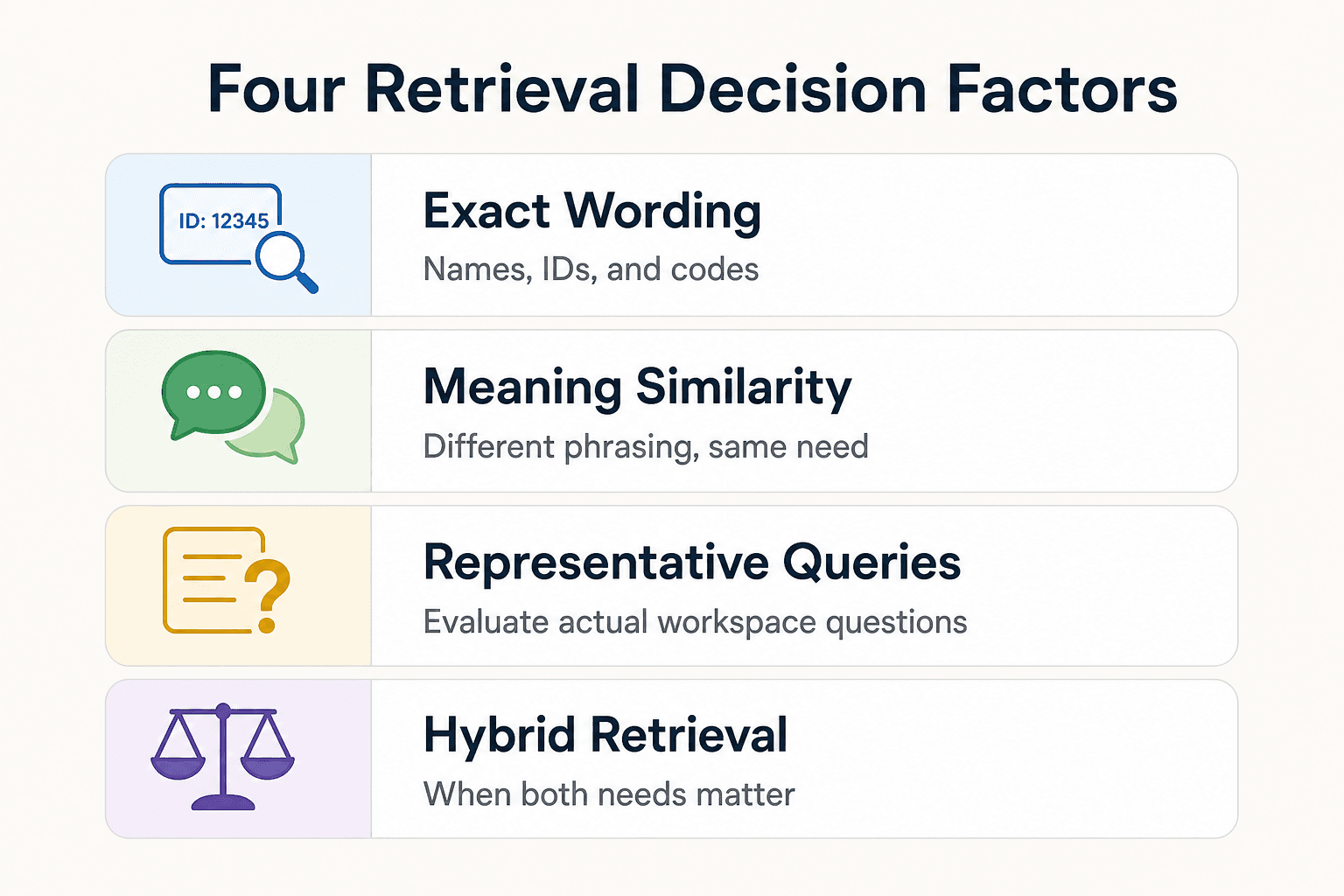
Choose retrieval based on the questions people ask, the content you hold, how often it changes, and the impact of an incorrect result. Start by identifying whether successful matches depend on exact wording or similarity of meaning.
Quick answer
Do not make a vector database the default choice for every AI app. First test whether the retrieval task is already served by exact matching, structured constraints, or document context; evaluate semantic retrieval when users' language and source language regularly differ.
- Use keyword search for exact terms, IDs, and error codes.
- Consider hybrid search when both exact matching and meaning matter.
When a vector database is overkill
Before adding vector search, determine whether users need documents retrieved by meaning or whether exact terms answer the task. Lexical search is particularly effective for product names, IDs, error codes, and regulated terminology where wording matters.
What a vector database actually does
Semantic search represents queries and documents as vector embeddings, then compares a query vector with vectors stored in a database. It can retrieve content with similar meaning even when the stored text does not contain the exact query terms, as MongoDB explains.
Semantic search is designed for similarity rather than exact-term matching, so exact names, codes, and other required wording may still call for lexical search or a hybrid approach.
The simple test: exact lookup, keywords, filters, or meaning?
Start with the question users ask. Names, IDs, error messages, and regulated terms fit lexical search, where exact matching is precise and ranking is predictable.
Need meaning? Use semantic retrieval when people phrase the same need in different ways and relevant documents use different language. In multi-tenant products, Firecrawl describes retrieving from an isolated namespace or separate database for each customer.
Overkill does not mean vector search is bad
Vector search is useful for RAG, knowledge search, recommendations, and other work where related meaning drives retrieval. Firecrawl's vector-database guide describes semantic retrieval as a common fit for RAG and knowledge applications.
The main question is whether meaning-based retrieval improves results for the workspace and queries you actually have. Evaluate that question with representative user queries rather than treating vector search as a default requirement.
Keyword search vs. semantic search: which retrieval task fits?
| Factor | Keyword search | Semantic search |
|---|---|---|
| How it matches | Matches query terms against indexed text | Finds results with similar meaning |
| Strong fit | Exact terms, product names, IDs, and error codes | Natural-language queries with varied wording |
| Main limitation | May miss relevant results expressed with different words | Retrieves by similarity rather than literal term matching |
[!note] Keyword search matches query terms and is useful for exact wording; semantic search retrieves by meaning. MongoDB notes that relying on either method alone can produce incomplete or misleading results.
How retrieval choices differ in a RAG or agent app
Retrieval can use lexical matching, vector similarity, or a combination of both. The right choice depends on whether the task requires exact wording, similarity of meaning, or both.
Direct access and document context
When a task already identifies a particular document, keep that document context explicit rather than treating every request as a search problem.
For code work, include the relevant source location in the task context when it is known.
Metadata filters alongside search
Hybrid search can combine lexical search, semantic search, and metadata filters. This allows a system to use exact terms and contextual similarity while applying relevant metadata conditions.
Database queries are useful when the application can express the needed conditions as fields and filters.
Keyword and full-text search: best when exact wording matters
Keyword search matches terms stored in an index. Modern lexical systems commonly use ranking methods such as BM25, which considers factors including term frequency, document length, and inverse document frequency.
Its main limitation is literal wording: lexical search cannot infer meaning beyond the terms supplied in the query.
Similarity comparisons for a small experiment
For a small semantic-search experiment, you can compare a query vector with vectors stored in a database using a similarity metric such as cosine similarity or dot product.
Use representative queries to assess whether this approach provides useful results for the workspace and response-time requirements.
Vector and hybrid search: best when meaning and scale both matter
Vector search compares query and document embeddings to rank contextually similar material. Its value should be measured against the queries where a lexical baseline does not return useful context.
Hybrid search runs lexical and semantic retrieval together, then merges results. It can preserve exact terms while expanding the search to contextually similar matches.
Step-by-step: choose retrieval by the task
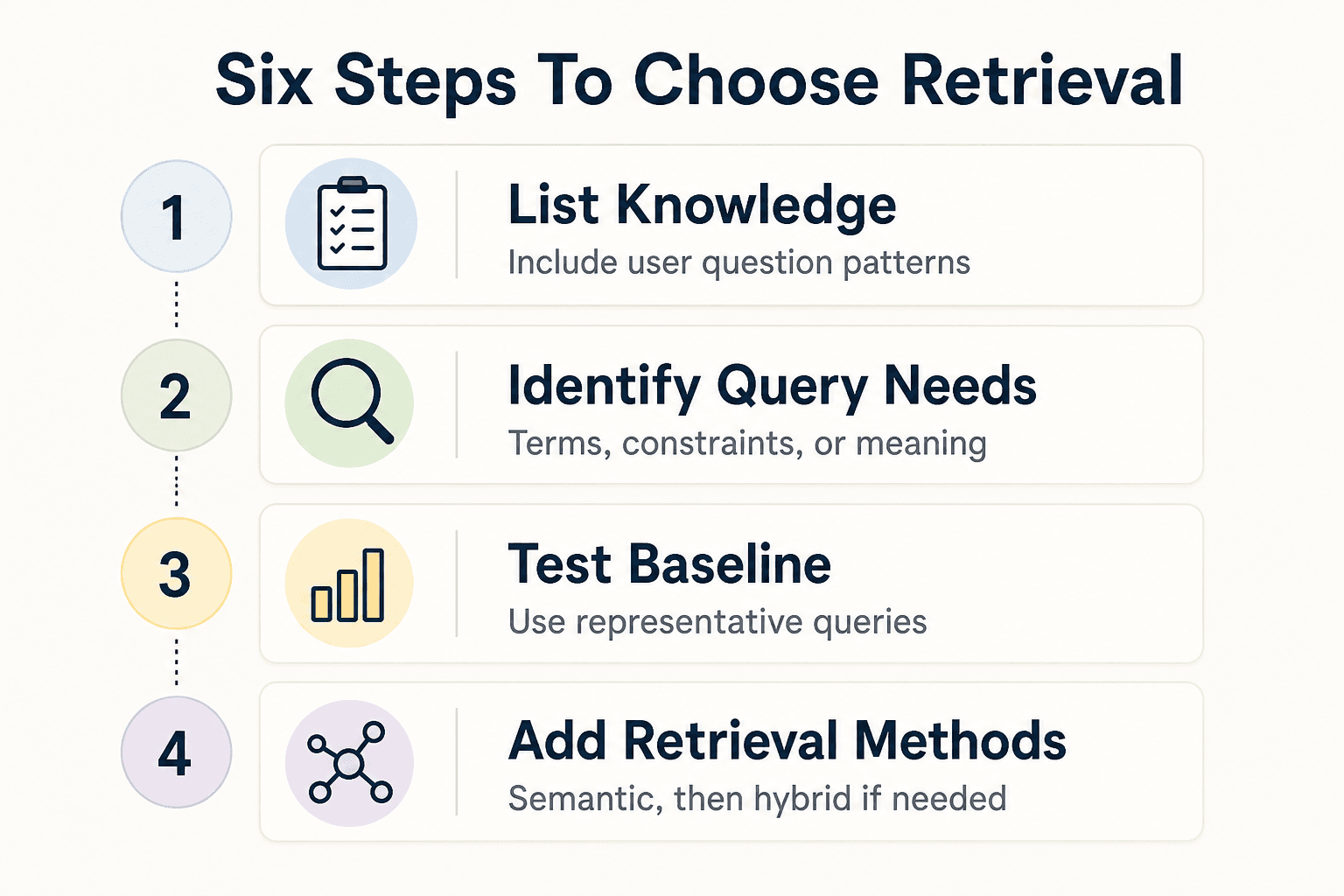
- List the knowledge your app needs to retrieve and how users will ask for it.
- Identify whether queries depend on exact terms, structured constraints, or similarity of meaning.
- Start with the retrieval method that matches those queries, such as keyword search for exact terms.
- Test it with representative queries and check whether relevant results are missed.
- Add semantic retrieval if meaning-based queries are not served well by the existing approach.
- Evaluate hybrid search when both exact matching and semantic relevance matter.
Real-world cases where simpler retrieval is enough
Start with the task, not the word "RAG." Test retrieval against the questions users actually ask. For teams that need project knowledge available across sessions and tools, GigaRAG offers shared memory through its central Hive Mind.
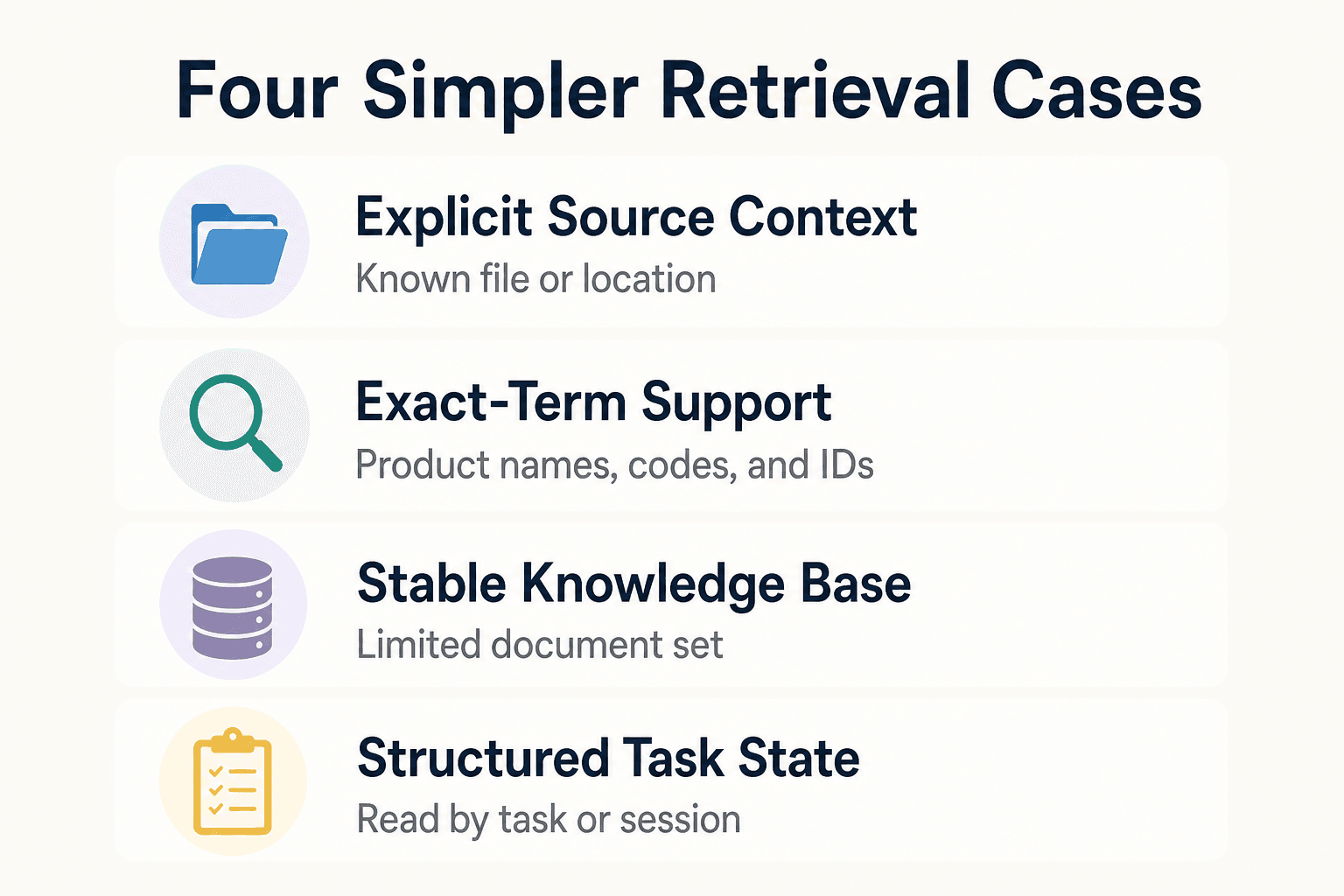
A coding assistant with explicit source context
For code tasks, make the relevant source context explicit in the request, including a file path or other location when one is known.
Include relevant version information with the task context when the intended source revision matters.
A support tool that searches product names, error codes, and IDs
Product names, ticket IDs, account IDs, and error codes are examples of queries where lexical search can provide exact-term matching and predictable ranking.
The limitation is literal wording: lexical search cannot infer meaning beyond the terms supplied in the query. Semantic search is designed to support intent expressed in natural language.
A small team knowledge base with a limited, stable document set
For a limited document set, test whether clear naming and lexical search return the material users need. Keep titles, owners, dates, and access rules available as document metadata.
Do not add a vector index solely because the content is prose. Check whether representative queries reveal a meaning-based retrieval gap.
An agent scratchpad or task state store
Store active task state as structured data: current goal, completed steps, tool outputs, and known constraints. Read it back by task or session ID.
This isn't long-term memory. It is working state, so a simple record store makes updates and deletion easier to control.
A structured internal tool driven by customer, project, or ticket fields
Query the fields you already have. Filter by customer, project, status, owner, and permission scope before sending records to the model.
When customer and permission fields are available, apply those fields to the retrieval workflow before using semantic similarity to rank or expand the remaining material.
A decision guide: do you need vector search yet?
Start with the question users ask, then test the simplest retrieval method that can answer it. Use vectors only when users need meaning-based matches and your baseline misses relevant results. Corpus size, update rate, filters, latency needs, and the cost of wrong answers decide the rest.
[!tip] For a documentation bot, include queries with exact product names or error codes alongside natural-language questions in your relevance checks. This can show whether keyword, semantic, or hybrid search fits the workload.
Step 1: Identify whether users need exact answers or meaning-based matches
Ask what a successful query looks like. IDs, file paths, product names, and error codes need exact lookup or lexical search, while vague natural-language questions may need semantic matches.
Don't assume prose means vectors. Lexical search matches stored terms and phrases, which makes its ranking easier to predict when wording matters.
Step 2: Check corpus size, change frequency, and retrieval latency needs
Count the documents, but do not stop there. Check how often they change, how quickly results must return, and how content updates will be handled in the retrieval design.
Small and stable is simpler.
Step 3: Test metadata filters and keyword search before embeddings
Filter first by tenant, permission, document type, date, project, or status. Then run keyword search against the remaining records.
This creates a baseline for the filtered keyword workflow. If users find the right material with filters and terms, evaluate whether semantic retrieval adds enough value for the task.
Step 4: Use brute-force similarity for small semantic-search experiments
If meaning-based search looks necessary, represent queries and documents as embeddings, then compare the query vector with vectors stored in a database using a similarity metric such as cosine similarity or dot product.
Keep the test honest. Use real queries and judge whether the returned passages answer them.
Step 5: Select a vector-search implementation when evaluation shows a real retrieval gap
Add a vector index when brute-force comparison becomes too slow for the workload or when exhaustive comparison is impractical for the corpus. Select the implementation based on measured latency, relevance, filtering needs, scale, and operational requirements.
It depends on measured latency and relevance, not on whether your app uses an LLM.
Decision checklist: choose lexical, semantic, or hybrid retrieval
Choose files for known paths. Choose database queries for structured records and filters. Choose keyword search for exact terms. Choose brute-force similarity for a small semantic test.
Choose vector search when evaluated queries need meaning-based retrieval at a scale your baseline can't handle. Choose hybrid search when users need both exact terms and related meaning.
If your agents need shared project knowledge across sessions and tools, GigaRAG provides a central Hive Mind through MCP or the API. Its access controls can manage what each agent can use.
Common mistakes when skipping or adding vector search
The main mistake is treating retrieval as a storage choice instead of an answer-quality problem. Define the task, the source material, and the access rules before evaluating retrieval methods.
Adding embeddings before defining the retrieval task
Start with failed user questions, not a database feature list. For ticket IDs, file paths, or product names, test whether exact-term retrieval answers the task before introducing semantic search.
Define what "relevant" means first. Then you can tell whether exact terms, filters, or meaning-based retrieval are actually missing.
Treating keyword search as semantic search
Do not treat keyword relevance as proof that the system understands intent. Include paraphrased user questions in evaluation so you can see whether literal matching fails to surface the material users need.
The reverse mistake costs you too. Lexical search better fits exact product names, error codes, and regulated terms where wording must match. Use hybrid retrieval when a query needs both.
Defining retrieval and access rules
A larger context window changes how much text a model can receive, but retrieval still determines which sources the application selects for a task.
Keep retrieval separate from generation so the application can apply its own tenant, role, date, and document-status rules before supplying context to the model.
Ignoring chunking, source quality, and retrieval evaluation
Document quality belongs in retrieval evaluation. Inspect headings, update status, duplicate content, and chunk boundaries when reviewing the context returned to the model.
Check retrieved passages against real queries. Measure whether they answer the question, not just whether they look related.
Building persistent agent memory without deciding what should be remembered
Not every chat turn deserves permanent memory. Store task state, confirmed preferences, and durable facts deliberately, then give each item a clear owner and expiry rule.
This workload differs from a stable document library: Firecrawl notes that agent memory can involve frequent writes, iterative retrieval, fact extraction, and entity resolution across conversation turns. GigaRAG provides shared memory for AI agents and access controls for managing what each agent can use.
Start simple, then add retrieval infrastructure on evidence
Treat retrieval changes as experiments. Start with the smallest approach that serves a known user task, then add semantic retrieval only when representative queries show that meaning-based matches improve the results.
A practical progression from files to search to semantic retrieval
Keep source files when an agent opens known paths or reads a small workspace. Use record queries when the task is defined by fields, permissions, or filters.
Add full-text search when users need literal wording to locate material. If relevance checks show repeated misses on paraphrased questions, test embeddings with brute-force similarity before introducing a vector index.
What to measure before changing your stack
Log the query, retrieved items, source version, filters applied, and whether the answer had the right evidence. Check failure patterns, not just average relevance.
If semantic matches fix repeated misses, measure latency, indexing time, write frequency, and retrieval quality against real queries. Hybrid retrieval can combine exact lexical matches with semantic similarity when both matter, as MongoDB describes.
Frequently asked questions
Do I need a vector database for a small RAG application?
Not necessarily. Use one when the application needs to retrieve relevant material by related meaning and simpler retrieval misses useful results. If users mainly search for exact terms, lexical search may be sufficient; use hybrid search when both exact matching and semantic relevance matter.
Can I use PostgreSQL or another traditional database instead of a vector database?
Possibly, if it provides the retrieval capabilities your application needs. Use lexical retrieval when users need exact terms and phrases; use semantic retrieval when the task depends on related meaning. A hybrid approach can combine both when neither method alone produces suitable results.
When is keyword search better than semantic search?
Keyword search is a strong fit when users know the exact terms they need, such as product names, IDs, or error codes. Semantic search is more useful when relevant content may use different wording.
Can I use brute-force similarity search instead of a vector index?
You can use direct vector comparisons for a small semantic-search experiment. Compare representative queries and returned documents with a similarity metric, then assess whether the approach meets your relevance and response-time needs.
What is semantic search?
Semantic search retrieves results by meaning rather than exact wording. It represents queries and documents as vector embeddings and compares the query vector with stored vectors using similarity measures such as cosine similarity or dot product.
What are vector databases used for?
Vector databases support applications that retrieve information by meaning rather than exact match. Firecrawl lists use cases including RAG, semantic search, recommendations, image and video search, and agent working memory.
Can hybrid search apply required or excluded terms?
Yes. Hybrid search combines lexical and semantic retrieval, allowing exact terms or exclusions to be handled alongside contextually similar matches.
When does hybrid search make more sense than vector search alone?
Hybrid search fits tasks that need both exact-term precision and semantic relevance. It combines lexical and semantic results, which can help when either method alone misses useful matches.
About GigaRAG
GigaRAG is a shared memory platform for AI agents that helps developers and teams keep project knowledge available across sessions and tools.
You can connect agents to a central Hive Mind through MCP or the API. GigaRAG includes access controls to manage what each agent can use.


